 Fastero Dev Team
GitHub's MCP server lets Claude read code, triage issues, review pull requests and check Actions runs in your repositories. GitHub hosts one and publishes the same code as a binary you can run yourself. We downloaded version 2.2.0 and counted what it gives Claude by default, and how much of that can write.
The short answer: the official server is github/github-mcp-server. The remote version lives at https://api.githubcopilot.com/mcp/; in Claude Code you add it with claude mcp add --transport http github https://api.githubcopilot.com/mcp/ --header "Authorization: Bearer YOUR_GITHUB_PAT", because GitHub's OAuth sign-in for the remote server works only in hosts with a registered GitHub app, and Claude Code and Claude Desktop aren't among them. The local version (release binary or ghcr.io/github/github-mcp-server in Docker) can sign in through your browser instead, and it's the only one that works with GitHub Enterprise Server. Tools come in 23 toolsets. The default set gave 88 tools in our count, 57 of them write tools, so turn on read-only mode (--read-only, or the X-MCP-Readonly: true header) unless Claude needs to write, and enable only the toolsets you use.
Fastero
Point Claude at your database.
Add Fastero to claude.ai or Claude Code. Claude builds the dashboard, deploys the app or publishes a live page, and your team opens it in Fastero.
Try free →Remote or local
| Remote (hosted by GitHub) | Local (you run it) | |
|---|---|---|
| Address or command | https://api.githubcopilot.com/mcp/ |
github-mcp-server stdio, or docker run -i --rm ghcr.io/github/github-mcp-server |
| Sign-in from Claude Code or Claude Desktop | Personal access token in a header | Browser OAuth on github.com with official builds, a token, or a GitHub App |
| Choose toolsets | X-MCP-Toolsets header, or /x/{toolset} in the URL |
--toolsets or GITHUB_TOOLSETS |
| Read-only | X-MCP-Readonly: true, or /readonly in the URL |
--read-only or GITHUB_READ_ONLY=1 |
| Only here | create_pull_request_with_copilot, Copilot Spaces, GitHub docs search |
Enterprise Server, through --gh-host |
GitHub's support table lists Claude Code and Claude Desktop as "✅ PAT + ❌ No OAuth" for the remote server, and its Claude Desktop guide says that the remote server "requires OAuth authentication through a registered GitHub App (or OAuth App), which is not currently supported. Use the local Docker setup instead."
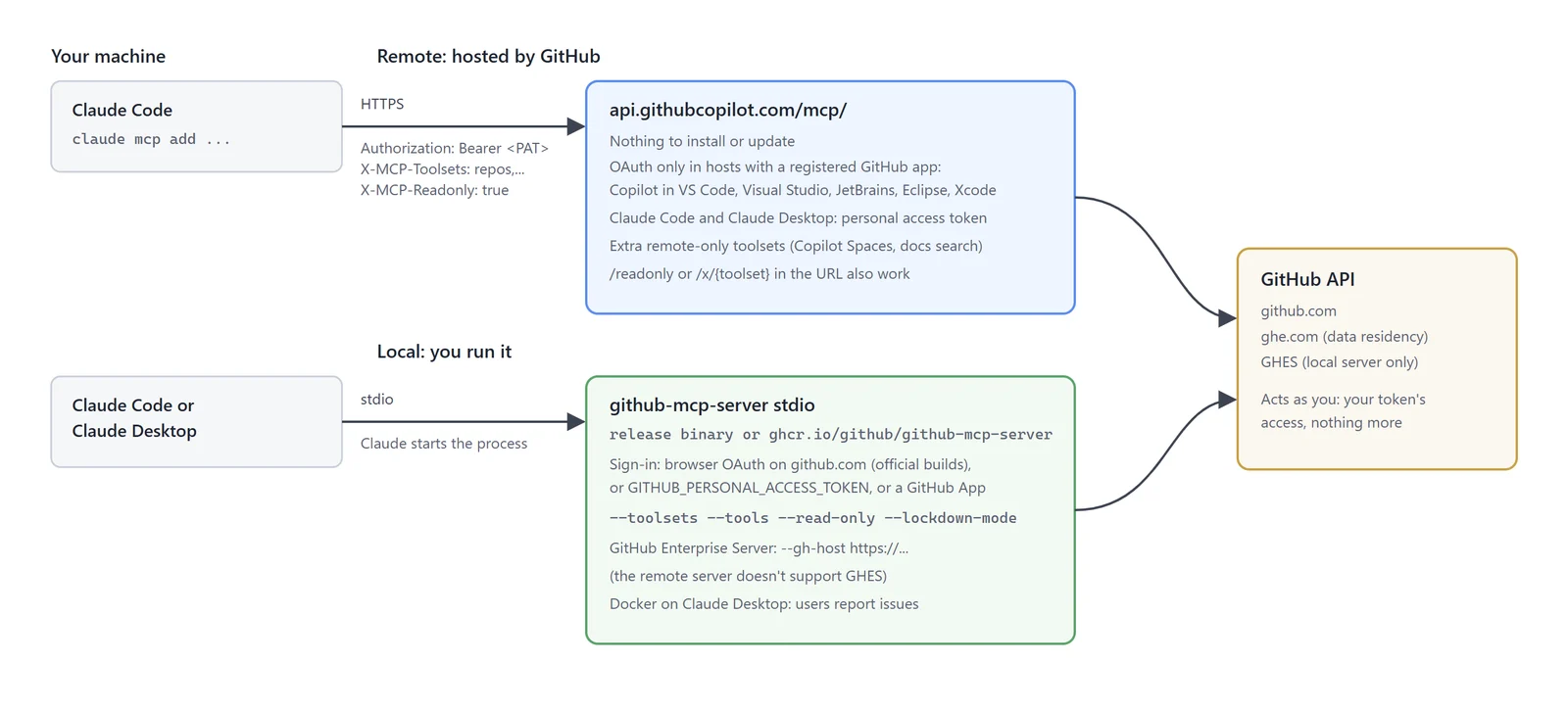
The two ways to run GitHub's MCP server, from GitHub's docs, checked 20 November 2026
Add the GitHub MCP server to Claude Code
Claude Code's own docs give the remote setup, with a fine-grained token that has access to the repositories you want Claude to work with:
claude mcp add --transport http github https://api.githubcopilot.com/mcp/ \
  --header "Authorization: Bearer YOUR_GITHUB_PAT"
claude mcp add doesn't check the token, so run /mcp in a session: a working server shows a checkmark, a bad token an ✘ with the HTTP status. GitHub's own guide prefers claude mcp add-json, but warns that on Windows it "may return Invalid input" for HTTP servers; use the command above then.
To narrow it, send the toolset and read-only headers too. This project file is ours, not from the docs; Claude Code fills in ${GITHUB_MCP_PAT} from your shell, so the token stays out of git. Pick a name of your own: Claude Code blanks some well-known credential variables in a remote server's headers.
{
  "mcpServers": {
    "github": {
      "type": "http",
      "url": "https://api.githubcopilot.com/mcp/",
      "headers": {
        "Authorization": "Bearer ${GITHUB_MCP_PAT}",
        "X-MCP-Toolsets": "repos,issues,pull_requests,actions",
        "X-MCP-Readonly": "true"
      }
    }
  }
}
For the local server, GitHub's guide gives a Docker command that signs in through the browser and keeps the token "in memory only":
claude mcp add github -e GITHUB_OAUTH_CALLBACK_PORT=8085 -- docker run -i --rm -p 127.0.0.1:8085:8085 -e GITHUB_OAUTH_CALLBACK_PORT ghcr.io/github/github-mcp-serverWithout Docker, download the release binary and add it as github-mcp-server stdio. More on scopes and .mcp.json in Claude Code MCP.
Add it to Claude Desktop
Use the local server. Official builds carry GitHub's own OAuth app, so on github.com "you can start the server with no token and no client ID at all" and sign in through the browser. This claude_desktop_config.json entry is ours; we validated it below but didn't run the sign-in.
{
  "mcpServers": {
    "github": {
      "command": "C:/tools/github-mcp-server/github-mcp-server.exe",
      "args": ["stdio", "--read-only", "--toolsets=repos,issues,pull_requests,actions"]
    }
  }
}
To use a token instead, add "env": {"GITHUB_PERSONAL_ACCESS_TOKEN": "..."}; a token "takes precedence over OAuth". GitHub's Docker examples work too, though its guide says users have "reported compatibility issues with Claude Desktop and Docker-based MCP servers". Claude's help center now lets a custom connector send "fixed credentials such as API keys" as request headers, which would fit GitHub's token sign-in; GitHub's guide doesn't mention it, and we didn't test it. More in the Claude Desktop config guide.
Toolsets: what Claude gets by default
The binary has a list-scopes command that lists every tool the server would register for a set of flags, marked read-only or read-write, and it runs without a token. We ran it on version 2.2.0 (commit 67d4dc4, built 16 November 2026), downloaded for Windows with its SHA-256 checksum matching GitHub's list. The last line of each run:
$ github-mcp-server list-scopes                               # default toolsets
Total: 90 tools, 4 unique scopes
$ github-mcp-server list-scopes --read-only
Total: 31 tools, 2 unique scopes
$ github-mcp-server list-scopes --toolsets=all
Total: 147 tools, 12 unique scopes
$ github-mcp-server list-scopes --toolsets=all --read-only
Total: 69 tools, 6 unique scopes
Two tools, pull_request_review_write and resolve_review_thread, are listed twice, so the default set has 88 distinct tools, 57 of them read-write, and all toolsets together have 145. The default isn't quite what the README says. The README lists context, repos, issues, pull_requests and users; the binary's own help says the default is "context, copilot, issues, pull_requests, repos, users", and its count includes the two Copilot tools. Trust --help for the version you run.
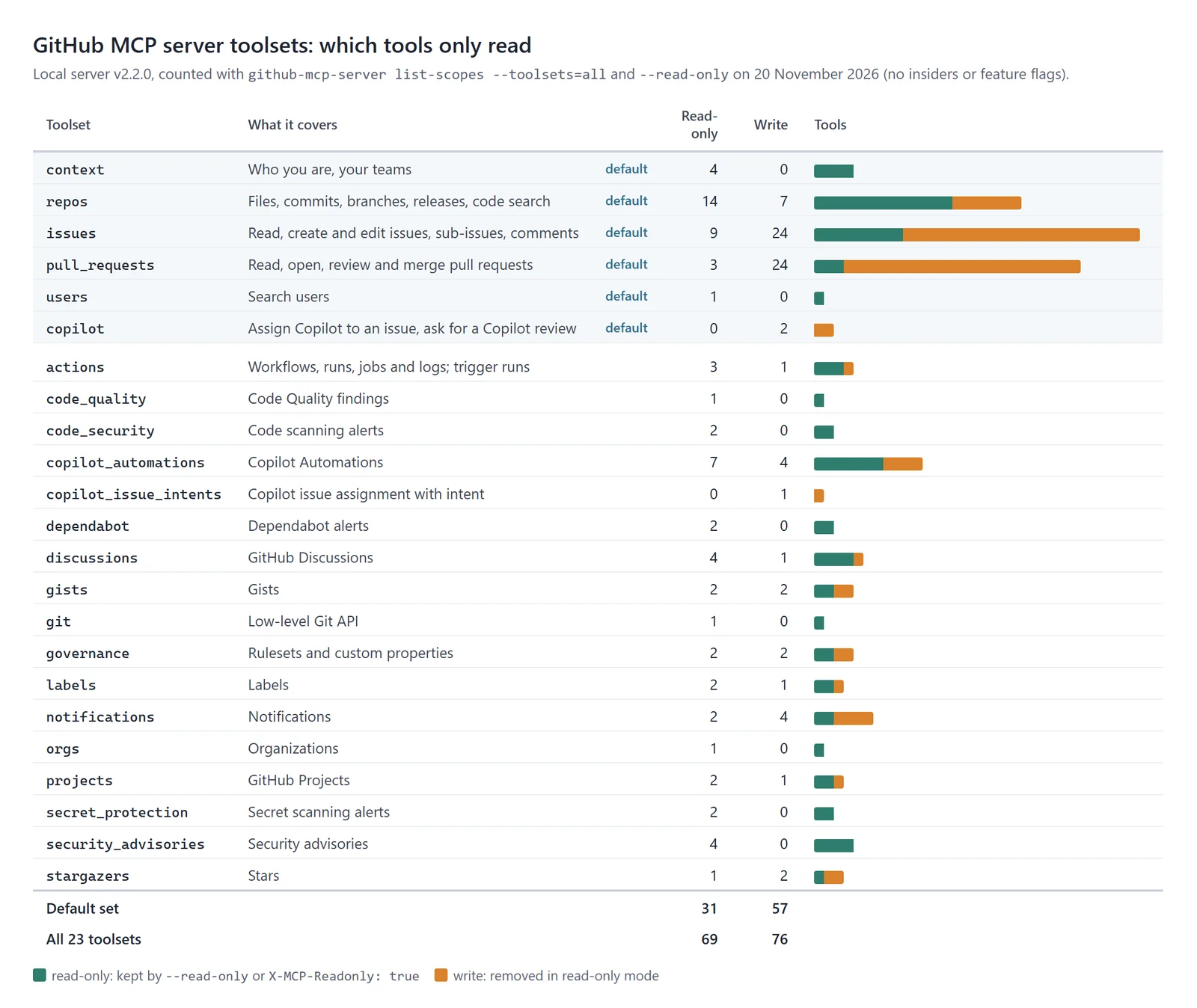
Read-only and write tools per toolset in github-mcp-server 2.2.0, from its list-scopes command, 20 November 2026
The tools most developers reach for:
| Job | Tools | Toolset |
|---|---|---|
| Read and search code | get_file_contents, search_code, list_commits, get_file_blame |
repos |
| Triage issues | issue_read, list_issues, search_issues, issue_write, add_issue_comment |
issues |
| Review pull requests | pull_request_read, list_pull_requests, pull_request_review_write, merge_pull_request |
pull_requests |
| Debug CI | actions_list, actions_get, get_job_logs (with failed_only), actions_run_trigger |
actions |
Actions isn't in the default set: add it with --toolsets=default,actions or the header. Claude Code's tool search loads only tool names at the start, so a big server costs little context, but GitHub still advises narrowing: "Fewer tools means better tool selection accuracy and fewer errors."
Point Claude at your database.
Start free →Read-only mode, tested
Our checker script parses both example files and a copy with two typos, compares toolset names with --help and feeds the Claude Desktop entry's arguments to list-scopes, which shows exactly what Claude would get (excerpt):
== claude_desktop_config.json
  toolsets in --toolsets: ['repos', 'issues', 'pull_requests', 'actions'] -> OK
  v2.2.0 would expose 29 tools: 29 read-only, 0 write
== .mcp.json
  'github': remote https://api.githubcopilot.com/mcp/  read-only header='true'
  toolsets in X-MCP-Toolsets: ['repos', 'issues', 'pull_requests', 'actions'] -> OK
== mcp-typo.json
  toolsets in X-MCP-Toolsets: ['repos', 'isues', 'pull_request'] -> UNKNOWN: isues, pull_request
The same four toolsets without --read-only give 85 distinct tools. Three more things we checked:
- A typo in a toolset fails silently.
--toolsets=repos,isuesregistered only the 14 repos read tools, with no warning, and the remote server's docs say unknown toolsets "are silently ignored without error". - A typo in a tool name stops the server. Passing
--toolswithget_file_contentsand a made-updelete_everythingexited withunknown tools specified in WithTools: delete_everything. - Read-only wins. Asking for
create_issuewith--read-onlydropped it; the README: "write tools are skipped if--read-onlyis set, even if explicitly requested".
We also tried Claude Code ask and deny rules instead (mcp__github__create_*, mcp__github__update_* and so on). Matched against the real tool names with Python's fnmatch, seven patterns covered 38 of the 57 default write tools and missed 19, including fork_repository and submit_pending_pull_request_review. Name patterns leak; read-only mode doesn't.
Tokens and scopes
- Fine-grained tokens are what both Claude Code's docs and GitHub's governance guide recommend: "Classic tokens have broader scopes." The server can't read a fine-grained token's permissions, so it shows every tool and GitHub's API refuses what the token can't do.
- Classic tokens (
ghp_) are checked at start-up, and tools needing scopes the token lacks are hidden.list-scopes --output=summarygives the scopes the enabled tools may ask for:repoandread:orgfor the default set in read-only mode, plusworkflowanddelete_repowith writes on. - Organizations decide. By default a fine-grained token needs an organization owner's approval before it reaches organization resources, and for Enterprise Managed Users "PAT is disabled by default". GitHub's "MCP servers in Copilot" policy doesn't cover Claude: third-party hosts are governed by token, OAuth app and GitHub App policies.
GitHub Enterprise
GitHub Enterprise Cloud with data residency works remotely at https://copilot-api.<your-subdomain>.ghe.com/mcp. GitHub Enterprise Server "does not support remote server hosting", so run the local server with --gh-host https://your-ghes-host or GITHUB_HOST; HTTPS is enforced, and browser sign-in there needs your own OAuth or GitHub App passed with --oauth-client-id.
Prompt injection from issues and pull requests
Anyone can open an issue on a public repository, and whatever they write reaches Claude as text. In May 2025 Invariant Labs planted instructions in a public issue; when the user asked Claude Desktop to look at the issues, the agent pulled data from private repositories into a public pull request. Claude Desktop asks before each tool call by default, but Invariant notes that "many users already opt for an “Always Allow” confirmation policy". The defences, in order of strength:
- Read-only mode removes the write tools an injected instruction would need.
- Lockdown mode (
--lockdown-modeorX-MCP-Lockdown: true) hides content on public repositories from authors without push access. GitHub calls it "a best-effort content filter, not a security boundary". - Push protection "blocks secrets in AI-generated responses" for public repositories and private ones with GitHub Advanced Security.
- Approval prompts. Keep them on for GitHub's write tools, and don't click "Always Allow".
The full checklist is in MCP security.
When Claude also needs your team's numbers
GitHub's server covers code, issues and pull requests. Questions like "did last week's checkout fix change failed payments?" need the team's data too. Fastero is an AI and data platform where people and AI agents work together on a team's data, and its MCP server sits beside GitHub's in the same Claude Code session:
- Add it next to GitHub's.
claude mcp add --scope user --transport http fastero https://api.fastero.com/api/v1/mcp, then/mcpto sign in through the browser. Tools arrive asmcp__fastero__…besidemcp__github__…. - No database password in an agent's config. Databases connect once, in the workspace.
- Read-only SQL. Its SQL tool runs one
SELECT,WITH,EXPLAINorSHOWstatement, refuses anything that could change data and returns at most 500 rows. - Keys for scripts. At most 90 days, read and SQL only by default; people sign in instead.
- Results the team can open. A query or dashboard Claude saves there opens for colleagues with their own login. Fastero is tested with Claude and Claude Code, and Claude's connector directory lists it (Community).
With both connected, keep GitHub read-only: a session that reads private numbers and can post to a public repository is the pattern the Invariant demo exploited.
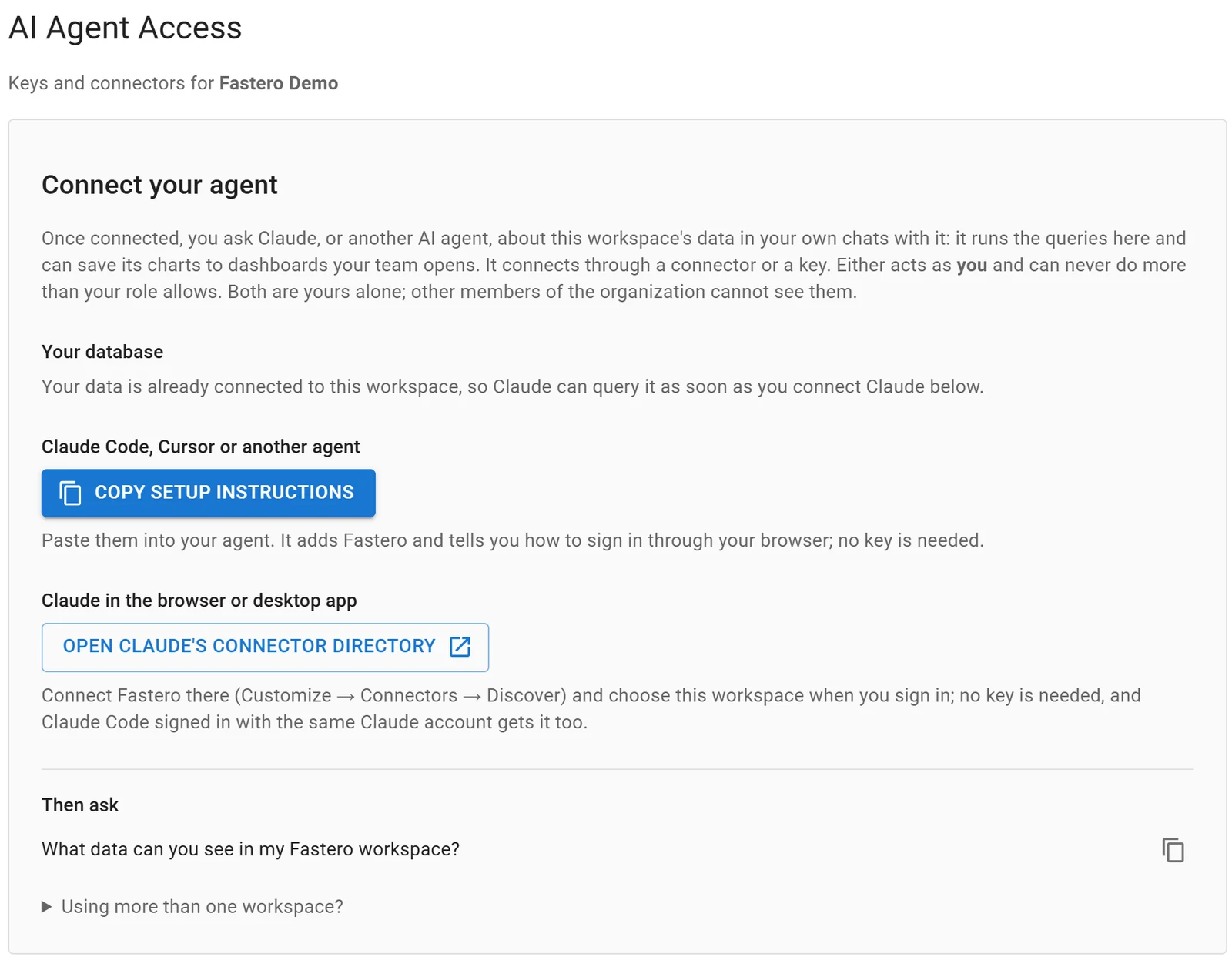
Settings, AI Agent Access: an agent signs in through the browser, so there is no key to copy.
For other servers worth adding, see the best MCP servers for Claude Code; for Jira and Confluence, Jira MCP; and for the protocol itself, what an MCP server is.
FAQ
What is the GitHub MCP server?
GitHub's official Model Context Protocol server, github/github-mcp-server, gives AI tools access to repositories, issues, pull requests, Actions and security alerts. GitHub hosts it, and the same MIT-licensed code runs locally as a binary or Docker image.
What is the GitHub MCP server URL?
https://api.githubcopilot.com/mcp/. Add /readonly for read-only tools, /x/issues for a single toolset, or /x/all for every toolset. Enterprise Cloud with data residency uses https://copilot-api.<subdomain>.ghe.com/mcp.
How do I add the GitHub MCP server to Claude Code?
Run claude mcp add --transport http github https://api.githubcopilot.com/mcp/ --header "Authorization: Bearer YOUR_GITHUB_PAT" with a fine-grained token, then check it with /mcp. To sign in through the browser instead, run the local server in Docker or as the release binary.
Is the GitHub MCP server free?
The code is MIT-licensed and the release binary is a free download. GitHub's setup pages don't name a plan for the remote server; its changelog says some capabilities, such as handing work to the Copilot coding agent, come "with the appropriate paid licenses".
Does the GitHub MCP server work with GitHub Enterprise Server?
Only the local server: GitHub Enterprise Server doesn't support the remote one. Start it with --gh-host https://your-host and a token, or your own OAuth or GitHub App for browser sign-in.
How do I make the GitHub MCP server read-only?
Start the local server with --read-only (GITHUB_READ_ONLY=1 in Docker), or send X-MCP-Readonly: true to the remote server, or use a URL ending in /readonly. In our count, the default toolsets fell from 88 tools to 31.
Sources
Checked 20 November 2026. github-mcp-server 2.2.0 ran on Windows 11 with Python 3.14.3 for the checks; Claude Code 2.1.284 was used only for --help. No token was created and no credentials were sent to GitHub.
- GitHub repository: README, remote server, Claude installation guide, installation guides and host support, local OAuth login, scope filtering, policies and governance, release v2.2.0
- GitHub Docs: Set up the GitHub MCP server, About MCP
- GitHub changelog: remote server generally available, server instructions and consolidated tools
- Anthropic: Claude Code MCP
- Invariant Labs: GitHub MCP exploited