 Fastero Dev Team
The Claude Agent SDK lets you run Claude Code from your own program. Instead of typing into a terminal, your Python or TypeScript code sends the prompt, chooses which tools Claude may use, and reads every message that comes back.
The short answer: the Claude Agent SDK is Claude Code packaged as a library, claude-agent-sdk for Python (0.2.180) and @anthropic-ai/claude-agent-sdk for TypeScript (0.3.322). You call query() with a prompt and options, and the SDK runs a Claude Code binary it bundles, with Claude Code's built-in tools, permissions, hooks, subagents, sessions and MCP servers, inside your own process. Unlike the Messages API you don't write the tool loop, and unlike Managed Agents nothing is hosted for you. It authenticates with an API key or Bedrock, Google Cloud or Microsoft Foundry credentials, defaults to Opus 5.5, and was called the Claude Code SDK until September 2025.
Fastero
Point Claude at your database.
Add Fastero to claude.ai or Claude Code. Claude builds the dashboard, deploys the app or publishes a live page, and your team opens it in Fastero.
Try free →What the Agent SDK is
Anthropic describes it as "A library that runs the Claude Code binary, with Claude Code's" tools, agent loop "and context management that power Claude Code, programmable in Python and TypeScript." Both packages "bundle a native Claude Code binary, so most installs need no separate Claude Code install", and the SDK runs that binary as a subprocess. Anything Claude Code can do in your terminal, read and edit files, run commands, search the web, call MCP servers, hand work to subagents, your code can now start and watch.
It was renamed in September 2025: "The Claude Code SDK has been renamed to the Claude Agent SDK". The old packages were claude-code-sdk and @anthropic-ai/claude-code; the new ones first appeared on npm on 27 September 2025 and on PyPI the next day.
Agent SDK, Messages API or Managed Agents?
| Messages API (client SDKs) | Claude Agent SDK | Managed Agents (beta) | |
|---|---|---|---|
| What you get | One model call at a time | Claude Code's agent loop and tools, as a library | An agent loop Anthropic hosts, in a cloud sandbox |
| Who runs the tool loop | You: "You write the tool loop yourself" | The SDK | Anthropic |
| Where tools run | Wherever your code runs them | Your machine or server | "an Anthropic-managed cloud sandbox" |
| Built-in tools | None | Read, Write, Edit, Bash, Glob, Grep, WebSearch, WebFetch, subagents and more | Anthropic's sandbox tools |
| Pick it when | You want full control, or no tools at all | You want Claude Code's behaviour in your own app, script or CI job | You don't want to host the agent at all |
For other languages there's no SDK; Anthropic suggests running the CLI with claude -p "To drive the same agent loop from a language other than Python or TypeScript".
Install it
Python needs 3.10 or later, Node.js 18.14 or later for TypeScript:
pip install claude-agent-sdk
npm install @anthropic-ai/claude-agent-sdk
We installed the Python package into a fresh Python 3.14 environment on Windows 11 on 11 November 2026. It pulled in 30 packages, including mcp, and the Windows wheel carried a 346 MB claude.exe, Claude Code 2.1.321, so neither Node.js nor a separate Claude Code was needed. One exception: "If pip installs the Python SDK's source distribution instead of a platform wheel, for example on ARM64 Windows, no binary is bundled."
Then give it credentials. For the API, set ANTHROPIC_API_KEY: "The SDK reads the key from the environment of the process that runs your agent; it doesn't load .env files automatically." For Amazon Bedrock set CLAUDE_CODE_USE_BEDROCK=1 with AWS credentials; for Google Cloud, CLAUDE_CODE_USE_VERTEX=1 with Google credentials.
One rule matters if you build a product: "Unless previously approved, Anthropic does not allow third party developers to offer claude.ai login or rate limits for their products, including agents built on the Claude Agent SDK." Your users' agents run on API keys or cloud credentials, not on their Claude subscriptions.
Your first query
query() starts a session and yields messages as Claude works. The smallest useful run, in Python:
import asyncio
from claude_agent_sdk import query, ClaudeAgentOptions, ResultMessage

async def main():
    options = ClaudeAgentOptions(
        allowed_tools=["Read", "Glob", "Grep"],   # approved without asking
        max_turns=10,
        max_budget_usd=0.50,
    )
    async for message in query(prompt="Summarise what this repository does", options=options):
        if isinstance(message, ResultMessage):
            print(message.result)
            print("estimated cost:", message.total_cost_usd)

asyncio.run(main())
And the TypeScript equivalent, from Anthropic's quickstart:
import { query } from "@anthropic-ai/claude-agent-sdk";

for await (const message of query({
  prompt: "Review utils.py for bugs that would cause crashes. Fix any issues you find.",
  options: {
    allowedTools: ["Read", "Edit", "Glob"],
    permissionMode: "acceptEdits"
  }
})) {
  if (message.type === "result") console.log(`Done: ${message.subtype}`);
}
Use query() for one task; for a conversation, use ClaudeSDKClient "for interactive applications such as chat interfaces, or when the next action depends on Claude's response."
The options people get wrong
allowed_toolsapproves; it doesn't restrict. The docs are explicit: "This does not restrict Claude to only these tools." To limit which tools exist, settools; to refuse everything you didn't approve, use the permission modedontAsk, which will "Deny anything not pre-approved instead of prompting".- Your settings load by default. "Omitting
settingSourcesonquery()loads user, project, and local filesystem settings, matching the CLI", so a script picks up your~/.claudesettings, the project'sCLAUDE.mdand its.mcp.jsonservers. For a predictable agent on a server, passsetting_sources=[](TypeScript:settingSources: []), andstrict_mcp_config=Trueto use only the servers you pass in. - The system prompt isn't Claude Code's. Since v0.1.0, "The SDK no longer uses Claude Code's system prompt by default." Ask for the
claude_codepreset if you want Claude Code's behaviour exactly. max_budget_usdis a soft stop. It stops "when the client-side cost estimate reaches this USD value", and a turn in progress can pass it.
What our test runs showed
We ran three small scripts on 11 November 2026, each isolated from the machine's own Claude Code settings with setting_sources=[], strict_mcp_config=True and no built-in tools. The first asked for one word. The other two pointed the SDK at a remote MCP server, Fastero's, first with no key and then with a wrong one:
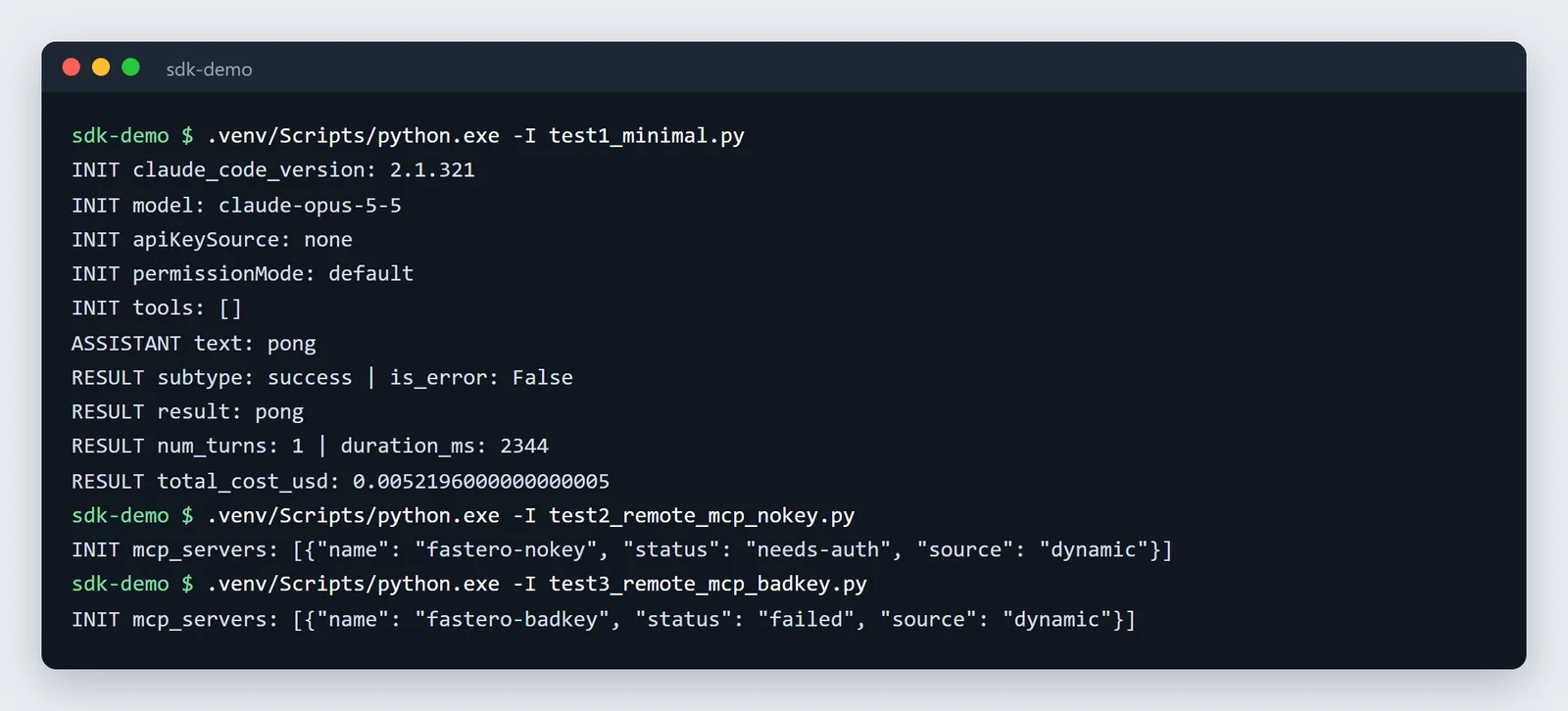
Our three runs, an excerpt of their output, unedited.
What they show:
- The default model is Opus 5.5. With no model set, the run reported
claude-opus-5-5, and the one-word reply cost an estimated $0.0052, almost all of it for writing the prompt to the cache. usageleaves things out. The result'smodel_usagealso listed a smallclaude-haiku-5-5call thatusagedidn't. Anthropic's reference confirmsmodel_usagecovers "the main loop, subagents, and internal calls such as compaction and Workflow agents", so use it for totals.- A server with no key doesn't stop the run. The server reported
needs-authand contributed no tools, while the turn still succeeded. The SDK won't sign you in: "The SDK doesn't open a browser or run an interactive OAuth flow." Pass a key inheaders. - A wrong key fails clearly. Status
failed, with the error "OAuth fallback is disabled when headers.Authorization is set." That matches the docs: "In either case, the agent run continues without that server's tools", so check the status before trusting the answer. - Don't log the status object.
get_mcp_status()returned the server's configuration with theAuthorizationheader in full. Logging it would log your key. - It ran without an API key. With no key set, the SDK used the machine's existing Claude Code sign-in (
apiKeySource: none). That's convenient for a script on your own computer, but don't build on it: Anthropic's usage limits "assume ordinary, individual usage of Claude Code and the Agent SDK", and products may not offer claude.ai login.
Point Claude at your database.
Start free →Custom tools
A custom tool is a Python function wrapped as an in-process MCP server. "The server runs in-process inside your application, not as a separate process." From Anthropic's example:
from typing import Annotated, Any
from claude_agent_sdk import tool, create_sdk_mcp_server, ClaudeAgentOptions

@tool(
    "get_temperature",
    "Get the current temperature at a location",
    {
        "latitude": Annotated[float, "Latitude coordinate"],
        "longitude": Annotated[float, "Longitude coordinate"],
    },
)
async def get_temperature(args: dict[str, Any]) -> dict[str, Any]:
    ...  # call your API here
    return {"content": [{"type": "text", "text": "Temperature: 61°F"}]}

weather_server = create_sdk_mcp_server(name="weather", version="1.0.0", tools=[get_temperature])

options = ClaudeAgentOptions(
    mcp_servers={"weather": weather_server},
    allowed_tools=["mcp__weather__get_temperature"],
)
In TypeScript the same pair is tool() and createSdkMcpServer(). Tools from any MCP server are named mcp__<server>__<tool>, and mcp__weather__* approves all of a server's tools at once.
Subagents, hooks and sessions
- Subagents. "Define subagents directly in your code using the
agentsparameter. Claude invokes subagents through theAgenttool." Each gets a description, a prompt, its own tool list and optionally a cheaper model, so a reviewer can be read-only and run on Sonnet. - Hooks. "Hooks are callback functions that run your code in response to agent events, like a tool being called, a session starting, or execution stopping." Use them to block a command, log every tool call or add context. "Some hooks are available in both SDKs, while others are TypeScript-only."
- Sessions. "The SDK writes it to disk automatically so you can return to it later." Continue the last session, resume one by ID, or fork it to try a different approach.
What it costs
The library costs nothing; the tokens do. With an API key you pay per token, Opus 5.5 at $4 per million input tokens and $20 per million output by default. Every result carries total_cost_usd, and "The total_cost_usd and costUSD fields are client-side estimates, not authoritative billing data." The Max, Ultra and Team plans' monthly API credits can pay for Agent SDK apps, though not for interactive Claude Code; see Claude Code pricing. Subagents each send their own requests, so an agent that fans out costs more than its main conversation suggests.
Giving an agent your team's data
An agent built on the SDK is only as useful as what it can reach. For data work, that's usually a database, the team's saved queries and agreed metric definitions, and somewhere to put the result where colleagues can open it.
Fastero is an AI and data platform where people and AI agents work together on a team's data. Its MCP server gives an agent the workspace's connections, saved queries, definitions, notebooks and dashboards, under the permissions of the key you give it. Make a key in Fastero under Settings › AI Agent Access, keep it in an environment variable, and pass it as a header:
import os
from claude_agent_sdk import ClaudeAgentOptions

options = ClaudeAgentOptions(
    setting_sources=[],
    strict_mcp_config=True,
    mcp_servers={
        "fastero": {
            "type": "http",
            "url": "https://api.fastero.com/api/v1/mcp",
            "headers": {"Authorization": f"Bearer {os.environ['FASTERO_AGENT_KEY']}"},
        }
    },
    allowed_tools=["mcp__fastero__*"],
)
Without the header, the server answers with exactly the needs-auth status our test saw. More on Claude Code with MCP servers, the best MCP servers for Claude Code and Claude Code for data analysis.
FAQ
What is the Claude Agent SDK?
A Python and TypeScript library that runs Claude Code from your own code: the same agent loop, built-in tools, permissions, hooks, subagents, sessions and MCP support, controlled by options instead of a terminal.
What's the difference between Claude Code and the Agent SDK?
Claude Code is the app you use interactively, in a terminal, IDE, desktop or browser. The Agent SDK is the same engine as a library, for scripts, CI jobs and products. The SDK bundles the Claude Code binary and runs it as a subprocess.
Is the Claude Agent SDK free?
The library costs nothing; the Python package is MIT-licensed. What it runs is billed per token on your API key or cloud account, at the same prices as the Claude API.
Do I need Claude Code or Node.js installed?
No. Both the Python and TypeScript packages bundle a Claude Code binary. The Python package doesn't need Node.js at all, except on platforms where pip falls back to the source distribution, such as ARM64 Windows.
Can I use my Claude Pro or Max subscription with the Agent SDK?
For a product, no: Anthropic doesn't let third-party products offer claude.ai login. Use an API key or cloud credentials. Max, Ultra and Team plans include monthly API credits that can pay for Agent SDK apps.
How do I add a remote MCP server with an API key?
Pass it in mcp_servers with "type": "http", the URL and a headers dictionary holding the Authorization header. The SDK doesn't run OAuth, so a server that needs it reports needs-auth.
What happened to the Claude Code SDK?
It was renamed the Claude Agent SDK in September 2025. Replace claude-code-sdk with claude-agent-sdk, and @anthropic-ai/claude-code with @anthropic-ai/claude-agent-sdk; Anthropic's migration guide lists the other changes.
How do I track tokens and cost in the Agent SDK?
Read the result message: total_cost_usd for an estimate, and model_usage for tokens per model, including subagents. For the real bill, use your API console or cloud billing.
Sources
Read on 11 November 2026; our three test runs used Python 3.14 on Windows 11 the same day, with claude-agent-sdk 0.2.180:
- Anthropic: Agent SDK overview, Quickstart, Python reference, TypeScript reference, Migration guide, MCP, Custom tools, Subagents, Hooks, Sessions, Cost tracking, Hosting, Legal and compliance, Managed Agents, Model configuration
- Packages: claude-agent-sdk on PyPI, @anthropic-ai/claude-agent-sdk on npm, the Python and TypeScript repositories