 Fastero Dev Team
A Claude skill is a folder of instructions, and sometimes scripts, that Claude loads when a task matches it. In Anthropic's words, skills "teach it how to do a task the way you or your team does it". They work in claude.ai, the desktop and mobile apps, Cowork, Claude Code and the API, and they follow an open standard, so the same folder works in other agents that support it.
The short answer: in claude.ai, turn on Anthropic's own skills first. The document skills for Excel, Word, PowerPoint and PDF are built in, and skill-creator turns a process you keep repeating into a skill of your own. For data work, add Anthropic's Data skill. In Claude Code, the most installed community skill set is Superpowers. Install only skills you've read, because a skill runs instructions and code with whatever access Claude has.
Fastero
Point Claude at your database.
Add Fastero to claude.ai or Claude Code. Claude builds the dashboard, deploys the app or publishes a live page, and your team opens it in Fastero.
Try free →Where to find skills
In claude.ai, open Customize → Skills and switch to Discover. It lists Anthropic's skills, partner skills and 57 categories, each with its install count "across all of Claude".
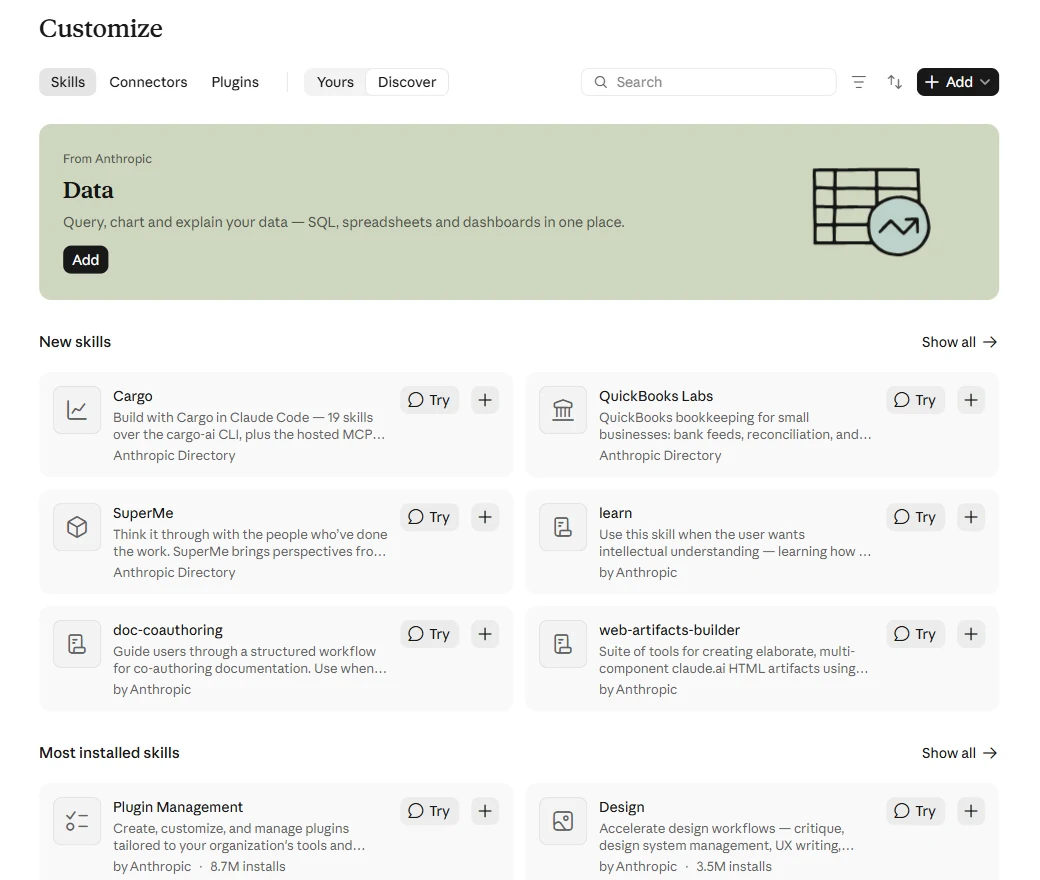
Customize → Skills → Discover on 4 November 2026.
Other places to look:
- github.com/anthropics/skills, Anthropic's own repository of 19 skills, with about 187,000 stars.
- Claude Code's plugin catalog, where many skills ship inside plugins. See the best Claude Code plugins.
- skills.sh and the
npx skillsinstaller, which install skills into Claude Code and about 79 other agents.
The most installed skills in Claude's directory
| Skill | By | Installs | What it does |
|---|---|---|---|
| Plugin Management | Anthropic | 8,693,067 | Creates and adapts plugins for your organization's tools |
| Design | Anthropic | 3,538,978 | Design critique, design systems, UX writing and accessibility checks |
| Productivity | Anthropic | 3,352,012 | Tasks, daily plans and memory, with your calendar, email and chat |
| Data | Anthropic | 2,898,738 | SQL, data exploration, charts and dashboards |
| Marketing | Anthropic | 2,664,339 | Marketing work in your brand's voice |
| Engineering | Anthropic | 2,481,586 | Standups, code review, architecture decisions and incident response |
| Finance | Anthropic | 2,119,253 | Finance work such as models and reconciliations |
| Postiz | Nevo David | 1,880,261 | Social media posting to more than 28 platforms |
| Product Management | Anthropic | 1,799,195 | Specs, roadmaps and research |
| PDF Viewer | Anthropic | 1,754,539 | View, annotate and sign PDFs in an interactive viewer |
Counts as Claude's Most installed page showed them on 4 November 2026. Most of these directory entries are bundles that bring tools and connectors along with their skills.
15 skills worth adding
| Skill | Best for | Where it works |
|---|---|---|
| xlsx, docx, pptx, pdf | Spreadsheets, documents, decks and PDFs | Built into claude.ai and the API |
| skill-creator | Writing and testing your own skills | claude.ai, Cowork, Claude Code |
| Data | SQL, charts and dashboards | claude.ai, Cowork, Claude Code |
| doc-coauthoring | Writing a spec, proposal or long document with Claude | claude.ai, Claude Code |
| web-artifacts-builder | Bigger, multi-part artifacts in claude.ai | claude.ai |
| frontend-design | Interfaces that don't look templated | Claude Code |
| mcp-builder | Building your own MCP server | claude.ai, Claude Code |
| webapp-testing | Testing a local web app in a browser | Claude Code |
| Superpowers | Planning, test-first work and debugging in a set order | Claude Code |
| Matt Pocock's Skills | Code review, TDD and spec-to-ticket flows | Claude Code and other agents |
| Humanizer | Removing the signs of AI writing from a draft | Claude Code and claude.ai |
| dbt Agent Skills | Models, tests and the semantic layer in dbt | Claude Code |
| developing-with-streamlit | Building and fixing Streamlit apps | Claude Code |
| Supabase Postgres best practices | Faster Postgres queries and schemas | Claude Code |
| Scientific Agent Skills | Exploratory analysis, statistics and forecasting in Python | Claude Code, Cowork |
Anthropic's own skills
The document skills handle .xlsx, .docx, .pptx and .pdf files. In claude.ai and the API they're built in and need nothing but code execution switched on. In Claude Code, install the source-available copies:
/plugin marketplace add anthropics/skills
/plugin install document-skills@anthropic-agent-skills
skill-creator writes a new skill with you, then tests it: it runs evaluations, compares results with and without the skill, and tunes the description Claude uses to decide when to load it. In claude.ai it's listed under Customize → Skills as from Anthropic. In Claude Code:
/plugin install skill-creator@claude-plugins-officialThe rest of Anthropic's examples install together with /plugin install example-skills@anthropic-agent-skills: doc-coauthoring, frontend-design, mcp-builder, webapp-testing, web-artifacts-builder, theme-factory, brand-guidelines, internal-comms and a few creative ones. Most are Apache 2.0, while the four document skills are source-available.
Skills for data work
Anthropic's Data skill is the one most data people should add first. It bundles ten skills, including sql-queries ("Write correct, performant SQL across all major data warehouse dialects"), explore-data, create-viz, build-dashboard, statistical-analysis and validate-data, which checks an analysis "before sharing". Add it from Customize → Skills in claude.ai, or in Claude Code:
claude plugin marketplace add anthropics/knowledge-work-plugins
claude plugin install data@knowledge-work-plugins
The rest depend on your stack:
| Skill | What it does | Install in Claude Code |
|---|---|---|
| dbt Agent Skills | Build and change models, tests, the semantic layer and dbt Mesh | npx skills add dbt-labs/dbt-agent-skills |
| developing-with-streamlit | "ALL Streamlit tasks: creating, editing, debugging, testing, beautifying, styling, theming" | pip install --upgrade streamlit, then streamlit skills |
| Supabase Postgres best practices | "Postgres performance optimization guidelines from Supabase" | npx skills add supabase/agent-skills --skill supabase-postgres-best-practices |
| ClickHouse best practices | "28 rules covering schema design, query optimization, and data ingestion" | npx skills add clickhouse/agent-skills |
| Databricks | The CLI, Apps, Lakebase, Jobs and pipelines | databricks aitools install |
| DuckDB Skills | Query CSV, Parquet, JSON and Excel files with DuckDB | /plugin install duckdb-skills@claude-plugins-official |
| Scientific Agent Skills | 177 skills, including polars, statsmodels, scikit-learn and forecasting | npx skills add K-Dense-AI/scientific-agent-skills |
| Hugging Face Skills | Datasets, training and evaluation on the Hub | /plugin install huggingface-skills@claude-plugins-official |
Two notes. Streamlit's skill now ships inside Streamlit 1.58 and later, and its old streamlit/agent-skills repository is archived, so skip roundups that still link it. DuckDB's skills haven't changed since April 2026 and say Windows isn't fully supported.
Where a skill stops
A skill tells Claude how to write the query. It can't reach your database: "Live data from another service: that's what an MCP connector provides. A skill can tell Claude how to use a connector, but it can't reach the service itself." Pair a data skill with a connector, and with somewhere for the result to go once it's right.
Fastero is that pairing for a team. Its connector gives Claude your databases, with a SQL tool that runs only read-only queries, and Claude builds where colleagues already look: dashboards they open with their own login, Streamlit apps behind that login, and notebooks that run on a schedule. Viewers are free.
In Fastero, write a query for revenue by region for each of the last 12 full months, check
the totals against last month's report, then save it as a chart on the Sales dashboard.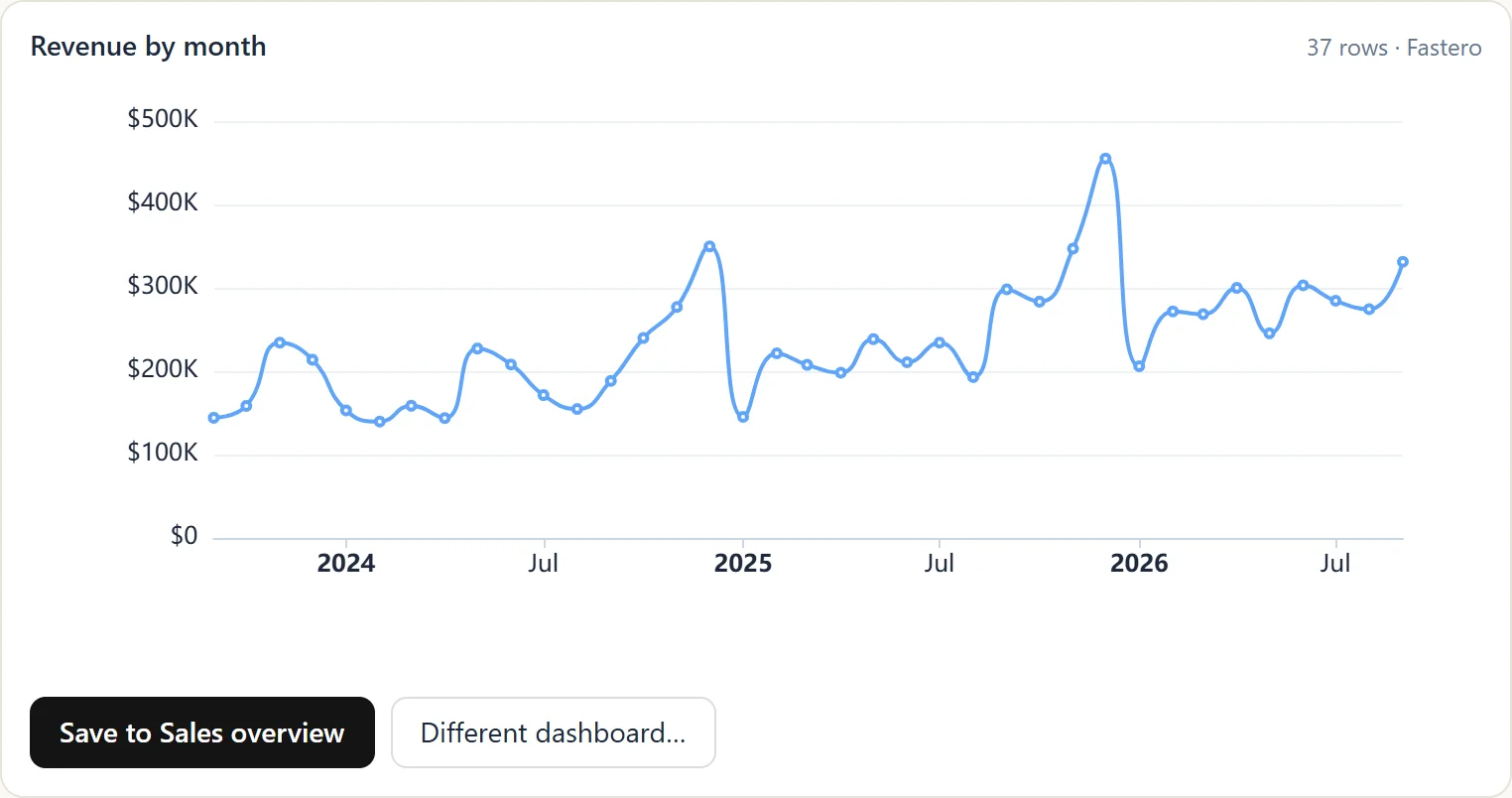
A chart from a live database in the chat, ready to save to a dashboard. Sample data.
Point Claude at your database.
Connect Claude →Popular community skills
| Skill | Stars on GitHub | What it does | Install |
|---|---|---|---|
| Superpowers | about 312,000 | Brainstorming, planning, test-first work, systematic debugging | /plugin install superpowers@claude-plugins-official |
| Matt Pocock's Skills | about 311,000 | 21 skills for grilling a plan, TDD, code review and tickets | claude plugin install mattpocock-skills@claude-plugins-official |
| UI UX Pro Max | about 145,000 | Design guidance for professional interfaces | /plugin marketplace add nextlevelbuilder/ui-ux-pro-max-skill |
| Caveman | about 117,000 | Terse replies, to spend fewer tokens | /plugin marketplace add JuliusBrussee/caveman |
| Humanizer | about 64,000 | Checks a draft for 26 signs of AI writing | /plugin marketplace add blader/humanizer |
| Marketing Skills | about 58,000 | Conversion, copywriting, SEO and ads | npx skills add coreyhaines31/marketingskills |
| Obsidian Skills | about 51,000 | Obsidian notes, Bases and JSON Canvas | /plugin marketplace add kepano/obsidian-skills |
| Trail of Bits Skills | about 8,000 | Security research and audit workflows | /plugin marketplace add trailofbits/skills |
Stars read on 4 November 2026. After a marketplace add, install the plugin by name from that marketplace.
How to add a skill
In claude.ai or the desktop app:
- Under Settings → Capabilities, turn on Code execution and file creation, which the newer layout calls Create and edit files. Skills "run in Claude's code sandbox".
- Open Customize → Skills. Turn on a skill from Discover, or click +, then Create skill, then Upload a skill.
- Upload a ZIP whose top level is the skill's folder. "a
SKILL.mdsitting at the root of the ZIP isn't recognized as a skill."
zip -r my-skill.zip my-skill/Skills you turn on in claude.ai follow your account to the web, desktop and mobile apps, and Claude Code picks them up from version 2.1.273 when you sign in with the same account.
In Claude Code: put the folder in ~/.claude/skills/ for every project, or in a project's .claude/skills/ and commit it so your team gets it too. Claude Code notices new and changed skills without a restart, and /skills lists them.
Through the API: upload with POST /v1/skills, then list the skill's ID in the request's container, alongside the code execution tool. The Skills API "is out of beta and needs no beta header." A request can carry up to 20 skills, and an upload can be up to 30 MB.
On Team and Enterprise: owners add skills under Organization settings → Plugins & skills, where each can be available, installed by default or required.
What's inside a skill
A skill is a folder with a SKILL.md file:
---
name: monthly-revenue-check
description: Checks a monthly revenue query against last month's report before it's shared. Use when the user asks for monthly revenue or a month-end number.
---

1. Run the query for the last full month and the month before.
2. Compare the totals with the figures in reference/last-report.md.
3. If they differ by more than 1%, list the rows that explain the gap before answering.
The name takes up to 64 lowercase letters, numbers and hyphens, and can't contain "anthropic" or "claude". The description takes up to 1,024 characters and "must include both what the Skill does and when Claude should use it". Anthropic suggests keeping SKILL.md under 500 lines and moving longer material into files next to it.
Claude doesn't read every skill up front. It sees each skill's name and description, about 100 tokens each, loads the full instructions only when a request matches, and opens extra files only when needed. That's why the description matters most: "it's the only part Claude sees before deciding to use the skill".
Before you add a skill
Anthropic's advice is to "Use Skills only from trusted sources: those you created yourself or obtained from Anthropic", because "a malicious Skill can direct Claude to call tools or run code in ways that don't match the Skill's stated purpose." Skills that you upload or that someone shares "aren't reviewed by Anthropic".
- Read
SKILL.mdand every script before you turn a skill on. - Watch for skills that fetch from outside addresses. "Even trustworthy Skills can be compromised if their external dependencies change over time."
- In Claude Code, check
allowed-tools. "A skill can grant itself broad tool access", and the folder's trust setting doesn't limit it. - Never put passwords or keys in a skill. Everyone you share it with gets its files; use a connector instead.
- Keep the list short. "With too many Skills active, Claude might fail to select the right Skill or miss relevant ones entirely."
Skills, plugins, connectors and projects
| What it is | Use it when | |
|---|---|---|
| Skill | "Task-specific procedures that Claude loads when a request matches" | You want Claude to follow your process |
| Plugin | Several skills packaged with connectors, commands and agents | You want to install and share them as one unit |
| Connector | A connection to an outside service or data | Claude needs live data or to act in a tool |
| Project | "Background knowledge that's always loaded in that project's chats" | The same files and context belong in every chat |
Anthropic's own summary: "MCP connects Claude to data; Skills teach Claude what to do with that data." More on connectors in Claude connectors, and on projects in Claude projects.
FAQ
What are Claude skills?
Folders of instructions, scripts and reference files that Claude loads when a task matches. Each has a SKILL.md file whose name and description tell Claude when to use it.
Are Claude skills free?
Anthropic's help says skills are available on Free, Pro, Max, Ultra, Team and Enterprise, with code execution switched on, though some of its developer pages still say Pro and above. Anthropic's skills and the open-source ones cost nothing to add.
How do I install a skill in Claude?
In claude.ai, open Customize → Skills, then turn one on from Discover or upload a ZIP of the skill's folder. In Claude Code, put the folder in ~/.claude/skills/ or install a plugin that carries it.
What's the difference between a skill and an MCP connector?
"MCP connectors give Claude access to a tool or data source, and skills teach it how to do a task the way you or your team does it." A skill can tell Claude how to use a connector, but can't reach the service by itself.
Do claude.ai skills work in Claude Code?
Yes. Skills you've turned on in claude.ai sync into Claude Code from version 2.1.273 when you sign in with the same account. Skills you create in Claude Code's folders stay on that machine.
Are Claude skills safe?
As safe as their source. A skill runs instructions and code with the access Claude has, so Anthropic advises using only skills you wrote or got from Anthropic, and reading anything else before you turn it on.
Sources
Read on 4 November 2026, with install counts from Claude's directory and stars from GitHub the same day:
- Skills overview, How to build a skill, Extend Claude, Plugins admin, What are skills, Use skills in Claude, Creating custom skills
- Skills in Claude Code, Agent Skills overview, Skills guide, Agent Skills specification
- Introducing skills, Skills explained, Organization skills and directory
- anthropics/skills, anthropics/knowledge-work-plugins, and each skill's repository named above
Try Fastero free — connect Claude to your databases, and turn the queries your skills write into dashboards and apps your team opens. No credit card required.