 Fastero Dev Team
A Jira MCP server lets Claude search your issues, read a ticket and its comments, and create, edit or move work items for you. Atlassian runs an official one for Jira Cloud, and a popular community server covers Jira Server and Data Center. We read both sets of docs, counted the tools and ran the community server locally to see what read-only mode leaves.
The short answer: for Jira Cloud, use Atlassian's own MCP server (also called the Atlassian Rovo MCP Server) at https://mcp.atlassian.com/v2/mcp. It signs in with OAuth 2.1 and acts as you, with your Jira permissions, and also covers Confluence, Jira Service Management, Bitbucket and Loom. In Claude Code, run claude mcp add --transport http atlassian https://mcp.atlassian.com/v2/mcp, then /mcp; in claude.ai, add the Atlassian connector from Claude's directory. Jira's delete and project-admin tools stay off until an admin enables them. Lookups and writes are free; Rovo search and other "enriched" calls use Rovo credits. For Jira Server or Data Center, use the community mcp-atlassian, which runs on your machine with a personal access token and has a --read-only switch.
Fastero
Point Claude at your database.
Add Fastero to claude.ai or Claude Code. Claude builds the dashboard, deploys the app or publishes a live page, and your team opens it in Fastero.
Try free →Jira MCP servers compared
| Atlassian MCP server | mcp-atlassian (community) | |
|---|---|---|
| Runs | Hosted by Atlassian at mcp.atlassian.com/v2/mcp |
On your machine, or your own server |
| Jira deployments | Cloud | Cloud, Server and Data Center |
| Sign-in | OAuth 2.1 as you; API token if the admin allows | API token, personal access token, OAuth 2.0, client certificate |
| Read-only | Admin turns off Write | --read-only |
| Admin controls | Domains, IP allowlist, permissions, audit log | Only the token's own access |
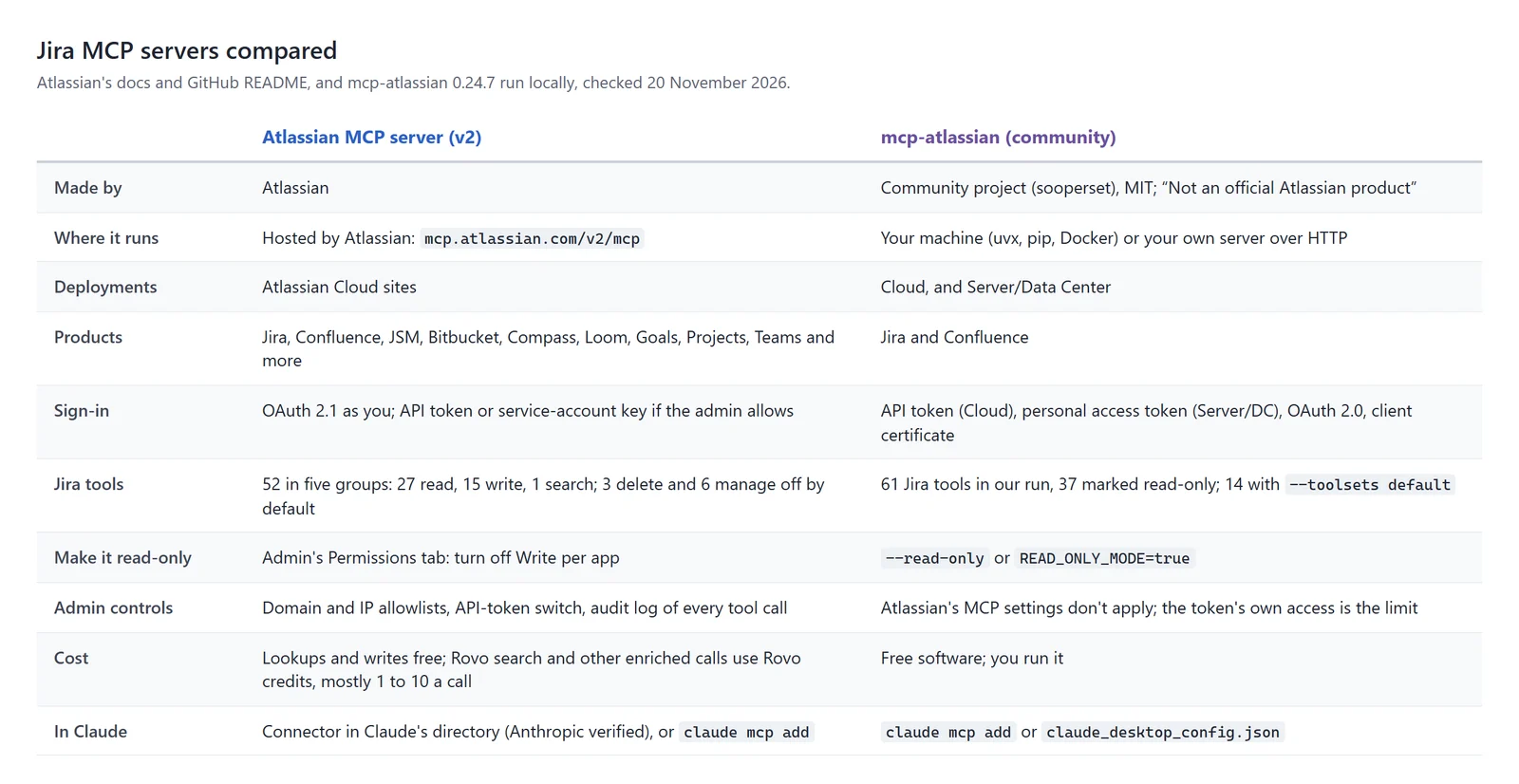
Atlassian's MCP server and mcp-atlassian side by side, from their docs and our run of mcp-atlassian 0.24.7, 20 November 2026
Atlassian's MCP server: what it covers
Atlassian calls it "a cloud-hosted bridge" to Jira, Confluence, Jira Service Management, Bitbucket, Compass, Loom and its planning apps. You need "an Atlassian Cloud site" with one or more of those products; the setup pages name no plan.
Version 2 is the current one. Atlassian says the old SSE address, https://mcp.atlassian.com/v1/sse, would "no longer be supported" after 30 June 2026, and from 1 March 2027 existing v1 connections "will automatically start to expose and utilize v2 tools". Many setup guides still show the v1 addresses.
The server doesn't send every tool definition at once. Agents see a few "Primary" tools, including getJiraIssue, searchJiraIssuesUsingJql, createJiraIssue, editJiraIssue, transitionJiraIssue and addOrEditJiraIssueComment, and reach the rest through discover plus executeRead, executeWrite or executeDestructive. (https://mcp.atlassian.com/v2/mcp?tools=all lists everything, for MCP gateways.) Counting Atlassian's Supported tools page with a short script, Jira has 52 tools in five permission groups:
| Permission group | Tools | Examples | Default |
|---|---|---|---|
read_jira |
27 | getJiraIssue, listJiraIssueComments, getJiraBoardSprintData |
On |
write_jira |
15 | createJiraIssue, transitionJiraIssue, manageJiraSprint |
On |
search_jira |
1 | searchJiraIssuesUsingJql |
On |
delete_jira |
3 | deleteJiraIssue, deleteJiraComment ("Cannot be undone") |
Off until an admin enables it |
manage_jira |
6 | createJiraProject, updateJiraScreen |
Off until an admin enables it |
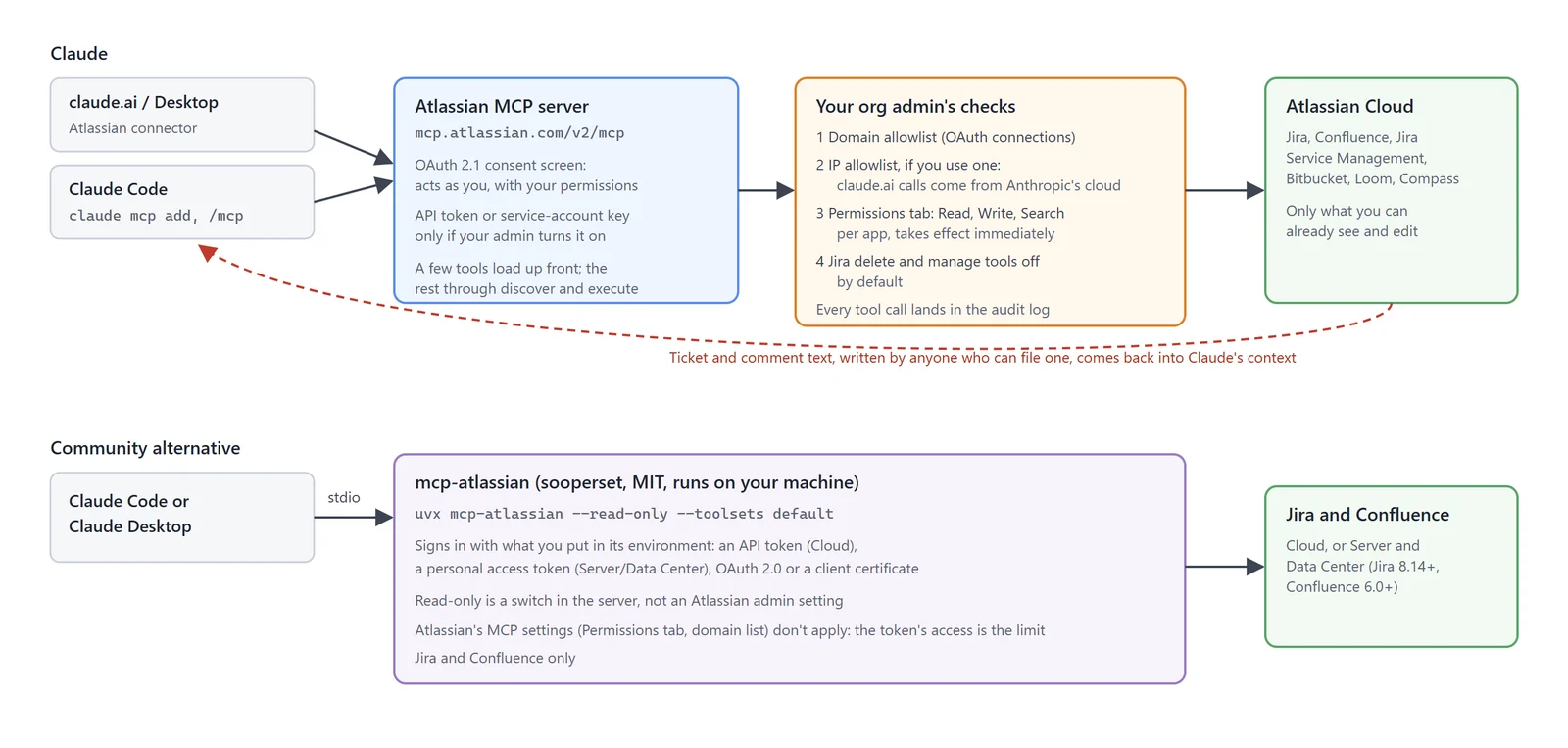
How a Jira request travels through Atlassian's MCP server, and the community alternative, from Atlassian's docs checked 20 November 2026
Add Jira to Claude
Claude Code. Atlassian's docs give one command, then /mcp "once you’ve opened a Claude Code session to authenticate":
claude mcp add --transport http atlassian https://mcp.atlassian.com/v2/mcpA project's .mcp.json can hold the same entry, {"type": "http", "url": "https://mcp.atlassian.com/v2/mcp"}, with no secret in it, since each person signs in; more in Claude Code MCP.
claude.ai and Claude Desktop. Claude's directory lists "Atlassian MCP": made by Atlassian, "Anthropic verified", added November 2025, connector URL https://mcp.atlassian.com/v2/mcp. Add it from the listing or under Customize > Connectors. Atlassian's own steps for Claude Desktop are Settings, then Extensions, Browse extensions, Plugins, and search for Atlassian.
Scripts and CI, with an API token. If your admin allows it, the server accepts a personal API token as Authorization: Basic <base64(email:api_token)> or a service-account key as a Bearer token. This file is ours; ${ATLASSIAN_MCP_BASIC} holds the base64 string and comes from your shell:
{
  "mcpServers": {
    "atlassian": {
      "type": "http",
      "url": "https://mcp.atlassian.com/v2/mcp",
      "headers": { "Authorization": "Basic ${ATLASSIAN_MCP_BASIC}" }
    }
  }
}
Atlassian warns that token sign-in may show fewer tools than OAuth and isn't bound to one site, so tools must pass the right cloudId. Its sources disagree on Jira Service Management: the GitHub README says those tools work with API tokens only, while the Supported tools page lists them under both methods.
Permissions and admin controls
The server "never grants access beyond what the user already has": Claude sees only the projects and issues you can see. On top of that, an organization admin has four controls in Atlassian Administration, under Connectors, then Atlassian MCP server:
- Permissions. Read, Write and Search can be allowed or blocked for each app, and changes "take effect immediately". A blocked call returns
Access denied: Your organization admin has not authorized the write permission. - Domains. OAuth connections are allowed only from listed AI tools. Atlassian's own list (Claude.ai and ChatGPT among them) is on by default and can only be blocked as a whole; you can add your own domains.
- API tokens. Token sign-in is a switch; with it off, clients must use OAuth.
- IP allowlists still apply. Claude's remote connectors connect "from Anthropic's cloud infrastructure, rather than from your local device", so a claude.ai connector can fail your allowlist even when you're on the company VPN. Atlassian's README says local connections can use your network's address.
Every tool call is logged: admins filter the audit log, under Insights, for "Rovo MCP User Actions".
Rate limits aren't published on the pages we read. A user on Atlassian's GitHub repository reports 429 Too Many Requests errors after bursts of about 20 parallel calls, well under the hourly volume they expected, and says they couldn't find MCP-specific limits in the docs.
What it costs: Rovo credits
Atlassian lists single-product lookups, "such as looking up a Jira work item", and write operations as free. Enriched calls, which include Rovo search (search, searchAtlassian) and getTeamworkGraphContext, cost "1-10 Rovo credits per call" for the vast majority, and they "consume Rovo credits even if Rovo or AI is turned off for your site". Paid Jira plans include 25, 70 or 150 credits per user a month on Standard, Premium and Enterprise, pooled across the organization and shared with Rovo Chat and agents; beyond that the list price is $0.01 a credit. Our small Python script on those numbers, for example team sizes:
Example team                       credits/month  enriched calls @1    @10
10 Jira Standard users                       250                250     25
25 Jira Premium users                      1,750              1,750    175
100 Jira Enterprise users                 15,000             15,000  1,500
1,000 enriched calls past the allowance: $10 to $100
For the ten-person team that's 25 to 250 enriched calls a month. JQL searches through searchJiraIssuesUsingJql and issue lookups aren't marked Enriched, so they don't count.
Point Claude at your database.
Start free →The community server: mcp-atlassian
sooperset/mcp-atlassian (MIT, 6,139 GitHub stars on 20 November 2026) is the best-known alternative, and its README is clear: "Not an official Atlassian product." It covers Jira and Confluence only, and adds what Atlassian's server doesn't: Jira Server and Data Center (8.14 and later) and Confluence 6.0 and later, with a personal access token or a client certificate. On Cloud it signs in with an API token or OAuth 2.0.
We installed version 0.24.7 in a Python 3.14.3 venv and started it with JIRA_URL pointing at a local port where nothing listens, so no request could reach Atlassian, then listed its tools over stdio with the MCP Python SDK:
[unset] server Atlassian MCP 3.4.11: 61 tools, 61 jira_*, 37 with readOnlyHint=true, 24 without
[default] server Atlassian MCP 3.4.11: 14 tools, 14 jira_*, 6 with readOnlyHint=true, 8 without
[all-readonly] server Atlassian MCP 3.4.11: 37 tools, 37 jira_*, 37 with readOnlyHint=true, 0 without
[default-readonly] server Atlassian MCP 3.4.11: 6 tools, 6 jira_*, 6 with readOnlyHint=true, 0 without
(3.4.11 is the FastMCP version underneath.) With TOOLSETS unset you get all 61 Jira tools, though its log still warns "In v0.22.0, the default will change to 6 core toolsets only", so set --toolsets yourself. The default toolsets include jira_delete_issue, and --read-only removes every write tool. Our URL looked like Data Center, and its docs say two Cloud-only tools are then hidden; neither appeared.
A read-only Data Center entry for Claude Desktop, ours, checked by starting the server with exactly these arguments:
{
  "mcpServers": {
    "jira-datacenter": {
      "command": "uvx",
      "args": ["mcp-atlassian", "--read-only", "--toolsets", "default"],
      "env": {
        "JIRA_URL": "https://jira.example.com",
        "JIRA_PERSONAL_TOKEN": "your-personal-access-token"
      }
    }
  }
}
== claude_desktop_config.json
'jira-datacenter': local uvx mcp-atlassian --read-only --toolsets default
note: token written in the file = True
mcp-atlassian 0.24.7 with these args lists 6 tools, 6 marked read-only:
jira_get_issue, jira_search, jira_search_fields, jira_get_field_options, jira_get_project_issues, jira_get_transitionsThe token sits in that file in plain text, so treat the file like a password. In Claude Code, pass the same variables with -e to claude mcp add, then the command after --.
Prompt injection: anyone can write a ticket
A Jira issue holds text from whoever filed it, and on a service desk that's anyone outside the company. In June 2025, Cato Networks showed the pattern against Atlassian's server; Simon Willison's summary of their steps: "A threat actor (acting as an external user) submits a malicious support ticket", an internal user "invokes an MCP-connected AI action", and the payload "is executed with internal privileges", with data "exfiltrated to the threat actor’s ticket". The reply field is the way out. What helps:
- Turn off Write where nobody needs it. On Atlassian's server that's the admin's Permissions tab; on mcp-atlassian,
--read-only. - Leave delete and manage off. They are off by default on Atlassian's server.
- Confirm writes in Claude Code. Atlassian's three execute tools exist so that "each execute type is used to apply agent-level confirmation". An ask rule on them and on the Primary write tools makes Claude Code prompt before any change. This settings block is ours; our check script parsed it and matched it against the Primary tools: every write tool hit a rule, no read tool did.
{
  "permissions": {
    "ask": ["mcp__atlassian__executeWrite", "mcp__atlassian__create*", "mcp__atlassian__edit*",
            "mcp__atlassian__transition*", "mcp__atlassian__add*", "mcp__atlassian__update*"],
    "deny": ["mcp__atlassian__executeDestructive"]
  }
}- Watch the audit log for writes nobody asked for. More in MCP security.
Ticket lists beside the numbers
Jira knows which bugs are open; it doesn't know what they cost. Fastero is an AI and data platform where people and AI agents work together on a team's data, and its MCP server runs beside Atlassian's in the same Claude session. Ask, for example: "List the open checkout bugs in Jira, then from Fastero show failed payments per day over the same two weeks, in one table."
- Two servers, one session. In Claude Code:
claude mcp add --scope user --transport http fastero https://api.fastero.com/api/v1/mcp, then/mcpto sign in through the browser. Claude's connector directory lists Fastero (Community). - No database password in an agent's config. Databases connect once, in the workspace.
- Read-only SQL. One
SELECT,WITH,EXPLAINorSHOWstatement per call, anything that could change data refused, at most 500 rows back. - Something the team opens later. A query or dashboard Claude saves in Fastero opens for colleagues with their own login, without Claude. Keys for scripts last at most 90 days and are read and SQL only by default.
Keep Jira writes behind a prompt in that session: ticket text written by outsiders shouldn't be able to post your numbers into a reply.
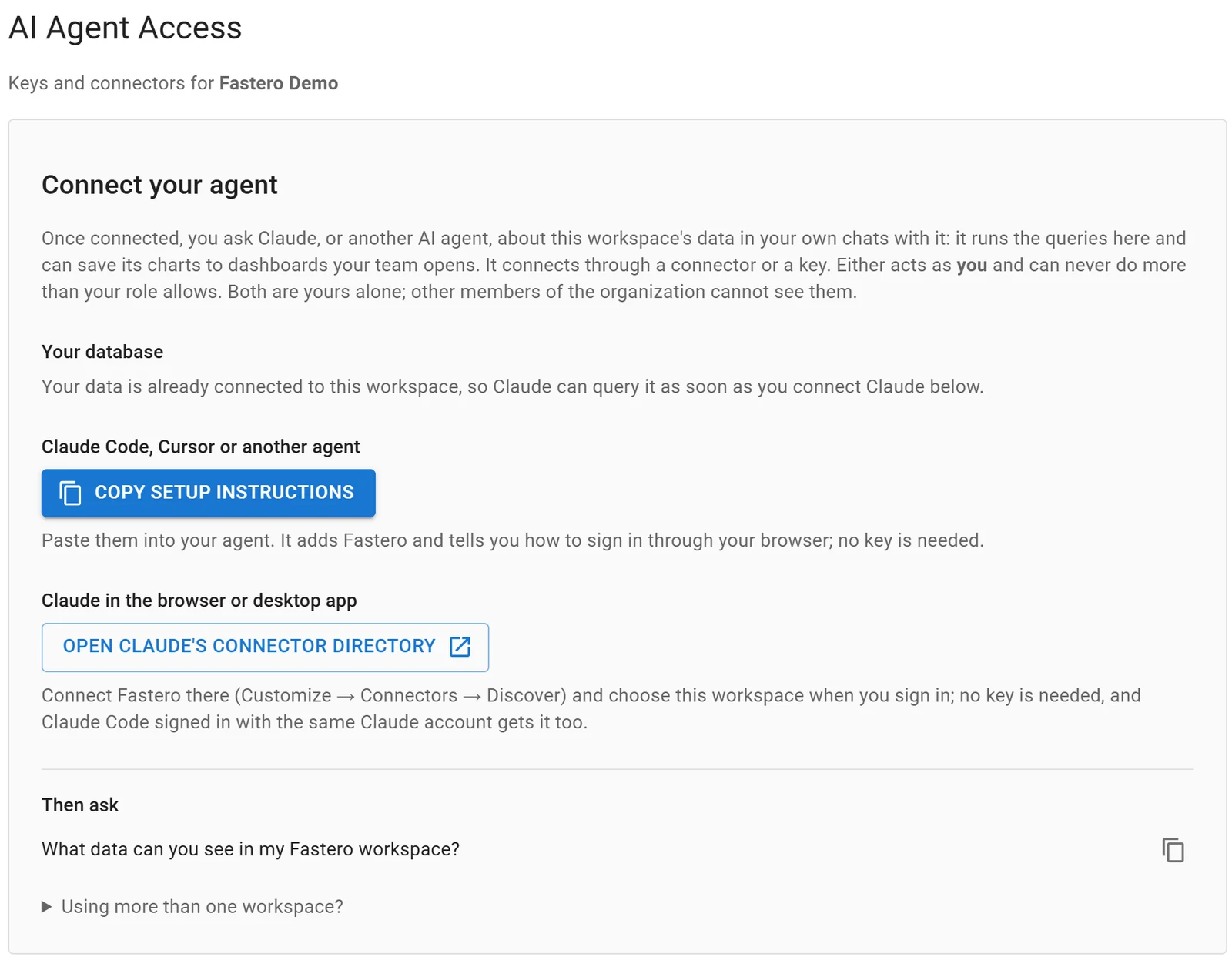
Settings, AI Agent Access: an agent signs in through the browser, so there is no key to copy.
For code and pull requests, see the GitHub MCP server; for more servers, the best MCP servers for Claude Code; and for how the protocol works, what an MCP server is.
FAQ
Is there an official Jira MCP server?
Yes. Atlassian hosts the Atlassian MCP server, also called the Atlassian Rovo MCP Server, for Jira, Confluence and its other Cloud apps. It signs in with OAuth 2.1 and acts with your permissions.
What is the Atlassian MCP server URL?
https://mcp.atlassian.com/v2/mcp. The old https://mcp.atlassian.com/v1/sse address lost support after 30 June 2026, and Atlassian moves remaining v1 connections to v2 tools on 1 March 2027.
How do I connect Claude to Jira?
In claude.ai or Claude Desktop, add the Atlassian connector from Claude's directory and sign in. In Claude Code, run claude mcp add --transport http atlassian https://mcp.atlassian.com/v2/mcp, then /mcp to authenticate.
Does the Atlassian MCP server work with Jira Data Center?
No. It needs an Atlassian Cloud site. For Jira Server or Data Center 8.14 and later, the community mcp-atlassian server connects with a personal access token.
Is the Atlassian MCP server free?
Lookups of single items and write operations are free. Rovo search and other enriched calls use Rovo credits, mostly 1 to 10 a call, from the allowance paid Jira plans include; past it, credits cost $0.01 each.
Can I make a Jira MCP server read-only?
On Atlassian's server an organization admin turns off Write on the Permissions tab, and delete and project-admin tools are off by default. On mcp-atlassian, start it with --read-only or set READ_ONLY_MODE=true.
Sources
Checked 20 November 2026. mcp-atlassian 0.24.7 (with mcp 1.30.0 and FastMCP 3.4.11) ran on Windows 11 with Python 3.14.3 against a local address only. No Atlassian account was used and no token was created.
- Atlassian: Get started with the Atlassian MCP server, Supported tools, Configure OAuth 2.1, Configure authentication via API token, Upgrade from v1 to v2, Understand the MCP server, Control MCP server settings, Configure MCP server permissions, How Rovo credits work, developer overview, GitHub README, rate-limit issue #171, MCP risk awareness
- Anthropic: Atlassian in Claude's directory, Custom connectors using remote MCP, Claude Code permissions
- Community: sooperset/mcp-atlassian and its docs, PyPI, Simon Willison on the Cato Networks report