 Fastero Dev Team
Claude can write a good report in a minute. Getting the same report next Monday, with the same definitions, sent to people who don't use Claude, is a different problem. The way to solve it is to separate two jobs: Claude is good at working out what the report should say, and a schedule is good at running it again.
The short answer: have Claude build the report once, as saved SQL behind a dashboard, then schedule it. In Fastero, one more sentence does that: "email this to the team every Monday at 9:00". Each run recalculates the numbers from the same queries and emails the charts, tables and a PDF, with no one asking and no model deciding afresh what counts as revenue. Claude's own scheduled tasks are the better choice when the report needs judgement each time, such as summarising what happened in Slack this week. They run a prompt on a timetable and leave the result in a session for you to review.
Fastero
Point Claude at your database.
Add Fastero to claude.ai or Claude Code. Claude builds the dashboard, deploys the app or publishes a live page, and your team opens it in Fastero.
Try free →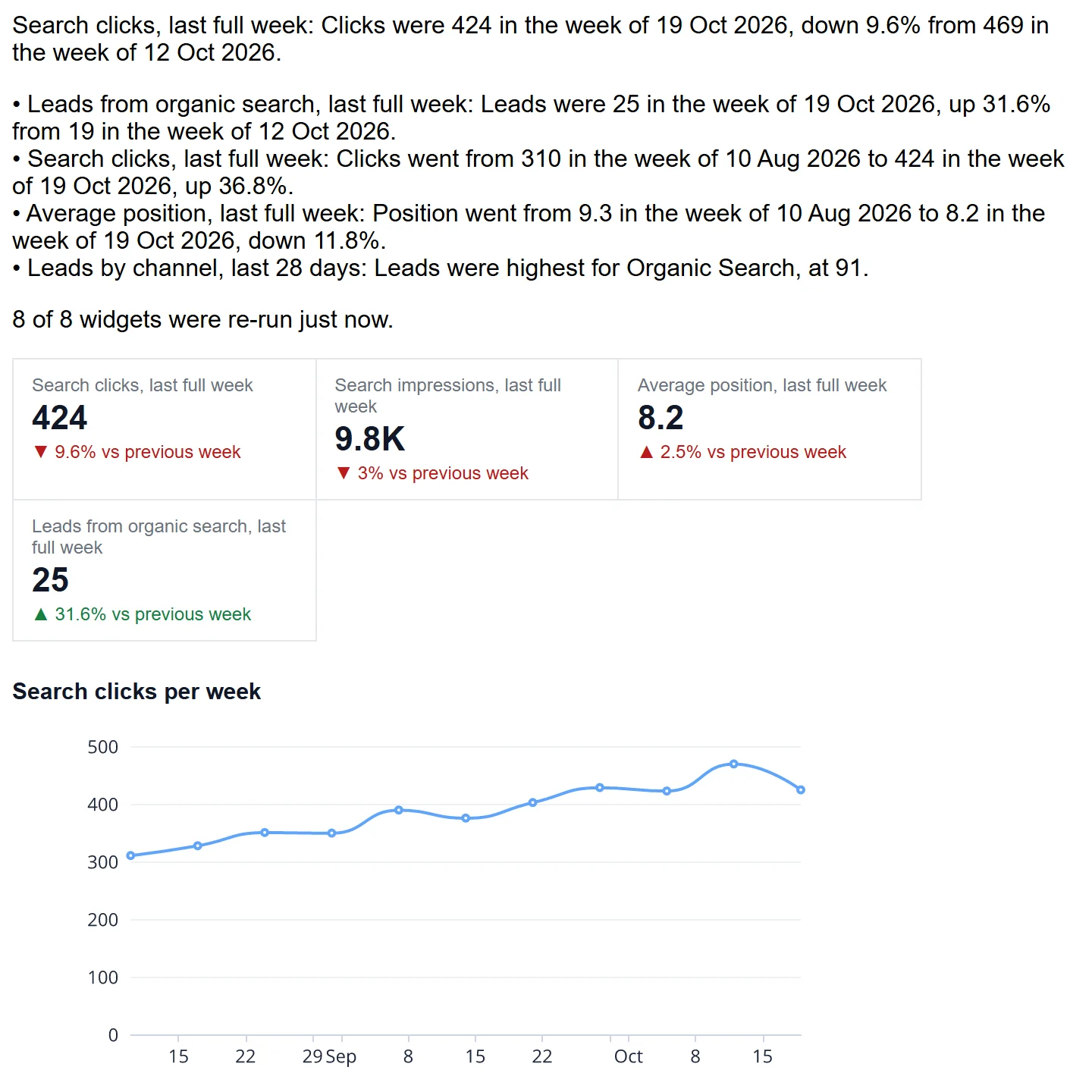
The start of a real report email from Fastero, on the client SEO report. Sample data.
Four ways to automate a report with Claude
| Scheduled task in the Claude app | Cloud scheduled task in Claude Code | A script Claude writes | A dashboard email in Fastero | |
|---|---|---|---|---|
| What runs each time | Your prompt, as a new Cowork session | Your prompt, as a full Claude Code session | Your code | The saved queries |
| Who works out the numbers | Claude, fresh each run | Claude, fresh each run | Your code | Your SQL |
| Where the result goes | A session you review, or wherever a connector can write | The same | Wherever you code it to | An email with charts, tables and a PDF |
| Who can receive it | You, unless it writes elsewhere | You, unless it writes elsewhere | Anyone | Up to 20 members of the workspace |
| Runs with your laptop closed | Yes, unless it needs local files | Yes | If you host it | Yes |
| Plan | Any paid Claude plan | Any paid Claude plan; research preview | None | Fastero, Free plan included |
Cloud scheduled tasks, formerly routines, "belong to your individual claude.ai account" and "their runs count against your account's usage and limits", in Anthropic's words. Each is a real Claude session, which makes them powerful and also means the work isn't the same each time. More in our guide to Claude Code routines.
Fixed report or fresh judgement?
Which you want depends on what the report is for.
Use a fixed report when the numbers have to agree. A figure in Monday's email should match the figure in last Monday's, and the dashboard, and what finance has. If a model works out the number afresh on each run, it can pick a different filter or date boundary, and you find out when someone asks why revenue changed by 3%. SQL that was checked once gives the same answer every time it runs on the same data. Other people building these reports say the same: let a data layer do the arithmetic before anything reaches Claude.
Use a scheduled task when the report needs reading, not counting. "What did customers complain about in support this week?" or "Summarise the decisions made in these three Slack channels" have no query behind them, and that's exactly what Claude is for. Read the run's transcript the first few times: Anthropic notes that a run marked succeeded only means the session ended without reporting a failure, and that blocked requests or missing connector tools "appear in the transcript rather than on the row".
Use both when you want numbers and commentary. A scheduled task with Fastero's connector can run the dashboard's saved queries and write a paragraph on what changed, so the arithmetic stays fixed and only the words are new.
Build a weekly report: the worked example
This is the path that gets you a report you can leave alone. The schedule and the email in the picture ran in a real workspace, on sample data.
1. Connect Claude and your data
Connect Fastero to Claude from its connector directory, and connect your database in Fastero, ideally with a read-only login. Postgres works directly; Google Sheets and uploaded CSV or Excel files work too.
2. Ask for the report
Say what the report is for and who reads it, not only what's in it:
Build a weekly report for our Monday leadership meeting on the orders database.
Number cards with the change on the week before: revenue, orders, average order value
and new customers. Below them, revenue per week for the last 12 weeks, revenue by
channel, and a table of the ten products that changed most. Use complete weeks only,
Monday to Sunday, and exclude cancelled orders and test accounts. Show me the SQL for
each number before you save it.
Two phrases there do most of the work. "Complete weeks only" stops a half-finished week reading as a collapse. "Show me the SQL" gets you the one check that matters, because this is the only time anyone reads these definitions.
3. Check the numbers once
Pick two numbers you already know and ask Claude to compare them with your own source. If "revenue" means something particular at your company, tell it, and ask it to save that as a definition in Fastero, so later conversations and Fastero's own assistant count it the same way.
4. Schedule it
Email this dashboard to me and to dana@example.com every Monday at 9:00 Berlin time.Claude calls one tool, and the schedule exists. You can read the timetable back with "what's scheduled?", and switch it off the same way. Each run works like this:
- It runs every query fresh, so the email shows today's numbers rather than a cached copy.
- It sends the report itself: the number cards, up to twelve charts as pictures, the first ten rows of each table, a short summary of what changed, and a PDF of the whole dashboard, with a button that opens it in Fastero.
- Recipients stay in control. Each can stop this one report from a link in the email.
- If a run fails, you're told, not your recipients.
Recipients must be members of your workspace, up to 20 per report. Viewers are free, and only a person can add an outside address, in the app, not Claude. That's a deliberate guard against an agent emailing your numbers to someone new.
Timetables use cron and run at most once an hour. 0 9 * * 1 is 09:00 every Monday, 0 8 1 * * is 08:00 on the 1st of each month, and 0 7 * * 1-5 is 07:00 on weekdays, each in the time zone you name.
Point Claude at your database.
Connect Claude →Get an email only when something changes
Often the report you actually want is silence until something's wrong. A Fastero alert watches one number from a saved query and emails when it crosses a line, then again when it comes back:
Email me if yesterday's orders fall below 200, checking every morning at 8:00.It doesn't repeat itself while the number stays across the line, and it tells you once if the check itself starts failing. Our Claude Code usage guide uses one to catch a runaway day, and a tracker like our Claude outage history could email you when a service you depend on has an open incident.
Reports you can set up this way
Each of these is a prompt, followed by the same scheduling sentence:
| Report | Who it's for | The prompt |
|---|---|---|
| Client report | An agency's client, monthly | "Build a monthly report for this client: sessions, leads and spend by channel, against last month, with the campaigns that changed most." |
| SEO report | An agency's client, monthly | "Report search clicks, position and leads, with the queries that moved most over 28 days." See Claude for SEO. |
| AI agent report | The team running agents, weekly | "Runs, success rate, cost per run and the tools that fail most, by agent, for the last four weeks." See AI agent observability. |
| Data freshness | A data team, every morning | "Which of our tables haven't been updated when they should have been, and how many rows arrived yesterday against the usual?" |
| Product metrics | A product team, weekly | "Signups, activation and weekly active users with the change on last week, and the features used most." |
| Claude Code spend | Engineering leads, weekly | "Spend per person and per model, cost per active day, and anyone over $50 in a day." See Claude Code usage. |
For more dashboards to start from, see 12 Claude dashboard examples, with the prompts.
When a dashboard isn't the right shape
Sometimes a report needs its own layout, or has to combine an API with a database. Then ask Claude for a Python job in Fastero instead: it runs on a schedule on its own machine, with passwords kept as Secrets, and can draw and send its own charts. The GitHub stars tracker and the AI model price tracker are built that way: a job that collects numbers every day, and a dashboard that shows them.
FAQ
Can Claude automate reports?
Yes. Claude's scheduled tasks can run a report prompt on a timetable, on any paid plan. If you need the same numbers each run and want the report sent to other people, have Claude build it as a dashboard in a tool like Fastero and schedule that instead: the queries repeat exactly, and the email goes out by itself.
Can Claude send a weekly email?
Not by itself on a timetable. A scheduled task leaves its result in a session, and reaches other people only through a connector you've included. Through Fastero's connector, Claude can schedule an emailed dashboard in one sentence, and Fastero sends it from then on.
Do scheduled Claude tasks use my plan's usage?
Cloud scheduled tasks in Claude Code do: Anthropic says their runs count against your account's usage and limits. A dashboard email in Fastero runs SQL, not a Claude session, so it doesn't use your Claude plan at all.
Does my computer need to be on?
Not for scheduled tasks in the Claude app, unless a task needs local files or apps, and not for cloud tasks in Claude Code or for a Fastero email. A script you run with cron needs a machine that's on.
Can I send a report to someone outside my company?
Through Fastero, the recipient has to be a member of the workspace, and a person adds them; viewers are free. For someone who won't sign in, a dashboard can have a public link, which a person confirms once.
How do I stop the numbers changing between reports?
Keep the calculation in saved SQL and have Claude reuse it, rather than asking a model to work it out each run. Save your definitions, and use complete weeks or months so a part-finished period doesn't look like a drop.
Sources
Read on 31 October 2026:
- Anthropic — Automate work with scheduled tasks, Schedule recurring tasks in Claude Cowork
- How to automate marketing performance reporting and analytics in Claude (Coupler.io)
- Fastero — Claude connectors, Claude Code routines
Try Fastero free — have Claude build the report once, and let it go out every Monday by itself. No credit card required.