 Fastero Dev Team
A Claude project is a workspace with its own instructions, files, memory and chats. Every chat you start inside it begins knowing what the project knows, so you stop pasting the same background into every conversation.
The short answer: open Projects in the Claude sidebar and click New project, then add instructions and files. Free accounts can create five projects; paid plans have no stated limit. Project files can be up to 30 MB each, and paid plans automatically search large collections, adding up to 10x the capacity. Sharing is on Team and Enterprise only, as Can view or Can edit. Since September 2026 the name also covers a redesigned beta in Claude Code, which belongs to one person and can't be shared.
Fastero
Point Claude at your database.
Add Fastero to claude.ai or Claude Code. Claude builds the dashboard, deploys the app or publishes a live page, and your team opens it in Fastero.
Try free →What's inside a project
| Part | What it does | Good to know |
|---|---|---|
| Instructions | Tell Claude how to behave in every chat in the project | Apply to all of the project's chats |
| Context (project knowledge) | Files and text Claude can read | Also called the knowledge base |
| Memory | What Claude learns while working in this project | Kept apart from other projects' memory; your account memory also applies unless you turn off Use account memory |
| Chats | Your conversations | They don't see each other unless you add the content to the project |
The name and description are labels for people. Anthropic says "Claude will not have access to these details", so anything Claude should know belongs in the instructions.
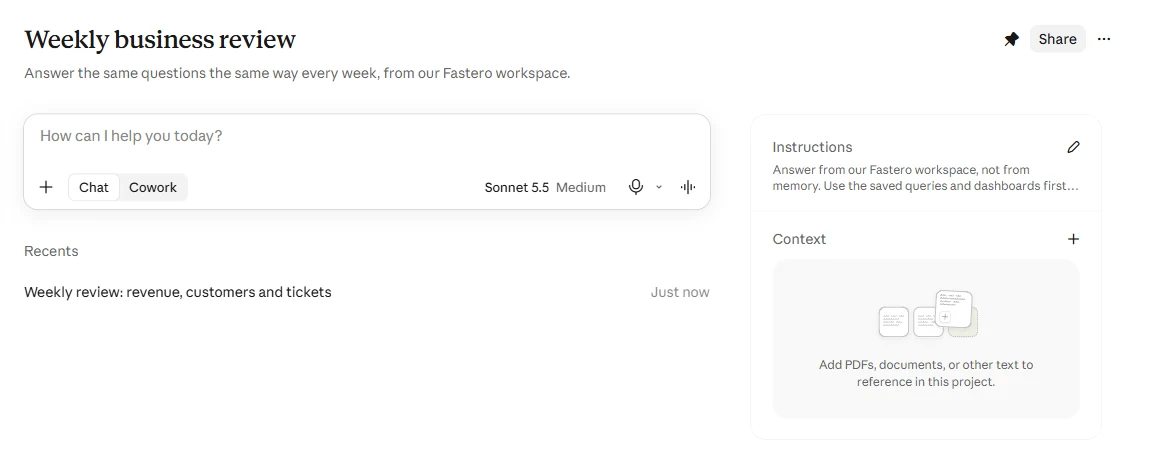
A real project on a Free account, with instructions saved and one chat so far.
How to create a Claude project
- In claude.ai, click Projects in the sidebar, then New project.
- Answer What are you working on? and What are you trying to achieve?, then click Create project.
- Beside Instructions, click + and write how Claude should work here.
- Beside Context, click + and add files or text.
- Ask something in the message box at the top. That chat now belongs to the project.
To bring an existing chat in, open its menu and choose Add to project.
What to write in the instructions
Say what a good answer looks like, and name what Claude should use and what it shouldn't touch. Here's the set behind the project in the picture:
Answer from our Fastero workspace, not from memory. Use the saved queries and dashboards
first, and write new SQL only when none fits. Report full weeks, Monday to Sunday, state the
dates, and compare each number with the week before. Say which query or dashboard each number
came from. Keep the answer short enough to paste into Slack. Don't change or delete anything
in Fastero unless I ask.
When we asked this project for "this week's review: revenue, new customers and open support tickets", Claude reported full weeks, named the saved query behind each number and flagged a table whose data stopped early. It ended with "I changed nothing in Fastero."
Limits
| Free | Pro, Max, Ultra | Team, Enterprise | |
|---|---|---|---|
| Number of projects | 5 | No stated limit | No stated limit |
| Size of each project file | 30 MB | 30 MB | 30 MB |
| Files per project | No stated limit, but they must fit the context window | Same, then search takes over | Same, then search takes over |
| Search across large knowledge | No | Yes, up to 10x capacity | Yes, up to 10x capacity |
| Sharing with people | No | No | Yes |
The search switches on by itself as you approach the context window limit: Claude then looks things up in the project's knowledge instead of loading it all. You'll see an indicator, and there's nothing to configure.
Files can be PDF, DOCX, CSV, TXT, HTML, ODT, RTF, EPUB, JSON, XLSX, JPEG, PNG, GIF or WebP, and Claude reads the text from most of them. Google Docs added from Drive stay in sync on their own. GitHub repositories are synced by you, with Sync now.
Projects, chats, Skills and artifacts
| What it is | Use it when | |
|---|---|---|
| Chat | One conversation | The task won't come back |
| Project | Standing instructions and files for a body of work | The same background applies to many chats |
| Skill | Written steps Claude loads when a task calls for them, everywhere | You keep copying the same instructions between projects |
| Artifact | Something Claude made, such as a page or a document | You want to put a result in front of someone |
Anthropic's own version: "Projects say 'here's what you need to know.' Skills say 'here's how to do things.'" An artifact made in a project's chat takes its access from the project: viewers need access to that project too. For artifact ideas, see 12 Claude artifact examples.
How to share a Claude project
Sharing needs a Team or Enterprise plan. Open the project and click Share, then pick people and a level:
- Can view: see the contents, knowledge and instructions, and chat in the project, without editing it.
- Can edit: change the project too.
Setting a project to public means your organization, not the internet: "Everyone in your organization can view and use the project." Your chats inside a shared project stay private unless you share them one by one, so a colleague gets the project's knowledge and not your conversations.
Two limits matter for data work. On Team and Enterprise, "Connectors are only available in private projects", and Google Drive files can only be added in private projects too. A project shared with colleagues therefore leans on the files inside it, and those files age the moment you upload them.
Point Claude at your database.
Connect Claude →The new Projects in Claude Code
Anthropic announced a redesign on September 17, 2026, and it works quite differently. It's in public beta on Pro, Max and Ultra, and not offered on Team or Enterprise yet.
- One conversation that runs many threads. You say what needs doing and Claude starts a thread for each task, usually in the cloud.
- One owner. "A project belongs to one user. You can't share a project or its threads with another user."
- Where it works: claude.ai/code, the desktop app and the mobile app, but not the terminal or the VS Code and JetBrains plugins.
- Bigger limits: instructions up to 16,000 characters, a library of up to 100 files and 2 GB in one pick, and 500 new threads a day. Cloud threads can use all your connectors.
Anthropic is moving existing projects to the new version for some individual users, and says chat, Cowork, Team and Enterprise will follow. Cowork already uses the same projects as chat: start a task from a project and it gets the project's instructions and files.
Keep a project on live numbers
A CSV in a project is a photograph. Ask about last week in a month's time and Claude answers from the old file, confidently.
Connect a database instead and the project reads current numbers on every question. With Fastero connected, Claude can use your saved queries, dashboards and shared definitions, so "revenue" means what it means in your team's reports. It also saves its work somewhere colleagues can open it:
- Definitions stay with the data. Tell Claude what an active customer is and it saves that in Fastero, where later conversations and teammates get the same answer. It doesn't sit in one person's project file.
- Results outlive the chat. A chart goes onto a dashboard that refreshes on a schedule, opened by people with their own login and role. They don't need Claude.
- Writes stay under your control. Claude asks before each tool until you say otherwise, and your role in Fastero limits what it can do.
Start with 12 Claude prompts for data analysis, or see what connecting takes.
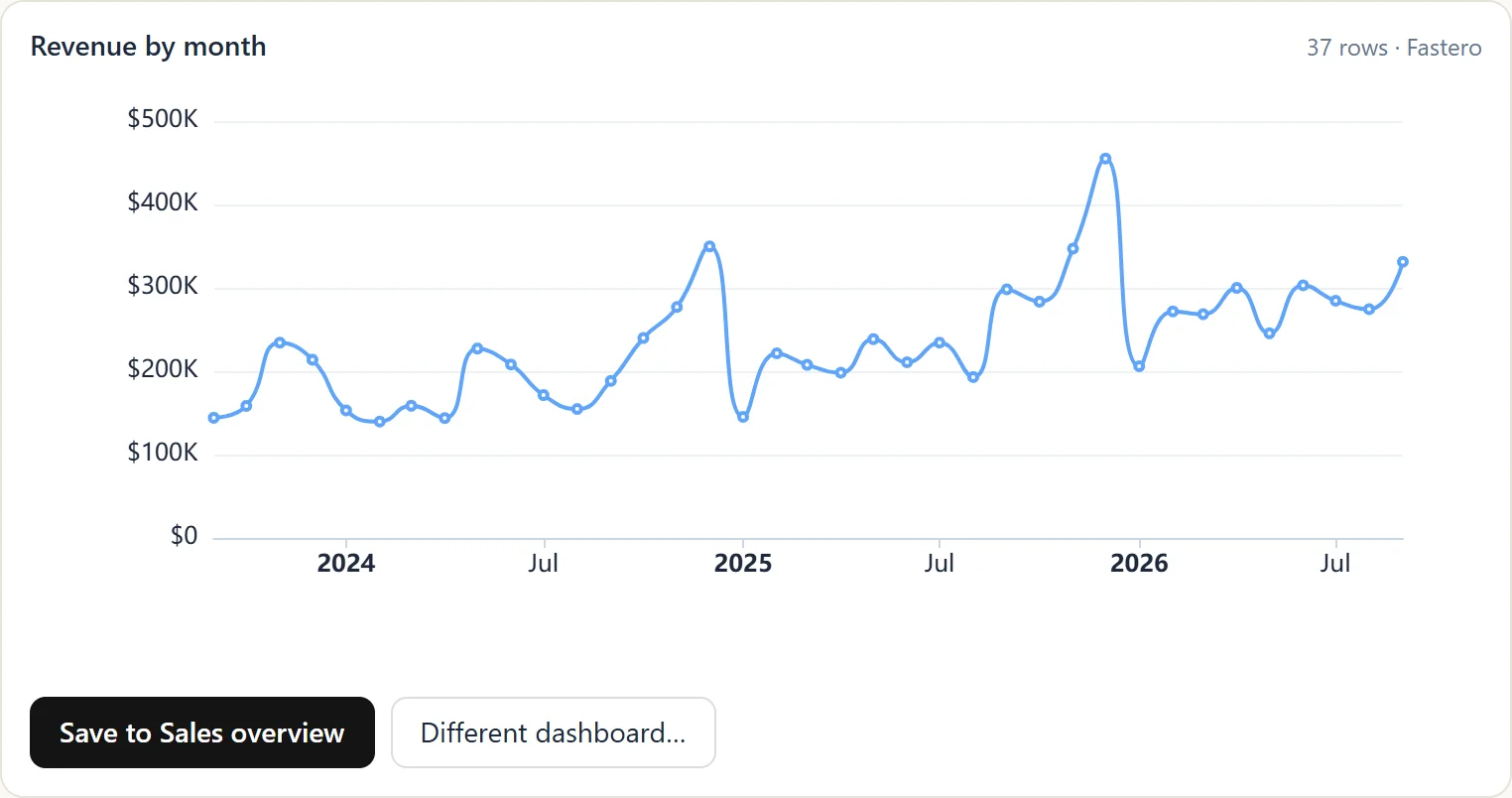
A chart from a live database in the chat, with a button to save it to a dashboard. Sample data.
FAQ
Are Claude Projects free?
Yes, up to a point. Free accounts can create up to five projects, without the search that extends capacity. Paid plans have no stated limit on the number of projects.
How much can I upload to a Claude project?
Each file can be 30 MB. The total has to fit Claude's context window, and on paid plans Claude switches to searching the knowledge when you get close, which expands capacity by up to 10x. Anthropic doesn't state a hard total in megabytes.
Do chats in a project remember each other?
Not directly. "Context is not shared across chats within a project unless the information is added into the project knowledge base." The project's memory can carry things over, if memory is on.
Can I share a Claude project on Pro or Max?
No. Sharing is on Team and Enterprise only. Pro and Max accounts belong to one person.
Can a Claude project use connectors?
Yes. We ran Fastero's connector inside a project on a Free account. On Team and Enterprise, Anthropic says connectors are only available in private projects.
What's the difference between Claude Projects and Skills?
A project holds knowledge for one body of work. A skill holds a way of doing something and is available everywhere. Anthropic's rule of thumb: if you keep copying the same instructions between projects, make a skill.
Sources
Read on 2 November 2026; our own test was run the same day:
- What are projects?, Create and manage projects, Project sharing, Control sharing for your organization
- Upload files to Claude, Retrieval for projects, Claude pricing
- Connectors, Google Workspace connectors, GitHub integration
- Skills explained, Share artifacts
- Projects, redesigned, Projects in Claude Code, Projects in Cowork
Try Fastero free — connect Claude to your database, so your projects answer from live numbers and your team can open the results. No credit card required.