 Fastero Dev Team
Claude Code installs with one line in a terminal, and most failed installs come from pasting the line meant for another shell. Below is every install method Anthropic documents, read on 20 November 2026, plus what we found on our own Windows 11 machine: two copies of Claude Code, only one of them doing anything.
The short answer: on macOS, Linux or WSL run curl -fsSL https://claude.ai/install.sh | bash. On Windows, in PowerShell run irm https://claude.ai/install.ps1 | iex, or in CMD run curl -fsSL https://claude.ai/install.cmd -o install.cmd && install.cmd && del install.cmd. No admin rights, no Node.js. Open a new terminal and run claude --version; it prints a version number followed by (Claude Code), and the newest on 20 November was 2.1.329. Then run claude in your project and sign in through the browser with a Pro, Max, Ultra, Team or Enterprise plan or a Console account; the Free plan doesn't include Claude Code. This native install updates itself. Homebrew and WinGet installs don't unless you opt in, apt, dnf and apk follow your system updates, and npm needs Node.js 22 or later.
Fastero
Point Claude at your database.
Add Fastero to claude.ai or Claude Code. Claude builds the dashboard, deploys the app or publishes a live page, and your team opens it in Fastero.
Try free →Every way to install Claude Code
| Method | Command | Platforms | Auto-updates |
|---|---|---|---|
| Native installer (Anthropic's recommendation) | curl -fsSL https://claude.ai/install.sh | bash |
macOS, Linux, WSL | Yes, in the background |
| Native, PowerShell | irm https://claude.ai/install.ps1 | iex |
Windows | Yes |
| Native, CMD | curl -fsSL https://claude.ai/install.cmd -o install.cmd && install.cmd && del install.cmd |
Windows | Yes |
| Homebrew | brew install --cask claude-code |
macOS | No: brew upgrade claude-code |
| WinGet | winget install Anthropic.ClaudeCode |
Windows | No: winget upgrade Anthropic.ClaudeCode |
| apt, dnf, apk | Add Anthropic's signed repository, then sudo apt install claude-code (or dnf, apk) |
Debian, Ubuntu, Fedora, RHEL, Alpine | No: your normal system upgrades |
| npm | npm install -g @anthropic-ai/claude-code@latest |
macOS, Linux (glibc and musl), Windows; x64 and ARM64 | Yes, if npm's global folder is writable without sudo |
The Homebrew cask claude-code follows the stable channel, "typically about a week behind"; claude-code@latest gets each release as it ships. Setting CLAUDE_CODE_PACKAGE_MANAGER_AUTO_UPDATE to 1 makes Claude Code run the Homebrew or WinGet upgrade itself; apt, dnf and apk stay manual "because those commands need elevated privileges." npm is still documented, under advanced options: the package "installs the same native binary as the standalone installer", so claude doesn't use Node when it runs. Never install it with sudo. If you'd rather skip the terminal, the Claude desktop app includes Claude Code in its Code tab on paid plans: see Claude Code Desktop vs the CLI.
System requirements
macOS 13.0+, Windows 10 1809+ or Windows Server 2019+, Ubuntu 20.04+, Debian 10+ or Alpine Linux 3.19+; 4 GB of RAM or more; an x64 or ARM64 processor; Bash, Zsh, PowerShell or CMD; an internet connection, in a country Anthropic supports (elsewhere you get App unavailable in region). On Alpine, run apk add bash curl first.
Installing Claude Code on Windows
You can run it natively or inside WSL. The docs' comparison:
| Option | Requires | Sandboxing | When to use |
|---|---|---|---|
| Native Windows | Nothing; Git for Windows optional | Not supported | Windows projects and tools |
| WSL 2 | WSL 2 enabled | Supported | Linux toolchains, or sandboxed commands |
| WSL 1 | WSL 1 enabled | Not supported | If WSL 2 isn't available |
For native Windows, the only decision is which shell you're in: your prompt starts with PS in PowerShell and not in CMD. For WSL, open the distribution and run the Linux command there; you then launch claude inside WSL too.
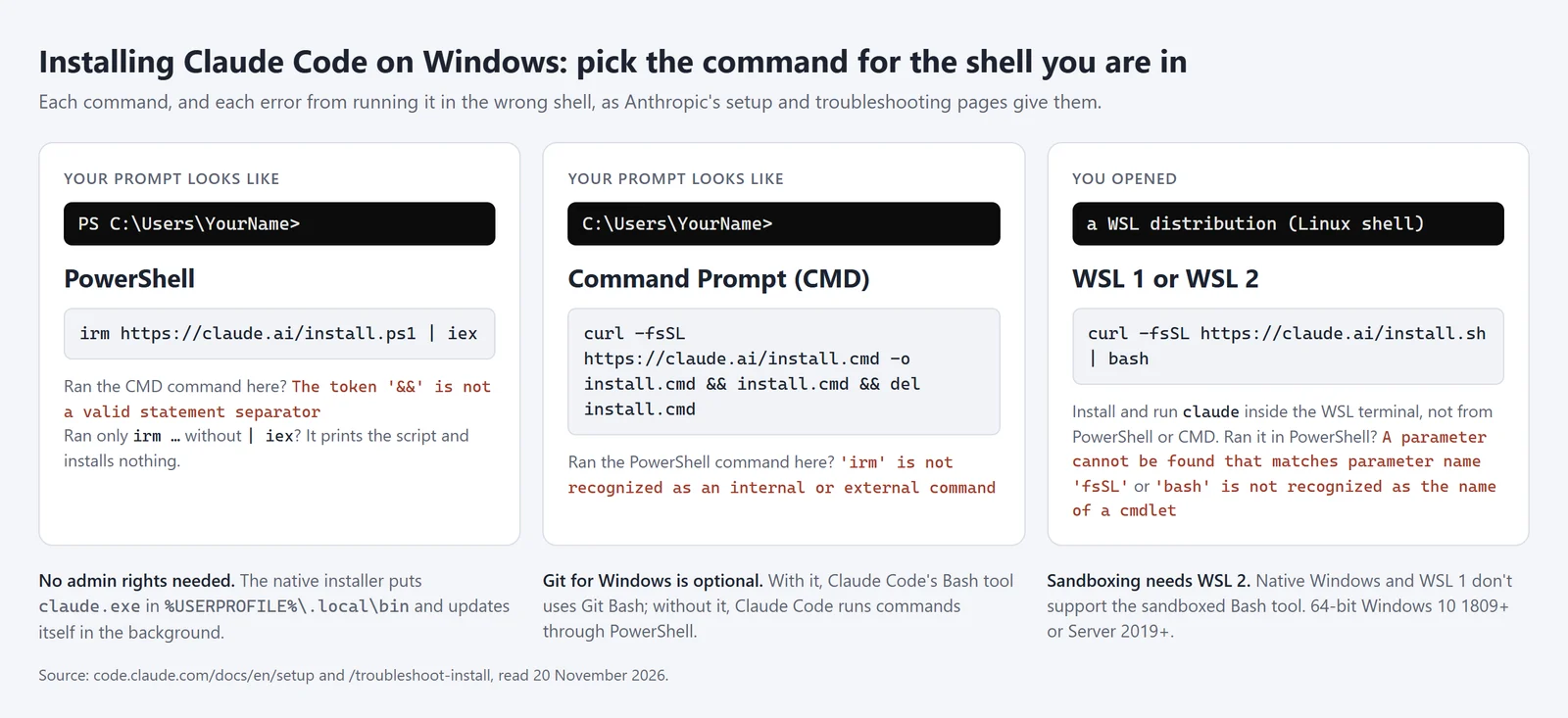
Which install command to run on Windows, and the error each wrong choice gives, from Anthropic's setup and troubleshooting pages (20 November 2026)
With Git for Windows installed, Claude Code's Bash tool runs commands through Git Bash; without it, Claude Code "uses PowerShell as the shell tool instead". If Git is installed somewhere Claude Code doesn't look, the docs give this setting for ~/.claude/settings.json:
{
  "env": {
    "CLAUDE_CODE_GIT_BASH_PATH": "C:\\Program Files\\Git\\bin\\bash.exe"
  }
}
Claude Code needs a 64-bit Windows. If you see Claude Code does not support 32-bit Windows on a 64-bit PC, you opened Windows PowerShell (x86) from the Start menu; open the entry without "x86".
Sign in: which accounts work
Run claude and a browser opens. If it doesn't, press c to copy the login URL. If the browser shows a code instead of returning to the terminal, paste it at Paste code here if prompted. You're done when the terminal says Login successful. Over SSH, in WSL 2 or in a container, open the copied URL in a browser on your own computer and paste back the code it shows; if pasting into the prompt fails, claude auth login reads the code from your shell.
| Account | Works? | Price, checked 20 November 2026 |
|---|---|---|
| Free | No | $0 |
| Pro | Yes | $20 a month, or $17 a month billed yearly ($200 up front) |
| Max | Yes | $100 a month |
| Ultra | Yes | $200 a month |
| Team, Enterprise | Yes, with the account your admin invited | Per seat |
| Claude Console | Yes, billed at API rates | Pay as you go |
| Amazon Bedrock, Google Cloud's Agent Platform, Microsoft Foundry | Yes, set up with environment variables, no browser login | Your cloud bill |
One trap: if ANTHROPIC_API_KEY is set and you approve it, Claude Code uses the key instead of your subscription, which is how an old key from a past job produces This organization has been disabled. On Windows the login is stored in %USERPROFILE%\.claude\.credentials.json; on a Mac, in the Keychain. Plans compared in full: Claude Code pricing.
Check it worked, and what we found on our PC
claude --version is the check the docs give, and claude doctor prints read-only install and settings diagnostics without starting a session. We ran the version check, where.exe and the docs' own PATH checks on Windows 11 on 20 November 2026, without installing or updating anything:
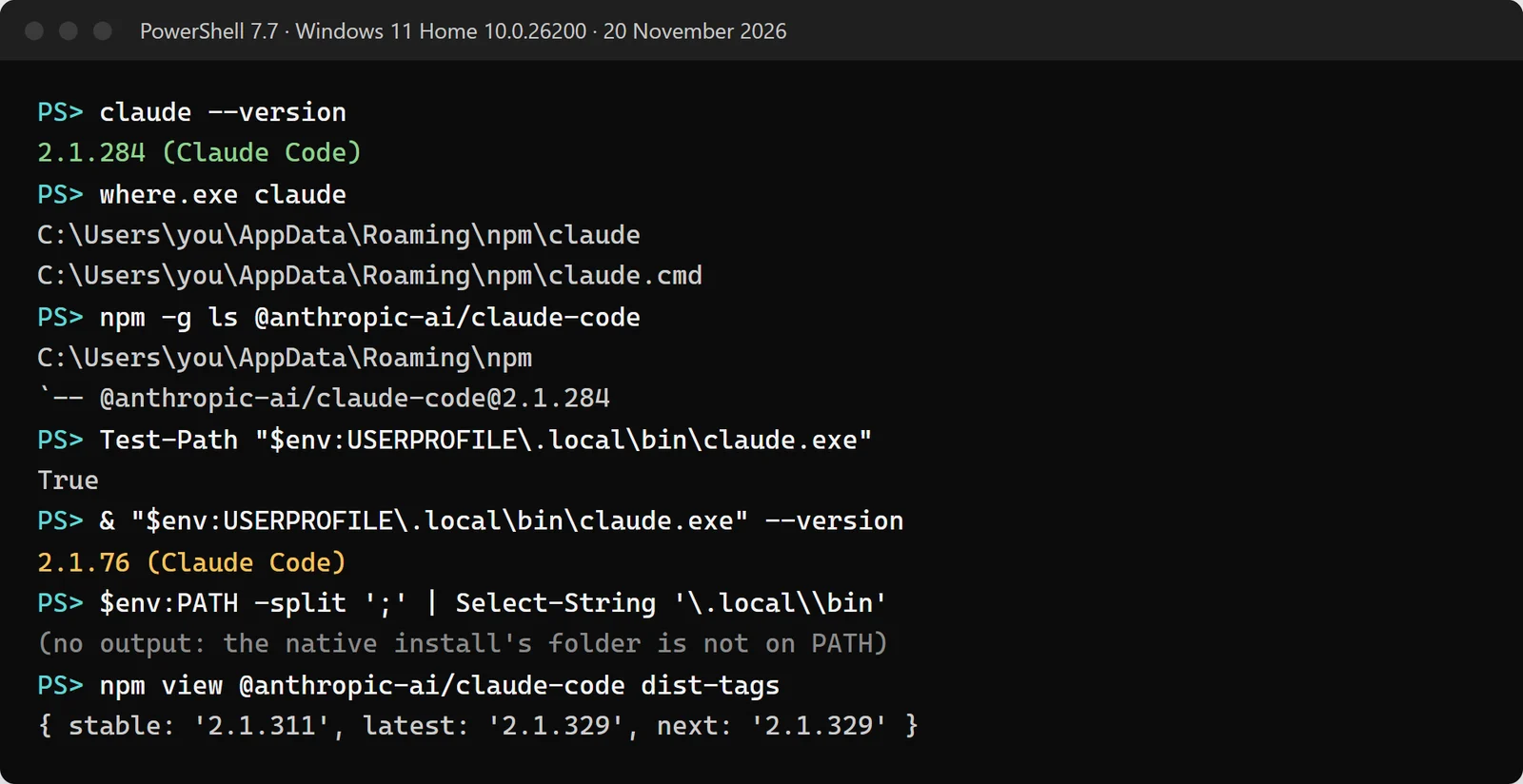
This machine's output on 20 November 2026: the claude on PATH is an npm install at 2.1.284, and an older native install (2.1.76) sits unused because its folder isn't on PATH. User name replaced with "you".
Typing claude runs an npm install of version 2.1.284, released 28 September. A native install of 2.1.76, from March, is still on disk, but its folder isn't on PATH, so it never runs. The newest release that day was 2.1.329, 39 releases later in the changelog. This is the case Anthropic's troubleshooting page describes: "If you find multiple installations, keep only one", preferably the native one at %USERPROFILE%\.local\bin\claude.exe. By the docs, the fix is npm uninstall -g @anthropic-ai/claude-code, then the PowerShell installer, then adding %USERPROFILE%\.local\bin to your user PATH if the installer's Setup notes: say it's missing. We left this machine as it was.
Two subcommands that manage an install, as our 2.1.284 prints them:
$ claude install --help
Usage: claude install [options] [target]

Install Claude Code native build. Use [target] to specify version (stable,
latest, or specific version)

Options:
  --force     Force installation even if already installed
  -h, --help  Display help for command

$ claude auth login --help
Usage: claude auth login [options]

Sign in to your Anthropic account

Options:
  --claudeai       Use Claude subscription (default)
  --console        Use Anthropic Console (API usage billing) instead of Claude
                   subscription
  --email <email>  Pre-populate email address on the login page
  -h, --help       Display help for command
  --sso            Force SSO login flow
Updates, and how to turn them off
A native install checks for updates at startup and while running, downloads them in the background, and uses the new version the next time you start Claude Code. claude update installs one now. Two settings control it:
- Channel:
autoUpdatesChannelis"latest"by default;"stable"waits for a version "typically about one week old, skipping releases with major regressions". Change it in/config. To switch to stable without being moved to an older version, also setminimumVersionto the version you run. - Off: the docs' setting for
~/.claude/settings.jsonis
{
  "env": {
    "DISABLE_AUTOUPDATER": "1"
  }
}
That stops only the background check; claude update and claude install still work. DISABLE_UPDATES blocks every update path, for teams that ship Claude Code themselves. To pin a version at install time, pass it to the installer, for example curl -fsSL https://claude.ai/install.sh | bash -s 2.1.89, or run claude install stable.
Point Claude at your database.
Start free →How to uninstall Claude Code
| Installed with | Remove with |
|---|---|
| Native, macOS/Linux/WSL | rm -f ~/.local/bin/claude and rm -rf ~/.local/share/claude |
| Native, Windows | Remove-Item -Path "$env:USERPROFILE\.local\bin\claude.exe" -Force, then Remove-Item -Path "$env:USERPROFILE\.local\share\claude" -Recurse -Force |
| Homebrew | brew uninstall --cask claude-code (or claude-code@latest) |
| WinGet | winget uninstall Anthropic.ClaudeCode |
| apt, dnf, apk | Remove the package and the repository file, as the setup page lists |
| npm | npm uninstall -g @anthropic-ai/claude-code |
Settings, allowed tools, MCP servers and session history live in ~/.claude and ~/.claude.json; deleting them removes all of that. The VS Code extension, the JetBrains plugin and the desktop app recreate ~/.claude, so uninstall those first if you want it gone. If claude still runs afterwards, a second install is left.
Fixes for common install errors
| What you see | What it means, and the fix |
|---|---|
command not found: claude or 'claude' is not recognized |
The install folder isn't on PATH. Add ~/.local/bin (macOS, Linux) or %USERPROFILE%\.local\bin (Windows), then open a new terminal; a terminal inside an editor needs the editor restarted |
'irm' is not recognized / The token '&&' is not a valid statement separator |
The other shell's command: see the picture above |
syntax error near unexpected token '<', System.Xml.XmlDocument, or a bare 403 |
The install URL returned a web page or an error. Retry later, check your proxy or region, or use Homebrew or WinGet |
running scripts is disabled on this system |
PowerShell is blocking npm's .ps1 launchers: Set-ExecutionPolicy -ExecutionPolicy RemoteSigned -Scope CurrentUser, or use the PowerShell installer instead of npm |
The process cannot access the file ... being used by another process |
Close other installer windows, delete %USERPROFILE%\.claude\downloads, run the installer again |
claude opens Claude Desktop |
An older desktop app registered its own Claude.exe; update the desktop app |
Killed during install on Linux |
Not enough memory: free some or add swap |
API Error: 403 Request not allowed after login |
Check your subscription is active, or that your Console role includes Claude Code or Developer |
Behind a corporate proxy, set HTTPS_PROXY and HTTP_PROXY before running the installer. For everything after installation, the Claude Code cheat sheet lists the commands and flags.
Once it's installed: connect it to your team's data
Claude Code works on the files in your folder. A team's numbers usually live in a database, which Claude Code reaches only through a connection you give it.
Fastero is an AI and data platform where people and AI agents work together on a team's data. It is a remote HTTP MCP server with OAuth sign-in, tested with Claude and Claude Code:
- Add it in one line:
claude mcp add --scope user --transport http fastero https://api.fastero.com/api/v1/mcp, then type/mcp, choose fastero and sign in through the browser. There's no key to copy. - Databases connect once in the Fastero workspace, so no database password sits in Claude Code's config.
- SQL stays read-only: one
SELECT,WITH,EXPLAINorSHOWstatement per call, anything that could change data refused, at most 500 rows back. - What Claude builds stays where colleagues can open it: saved queries and dashboards they sign in to see. Viewers are free.
- For scripts that can't sign in, a key lasts at most 90 days and allows reading and SQL by default. Settings → AI Agent Access has both sets of instructions.
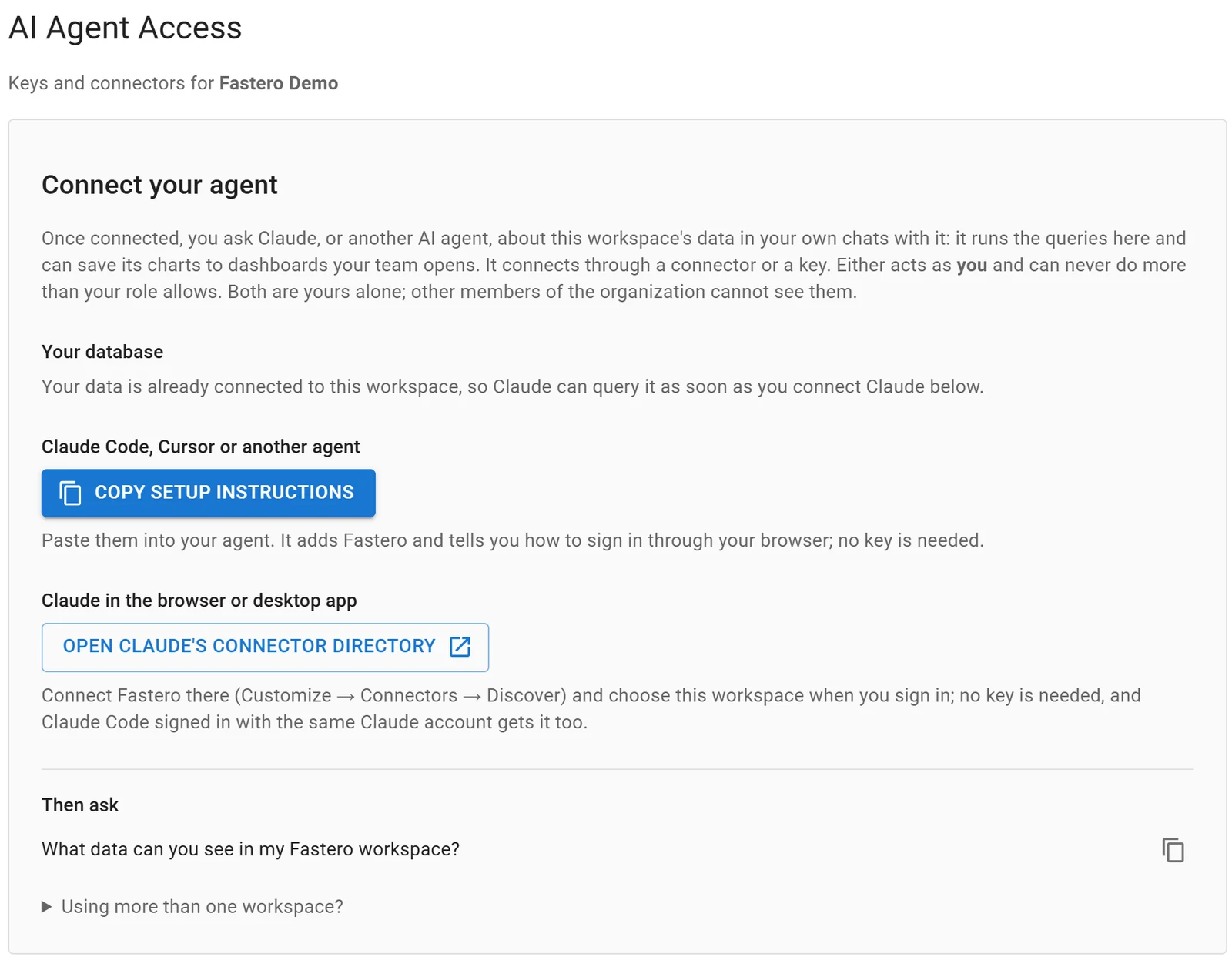
Settings, AI Agent Access: an agent signs in through the browser, so there is no key to copy.
More in Claude Code and MCP, and in Claude Code in VS Code if you'd rather work in the editor.
FAQ
How do I install Claude Code on Windows?
Open PowerShell and run irm https://claude.ai/install.ps1 | iex, or in CMD run curl -fsSL https://claude.ai/install.cmd -o install.cmd && install.cmd && del install.cmd. You don't need admin rights. Open a new terminal and run claude --version to check.
Does Claude Code need Node.js?
No. The native installer, Homebrew, WinGet and the Linux packages need no Node.js. Only the npm install does, and it needs Node.js 22 or later, though the installed claude doesn't use Node when it runs.
Do I need WSL to run Claude Code on Windows?
No. Claude Code runs natively in PowerShell or CMD. WSL 2 is worth it for Linux toolchains or for sandboxed shell commands, which native Windows doesn't support.
Can I use Claude Code for free?
Not on the Free plan: Claude Code needs Pro ($20 a month, or $17 billed yearly), Max, Ultra, Team or Enterprise, or a Console account billed at API rates, checked 20 November 2026.
How do I update Claude Code?
A native or npm install updates itself in the background; run claude update to update now. Homebrew and WinGet installs need brew upgrade claude-code or winget upgrade Anthropic.ClaudeCode, and Linux packages update with your system.
Why does Windows say 'claude' is not recognized?
The folder holding claude.exe, %USERPROFILE%\.local\bin, isn't on your PATH yet, or the terminal was open before you installed. Add the folder to your user PATH and open a new terminal; if the error started right after an update, the troubleshooting page shows how to restore claude.exe from its backup.
Sources
Read on 20 November 2026; command output from Claude Code 2.1.284 on Windows 11 Home (10.0.26200), and version tags from the npm registry the same day: