 Fastero Dev Team
Most lists of Claude Code project ideas are weekend toys: a personal website, an expense tracker, a photo organiser. This one is the work you'd otherwise do by hand: dashboards, reports, tests, migrations, bots and tools. Each project has a prompt to paste, a check that tells you it's done, a time drawn from people who built something similar, and what the project needs once it exists.
The short answer: pick a job you'd otherwise do by hand, and give Claude Code a prompt that says what finished looks like and a check it can run itself: tests that pass, a row count that matches, a page that loads. That check is Anthropic's own first piece of advice. Small tools take an afternoon, an app a week or two. And decide before you start where the result will live: a dashboard, a report or a bot is only useful once it runs somewhere your colleagues can reach.
Fastero
Point Claude at your database.
Add Fastero to claude.ai or Claude Code. Claude builds the dashboard, deploys the app or publishes a live page, and your team opens it in Fastero.
Try free →Before any project: the setup that saves rework
- Start in an empty folder, run
claude, and run/initto draft a CLAUDE.md. Keep it short: the commands that build and test the project, and anything Claude couldn't learn by reading the code. - For anything bigger than an afternoon, plan first. Press Shift+Tab for plan mode, where Claude researches and proposes without changing files. Or ask it to interview you: "Interview me until you could write the spec, then write it to SPEC.md," and build from that file in a fresh session.
- Give it a check. Say it in the prompt ("run the tests and keep going until they pass"), or set one with
/goal, which Claude checks after every turn. - Ask for evidence, not a summary: the command it ran and its output, or a screenshot.
- Commit often, so
/rewindor git can take you back.
"Claude Code projects" can also mean Anthropic's new Projects feature: one coordinating conversation that starts several cloud sessions in parallel, each opening its own branch and pull request. It is in beta on Pro and Max plans, in claude.ai/code and the desktop app, not in the terminal. Any project below can run there; this page is about what to build.
Data and reporting projects
1. A dashboard on your company's database
The project people most often finish and then can't share. Point Claude at a read-only connection and ask for the numbers your team checks every week.
Connect to our Postgres read replica (connection string in .env, read-only user).
Find the tables behind orders and customers, then build a dashboard with: revenue
and orders per month for two years, revenue this month against last month, and
the ten customers with the most revenue. Write each metric's SQL to metrics/ with
a comment saying what it counts.
Done when: each number on the dashboard matches the same query run by hand, and the comments say what is excluded (refunds, test accounts, tax). Time: an hour or two once the connection works. Afterwards: colleagues need to open it with their own login, and it should refresh on its own. Connected to Fastero through Claude's connector directory, Claude can save the queries and build the dashboard there in the same session: our Claude Code and Postgres tutorial goes step by step.
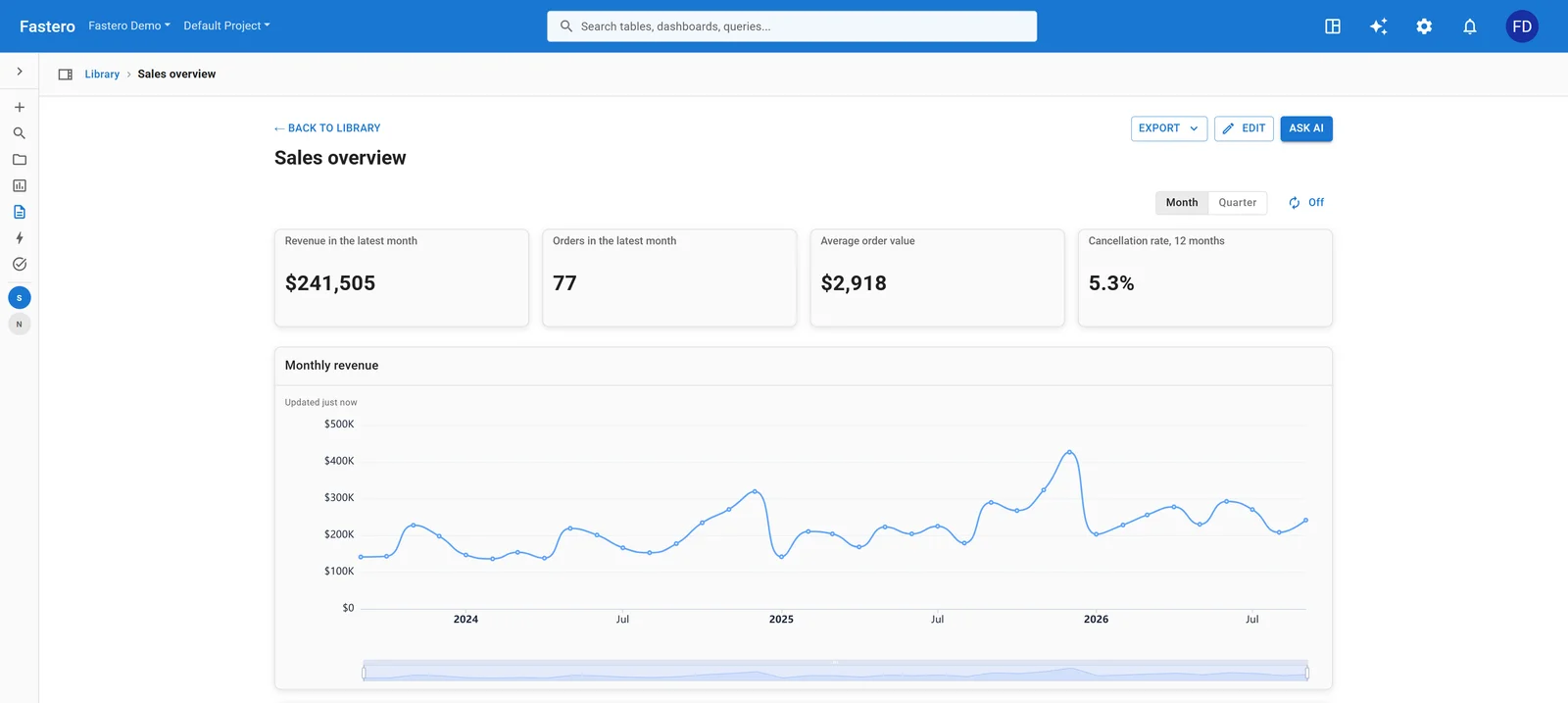
A dashboard in Fastero, built from the same kind of prompt. Sample data.
2. A Streamlit app your team can use
When a dashboard isn't enough: a calculator, a what-if model, a tool that takes input. Streamlit turns a Python script into a web app.
Build a Streamlit app for our sales team: pick a region and a date range, see
revenue, orders and average order value against the previous period, and a table
of the top products. Read from data/orders.csv for now. Put the calculations in
metrics.py with pytest tests, and keep app.py to layout only.
Done when: pytest passes, streamlit run app.py loads without errors, and the totals for one region match the CSV opened in a spreadsheet.
Time: a few hours. One developer built stakeholders' dashboards this way, from a call transcript, in "a few hours".
Afterwards: a Streamlit app needs a server, and an internal one needs a login in front of it. Fastero hosts Streamlit apps behind your team's sign-in, and Claude Code can deploy one there through Fastero's connector. See how to put a login on a Streamlit app.
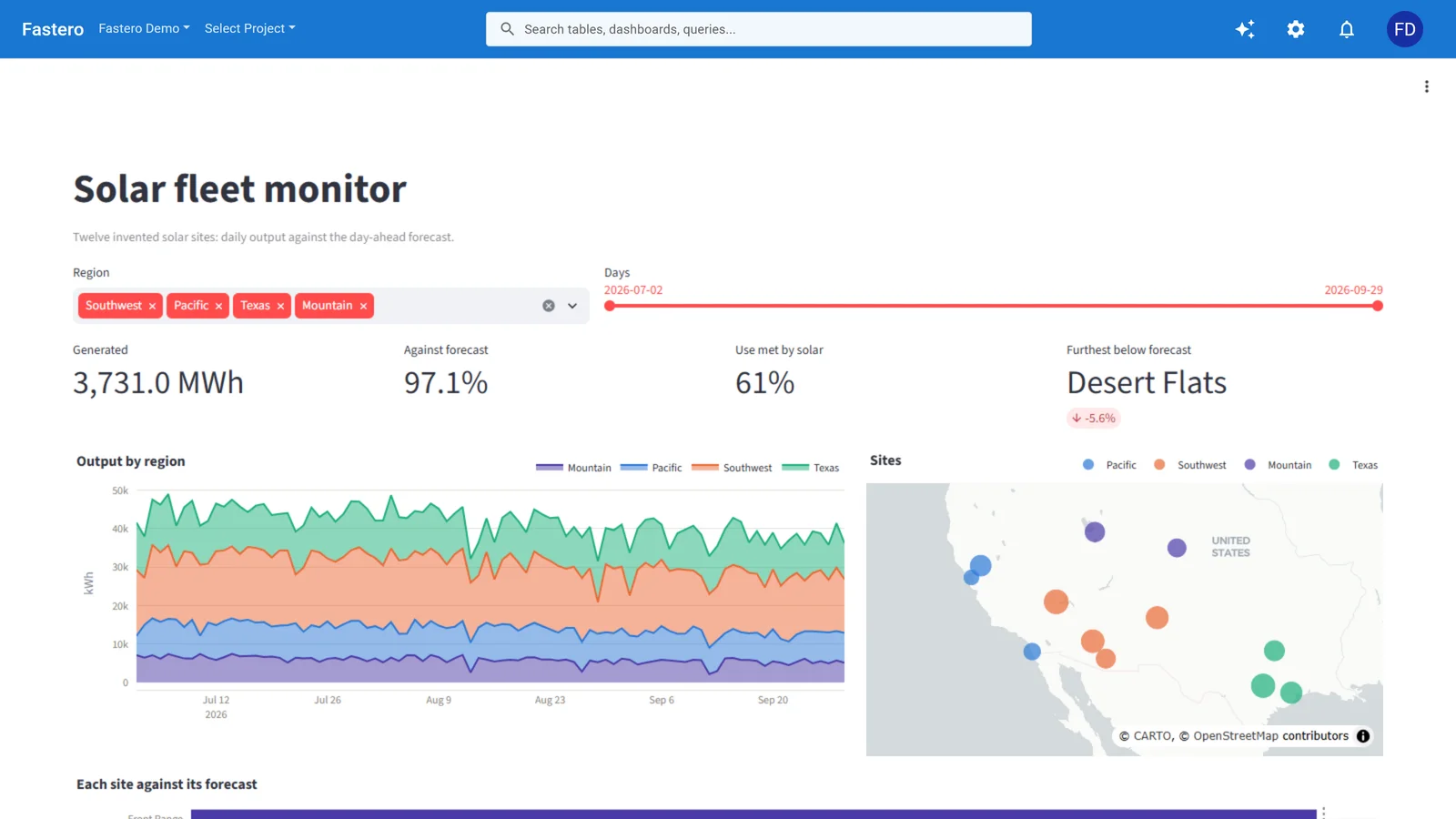
A Streamlit app hosted in Fastero, behind the team's login. Sample data.
3. A weekly report that sends itself
The Monday email someone assembles by hand from three tabs.
Write report.py: query last week's signups, revenue and support tickets from the
warehouse (credentials from environment variables), compare each with the week
before, and render a short HTML email with the three numbers, the change, and one
chart. Add --dry-run to write the email to out/report.html instead of sending it.
Done when: the dry run's numbers match last week's figures as your team already reports them. Time: an afternoon. Afterwards: something has to run it every Monday. A Claude Code routine can, from Anthropic's cloud, on paid plans, at most once an hour; or schedule the script, or the dashboard's email, in Fastero. Automate reports with Claude compares them.
4. A spreadsheet model rebuilt as tested Python
Pricing models and forecasts outgrow Excel. Claude reads the formulas and rewrites them, but only a test proves the rewrite is right.
model.xlsx is our pricing model. Read every formula on the Inputs and Calc sheets,
rebuild the calculation as a Python module with one function per output, and write
pytest cases that feed the three scenarios on the Scenarios sheet and compare every
output with the spreadsheet's values to the cent.
Done when: all three scenarios match the spreadsheet exactly. Time: under an hour for a complex model, in one write-up that used plan mode. Afterwards: a function people call, or a small app for the colleagues who used the spreadsheet (project 2).
5. A data pipeline from an API
Pull a public or internal API into DuckDB or Postgres every day, with tables people can query.
Load the stations and daily readings from the flood monitoring API into DuckDB,
with a staging table per endpoint and a clean readings table. Handle pagination and
retries. After each load, print the row count of each table next to the total the
API reports.
Done when: your row counts equal the API's own totals. One data engineer's Claude-built loader stopped at the API's page limit, with 1,493 rows of about 5,458, and raised no error: the count check is what catches that. Time: a few hours. Afterwards: a daily schedule, and an alert when a load fails. A worked example: a tracker of npm and PyPI downloads and GitHub stars that Claude built, scheduled and charted in Fastero, including the gaps in npm's counts it had to work around.
6. A data quality alert
Catch the broken load before the Monday meeting does.
Write checks.py: for each table in checks.yml, compare today's row count with the
average of the last 14 days, check the newest timestamp is under the allowed age,
and check the listed columns have no unexpected nulls. Post any failure to the
Slack webhook in SLACK_WEBHOOK_URL. Add a test that feeds a stale table and an
empty load and asserts both raise an alert.
Done when: the test passes, and a deliberately emptied test table produces a Slack message. Time: an afternoon. Afterwards: a schedule, after the loads it checks.
Point Claude at your database.
Connect Claude →Software projects
7. Tests for code that has none
The project with the clearest finish line. One team generated 16,000 unit tests for a 350,000-line .NET backend in four working days, for about $1,500 of API usage, and took coverage from 58% to 82%, reviewing as they went.
Write unit tests for src/billing/, one test file per class, following the style in
tests/orders/. Cover the edge cases in the docstrings. After each file, run the
tests and the coverage report, and keep going until coverage for src/billing/ is
above 80%.
Done when: coverage passes the target, and the tests fail when you break the code on purpose. A test that never fails checks nothing. Time: hours for a module, days for a codebase. Afterwards: CI, so the tests run on every change.
8. A migration: framework, language or library
Moving from Cypress to Playwright, JavaScript to TypeScript, one logging library to another. Anthropic itself moved Bun from Zig to Rust this way, in under two weeks.
Migrate the end-to-end tests in cypress/ to Playwright, one spec at a time. Keep
every assertion's meaning: a check for the text "$49.00" must stay a check for
that text. After each spec, run it against the dev server and fix it until it
passes, then commit.
Done when: every migrated test passes, and fails when you change the text or value it checks. One migration turned a check for "$49.00" into "is the element visible", a test that can't fail. Time: about four working days for 90 tests, in one write-up. Afterwards: CI, and deleting the old framework.
9. A Slack bot that answers from your own data
For incidents, support or on-call: a bot that finds the similar past case.
Build a Slack bot (Bolt for Python) that, when mentioned in #incidents with an
error message, searches our past incident reports in docs/incidents/ and replies
with the three most similar, each with its date, cause and fix. Add a test with
three sample messages and the incidents they should match.
Done when: the three test messages return the expected incidents, and the bot replies in a test channel. Time: a day or two. Afterwards: somewhere always on, with the Slack token kept as a secret, not in code.
10. Release notes from your pull requests
Read the merged pull requests since the v2.3.0 tag with gh, group them into
Features, Fixes and Internal, and write CHANGELOG.md entries in plain English for
customers, leaving Internal out. Show me the draft before writing the file.
Done when: every merged pull request appears exactly once, in the right group. Time: minutes, or a few hours to backfill months of history. Afterwards: run it in CI on every release tag.
11. A documentation site from scattered docs
Docs in a wiki, a README and old Google Docs, moved into one site with search.
Build an Astro docs site from the Markdown in docs/ and the pages exported to
export/. Keep every old URL working with redirects listed in redirects.csv. Run a
link checker over the built site and fix every broken link.
Done when: the link checker reports nothing broken, and every old URL redirects. Teams that did this report one to two weeks instead of months. Time: days for a large site. Afterwards: a static host, and a check on every pull request.
12. A browser extension
Small, self-contained, and easy to test by hand.
Build a Chrome extension (Manifest V3, TypeScript) that records the time spent on
each website per day, shows today's top ten sites in the popup, and stores
everything locally. Include a checklist in README.md of what to test by hand.
Done when: it loads unpacked in Chrome and passes your checklist. Time: a weekend, in one write-up. Afterwards: a listing in the Chrome Web Store, or a zip for colleagues.
13. A command-line tool for a chore you repeat
Write a CLI, `standup`, that reads my commits and merged pull requests from the
last working day across the repos in ~/work and prints a three-line summary I can
paste into Slack. Add --since and tests for the date logic, including Mondays.
Done when: the tests pass, and Monday's output covers Friday. Time: an afternoon. Afterwards: nothing; it runs where you are.
14. An MCP server for an internal API
So Claude, and your colleagues' Claude, can use the tool your team built.
Build an MCP server in TypeScript for our internal inventory API (OpenAPI spec in
api.yaml): read-only tools to look up a product, check stock by warehouse and list
recent orders. Every tool gets a clear description and an error message that says
what went wrong. Test it with the MCP Inspector.
Done when: claude mcp add connects it, /mcp lists the tools, and each answers a sample question.
Time: a day.
Afterwards: host it if colleagues will use it from claude.ai: a remote server, with sign-in. Our MCP security guide covers what to check first.
15. A routine that triages errors while you sleep
One team replaced a 20 to 30 minute daily check with a routine that reads production errors every six hours, groups them, and opens tickets for the new ones.
Every six hours: read the last six hours of errors from our error tracker, group
them by cause, compare with the open tickets, and post a summary to #eng-alerts
with new errors first. Open a ticket for any new error seen more than ten times.
Done when: a run started by hand posts the summary you expected. Time: an hour to set up. Afterwards: it is the schedule. Routines are a research preview on paid plans, with a one-hour minimum interval; our guide to Claude Code routines has the limits.
Where finished projects live
Half of these projects end in something other people need to open: a dashboard, an app, a report, a bot. Claude Code builds them in a folder on your computer, which is where most of them stall. Before you start, decide:
- Who opens it, and how they sign in. A link anyone can open is fine for public data, not for company numbers.
- What keeps it current. A schedule for reports and loads; an always-on server for bots and apps.
- Where the secrets go. Database passwords and API keys belong in a secrets store, not in the code.
Fastero is an AI and data platform where people and AI agents work together on a team's data. Connect it to Claude Code through Claude's connector directory, and Claude can save queries, build dashboards, deploy Streamlit apps and schedule a dashboard email in your team's workspace, where colleagues sign in to use them.
What a project costs
Claude Code isn't on the free Claude plan. It's included in Pro ($20 a month, or $17 a month paid yearly) and Max (from $100 a month), sharing one usage limit with chat; both have a five-hour session limit and a weekly limit. Anthropic publishes no hours, so heavy days on Pro reach the limit sooner. On an API key you pay per token: Anthropic's own average is about $13 per developer per active day, and under $30 for 90% of users. The few projects that published a cost: about $1,500 for 16,000 tests, and $5 to $8 per run for a daily pipeline. To watch your own, see Claude Code usage.
FAQ
What can you build with Claude Code?
Anything made of files and commands: apps, scripts, dashboards, test suites, migrations, documentation sites, browser extensions, bots and MCP servers. The work-sized builds people have written up took from an afternoon to two weeks.
Can Claude Code build a full app?
Yes, with review. One developer built a self-hosted finance dashboard in 12 days and 132 commits; another built a social app in "the better part of a week", and counted that only 2 of 27 sessions fully achieved their goals. Tests, the data model and review are still yours.
How do I start a Claude Code project?
Install Claude Code, open a terminal in an empty folder, run claude, and run /init to draft a CLAUDE.md. Start with one small task that has a check, commit, and grow from there. For a bigger project, ask Claude to interview you and write SPEC.md first.
Is Claude Code free?
No. The free Claude plan doesn't include Claude Code; Pro, Max, Team and Enterprise do, or you can pay per token with an API key.
Can Claude Code run a project while my laptop is closed?
Yes, in Anthropic's cloud: routines run on a schedule, an API call or a GitHub event, and cloud sessions keep going without your machine. /loop and the desktop app's scheduled tasks need your computer on.
What's the difference between Claude Code Projects and these projects?
Projects is an Anthropic feature: one conversation that coordinates several cloud sessions working in parallel, in beta on Pro and Max. The projects on this page are things to build, with Projects or without.
Sources
- Anthropic — Best practices for Claude Code, Permission modes and plan mode, Goal, Routines, Projects, Costs, Pricing, Code migration at scale
- Builds quoted — Custom dashboards with Claude Code (Matt Stockton), Converting Excel models to Python (Martin Alderson), Claude Code isn't going to replace data engineers yet (Robin Moffatt), 16,000 tests in 4 days (codecentric), 90 Cypress tests to Playwright, DoltHub's new documentation site, A Chrome extension with Claude Code, Error triage with Claude Code routines (MakerKit), A self-hosted finance dashboard (Kevin Kinnett), A social app in a week (Christopher Meiklejohn), A pipeline that runs every weekday (FutureSearch)
Try Fastero free — connect Fastero to Claude Code and the dashboards, apps and reports you build land where your team signs in to use them. No credit card required.