
The short answer: if your data lives in a warehouse, start with that warehouse's own connector — Snowflake, BigQuery or Databricks Genie. If you already run a BI tool, its connector (Metabase, Hex, Sigma, ThoughtSpot) lets Claude work with the definitions your team already trusts. And if you want what Claude builds to outlive the conversation — a dashboard your team opens next week, emailed every Monday, on any database — add Fastero as a custom connector.
Connectors let Claude reach outside the chat: read a table, run a query, open a spreadsheet, build a chart. Anthropic's directory lists 900 of them, and most have nothing to do with data. Here are the ones that do, grouped by the job you want done.
How Claude connectors work
- One catalogue, everywhere. The Connectors Directory serves claude.ai, the desktop and mobile apps, Cowork and Claude Code. You find it under Customize → Connectors: search, click Connect to Claude, and sign in to the service.
- Anything with a URL can be added. Listed and unlisted connectors "use the same technology", so if a service gives you a connector address, add it under Customize → Connectors → Add custom connector. Custom connectors work on every plan, including Free, which is limited to one.
- Team and Enterprise. An Owner adds the connector for the organization under Organization settings → Connectors; each member then connects their own account.
- Labels. Verified means Anthropic tested the tools for quality and compatibility — Anthropic notes it "isn't a security audit". Community connectors were screened but not reviewed in depth. Custom means you added it yourself.
- You stay in control. Each chat can switch connectors on or off, and each tool can be set to always allow, ask first, or blocked.
The data connectors at a glance
| Connector | Category | What it does for data work | Leaves something your team can open? |
|---|---|---|---|
| Snowflake | Warehouse | Cortex Agents and Cortex Search; read-only SQL by default | No — answers in the chat |
| BigQuery (Google) | Warehouse | Lists datasets, runs SQL; a read-only query tool; results capped at 3,000 rows | No |
| Databricks Genie | Lakehouse | Plain-language questions answered by Genie, within Unity Catalog permissions | No |
| ClickHouse | Database | Read-only SQL on ClickHouse Cloud | No |
| Supabase | Postgres | SQL, schema changes, migrations, logs — built for developers | No |
| Neon | Postgres | SQL, schema diffs, migrations on a branch; read-only or full access | No |
| MotherDuck | DuckDB warehouse | Read and write SQL; creates and shares "Dives", interactive visualizations | Yes — Dives in MotherDuck |
| Metabase | BI | Builds and runs queries; creates questions and dashboards, within your Metabase permissions | Yes — in your Metabase |
| Hex | Notebooks | Searches projects and threads; editing for Hex editors; Team or Enterprise plan, beta | Yes — in your Hex |
| Sigma | BI | Searches Sigma documents; plain-language queries | In Sigma |
| ThoughtSpot Spotter | BI | Analysis sessions; can create a dashboard | Yes — in ThoughtSpot |
| Tableau | BI | Desktop extension only: queries data sources, views and Pulse metrics | In Tableau |
| Plotly Cloud | Data apps | Writes a Dash app, deploys it and returns a live URL | Yes — a hosted app |
| Stripe | Payments | Reads and writes Stripe data; balance and analytics tools | No |
| HubSpot | CRM | CRM objects, campaign attribution, saved reports, queries | No |
| Salesforce (beta) | CRM | Customer 360 data within Salesforce permissions | No |
| Amplitude | Product analytics | Queries charts, dashboards, experiments and metrics | In Amplitude |
| Mixpanel | Product analytics | Segmentation, funnel and retention queries; creates dashboards | Yes — in Mixpanel |
| PostHog | Product analytics | HogQL or plain-language queries; manages insights and dashboards | Yes — in PostHog |
| Supermetrics | Marketing data | Google Ads, Meta, Google Analytics and 200+ marketing sources | Shares live dashboards |
| Google Drive | Files | Reads Docs, Sheets, Excel and PDFs; creates and shares files | No |
| Microsoft 365 | Files | Searches SharePoint, OneDrive, Outlook and Teams; work accounts only | No |
| Airtable | Spreadsheet database | Reads, creates and updates records and tables | No |
| Fastero (custom) | Workspace | Any connected database: dashboards, Streamlit apps, live pages, scheduled PDF reports, sharing | Yes — your team opens it with their own login |
Fastero
Connect your database. Ask questions. Get dashboards.
Postgres, BigQuery, Snowflake, and 10+ sources — live-connected, AI-powered, no dashboard builder learning curve.
Try free →Query your warehouse: Snowflake, BigQuery, Databricks, ClickHouse
The warehouse vendors' own connectors are the most direct way to ask questions of the data you already pay to store. They respect the permissions you already set — Snowflake roles, BigQuery IAM, Databricks Unity Catalog — and they keep the work inside the warehouse.
Read the fine print before you point one at production. Snowflake's connector needs an admin to create an MCP server object first and returns read-only SQL by default. Google's BigQuery connector offers a read-only query tool beside one that can write, and caps results at 3,000 rows. Databricks routes questions through Genie, so it answers best on spaces your team has curated.
Best for: analysts who want quick answers from the warehouse they already use. The answers stay in the chat.
Postgres you build on: Supabase and Neon
There is no general Postgres connector in the directory. If your database is hosted on Supabase or Neon, their connectors give Claude SQL, schema changes and migrations. Both are developer tools first: Supabase describes its server as built for development, and Neon lets you choose read-only access when you sign in. Use that option for anything with real data in it.
Best for: developers working on the app's own database. For a Postgres that isn't on either, connect it to a workspace connector such as Fastero, which holds the connection for Claude.
The BI tool you already have: Metabase, Hex, Sigma, ThoughtSpot, Tableau
If your team already has a BI tool, its connector is the quickest way to get answers that match the numbers your team already reports. Metabase's connector goes furthest: Claude can build questions and dashboards inside your Metabase, within your Metabase permissions. ThoughtSpot's can create a dashboard; Hex's lets editors change projects (it needs a Hex Team or Enterprise plan and is in beta). Tableau ships as a desktop extension rather than a remote connector, so it doesn't work in claude.ai on the web.
Looker, Power BI and Deepnote have no listing in the directory as of this writing.
Best for: teams that already run one of these tools and want Claude to work inside it.
Business and product data: Stripe, HubSpot, Salesforce, Amplitude, Mixpanel, PostHog, Supermetrics
These connectors bring Claude the data people most often ask about: revenue from Stripe, pipeline from HubSpot or Salesforce, funnels and retention from Amplitude, Mixpanel or PostHog. Mixpanel and PostHog can create dashboards in their own products. For marketing, there is no standalone Google Analytics connector; Supermetrics covers Google Ads, Meta, Google Analytics and over 200 other platforms, and says it can share Claude-generated live dashboards.
Best for: questions about one system at a time. Answers that join two of them happen in the conversation, so check which keys Claude matched on.
Files and spreadsheets: Google Drive, Microsoft 365, Airtable
Google Drive's connector reads Docs, Sheets, Excel files and PDFs, and a Sheet picked into a chat arrives with every tab. Microsoft 365 searches SharePoint, OneDrive, Outlook and Teams, and needs a work account approved by your admin. Airtable reads and updates records.
Best for: the spreadsheet half of your data. For a sheet that changes every week, a dashboard that reads it on a schedule beats re-uploading it to a chat.
Somewhere to keep the result: MotherDuck, Plotly Cloud and Fastero
Most connectors bring data into the conversation. A few take the work out of it, which is what you need when the deliverable is for someone else.
- MotherDuck creates "Dives", interactive visualizations you can share, on data in MotherDuck.
- Plotly Cloud writes a Dash app, deploys it, and returns a live URL.
- Fastero is a workspace for your team's dashboards, apps and notebooks, on whatever database you connect.
Fastero isn't in the directory yet, but it works as a custom connector on any plan: add https://api.fastero.com/api/v1/mcp under Customize → Connectors → Add custom connector, sign in, and choose your workspace. From one conversation, Claude can then:
- run SQL on any database you have connected — Postgres, MySQL, Snowflake, BigQuery, Google Sheets and more;
- build a dashboard with filters, tabs and number cards that compare with the previous period;
- deploy a Streamlit app behind your team's login;
- publish a live page that fetches fresh numbers every time a colleague opens it;
- email a dashboard as a PDF every Monday, and invite colleagues to open it.
In claude.ai, charts and pages appear right in the conversation, and one click saves a chart to a dashboard:
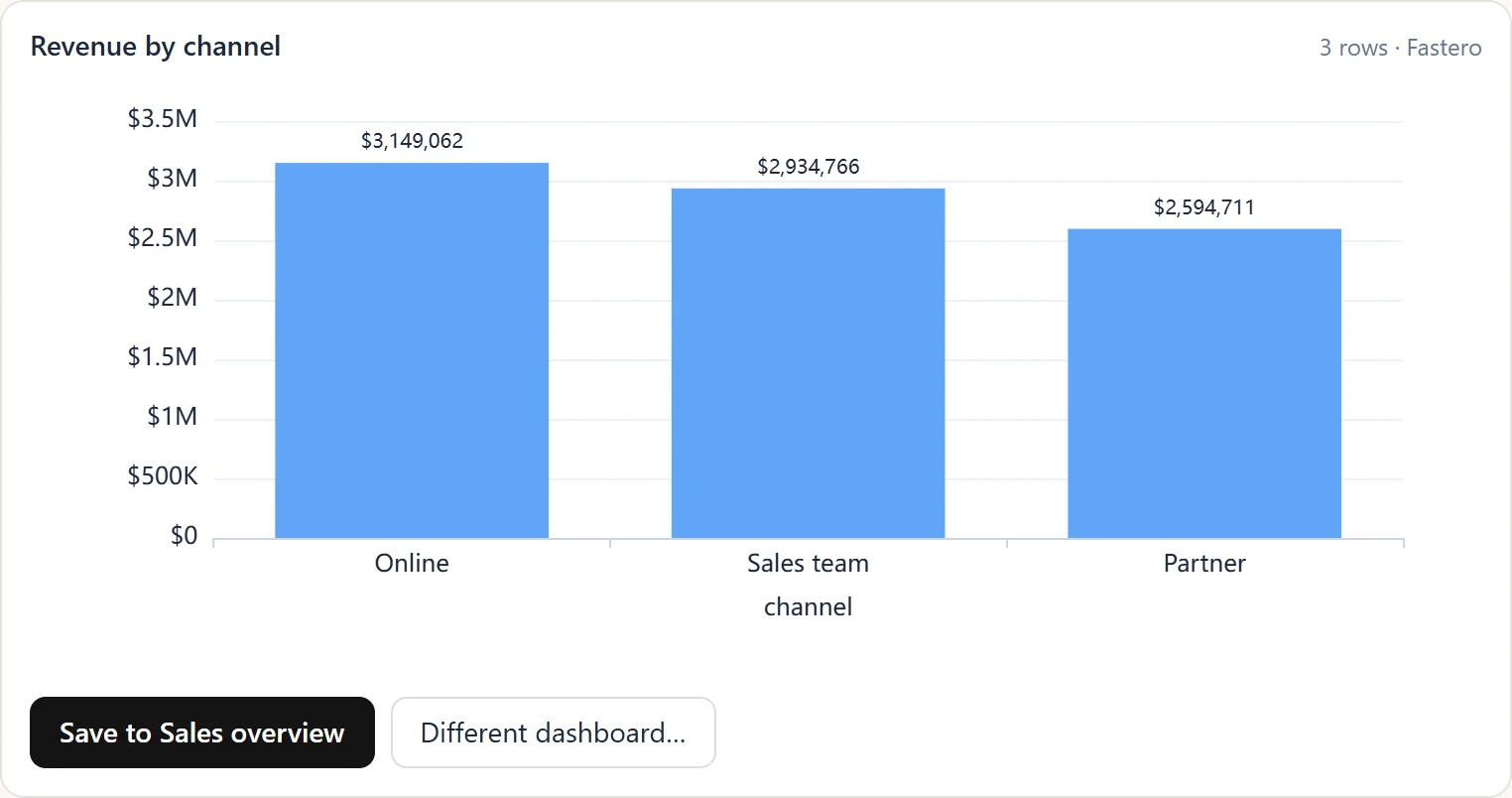
Your colleagues don't need Claude: they open the dashboard, app or page with their own Fastero login. Owners and admins see who opened what.
Best for: teams who want Claude's work to land somewhere colleagues open every week, on live data, without a BI tool to maintain. Our tutorial walks through it end to end: Claude Code + Postgres: build a dashboard your team can open.
How to choose
- Want quick answers from your warehouse? The warehouse's own connector: Snowflake, BigQuery or Databricks.
- Already run a BI tool? Its connector, so Claude uses the definitions your team trusts: Metabase, Hex, Sigma or ThoughtSpot.
- Building on Supabase or Neon? Their connectors, with read-only access for real data.
- Asking about Stripe, HubSpot or product analytics? That system's own connector.
- Need a dashboard your team opens next week, on any database, sent every Monday? Fastero as a custom connector.
You can run several at once. Connectors are switched on per chat, so a warehouse connector for questions and Fastero for the dashboard sit happily side by side.
FAQ
Can I use Claude connectors on the Free plan?
Yes. Directory connectors are available to all users on the web, desktop and mobile apps, and custom connectors work on every plan; Free accounts can add one custom connector.
How do I add a connector that isn't in the directory?
Open Customize → Connectors, choose Add custom connector, and paste the connector's URL. Listed and unlisted connectors use the same technology; the only difference is that Anthropic hasn't reviewed a custom one, so add only connectors from developers you trust.
Is there a Claude connector for Postgres?
Not a general one. Supabase and Neon have connectors for databases hosted on their platforms. For any other Postgres, connect it to a workspace connector such as Fastero, which stores the credentials and runs queries for Claude, or run a database server locally from Claude Code.
What's the difference between Verified and Community connectors?
Verified connectors had their tools tested by Anthropic for quality and compatibility; Community connectors were screened but not reviewed in depth. Neither is a security audit, so review the permissions a connector asks for either way.
Do connectors work in Claude Code?
Yes. Connectors you add in claude.ai are available in Claude Code when you sign in with the same Claude account.
Can Claude build a dashboard my team can open?
With the right connector, yes. Metabase, Mixpanel, PostHog and ThoughtSpot can create dashboards inside those products. Fastero builds dashboards, apps and live pages on any connected database, which colleagues open with their own login and can receive by email every week.
Sources
Checked on 6 October 2026:
- Directory, custom connectors and plans — Getting started with custom connectors, Use the Connectors Directory
- Verified, Community and Custom labels — Connector verification
- The directory listings — claude.com/connectors
- Snowflake — Cortex Agents MCP; BigQuery — Use the BigQuery MCP server; Supabase — Supabase MCP
- Metabase — Metabase MCP; Hex — Hex MCP server; MotherDuck — MotherDuck MCP
- Google Drive — Google Drive connector; Microsoft 365 — Microsoft 365 connector
Try Fastero free — add Fastero to Claude as a custom connector and turn its answers into dashboards, apps and weekly reports your team opens with their own login. No credit card required.