 Fastero Dev Team
Skills are how you teach Claude Code a procedure once: how your team writes a migration, reviews a query, or builds the weekly report. Claude reads only a skill's one-line description until the work calls for it, so you can have dozens without filling the context.
The short answer: in Claude Code a skill is a folder with a SKILL.md file, front matter followed by Markdown instructions, plus any scripts or reference files it needs. It becomes a /skill-name command, and Claude also loads it on its own when your request matches its description. Put it in ~/.claude/skills/<name>/ for yourself or .claude/skills/<name>/ in a repository for your team, or install skills from a plugin marketplace. Claude Code adds its own front matter on top of the portable format (disable-model-invocation, context: fork, paths, allowed-tools and more), $ARGUMENTS and ${CLAUDE_SKILL_DIR} substitution, and !`command` lines that run before Claude reads the skill. Custom slash commands were merged into skills in January 2026.
Fastero
Point Claude at your database.
Add Fastero to claude.ai or Claude Code. Claude builds the dashboard, deploys the app or publishes a live page, and your team opens it in Fastero.
Try free →What a skill is
"Claude uses skills when relevant, or you can invoke one directly with /skill-name." A skill is a folder:
.claude/skills/csv-rowcount/
├── SKILL.md          # front matter + instructions (required)
└── scripts/
    └── rowcount.js   # anything the instructions refer to
"Claude Code skills follow the Agent Skills open standard", the same format claude.ai and the API use, so a skill written for one mostly works in the others. "Custom commands have been merged into skills": an old .claude/commands/review.md still works as /review, but if a skill and a command share a name, the skill wins.
Front matter is optional: "All fields are optional. Only description is recommended so Claude knows when to use the skill." The description is what Claude sees in every session, so it should say when to use the skill, in the words people actually type.
Where skills live
| Scope | Location | Who gets it |
|---|---|---|
| Personal | ~/.claude/skills/<skill-name>/SKILL.md |
You, in every project |
| Project | .claude/skills/<skill-name>/SKILL.md |
Everyone who works in the repository |
| Plugin | Inside an installed plugin, called /plugin-name:skill-name |
Whoever installs the plugin |
| Enterprise | The managed settings directory | Everyone in the organisation |
When two have the same name, "Enterprise over personal, and personal over project." Skills in subfolders of a repository load "the first time Claude reads or edits a file in that subdirectory". Edits are picked up live: "Claude Code picks up the change within the current session, without a restart", though a skills folder created mid-session needs /reload-skills.
Skills you add in claude.ai now reach the terminal too. "Syncing in terminal sessions requires Claude Code v2.1.273 or later"; they land in ~/.claude/skills/synced/, and "Claude Code downloads synced skills and never uploads them." For safety, Claude Code "never runs these commands on your machine" when a synced skill contains ! lines.
Create a skill
Ask Claude ("make a skill that…"), install Anthropic's skill-creator with /plugin install skill-creator@claude-plugins-official, or write the file yourself. This is the skill we ran for this post:
---
description: Counts the data rows in a CSV file. Use when the user asks how many rows a CSV has.
argument-hint: "[csv-file]"
disable-model-invocation: true
allowed-tools: Bash(node *)
---

Row count, computed by a script before you read this skill:
!`node "${CLAUDE_SKILL_DIR}/scripts/rowcount.js" "$0"`

Skill directory: ${CLAUDE_SKILL_DIR}
Arguments received: $ARGUMENTS

Report the row count in one sentence. Then quote the "Skill directory" and "Arguments received" lines exactly as you see them.
Each line does something specific:
- The
!line runs first. The!`command`syntax "runs shell commands before the skill content is sent to Claude. The command output replaces the placeholder, so Claude receives actual data, not the command itself." Careful: "A failed command aborts the entire skill invocation, not just its own placeholder." $0and$ARGUMENTS.$ARGUMENTSis "All arguments passed when invoking the skill";$0,$1and so on are single arguments. With no placeholder, "Claude Code appends them asARGUMENTS: <value>".${CLAUDE_SKILL_DIR}is "The directory containing the skill'sSKILL.mdfile", so scripts are found wherever the skill is installed.allowed-toolslets the skill runnodewithout asking, for one turn: "The grant clears when you send your next message." It "does not restrict which tools are available".disable-model-invocation: truemeans only you can start it; Claude won't choose it on its own, and its description stays out of context until you do.
Running it
We ran it on 11 November 2026 with Claude Code 2.1.284 on Windows 11, in a one-off claude -p run:
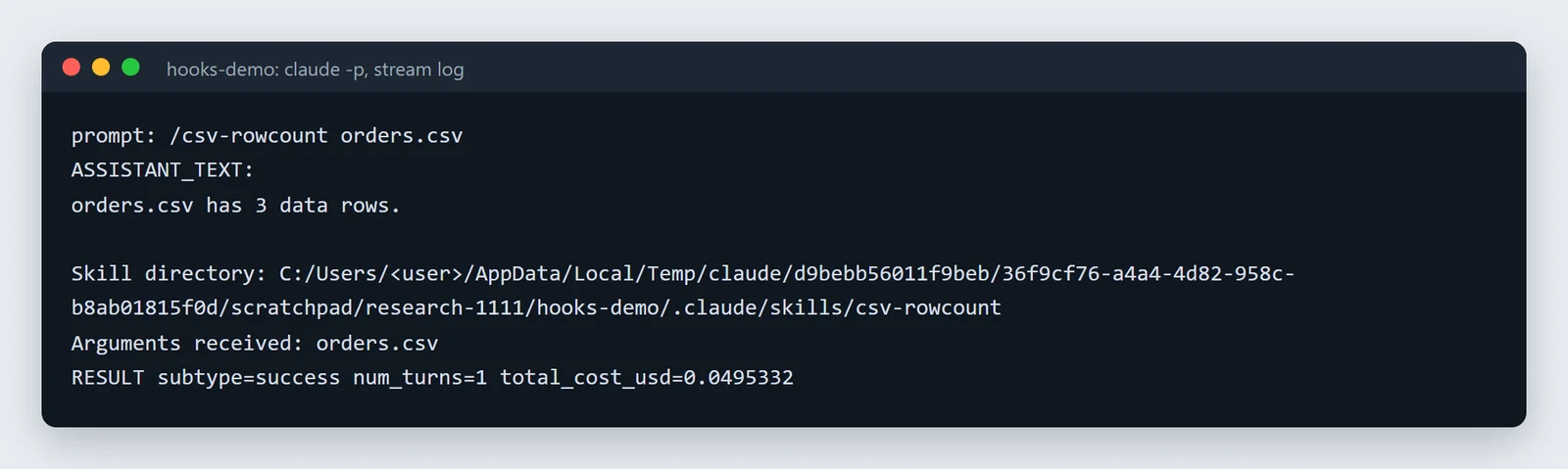
Our run, unedited: one turn, about five cents.
The script ran before Claude saw the skill, $0 was replaced inside the command, and ${CLAUDE_SKILL_DIR} became a Windows path with forward slashes. Two things we learned:
- In Git Bash, protect the slash. Typed plainly,
claude -p "/csv-rowcount orders.csv"reaches Claude asC:/Program Files/Git/csv-rowcount orders.csv, because Git Bash rewrites arguments that start with/. PrefixMSYS_NO_PATHCONV=1, as we did, or run from PowerShell. Typing it inside an interactive session is fine. - Hooks didn't see the
!command. A hook logging every shell command recorded nothing during this run: the command ran as part of loading the skill, not as a tool call. Use permission deny rules, or"disableSkillShellExecution": truein settings, to control those. More in our hooks guide.
The front matter fields
Claude Code reads 20 fields: name, description, when_to_use, argument-hint, arguments, disable-model-invocation, user-invocable, allowed-tools, disallowed-tools, model, effort, context, agent, background, hooks, paths, shell, metadata, license and compatibility. The ones that change behaviour most:
| Field | What it does |
|---|---|
description, when_to_use |
When Claude should use the skill. Together they're "truncated at 1,536 characters in the skill listing" |
disable-model-invocation: true |
Only you can start it, with /name |
user-invocable: false |
Only Claude can start it; it's hidden from the / menu |
allowed-tools |
Tools it may use without asking, for the current turn |
disallowed-tools |
"Tools removed from Claude's available pool while this skill is active." |
paths |
"When set, Claude loads the skill automatically only when working with files matching the patterns." |
model, effort |
A different model or effort level; "The override applies for the rest of the current turn and isn't saved to settings." |
context: fork, agent, background |
Run as a subagent; see below |
hooks |
"Hooks that Claude Code registers when the skill is invoked and keeps running for the rest of the session." |
"Claude Code ignores a field it doesn't recognize without reporting an error", so a typo fails silently. Check with claude plugin validate .claude/skills. And if you'll share a skill to claude.ai or the API, stick to six fields: name, description, license, compatibility, metadata and allowed-tools. Anything else is rejected there with "Unexpected key(s) in SKILL.md frontmatter". Our eight validated examples follow that rule.
Forked skills now run in the background
context: fork runs the skill as a separate subagent. "The subagent doesn't see your conversation history, so the skill's instructions have to stand on their own." It uses the general-purpose agent unless agent names another.
What changed in July 2026 (v2.1.218): forked skills became background tasks. "you keep working while it runs, and its result arrives in your conversation when it completes". For a skill whose answer you're waiting for, such as a review before a merge, add background: false. In claude -p and the Agent SDK it always waits.
Point Claude at your database.
Start free →Use and manage skills
- Start one with
/skill-nameand any arguments, or describe the task and let Claude pick it. Throughclaude -por the Agent SDK, "Claude Code loads only the first skill" on a line, "with the rest of the line as its arguments." - See them all with
/skills; presstto sort by token count. "Run/skill-doctorto see what each of your skills costs and how often it gets used." - Turn one off without deleting it with
skillOverridesin settings, set to on, name-only, user-invocable-only or off. - Control who can run them with permission rules: "
Skill(name)for exact match,Skill(name *)for prefix match with any arguments." - Keep them short. "Keep
SKILL.mdunder 500 lines." Descriptions share a listing budget that "scales at 1% of the model's context window", and after a conversation is compacted, Claude Code keeps "the first 5,000 tokens of each" skill in use.
Claude Code also comes with built-in skills, "such as /doctor, /code-review, /batch, /debug, /loop, and /claude-api."
Install other people's skills
Anthropic's skills ship as plugins: /plugin marketplace add anthropics/skills, then /plugin install document-skills@anthropic-agent-skills for the Excel, Word, PowerPoint and PDF skills. Anthropic says "These skills are provided for demonstration and educational purposes only." A skill can run commands with your permissions, so read one before installing it. Our list of the best Claude skills covers what's worth adding.
Skills, subagents, CLAUDE.md, MCP or hooks?
| Skill | Subagent | CLAUDE.md | MCP server | Hook | |
|---|---|---|---|---|---|
| What it is | Instructions and files for one kind of task | A separate worker with its own prompt and tools | Always-on project notes | A connection to an outside system's tools | A command run at a fixed moment |
| Who starts it | You with /name, or Claude when it matches |
Claude, or a forked skill | Loads every session | Claude calls its tools | The event, every time |
| Context it uses | The description always; the body when used | Its own window; only a summary comes back | All of it, every request | Tool names, then details when needed | None, unless it adds some |
| Always does the same thing? | No, Claude interprets it | No | No | The tool does; whether Claude calls it doesn't | Yes |
| Best for | Repeatable workflows, reference material | Big reads, parallel work | Commands, conventions, gotchas | Databases, issue trackers, browsers | Guardrails, formatting, logging |
The short version, in Anthropic's words about hooks versus everything else: instructions mean "Claude interprets the instructions; outcome can vary". And "A plugin bundles skills, hooks, subagents, and MCP servers into a single installable unit", which is how you share a set of them. See CLAUDE.md and hooks.
Why a skill doesn't trigger
- The description doesn't match. Use the words people type: "how many rows", not "cardinality".
- It's switched to you only with
disable-model-invocation: true, or turned off inskillOverrides. pathsdoesn't match the files Claude is working on.- Bad front matter. Malformed YAML or an unknown field is skipped quietly; run
claude plugin validate. - It's in a subfolder Claude hasn't touched yet, or a new top-level skills folder that needs
/reload-skills. - Too many skills. When descriptions pass the listing budget, some are cut.
/skillsand/skill-doctorshow which.
How skills changed, 2025 to 2026
- October 2025: skills arrive in Claude Code.
- January 2026:
context: forkand hooks in skill front matter, and custom slash commands merged into skills. - April 2026: Claude can run built-in commands such as
/initthrough skills. - July 2026: forked skills run in the background by default.
- September 2026: claude.ai skills sync into terminal sessions.
- October 2026:
UserPromptSubmithooks run before a skill expands, so blocking a prompt also stops its!commands; the skill list is resent after compaction. - November 2026: with the Bash sandbox on, skills in nested folders load only when you start or
/cdthere.
Skills for a team's data
Skills hold how a team works: which tables to trust, how revenue is calculated, what a weekly report contains. The data itself has to come from somewhere every person and agent reaches the same way.
Fastero is an AI and data platform where people and AI agents work together on a team's data. Claude Code connects to its MCP server and works with the team's database connections, saved queries, metric definitions, notebooks and dashboards. A skill can then say "use the team's definition of revenue" instead of carrying its own SQL, and the result lands somewhere colleagues can open. More on connecting Claude Code to MCP servers and Claude Code for data analysis.
FAQ
What are Claude Code skills?
Folders with a SKILL.md file of instructions, plus optional scripts and reference files, that Claude Code loads when a task matches the description or when you type /skill-name.
How do I create a skill in Claude Code?
Make a folder in ~/.claude/skills/ (for you) or .claude/skills/ (for the project) and add a SKILL.md with a description in its front matter and the instructions below it. Or ask Claude to write one, or use Anthropic's skill-creator.
What's the difference between skills and slash commands?
They were merged in January 2026. A file in .claude/commands/ still works as a command; a skill adds a folder for supporting files, its own front matter, and Claude choosing it on its own.
How do I install skills in Claude Code?
From a plugin marketplace: /plugin marketplace add anthropics/skills, then /plugin install document-skills@anthropic-agent-skills. Or copy a skill's folder into ~/.claude/skills/ or .claude/skills/.
Do claude.ai skills work in Claude Code?
Yes, since v2.1.273: skills from your claude.ai account sync into ~/.claude/skills/synced/ in terminal sessions signed in with claude.ai. Syncing is one way, and their ! commands never run locally.
Why isn't my skill triggering?
Usually the description doesn't use the words of the request. Check it's listed in /skills, that disable-model-invocation isn't set, that paths matches, and that the front matter is valid.
What does context: fork do in a skill?
It runs the skill as a separate subagent without your conversation history. Since July 2026 that subagent runs in the background and reports back when it's done; add background: false to wait for it.
Sources
Read on 11 November 2026, when the docs described Claude Code 2.1.322; our skill run used Claude Code 2.1.284 on Windows 11: