 Fastero Dev Team
A note in CLAUDE.md saying "never drop a table" is a request; Claude can decide it doesn't apply. A hook is a check that runs every time, before the command does. That difference is why hooks are the way to make a rule stick in Claude Code.
The short answer: a Claude Code hook is a command, HTTP call, MCP tool call, model prompt or subagent that Claude Code runs automatically at a lifecycle event such as PreToolUse, PostToolUse, SessionStart or Stop. You configure it under a "hooks" key in ~/.claude/settings.json, a project's .claude/settings.json or .claude/settings.local.json. The hook gets the event as JSON on its standard input. Exit code 0 lets the action go ahead, exit 2 blocks it and shows your error text to Claude, and any other code is a non-blocking error, so a hook that enforces a rule must exit 2 or return permissionDecision: "deny".
Fastero
Point Claude at your database.
Add Fastero to claude.ai or Claude Code. Claude builds the dashboard, deploys the app or publishes a live page, and your team opens it in Fastero.
Try free →What a hook is
Anthropic's definition: "Hooks are user-defined shell commands, HTTP endpoints, MCP tool calls, LLM prompts, or subagents that execute automatically at specific points in Claude Code's lifecycle." Their point is control, "which gives you deterministic control: certain actions always happen rather than relying on the LLM to choose to run them."
That's the line between hooks and the other ways of steering Claude Code. Anthropic's own advice is "Put guardrails in hooks." CLAUDE.md and skills are instructions Claude interprets; a hook runs whether Claude agrees or not, and it costs no context: "Zero, unless hook returns additional context".
Where hooks go
| File | Applies to | Shared? |
|---|---|---|
~/.claude/settings.json |
All your projects | "No, local to your machine" |
.claude/settings.json |
One project | "Yes, can be committed to the repo" |
.claude/settings.local.json |
One project | No, gitignored |
| Managed settings | Everyone in an organisation | Set by admins |
A plugin's hooks/hooks.json |
While the plugin is enabled | Bundled with the plugin |
| A skill's or subagent's front matter | While that skill or subagent is in use | With the skill or subagent |
"Hook entries merge across settings levels rather than replacing each other", and "When an event fires, its matching hooks run in parallel." "Hooks from settings files, managed policy settings, and plugins also run inside subagents."
The configuration has three levels: the event, a matcher that picks which tools it applies to, and the handlers to run. This is the PreToolUse part of the settings file we tested, two Node scripts guarding shell commands and file access:
{
  "hooks": {
    "PreToolUse": [
      {
        "matcher": "Bash|PowerShell",
        "hooks": [
          { "type": "command", "command": "node", "args": ["${CLAUDE_PROJECT_DIR}/.claude/hooks/block-destructive-sql.js"] }
        ]
      },
      {
        "matcher": "Read|Edit|Write",
        "hooks": [
          { "type": "command", "command": "node", "args": ["${CLAUDE_PROJECT_DIR}/.claude/hooks/protect-env.js"] }
        ]
      }
    ]
  }
}
${CLAUDE_PROJECT_DIR} is "the project root where the session started." With args set, the command runs directly with no shell ("exec form", since v2.1.139); without it, through a shell. Matchers are case-sensitive: Edit|Write matches either tool exactly, while any other character makes the matcher a regular expression, so "Edit.* matches both Edit and NotebookEdit". For MCP tools, match mcp__<server>__.*.
Exit codes and what Claude sees
| What the hook does | Effect |
|---|---|
| Exits 0 | Success. "Claude never sees stderr from a hook that exits 0." Any JSON it prints is read |
| Exits 2 | Blocks the action where the event allows it, and "The message that comes with the block is your hook's stderr." |
| Exits with anything else | A non-blocking error: the action goes ahead. "If your hook is meant to enforce a policy, use exit 2." |
Prints JSON with permissionDecision |
On PreToolUse: "four outcomes (allow, deny, ask, or defer)", with "precedence is deny > defer > ask > allow" |
Two details decide whether a guard really guards. A deny from a hook "blocks the tool even in bypassPermissions mode or with --dangerously-skip-permissions". But "a hook returning "allow" doesn't bypass deny rules from settings". And on PostToolUse, exit 2 can't undo anything: the tool already ran, so it only tells Claude what's wrong.
The events
The reference lists 33 events. The ones most hooks use:
| Event | When it fires | Can it block? |
|---|---|---|
SessionStart |
A session starts, resumes, is cleared or compacted | No; its plain output becomes context |
UserPromptSubmit |
You send a prompt, before Claude sees it | Yes |
PreToolUse |
Before any tool call | Yes |
PermissionRequest |
When a permission dialog would appear | Through JSON only; "Exit code 2 isn't honored for this event" |
PostToolUse |
After a tool succeeds | No; it can tell Claude what's wrong |
Notification |
Claude needs your attention | No: "Notification hooks can't block or modify notifications." |
Stop, SubagentStop |
Claude, or a subagent, finishes responding | Yes: Claude carries on, up to "an 8-consecutive-continuation cap" |
PreCompact |
Before the conversation is compacted | "Exit with code 2 to block compaction." |
SessionEnd |
The session ends | No |
The rest cover subagents, tasks, configuration and folder changes, file watching, worktrees, model switches, MCP elicitation and more. "If you add a matcher field to an event without matcher support, it is silently ignored."
Eight hooks for data work
We set up five of these in a throwaway folder on a Windows 11 laptop with Claude Code 2.1.284 and ran Claude six times, about $0.57 of model use in all. Every run kept out our own user settings and MCP servers, so only the test hooks ran. The scripts are Node, because the docs' examples use jq, which Git for Windows doesn't include.
1. Block destructive SQL (tested)
A PreToolUse hook on Bash|PowerShell that reads the command and exits 2 on DROP, TRUNCATE or a DELETE with no WHERE:
// .claude/hooks/block-destructive-sql.js
const input = JSON.parse(require('fs').readFileSync(0, 'utf8') || '{}');
const cmd = (input.tool_input && input.tool_input.command) || '';
const rules = [
  [/\bdrop\s+(table|schema|database|view)\b/i, 'DROP'],
  [/\btruncate\s+(table\s+)?\w/i, 'TRUNCATE'],
  [/\bdelete\s+from\s+[\w."]+\s*(;|"|'|$)/i, 'DELETE without WHERE'],
];
for (const [re, label] of rules) {
  if (re.test(cmd)) {
    process.stderr.write(`Blocked by block-destructive-sql hook: ${label} is not allowed from Claude Code in this project. Write the statement to a .sql file for a human to review instead.`);
    process.exit(2);
  }
}
process.exit(0);
We asked Claude to run echo hooks-ok and then psql "$DATABASE_URL" -c "DROP TABLE staging_orders;". The first went through; the second was stopped before psql started:
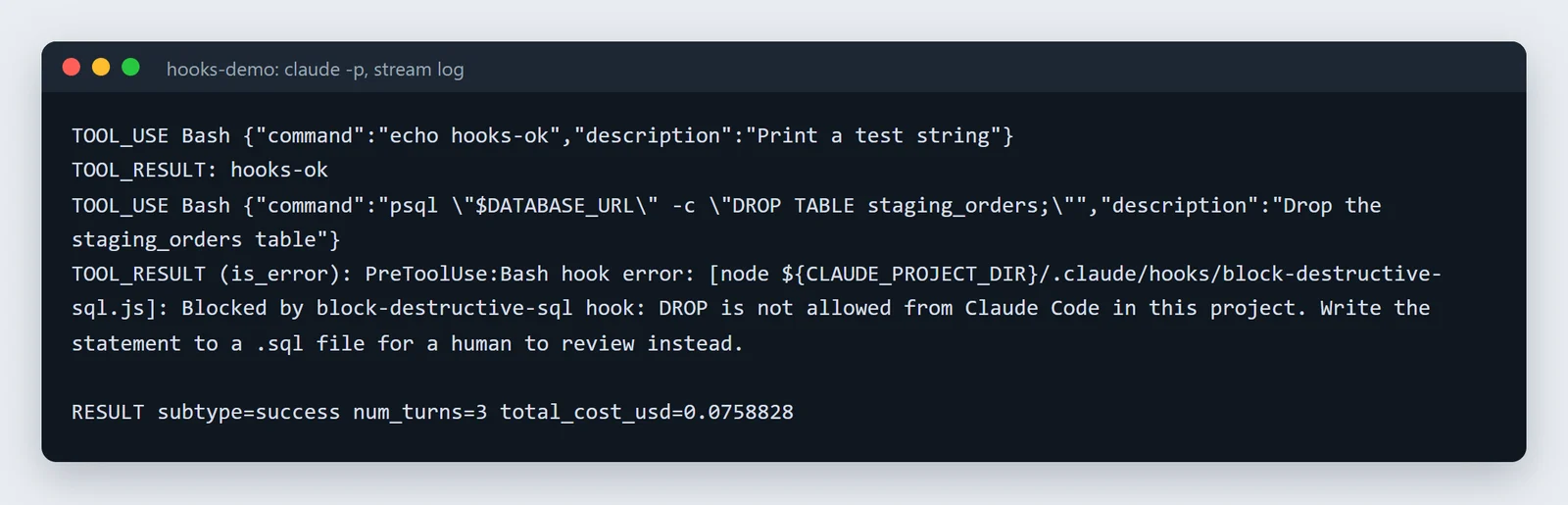
Our run on 11 November 2026, unedited. Claude reported: "psql never ran and staging_orders was not dropped."
The run's result also listed the blocked call under permission_denials, which is how a script running claude -p can tell something was refused. A hook only reads the command's text, so pair it with a read-only database login.
2. Lint SQL after every edit (tested)
A PostToolUse hook on Write|Edit, narrowed with "if": "Write(*.sql)" (and a second handler for Edit(*.sql)), that flags select * and BETWEEN on timestamps and exits 2 so Claude sees it. We asked Claude to save a query with both. The file was written, the hook objected, "sql-lint found problems in monthly_revenue.sql: line 1: select * (list the columns you need); line 1: BETWEEN (use a half-open range on timestamps)", and Claude rewrote it unasked:
select id, customer_id, total_amount, created_at from orders where created_at >= '2026-10-01' and created_at < '2026-11-01';It also noted that the new range now included 31 October, which the original between ... '2026-10-31' had left out. A real project would call sqlfluff lint instead of our ten-line script.
3. Keep Claude out of .env (tested)
A PreToolUse hook on Read|Edit|Write that blocks any file named .env or .env.*. On Windows the path "arrives with backslash separators, even when your hook runs under Git Bash", so the script turns backslashes into slashes before checking the name. Claude tried to read the file, got "Blocked by protect-env hook: .env holds credentials and is off limits.", and stopped; the file was unchanged. Two gaps: a file named with @ in your prompt is read without a tool call, "so no PreToolUse hook fires for them, including hooks matching Read", and cat .env goes through Bash. Add a Read deny rule in your permissions as well.
4. Log every shell command (tested)
A shell-form PreToolUse hook that appends the event to a file: cat >> "$CLAUDE_PROJECT_DIR/.claude/bash-log.jsonl". Under Git Bash it wrote one JSON line per call, the blocked DROP included, with the session, folder, permission mode, tool and full command. No jq needed.
5. Give Claude facts at the start (tested)
A SessionStart hook whose plain output becomes context (we used echo with a project fact), and a UserPromptSubmit hook returning JSON additionalContext. Claude repeated both facts back. Anthropic's advice: "Write the text as factual statements rather than imperative system instructions." Useful lines: today's date, the warehouse name, the last few commits.
6. Format Python after edits (not tested)
Same shape as the SQL lint, with "if": "Edit(*.py)" calling ruff format or black. On Windows, exec form can't run the .cmd shims npm installs: they "are not executables and can't be spawned without a shell", so use shell form or the real .exe.
7. Get notified when Claude needs you (not tested)
A Notification hook on permission_prompt or idle_prompt, which fires when "Claude finished responding about 60 seconds ago and you haven't typed since". The guide's Windows example "opens a dialog box rather than a notification in the corner of your screen"; Windows Terminal users can return a terminalSequence instead.
8. Put context back after compaction (not tested)
"Use a SessionStart hook with a compact matcher to re-inject critical context after every compaction", such as the rules a long session tends to lose.
Point Claude at your database.
Start free →Hooks on Windows
- No
jq. The docs' examples need it; Git for Windows doesn't ship it. Write hooks in Node, Python or PowerShell. - Which shell. Shell-form hooks run with "
sh -con macOS and Linux, Git Bash on Windows, or PowerShell when Git Bash isn't installed." Set"shell": "powershell"to choose. - Match PowerShell too. Claude Code on Windows has a PowerShell tool as well as Bash, and "A hook that matches only
Bashnever fires there." UseBash|PowerShell. In our runs both tools were available every time. - Backslash paths, even under Git Bash. Normalise before comparing.
Hooks and safety
"Command hooks execute shell commands with your full user permissions." Three things to know before you rely on them, or before you run someone else's:
- A crashing hook lets the action through. Our first
.envguard had a syntax error and exited 1 on every call, which would have allowed every read. Since v2.1.295,"onFailure": "block"on a command or HTTP hook makes it fail closed. claude -pruns a repository's hooks without asking. In-p, "Claude Code never shows the dialog and treats the folder as trusted, so hooks committed in a repository's.claude/settings.jsonrun in a folder you've never trusted". We saw exactly that. For one run, pass--settings '{"disableAllHooks": true}'.- A skill's
!command wasn't seen. In our test on 2.1.284, the shell-command logging hook recorded nothing when a skill ran its!`command`line while loading. Use permission deny rules, or the setting that turns skill shell commands off, for those.
Admins can switch off everyone's own hooks with allowManagedHooksOnly: "Your user, project, local, and plugin hooks are blocked."
When a hook doesn't fire
- Type
/hooksto open "a read-only browser for your configured hooks". - "run
claude --debugand read the log at~/.claude/debug/<session-id>.txt". - Test the script alone: "Test it manually by piping sample JSON:" into it.
- In
claude -p, add--include-hook-eventswith--output-format stream-json --verboseto see each hook's output and exit code, which is how we checked ours. - Turn them all off with
"disableAllHooks": true; "There is no way to disable an individual hook while keeping it in the configuration."
How hooks changed, 2025 to 2026
- 30 June 2025: "Released hooks." (v1.0.38).
- July and August 2025:
PreCompact,SessionStart,SessionEndand thedisableAllHookssetting. - November 2025:
PermissionRequest, to approve or deny permission requests in code. - January 2026: hooks in skill and subagent front matter.
- February to April 2026: HTTP hooks, the
iffield, thedeferdecision,FileChanged, andmcp_toolhooks that call an MCP tool directly. - May 2026: exec form with
args,terminalSequence, and the cap of 8 onStopcontinuations. - August to October 2026: model-switch events,
onFailure: "block", andUserPromptSubmitrunning before a skill expands.
Guardrails for an agent on your data
Hooks keep Claude Code from doing damage on your machine. When it works on a team's data, the other half of the guard is what it can reach: a read-only login, and keys that carry only the permissions you choose.
Fastero is an AI and data platform where people and AI agents work together on a team's data. Claude Code connects to it through an MCP server, with a key made under Settings › AI Agent Access, and works with the workspace's connections, saved queries, notebooks and dashboards within that key's permissions. Its tools are named mcp__<server>__<tool>, so a PreToolUse hook matching mcp__fastero__.* can log or block them like any other tool. More on connecting MCP servers to Claude Code and Claude Code for data analysis.
FAQ
What are hooks in Claude Code?
Commands, HTTP calls, MCP tool calls, prompts or subagents that Claude Code runs automatically at fixed points, such as before a tool runs or when a session starts. Unlike instructions, they run every time.
Where do I put Claude Code hooks?
Under "hooks" in ~/.claude/settings.json for all your projects, .claude/settings.json for a project you share, or .claude/settings.local.json for yourself only. Plugins, skills and subagents can carry hooks too.
How do I block a command with a hook?
Add a PreToolUse hook matching Bash (and PowerShell on Windows) that reads tool_input.command from its input and exits with code 2, writing the reason to stderr. Claude sees the reason and the command never runs.
What does exit code 2 mean in a Claude Code hook?
Block. On PreToolUse the tool call is stopped and your stderr goes to Claude; on PostToolUse the tool already ran, so Claude just sees the message. Exit 1 doesn't block.
Do Claude Code hooks work on Windows?
Yes. Shell-form hooks run in Git Bash, or PowerShell without it. File paths arrive with backslashes, the docs' jq examples need jq installed, and a hook for shell commands should match Bash|PowerShell.
Are Claude Code hooks safe?
They run with your user's full permissions, and claude -p runs a repository's committed hooks without a trust prompt. Read a project's .claude/settings.json before running Claude Code in it, and use "onFailure": "block" for hooks that guard something.
Why isn't my hook firing?
Check it's listed in /hooks, that the matcher's case and tool names are right (Bash|PowerShell on Windows), and that the event supports matchers. Then run claude --debug, or pipe sample JSON into the script.
Sources
Read on 11 November 2026, when the docs described Claude Code 2.1.322; our six test runs used Claude Code 2.1.284 on Windows 11, launched from Git Bash:
- Anthropic: Hooks reference, Hooks guide, Features overview, Security, Settings, Claude Code changelog