
An agent that worked in the demo can fail quietly in production: a tool starts timing out, a prompt change doubles the tokens, a model update makes it loop. Nobody notices until a customer does, or the invoice arrives. Observability is how you notice first.
The short answer: AI agent observability means recording every run — what the agent did, what each step cost and how it ended — and watching the totals. Track six numbers per agent: runs, success rate, 95th percentile run time, cost per run, tool error rate and steps per run. Use a tracing tool (LangSmith, Langfuse, Arize Phoenix and others) to debug one run step by step, and a dashboard over your run log for the weekly view the whole team reads.
The six numbers to watch
| Number | What it tells you | Watch for |
|---|---|---|
| Runs | How much the agent is used | A sudden drop: something upstream stopped calling it |
| Success rate | Share of runs that finished as intended | Any fall after a deploy, a prompt change or a model switch |
| 95th percentile run time | The run time nineteen in twenty runs beat | Slow tails the average hides |
| Cost per run | Spend divided by runs | A rise with no change in work done: more tokens, a pricier model, longer loops |
| Tool error rate | Share of tool calls that failed, per tool | The integration to fix first |
| Steps per run | Model and tool calls in one run | Loops: an agent repeating the same step |
Total spend matters to whoever pays the bill, but on its own it only grows with use. Cost per run is the number that tells you an agent got more expensive to operate.
Tracing one run vs watching the whole fleet
These are two different jobs, and most teams need both.
- Tracing records each run as a tree of steps — every model call with its prompt, response and tokens, every tool call with its inputs and result. You open it to answer "why did this run fail?".
- Monitoring adds up all the runs: per agent, per week, per model. You read it to answer "are our agents getting better or worse, and what do they cost?". It is what a manager, a budget owner or the weekly review looks at.
Fastero
Connect your database. Ask questions. Get dashboards.
Postgres, BigQuery, Snowflake, and 10+ sources — live-connected, AI-powered, no dashboard builder learning curve.
Try free →Start with a run log
Whatever tools you add later, write one row per run to a table you own. It makes every number above a short query, and it survives a change of tracing tool:
CREATE TABLE agent_runs (
  run_id        text PRIMARY KEY,
  agent         text NOT NULL,
  model         text NOT NULL,
  status        text NOT NULL,          -- 'succeeded' or 'failed'
  started_at    timestamptz NOT NULL,
  latency_ms    integer,
  input_tokens  integer,
  output_tokens integer,
  cost_usd      numeric(10, 5),
  error         text
);

CREATE TABLE agent_tool_calls (
  run_id     text NOT NULL,
  tool       text NOT NULL,
  called_at  timestamptz NOT NULL,
  ok         boolean NOT NULL
);
Each agent's health, week by week:
SELECT agent,
       date_trunc('week', started_at) AS week,
       count(*) AS runs,
       round(100.0 * count(*) FILTER (WHERE status = 'succeeded') / count(*), 1) AS success_rate,
       round(sum(cost_usd) / count(*), 4) AS cost_per_run,
       round(CAST(percentile_cont(0.95) WITHIN GROUP (ORDER BY latency_ms) / 1000.0 AS numeric), 1) AS p95_seconds
FROM agent_runs
WHERE started_at >= now() - INTERVAL '8 weeks'
GROUP BY agent, week
ORDER BY week DESC, agent;
And the tools that fail most:
SELECT tool,
       count(*) AS calls,
       round(100.0 * count(*) FILTER (WHERE NOT ok) / count(*), 1) AS error_rate
FROM agent_tool_calls
WHERE called_at >= now() - INTERVAL '30 days'
GROUP BY tool
HAVING count(*) >= 10
ORDER BY error_rate DESC;
We ran both queries on Postgres 17 and DuckDB against invented runs, and checked the results by hand: 18 successes in 20 runs gives 90.0, and run times of 1 to 20 seconds give a 95th percentile of 19.1 seconds.
Two things to add once the basics work: steps per run, with a hard limit on turns so a looping agent stops itself, and quality scores from an automated grader or from users. Anthropic's own advice is to grade what an agent produced rather than the path it took.
A dashboard the whole team reads
Tracing tools are built for the engineer debugging a run. The weekly question — are the agents getting better or worse, and what do they cost — belongs on a dashboard that the team, the budget owner and the people who use the agents can open.
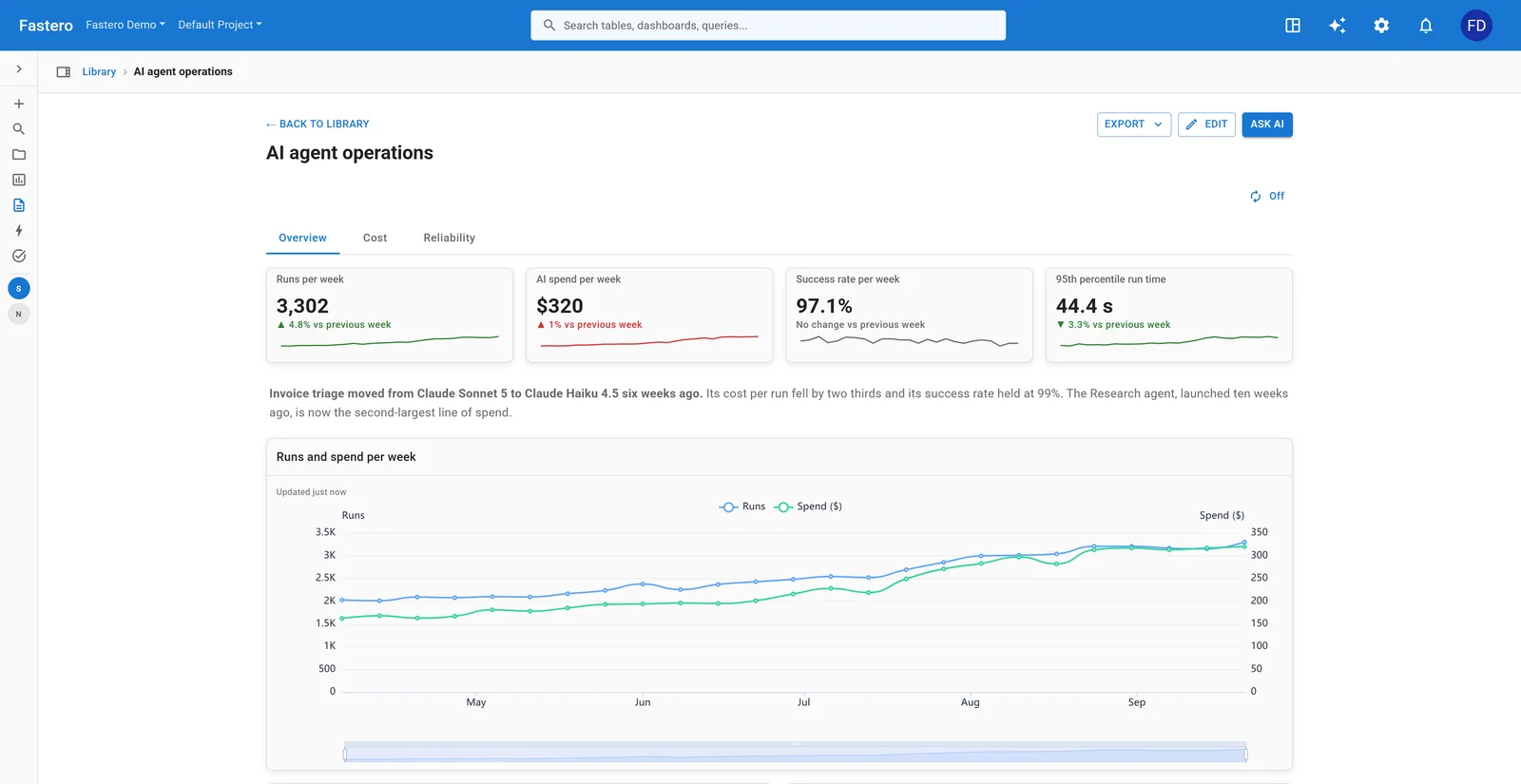
An AI agent operations dashboard in Fastero, built from one table of runs. Sample data.
In Fastero, connect the database that holds your run log, then describe the dashboard — the AI agent dashboard example has the prompt — and the AI writes the queries and lays it out: the numbers above with their change since last week, cost per run by agent and model, failures by day and tool error rates.
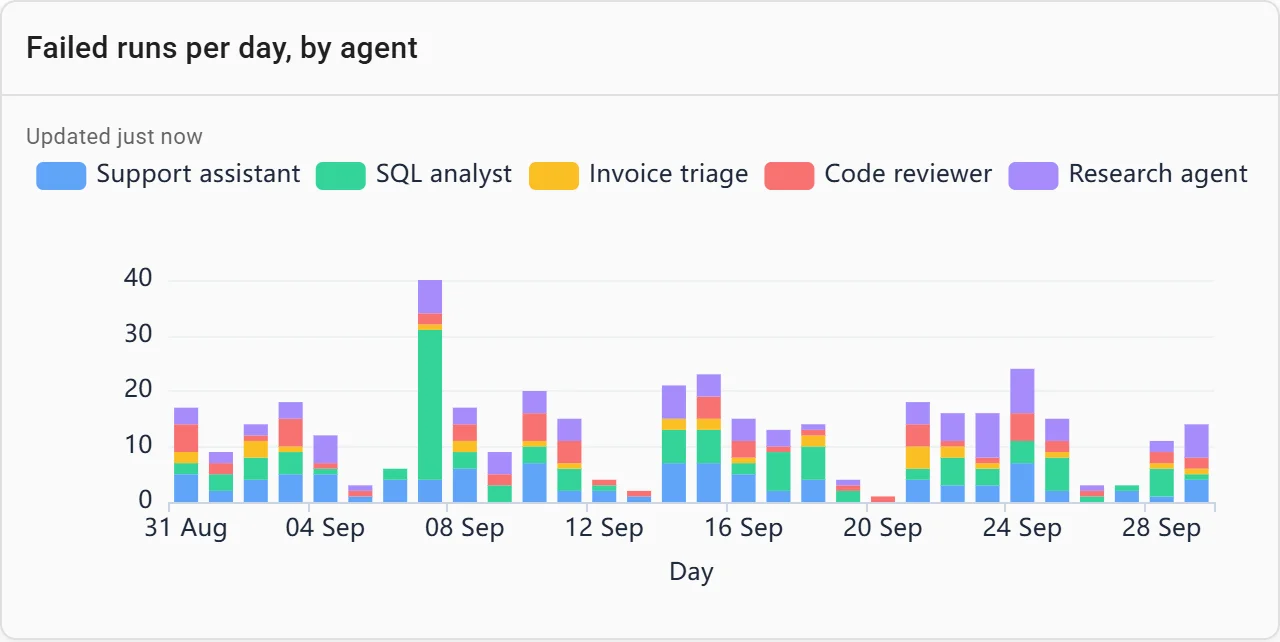
Failed runs per day. The tall bar is an afternoon when the SQL analyst's warehouse was down. Sample data.
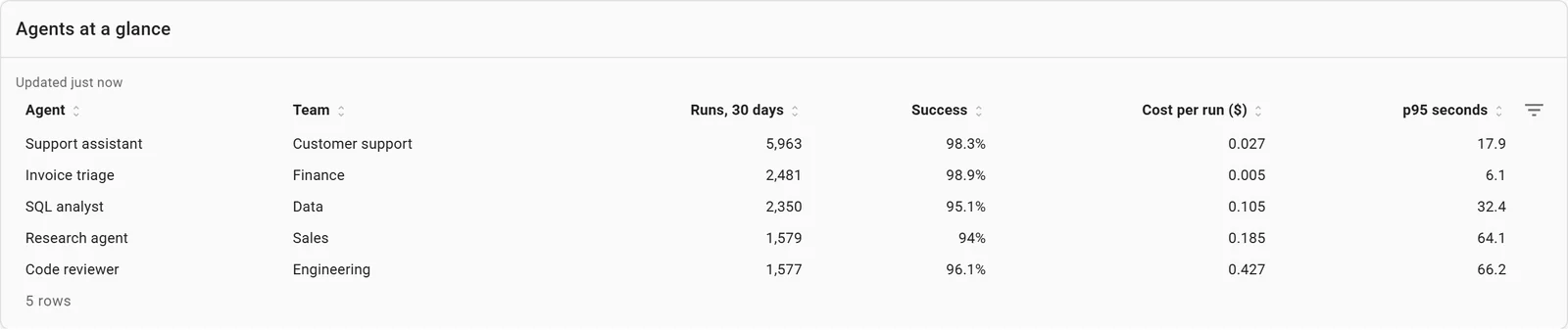
Every agent on one line. Sample data.
- Alerts on the numbers that matter. An alert watches one number from a saved query — the success rate, cost per run — and emails when it crosses a line, again when it comes back, and once if the check itself starts failing.
- The same view for everyone. Colleagues open the dashboard with their own login; viewers are free. A PDF can arrive by email every Monday.
- It stays current. The dashboard refreshes on a timer or when the run log changes.
The tools that trace agents
| Tool | What it does | Open source | Free plan | Paid from |
|---|---|---|---|---|
| LangSmith | Tracing, dashboards, alerts and evals, for any framework | SDK only | 5,000 traces a month, 1 seat | $39 per seat a month, plus $5 per 1,000 extra traces |
| Langfuse | Tracing, prompt management, evals and dashboards | Yes (MIT) | 50,000 units a month, or free to self-host | $29 a month |
| Arize Phoenix | Tracing and evals built on OpenTelemetry; Arize AX is the hosted version | Source-available (Elastic License 2.0) | Phoenix free to run yourself; AX 25,000 spans a month | AX Pro $50 a month |
| Braintrust | Evals and production tracing | SDKs only | 1 GB of data and 10,000 scores a month | $249 a month |
| Datadog LLM Observability | Agent tracing next to the rest of your Datadog monitoring | No | 40,000 model calls a month | $160 a month for 100,000 model calls, yearly |
| Pydantic Logfire | OpenTelemetry tracing with an agents view | SDK only | 10 million records a month | $49 a month |
| Comet Opik | Tracing, evals and an agent playground | Yes (Apache 2.0) | 25,000 spans a month, or free to self-host | $19 a month |
| MLflow Tracing | Tracing and evals in MLflow 3 | Yes (Apache 2.0) | Free to self-host | Managed on Databricks |
| W&B Weave | Tracing and evals, now part of CoreWeave Forge | SDK (Apache 2.0) | 1 GB a month | From $60 a month |
| Laminar | Agent tracing with browser-session recordings | Yes (Apache 2.0) | 1 GB a month | $30 a month |
| Helicone | An AI gateway that logs every request and its cost | Yes (Apache 2.0) | 10,000 requests a month | $79 a month |
| Fastero | Team dashboards and alerts over your own run log | Hosted | Free plan | $20 per editor a month |
Prices are the vendors' own, checked on 16 October 2026. Each one counts something different — traces, spans, "units", gigabytes or model calls — so estimate your monthly volume before you compare them.
What changed in 2026
The market for agent tracing consolidated quickly this year:
- Langfuse was bought by ClickHouse in January. It stays MIT-licensed and self-hostable.
- Helicone joined Mintlify in March and is in maintenance mode: it keeps running and getting fixes.
- Traceloop is joining ServiceNow; its OpenLLMetry instrumentation stays open source.
- Galileo was bought by Cisco in May and is now part of Splunk's agent monitoring.
- Arize was bought by Dynatrace for $915 million, closing on 1 October; Phoenix and Arize AX continue.
- Weights & Biases became part of CoreWeave Forge on 30 September, with a new agent product, Agent Lens.
- Datadog renamed LLM Observability to Agent Observability, and charges only for model calls.
- LangSmith moved to $5 per 1,000 extra traces in July, and limited extended retention to 180 days from 14 September.
If you pick a tool now, favour one that accepts OpenTelemetry data, so changing tools later means changing an endpoint, not your code.
OpenTelemetry: the standard underneath
OpenTelemetry's GenAI semantic conventions describe agent telemetry in one shared format: a span for each model call, invoke_agent and execute_tool spans for agents and their tools, and standard names for token counts. They are still marked "Development" rather than stable, and in June 2026 they moved into their own repository — but nearly every tool above accepts data in this format, and Grafana Cloud's agent observability is built on it too.
The model providers have their own views too:
- Anthropic: the Claude Console has Usage and Cost pages, and an Admin API reports usage by minute, hour or day and cost by day. The Claude API can export traces over OpenTelemetry, in beta.
- Claude Code and the Claude Agent SDK export metrics, events and, in beta, traces over OpenTelemetry. Turn it on with environment variables:
export CLAUDE_CODE_ENABLE_TELEMETRY=1
export OTEL_METRICS_EXPORTER=otlp
export OTEL_LOGS_EXPORTER=otlp
export OTEL_EXPORTER_OTLP_ENDPOINT=http://localhost:4317- OpenAI: a usage dashboard, Usage and Costs APIs, and tracing in the Agents SDK that is on by default, with a Traces dashboard.
One trap when you combine sources: Claude Code reports input tokens without the ones read from or written to the prompt cache, while the OpenTelemetry convention counts them in. A dashboard that adds the two together miscounts.
FAQ
What is AI agent observability?
Recording what AI agents do in production — every run, model call and tool call, with its cost, duration and outcome — and watching the totals, so you notice failures, slowdowns and cost increases before your users or your invoice do.
What should I monitor for AI agents?
Runs, success rate, 95th percentile run time, cost per run, tool error rate and steps per run, per agent and per week. Add quality scores from an automated grader or from users once those are in place.
What are the best AI agent observability tools?
For tracing and debugging single runs: LangSmith, Langfuse, Arize Phoenix, Braintrust, Comet Opik, Pydantic Logfire or Datadog, depending on your framework and whether you want open source. For the team's weekly view of every agent's numbers, a dashboard over your own run log, such as one built in Fastero.
Is there an open-source AI agent observability tool?
Yes. Langfuse (MIT), Comet Opik, MLflow Tracing and Laminar (Apache 2.0) are open source and self-hostable. Arize Phoenix is source-available under the Elastic License.
How do I monitor agents built with Claude?
Set CLAUDE_CODE_ENABLE_TELEMETRY=1 and the OpenTelemetry exporter variables to send Claude Code and Claude Agent SDK metrics and events to any OpenTelemetry backend. Use the Claude Console's Usage and Cost pages, or its Admin API, for spend, and log one row per run to your own database for a team dashboard.
Related reading:
- AI agent dashboard example
- KPI dashboard examples
- Best AI data agents for business teams
- Postgres MCP server: connect Claude to PostgreSQL
Sources: LangSmith pricing, Langfuse joins ClickHouse, Langfuse pricing, Arize pricing, Helicone joins Mintlify, Traceloop joins ServiceNow, Cisco and Galileo, Dynatrace completes Arize acquisition, CoreWeave Forge, Braintrust pricing, Datadog pricing, Pydantic pricing, Comet Opik pricing, MLflow, Laminar pricing, Helicone pricing, OpenTelemetry GenAI conventions, Claude Code monitoring, Claude usage and cost API, OpenAI Agents SDK tracing, Anthropic: demystifying evals for AI agents. Checked 16 October 2026.
Try Fastero free — connect your run log and get a dashboard and alerts for every agent your team runs. No credit card required.