 Fastero Dev Team
Monday morning: export from Stripe, export from the CRM, paste both into the spreadsheet, fix the formula that broke, check it against last week, turn it into charts, email it round. By lunchtime it's done, it's already about last week, and it says nothing about the failed payments piling up since Friday. Those you'll hear about from customers.
The short answer: automated reporting means reports that build and deliver themselves on a schedule, plus alerts that fire when a number crosses a line, so nobody rebuilds the same report by hand and problems surface before customers notice. It's made of three pieces: scheduled reports (a dashboard emailed every Monday at 9), threshold alerts (an email the moment failed payments exceed ten), and scheduled jobs (a script or notebook that does the work in between). The time it saves is real: in the FP&A Trends Survey 2025, "46% of FP&A time is spent on data collection and validation".
Fastero
Connect your database. Ask questions. Get dashboards.
Postgres, BigQuery, Snowflake, and 10+ sources — live-connected, AI-powered, no dashboard builder learning curve.
Try free →Why manual reporting costs more than it looks
- Time. FP&A Trends' 2025 survey of 459 finance professionals found 46% of their time going to collecting and checking data, and only 31% to insight and action. In Deloitte's survey of finance leaders (n=613), companies spent 48% of their time creating and updating reports, against 18% communicating with the business. (FP&A Trends' survey is sponsored by a finance software vendor; Deloitte's survey year isn't stated in the report.)
- Staleness. A weekly report is up to a week old when it's read, and the moment it's needed is usually between reports.
- Errors. Every copy and paste is a chance to paste the wrong range, and every manual step is one more that can be skipped in a busy week.
- Silence. A report shows what you asked for. It doesn't tell you when a payment run fails, stock runs out or ad spend doubles overnight.
The three building blocks
| Block | What it does | Example |
|---|---|---|
| Scheduled report | Rebuilds a dashboard from live data and sends it on a timetable | The weekly KPI email at 09:00 on Mondays |
| Threshold alert | Checks a number on a schedule and tells you when it crosses a line, and when it comes back | Failed payments today above 10 |
| Scheduled job | Runs a script or notebook that prepares data or does the work | A nightly job that reconciles payouts with orders |
Most BI tools now have the first two. In Power BI, "You receive an email on a schedule you set", though "Subscribing others requires a paid license (Pro or PPU)". Metabase's subscriptions can send "to people via email or Slack - even to people who lack an account in your Metabase." What usually ends up on someone's laptop is the third block, the scripts.
What to automate first
Start with the reports people already rebuild by hand, and the problems people currently learn about too late:
- The weekly numbers. Revenue, new customers, churn and cash, as a dashboard emailed on Monday morning.
- Failed payments. A daily check on failed or overdue payments, with an alert above a threshold.
- Spend pacing. Ad spend against budget, with an alert when a day runs well over.
- Stock or capacity. Items below their reorder point, or bookings against capacity, if that data lives in your database.
- The month-end pack. Cash, burn and runway on the first working day of the month.
- The check that the checks ran. An alert if a report's data stops updating, so the glue can't break silently.
Worked example: failed payments
Stripe already retries failed card payments on its own: "For new Stripe accounts, Stripe enables Smart Retries by default and configures it for up to 8 retries within 2 weeks." That's useful, and it also means a failed payment can sit unresolved for two weeks without anyone looking. A subscription that has failed a payment becomes past_due, and Stripe's advice is direct: "When a subscription changes to past_due, notify the customer directly and ask them to update their payment details."
There's a reporting trap here too: Stripe's MRR counts past_due subscriptions as revenue, so a dashboard showing healthy MRR can hide a growing pile of money that isn't coming in.
If your application keeps subscription status in its own database, as most do, the alert is one query:
SELECT COUNT(*) AS past_due_subscriptions
FROM subscriptions
WHERE status = 'past_due';
Save it as a query, and put an alert on it that emails the founder and whoever handles billing when it goes above, say, five. Pair it with a weekly dashboard that shows MRR with and without past_due subscriptions, so the gap is visible.
Connect any database. Ask in plain English.
Connect database →How scheduled reports and alerts work in Fastero
Email any dashboard on a schedule. From the dashboard's Export menu, choose Email this dashboard, add the recipients and pick how often. Each email shows the dashboard's numbers, charts and tables, with a PDF of the whole dashboard attached. People in the workspace also get a button that opens it in Fastero. People outside it, such as an investor or a client, can receive it too: they get one email asking them to confirm, and nothing else until they do. Each recipient can stop the report from a link in the email. With Slack connected, the charts can go to a channel as well.
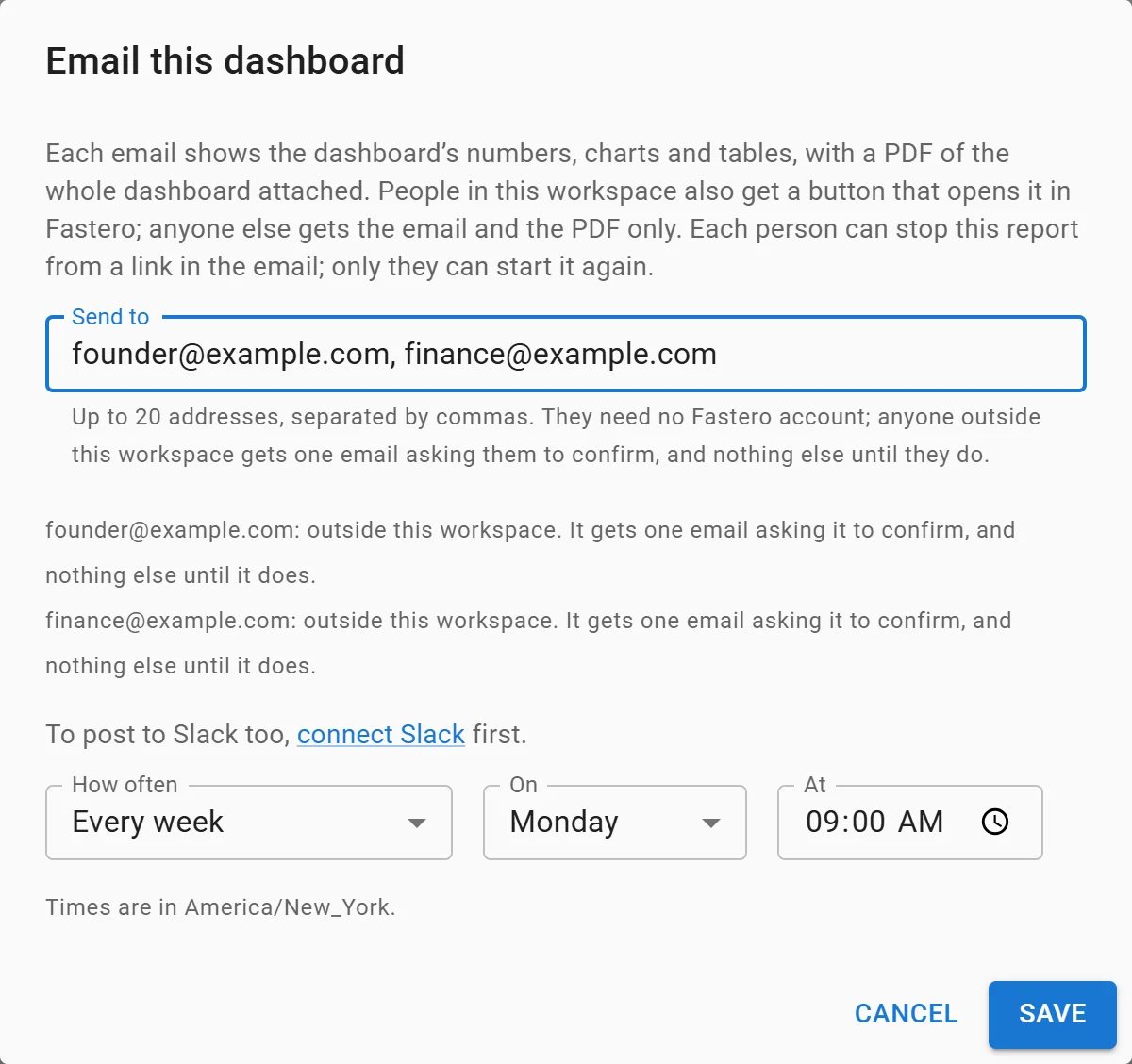
Scheduling the weekly finance email: every Monday at 09:00. Sample data.
Alert when a number crosses a line. An alert watches one number from a saved query against a threshold. On each check the query runs; Fastero emails when the number crosses the line, emails again when it comes back, and emails once if the check itself starts failing. Staying across the line doesn't flood your inbox. Checks can run as often as once an hour. Alerts are set up through Claude, using Fastero's connector, or through Fastero's API.
Run the jobs in between. Python scripts and notebooks run on a cron schedule in the workspace, with database credentials and API keys kept as secrets rather than in the code. A scheduled job can send the charts it produced by email or to Slack.
Every report from the same numbers. Reports read the metric definitions saved in the workspace, so the Monday email and the board deck calculate revenue the same way.
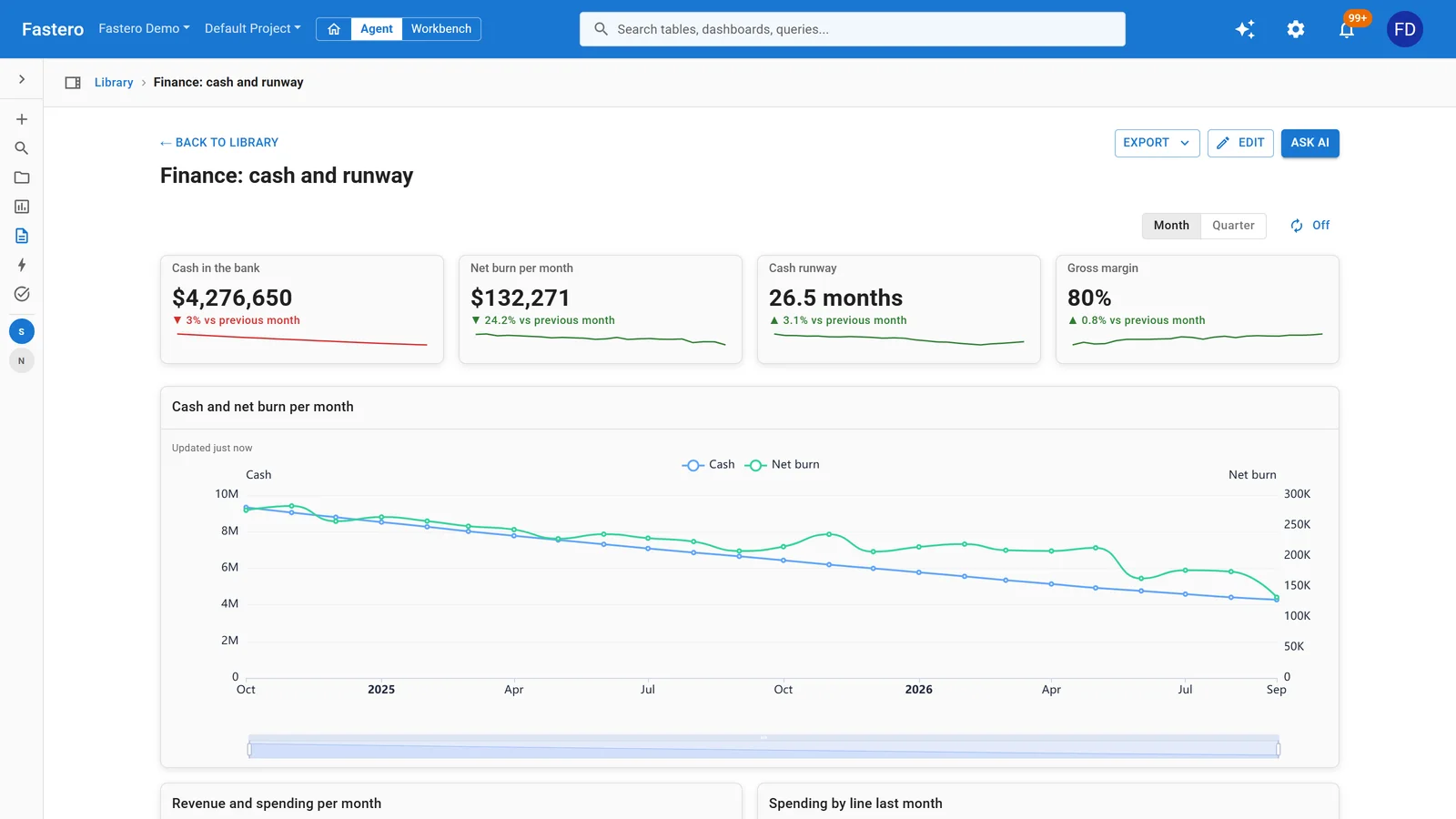
The dashboard behind the email, rebuilt from live data on each send. Sample data.
With Fastero's connector, you can ask Claude for any of these in plain words: "Email the cash and runway dashboard to me every Monday at 9" or "Alert me when overdue invoices go above 20."
A setup checklist
- One owner per report, named on the dashboard, and a second person who knows how to change it.
- Times in the reader's time zone, not the server's.
- Alerts that say what to do, in the alert's name: "Past-due subscriptions above 5: check billing".
- Fewer, better alerts. An alert that fires every day gets ignored; tune the threshold until it means something.
- A failure path. Make sure someone hears when a scheduled job or alert check fails, not just when the number moves.
FAQ
What is automated reporting?
Reports that are rebuilt from live data and delivered on a schedule without anyone doing it by hand, usually alongside alerts that fire when a number crosses a threshold.
What's the difference between a scheduled report and an alert?
A scheduled report arrives on a timetable whatever the numbers say. An alert checks a number on a schedule and only tells you when it crosses a line you set, and again when it comes back.
How much time do teams spend on manual reporting?
In the FP&A Trends Survey 2025, finance teams spent 46% of their time on data collection and validation. In Deloitte's Crunch time survey, companies spent 48% of their time creating and updating reports.
How do I get alerted when a Stripe payment fails?
Stripe sends an invoice.payment_failed event for each failed attempt, which a developer can listen for. Without code, alert on a query that counts past_due subscriptions or failed payments in your database, checked daily or hourly.
Can I email a dashboard to people without an account?
In Fastero, yes: people outside the workspace receive it after confirming once. In Metabase, subscriptions can also go to people without an account; in Power BI, subscribing others needs a Pro or Premium Per User licence.
Related reading:
- Run a Python script online, on a schedule
- What is a semantic layer?
- How to schedule SQL reports to Slack and email
- Stripe failed payments detection guide
- Bus factor
Sources: FP&A Trends Survey 2025, Deloitte: Crunch time 7, Reporting in a digital world, Power BI subscriptions, Metabase dashboard subscriptions, Stripe Smart Retries, Stripe subscription webhooks, Stripe subscription analytics. Checked 5 November 2026.
Try Fastero free — email any dashboard on a schedule, get alerts when a number crosses a line, and run the jobs in between. No credit card required.