 Fastero Dev Team
Amazon SageMaker Studio Lab was AWS's free JupyterLab: no AWS account, no credit card, and a free GPU every day once your account request was approved. If you're trying to sign up now and can't find the button, it isn't you. AWS closed Studio Lab to new customers on 30 July 2026, and almost none of the guides that rank for it say so.
The short answer: SageMaker Studio Lab no longer accepts new customers; AWS stopped sign-ups on 30 July 2026. Existing accounts still work, and AWS says it does "not plan to introduce new features." Those accounts get a CPU runtime for 4 hours per session and 8 hours a day, or a T4 GPU for 4 hours a day, with 15 GB of storage that persists. AWS points new users to SageMaker Studio, which since October 2026 accepts a Google, GitHub or Apple sign-in and comes with AWS Free Tier credits, not a daily free GPU. For free notebooks now, use Kaggle or Google Colab.
Fastero
Jupyter notebooks for your team, with nothing to install.
Start a notebook or bring your .ipynb files. SQL cells query your databases with no password in the code, and a notebook runs now or on a schedule. Colleagues open it with their own login; viewers are free.
Try free →What happened to Studio Lab
In July 2026, Studio Lab's site carried a banner: "Amazon SageMaker Studio Lab will no longer be open to new customers starting on 7/30/26. If you would like to use the service, please sign up prior to 7/30/26." The Request account button was on the home page on 26 July and gone by 18 August. Every Studio Lab page in AWS's documentation now opens with "Amazon SageMaker Studio Lab is no longer open to new customers."
For people who already had an account, little changed: "Existing customers can continue to use the service as normal." AWS keeps working on security and availability, "but we do not plan to introduce new features." One documentation page, the onboarding guide, still describes requesting an account, which is why some people keep looking for a form that no longer exists.
What existing users still get
| SageMaker Studio Lab | |
|---|---|
| CPU runtime | 4 hours per session, 8 hours in any 24 hours, on a T3.xlarge |
| GPU runtime | 4 hours per session, 4 hours in any 24 hours, on a G4dn.xlarge with one NVIDIA T4 |
| Storage | 15 GB per project, kept between sessions |
| Memory | 16 GB according to the FAQ; one 2026 AWS page says 12 GB |
| Interface | JupyterLab 4, since 8 August 2025 |
| Projects | One project, with one CPU or GPU runtime at a time |
| Cost | Free, with "no credit card or AWS account required" |
The limits are firm: "Studio Lab does not support time limit increases." Two things set Studio Lab apart from free Colab. Packages you install are kept in your project, "so there is no need to reinstall packages every time you return", and you can close the browser during a long run: "you do not need to keep your project open." Edits you haven't saved are another matter: "File edits are periodically saved, but are not saved when your runtime ends."
Many guides still say CPU sessions last 12 hours. That was the figure at launch in December 2021; it's 4 hours a session now.
The errors existing users see
"There is no runtime available right now. Please change the compute type or try again later." No GPU (or CPU) machine is free. "Availability of CPU or GPU runtimes is not guaranteed and is subject to demand", and users have reported this message since 2022. Try the other compute type, or try later.
"Project runtime is in safe mode." Your 15 GB is full. Clear at least 500 MB and start the runtime again.
"Preparing project runtime..." that never finishes. AWS's troubleshooting advice is to launch again, then to switch between CPU and GPU.
"You can't use the project runtime because your account is associated with activity that may have violated our Service Terms." An account block. Studio Lab's support is community-based, through a GitHub repository, and a blocked user can no longer open a new account.
Studio Lab vs Colab vs Kaggle
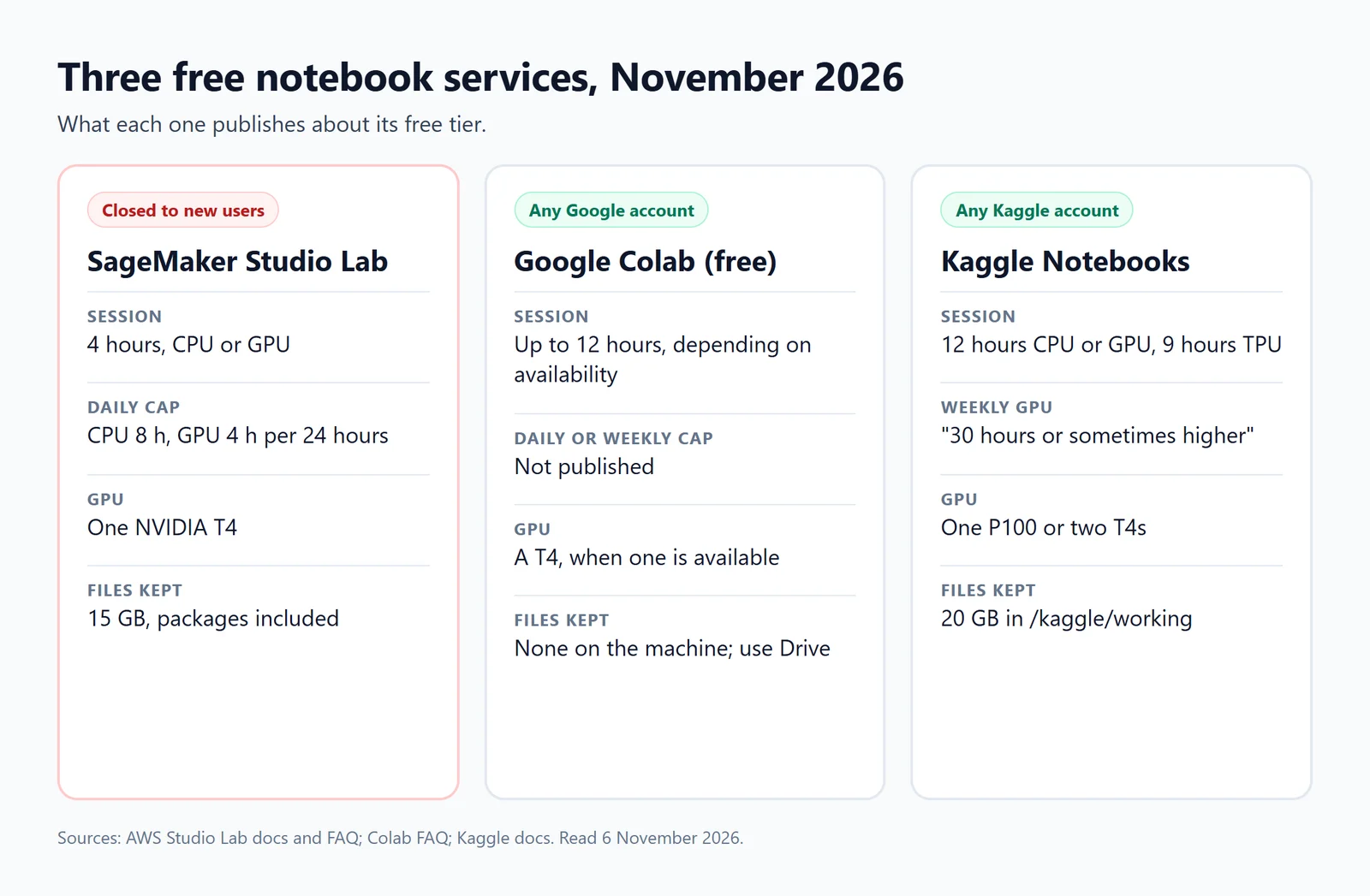
What each service publishes about its free tier, November 2026.
| SageMaker Studio Lab | Google Colab (free) | Kaggle Notebooks | |
|---|---|---|---|
| New sign-ups | Closed since 30 July 2026 | Any Google account | Any Kaggle account |
| Longest session | 4 hours (CPU or GPU) | "At most 12 hours, depending on availability" | 12 hours CPU or GPU, 9 hours TPU |
| Daily or weekly cap | CPU 8 hours and GPU 4 hours per 24 hours | Not published | GPU about 30 hours a week, "or sometimes higher" |
| GPU | One NVIDIA T4 | A T4 "subject to quota restrictions and availability" | One P100 or two T4s |
| Storage kept | 15 GB, packages included | None on the machine | 20 GB in /kaggle/working |
| Closing the tab | Keeps running until the limit | Stops | Save & Run All runs as its own session |
Jupyter notebooks for your team.
Start free →What to use instead
- For a free GPU: Kaggle. It publishes its weekly GPU allowance, runs sessions for up to 12 hours and keeps 20 GB of files. See our guide to Kaggle Notebooks and our Kaggle vs Colab comparison.
- For the quickest start: Google Colab. Any Google account, a T4 when one is free, and nothing kept between sessions. Its limits are in our Colab limits guide.
- For AWS: SageMaker Studio. AWS calls it "a complete replacement for SageMaker Studio Lab". Since 15 October 2026, new customers can sign up with Google, GitHub or Apple and get "free credits as part of the AWS Free Tier with no credit card required in most cases": $100 at sign-up and up to $200 over six months. That's credit that runs out, not a free T4 every day. If you're moving from Studio Lab, your files, notebooks and conda environment files carry over; your usage history doesn't.
- For notebooks with nothing to install: JupyterLite runs Jupyter in your browser, at jupyter.org/try, with no server at all. More options are in our guide to running Jupyter notebooks online.
When the notebook is for a team
Studio Lab was built "for learning and experimentation only", one project per person. When a notebook reads company data and other people rely on its results, the needs change: credentials kept out of the code, a schedule, and colleagues who can open it with their own login.
Fastero is an AI and data platform where people and AI agents work together on a team's data, and its notebooks are real .ipynb files that run next to that data:
- Files that stay put. Notebooks and project files are kept in the workspace, and database passwords live in its Secrets, reaching cells as environment variables.
- SQL cells query a workspace connection and hand the rows to Python as a pandas DataFrame.
- Schedules on the Free plan. Run a notebook now or on any cron schedule, with no browser open.
- Sharing with a sign-in. Colleagues open it with their own login; viewers are free.
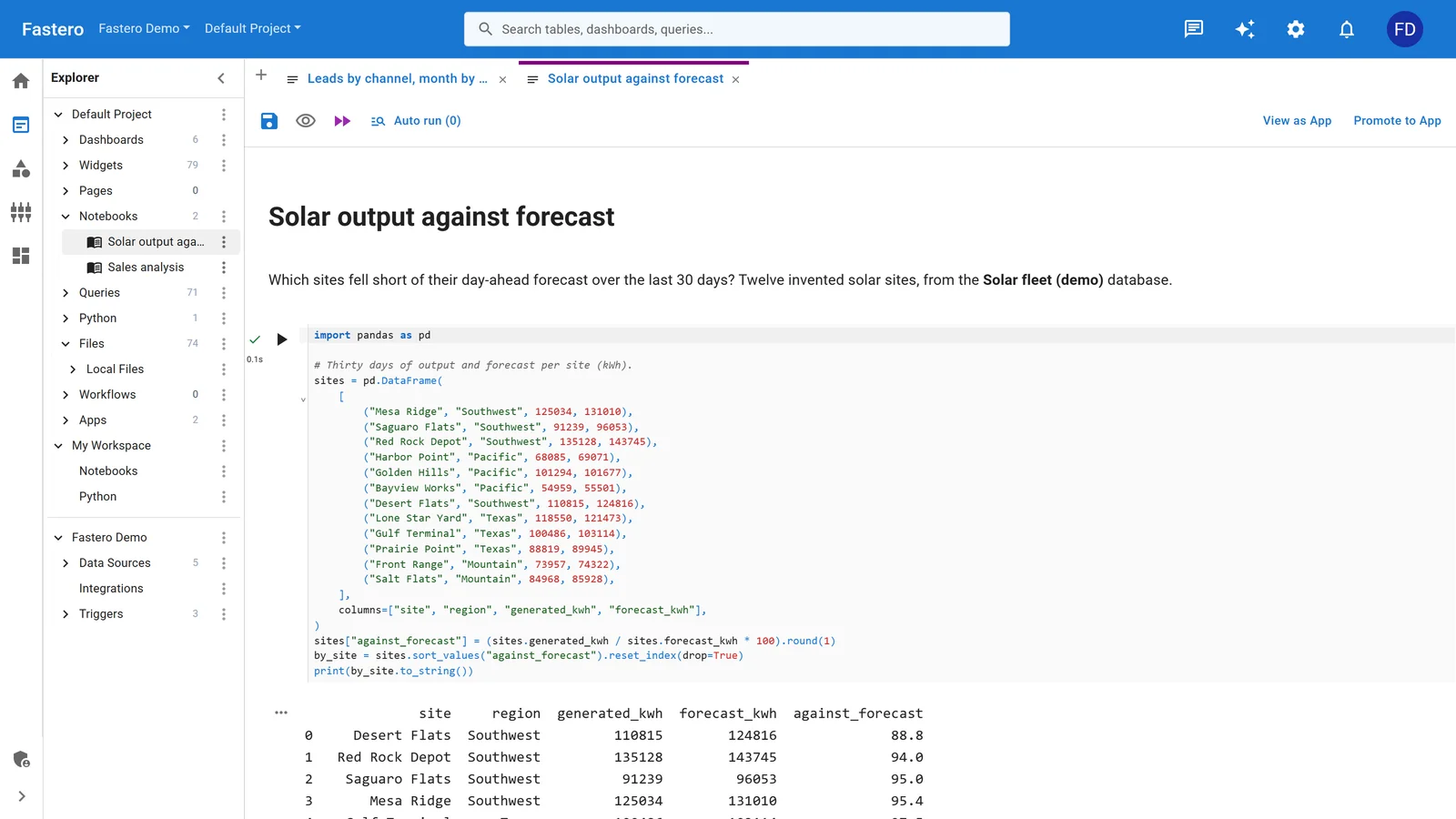
A notebook in a Fastero project, beside the project's queries and data sources. Sample data.
Fastero runs notebooks on CPU machines and has no GPUs, so for training models keep Kaggle or Colab.
FAQ
Is SageMaker Studio Lab still available in 2026?
For existing users, yes. AWS stopped accepting new customers on 30 July 2026, and says it doesn't plan new features. Existing accounts keep working as before.
Why can't I request a SageMaker Studio Lab account?
Because AWS closed sign-ups on 30 July 2026, and the Request account button was removed. AWS's onboarding page still describes the old process, but no new accounts are being created.
Is SageMaker Studio Lab free?
Yes, for existing accounts: no AWS account or credit card. Its replacement, SageMaker Studio, gives new customers AWS Free Tier credits that run out, rather than a free daily allowance.
How many free GPU hours does SageMaker Studio Lab give?
Four hours in any 24 hours, in sessions of up to 4 hours, on one NVIDIA T4, when a GPU is available. CPU runtimes allow 8 hours a day in 4-hour sessions.
What GPU does SageMaker Studio Lab use?
An NVIDIA T4, on a G4dn.xlarge instance. CPU runtimes use a T3.xlarge.
Do my files and packages stay after a Studio Lab session?
Yes. Your project's 15 GB is kept between sessions, packages you install included, though edits you haven't saved when a runtime ends are lost.
SageMaker Studio Lab vs Google Colab: which is better?
For new users the question is settled: Studio Lab is closed. For existing users, Studio Lab keeps files and packages and runs with the tab closed, while free Colab allows longer sessions but keeps nothing on the machine.
What can I use instead of SageMaker Studio Lab?
Kaggle Notebooks for a free GPU with a published weekly allowance, Google Colab for the quickest start, SageMaker Studio for AWS with free credits, and a team workspace such as Fastero for notebooks on company data.
Sources
Read on 6 November 2026; Studio Lab's own site from Wayback Machine copies of 18 July, 26 July and 8 October 2026:
- AWS — Studio Lab availability change, Studio Lab overview, Studio Lab documentation, Troubleshooting, Studio Lab FAQ (Wayback, 18 July 2026), SageMaker Studio social sign-in (15 October 2026), AWS Free Tier, Studio Lab launch (December 2021)
- User reports — aws/studio-lab-examples issues
- Google — Colab FAQ, Making the most of your Colab subscription
- Kaggle — Notebooks documentation, Efficient GPU usage tips
Try Fastero free — run notebooks next to your team's data, keep their files, and schedule and share them with a sign-in. No credit card required.