 Fastero Dev Team
Most comparisons of JupyterLab and Jupyter Notebook describe the classic Notebook 6: a plain single-document app with no terminal, no debugger and no real-time collaboration, against a full IDE. That stopped being true in July 2023, when Notebook 7 was rebuilt from JupyterLab's own components. We installed both on 6 November 2026, the day Notebook 7.6.5 and JupyterLab 4.6.6 came out, to see what actually differs now.
The short answer: since Notebook 7, Jupyter Notebook is built from JupyterLab's components and runs on the same Jupyter Server. Both open the same .ipynb files with the same kernels, and installing Notebook installs JupyterLab too. The difference is layout: Notebook shows one document per browser tab, while JupyterLab puts notebooks, terminals, consoles and files side by side in tabs and split panes. Both have a debugger, a table of contents, dark mode and optional real-time collaboration. Pick Notebook for focused work on one notebook and for teaching, JupyterLab for daily work across many files; switching takes one click.
Fastero
Jupyter notebooks for your team, with nothing to install.
Start a notebook or bring your .ipynb files. SQL cells query your databases with no password in the code, and a notebook runs now or on a schedule. Colleagues open it with their own login; viewers are free.
Try free →What changed with Notebook 7
Project Jupyter decided in late 2021 to keep developing the Notebook application and rebuild it, and Notebook 7.0 shipped in July 2023. The announcement put it plainly: "The major change is building the Jupyter Notebook 7 interface with JupyterLab components so that the two applications share a common codebase and extension system."
The two now behave as two front ends of one server. "When you run either application using jupyter lab or jupyter notebook, we automatically detect if the other application is installed and enable its user experience as well." Each Notebook 7 release is based on a JupyterLab 4 release: Notebook 7.6 "is based on JupyterLab 4.6".
What we saw running both
We installed both with pip install jupyterlab notebook in a clean Python 3.14 environment on Windows 11 and got Notebook 7.6.5, JupyterLab 4.6.6 and Jupyter Server 2.21.1. Then we started each server and checked what it serves:
| Address | Server started with jupyter notebook |
Server started with jupyter lab |
|---|---|---|
/ |
Redirects to /tree |
Redirects to /lab |
/tree (Notebook's file list) |
Works | Works |
/lab (JupyterLab) |
Works | Works |
/notebooks/<file>.ipynb (Notebook's editor) |
Works | Works |
Both commands loaded the same server extensions, and each server served both interfaces; the only difference was the page / sends you to. Notebook's toolbar has a JupyterLab button and JupyterLab's notebook toolbar has a Notebook button, each opening the same file in the other interface.
Two installation details surprised us. pip show notebook lists JupyterLab among its requirements, so installing Notebook installs both. The reverse isn't true: in a second environment with only pip install jupyterlab, jupyter notebook failed with "Jupyter command jupyter-notebook not found." and /tree returned a 404. If you want both, install notebook. Our guide to installing Jupyter Notebook covers the rest.
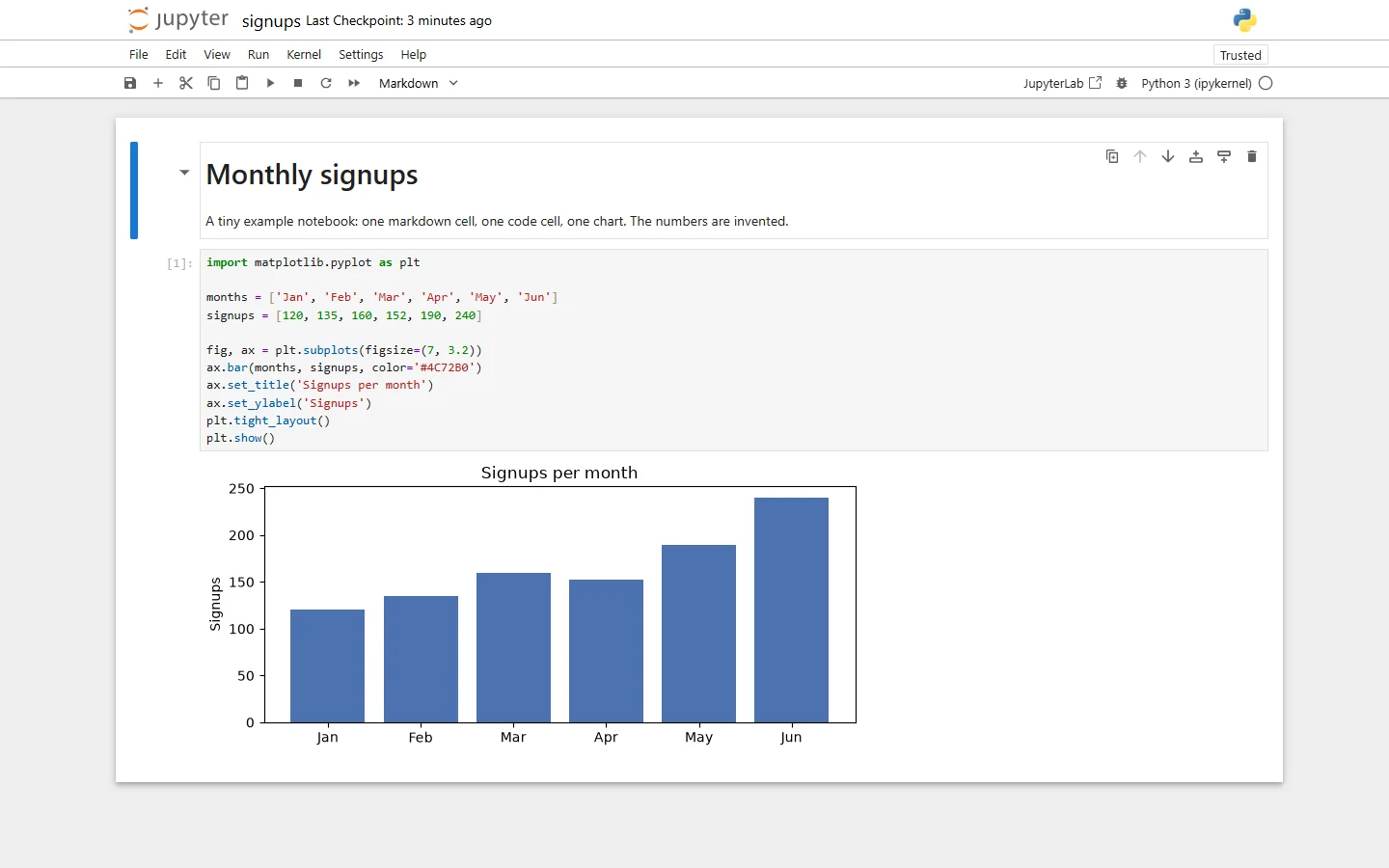
Jupyter Notebook 7.6: one notebook, one browser tab, with a button to open it in JupyterLab. Invented data.
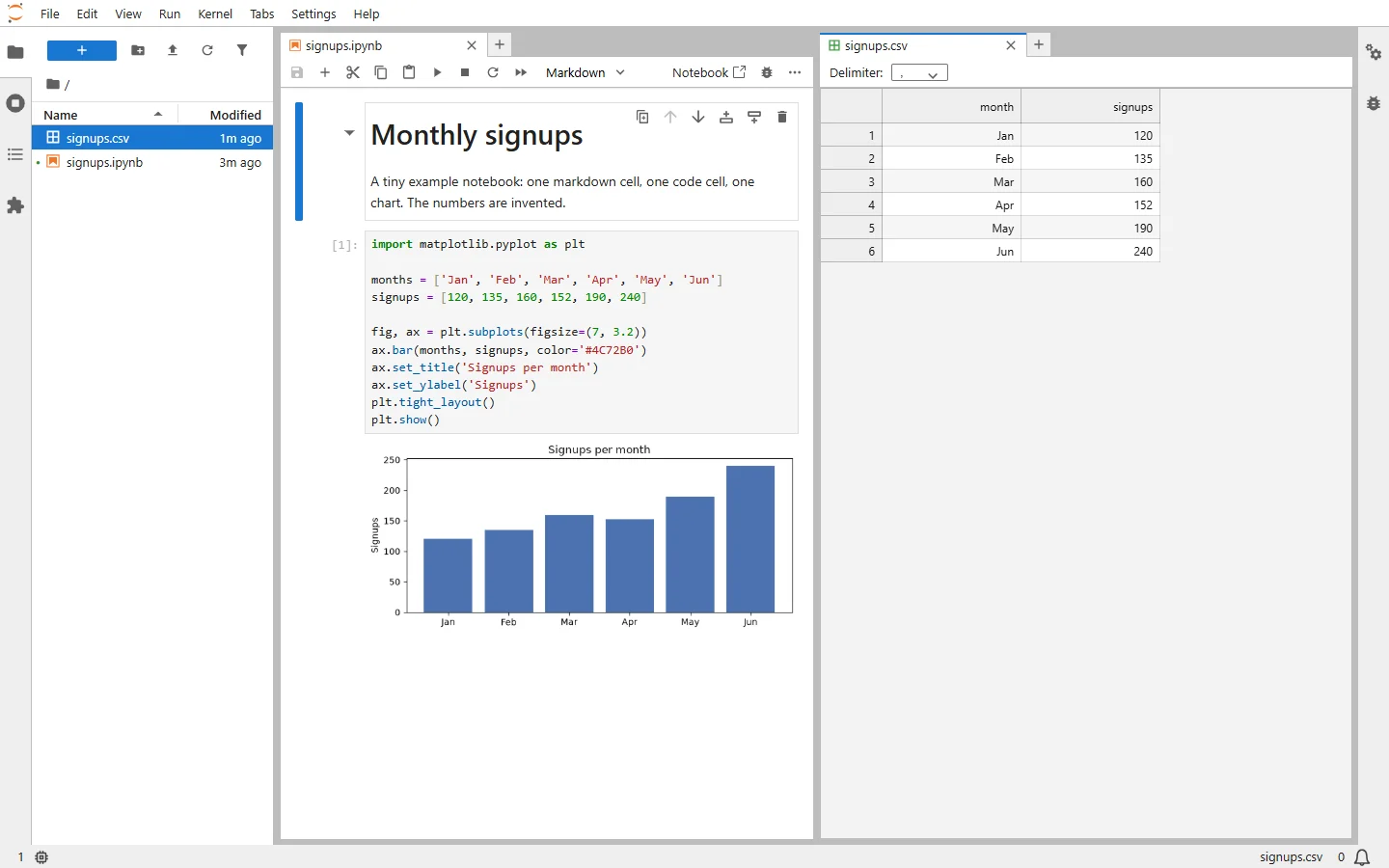
JupyterLab 4.6: the same notebook beside the CSV it uses, in split panes. Invented data.
The differences that remain
| Jupyter Notebook 7.6 | JupyterLab 4.6 | |
|---|---|---|
| Start command | jupyter notebook, opens /tree |
jupyter lab, opens /lab |
| Layout | One document per browser tab, with optional side panels | Tabs, panes split four ways, movable sidebars, a Launcher |
| File browser | Its own page, or a side panel | Left sidebar |
| Terminals and consoles | Yes, each on its own page; a scratchpad console beside a notebook since 7.6 | Yes, as tabs beside your documents |
| Debugger, table of contents, dark mode | Yes | Yes |
| Real-time collaboration | With the jupyter-collaboration extension |
The same extension |
| Extensions | Most JupyterLab extensions | Extension Manager that installs from PyPI |
| Viewing other files | A text editor | CSV grid, JSON, images, PDFs and Markdown preview beside notebooks |
| Server, kernels, file format | The same | The same |
Notebook keeps what its developers call "the document-centric experience, where each individual notebook opens in a separate browser tab and the visible tools and menus are focused on the open document." JupyterLab is the workspace: "You can arrange multiple documents and activities side by side in the work area using tabs and splitters." JupyterLab also has a single-document mode, called Simple Interface, if you want its features with Notebook's focus.
The debugger needs a kernel that supports debugging, and the standard Python kernel, ipykernel, does. Real-time collaboration comes with a warning in its documentation: "Collaborators will have full access to your JupyterLab environment, including the ability to edit and execute cells."
Jupyter notebooks for your team.
Start free →Which one to use
Jupyter Notebook if you work on one notebook at a time, teach, or want the least on screen. It also adapts better to small screens: Notebook 7 "automatically switches to a more compact layout on mobile devices".
JupyterLab if your day mixes notebooks with scripts, data files and terminals, and you want them side by side, or if you rely on extensions.
Either, since they share a server: start whichever you open most and press the button to switch when you need the other.
What happened to the classic Notebook and nbextensions
Classic Notebook 6 still exists but has stood still. The project's README lists it as maintained for "Maintenance and security-related issues", the nbclassic FAQ calls 6.5.x "intended to be end of life", and the last 6.x release was 6.5.7 in May 2024. To get the classic interface back alongside Notebook 7, install nbclassic, which serves it at /nbclassic/tree.
The old extensions don't carry over. The popular jupyter_contrib_nbextensions package has had an open issue since August 2023 saying "It appears that this is no longer compatible with Jupyter Notebook V7." Look for the JupyterLab extension that does the same job; most work in Notebook 7 too.
When notebooks need to be shared
Both interfaces run on your own machine, or on a server you look after. When a notebook reads company data and colleagues need its results, the questions become who can open it, where the database password lives, and what runs it every morning.
Fastero is an AI and data platform where people and AI agents work together on a team's data. Its notebooks are standard .ipynb files, so you can bring in what you wrote in JupyterLab or Notebook:
- SQL cells query a workspace connection and hand the rows to Python as a pandas DataFrame, with credentials kept out of the notebook.
- Schedules: run a notebook now or on any cron schedule, on the Free plan.
- Sharing: colleagues sign in with their own login; viewers are free and can read without changing anything.
- Promote to App turns a notebook into an app behind the same login.
More on running Jupyter notebooks online and sharing a Jupyter notebook.
FAQ
What is the difference between JupyterLab and Jupyter Notebook?
Since Notebook 7, mainly layout. Both are built from the same components and run on the same server. Notebook shows one document per browser tab; JupyterLab arranges notebooks, terminals, consoles and files in tabs and split panes.
Is Jupyter Notebook being replaced by JupyterLab?
No. Jupyter Notebook continues as Notebook 7, rebuilt on JupyterLab's components. What's being retired is the classic Notebook 6 interface, which gets only maintenance and security fixes and hasn't had a release since May 2024.
Is JupyterLab better than Jupyter Notebook for beginners?
Notebook is simpler to start with: one notebook, fewer panels. Since both run on the same server, a beginner can switch to JupyterLab with one click when they need more.
Does pip install notebook install JupyterLab?
Yes. Notebook 7 depends on JupyterLab, so pip install notebook installs both. pip install jupyterlab alone doesn't install Notebook.
Can I use JupyterLab and Jupyter Notebook at the same time?
Yes. One server serves both: start it with either command and open /lab or /tree, or use the button in the notebook toolbar to switch.
Do JupyterLab and Jupyter Notebook use the same files and kernels?
Yes, the same .ipynb format and the same kernels.
Does Jupyter Notebook have a terminal and a debugger?
Notebook 7 has both: open a terminal from the New menu on the file list, and a debugger that "allows you to step through your code cell by cell."
How do I get the classic Jupyter Notebook back?
Install nbclassic, which serves the classic interface at /nbclassic/tree next to Notebook 7, or pin notebook<7 in an environment kept for old extensions.
Sources
Read on 6 November 2026:
- Project Jupyter — Announcing Jupyter Notebook 7, Notebook 7 features, Notebook changelog, Notebook README, nbclassic developer FAQ, JupyterLab overview, JupyterLab debugger, Real-time collaboration
- PyPI — notebook, jupyterlab
- jupyter_contrib_nbextensions issue #1647
- Our own test: Notebook 7.6.5, JupyterLab 4.6.6, Jupyter Server 2.21.1, Python 3.14.3, Windows 11
Try Fastero free — bring your Jupyter notebooks, run them next to your team's data, and schedule and share them with a sign-in. No credit card required.