 Fastero Dev Team
An MCP server gives an AI client such as Claude or Claude Code a set of tools it can call. In Python each tool is a typed function, and the library turns the type hints into the schema the model reads. We built one over a CSV of invented sales data, tested it four ways and kept every output.
The short answer: install the official SDK with pip install "mcp[cli]" (version 2.3.0) or FastMCP with pip install fastmcp (version 4.2.2, which installs the official SDK too). Both turn a type-hinted function into an MCP tool. In SDK version 2 the class older tutorials call FastMCP is MCPServer, and from mcp.server.fastmcp import FastMCP fails. mcp.run() serves over stdio, which Claude Code and Claude Desktop launch on your machine; mcp.run(transport="streamable-http") serves http://127.0.0.1:8000/mcp. Test it with npx @modelcontextprotocol/inspector --cli python server.py --method tools/list, then add it with claude mcp add sales -- python /absolute/path/server.py.
Fastero
Point Claude at your database.
Add Fastero to claude.ai or Claude Code. Claude builds the dashboard, deploys the app or publishes a live page, and your team opens it in Fastero.
Try free →The official SDK and FastMCP: how they relate
| Official MCP SDK | FastMCP | |
|---|---|---|
| Install | pip install "mcp[cli]" |
pip install fastmcp |
| Latest version | 2.3.0, 2 October 2026 | 4.2.2, 18 November 2026 |
| Made by | The Model Context Protocol project | Prefect |
| License | MIT | Apache-2.0 |
| Python | 3.10 or later | 3.11 or later |
| Server class | from mcp.server import MCPServer |
from fastmcp import FastMCP |
| HTTP transport name | "streamable-http" |
"http" |
| Installed in our venv | 38 packages, 91 MB (with cli) |
63 packages, 134 MB, mcp 2.3.0 among them |
| PyPI downloads, last week | 80.1 million | 17.4 million |
| GitHub stars | 24,907 | 28,673 |
Checked 20 November 2026 on PyPI, pypistats.org and GitHub. Every FastMCP install also downloads mcp, so the download counts overlap.
FastMCP's README says "FastMCP 1.0 was incorporated into the official MCP Python SDK in 2024", so in SDK 1.x, from mcp.server.fastmcp import FastMCP was the official way to write a server. Version 2.0.0, released 28 July 2026, renamed it: "The FastMCP class has been renamed to MCPServer to better reflect its role as the main server class in the SDK." The old path is gone, not deprecated. On mcp 2.3.0 it raises this, and the 1.x line still gets releases (1.30.0 on 7 September 2026), so pinning works:
ModuleNotFoundError: No module named 'mcp.server.fastmcp'. This is mcp 2.x, where FastMCP was renamed to MCPServer (from mcp.server.mcpserver import MCPServer) and other APIs changed; see the migration guide at https://py.sdk.modelcontextprotocol.io/v2/migration/#fastmcp-renamed-to-mcpserver or pin 'mcp<2' to keep running v1 code.The FastMCP project carried on separately, and version 4 "builds on that same SDK v2". Its upgrade guide calls MCPServer "the SDK's ergonomic surface over the protocol", while FastMCP adds "composition, middleware, proxying, authentication providers, tool transformation, a client, and a testing story."
- Pick the official SDK for a small server with fewer dependencies, or to match the protocol's own docs: modelcontextprotocol.io's Python quickstart uses
MCPServerand says "You must use the Python MCP SDK 2.0.0 or higher." - Pick FastMCP if you want middleware, auth providers, proxying or composing servers, or its CLI, such as
fastmcp install claude-code server.py.
Switching later is mostly renaming. Our server's FastMCP copy changes four lines of code:
-from mcp.server import MCPServer
-from mcp.server.mcpserver.exceptions import ToolError
+from fastmcp import FastMCP
+from fastmcp.exceptions import ToolError
-mcp = MCPServer("sales-readonly", instructions="Invented sample sales data. Every tool is read-only.")
+mcp = FastMCP("sales-readonly", instructions="Invented sample sales data. Every tool is read-only.")
-    mcp.run()  # stdio by default; mcp.run(transport="streamable-http") serves http://127.0.0.1:8000/mcp
+    mcp.run()  # stdio by default; mcp.run(transport="http") serves http://127.0.0.1:8000/mcp
Build a read-only data server (tested)
The data is Fastero's invented sample: 4,734 orders from November 2024 to October 2026. Setup on Windows 11 with Python 3.14.3 (on macOS or Linux the path is .venv/bin/python):
python -m venv .venv
.venv\Scripts\python -m pip install "mcp[cli]==2.3.0"sales_server.py, with two tools:
import csv
import os
from collections import defaultdict
from pathlib import Path
from typing import Literal

from mcp.server import MCPServer
from mcp.server.mcpserver.exceptions import ToolError
from mcp.types import ToolAnnotations

CSV_PATH = Path(os.environ.get("SALES_CSV", Path(__file__).with_name("sample-sales.csv")))

# Read once at start-up into an immutable tuple. No tool reopens the file,
# and no tool takes SQL, a path or free text, so a call can't write or reach anything else.
with CSV_PATH.open(newline="", encoding="utf-8") as f:
    ROWS = tuple(csv.DictReader(f))

NUMBERS = {"order_id": int, "quantity": int, "unit_price": float, "revenue": float}
READ_ONLY = ToolAnnotations(read_only_hint=True, idempotent_hint=True, open_world_hint=False)

mcp = MCPServer("sales-readonly", instructions="Invented sample sales data. Every tool is read-only.")


@mcp.tool(annotations=READ_ONLY)
def list_columns() -> dict:
    """List the sales table's columns with an example value each, the row count and the date range."""
    dates = [r["order_date"] for r in ROWS]
    return {
        "rows": len(ROWS),
        "first_order": min(dates),
        "last_order": max(dates),
        "columns": [
            {"name": k, "type": "number" if k in NUMBERS else "text", "example": v}
            for k, v in ROWS[0].items()
        ],
    }


@mcp.tool(annotations=READ_ONLY)
def aggregate(
    measure: Literal["revenue", "quantity", "orders"],
    group_by: Literal["region", "channel", "segment", "category", "product", "month"],
    top: int = 10,
) -> list[dict]:
    """Total revenue, quantity or order count by one column, largest first.
    group_by "month" groups on the order date's YYYY-MM and returns months in date order."""
    if not 1 <= top <= 50:
        raise ToolError("top must be between 1 and 50")
    totals: dict[str, float] = defaultdict(float)
    for r in ROWS:
        key = r["order_date"][:7] if group_by == "month" else r[group_by]
        totals[key] += 1 if measure == "orders" else NUMBERS[measure](r[measure])
    if group_by == "month":
        ranked = sorted(totals.items())[-top:]
    else:
        ranked = sorted(totals.items(), key=lambda kv: kv[1], reverse=True)[:top]
    return [{group_by: k, measure: round(v, 2) if measure == "revenue" else int(v)} for k, v in ranked]


if __name__ == "__main__":
    mcp.run()  # stdio by default; mcp.run(transport="streamable-http") serves http://127.0.0.1:8000/mcp
It is read-only because of how it's built, not because of a flag:
- The file is read once. Rows go into an immutable tuple at start-up, and no code path opens the CSV again, let alone for writing.
- No tool takes SQL, a path or free text.
measureandgroup_byareLiteraltypes, which become anenumin the schema, so the SDK rejects any other value before the function runs.topis capped at 50. - The annotation is a hint.
read_only_hint=Truetells the client the tool changes nothing, which a client may use to skip a confirmation. The SDK's docs say annotations "are hints, not security. Never rely on a client honouring them."
On a real database, the first lock is a login that can only read; tool code is the second. Postgres MCP servers shows such a role.
Test it without Claude
The SDK's Client connects to the server object in memory ("No subprocess. No port. Nothing on a wire.") or starts the file as a subprocess over stdio, as Claude does. The core of our test script:
async with Client(mcp) as client:  # the server object, in memory
    await run(client, "in memory")
stdio = StdioServerParameters(command=sys.executable, args=[str(HERE / "sales_server.py")])
async with Client(stdio) as client:  # a real subprocess
    ...
Its output (the list_columns result and a pydantic help link removed):
=== in memory: 2 tools
list_columns  read_only=True  args=[]
aggregate  read_only=True  args=['measure', 'group_by', 'top']
--- aggregate revenue by channel: is_error=False
{"result": [{"channel": "Online", "revenue": 708129.4}, {"channel": "Sales team", "revenue": 461236.82}, {"channel": "Partner", "revenue": 304334.65}]}
--- aggregate with SQL in group_by: is_error=True
Error executing tool aggregate: 1 validation error for aggregateArguments
group_by
  Input should be 'region', 'channel', 'segment', 'category', 'product' or 'month' [type=literal_error, input_value='region; DROP TABLE sales', input_type=str]
--- aggregate top=500: is_error=True
Error executing tool aggregate: top must be between 1 and 50
=== stdio subprocess: ['list_columns', 'aggregate']
--- aggregate revenue by month, last 3: is_error=False
{"result": [{"month": "2026-08", "revenue": 87202.49}, {"month": "2026-09", "revenue": 64819.38}, {"month": "2026-10", "revenue": 57517.58}]}
The SQL-shaped value never reached the function. Both refusals came back as results with is_error=True rather than crashes, so a model reads the message and can retry. The channel totals match an awk sum of the CSV to the cent. The FastMCP copy, called through FastMCP's own in-memory Client, listed the same two read-only tools and refused a group_by outside the enum:
[('list_columns', True), ('aggregate', True)]
[{'region': 'West', 'orders': 1371}, {'region': 'North', 'orders': 1310}, {'region': 'East', 'orders': 1082}, {'region': 'South', 'orders': 971}]
ToolError 1 validation error for call[aggregate]
Point Claude at your database.
Start free →Test it in the MCP Inspector
The MCP Inspector is the protocol's own debugging client: one npm package with a web UI, a terminal UI and a CLI. Version 2.16.0 is current (checked 20 November 2026). The CLI needs no browser, so it suits a terminal or CI job:
npx @modelcontextprotocol/inspector --cli .venv/Scripts/python.exe sales_server.py --method tools/list
npx @modelcontextprotocol/inspector --cli .venv/Scripts/python.exe sales_server.py --method tools/call --tool-name aggregate --tool-arg measure=revenue --tool-arg group_by=category --tool-arg top=3
tools/list shows what the model is given, including the enum and the hints (excerpt):
"group_by": {"enum": ["region", "channel", "segment", "category", "product", "month"], "title": "Group By", "type": "string"},
"annotations": {"readOnlyHint": true, "idempotentHint": true, "openWorldHint": false}
The call returned, with the three text copies of the rows shortened:
{
  "content": [ ... ],
  "structuredContent": {
    "result": [
      { "category": "Hardware", "revenue": 704343.33 },
      { "category": "Software", "revenue": 374298.41 },
      { "category": "Supplies", "revenue": 198371.68 }
    ]
  },
  "isError": false
}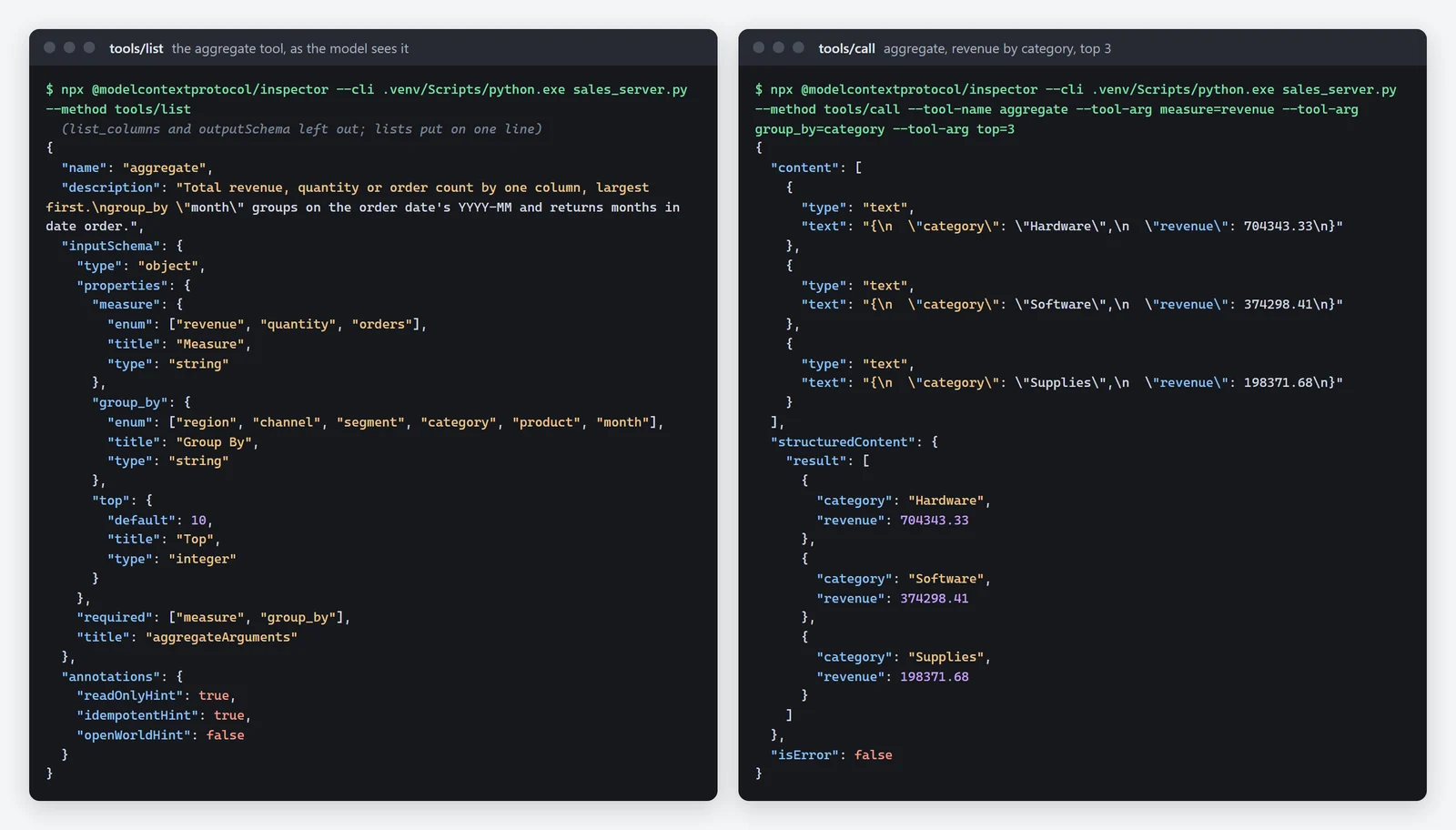
MCP Inspector 2.16.0's CLI against our server: real output, set as a terminal page. The tools/list result is cut to one tool, with its lists on one line. Invented sample data.
npm warned that 2.16.0 wants Node ^22.23.4 || ^24.22.1 || >=26.12.1; we had 24.12.0 and it ran anyway. The first npx run took 32 seconds, including the download. For the web UI, drop --cli, or run uv run mcp dev server.py from the SDK's CLI.
stdio or streamable HTTP
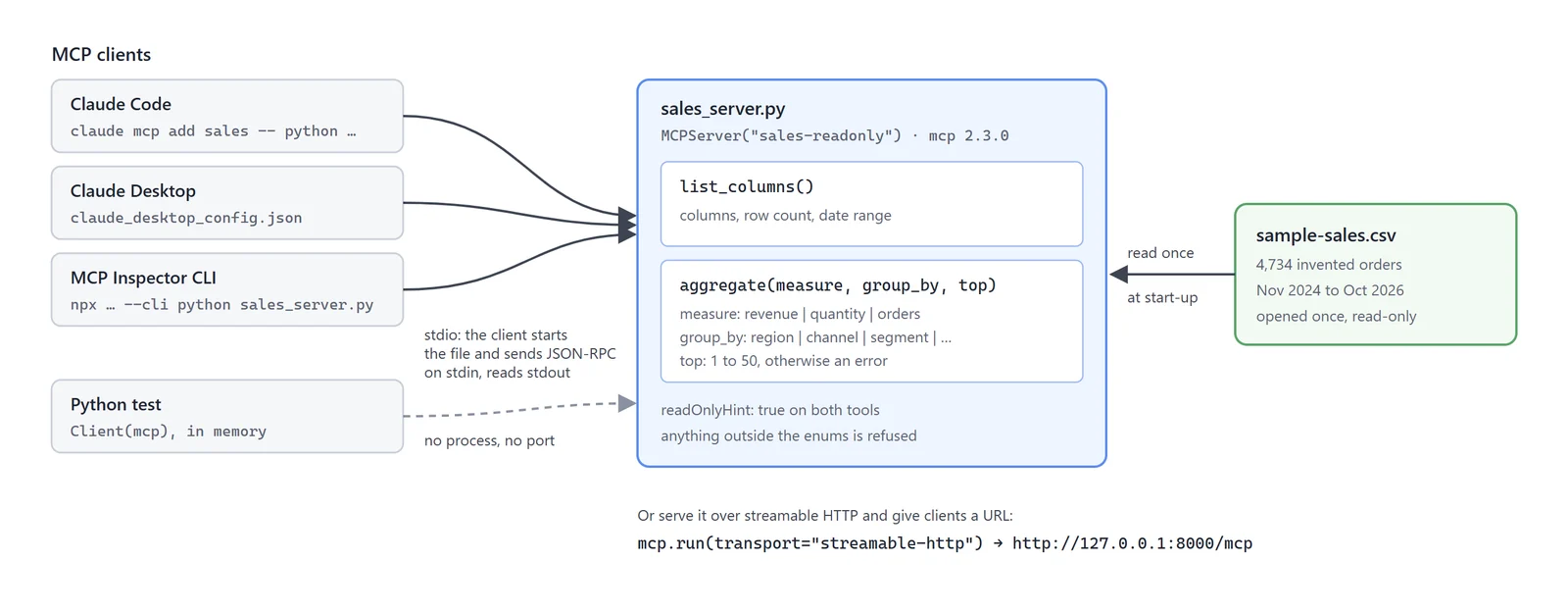
How the example connects: clients start the server over stdio, and the server reads the CSV once. The CSV holds 4,734 invented orders.
| stdio | Streamable HTTP | |
|---|---|---|
| How it runs | The client starts your file and talks over stdin and stdout | Your server listens on a port; clients connect to a URL |
| Official SDK | mcp.run() |
mcp.run(transport="streamable-http", port=8000) |
| FastMCP | mcp.run() |
mcp.run(transport="http", port=8000) |
| Address | None: "You never pick a port, and nothing listens on one" | http://127.0.0.1:8000/mcp by default |
| Use it for | One person on one machine | A server several people or clients share |
| Watch for | Anything printed to stdout corrupts the protocol; log to stderr | Authentication, and for claude.ai a public HTTPS address |
The older SSE transport was "superseded by Streamable HTTP in the 2025-03-26 protocol revision"; don't build on it. We served the same file on port 8765 (Docker held 8000 on this laptop) and called it by URL:
over HTTP: ['list_columns', 'aggregate']
{'result': [{'segment': 'Small business', 'quantity': 9726}, {'segment': 'Mid-market', 'quantity': 5703}, {'segment': 'Enterprise', 'quantity': 2282}]}
A localhost server works in Claude Code, but not as a claude.ai connector: Claude "connects to your remote MCP server from Anthropic's cloud infrastructure, rather than from your local device", so the server "must be reachable over the public internet from Anthropic's IP ranges", on port 443.
Add it to Claude Code and Claude Desktop
We didn't run these, so they're from the docs and from claude mcp add --help in Claude Code 2.1.284. In Claude Code, everything after -- is the command that starts the server; use absolute paths:
# stdio: Claude Code starts the server
claude mcp add sales -- /absolute/path/.venv/bin/python /absolute/path/sales_server.py
# on Windows
claude mcp add sales -- C:/work/mcp/.venv/Scripts/python.exe C:/work/mcp/sales_server.py
# streamable HTTP: a server that is already running
claude mcp add --transport http sales http://127.0.0.1:8000/mcp
The default scope is local (this project, only you); --scope user adds it to every project. Run /mcp in a session to check it connected. More on scopes and .mcp.json in Claude Code MCP.
In Claude Desktop, open Settings → Developer → Edit Config and add the same command to claude_desktop_config.json (~/Library/Application Support/Claude/ on macOS, %APPDATA%\Claude\ on Windows). On Windows, use forward slashes or doubled backslashes in JSON paths:
{
  "mcpServers": {
    "sales": {
      "command": "C:/work/mcp/.venv/Scripts/python.exe",
      "args": ["C:/work/mcp/sales_server.py"]
    }
  }
}
Then fully quit Claude Desktop, not just its window, and reopen it. uv run mcp install server.py writes the entry for you; the server's errors land in mcp-server-<NAME>.log under %APPDATA%\Claude\logs or ~/Library/Logs/Claude. More in the Claude Desktop config guide.
Security: what read-only covers
- Tools run as you. A local server is a process under your account; the MCP docs warn it "runs with your user account permissions". Read a server's code before you add it.
- Results can carry prompt injection. Every value a tool returns reaches the model as text. A product name in this CSV that read like an instruction would go straight into Claude's context; Claude Code's docs warn that servers fetching outside content "can expose you to prompt injection risk".
- Read-only has to be built in. This server has no write path to misuse, which matters more than any hint it sends.
Our twelve checks before connecting any server are in MCP security.
When you'd rather not build a data server
Writing a server is the right call for local files, an internal API or logic only you have. For a team's databases, someone then has to host it, add sign-in and keep its credentials safe. Fastero is an AI and data platform where people and AI agents work together on a team's data, and it runs that server for you:
- A remote HTTP MCP server at
https://api.fastero.com/api/v1/mcpwith OAuth sign-in. In Claude Code:claude mcp add --scope user --transport http fastero https://api.fastero.com/api/v1/mcp, then/mcpto sign in through the browser. Settings → AI Agent Access shows the steps, and Claude's connector directory lists Fastero (Community). - Databases connect once, in the workspace, not in each agent's config, so no database password sits in a config file on anyone's laptop.
- Read-only SQL: its
run_sqltool takes oneSELECT,WITH,EXPLAINorSHOWstatement, refuses anything that could change data, and returns at most 500 rows. - Keys for scripts that can't sign in: at most 90 days, read and SQL only by default.
- Tested with Claude and Claude Code.
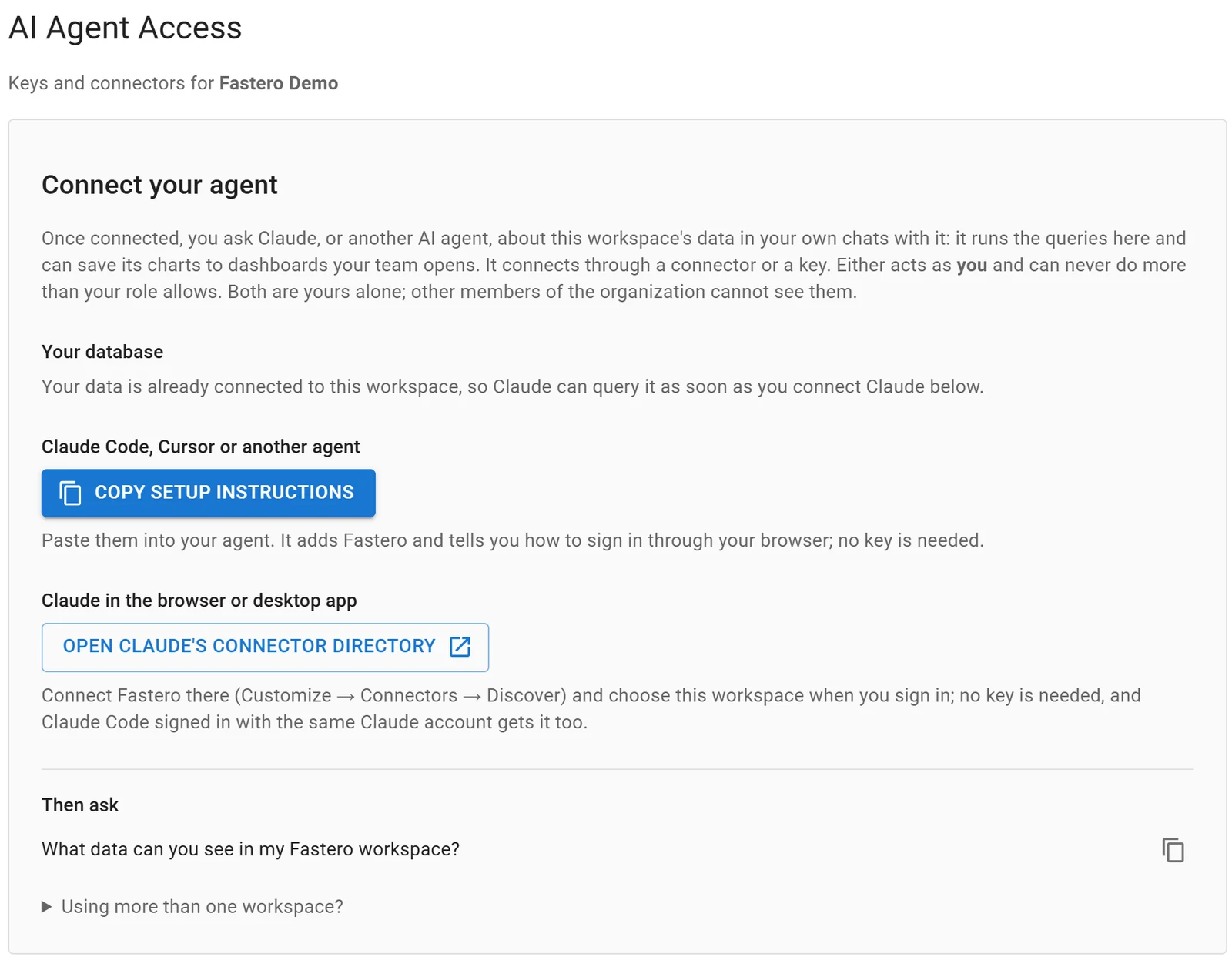
Settings, AI Agent Access: an agent signs in through the browser, so there is no key to copy.
MCP server examples lists other hosted servers, and what an MCP server is shows the protocol messages underneath.
FAQ
What is FastMCP?
FastMCP is an open-source Python framework for MCP servers and clients, made by Prefect and installed with pip install fastmcp. Version 4.2.2 is current (checked 20 November 2026), and it is built on the official mcp SDK, which it installs as a dependency.
Is FastMCP part of the official MCP Python SDK?
It was. FastMCP 1.0 became the SDK's high-level server in 2024, but SDK version 2 renamed that class MCPServer. The fastmcp package on PyPI is a separate project that builds on the SDK.
How do I build an MCP server in Python?
Install mcp or fastmcp, write each tool as a function with type hints and a docstring under @mcp.tool(), and call mcp.run(). Test it with the SDK's in-memory Client or the MCP Inspector, then add it to your client with an absolute path to your Python.
How do I test an MCP server?
Run npx @modelcontextprotocol/inspector --cli <command that starts your server> --method tools/list, then --method tools/call --tool-name <name> --tool-arg key=value. In Python tests, Client(mcp) connects to the server object in memory, with no process or port.
Why does from mcp.server.fastmcp import FastMCP fail?
Because mcp 2.x renamed the class. Use from mcp.server import MCPServer, switch to from fastmcp import FastMCP with the fastmcp package, or pin mcp<2.
Sources
Read on 20 November 2026; versions from PyPI and npm, downloads from pypistats.org, stars from GitHub the same day. Tests ran on Windows 11 with Python 3.14.3, mcp 2.3.0, fastmcp 4.2.2, MCP Inspector 2.16.0 and Node 24.12.0.
- MCP Python SDK: PyPI, What's new in v2, Migration guide, Running your server, Tools, Testing, Connect to a real host, Client transports
- FastMCP: PyPI, Upgrading from MCP SDK v2, Tools, Running your server, Claude Code
- MCP Inspector and its CLI
- modelcontextprotocol.io: Build a server, Connect to local servers, Transports, Security best practices
- Claude: Claude Code MCP docs, Custom connectors using remote MCP
Try Fastero free: connect Claude to your team's databases through a hosted MCP server, with read-only SQL and nothing to host. No credit card required.