 Fastero Dev Team
A SQL notebook is a document made of cells: some hold SQL that runs on a database and shows its result as a table right below, others hold notes in Markdown, and in most tools others hold Python that picks up where the SQL left off. It's the format for work you want to explain as well as run: an investigation, a runbook for an incident, a monthly analysis someone will read.
The short answer: if you used Azure Data Studio, which Microsoft retired on 28 February 2026, its replacement for SQL notebooks is SQL Notebooks in the MSSQL extension for VS Code, generally available since June 2026. Don't move to Polyglot Notebooks, which Microsoft deprecated in March 2026. For other databases: Jupyter with JupySQL works on almost anything, Databricks, Snowflake and BigQuery each have notebooks with SQL cells built in, marimo and Observable have SQL cells that default to DuckDB, and Deepnote and Fastero run SQL cells against connected databases in a hosted notebook your team can open and schedule.
Fastero
Jupyter notebooks for your team, with nothing to install.
Start a notebook or bring your .ipynb files. SQL cells query your databases with no password in the code, and a notebook runs now or on a schedule. Colleagues open it with their own login; viewers are free.
Try free →What makes a notebook a SQL notebook
A SQL editor runs one query and shows one result. A SQL notebook keeps every step: the query that found the problem, a note on what it means, the next query, a chart. Three things separate the tools:
- Which databases a SQL cell can reach: one engine (Databricks, Snowflake, BigQuery), any database with a driver (JupySQL), or DuckDB on files by default (marimo, Observable).
- What happens to the result: shown only, or handed to Python as a DataFrame you can keep working on.
- Who can open it and whether it can run on its own: a file on your laptop, or a shared notebook that runs on a schedule.
What happened to Azure Data Studio notebooks
Microsoft's notice is short: "Azure Data Studio is retired as of February 28, 2026 and no longer receives updates or security fixes." Its notebooks were .ipynb files with a choice of kernels: "Azure Data Studio notebooks support a number of different kernels, including SQL Server, Python, PySpark, and others."
The replacement is the MSSQL extension for Visual Studio Code, which added SQL Notebooks as a preview in March 2026 (version 1.41.0) and made them generally available in June (version 1.43.0). They run T-SQL cells with a results grid you can sort, filter and copy, plus Markdown cells and IntelliSense from the live connection. They "Use the native Visual Studio Code Jupyter notebook format (.ipynb files) for full compatibility with existing notebook tooling." Create one from the Command Palette ("New Notebook") or by right-clicking a database in the Object Explorer. One limitation: "Single server connection per notebook: Currently, each notebook connects to one SQL Server instance." You can switch databases on that server, but not query two servers from one notebook.
Many migration guides still recommend Polyglot Notebooks instead. Microsoft deprecated it on 27 March 2026: "No new features will be added to Polyglot Notebooks or .NET Interactive." Its repository is archived. Microsoft's own retirement page now points to SQL Notebooks in the MSSQL extension. For SQL Agent jobs and full administration, it points to SQL Server Management Studio.
10 SQL notebook options
| Tool | Databases | Where the result goes | Runs on a schedule | Cost |
|---|---|---|---|---|
| VS Code + MSSQL extension | SQL Server, Azure SQL, SQL database in Fabric | A results grid | No (use SQL Agent) | Free |
| Jupyter + JupySQL | Anything with a SQLAlchemy driver, DuckDB on files | A table, or a pandas DataFrame | No | Free |
| Databricks | Databricks SQL | An implicit DataFrame _sqldf |
Jobs | Free Edition (non-commercial) and paid |
| Snowflake Notebooks in Workspaces | Snowflake | A Snowpark DataFrame such as dataframe_1 |
Built-in scheduler | Snowflake usage |
| BigQuery Studio notebooks | BigQuery | A DataFrame named after the cell | Scheduled notebooks | Google Cloud usage |
| Deepnote | Postgres, Snowflake, BigQuery, Redshift and more; DuckDB on DataFrames | A DataFrame such as df_1 |
Team plan | Free plan; Team $39 per editor a month |
| Fastero | Postgres, SQL Server, MySQL, BigQuery, Redshift and more | A pandas DataFrame with the name you choose | Cron schedule | Free plan includes notebooks and schedules |
| marimo | DuckDB by default; Postgres, MySQL, SQLite, Snowflake, BigQuery | A Polars or pandas DataFrame | Runs as a script | Free and open source |
| Observable | DuckDB by default; SQLite, Postgres, Snowflake, BigQuery, Databricks | A JavaScript table | No | Free plan; Pro $22 a month |
| PyCharm Pro | Databases, DataFrames and CSV files | A pandas DataFrame | No | PyCharm Pro |
SQL in a Jupyter notebook: JupySQL
JupySQL adds %sql and %%sql to any Jupyter notebook. In its docs' words: "JupySQL allows you to run SQL and plot large datasets in Jupyter via a %sql, %%sql, and %sqlplot magics." To query a CSV file with DuckDB, with no database at all:
%pip install jupysql duckdb-engine
%load_ext sql
%sql duckdb://
%sql SELECT * FROM penguins.csv LIMIT 3
To keep the result for Python, assign it and convert it:
result = %sql SELECT * FROM penguins.csv
df = result.DataFrame()
We ran this on 5 November 2026 (JupySQL 0.11.1, DuckDB 2.0.0) and the query returned the right table. Two things to know. pandas isn't installed with JupySQL, so .DataFrame() fails until you pip install pandas. And the install also pulls in posthog, a telemetry library. For a database, connect with a SQLAlchemy address such as %sql postgresql://user:password@localhost/db; our SQL in Jupyter guide covers connections and keeping passwords out of the notebook.
SQL cells in the data platforms
Databricks notebooks run SQL with the %sql magic in any cell, and "In a Databricks notebook, results from a SQL language cell are automatically made available as an implicit DataFrame assigned to the variable _sqldf." Rename it to keep it, since the next SQL cell overwrites it:
new_dataframe_name = _sqldfSnowflake replaced its original notebooks with "Notebooks in Workspaces", which are Jupyter-compatible and have a built-in scheduler. The old ones are now called Legacy Notebooks, and "New accounts created after April 2026 cannot create Legacy Notebooks." A SQL cell's result is available as dataframe_1, dataframe_2 and so on, and later SQL cells can query it:
SELECT * FROM {{dataframe_1}} WHERE "carat" < 1.0
UNION ALL
SELECT * FROM {{dataframe_2}} WHERE "carat" >= 1.0;
BigQuery Studio notebooks run on Colab Enterprise and have SQL cells: "SQL cell: use a SQL cell to run GoogleSQL queries." The result becomes a DataFrame named after the cell, and Python variables go into the query in braces:
SELECT * FROM my_dataset.my_table WHERE x > {my_threshold};Jupyter notebooks for your team.
Start free →SQL cells on DuckDB: marimo and Observable
marimo, the open-source reactive notebook, adds SQL cells with pip install "marimo[sql]". As the docs put it, "This creates a "SQL" cell for you, which is syntactic sugar for Python code." The cell runs on DuckDB in memory by default, can connect to Postgres, MySQL, SQLite, Snowflake and BigQuery, and its result is a DataFrame. Because it's Python underneath, interface controls feed straight into the query:
output_df = mo.sql(f"SELECT * FROM my_table LIMIT {max_rows.value}")Observable notebooks are JavaScript, and "A SQL cell typically contains a single SELECT statement." DuckDB is the default; SQLite, Postgres, Snowflake, BigQuery and Databricks connect through a local settings file, and "Database connectors run locally on your computer, so your data stays private."
SQL notebooks for a team: Deepnote and Fastero
The options above mostly live on one person's machine or inside one data platform. When the notebook is something a team relies on, such as the weekly numbers or the check someone runs before a board meeting, you want it hosted, connected to your databases with shared credentials, readable by colleagues and able to run on its own.
Deepnote has SQL blocks for Postgres, Redshift, BigQuery, Snowflake and more, which store their result as a DataFrame, plus "DataFrame SQL" for querying DataFrames and CSV files: "DataFrame SQL uses duckdb under the hood." Scheduled runs are on the Team plan.
Fastero notebooks are .ipynb files with Python cells and SQL cells. A SQL cell names one of the workspace's database connections and a variable; when it runs, the query executes on that database with the credentials stored in the workspace, never in the notebook, and the rows arrive in Python as a pandas DataFrame with that name.
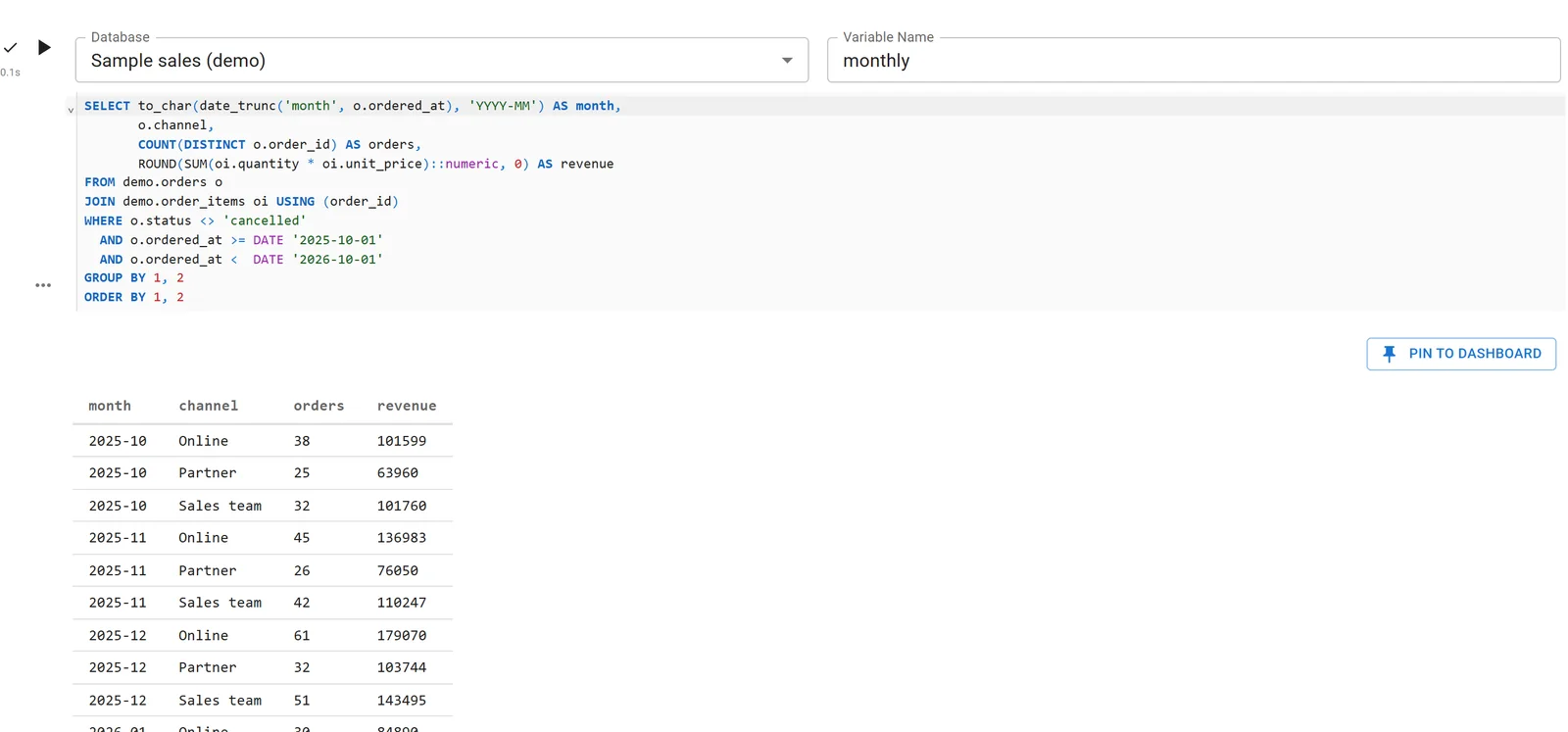
A SQL cell runs on a connected database, and its rows become the DataFrame monthly. Sample data.
The next cell picks the DataFrame up in Python:
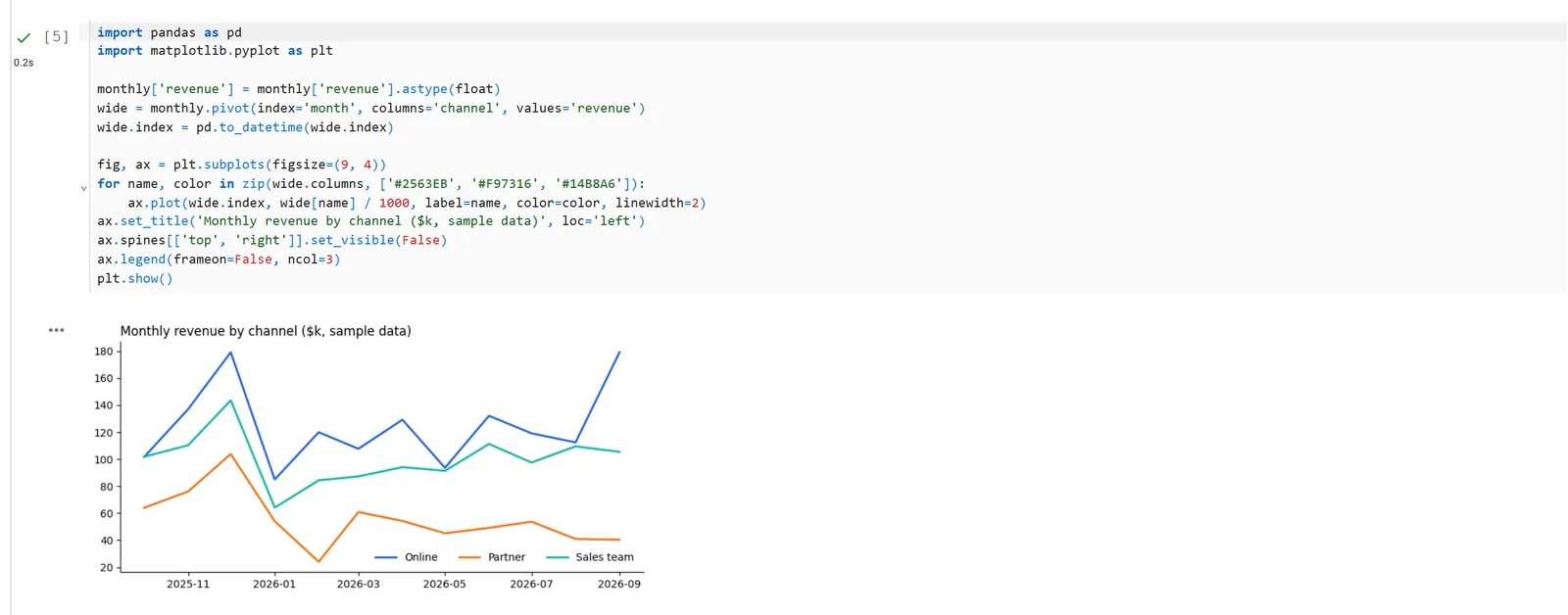
Python charts the SQL cell's result. Sample data.
From there, the notebook can run on a cron schedule, a cell's result can be pinned to a dashboard that updates with each run, and colleagues open it with their own login; viewers are free. Claude can also write and run notebooks like this one through Fastero's connector. Notebooks and schedules are on the Free plan.
Moving SQL results into Python
| Tool | How Python gets the result |
|---|---|
| JupySQL | result = %sql ..., then result.DataFrame() (needs pandas) |
| Databricks | _sqldf, overwritten by the next SQL cell, so rename it to keep it |
| Snowflake | dataframe_1, dataframe_2 and so on; later SQL cells use {{dataframe_1}} |
| BigQuery Studio | A DataFrame named after the cell; Python values go into SQL as {variable} |
| marimo | The SQL cell's output variable; values go into SQL through the f-string |
| Fastero | A pandas DataFrame with the name set on the cell |
FAQ
What is a SQL notebook?
A document of cells where SQL runs against a database and its result appears beneath it, mixed with Markdown notes and, in most tools, Python cells that keep working on the result. It records an analysis step by step, unlike a SQL editor that keeps only the current query.
What replaced Azure Data Studio notebooks?
SQL Notebooks in the MSSQL extension for Visual Studio Code, generally available since version 1.43.0 in June 2026. They use .ipynb files with an MSSQL kernel. Polyglot Notebooks, an earlier suggestion, was deprecated in March 2026.
Can one SQL notebook query two different servers?
Not in the MSSQL extension, which connects each notebook to one server. JupySQL can open several connections, and in Fastero each SQL cell picks its own connection.
How do I run SQL in a Jupyter notebook?
Install JupySQL and a driver (pip install jupysql duckdb-engine, or psycopg2-binary for Postgres), load it with %load_ext sql, connect with %sql <connection address>, and write queries in %%sql cells. Install pandas if you want results as DataFrames.
Can I query CSV or Parquet files with SQL in a notebook?
Yes. DuckDB reads files directly: through JupySQL with %sql duckdb://, in marimo's SQL cells, with Deepnote's DataFrame SQL, or in Observable.
Can a SQL notebook run on a schedule?
In Snowflake's Notebooks in Workspaces, BigQuery Studio, Databricks jobs, Deepnote's Team plan and Fastero, yes. A SQL notebook in VS Code doesn't run on a schedule; SQL Server Agent in SSMS handles scheduled jobs.
Related reading:
- SQL in a Jupyter notebook
- Jupyter notebook alternatives
- Schedule a Jupyter notebook
- SQL Server MCP server
- Best SQL clients for data teams
Sources: What's happening to Azure Data Studio, Azure Data Studio notebooks, SQL Notebooks in the MSSQL extension, vscode-mssql releases, Polyglot Notebooks deprecation, JupySQL, Databricks notebook code, Snowflake notebooks, BigQuery notebooks, Deepnote SQL blocks, Deepnote pricing, marimo SQL, Observable databases, PyCharm 2025.1. JupySQL tested 5 November 2026; checked the same day.
Try Fastero free — SQL cells on your team's databases, Python on the results, schedules and dashboards, with free viewers. No credit card required.