 Fastero Dev Team
A Slack MCP server lets an AI assistant search your Slack, read channels and threads, and post messages for you. Slack now runs its own, so the choice is less about which server to use than about how much you let the agent do with it.
The short answer: Slack's official MCP server is hosted at https://mcp.slack.com/mcp. You can't point any client at it: Slack accepts only clients backed by a registered Slack app, so you use it through Claude's Slack connector (made by Slack, Anthropic verified), Slack's plugin for Claude Code (/plugin install slack@claude-plugins-official), Cursor or Perplexity. In claude.ai, add Slack from Customize › Connectors; it's on Pro, Max and Ultra since January 2026, and on Team and Enterprise once an Owner enables it. A Slack workspace admin must approve the integration first. It signs in as you, with your user token, so it can read what you can read and post where you can post. Community servers such as korotovsky/slack-mcp-server run on your machine with your own tokens; the original reference server is archived.
Fastero
Point Claude at your database.
Add Fastero to claude.ai or Claude Code. Claude builds the dashboard, deploys the app or publishes a live page, and your team opens it in Fastero.
Try free →Slack's MCP options at a glance
| Slack's official server | Claude's Slack connector | Slack's Claude Code plugin | Community server (korotovsky) | |
|---|---|---|---|---|
| What it is | Hosted MCP server at mcp.slack.com | Slack's server, added in claude.ai | Slack's server plus Slack developer skills | Open-source server you run locally |
| Signs in as | You (user token, OAuth) | You | You | Your user, bot or browser-session token |
| Can post | Yes | Yes | Yes | Off by default |
| Admin approval | Through Slack's app approval | Slack admin; Owner on Claude Team and Enterprise | Slack admin | None needed in stealth mode |
| Works in | Claude.ai, Claude Code, Perplexity, Cursor | claude.ai, Claude Desktop, Claude Code | Claude Code, Cursor (skills only in Codex) | Any client that runs stdio, SSE or HTTP servers |
Slack's official MCP server
Slack's server covers "searching through Slack, retrieving and sending messages, managing canvases, managing users, uploading files, and working with lists". It speaks "JSON-RPC 2.0 over Streamable HTTP" at https://mcp.slack.com/mcp, and Slack says: "We do not support SSE-based connections or Dynamic Client Registration at this time."
That last point is why you can't paste the address into just any MCP client. "MCP clients must be backed by a registered Slack app with a fixed app ID", and "Only directory-published apps or internal apps may use MCP." So for most people the server arrives through one of the partner clients Slack lists, "no coding needed": Claude.ai, Claude Code, Perplexity and Cursor. Building your own client means registering a Slack app and using its client_id and client_secret; Slack also supports PKCE for desktop clients.
Calls are subject to Slack's usual Web API rate limits, from "20+ per minute" for searching channels or users to "100+ per minute" for reading files and profiles. Admins can audit MCP activity in Slack's audit logs.
Add Slack to Claude (claude.ai and Claude Desktop)
Slack is in Claude's connector directory: "Anthropic verified", made by Slack, added November 2025, with the connector URL https://mcp.slack.com/mcp.
- Go to Customize › Connectors in claude.ai.
- Find Slack and select Connect, then sign in to your Slack workspace.
- In a chat, select +, then Connectors, and turn Slack on.
Plans: Anthropic first offered the connector on Team and Enterprise, then added an update: "The Slack connector is now available for Claude Pro and Max subscribers. (January 26, 2026)". An editor's note says mentions of Max from before 30 October 2026 "include what are now the Max and Ultra plans". On Team and Enterprise, an Owner enables it under Organization settings › Connectors before members can connect, and Anthropic's setup page says to install the Claude app in Slack first. Anthropic doesn't say whether Free accounts get it.
If you sign in to Claude Code with the same claude.ai account, the connector comes along: "MCP servers you've added in claude.ai, known as connectors, are automatically available in Claude Code".
Add Slack to Claude Code
The simplest route is Slack's own plugin, published in Claude's official marketplace:
/plugin install slack@claude-plugins-official"The Slack MCP server is configured automatically when the plugin loads. You'll be prompted to authenticate into your Slack workspace via OAuth." The plugin also adds Slack developer skills, such as block-kit, create-slack-app and slack-search, and its marketplace page counted 92,287 installs on 12 November 2026.
You can see how it connects in the plugin's source. Its .mcp.json names Slack's app and a fixed callback port, because Slack doesn't allow dynamic registration:
{
  "mcpServers": {
    "slack": {
      "type": "http",
      "url": "https://mcp.slack.com/mcp",
      "oauth": {
        "clientId": "1601185624273.8899143856786",
        "callbackPort": 3118
      }
    }
  }
}
Claude Code's mcp add takes the same two settings as flags, which is what an app of your own would need:
$ claude --version
2.1.284 (Claude Code)

$ claude mcp add --help
Options:
  --callback-port <port>       Fixed port for OAuth callback (for servers
                               requiring pre-registered redirect URIs)
  --client-id <clientId>       OAuth client ID for HTTP/SSE servers
  --client-secret              Prompt for OAuth client secret (or set
                               MCP_CLIENT_SECRET env var)
  ...
In Cursor, run /add-plugin slack in an Agent chat. In Codex and other agents, Slack's plugin installs the skills only, because "the Slack MCP Server is not available on Codex yet".
Scopes: what it can read and what it can post
Slack's server works with a user token, and each tool needs its own scopes:
| Tool | User-token scopes |
|---|---|
| Search messages and channels | search:read.public, search:read.private, search:read.mpim, search:read.im |
| Read a channel or thread | channels:history, groups:history, mpim:history, im:history |
| Read and search files | files:read, search:read.files |
| User profiles and emails | users:read, users:read.email |
| Send or schedule a message | chat:write |
| Create a channel or DM | channels:write, groups:write, im:write, mpim:write |
| Canvases | canvases:read, canvases:write |
| Upload a file | files:write |
| Reactions and lists | reactions:read, reactions:write, lists:read, lists:write |
The im and mpim scopes are direct and group messages. Anthropic's description of the connector: "Claude only searches public and private Slack channels you have access to."
In our Claude Code session on 12 November 2026, the claude.ai Slack connector exposed 27 tools, more than the 11 its directory page lists. Fourteen only read: searches, channel and thread history, canvases, lists, files, profiles and reactions. Thirteen change something or prepare to: slack_send_message, slack_schedule_message, slack_send_message_draft, slack_create_conversation, slack_add_reaction, slack_create_canvas, slack_update_canvas, the file-upload pair, and four for lists.
Point Claude at your database.
Start free →The risks of an agent that can post
- It posts as you. Messages, channels and reactions are created "on behalf of the authenticated user", so colleagues see your name, not a bot's.
- Instructions hide in messages. Anything the agent reads, from a channel or a shared file, lands in its context. Slack's own warning: "please be mindful about connecting to or utilizing other MCP servers at the same time." An agent that reads Slack and can also write elsewhere can move data between them.
- DMs are in scope. The search and history scopes include private channels and direct messages you're in.
- Mistakes are public. A wrong channel ID or a scheduled message sent twice reaches real people.
The controls that exist:
- Block the posting tools. A claude.ai organisation "can set per-tool controls on claude.ai connectors": a tool set to ask prompts on every call, "even in acceptEdits, auto, and bypassPermissions permission modes", and a blocked tool is removed in claude.ai, the desktop app and Claude Code.
- Deny them in Claude Code. Connector tools appear as
mcp__claude_ai_Slack__<tool>, and plugin tools asmcp__plugin_slack_slack__<tool>, so a deny rule removes one:
{
  "permissions": {
    "deny": ["mcp__claude_ai_Slack__slack_send_message", "mcp__claude_ai_Slack__slack_schedule_message"]
  }
}- Draft instead of send. The server can "draft, format, and preview messages directly within AI clients", so you can ask for a draft and send it yourself.
Workspace admin approval
Slack's plugin is blunt: "Your Slack workspace admin must approve MCP integration before you can authenticate." By default Slack lets members install apps, but Workspace Owners can switch on Only allow pre-approved apps, after which members request apps and admins approve or restrict them. In an Enterprise organisation, app approval turns on automatically when an Org Owner sets an app management policy.
Large organisations on Slack's Enterprise+ plan with Okta can go further: Enterprise-Managed Authorization provisions access to the Slack MCP server in Claude from the identity provider, with Claude Team or Enterprise, so people can only sign in with work accounts.
Community Slack MCP servers
korotovsky/slack-mcp-server(MIT, 1,896 GitHub stars on 12 November 2026). It runs locally over stdio, SSE or HTTP, and supports user (xoxp), bot (xoxb) or browser-session (xoxcandxoxd) tokens. Its "stealth mode" runs "without requiring additional permissions or bot installations", which also means no admin approves it, so check your workspace's rules first. Posting is "disabled by default for safety" and enabled per channel withSLACK_MCP_ADD_MESSAGE_TOOL, but its user-group tools, which can create and update groups, are registered by default. Its README says: "This is not an official Slack product."- The original reference server,
@modelcontextprotocol/server-slack, now sits in the archived servers repository, and npm marks every version "Package no longer supported". It used a bot token with scopes such aschat:write,channels:historyandusers:read.
For most people the official server is the better default: it's hosted, signs in with OAuth, respects admin approval and leaves an audit trail.
When the numbers should reach Slack on a schedule
Agents are good at answering a question in Slack once. A number the team checks every Monday is a different job. Fastero is an AI and data platform where people and AI agents work together on a team's data, and its scheduled dashboard email can post to Slack too:
- One schedule, two places. Schedule a dashboard daily, weekly or monthly; each email has its numbers, charts and tables plus a PDF.
- Slack in the same dialog. Once Slack is connected, the dialog's Also post the charts to Slack picks a channel. Before that it says "To post to Slack too, connect Slack first".
- A bot in the channels you choose. Fastero posts as its own app, only in channels where someone has typed
/invite @Fastero. - People outside the workspace. Members also get a button that opens the dashboard in Fastero; anyone else gets the email and the PDF, after confirming their address.
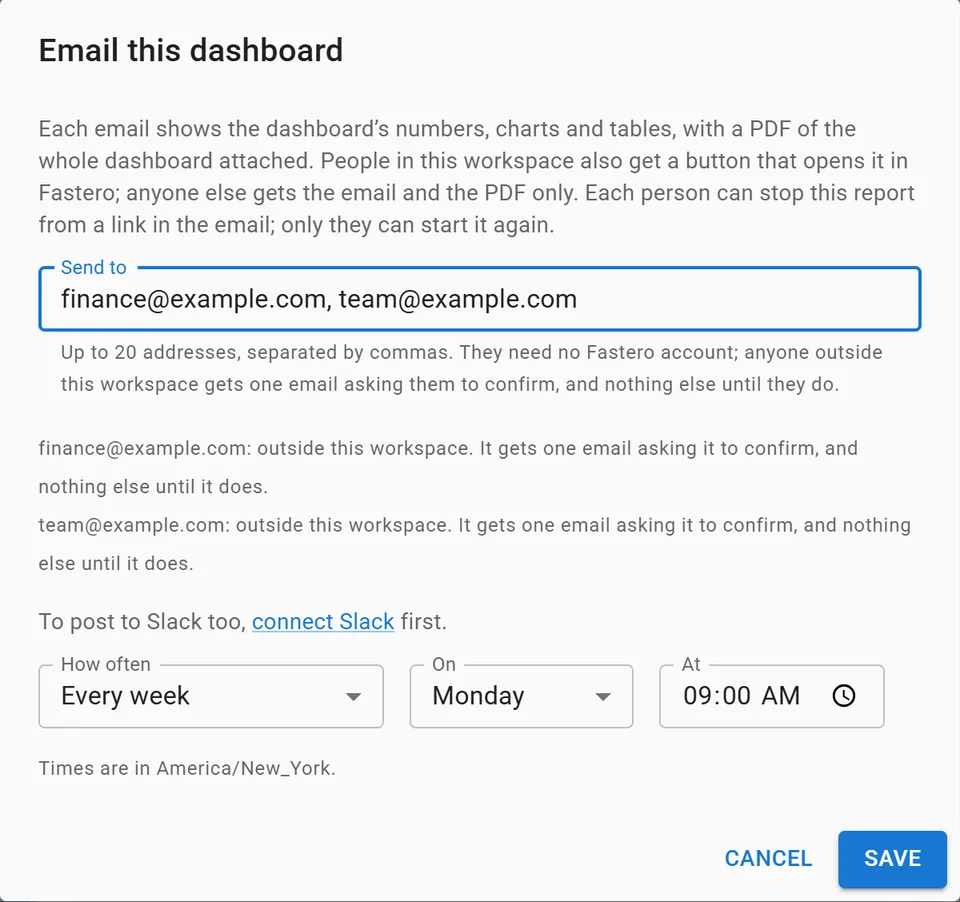
Setting up a weekly email of a dashboard, with invented addresses.
More on scheduling SQL reports to Slack and email, MCP in Claude Code and MCP security.
FAQ
Is there an official Slack MCP server?
Yes. Slack hosts it at https://mcp.slack.com/mcp. It works through clients backed by a registered Slack app: Claude.ai, Claude Code, Perplexity and Cursor, or an internal or directory-published app of your own.
How do I connect Slack to Claude?
In claude.ai, go to Customize › Connectors, find Slack and select Connect. In Claude Code, install Slack's plugin with /plugin install slack@claude-plugins-official, or sign in with the claude.ai account that has the connector.
Which Claude plans have the Slack connector?
Pro and Max since 26 January 2026, which includes today's Ultra, and Team and Enterprise, where an Owner enables it first. Anthropic doesn't say whether Free accounts get it.
Can I add the Slack MCP server to ChatGPT or Codex?
Slack doesn't list them: its ready-made clients are Claude.ai, Claude Code, Perplexity and Cursor, and in Codex its plugin installs only the skills. ChatGPT has a Slack plugin of its own, which OpenAI describes as a way "to summarize channels or draft replies".
Does the Slack MCP server need admin approval?
Yes. A Slack workspace admin must approve the integration before you can sign in. Community servers that use browser-session tokens skip that step, which is a reason to check your workspace's policy first.
How do I stop Claude posting to Slack?
Ask for drafts instead of sends, set the posting tools to ask or blocked in your Claude organisation's connector controls, or add deny rules for the posting tools in Claude Code's settings, as in the example above.
Sources
Checked 12 November 2026. Claude Code commands ran on version 2.1.284 on Windows.
- Slack: Slack MCP server overview, Slack MCP and Skills Plugin, plugin repository and its
.mcp.json, Manage app approval, Manage access to the Slack MCP server through your identity provider - Anthropic: Slack in Claude's directory, Slack plugin, Slack integration, Claude and Slack, Claude Code MCP, Claude Code permissions
- Community: korotovsky/slack-mcp-server, archived reference server, npm @modelcontextprotocol/server-slack