 Fastero Dev Team
GitHub Codespaces opens a repository on a cloud machine, in VS Code in the browser, and its default image already has Python, pandas and JupyterLab installed. The catch is the meter: free use is counted in core hours, so the machine you pick decides how far the free month goes.
The short answer: to run a notebook in a codespace, open GitHub's github/codespaces-jupyter template, click Use this template, then Open in a codespace (or create a codespace from your own repository), open the .ipynb file and click Run All. To use JupyterLab instead of VS Code, choose Open in, then JupyterLab, on github.com/codespaces, or run gh codespace jupyter. As of 20 November 2026, a free personal account gets 120 core hours and 15 GB of storage a month (GitHub Pro: 180 and 20). A 2-core machine costs $0.18 an hour, so the free allowance is 60 hours on 2 cores, or 30 hours on the 4 cores GitHub's own Jupyter template asks for. Storage costs $0.07 per GB a month. A codespace stops after 30 idle minutes by default, runs for at most 12 hours, and is deleted 30 days after it stops. Organizations get no free quota, and GPUs are not generally available.
Fastero
Jupyter notebooks for your team, with nothing to install.
Start a notebook or bring your .ipynb files. SQL cells query your databases with no password in the code, and a notebook runs now or on a schedule. Colleagues open it with their own login; viewers are free.
Try free →How to open a Jupyter notebook in a codespace
GitHub's machine learning guide gives these steps, in VS Code in the browser:
- Go to the
github/codespaces-jupytertemplate repository, click Use this template, then Open in a codespace. - Open a notebook, such as
notebooks/image-classifier.ipynb, and click Run All. - If asked for a kernel, choose Python Environments, then the Python at the recommended location.
The default image comes with "Numpy, pandas, SciPy, Matplotlib, seaborn, scikit-learn, Keras, PyTorch, Requests, and Plotly" installed. A codespace made from a template opens in the VS Code web client and isn't a repository yet: the template's README says to click Publish Branch when you want to keep the work. Until then it runs on a machine you can't change.
To work in JupyterLab instead, any of these works, according to GitHub's docs:
- On github.com/codespaces, click the ... next to the codespace, then Open in, then JupyterLab.
- Under Settings, Codespaces, Editor preference, choose JupyterLab, so existing codespaces open in it.
- With GitHub CLI, the docs give this command:
gh codespace jupyterJupyterLab must be installed in the codespace. The default image has it; a custom image needs the Python feature with "installJupyterlab": true.
A devcontainer.json for a notebook project (tested)
For your own repository, a .devcontainer/devcontainer.json decides what every codespace gets. We wrote one for a small notebook project on Fastero's invented sample sales data:
project/
  .devcontainer/devcontainer.json
  requirements.txt
  notebooks/sales.ipynb
  data/sample-sales.csv
{
"name": "Sales notebooks",
"image": "mcr.microsoft.com/devcontainers/universal:6",
"waitFor": "onCreateCommand",
"updateContentCommand": "python3 -m pip install -r requirements.txt",
"customizations": {
"codespaces": {
"openFiles": ["notebooks/sales.ipynb"]
},
"vscode": {
"extensions": ["ms-toolsai.jupyter", "ms-python.python"]
}
}
}duckdb==2.0.1
pandas==3.1.1
matplotlib==3.11.2Line by line:
imageis the universal image, the one Codespaces uses when a configuration names none. Its newest published version, 6.1.15, installs Python 3.14.2 and JupyterLab, sogh codespace jupyterworks.updateContentCommandinstalls the requirements. It runs when the codespace is built, and also when a prebuild is made, so a prebuilt codespace opens with the packages already there. GitHub's template uses the same line.extensionsadds the VS Code Jupyter and Python extensions.- No
hostRequirements. GitHub's template sets"cpus": 4, which halves your free hours. Without it, "the machine type with the lowest valid resources is used", 2 cores.
We checked the file three ways on 20 November 2026: a strict JSON parse, the dev container spec's own JSON schema (which pulls in the Codespaces and VS Code sections), and the dev containers CLI 0.90.0, whose devcontainer read-configuration parsed it and mapped the workspace to /workspaces/project. The schema check, with two broken copies to show it catches mistakes (the last two error messages cut for length):
$ python validate_devcontainer.py
python 3.14.3, jsonschema 4.26.0
json.loads: OK, 5 top-level keys: name, image, waitFor, updateContentCommand, customizations
Schema check, devcontainer.json as written: OK, 0 errors
Broken copy: 'updateContentComand' typo: 1 errors
   - Unevaluated properties are not allowed ('updateContentComand' was unexpected)
Same file with the image line removed: 2 errors
The last line matters for cost. GitHub says "Storage of base dev containers built from the default dev container image is free of charge", while with another base image "the resulting container and all of the files in the codespace will be counted as used storage". Leaving image out is the documented way to get the default, and Codespaces accepts it, but the spec's schema rejects the file, so other dev container tools may too. GitHub's check is devcontainer-info in the codespace's terminal: one built from the default image reports "Definition ID: universal".
We didn't create a codespace. We ran the same notebook locally with the versions in requirements.txt, in JupyterLab 4.6.6 on Python 3.14.3:
       month   revenue  orders
0 2026-05-01  76227.74     259
1 2026-06-01  78968.85     271
2 2026-07-01  84136.94     268
3 2026-08-01  87202.49     251
4 2026-09-01  64819.38     227
5 2026-10-01  57517.58     202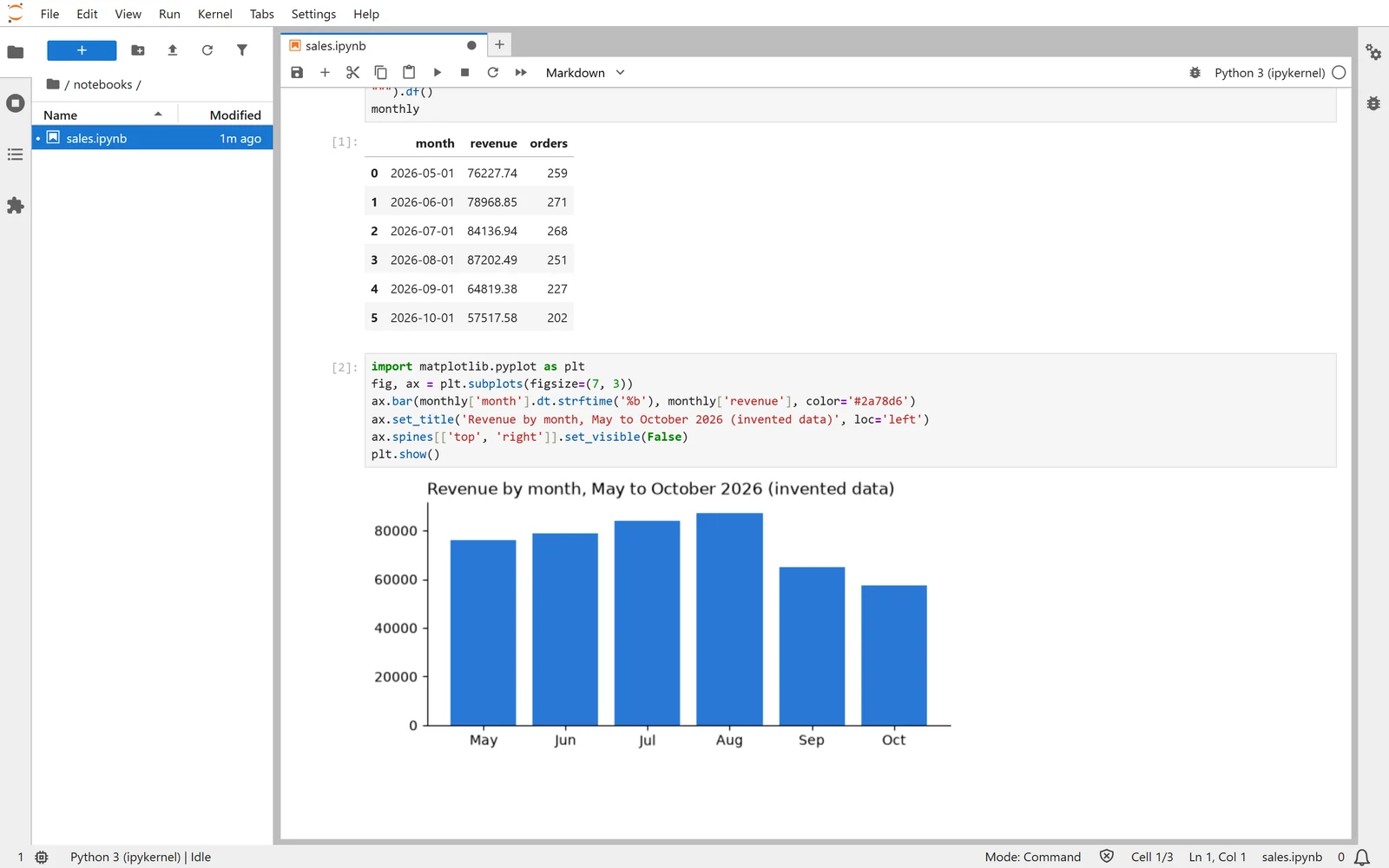
The example project's notebook in JupyterLab 4.6.6, run locally on invented sample data, 20 November 2026. A codespace opens the same file in the same JupyterLab.
GitHub Codespaces pricing (checked 20 November 2026)
You pay for compute while a codespace is active and for storage while it exists. Compute is "proportional to the number of processor cores", so GitHub counts free use in core hours:
| Machine | Price an hour | Free account (120 core hours) | GitHub Pro (180 core hours) |
|---|---|---|---|
| 2-core | $0.18 | 60 hours | 90 hours |
| 4-core | $0.36 | 30 hours | 45 hours |
| 8-core | $0.72 | 15 hours | 22.5 hours |
| 16-core | $1.44 | 7.5 hours | 11.25 hours |
| 32-core | $2.88 | 3.75 hours | 5.6 hours |
| Storage | $0.07 per GB a month | 15 GB a month | 20 GB a month |
We worked those through a short calculator (Python 3.14.3, matplotlib 3.11.2) from the prices on GitHub's billing page:
$ python codespaces_calc.py codespaces-free-hours.png
python 3.14.3, matplotlib 3.11.2; prices checked 20 November 2026

1. What the free monthly allowance buys (personal accounts)
Machine   $ / hour  Free: hours  Pro: hours
 2-core      0.18           60          90
 4-core      0.36           30          45
 8-core      0.72           15        22.5
16-core      1.44          7.5       11.25
32-core      2.88         3.75       5.625
Value of the allowance: Free 120 core hours x $0.09 = $10.80 of compute + 15 GB-month ($1.05); Pro $16.20 + 20 GB-month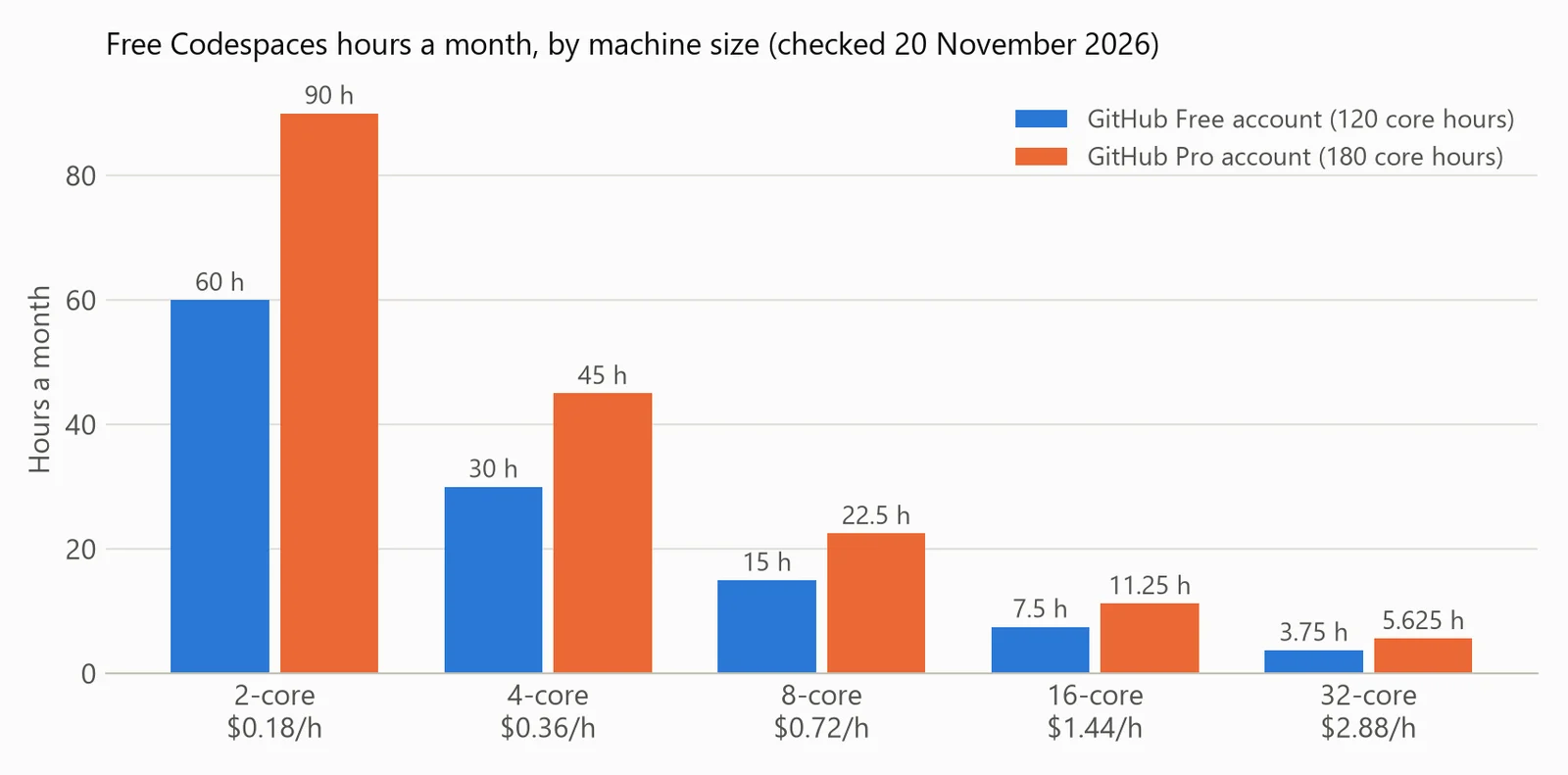
Free Codespaces hours a month on each machine size, from GitHub's prices and quotas on 20 November 2026
So the free month is worth about $12. GitHub is plain about what that is for: it "is not intended to be enough for you to do everyday work free of charge." Without a payment method, Codespaces stops you when either compute or storage runs out; with one, you can have GitHub email you at 90% and 100% of the included use. Storage is cumulative: deleting a codespace slows the count but doesn't lower this month's figure.
Prebuilds make a codespace start faster by preparing the container in advance; GitHub suggests them when creating a codespace takes "more than 2 minutes". Each prebuild runs as a GitHub Actions workflow, which uses Actions minutes, and is stored, which uses Codespaces storage even when you have no codespaces open.
Idle timeout, the 12-hour limit and automatic deletion
| Setting | Default | What you can set |
|---|---|---|
| Idle timeout | 30 minutes | 5 to 240 minutes, in Settings or with gh codespace create --idle-timeout |
| Longest run | 12 hours | Fixed, "even while you are actively using the codespace" |
| Deletion after stopping | 30 days | 0 to 30 days, or Keep codespace to keep it until you delete it |
Three things catch notebook users. Typing, using the mouse and terminal output reset the idle timer, and a codespace you leave without stopping bills until it times out. A training run longer than 12 hours needs checkpoints. And "Automatic deletion happens irrespective of whether a codespace contains unpushed changes", so commit notebooks, outputs included if you want them, before you walk away.
Jupyter notebooks for your team.
Start free →Codespaces for a team: who pays
Free use belongs to personal accounts: "GitHub plans for organizations and enterprises do not include a free quota." On the GitHub Free plan for organizations, the person who creates a codespace always pays. On GitHub Team ($4 per user a month) or Enterprise ($21), the organization can pay instead: it makes codespaces "organization-owned", chooses which members may use them, and sets a non-zero budget. It can then limit machine types, the idle timeout and the retention period. A person removed from the organization loses their codespaces, which are deleted.
What that means for a team of five working in notebooks, with example usage: 4 hours a day for 20 days, each session left to time out after 30 minutes instead of being stopped, and one 10 GB codespace each, kept all month. The same run of the calculator continues:
2. A team of five (example): 20 days x (4 h work + 0.5 h idle before the 30-minute timeout) = 90 active hours each, 10 GB kept all month each
Machine | Personal accounts, each with the free quota | Organization on GitHub Team (no free quota)
2-core | $27.00 a month (60 core hours each over the free 120) | $104.50 a month ($84.50 usage + $20 for 5 Team seats)
4-core | $108.00 a month (240 core hours each over the free 120) | $185.50 a month ($165.50 usage + $20 for 5 Team seats)
8-core | $270.00 a month (600 core hours each over the free 120) | $347.50 a month ($327.50 usage + $20 for 5 Team seats)

Stopping each codespace instead of waiting for the timeout saves 50 active hours a month across the team: $18.00 on 4-core machines.
Those are estimates from list prices, not GitHub's figures. The organization pays more because it loses five free allowances, and gains control over machine sizes and timeouts in return. Git history for the notebooks is a separate problem: see Jupyter notebooks in Git.
Where else to run a notebook
| Option | Free use (checked 20 November 2026) | Pick it when |
|---|---|---|
| GitHub Codespaces | 120 core hours and 15 GB a month, personal accounts | The notebook lives in a repository with its code |
| Google Colab | Free; "at most 12 hours" a run, limits unpublished | You want a GPU for an experiment |
| Binder | 1 to 2 GB of memory, up to six hours, stops after 10 idle minutes | Sharing a public repository's notebooks |
| JupyterLite | Runs entirely in your browser | Trying Jupyter with nothing to install |
| Fastero | Notebooks and cron schedules on the Free plan | A team's notebooks on company data, run on a schedule |
More options, with their limits, in where to run a Jupyter notebook online and Azure Notebooks.
When the notebook runs for a team
A codespace is a developer's machine: it runs while someone has it open, for 12 hours at most, so a notebook that must run every morning needs a scheduler somewhere else. Fastero is an AI and data platform where people and AI agents work together on a team's data, and its notebooks run without anyone keeping a machine on:
- Real
.ipynbfiles. Upload yours or import them from the project's Git repository. - SQL cells run on a workspace connection with its stored credentials and hand the result to Python as a pandas DataFrame, so no password sits in the repository.
- Secrets reach cells as environment variables, in interactive and scheduled runs.
- Schedules: run a notebook now or on a cron schedule, on the Free plan.
- Sharing: colleagues open it with their own login; viewers are free and can read without running or changing it.
- Sizing: each workspace's notebook server has 1 CPU and 2 GB, with no GPUs. For a GPU job, Colab or Kaggle fits better.
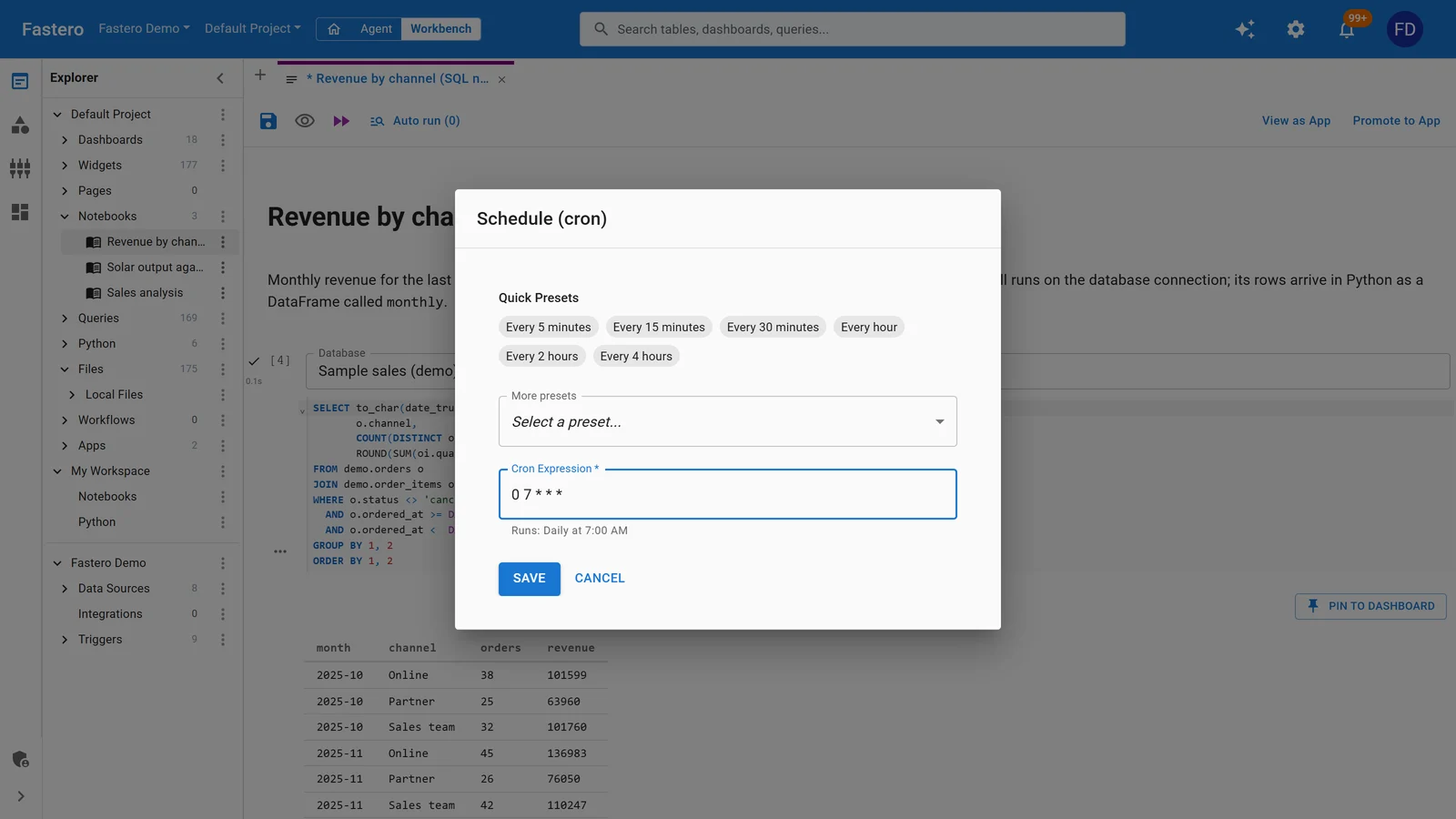
Scheduling a notebook in Fastero: presets or any cron expression. Sample data.
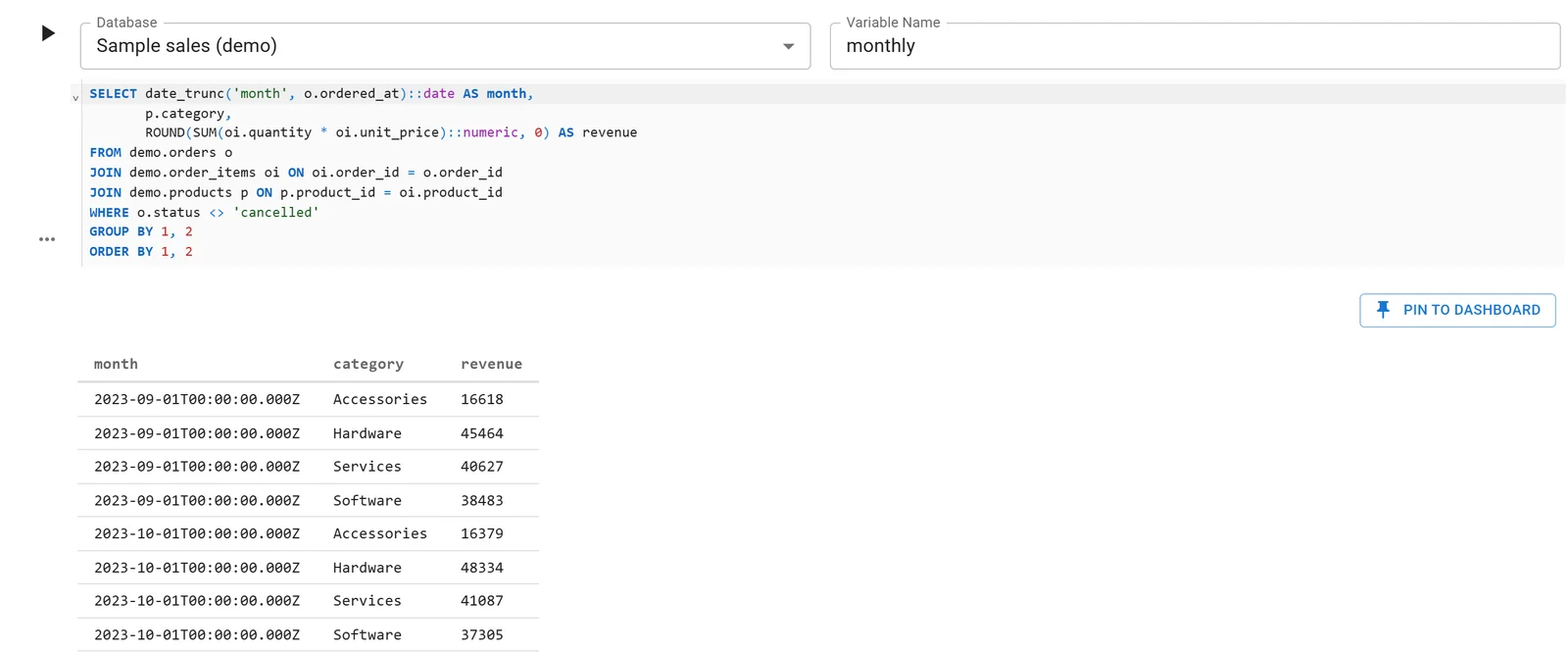
A Fastero notebook whose SQL cell reads a database connection; the rows arrive in Python as a DataFrame. Sample data.
More on scheduling a Jupyter notebook.
FAQ
Is GitHub Codespaces free?
For personal accounts, up to a monthly allowance: 120 core hours and 15 GB of storage on GitHub Free, 180 and 20 on GitHub Pro. That is 60 hours on the smallest, 2-core machine. Organizations get no free quota.
How much does GitHub Codespaces cost?
From $0.18 an hour for a 2-core machine to $2.88 for 32 cores, plus $0.07 per GB of storage a month, as of 20 November 2026. On a personal account you pay only beyond the free allowance, and only once you've added a payment method; an organization pays for all of it.
Can you use Jupyter notebooks in GitHub Codespaces?
Yes. Open the .ipynb file in VS Code and click Run All, or open the codespace in JupyterLab. The default image includes Python, JupyterLab and common data libraries.
How do I open JupyterLab in Codespaces?
On github.com/codespaces, choose Open in, then JupyterLab, or run gh codespace jupyter, or make JupyterLab your default editor in your Codespaces settings. JupyterLab must be installed in the codespace, which the default image does.
Does GitHub Codespaces have GPUs?
Not for most people. GitHub says GPU machines were "offered to selected customers during a trial period" and are "not generally available". Machine types range from 2 to 32 cores.
How long does a codespace run before it stops?
It stops after 30 minutes without activity by default, which you can set between 5 minutes and 4 hours. Whatever you set, a codespace runs for at most 12 hours before you must stop it and reconnect.
Sources
Checked on 20 November 2026:
- GitHub docs: Codespaces billing, Product usage included, Getting the most out of your included usage, Codespaces for machine learning, Opening an existing codespace, Setting your default editor, Introduction to dev containers, Setting up a Python project, Minimum machine specification, Changing the machine type, About prebuilds, Timeout period, Codespace lifecycle, Automatic deletion, Who owns and pays, Managing the cost in your organization
- GitHub: Pricing, Codespaces features and FAQ, github/codespaces-jupyter template
- Dev containers: Universal image, Python feature, dev container JSON schema
- Other notebooks: Colab FAQ, mybinder.org user guidelines, Try Jupyter
- Our work: the devcontainer.json, its validation (jsonschema 4.26.0, dev containers CLI 0.90.0), the notebook (JupyterLab 4.6.6) and the calculator, Python 3.14.3, run 20 November 2026
Try Fastero free: run your team's notebooks on a schedule, next to the data, with nobody's machine left on. No credit card required.