 Fastero Dev Team
Google Colab has had AI built in since 2023, and in 2025 Google rebuilt Colab around it. Most guides still describe an earlier version: they name the wrong model, the wrong file types, or features that have since been replaced. This is what is there in November 2026, what each plan gets, and the part most guides leave out: what Google does with what you type.
The short answer: Colab AI is Gemini, built into every notebook and opened from the spark icon at the bottom. It explains and writes code, fixes errors in a diff you approve, completes code as you type, and runs a Data Science Agent that takes a goal and a file, proposes a plan, runs the code and reports what it found. It is on by default for free users aged 18 or over in supported countries; paid plans get a larger Gemini allowance, and newer models reach paying users first. In consumer Colab, Google keeps your prompts, code and output to improve its products, people may review them, and they are kept for up to 18 months. Colab Enterprise on Google Cloud does not train on them.
Fastero
Jupyter notebooks for your team, with nothing to install.
Start a notebook or bring your .ipynb files. SQL cells query your databases with no password in the code, and a notebook runs now or on a schedule. Colleagues open it with their own login; viewers are free.
Try free →What Colab AI can do
Google lists three things in its FAQ: "Iterative Querying: A simple conversational interface for generating code, explaining concepts, and fixing errors", a Data Science Agent, and code transformation. In practice that comes to:
- A chat about your notebook. Click the spark icon in the notebook footer. Short requests open in a box in the middle of the screen; longer conversations go in a side panel.
- Code from a description, written into a new cell.
- Error fixes. When a cell fails, "Colab will iteratively suggest fixes in a diff view for your review."
- Autocomplete as you type, on every plan since June 2024.
- The Data Science Agent: give it a goal and a file and it plans, runs and reports, correcting its own errors as it goes (more below).
- An AI prompt cell, a cell type that sits next to code and text cells, added from the arrow beside + Code.
- Gemini from your own code with the
google.colab.ailibrary: no API key, with monthly limits on the free plan. - Newer modes, added in 2026: Custom Instructions saved with a notebook, Learn Mode, where Gemini "provides step-by-step guidance instead of writing code for you", and Visualization Mode, which reads your data, writes the chart code, runs it, and retries when it fails.
Colab AI doesn't browse the web, though it can write code that fetches a page. It can't see your Google Drive or your saved secrets unless you give it access.
How to turn it on, and why you might not see it
There's nothing to install. Google says "the AI features are enabled by default for all eligible users". If the spark icon isn't there, the usual reasons are:
- Your account's age. Colab's AI requires a Google account aged 18 or over.
- Your country. It needs "a supported locale". Google doesn't publish the list; the last count it gave was 175 locales, in December 2023.
- A work or school account. A Google Workspace administrator can switch Colab off for the whole organisation.
- The notebook. Since 2025, a notebook's author can turn AI off for that notebook, a switch built for teachers.
Which plan gets what
| Plan | Gemini allowance (Google's words) | Also worth knowing |
|---|---|---|
| Free | On by default, allowance not stated | google.colab.ai with monthly limits, on Gemini 2.5 Flash models |
| Pay As You Go | "Standard Gemini quota" | Paid compute without a subscription |
| Colab Pro | "Expanded Gemini quota" | Newer Gemini models first |
| Colab Pro+ | "Maximum Gemini quota" | Background execution for up to 24 hours |
| Google AI plans | Colab compute units included since 22 September 2026 | Only Ultra adds background execution |
| Colab Enterprise | Gemini for Google Cloud, "currently available to try at no additional cost" | Runs in your Google Cloud project |
Google doesn't publish the size of any allowance, only the names. Newer models go to paying users first: when Gemini 3 arrived in November 2025, Google brought it to "Colab Pro, Pro+, and Enterprise subscribers first" and said free users would get it "in the near future". Colab's release notes say "Gemini 3 is now available in Colab" in January 2026 without naming plans. Prices and compute units for each plan are in our Colab Pro guide.
The Data Science Agent, with a CSV
The agent is for a whole analysis, not a single cell. Open a blank notebook, upload a file in the Gemini panel, and describe what you want: Google's examples are "Visualize trends", "Fill-in missing values" and "Build and optimize prediction model". The agent writes a plan, and you decide whether to run it. While it runs, "it can reason about results, self-correct errors, and adjust its plan", and it finishes with a notebook of cells you can read and rerun, not a chat answer.
It reads CSV, TSV, JSON and Excel files, uploaded in the chat. Launch coverage from March 2025 still says "CSV, JSON, or .txt files under 1GB"; that list is out of date. Google's own caution is short: "Data Science Agent may make mistakes."
People who use it report the same pattern with every coding assistant: first drafts are quick and back-and-forth fixing is weaker. On Hacker News in September 2026, one user wrote "Code gen in a cell is OK, but things fall apart when you try to get into a feedback loop." Issues in Colab's own tracker describe the agent repeating functions from earlier cells in each new one, writing code that calls retired Gemini models, and putting cells at the bottom of the notebook instead of where they were asked for.
What Google does with your prompts and code
This is the difference between consumer Colab and Colab Enterprise that guides to Colab AI leave out. Colab's FAQ is direct about the consumer version:
- What is collected: "When you use generative AI features in Colab, Google collects prompts, related code, generated output, related feature usage information, and your feedback."
- What it's used for: to "provide, improve, and develop Google products and services and machine learning technologies".
- Who sees it: "human reviewers may read, annotate, and process your prompts, generated output, related feature usage information, and your feedback."
- How long, and deletion: the data is stored so that Google "cannot tell who provided it and can no longer fulfill any deletion requests and will be retained for up to 18 months."
Google's advice follows from that: "Please do not include sensitive (e.g., confidential) or personal information that can be used to identify you or others in your prompts or feedback." In Colab Enterprise, Gemini for Google Cloud runs under different terms: "Gemini doesn't use your prompts or its responses as data to train its models." Our Colab Enterprise guide covers what it costs.
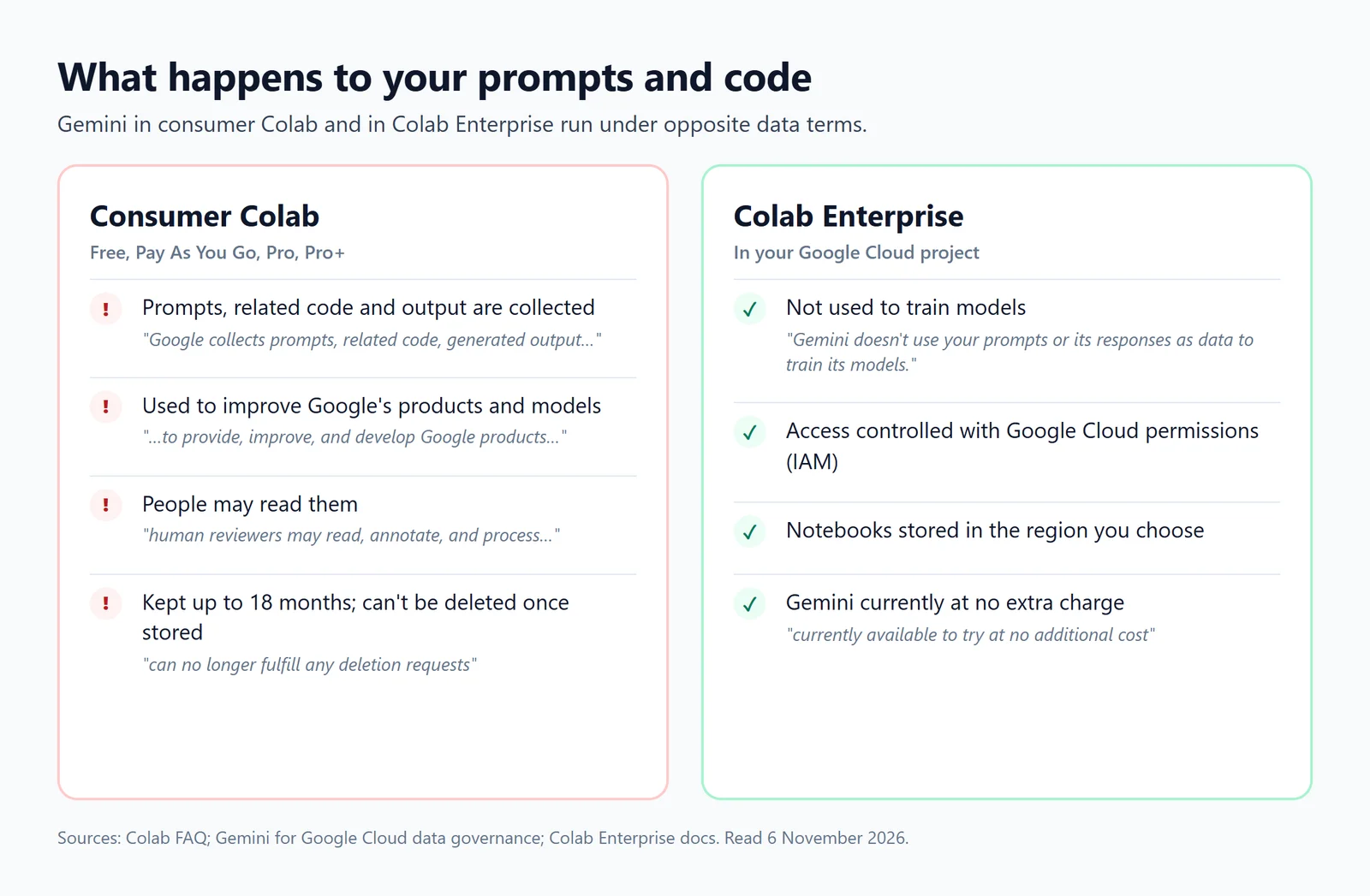
What Google's own pages say about prompts, code and output in each version of Colab, as of November 2026.
So for coursework and public data, consumer Colab AI is fine. For a company's code or customer data, read those four lines before pasting anything in.
Jupyter notebooks for your team.
Start free →What Colab AI can't do
- Keep a free session alive. Free notebooks still run "for at most 12 hours" and stop when idle. The agent works inside your session, not beyond it.
- Run a notebook on a schedule. Google switched scheduled notebooks off in consumer Colab on 27 March 2026, giving "low usage of scheduled notebooks" as the reason. Colab Enterprise still schedules them.
- See your Drive or secrets unless you grant access, or browse the web.
- Work everywhere. Under-18 accounts, unsupported countries and some Workspace domains don't get it.
Colab and other AI agents
Two 2026 releases let AI agents other than Gemini work with Colab. In March, Google released an open-source Colab MCP server, "opening up Google Colab to be accessed directly by any AI agent", so an assistant such as Claude Code or Gemini CLI can drive a notebook. In June came a Colab command-line tool for terminals and agents. Both still run on a Colab session, with the same limits.
When the notebook is about your company's data
Colab AI starts from a file you upload. Analysis at work usually starts from a database, a question someone asked, and a result that has to be there again next Monday. Fastero is an AI and data platform where people and AI agents work together on a team's data, and its notebooks run next to that data:
- Ask for an analysis of a file. Upload a CSV or Excel file and Fastero's assistant writes a notebook that analyses it and runs it. In any notebook, SQL cells read a workspace connection, so no password sits in the notebook.
- Or let Claude do it. Through Fastero's connector, Claude can create a notebook, write its cells, run it, read the output and put it on a schedule. We tried it on the demo workspace's sample sales database: Claude wrote a SQL cell and a chart cell, ran the notebook in 12 seconds and read back the result.
- Then it keeps running. Schedule the notebook on any cron schedule, on the Free plan, and share it with a sign-in. Viewers are free.
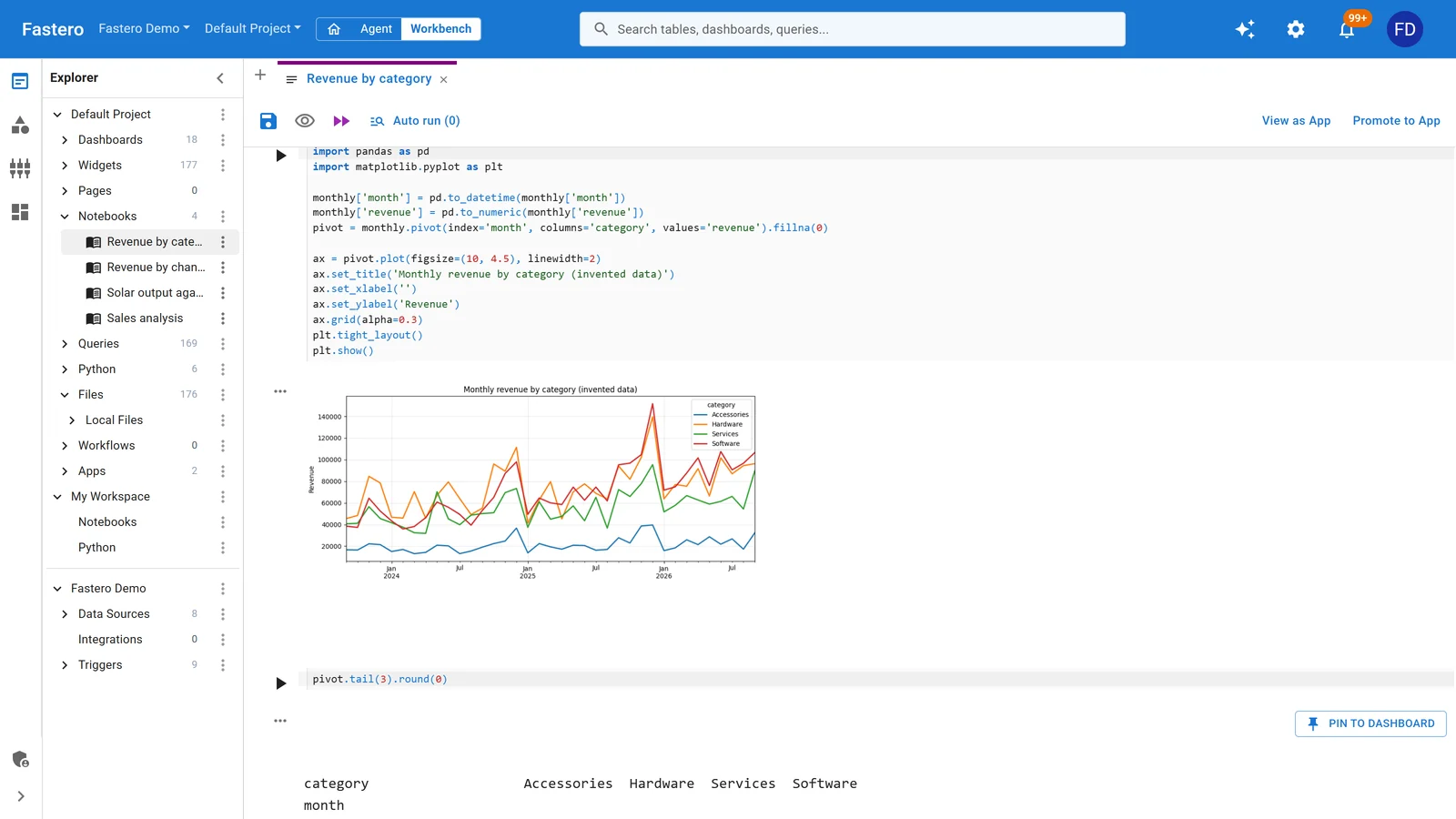
A notebook Claude wrote and ran in Fastero through the connector. Sample data.
Fastero has no GPUs: for training models, keep Colab or Kaggle. More on Claude Code with Jupyter notebooks and on where your notebook can run on a schedule.
FAQ
Is Colab AI free?
Yes, for eligible users: it's on by default on the free plan, for accounts aged 18 or over in supported countries. Paid plans get a larger Gemini allowance and newer models first. Google publishes the names of the allowances, not their size.
How do I open Gemini in Colab?
Click the Gemini spark icon in the notebook's footer. Quick requests open in a box in the middle of the screen; longer ones in a side panel.
Why don't I see Gemini in my Colab?
Usually because your account is under 18, your country isn't supported, your Workspace administrator has switched Colab's AI off, or the notebook's author turned AI off for that notebook.
Does Google Colab use my code to train AI?
In consumer Colab, Google collects your prompts, related code and output and uses them to "provide, improve, and develop Google products and services and machine learning technologies"; human reviewers may read them, and they are kept for up to 18 months. Colab Enterprise says Gemini doesn't use your prompts or its responses to train models.
What is the Colab Data Science Agent?
An agent that takes a goal and a data file (CSV, TSV, JSON or Excel), writes a plan, runs it once you approve, corrects its own errors and leaves you a notebook of cells with its findings.
Which Gemini model does Colab use?
Gemini 2.5 Flash ran the 2025 relaunch, and Gemini 3 reached paying users first, from November 2025. Google hasn't said plainly which model free users get today. The google.colab.ai library's free tier uses Gemini 2.5 Flash and Flash-Lite.
How do I turn off AI in Google Colab?
A notebook's author can turn AI off for that notebook. For a whole organisation, a Google Workspace administrator controls Colab access.
Can Colab AI run my notebook on a schedule?
No. Consumer Colab dropped scheduled notebooks on 27 March 2026. Colab Enterprise schedules them in Google Cloud, Kaggle reruns notebooks daily, weekly or monthly, and Fastero runs them on any cron schedule on its Free plan.
Sources
Read on 6 November 2026:
- Google — Colab FAQ, Colab sign-up page and plan FAQ, Colab release notes, Data Science Agent in Colab (March 2025), A reimagined, AI-first Colab (May 2025), Gemini 3 in Colab (November 2025), Gemini and Gemma via the Colab library at no cost, Colab updates: Custom Instructions and Learn Mode (April 2026), Visualization Mode (June 2026), The Colab MCP server (March 2026), The Colab CLI (June 2026), Deprecation notice of scheduled notebooks (27 March 2026), Colab is now part of your Google AI plan (22 September 2026)
- Google Cloud — Set up Gemini in Colab Enterprise, How Gemini for Google Cloud uses your data
- User reports — Hacker News comments on Gemini in Colab, Colab's issue tracker
Try Fastero free — let AI write and run notebooks on your team's data, then schedule and share them with a sign-in. No credit card required.