 Fastero Dev Team
Anthropic uses the word "marketplace" for a website, for the catalog you add connectors and plugins from inside Claude, and for a catalog file in Claude Code. They overlap, but each has its own contents, its own review rules and its own way of delivering updates.
The short answer: the Claude Marketplace at claude.com/marketplace, launched on 23 September 2026, has three sections: connectors and plugins to add, Claude-powered agents and products to buy with part of an Anthropic spend commitment (a limited preview), and consulting partners. Its connectors and plugins are Anthropic's directory, the catalog you browse inside Claude, where every listing is scanned before it appears. In Claude Code, a marketplace is any catalog defined by a .claude-plugin/marketplace.json file: Anthropic's official claude-plugins-official is added for you, its community marketplace claude-community you add yourself, and anyone can publish one from a git repository. A private repository makes a private marketplace, which is how a team shares its own plugins. Anthropic doesn't review third-party marketplaces.
Fastero
Point Claude at your database.
Add Fastero to claude.ai or Claude Code. Claude builds the dashboard, deploys the app or publishes a live page, and your team opens it in Fastero.
Try free →What "Claude marketplace" can mean
| What it is | Where you use it | Reviewed by Anthropic? | |
|---|---|---|---|
| Claude Marketplace website | A catalog of connectors and plugins, partner products and service partners | claude.com/marketplace | Listings come from the directory; partner products are reviewed for eligibility |
| Anthropic's directory | The catalog you add connectors and plugins from in Claude | claude.ai and Cowork; plugins also reach Claude Code | Yes: scanned, and new plugins reviewed by a person |
| Claude Code plugin marketplaces | Catalogs in marketplace.json files |
/plugin in Claude Code |
Official and community: yes. Third-party: no |
| Your organization's marketplace | Your own plugins, from a private repository | Claude Code, and on Team and Enterprise also claude.ai and Cowork | By your admins; Enterprise can add a security scan |
If you came looking for which plugins to install, that's a separate question: see the best Claude Code plugins and the best Claude skills. This page is about how the catalogs work.
The Claude Marketplace website
Anthropic launched it on 23 September 2026 to bring "plugins and connectors, agents and products, and service partners into one place." It has three parts.
- Add connectors and plugins. The launch post counted "more than 2,000 available today". On 12 November 2026 the catalog page showed 1,123 connectors and 529 plugins, so the two counts don't match. Many listings carry an Anthropic verified label.
- Buy agents and products. Claude-powered software from partners such as CrowdStrike, Cursor, Harvey, Legora, Lovable and Snowflake; the page listed 33 products on 12 November. Organizations with an Anthropic commitment can put part of it toward these purchases, but "Using your commitment this way is in limited preview." You click Request to buy or ask your account team.
- Scale with service partners. Consulting firms and system integrators from the Claude Partner Network, such as Accenture, Boston Consulting Group and Deloitte.
There's no separate way onto the site for connectors and plugins: Anthropic's docs say "there's no separate Claude Marketplace submission, and you submit to the directory instead". Products for sale go through an application, and "our team will review for eligibility."
Claude Enterprise itself is also sold through the AWS Marketplace, a different thing again; see Claude Enterprise.
Anthropic's directory: connectors and plugins inside Claude
The directory is "the catalog people browse on claude.ai and in Cowork to add plugins and connectors." One listing reaches claude.ai, Cowork and Claude Code: a plugin added on claude.ai loads in Claude Code through account sync, as <name>@synced.
Who reviews entries. Anyone on a paid plan can submit, from the developer portal at claude.ai/directory/manage. Each kind of listing gets different checks:
| Submission | What Anthropic checks |
|---|---|
| Plugin bundle | "every version gets automated validation and a security scan, and a person reviews a new listing before it goes live" |
| MCP connector | "scanned automatically for policy compliance and, by default, listed as a Community connector"; Anthropic may escalate it to Verified review, where a reviewer tests each tool |
What the connector labels mean.
| Label | Meaning |
|---|---|
| Verified | Anthropic tested the tools for quality and compatibility. "It isn't a security audit or a guarantee of how the connector will perform." |
| Community | "Anthropic screens Community connectors before listing them but hasn't reviewed them in depth." |
| Custom | A connector you added yourself by URL. Anthropic hasn't reviewed it |
There's no application for the Verified label; Anthropic decides during review. Listing doesn't change what a connector can do once connected, and its developer can change its tools after review. For adding connectors in claude.ai, see Claude connectors.
How updates arrive. For a plugin, the directory watches the branch the author named and checks it on a schedule, or on every push if the author sets up a GitHub webhook. A new version that passes is published. Until then, "The listing keeps serving the last published version".
Claude Code plugin marketplaces
In Claude Code, "A marketplace is a catalog of plugins that a repository defines in its .claude-plugin/marketplace.json file." Four kinds matter:
Counts from each catalog file on GitHub, 12 November 2026.
| Official | Community | Third-party | Your own | |
|---|---|---|---|---|
| Name you install with | claude-plugins-official |
claude-community |
The name in its marketplace.json |
Yours |
| How you get it | Added the first time you start an interactive session | /plugin marketplace add anthropics/claude-plugins-community |
/plugin marketplace add <owner>/<repo> |
Same as third-party |
| What's in it | Anthropic's plugins plus partners'; 317 entries, 40 by Anthropic | Plugins authors submitted to Anthropic; 2,283 entries, 2,273 pinned to a commit | Whatever the author lists | Your team's plugins |
| Who checked it | Anthropic | "passed automated security scanning, and been approved for distribution" | "Anthropic doesn't review third-party marketplaces" | You |
| Background auto-update | On | Off | Off | Off |
Install from any of them with /plugin install <plugin>@<marketplace-name>, or browse them in the Discover tab of /plugin. Three details:
- The official catalog is shrinking to Anthropic's own plugins. Its repository says "
.claude-plugin/marketplace.jsonis being phased out for third-party plugins" and that third-party plugins are now submitted to the directory. - Anthropic's names are protected. "Claude Code accepts the official and community names only for marketplaces sourced from
github.com/anthropics/repositories", so a third-party marketplace can't pose as Anthropic's. - Community entries are pinned. Where the community catalog pins a plugin to a commit, "Claude Code refuses to install a different commit."
Older tutorials add anthropics/claude-code as a marketplace. That one is deprecated; skip the step.
How to run a private marketplace for your team
A marketplace needs no server and no submission. "Once the file is in the repository, the plugin is published". Anthropic's minimal example, for a plugin in the repository's root:
{
  "name": "your-marketplace",
  "owner": { "name": "Your Name" },
  "plugins": [
    { "name": "deploy-helper", "source": "./" }
  ]
}
Save it as .claude-plugin/marketplace.json, check it with claude plugin validate ., and push. Then:
- Keep it private. "if the repository is private, the marketplace is private too." Claude Code "has no git token of its own": each person needs read access and stored git credentials, such as an SSH key loaded in
ssh-agent, orgh auth loginfollowed bygh auth setup-git. - Tell people how to add it.
claude plugin marketplace add your-org/your-marketplace, thenclaude plugin install deploy-helper@your-marketplace. - Or have an admin roll it out. Managed settings register the marketplace and switch plugins on for everyone at their next session:
{
  "extraKnownMarketplaces": {
    "your-marketplace": {
      "source": { "source": "github", "repo": "your-org/your-marketplace" },
      "autoUpdate": true
    }
  },
  "enabledPlugins": {
    "code-formatter@your-marketplace": true,
    "deploy-helper@your-marketplace": true
  }
}- Restrict what else people can add.
strictKnownMarketplacesis an allowlist of marketplace sources; an empty list,[], "locks every marketplace source out, including the official marketplace." - On Team and Enterprise, sync it into claude.ai. Owners connect the repository under Organization settings > Plugins & skills, which reads it through the organization's GitHub or GitLab connection, so members' git credentials aren't involved. The repository must be private or internal. Each plugin can be hidden, available to install, installed for everyone or required, and keeps a version history. On Enterprise, a security scan can also check skills and plugins when someone uploads or edits them.
To give everyone in one repository the same plugins without an admin, commit the same two keys to the repository's .claude/settings.json; the plugins guide covers the caveats.
Point Claude at your database.
Start free →How updates arrive
| Where the plugin came from | How a new version reaches people |
|---|---|
| Official marketplace | Background auto-update, on by default |
| Community, third-party or your own marketplace | Only when someone runs claude plugin update <plugin>@<marketplace> or /plugin marketplace update <name>, unless auto-update is turned on |
| Anthropic's directory | Published once a new version passes the checks |
| Your organization's synced marketplace | When the marketplace re-syncs; owners can turn on automatic sync |
A running session keeps the versions it loaded; after an update Claude Code shows Plugin updated: <name> · Run /reload-plugins to apply. Two traps for authors: if plugin.json sets a version and you push without raising it, users keep the old copy; and "Never change a published plugin's name", because existing installs are recorded under it.
Auto-update has a cost on the trust side too: the plugin files you reviewed "can change on disk". A plugin can run code with your user's permissions, so check what each one installs before you add its marketplace.
Where Fastero fits: a connector, not a plugin
The data plugins in these catalogs help Claude write a query. A team still needs somewhere the result lives that colleagues open. Fastero is an AI and data platform where people and AI agents work together on a team's data, and it reaches Claude as a connector rather than a plugin:
- In Claude's connector directory, with the Community label, which in Anthropic's terms means screened before listing but not reviewed in depth.
- A remote MCP server at
https://api.fastero.com/api/v1/mcpwith OAuth sign-in. In Claude Code:claude mcp add --scope user --transport http fastero https://api.fastero.com/api/v1/mcp, then/mcpto sign in through the browser. A connector added in claude.ai also reaches Claude Code signed in with the same account. - Keys for scripts and anything that can't sign in: at most 90 days, read and SQL by default.
- Claude works as you, inside one workspace and never beyond your role, building dashboards your colleagues open with their own login. Viewers are free.
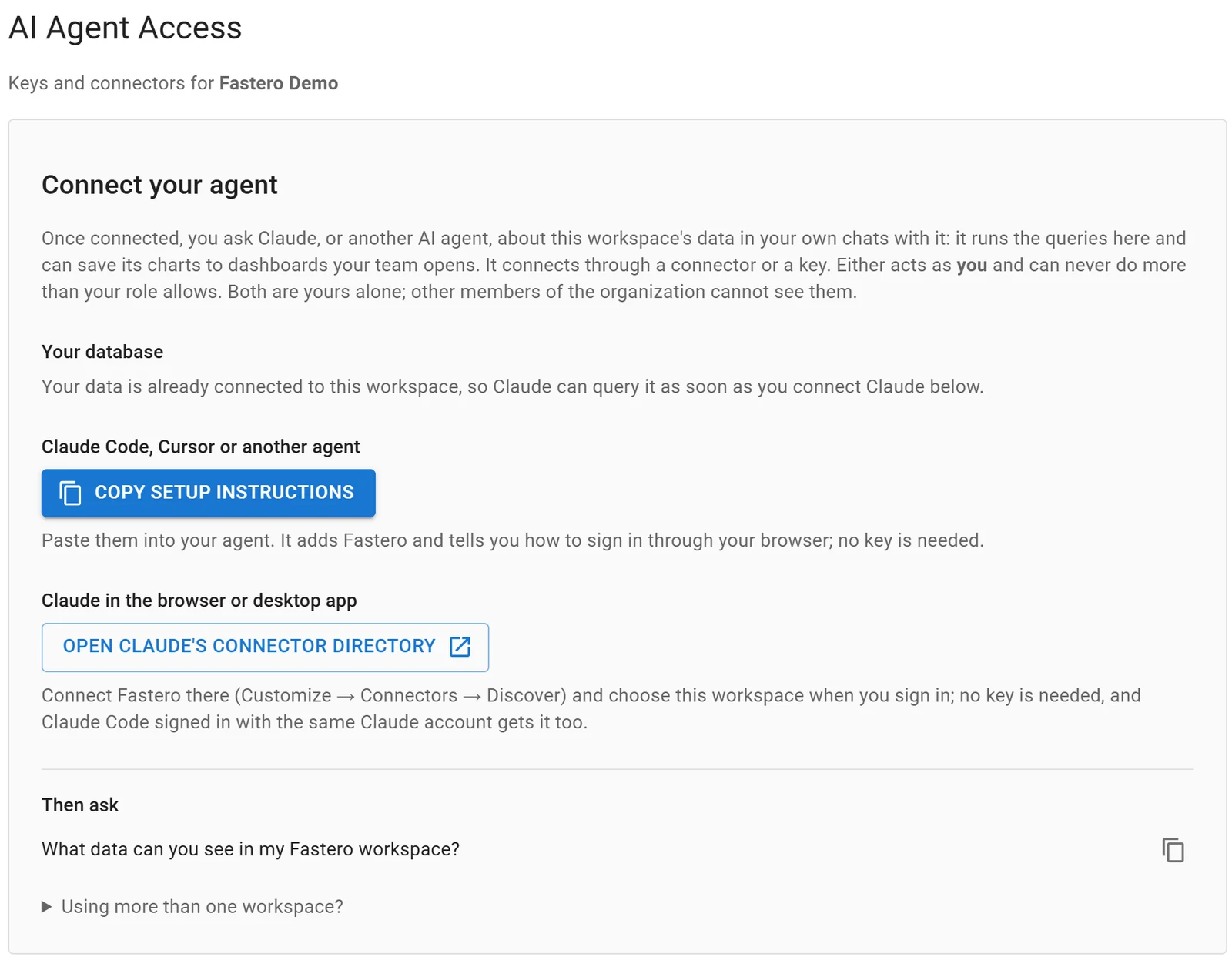
Settings, AI Agent Access: an agent signs in through the browser, so there is no key to copy.
FAQ
What is the Claude Marketplace?
Anthropic's website at claude.com/marketplace, launched 23 September 2026, where you browse connectors and plugins, buy Claude-powered partner products with part of an Anthropic commitment, and find consulting partners.
Can I buy software through the Claude Marketplace?
Eligible organizations with an Anthropic spend commitment can put part of it toward the listed agents and products. That route was in limited preview on 12 November 2026; you start with Request to buy or your account team.
How do I add a plugin marketplace in Claude Code?
Run /plugin marketplace add <owner>/<repo> in a session, or claude plugin marketplace add in your shell, then install with /plugin install <plugin>@<marketplace-name>. The official marketplace is added for you.
What's the difference between the official and community marketplaces?
claude-plugins-official holds Anthropic's plugins and partners', is added automatically and updates in the background. claude-community holds plugins authors submitted to Anthropic, which passed automated security scanning; you add it yourself, and its plugins are pinned to commits and don't auto-update by default.
How do I make a private plugin marketplace for my team?
Put a .claude-plugin/marketplace.json in a private git repository and give your team read access. An admin can register it for everyone through managed settings, or, on Team and Enterprise, sync it under Organization settings > Plugins & skills.
How do I list my plugin or connector in the Claude Marketplace?
Submit it to Anthropic's directory from the developer portal at claude.ai/directory/manage, on any paid plan. There's no separate Marketplace submission. Plugins are scanned on every version and reviewed by a person before the first listing.
Do Claude plugins update automatically?
Plugins from the official marketplace and from marketplaces added through claude.ai do. Community, third-party and your own marketplaces don't, until a user or admin turns auto-update on.
Sources
Checked 12 November 2026:
- Claude Marketplace: Marketplace, Connectors and plugins, Agents and products, Marketplace partners, Claude Marketplace launch post (23 September 2026)
- Directory: Publish to the directory, Submit a plugin, Connector verification, Manage plugins for your organization
- Claude Code docs: Anthropic's marketplaces, Install plugins, Create a marketplace, Host and maintain a marketplace, Publish a plugin, Plugins for your organization, Plugin security and trust
- Catalogs: anthropics/claude-plugins-official and anthropics/claude-plugins-community, README and
marketplace.json, counted 12 November 2026 - Fastero: MCP server