 Fastero Dev Team
"Scheduled tasks" now names several different features across Anthropic's products, and "routines" is the old name for one of them. They differ on the two things that decide whether a schedule works: where it runs, and whether your computer has to be awake when it's due.
The short answer: for a briefing or report from your connected apps, create a scheduled task in the Claude app (formerly Cowork). It runs in Anthropic's cloud on any paid plan, at most hourly, with your computer off. For work on a code repository, use a Claude Code cloud scheduled task, which Anthropic called a routine until October 2026: also cloud, at most hourly, and it can start from an API call or a GitHub event. Use a Desktop scheduled task for local files, but only while the app is open and the computer awake. /loop polls inside an open Claude Code session and expires after seven days. For a product, Managed Agents scheduled deployments run down to the minute for tokens plus $0.08 per session-hour, or run claude -p or the API from your own cron.
Fastero
Point Claude at your database.
Add Fastero to claude.ai or Claude Code. Claude builds the dashboard, deploys the app or publishes a live page, and your team opens it in Fastero.
Try free →Every way to schedule Claude, compared
Checked 12 November 2026.
| Option | Runs on | Computer must be on | Shortest interval | Cost |
|---|---|---|---|---|
| Scheduled task in the Claude app (Cowork) | Anthropic's cloud | No, unless the task needs local files or apps | Hourly | Your plan's usage |
| Claude Code cloud scheduled task (routine) | Anthropic's cloud | No | 1 hour | Your plan's usage |
| Claude Code Desktop scheduled task | Your computer, in the desktop app | Yes, app open and awake | 1 hour in the form, 1 minute if Claude sets it | Your plan's usage |
/loop and the cron tools |
An open Claude Code session | Yes, session open | 1 minute | Your plan or API key |
| Managed Agents scheduled deployment | Anthropic's cloud sandbox | No | 1 minute | API tokens plus $0.08 per running session-hour |
Your own scheduler with claude -p or the API |
Your server, CI or cloud scheduler | Your server must be | Whatever your scheduler allows | API tokens, or a plan token for claude -p |
The first three need a paid Claude plan (Pro, Max, Ultra, Team or Enterprise), and /loop works with a plan or an API key. The last two are developer options billed per token.
1. Scheduled tasks in the Claude app (Cowork)
This is the one most people mean. Scheduled tasks "run on their cadence even when your computer is asleep or the Claude Desktop app is closed", and each one "runs as its own Cowork session" with your connectors, skills and plugins.
Set one up. If your message box no longer shows Chat and Cowork, just ask in any conversation, for example "Every Monday at 9 AM, summarize last week's messages in my team's Slack channels", then check what Claude proposes and click Schedule. Otherwise type /schedule in a Cowork task, or open Scheduled in the sidebar. A manual setup asks for a name, the prompt, the approval mode, the frequency ("hourly, daily, weekly, on weekdays, or manually"), and optionally a model and a folder.
Limits worth knowing:
- "If a scheduled task requires local files or apps, it will only run locally", so the desktop app has to be open.
- Tasks created on your computer before 6 October 2026 keep running there; new ones run in the cloud.
- Every run uses your allowance, and Cowork work "consumes limits faster than Chat".
Anthropic's safety advice is specific: "Don't schedule tasks that access sensitive files, send messages on your behalf, make purchases, or take other actions that are difficult to undo."
2. Claude Code routines, now cloud scheduled tasks
A cloud scheduled task is "a saved Claude Code configuration: a prompt, one or more repositories, and a set of connectors". It starts on a schedule, from an HTTP POST to its own address, or on a GitHub event. Create one at claude.ai/code/routines or with /schedule in the CLI:
/schedule daily PR review at 9amThe essentials, checked 12 November 2026:
- At most hourly on a schedule. Custom cron expressions that run more often are rejected, and a bare five-field cron is read in UTC.
- Hourly limits, not daily caps. 100 scheduled runs an hour per account; Run now and API fires share 30 an hour per task.
- Plan usage, no separate price. "Scheduled tasks draw down subscription usage the same way interactive sessions do."
- A fresh clone, not your disk. Each repository is cloned at the start of a run, and local MCP servers aren't there.
- Still a research preview. "Behavior, limits, and the API surface may change."
Setup, triggers, prompts that work unattended and ten examples are in our Claude Code routines guide.
3. Desktop scheduled tasks
The desktop app's Code tab can run a scheduled task on your own computer, with "direct access to your files and tools". In the New scheduled task dialog, turn on Only on this computer under Advanced settings and pick a folder; it needs Claude Desktop 1.1.5368 or later.
The catch: "Tasks only run while the desktop app is running and your computer is awake." On wake, Desktop runs one catch-up for the latest missed time within seven days, so "A daily task that missed six days runs once on wake", and a 9 a.m. task can run at 11 p.m. The forms stop at hourly, but Claude can set a shorter interval if you ask in a session.
4. /loop and the cron tools in Claude Code
/loop repeats a prompt inside the Claude Code session you have open:
/loop 5m check if the deployment finished and tell me what happenedLeave out the interval and Claude picks a delay between one minute and one hour after each pass. Behind it are the CronCreate, CronList and CronDelete tools; a session holds up to 50 tasks, in your local time zone. It's for watching something while you work, not a weekly job: "Tasks only fire while Claude Code is running and idle", and "Recurring tasks automatically expire 7 days after creation."
5. Managed Agents scheduled deployments
For developers building on the Claude API, a scheduled deployment starts a new Managed Agents session on a cron expression in an IANA time zone, "with no scheduler for you to build or host". It runs to the minute, with jitter "of up to 15 percent of the interval between runs, with a minimum of 5 seconds and a maximum of 9 minutes", and up to 1,000 deployments per organisation. It costs standard token prices plus $0.08 per session-hour while running, and a budget can cap each run.
6. Your own scheduler with claude -p or the API
Anything that can run a command on a timer can run Claude: cron, Windows Task Scheduler, a cloud scheduler, or a GitHub Actions workflow with a schedule trigger, which the Claude Code GitHub Action supports.
With Claude Code's non-interactive mode, these are the flags that matter for a job nobody watches (an excerpt of claude --help, Claude Code 2.1.284 on our machine):
  --permission-mode <mode>              Permission mode to use for the session
                                        (choices: "acceptEdits", "auto",
                                        "bypassPermissions", "manual",
                                        "dontAsk", "plan")
  --permission-prompts <target>         Who answers permission prompts with
                                        --print: "host" (the SDK host or
                                        --permission-prompt-tool) or "none"
  --max-budget-usd <amount>             Maximum dollar amount to spend on API
                                        calls (only works with --print)
  -p, --print                           Print response and exit (useful for
                                        pipes).
A crontab line for 8:07 every Monday might be:
7 8 * * 1 cd /srv/reports && claude -p "Write last week's revenue summary to report.md" --permission-mode auto --permission-prompts noneIn Manual mode, a claude -p run denies any call that needs approval, so set a mode or allow the tools the job needs. To use a Claude plan instead of an API key, claude setup-token creates a one-year token for CLAUDE_CODE_OAUTH_TOKEN. For a single model call rather than an agent, call the Messages API from your scheduler: you pay per token, and the Batch API takes 50 percent off for jobs that can wait.
Point Claude at your database.
Start free →Worked example: a weekly report every Monday
Say the goal is a short read on last week's revenue, waiting at 8 a.m. every Monday.
First, decide whether it needs a model. If the report is the same charts and numbers every week, a scheduled query or dashboard email is cheaper and gives the same answer every time. Schedule Claude when the report needs judgement: what changed, why, and what to look at.
Then set it up in the Claude app:
- Connect the data source in Customize → Connectors, and give it a read-only login.
- In a new conversation, describe the job and the schedule in one message:
Every Monday at 8 AM: pull revenue and orders for the last full week and the week before,
by region, from the Fastero connector. Write a one-page summary: totals, the three biggest
changes with the numbers behind them, and anything that moved more than 10%. Save it to my
Weekly folder as revenue-YYYY-MM-DD.docx. If a number can't be pulled, say so at the top
instead of leaving it out. Don't send messages to anyone.- Check the name, schedule and instructions Claude proposes, then click Schedule.
- Run it once on demand from the Scheduled page and read the result before the first Monday. On a week you know is incomplete, check that the missing number is flagged at the top.
Three habits make it reliable. Name the exact week, not a rolling seven days. Make a missing source show up in the output, so a failure doesn't look like a quiet week. And keep sending out of the prompt, as Anthropic advises: share the file yourself, or put the numbers where colleagues already look.
The same job as code. If the report lives in a repository, a Claude Code cloud task can run a script it maintains: /schedule weekly on Mondays at 8:07, run reports/weekly_revenue.py and open a pull request with the updated report.md. You get a diff to review instead of a document.
When the schedule is for a team's numbers
Recurring data work is usually one of three jobs: send the same numbers every week, rerun an analysis, or react when something breaks. Claude can do all three, but each run spends tokens and the output stays in one person's account. Fastero is an AI and data platform where people and AI agents work together on a team's data, and it schedules the routine parts itself:
- Dashboards emailed on a schedule. On the schedule you set, the dashboard's queries run fresh and each recipient gets the number cards, the charts, each table's first rows, a summary and a PDF of the whole dashboard. People in the workspace also get a button that opens it in Fastero; anyone else gets the email and the PDF.
- Notebooks on cron. A Jupyter notebook runs every cell on a schedule from its Schedule (cron) dialog, on the Free plan, and a cell's result can feed a dashboard widget.
- Claude when something goes wrong. A scheduled Python project, dashboard email, notebook run or alert can call a webhook or a Claude Code routine when it fails or finishes, or when an alert fires or recovers. An admin registers each destination under Settings → Developers → Callbacks, and a routine is started at most once per event.
- Schedules that stop with access. A schedule runs as the person who made it and stops doing anything once they can no longer edit the project.
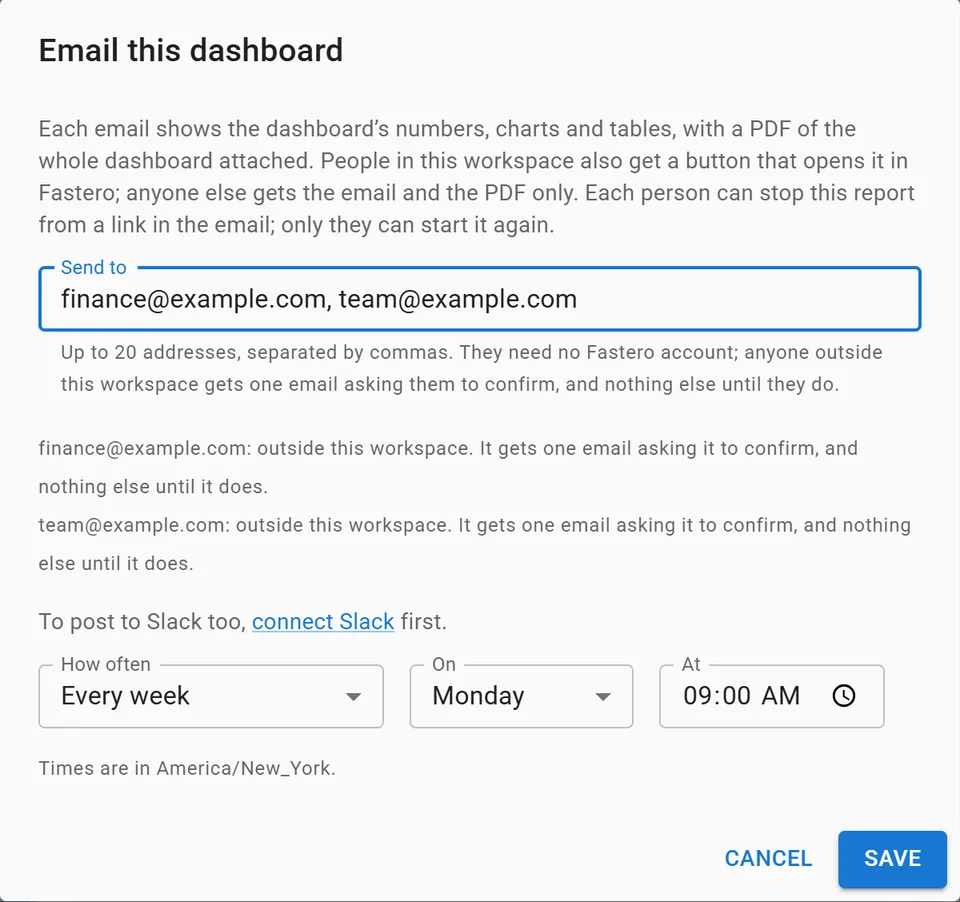
Setting up a weekly email of a dashboard, with invented addresses.
For the email side in more depth, see how to automate reports with Claude and how to schedule a Jupyter notebook.
FAQ
What are Claude scheduled tasks?
Prompts Claude runs on a timetable. In the Claude app (formerly Cowork) they run in Anthropic's cloud; in Claude Code they run in the cloud, in the desktop app on your computer, or inside an open session with /loop.
What are Claude routines?
The earlier name for Claude Code's cloud scheduled tasks: a saved prompt, repositories and connectors that run in Anthropic's cloud on a schedule, an API call or a GitHub event.
Does my computer need to be on for Claude scheduled tasks?
Not for cloud tasks in the Claude app or Claude Code, or for Managed Agents deployments. Desktop tasks need the app open and the computer awake, and /loop needs the session open.
How often can a Claude scheduled task run?
Hourly at most in the Claude app and for Claude Code cloud tasks. Desktop tasks, /loop and Managed Agents deployments can go down to one minute.
Do Claude scheduled tasks cost extra?
Not on a paid plan: they use your plan's usage like any other work. Managed Agents deployments and API calls from your own scheduler are billed per token, plus $0.08 per running session-hour for Managed Agents.
Can a scheduled task use my MCP servers?
Cloud tasks use the connectors on your claude.ai account. Servers you added on your own computer work only in runs on that computer: Desktop tasks, /loop and claude -p.
Are Claude scheduled tasks available on the Free plan?
No. Anthropic's pricing page lists "Hand off and schedule tasks" for Pro and above, and Claude Code isn't on Free either.
Sources
Checked 12 November 2026; the claude --help output is from Claude Code 2.1.284 on Windows 11 the same day:
- Anthropic help center: Schedule recurring tasks in Claude Cowork, Get started with Claude Cowork, Use Cowork on web, desktop and mobile, Use Claude Cowork safely, Pricing
- Claude Code docs: Automate work with scheduled tasks, Desktop scheduled tasks, Run prompts on a schedule, Run Claude Code programmatically, Authentication, GitHub Actions
- Claude Platform docs: Managed Agents scheduled deployments, Pricing