 Fastero Dev Team
Anthropic's Claude Code best-practices guide now rests on one diagnosis: a session goes wrong when Claude couldn't see something, had no way to check its work, or was trusted with a rule that needed enforcing. Its old engineering post on the topic now redirects there. We built the advice into a small repository and tested every part we could without starting a session.
The short answer: Anthropic splits instructions into ones Claude weighs (your prompt, CLAUDE.md, skills) and ones Claude Code enforces (permission rules, hooks, managed settings). The habits: keep CLAUDE.md to what Claude can't learn from the repo, under 200 lines; plan big changes in plan mode or with an "interview me" spec; give Claude a command that passes or fails, and make it a Stop hook when it must pass; /clear between unrelated tasks and check /usage; put never-rules in deny rules, which hold in every permission mode; use hooks for steps with zero exceptions; and give parallel work its own worktree with claude -w. ALL CAPS warnings and "think harder" are now on Anthropic's list of habits to drop.
Fastero
Point Claude at your database.
Add Fastero to claude.ai or Claude Code. Claude builds the dashboard, deploys the app or publishes a live page, and your team opens it in Fastero.
Try free →Guidelines and rules: the split behind every tip
From Anthropic's table, condensed:
| Claude decides | Claude Code enforces | |
|---|---|---|
| What to do | Your prompt, CLAUDE.md, skills |
Hooks, skills only you can start |
| What it can touch | Auto mode's classifier | Deny rules, strict sandbox, managed settings |
| When it's done | A request for evidence, /goal, /code-review |
Tests, a Stop hook, CI |
The guide's test for moving a line across: "If you keep adding emphasis to a CLAUDE.md line and Claude still misses it, that's a sign the line belongs in a hook." Our example repository has files on both sides:
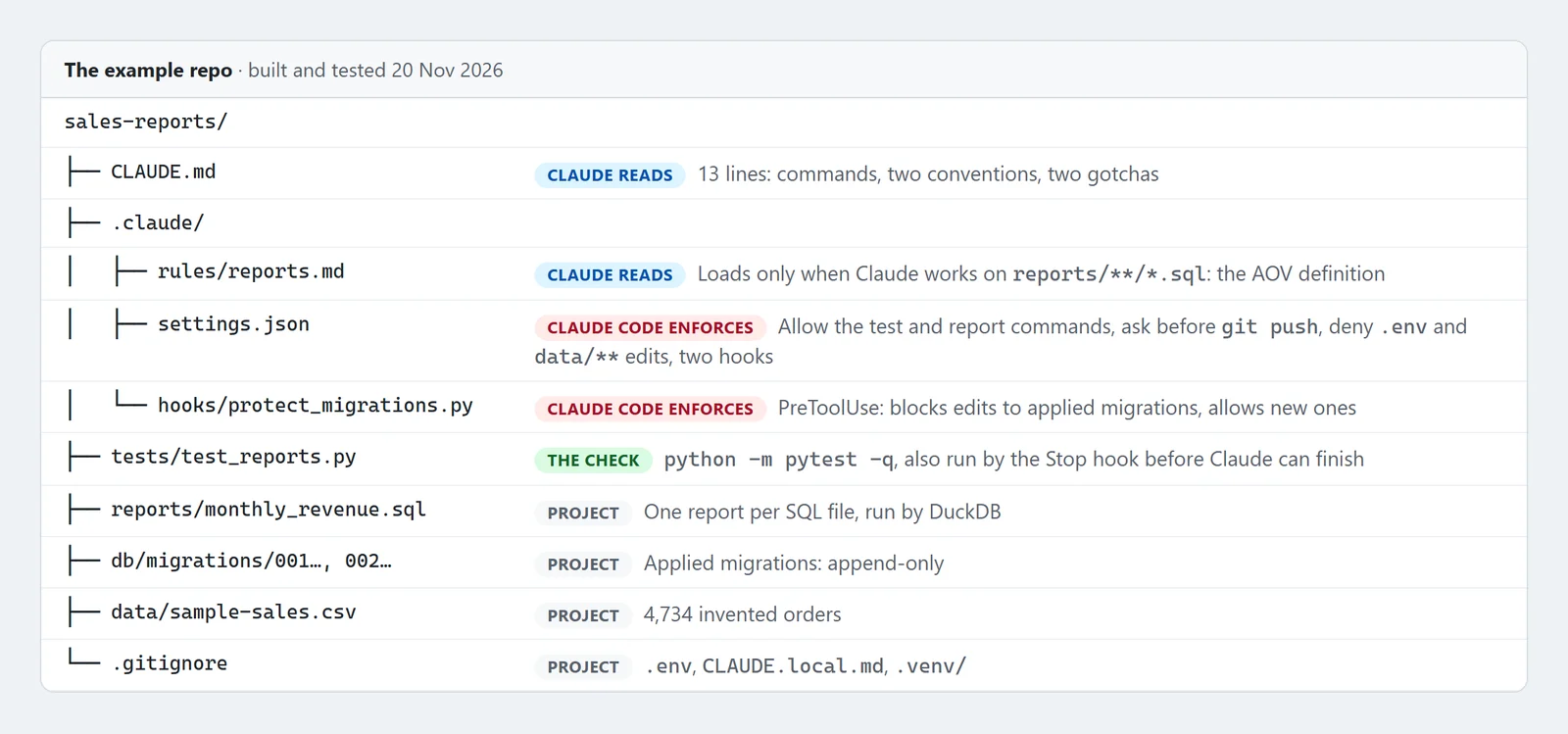
The example repository, labelled by who acts on each file. The sales data is invented.
1. Tell Claude what it can't find in the repo
The rule for CLAUDE.md: "Only write down what Claude can't find by reading the repo, or what it would otherwise spend time rediscovering every session." Ask "Could it find this by reading the code?" and "Would it actually go and look?" "If both are yes, leave it out." What passes: exact test and lint commands, code that misleads, decisions made outside the repo, and anything you've corrected twice.
Ours is 13 lines. Every command in it runs; on Python 3.14.3 the tests pass (2 passed in 1.33s):
# Commands
- Set up: `python -m venv .venv`, then `pip install -r requirements.txt`
- Run all tests: `python -m pytest -q`
- Run one test file: `python -m pytest tests/test_reports.py -q`
- Run a report: `python scripts/run_report.py reports/monthly_revenue.sql`

# Conventions
- A report is one SQL file in reports/, run by DuckDB against data/sample-sales.csv
- A schema change is a new numbered file in db/migrations/. Never edit one that exists

# Gotchas
- data/sample-sales.csv is invented sample data. Don't edit it to make a test pass
- revenue is already quantity × unit_price. Never multiply it by quantity again
We checked the last line: in all 4,734 rows, revenue equals quantity * unit_price to the cent. The average-order-value formula matters only for SQL reports, so it lives in .claude/rules/reports.md with paths: ["reports/**/*.sql"] and loads only when Claude works there. Personal preferences go in a gitignored CLAUDE.local.md. After /init drafts a file, "the work is mostly removing lines". More in our CLAUDE.md guide.
2. Plan before Claude edits
To see a change before it touches disk, use plan mode: Shift+Tab until the status bar shows ⏸ plan mode on, a prompt starting with /plan, or claude --permission-mode plan. Edits stay blocked until you approve, except in interactive terminal sessions with bypass permissions available (plan mode guide).
When you don't yet know what you want, the guide has Claude interview you. Its prompt, from the docs:
I want to add rate limiting to the public API but haven't thought it through yet. Interview me until you could write the spec, then write it to SPEC.md.Then build from SPEC.md in a fresh session, which starts with a clean context and a written definition of done.
3. Give Claude a check to run
"Give Claude something it can run that comes back pass or fail." Without one, "that makes you the test suite". Four ways to use a check, from asking to enforcing:
| Where the check lives | Who decides it passed |
|---|---|
| In the prompt: "run the auth tests after, and keep going until they pass" | Claude |
/goal all tests in tests/auth pass |
A separate model, after every turn |
A Stop hook |
Claude Code: exit 2 sends Claude back to work |
/code-review |
A fresh subagent that never saw your conversation |
Our Stop hook copies the docs' pattern, with pytest in place of tsc:
"Stop": [
  { "hooks": [ { "type": "command", "command": "python -m pytest -q 1>&2 || exit 2" } ] }
]
We ran the command by hand in Git Bash, the shell Claude Code uses for such hooks on Windows, on a copy of the repo whose report multiplies revenue by quantity again (pytest 9.2.0, DuckDB 2.0.0; output trimmed):
F.                                                                       [100%]
E       AssertionError: assert Decimal('5115847') == Decimal('1473701')
FAILED tests/test_reports.py::test_monthly_revenue_adds_up_to_the_csv - Asser...
1 failed, 1 passed in 1.64s
exit 2
Exit 2 blocks the stop and the output goes to Claude as the reason. After eight blocks in a row with no tool call between them, Claude Code ends the turn anyway. Whatever the check, ask Claude for the command and its output; "All tests pass" alone tells you little.
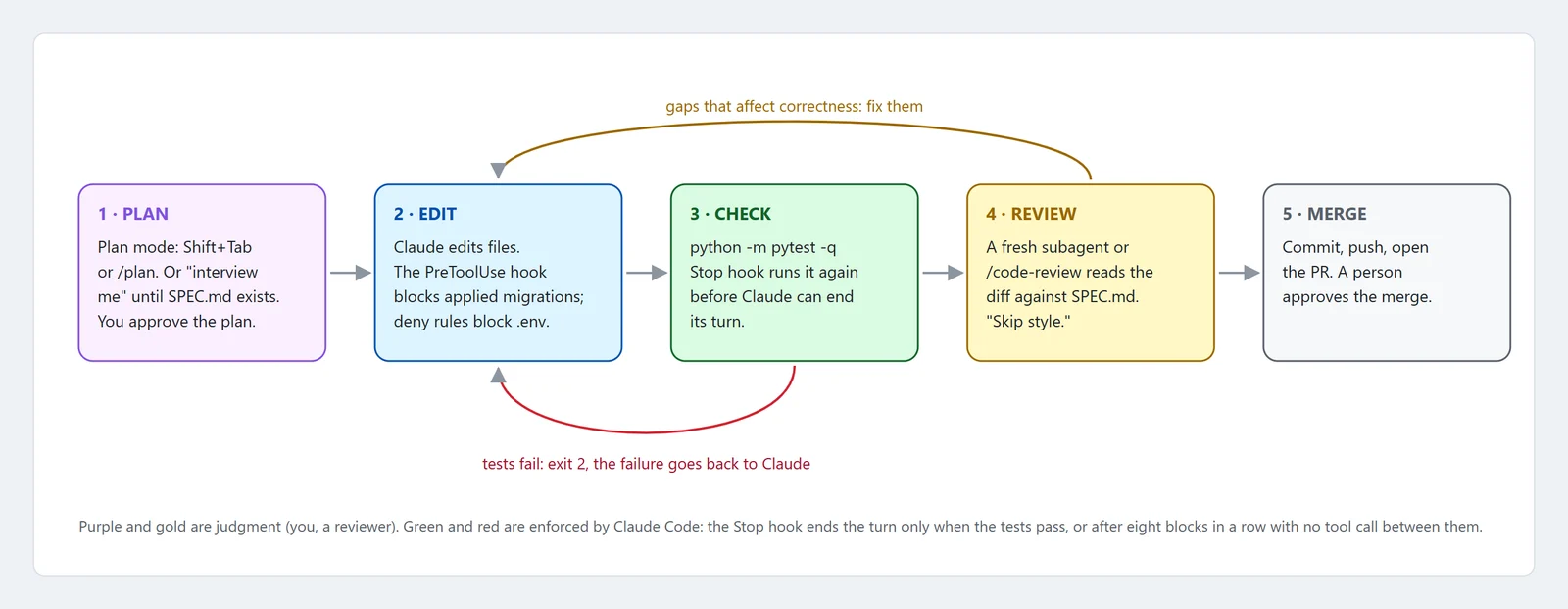
The loop the guide describes: the Stop hook enforces the check, a fresh reviewer and a person handle the rest.
4. Keep context, and the bill, small
With a 1M-token window on most current models and automatic compaction, running out is rare; paying for context you don't need is not, since every request resends the conversation:
/clearbetween unrelated tasks;/clear oauth-migrationnames the session you leave./compact keep the API changes and the test commandswhen a long task needs a summary./usagebreaks usage down by skill, subagent, plugin and MCP server on paid plans.Escstops Claude mid-action,/rewindrolls back, and "after two failed corrections run/clearand write a better prompt instead of a third."
Subagents cost tokens and run "the same model (or a smaller one) on the same task. You get parallelism or a fresh pair of eyes out of it, but not a smarter answer." Use them for parallel work, noisy output and review; one defined with tools: Read, Grep, Glob can't edit anything.
5. Put the never-rules in permission rules
deny rules "hold in every permission mode, including auto and bypassPermissions", and "Rules are evaluated in order: deny, then ask, then allow." Ours:
"permissions": {
  "allow": ["Bash(python -m pytest *)", "Bash(python scripts/run_report.py *)"],
  "ask":   ["Bash(git push *)"],
  "deny":  ["Read(./.env)", "Read(./.env.*)", "Edit(/data/**)"]
}
Know the edges. A Read deny rule catches cat .env but not a script that opens the file. Write(path) rules are accepted but never match: write Edit(path), which covers every built-in editing tool. And auto mode, where terminal sessions start since v2.1.283, is "a classifier model judging each action rather than a hard rule".
The docs point editors at SchemaStore's schema, so we validated our file against it (the hook object shortened):
$ python check_settings.py claude-code-settings.schema.json .claude/settings.json
jsonschema 4.26.0, schema draft http://json-schema.org/draft-07/schema#
.claude/settings.json: 1 schema errors
  at hooks/PreToolUse/0/hooks/0 -> {... 'onFailure': 'block'} is not valid under any of the given schemas
The one error is onFailure, a hook field added in v2.1.295; without it the file validates. The docs warn that "The schema can lag behind the newest CLI releases."
Point Claude at your database.
Start free →6. Use hooks for steps with zero exceptions
The guide says "a hook is for a rule with zero exceptions." Ours: applied migrations are append-only. A deny rule on db/migrations/** would also block new migration files, so this needs a script that tells new from existing (its docstring left out):
import json
import os
import sys

event = json.load(sys.stdin)
tool = event.get("tool_name")
path = event.get("tool_input", {}).get("file_path", "")
norm = path.replace("\\", "/")  # on Windows, file_path arrives with backslashes

if "/db/migrations/" in norm and (tool == "Edit" or (tool == "Write" and os.path.exists(path))):
    name = norm.rsplit("/", 1)[-1]
    print(f"Blocked: {name} is an applied migration. "
          "Add a new numbered file in db/migrations/ instead.", file=sys.stderr)
    sys.exit(2)

sys.exit(0)
It runs on PreToolUse for Edit|Write, in exec form ("command": "python", the script in args), with "onFailure": "block". We piped JSON in the documented PreToolUse shape into it, with Windows paths:
$ python .claude/hooks/protect_migrations.py < edit-001.json; echo "exit $?"
Blocked: 001_create_orders.sql is an applied migration. Add a new numbered file in db/migrations/ instead.
exit 2
$ python .claude/hooks/protect_migrations.py < write-003.json; echo "exit $?"
exit 0
$ echo 'not json' | python .claude/hooks/protect_migrations.py > /dev/null 2>&1; echo "exit $?"
exit 1
Two traps showed up. The hooks reference warns that a forward-slash check "never matches a backslash path", so we ran the same cases through a copy without the replace line:
| Call | Our hook | Without normalising \ |
|---|---|---|
Edit db\migrations\001… |
exit 2, blocked | exit 0, allowed |
Write new db\migrations\003… |
exit 0 | exit 0 |
Edit db/migrations/002… |
exit 2, blocked | exit 2, blocked |
Edit reports\monthly_revenue.sql |
exit 0 | exit 0 |
The naive version works on macOS and Linux and lets every Windows-path edit to a migration through. And the crash case exits 1, a non-blocking error: without onFailure: "block" (v2.1.295 or later; our 2.1.284 predates it), a broken guard lets the edit go ahead. More in our Claude Code hooks guide.
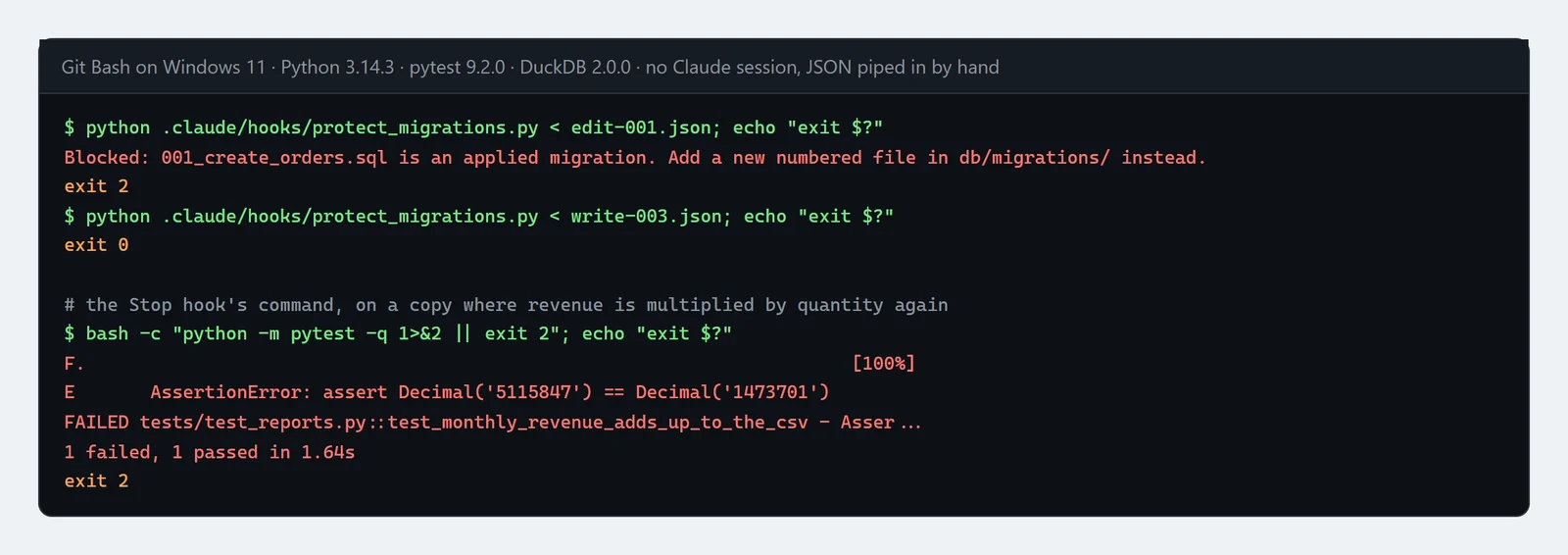
Both hooks fed by hand on Windows 11, no Claude session. The data is invented.
7. Run parallel work in separate checkouts
claude -w feature-auth starts a session in a new git worktree (-w, --worktree [name] in claude --help on 2.1.284). A worktree lacks gitignored files, so list the small ones it needs in .worktreeinclude, as in the docs:
.env
.env.local
config/dev-credentials.json
/batch splits one large change into 5 to 30 units, each in its own worktree; the desktop app runs worktree sessions side by side; and a second session reviewing the first one's diff is "the easiest independent reviewer you can get". For unattended runs, the guide's script pattern is claude -p with --allowedTools, --permission-mode dontAsk and --max-turns. Timers and events are in Claude Code routines and Claude Code GitHub Actions.
Tips you can stop following
From Anthropic's "What you can stop doing" table, shortened:
| Old advice | What the guide says now |
|---|---|
| IMPORTANT or ALL CAPS | Emphasis "mostly makes Claude over-apply the rule"; use a hook, or shorten the file |
| "think hard", "be thorough" | "Effort is the control for that"; ultrathink still deepens one turn |
| Delegate for a better answer | A fresh reviewer helps; delegating the same task doesn't |
| Describe your architecture in CLAUDE.md | "Claude reads the repo itself." |
When Claude Code works on a team's database
The same rules apply when the task is about a team's numbers: Claude shouldn't hold the database password or be able to change the data. Fastero is an AI and data platform where people and AI agents work together on a team's data:
- A Postgres database (Supabase and Neon included) connects once in the workspace, so no password sits in
.envor an agent's config. - Claude Code adds it as a remote MCP server with
claude mcp add --scope user --transport http fastero https://api.fastero.com/api/v1/mcp, then/mcpto sign in through the browser. - Its SQL tool runs one
SELECT,WITH,EXPLAINorSHOWstatement, refuses anything that could change data and returns at most 500 rows (as of 20 November 2026). - Metric definitions the team saved come back from
fastero_get_definitions, so "average order value" means the same in every session without a line in each repo'sCLAUDE.md. - Scripts that can't sign in use a key: at most 90 days, read and SQL by default.
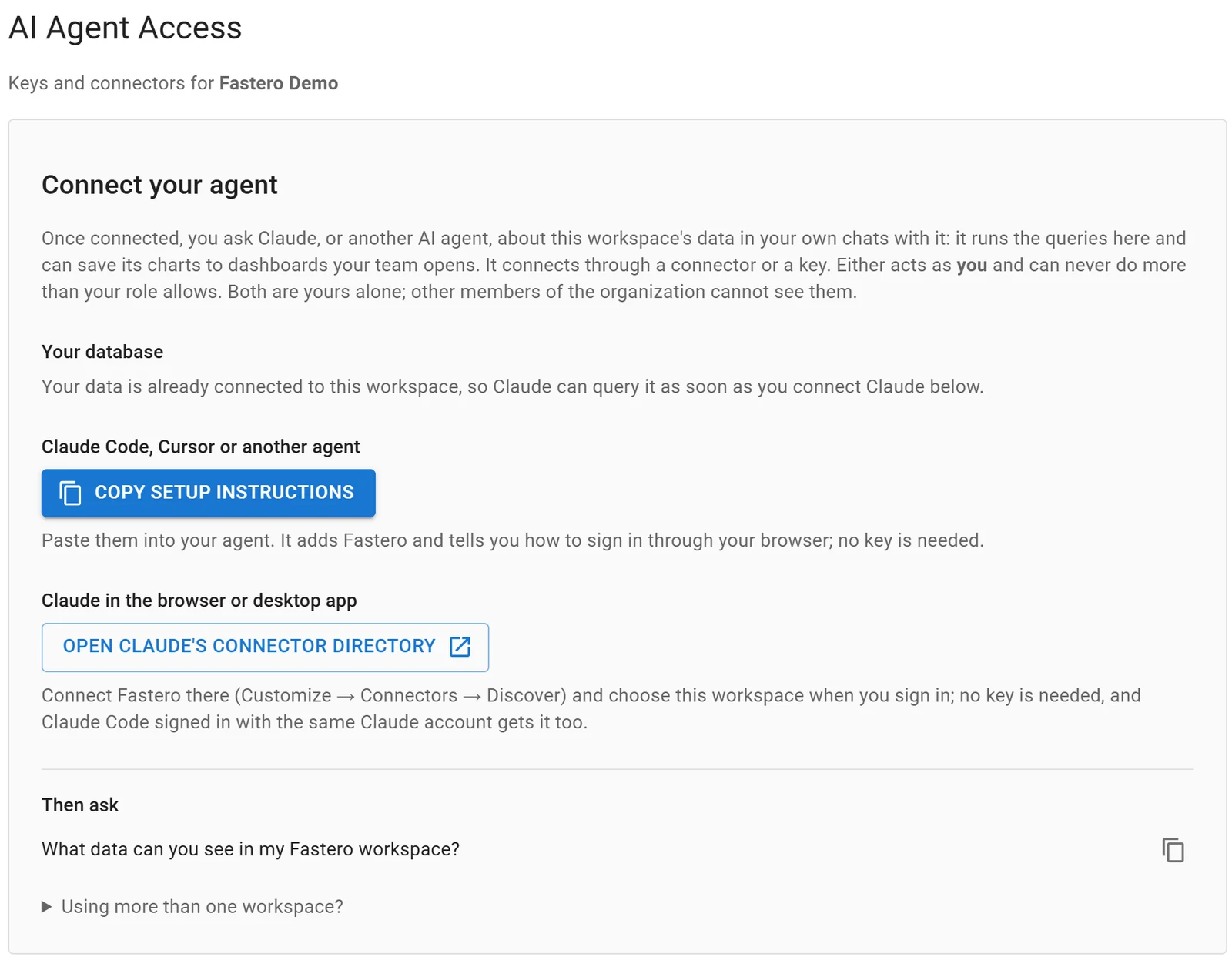
Settings, AI Agent Access: an agent signs in through the browser, so there is no key to copy.
FAQ
What are the best practices for Claude Code?
Anthropic's guide has three at its core: tell Claude what it can't see (a short CLAUDE.md, specific prompts), give it a check to run (tests, a Stop hook), and enforce rules that can't have exceptions (deny rules, hooks). Cost control and parallel worktrees come after those.
How long should CLAUDE.md be?
Anthropic's memory docs recommend under 200 lines per file, because every line loads into every session. Leave out what Claude can learn from the code, and move rules for one part of the codebase into .claude/rules/ with a paths: filter.
Does "ultrathink" still work in Claude Code?
Yes: it asks for deeper reasoning on one turn without changing your effort setting. "Think hard" is ordinary text; /effort is the real control, with medium the default on current models.
How do I stop Claude Code from asking for permission?
Interactive sessions start in auto mode since v2.1.283, where a classifier approves routine actions. Add allow rules for commands you trust, or run /fewer-permission-prompts to build an allowlist from recent sessions. Keep deny rules for what must never happen; those hold in every mode.
Are CLAUDE.md instructions guaranteed to be followed?
No. Claude reads them and usually follows them, but it can decide a guideline doesn't apply. For something that must always or never happen, use a hook or a permission rule, which Claude Code applies whatever the model decides.
Sources
Read on 20 November 2026. Commands ran on Windows 11 with Claude Code 2.1.284 (the newest release that day was 2.1.329), Python 3.14.3, pytest 9.2.0, DuckDB 2.0.0 and jsonschema 4.26.0. No Claude session was started; hook inputs were piped in by hand. The data is Fastero's invented sample. The old URL, anthropic.com/engineering/claude-code-best-practices, returned a 308 redirect to the docs page.
- Claude Code docs: Best practices, Memory and CLAUDE.md, Hooks reference, Hooks guide, Configure permissions, Permission modes, Settings, Common workflows, Subagents, Worktrees, Commands, CLI reference, Changelog
- SchemaStore's Claude Code settings schema, linked from the settings docs