 Fastero Dev Team
A Claude skill is a folder of instructions Claude loads when a request calls for it: how your team formats SQL, what goes in the monthly report, which colours a chart uses. Most examples online are for coding or writing. These eight are for working with data, and each one is a complete file you can copy.
The short answer: a skill is a folder with a SKILL.md file in it. The file starts with YAML front matter holding a name and a description of what the skill does and when to use it, followed by instructions in Markdown; it can bring along scripts/, references/ and assets/ folders. Claude sees only the name and description until a request matches, then reads the rest. In Claude Code, put the folder in ~/.claude/skills/ or your repo's .claude/skills/; in claude.ai, upload it as a ZIP under Customize › Skills; through the API, upload it to /v1/skills. The eight examples below passed Anthropic's validators; six of them work everywhere, and two use fields only Claude Code accepts.
Fastero
Point Claude at your database.
Add Fastero to claude.ai or Claude Code. Claude builds the dashboard, deploys the app or publishes a live page, and your team opens it in Fastero.
Try free →What's in a skill
monthly-kpi-report/
├── SKILL.md              ← required: front matter + instructions
├── references/
│   └── metrics.md        ← read only when the instructions point to it
└── assets/
    └── report-template.md
Claude Code's skills "follow the Agent Skills open standard", the same format claude.ai and the API use. The front matter:
| Field | Required | Works in |
|---|---|---|
name |
Yes outside Claude Code | Everywhere. Lowercase letters, numbers and hyphens, up to 64 characters, matching the folder name; it can't contain "anthropic" or "claude" |
description |
Yes | Everywhere. What it does and when to use it, up to 1,024 characters |
license, compatibility, metadata, allowed-tools |
No | Everywhere |
paths, argument-hint, disable-model-invocation, context, agent, when_to_use and others |
No | Claude Code only |
That last row matters. A skill using a Claude Code field works in Claude Code, but outside it the upload fails with an error like this one: "Unexpected key(s) in SKILL.md frontmatter: argument-hint. Allowed properties are: allowed-tools, compatibility, description, license, metadata, name".
How Claude picks a skill. "The description is what Claude matches your request against when determining whether to trigger the Skill." Every skill's name and description sit in Claude's context from the start; the body loads only when it's needed, and extra files only if the body sends Claude to them. So the description does the work: say what the skill does and the words a user would actually type when they need it. Anthropic's advice is to "Always write in third person" and to keep SKILL.md under 500 lines.
Where skills live
| Where | How |
|---|---|
| Claude Code, just you | ~/.claude/skills/<skill-name>/SKILL.md |
| Claude Code, your team | .claude/skills/<skill-name>/SKILL.md in the repo |
| Claude Code, from a plugin | <plugin>/skills/<skill-name>/SKILL.md, run as /plugin:skill |
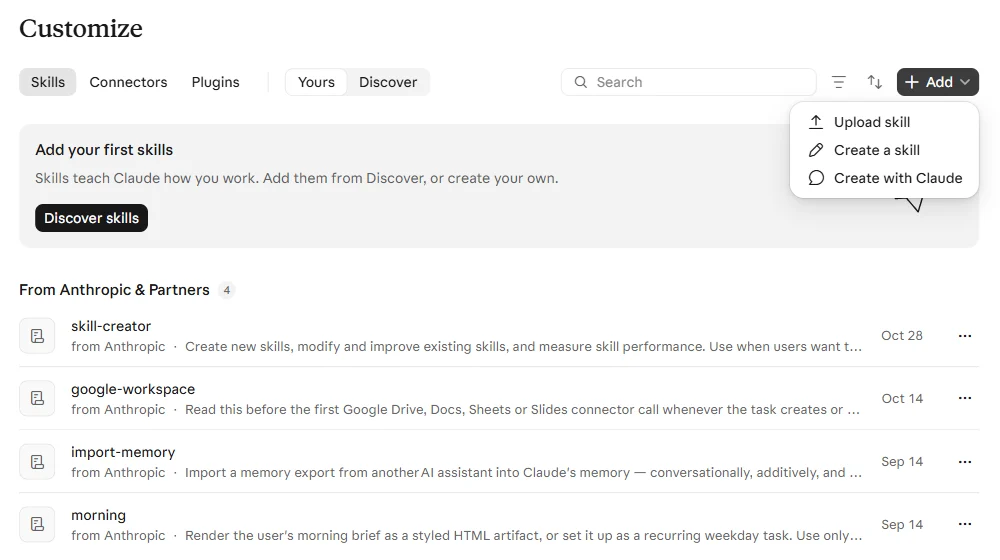
| claude.ai | Customize › Skills › Add › Upload skill (a ZIP with the skill folder at its root), or Create a skill, or Create with Claude |
| The API | Upload to /v1/skills, then list it in the request's container alongside the code execution tool; up to 20 skills per request |
The Add button on claude.ai's Skills page offers three ways in: Upload skill, Create a skill, and Create with Claude. We took this screenshot in a Free account, where all three were offered:
Skills you add in claude.ai also reach Claude Code when you sign in to it with the same account: Claude Code "downloads your account's skills into ~/.claude/skills/synced/".
Eight skill examples for data work
1. SQL style guide
The simplest kind of skill: rules, plus one before-and-after example so Claude can see what the rules mean.
---
name: sql-style-guide
description: Applies the team's SQL style rules when writing, reviewing or reformatting SQL for PostgreSQL, BigQuery or Snowflake. Use when the user asks for a query, pastes SQL to clean up, or asks why a query is hard to read.
license: Apache-2.0
metadata:
  owner: data-team
  version: "1.0"
---

# SQL style guide

Apply these rules to every query you write or edit. When reviewing someone else's SQL, list each rule it breaks with the line it breaks it on, then give the corrected query.

## Layout

- Keywords in lowercase: `select`, `from`, `left join`, `group by`.
- One clause per line. Each selected column on its own line, indented four spaces, with trailing commas.
- Use CTEs (`with ... as`) instead of subqueries nested more than one level deep.
- Name each CTE for what it holds: `paid_orders`, not `t1` or `cte2`.

## Names

- snake_case for tables, columns and aliases.
- Alias every table in a join with a short, meaningful name: `o` for orders is fine, `a` and `b` are not.
- Booleans start with `is_` or `has_`. Timestamps end with `_at`. Dates end with `_date`.

## Joins and filters

- Always write the join type (`inner join`, `left join`). Never use comma joins.
- Once more than one table is involved, qualify every column with its table alias.
- Filters that define the population go in `where`. Filters that define one metric go in `count(*) filter (where ...)` (PostgreSQL) or `countif(...)` (BigQuery) or `count_if(...)` (Snowflake).

## Safety

- No `select *` in anything saved, scheduled or shared.
- Never write `delete` or `update` without a `where` clause, and show the matching row count first.
- Filter timestamps with half-open ranges: `created_at >= '2026-10-01' and created_at < '2026-11-01'`. Never use `between` on timestamps.

## Example

Before:

    SELECT * FROM orders a, customers b WHERE a.customer_id = b.id AND a.created_at BETWEEN '2026-10-01' AND '2026-10-31'

After:

    select
        o.order_id,
        o.created_at,
        o.amount,
        c.country
    from orders as o
    inner join customers as c
        on o.customer_id = c.customer_id
    where o.created_at >= '2026-10-01'
        and o.created_at < '2026-11-01'
2. Monthly KPI report
A skill with steps, a definitions file and a template. The definitions live in references/metrics.md, so they load only when the report is being built, and Claude is told not to invent its own.
---
name: monthly-kpi-report
description: Builds the monthly KPI report from the analytics warehouse, comparing the closed month with the prior month and the same month last year. Use when the user asks for the monthly report, month-end KPIs, a monthly business review, or month-over-month and year-over-year numbers.
license: Apache-2.0
metadata:
  owner: finance-analytics
  version: "1.2"
---

# Monthly KPI report

## Steps

1. Confirm the month. Default to the last fully closed calendar month. Never report a month that is still in progress.
2. Read [references/metrics.md](references/metrics.md) and compute every metric listed there exactly as defined. Do not add metrics or change a definition. If a metric cannot be computed, say which one and why.
3. For each metric, get three values: the report month, the prior month, and the same month a year earlier. Compute the month-over-month and year-over-year change in percent.
4. Flag any metric that moved more than 20% month over month in either direction. Before calling it a business change, check for a data cause: missing days, a source that loaded late, or duplicated rows.
5. Fill in [assets/report-template.md](assets/report-template.md), keeping its section order.
6. End with the exact queries you ran, so a reviewer can rerun them.

## Formatting

- Thousands separators on every number. Currency with no decimals. Percentages with one decimal.
- State the time zone used for month boundaries: UTC unless the user says otherwise.
- If the prior-year month has no data, write "n/a", never 0.
And references/metrics.md:
# Metric definitions

All metrics use UTC month boundaries and exclude rows where `customers.is_test = true`.

| Metric | Definition | SQL expression (PostgreSQL) |
| --- | --- | --- |
| Revenue | Sum of paid order amounts, net of refunds, in the month the order was paid | `sum(o.amount) - coalesce(sum(r.amount), 0)` over `orders o left join refunds r using (order_id)` where `o.paid_at` is in the month |
| New customers | Customers whose first paid order falls in the month | `count(*)` of customers where `min(o.paid_at)` is in the month |
| Active customers | Customers with at least one paid order in the month | `count(distinct o.customer_id)` where `o.paid_at` is in the month |
| Churn rate | Active customers last month with no paid order this month, divided by active customers last month | `1 - (retained / active_last_month)` |
| Average revenue per active customer | Revenue divided by active customers | `revenue / nullif(active_customers, 0)` |

Do not compute any other metric for this report.
The template in assets/report-template.md is a Markdown skeleton: a summary, a table with the month, prior month, change and same month last year for each metric, a flags section and the queries.
3. Chart style
---
name: chart-style
description: Applies house chart conventions (chart type, colours, titles, axis labels, number formats) to any chart made in matplotlib, Plotly, Vega-Lite or a BI tool. Use when the user asks for a chart, plot, graph or dashboard tile, or asks to make charts look consistent.
license: Apache-2.0
---

# Chart style

## Pick the chart type

- Change over time: line chart. Bars only for 12 or fewer periods.
- Comparing categories: horizontal bar chart, sorted largest first.
- Parts of a whole: stacked bar. A pie chart only for two or three parts.
- Distribution of one measure: histogram or box plot.
- Relationship between two measures: scatter plot.

## Text

- The title states the finding ("Revenue grew 12% in October"), not the axes ("Revenue by month").
- The subtitle gives the metric definition, unit, date range and data source.
- Label axes with units. Drop an axis label that only repeats the title.
- Label the last point of each line directly instead of relying on a legend.

## Colour

- One highlight colour, `#2563EB`, for the series that matters. Grey, `#9CA3AF`, for context series.
- At most six categorical colours, in this order: `#2563EB`, `#F59E0B`, `#10B981`, `#EF4444`, `#8B5CF6`, `#6B7280`.
- Never make red and green the only difference between two series.

## Numbers

- Bar chart value axes start at zero.
- Thousands as 12.3K, millions as 4.5M. Percentages with one decimal.

## matplotlib

Load the house style before plotting: `plt.style.use("assets/house.mplstyle")`, with the path resolved from this skill's folder. It sets the fonts, the colour cycle and the grid; the rules above still apply.
assets/house.mplstyle holds the same colour cycle, a y-only grid, no top or right spines and left-aligned bold titles, so matplotlib charts start in the house style.
4. Data dictionary lookup
A skill that keeps the dictionary in three reference files, one per domain, and tells Claude to read only the one it needs.
---
name: data-dictionary-lookup
description: Looks up what a warehouse table or column means, its grain, its source system and its known caveats before any query is written. Use when the user names a table or column, asks where a number comes from, or asks which table holds a field such as revenue, plan, signup date or churn.
license: Apache-2.0
---

# Data dictionary lookup

Before writing SQL against the warehouse, find each table you plan to use in the files below and read its entry. Read only the file for the domain you need.

| Domain | Tables | File |
| --- | --- | --- |
| Sales | orders, refunds | [references/sales.md](references/sales.md) |
| Customers | customers, subscriptions | [references/customers.md](references/customers.md) |
| Product usage | events | [references/product-usage.md](references/product-usage.md) |

## Rules

- Respect each table's grain. Never join two tables at different grains without aggregating one of them first.
- Apply every caveat listed for a table, such as excluding test accounts.
- If a table or column isn't in the dictionary, say so and ask. Don't infer its meaning from its name.
Each reference entry gives a table's grain, source, key columns and caveats, such as this one from references/sales.md:
## refunds

- Grain: one row per refund. An order can have several.
- Source: the billing system, loaded hourly.
- Key columns: `refund_id`, `order_id`, `amount`, `refunded_at`.
- Caveats: aggregate to one row per `order_id` before joining to `orders`, or revenue double-counts.
That last line is exactly the mistake a model makes when it guesses from column names.
5. CSV cleaning checklist, with a script
Skills can carry code. This one ships scripts/profile_csv.py, a profiler that uses only Python's standard library, and tells Claude to run it before touching the file.
---
name: csv-cleaning-checklist
description: Profiles and cleans a CSV or TSV file before analysis, covering encoding, delimiter, header row, column types, missing values, duplicates and inconsistent categories, and reports every change made. Use when the user uploads or points to a CSV, says a file is messy, or a load or query on file data fails.
license: Apache-2.0
compatibility: Requires Python 3.9 or later; uses the standard library only
---

# CSV cleaning checklist

## 1. Profile before changing anything

Run the profiler from this skill's folder:

    python scripts/profile_csv.py path/to/file.csv

It prints the detected encoding and delimiter, row count, duplicate rows, and for each column: missing values, distinct values, inferred type, values with stray spaces, and categories that differ only by letter case. Show the user this profile before cleaning.

## 2. Work through the checklist in order

1. Encoding: re-save as UTF-8 if the profile says otherwise.
2. Header: exactly one header row; rename columns to snake_case.
3. Whitespace: trim leading and trailing spaces in every text column.
4. Types: convert each column to its inferred type. List the values that fail conversion instead of silently dropping them.
5. Missing values: treat empty strings, `NA`, `N/A`, `null` and `-` as missing. Don't fill them unless the user says how.
6. Categories: merge values that differ only by case or spacing ("Paid", "paid ", "PAID").
7. Duplicates: remove exact duplicate rows only. Report near-duplicates without removing them.

## 3. Report and save

- Write the cleaned data next to the original with `.clean.csv` added to the name. Never overwrite the original.
- End with a table of every change: step, column, rows affected.
We ran the script on a deliberately messy test file. It reported the semicolon delimiter, one duplicate row, "Paid", "paid " and "PAID" as one category in three spellings, the stray spaces, three missing amounts, and a bad date that kept its column as text.
6. Analysis write-up
---
name: analysis-writeup
description: Writes up an ad-hoc data analysis as a one-page brief with the question, the answer, the evidence, the method, the caveats and the next step, in that order. Use when the user asks to summarise findings, write up an analysis, or turn query results into a note for a stakeholder.
license: Apache-2.0
---

# Analysis write-up

Use this structure and keep it to one page. Lead with the answer; the reader may stop after the first two sections.

```markdown
# [The question, phrased as the stakeholder asked it]

## Answer
[One or two sentences with the number and what it means. No hedging words unless a caveat below requires them.]

## Evidence
[A table or chart of the numbers behind the answer, with units and date range.]

## How we got it
[Data sources, filters, time zone, and the definition of every metric used. Link or paste the queries.]

## Caveats
[What could make the answer wrong: missing data, small samples, definitions that differ from other reports.]

## Next step
[The one decision or follow-up this enables.]
```

## Rules

- Every number in the Answer must appear in the Evidence.
- Round to the precision the decision needs: "about 18%", not "17.94%", unless the reader asked for exact figures.
- If the data can't answer the question, say so in the Answer section and explain why in Caveats.
7. dbt model conventions (Claude Code only)
This one uses paths, a Claude Code field that limits the skill to matching files, and allowed-tools, which pre-approves the listed commands for that turn.
---
name: dbt-model-conventions
description: Enforces the project's dbt conventions for model layers, file names, materializations, tests and documentation when creating or editing dbt models. Use when working on files under models/ or when the user asks for a new staging, intermediate or mart model.
paths:
  - "models/**/*.sql"
  - "models/**/*.yml"
allowed-tools: Bash(dbt compile *) Bash(dbt build --select *) Bash(dbt ls *)
---

# dbt model conventions

## Layers and names

| Layer | Folder | File name | Materialization |
| --- | --- | --- | --- |
| Staging | `models/staging/<source>/` | `stg_<source>__<entity>.sql` | view |
| Intermediate | `models/intermediate/` | `int_<entity>_<verb>.sql` | ephemeral |
| Marts | `models/marts/<domain>/` | `fct_<event>.sql` or `dim_<entity>.sql` | table, or incremental above 10 million rows |

- Staging models select from exactly one `source()` and only rename, cast and filter deleted rows. No joins.
- Marts select only from staging or intermediate models through `ref()`, never from `source()`.
- One model per file. The file name is the model name.

## Every model needs

- A primary key with `unique` and `not_null` tests in the model's `.yml` file.
- A one-line `description` for the model and for every column a mart exposes.
- `relationships` tests on foreign keys in fact tables.

## Before you finish

Run `dbt build --select <model_name>+` and fix every failing test. Report the command and its result.
Quote the globs: a value starting with * is read by YAML as something else. Note what allowed-tools doesn't do: "It does not restrict which tools are available", and "The grant clears when you send your next message."
8. Query review (Claude Code only)
A skill you run yourself, as /query-review path/to/file.sql. disable-model-invocation: true stops Claude from loading it on its own, and context: fork runs it in a separate subagent so the review doesn't fill your main conversation.
---
name: query-review
description: Reviews a SQL query for correctness before it is shared or scheduled, checking grain, join fan-out, filters, NULL handling, time zones and cost.
argument-hint: "[path-to-sql-file]"
disable-model-invocation: true
context: fork
agent: Explore
---

# Query review

Review the SQL in $ARGUMENTS. Read the file, and any files it includes, before judging it.

Check each item and report it as OK or as a problem with the line number and a fix:

1. Grain: state what one output row represents. Flag any join that can multiply rows (one-to-many without aggregation first).
2. Filters: test accounts excluded, date ranges half-open, no filter on the right-hand table of a left join that silently turns it into an inner join.
3. NULLs: aggregates and comparisons that drop or miscount NULLs, such as `count(column)` where `count(*)` was meant, or `not in` against a column that can be NULL.
4. Time zones: every timestamp converted to one stated time zone before grouping by day or month.
5. Cost: full scans of large tables without a partition or date filter, and `select *` against wide tables.

End with a one-line verdict: ready to share, or the problems to fix first.
Point Claude at your database.
Start free →Check a skill before you upload it
We ran all eight through three validators, then seven deliberately broken skills to see what each one catches:
| Problem | skill-creator's quick_validate.py |
skills-ref validate |
claude plugin validate |
|---|---|---|---|
| The six portable examples | Pass | Pass | Pass |
| Claude Code-only fields (examples 7 and 8) | Rejected | Rejected | Pass |
| Uppercase letters in the name | Caught | Caught | Missed |
| "claude" in the name | Missed | Missed | Missed |
< or > in the description |
Caught | Missed | Missed |
| Description over 1,024 characters | Caught | Caught | Missed |
| Name doesn't match the folder | Missed | Caught | Missed |
Unquoted Use when: in the description |
Caught | Caught | Missed |
Three lessons. Run both portable validators, since each catches something the other misses. Check for "claude" and "anthropic" in names by eye, because none of them did. And quote any description that contains a colon: Claude Code's own check accepted description: Formats SQL. Use when: ..., which isn't valid YAML for the other two, so a skill can work in Claude Code and fail to upload elsewhere.
One conflict in Anthropic's own documentation: a help-center article gives 200 characters as the description limit, while the platform docs, the specification and Anthropic's validator say 1,024. Anthropic's own published skills have descriptions well over 200 characters. Keep the essential "use when" words in the first 200 characters, and you're safe either way.
Anthropic's own skills
Anthropic's public anthropics/skills repository held 19 skills on 8 November 2026: academy-guide, algorithmic-art, brand-guidelines, canvas-design, claude-api, discernment-nudge, doc-coauthoring, docx, frontend-design, internal-comms, mcp-builder, pdf, pptx, skill-creator, slack-gif-creator, theme-factory, web-artifacts-builder, webapp-testing and xlsx. The repository says they "are provided for demonstration and educational purposes only." In Claude Code, /plugin marketplace add anthropics/skills makes them installable. The four document skills (docx, pdf, pptx, xlsx) are built into claude.ai and the API, but "are not available in Claude Code" except from this repository.
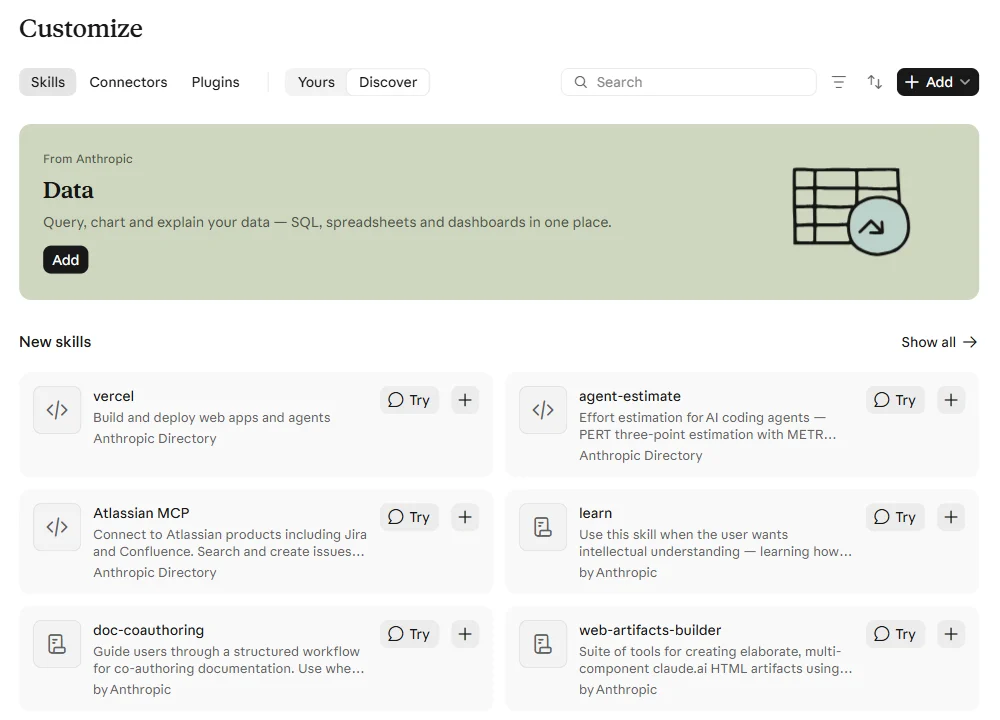
For a tour of the skills worth installing rather than writing, see the best Claude skills.
Skills and shared definitions
Examples 2 and 4 put your metric definitions and data dictionary into files. That works for one person, and it's how a lot of teams start. The catch is the one every copy has: when finance changes how churn is counted, every skill folder on every laptop is now wrong until someone updates it.
Fastero keeps those definitions in one place for the whole team: the SQL behind each metric, what each table holds and how tables join. Claude reads them through Fastero's connector when it answers a question, and so do your colleagues and Fastero's own assistant. When we asked Claude for revenue by category from a sample database, it used the workspace's saved definition and left out cancelled orders without being told. Skills remain the right place for how your team works: style, steps, templates.
FAQ
What is a Claude skill?
A folder with a SKILL.md file (a name, a description of when to use it, and instructions) plus any scripts, references or templates it needs. Claude loads it when a request matches the description.
How do I create a Claude skill?
Make a folder named after the skill, add a SKILL.md with name and description front matter and Markdown instructions, and put it in ~/.claude/skills/ for Claude Code, or ZIP the folder and upload it under Customize › Skills in claude.ai. claude.ai's Add menu also has "Create with Claude", and in Claude Code, Anthropic's skill-creator skill helps you write and test one.
What goes in SKILL.md front matter?
name and description are needed everywhere except Claude Code, where only the description is recommended. license, compatibility, metadata and allowed-tools work everywhere. Fields such as paths, argument-hint and context work only in Claude Code.
How does Claude decide when to use a skill?
It matches your request against each skill's description, which is always in its context. The body and extra files load only when a skill is used, so you can have many installed without filling the context.
What's the difference between skills and MCP?
MCP connects Claude to other systems: a database, a ticket tracker, a browser. Skills teach it how to do a task: your SQL style, your report's steps. They work well together, for example a KPI-report skill that runs its queries through a database MCP server.
Can I use the same skill in Claude Code and claude.ai?
Yes, if it uses only the six portable front matter fields. Skills with Claude Code-only fields fail to upload to claude.ai and the API until you remove those fields.
Related reading:
- Best Claude skills, and how to install them
- Claude Code examples
- Claude Code MCP
- Best Claude Code plugins
- What is a semantic layer?
Sources: Anthropic: Claude Code skills, Agent Skills overview, best practices, Skills API guide, anthropics/skills, help center articles on using and creating skills; the Agent Skills specification. The eight skills were validated on 8 November 2026 with quick_validate.py from anthropics/skills, skills-ref 0.1.0 and claude plugin validate from Claude Code 2.1.284.
Try Fastero free — keep your team's metric definitions in one place that Claude, your colleagues and Fastero's assistant all read. No credit card required.