 Fastero Dev Team
The Claude Code GitHub Action runs Claude Code on a GitHub runner when something happens in your repository: a comment that mentions @claude, a new pull request, a cron schedule. We wrote two workflows, checked them with two validators, and read the security docs for the defaults that matter.
The short answer: run /install-github-app in Claude Code inside the repository (admin rights, github.com only). It installs the Claude GitHub App, saves an ANTHROPIC_API_KEY or CLAUDE_CODE_OAUTH_TOKEN secret and opens a pull request with the workflow files. By hand: install the app from github.com/apps/claude, add the secret, copy examples/claude.yml into .github/workflows/. With no prompt input the action waits for @claude in a comment; with one it runs on any event, such as pull_request or schedule. GitHub bills runner minutes to the repository owner (free on standard runners in public repositories) and Anthropic bills tokens, unless you use a subscription token. Only people with write access can trigger it, bots are refused unless listed, and Claude can't approve pull requests.
Fastero
Point Claude at your database.
Add Fastero to claude.ai or Claude Code. Claude builds the dashboard, deploys the app or publishes a live page, and your team opens it in Fastero.
Try free →What the action does
The action is anthropics/claude-code-action@v1, a floating tag; the latest release was v1.0.284, on 19 November 2026. It "executes entirely on your own GitHub runner" and picks its mode from the workflow:
| Mode | What starts it | Where the result goes |
|---|---|---|
Interactive (no prompt) |
@claude in an issue or PR comment, a PR review, or a new issue's title or body |
One comment on the issue or PR, updated as Claude works |
Automation (prompt set) |
Any event: pull_request, schedule, workflow_dispatch |
The run log, unless the prompt says to post and a posting tool is allowed |
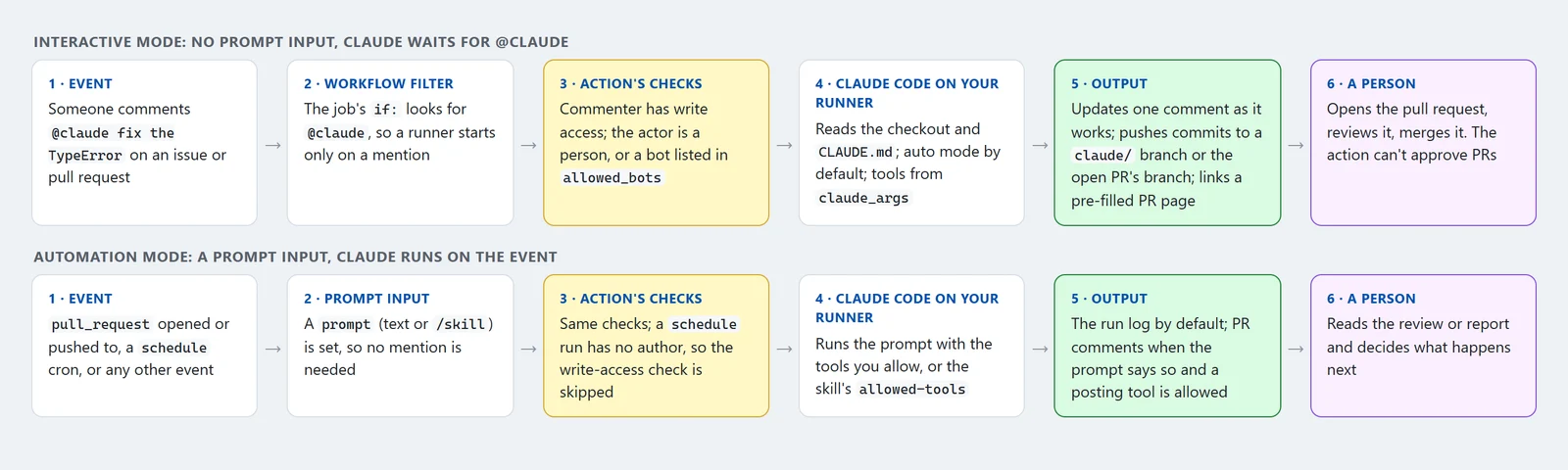
How a run flows in each mode, drawn from Anthropic's docs and the action's security and capabilities pages.
On an issue, Claude commits to a new claude/ branch; on an open pull request, to that PR's branch. It links "a prefilled PR creation page", and "The user must click the link and create the PR themselves". It can't submit formal reviews or approve pull requests.
Other ways to get Claude on a pull request, adapted from Anthropic's comparison:
| Option | Runs on | Who can use it |
|---|---|---|
| This action | Your CI runners | Anyone with an API key, cloud credentials or a subscription token |
| Code Review | Anthropic's infrastructure, no workflow file | Team and Enterprise organizations |
| Cloud scheduled task with a GitHub trigger | A cloud session | A claude.ai login, not an API key |
Pick Code Review on Team or Enterprise for reviews without YAML, and a local session in the terminal or Claude Code Desktop for work you watch. Pick the action to choose the prompt, model, triggers and runner yourself. Scheduled tasks are in Claude Code routines.
Quick setup with /install-github-app
- Sign in to the GitHub CLI (
gh auth login), runclaudein the repository, then/install-github-app. - Install the Claude GitHub App in the browser page that opens, then press Enter.
- Select Set up GitHub Actions workflows; deselect the mention or review workflow if you want only one.
- Choose a credential: a long-lived token from your Claude subscription, or an API key.
- Confirm, then create and merge the pull request Claude Code opens, which adds
claude.ymland, if selected,claude-code-review.yml.
Quick setup covers the Claude API and subscriptions, not cloud providers. Review workflows made before v2.1.229 wrote only to the run log; newer ones comment on the PR.
Manual setup: app, secret, workflow
- Install the app from github.com/apps/claude. The action relies on three of its permissions: Contents, Issues and Pull requests, each read and write.
- Add a secret.
ANTHROPIC_API_KEYis a key from the Claude Console.CLAUDE_CODE_OAUTH_TOKENuses your Pro, Max, Ultra, Team or Enterprise subscription;claude setup-tokenmakes a one-year token and prints it without saving it. For a secret shared across repositories, use an API key: the OAuth token is tied to one person's subscription. - Copy the workflow,
examples/claude.yml, into.github/workflows/.
claude setup-token --help on our install (2.1.284; the newest release that day was 2.1.329):
Usage: claude setup-token [options]

Set up a long-lived authentication token (requires Claude subscription)
To store no long-lived secret, workload identity federation (anthropic_federation_rule_id, anthropic_organization_id) exchanges the workflow's GitHub OIDC token for API access.
Two workflows we wrote and checked
The mention responder is the repository's examples/claude.yml with three additions from the docs' cost advice: a job timeout, a concurrency group per issue or PR, and a turn cap.
name: Claude (mentions)

on:
  issue_comment:
    types: [created]
  pull_request_review_comment:
    types: [created]
  pull_request_review:
    types: [submitted]
  issues:
    types: [opened, assigned]

jobs:
  claude:
    if: |
      (github.event_name == 'issue_comment' && contains(github.event.comment.body, '@claude')) ||
      (github.event_name == 'pull_request_review_comment' && contains(github.event.comment.body, '@claude')) ||
      (github.event_name == 'pull_request_review' && contains(github.event.review.body, '@claude')) ||
      (github.event_name == 'issues' && (contains(github.event.issue.body, '@claude') || contains(github.event.issue.title, '@claude')))
    runs-on: ubuntu-latest
    timeout-minutes: 30
    concurrency:
      group: claude-${{ github.event.issue.number || github.event.pull_request.number }}
      cancel-in-progress: false
    permissions:
      contents: write
      pull-requests: write
      issues: write
      id-token: write
      actions: read
    steps:
      - uses: actions/checkout@v6
        with:
          fetch-depth: 1
      - uses: anthropics/claude-code-action@v1
        with:
          anthropic_api_key: ${{ secrets.ANTHROPIC_API_KEY }}
          claude_args: |
            --max-turns 20
The if: keeps runners from starting without a mention. Twenty turns is our pick, not Anthropic's. The review workflow is the docs' "Run a skill" example plus a timeout and a concurrency group that cancels a review when a newer push arrives:
name: Claude (PR review)

on:
  pull_request:
    types: [opened, synchronize, ready_for_review, reopened]

jobs:
  review:
    runs-on: ubuntu-latest
    timeout-minutes: 20
    concurrency:
      group: claude-review-${{ github.event.pull_request.number }}
      cancel-in-progress: true
    permissions:
      contents: read
      pull-requests: read
      issues: read
      id-token: write
    steps:
      - uses: actions/checkout@v6
        with:
          fetch-depth: 1
      - uses: anthropics/claude-code-action@v1
        with:
          anthropic_api_key: ${{ secrets.ANTHROPIC_API_KEY }}
          plugin_marketplaces: "https://github.com/anthropics/claude-plugins-official.git"
          plugins: "code-review@claude-plugins-official"
          prompt: "/code-review:code-review --comment ${{ github.repository }}/pull/${{ github.event.pull_request.number }}"
          claude_args: '--allowedTools "mcp__github_inline_comment__create_inline_comment"'
--comment makes Claude post inline comments; without it, findings stay in the run log. Keep the --allowedTools line: the action starts the inline-comment server only when claude_args names it. Job permissions can stay read-only because, without github_token, the action authenticates as the Claude GitHub App, which needs id-token: write.
We checked both files on Windows 11 with Python 3.14.3, PyYAML 6.0.3 and actionlint 1.7.12 (pip install actionlint-py in a venv). Our script also compares each with: key with the inputs in the action's action.yml, fetched the same day (output trimmed):
PyYAML 6.0.3; claude-code-action action.yml declares 41 inputs
claude.yml: name='Claude (mentions)'
  top-level keys as PyYAML sees them: ['name', True, 'jobs']
  anthropics/claude-code-action@v1: with ['anthropic_api_key', 'claude_args']
    unknown inputs: none
claude-review.yml: name='Claude (PR review)'
  top-level keys as PyYAML sees them: ['name', True, 'jobs']
  anthropics/claude-code-action@v1: with ['anthropic_api_key', 'plugin_marketplaces', 'plugins', 'prompt', 'claude_args']
    unknown inputs: none

$ actionlint .github/workflows/claude.yml .github/workflows/claude-review.yml
exit=0
Note True: PyYAML follows YAML 1.1, where a bare on is a boolean. PyYAML only proves the file parses; actionlint caught all four typos we planted in a copy:
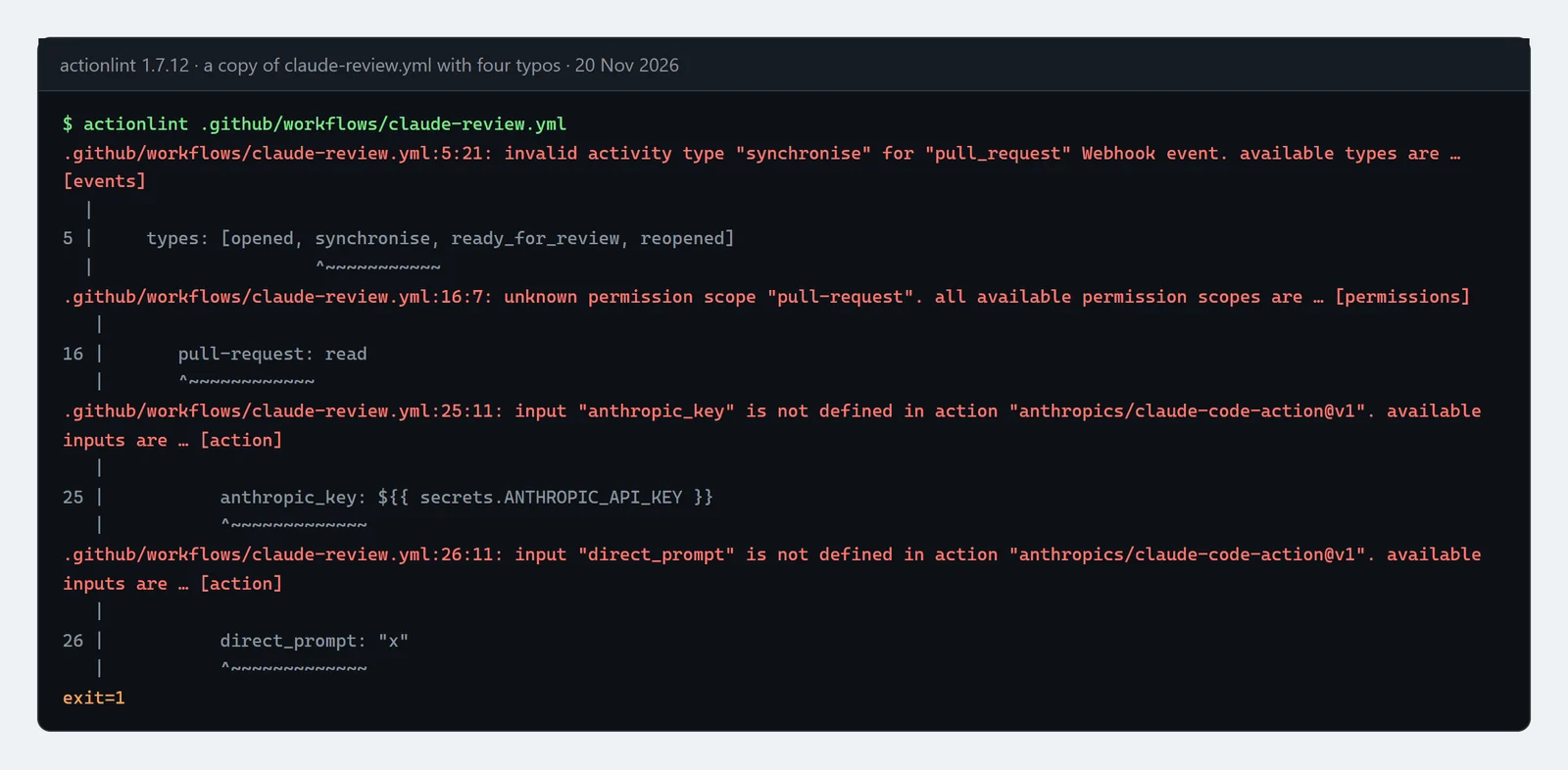
actionlint 1.7.12 on a deliberately broken copy of the review workflow. PyYAML parsed the same file without complaint.
One gap: actionlint's list of this action's inputs has 34 names, and today's action.yml has 41. It rejects allow_fork_prs, a documented security input (input list and code frame cut):
$ actionlint .github/workflows/claude-review.yml
.github/workflows/claude-review.yml:26:11: input "allow_fork_prs" is not defined in action "anthropics/claude-code-action@v1". available inputs are ... [action]
exit=1
$ actionlint -ignore 'input "allow_fork_prs" is not defined' .github/workflows/claude-review.yml
exit=0
It also misses restrict_untrusted_prs and the five federation inputs.
Point Claude at your database.
Start free →The inputs you'll use
| Input | What it does |
|---|---|
prompt |
Text or a /skill; its presence switches to automation mode |
claude_args |
Any Claude Code CLI flag: --max-turns, --model, --allowedTools, --permission-mode |
anthropic_api_key / claude_code_oauth_token |
The credential |
github_token |
Omit it to act as the Claude app; pass one for a custom app |
trigger_phrase, label_trigger, assignee_trigger |
What starts interactive mode; default @claude |
plugin_marketplaces, plugins |
Install plugins before the run |
allowed_bots, allow_fork_prs |
Which bots may trigger it; whether fork PRs run |
use_bedrock, use_vertex, use_foundry |
Route inference through your cloud |
The action runs Claude in auto mode by default: workspace reads and edits run, and "a safety review decides any other tool call that your allow rules don't cover". If you rely on --allowedTools as a strict list, add --permission-mode acceptEdits (mentions) or default (prompts); the modes are the ones in our plan mode guide. Workflows still on @beta need @v1, prompt instead of direct_prompt, and CLI options moved into claude_args.
Permissions the workflow needs
| Permission | Why |
|---|---|
contents: write |
Commit to a branch |
pull-requests: write, issues: write |
Comment and update PRs and issues |
id-token: write |
Required for the action's default GitHub App sign-in, and for federation |
actions: read |
Lets Claude read CI results on PRs |
The Claude GitHub App asks for 15 permissions because Code Review and cloud auto-fix share it, and GitHub doesn't let you accept a subset. For only Contents, Issues and Pull requests, create a custom app and pass its token in github_token. The sources disagree on one: Anthropic's docs list Workflows as read and write, while the action's FAQ says the app "doesn't have workflow write access". One trap: commits made with the default GITHUB_TOKEN don't trigger other workflows, so CI won't run on Claude's commits if you pass it.
Bedrock, Vertex and Foundry
Set use_bedrock: "true", use_vertex: "true" (Google Cloud's Agent Platform) or use_foundry: "true". All three sign in with GitHub's OIDC token, so the repository stores identifiers such as AWS_ROLE_TO_ASSUME, not cloud keys. On public repositories, Anthropic warns, the credential steps run before the action checks the commenter's write access, so add your own check first.
What it costs, and who pays
| Cost | Who pays | Numbers, checked 20 November 2026 |
|---|---|---|
| Runner time | The repository owner | Free on standard runners in public repositories. Private: $12 of included compute a month on GitHub Free, $18 on Pro and Team, $300 on Enterprise Cloud; Linux 2-core at $0.006 a minute |
| Tokens, API key | Your Claude Console account | Opus 5.5: $4 input, $20 output per million tokens; Sonnet 5.5: $2 and $10 |
| Tokens, OAuth token | Your Claude subscription | Counts against your plan's usage instead of API billing |
| Tokens, cloud provider | Your AWS, Google Cloud or Azure bill | Your provider's rates |
In GitHub's own example a 10-minute Linux run costs $0.06, so GitHub Free's $12 covers 200 such runs a month (our arithmetic). Without --model, the action uses Claude Code's default, Opus 5.5 on most plans. To cap both bills, Anthropic lists specific @claude requests, a short CLAUDE.md (see Claude Code best practices), --max-turns, job timeouts and concurrency limits. Token prices in more depth: Claude Code pricing.
Security defaults, and where they stop
- Who can trigger it. On issue and PR events the actor needs write access. Bots are refused unless named in
allowed_bots, and named bots "are not checked for repository permissions". The docs markallowed_non_write_users"RISKY". - Pull requests. On any PR,
.claude/,CLAUDE.md,.mcp.jsonand other Claude config come from the base branch, so a PR can't rewrite Claude's instructions. When the author lacks write access, commands that run repository code (package managers, test runners) are also denied by default. - Forks.
allow_fork_prs: "false"refuses them. Otherwise Claude pushes a fork's PR to apr-Nbranch in your repository; keep it out of CI that holds secrets. - Prompt injection. Hidden HTML, invisible characters and alt text are stripped, "but new bypass techniques may emerge". Auto mode "is a review, not a boundary".
- Logs.
show_full_outputis off by default; on a public repository, run logs are public.
A scheduled job that needs the team's database
A scheduled report on a team's numbers needs a database it can read, and a runner can't sign in through a browser. Fastero is an AI and data platform where people and AI agents work together on a team's data, with a remote HTTP MCP server at https://api.fastero.com/api/v1/mcp:
- A Postgres database (Supabase and Neon included) connects once in the workspace, so the workflow holds no database password.
- For a runner, create a key in Settings → AI Agent Access: keys are for scripts and anything that can't sign in, last at most 90 days and default to read and SQL. Store it as a repository secret and replace it before it expires.
- The key acts as the person who made it, in one organization, never beyond their role; revoking it ends access at once.
- The SQL tool runs one read statement and returns at most 500 rows (as of 20 November 2026).
claude_argstakes--mcp-config, so the server goes in an MCP config file the workflow passes in; try the workflow in a scratch repository first.
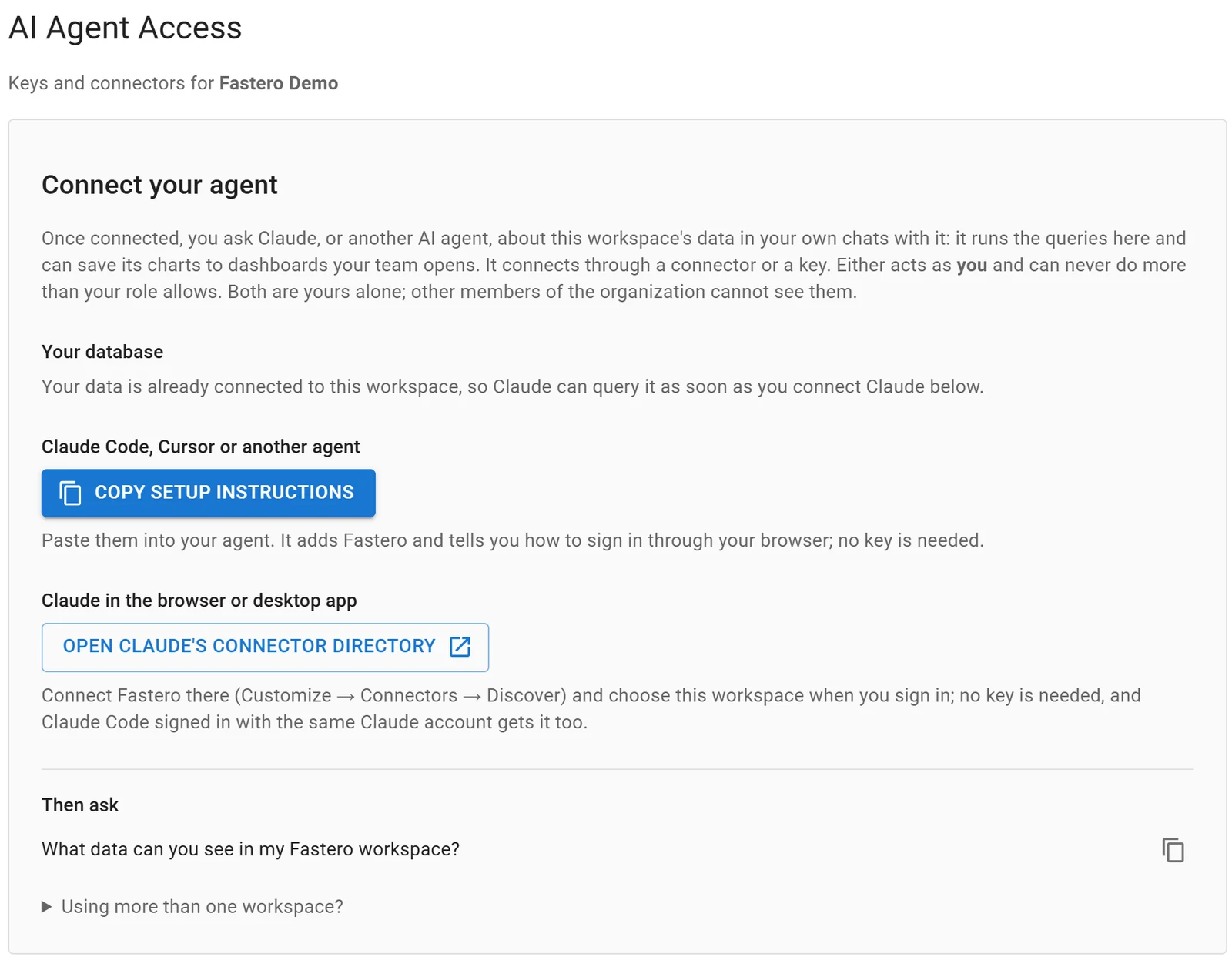
Settings, AI Agent Access: an agent on your computer signs in through the browser; a runner, which can't, uses a key made on the same screen.
FAQ
How do I set up Claude Code GitHub Actions?
Run /install-github-app in Claude Code inside the repository: it installs the Claude GitHub App, stores your credential as a secret and opens a pull request with the workflow files. Or install the app, add the secret and copy examples/claude.yml into .github/workflows/ yourself.
Is the Claude Code GitHub Action free?
The action is open source under MIT, but each run uses GitHub runner time and model tokens. Standard runners are free in public repositories; tokens are billed to your API key or count against your Claude subscription if you use an OAuth token.
Can I use my Claude Pro or Max subscription instead of an API key?
Yes. Run claude setup-token locally, store the one-year token as CLAUDE_CODE_OAUTH_TOKEN, and pass it as claude_code_oauth_token. Pro, Max, Ultra, Team and Enterprise plans qualify.
Why isn't Claude responding to @claude?
Check that the GitHub App is installed, workflows are enabled, the secret exists, and the comment contains @claude as a whole word. The commenter also needs write access to the repository.
Can Claude merge or approve pull requests?
No. It can't approve pull requests or submit formal reviews, and it pushes only to its own branch or the PR's branch. It links a pre-filled PR page, and a person creates and merges the PR.
Sources
Read on 20 November 2026. The workflows were validated on Windows 11 with Python 3.14.3, PyYAML 6.0.3 and actionlint 1.7.12; nothing was pushed to GitHub. claude setup-token --help ran on Claude Code 2.1.284.
- Anthropic: Claude Code GitHub Actions, Cloud providers, Code Review, Authentication, CLI reference, Best practices, Changelog, API pricing
- anthropics/claude-code-action: README, action.yml, docs on usage, security, setup, FAQ, capabilities, and
examples/ - GitHub: Actions billing, Events that trigger workflows, GITHUB_TOKEN