 Fastero Dev Team
Most Claude Code examples online are a prompt and a promise. We wanted to see what it actually does, so we gave it one folder with a sales CSV and six ordinary jobs, and kept everything it said. Then we checked its work.
The short answer: Claude Code is Anthropic's coding agent: it runs in your terminal, reads your files, writes and runs code, and reports back. In our six examples it answered a question about the data correctly and warned us the answer was fragile, made a clean chart from one sentence, found the one missing day in two years of orders, wrote 13 tests that pass and a bug they exposed, wrote a useful CLAUDE.md, and added an MCP server. Every number it gave us matched our own check. It needs a paid Claude plan: "The free claude.ai plan does not include Claude Code access."
Fastero
Point Claude at your database.
Add Fastero to claude.ai or Claude Code. Claude builds the dashboard, deploys the app or publishes a live page, and your team opens it in Fastero.
Try free →How we ran these
- The folder:
q4-review, holdingsales.csv: 4,734 invented orders from November 2024 to October 2026, with region, channel, segment, category, product, quantity, price and revenue. - The tool: Claude Code 2.1.284 on Windows 11, run as
claude -p "<prompt>"(print mode, which answers once and exits), so the output below is exactly what it printed. Print mode prints Markdown as plain text; in an interactive session the same answer is formatted. - The permissions: we allowed Python, reading files, and, for the tasks that needed it, writing files. Nothing else, and no MCP servers.
1. Ask a question about a CSV
claude -p "Which region grew revenue fastest between the first and last full quarter in sales.csv? Show the numbers in a small table."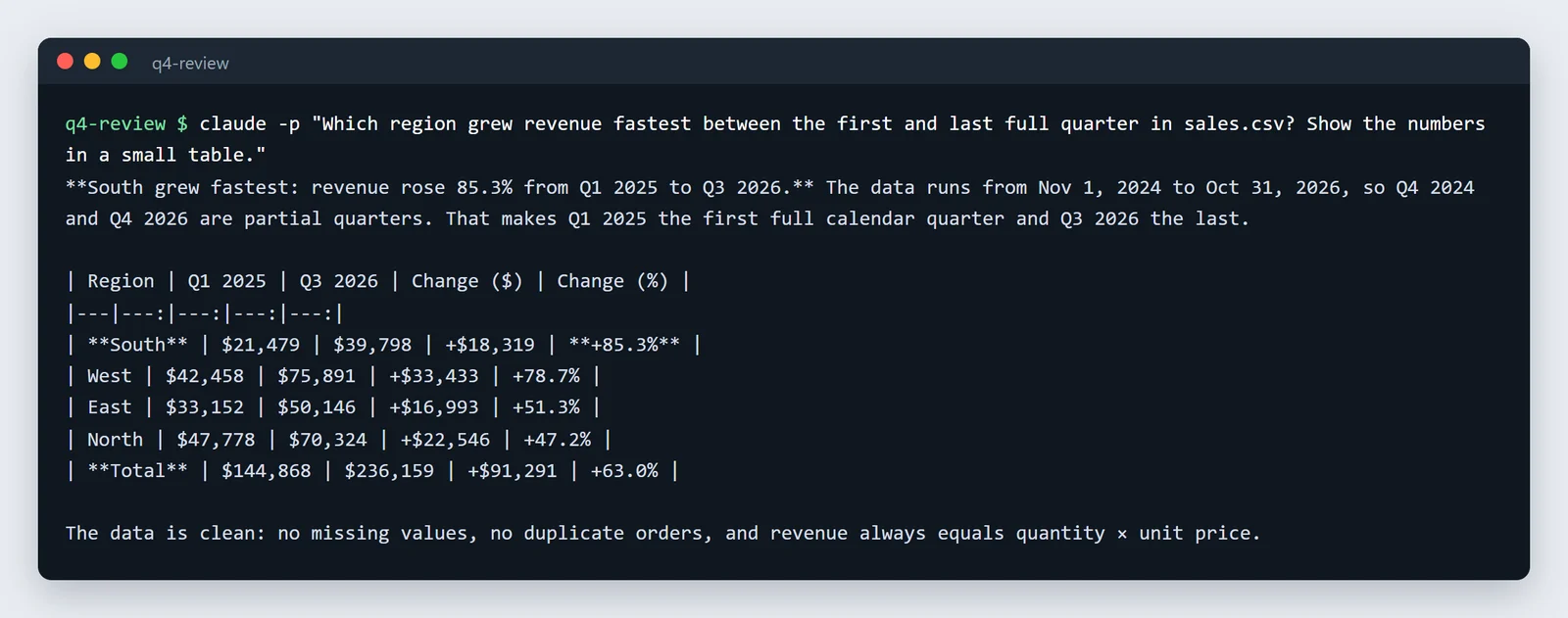
It worked out on its own that the data starts on 1 November and ends on 31 October, so the first and last calendar quarters are partial, and compared Q1 2025 with Q3 2026. The table is right: we recomputed every figure with pandas and they match to the dollar.
The useful part came after the table. It said it wouldn't report South's lead alone:
Seasonality skews a Q1-to-Q3 comparison. Every region is weak in Q1 and strong in Q2–Q3. Comparing Q3 2025 with Q3 2026 instead gives North +58%, West +56%, East +5% and South −5%. On that basis South shrank.
It also pointed out that data starting on 1 November may mean a fiscal year beginning in November, which would make West the answer. That's the difference between a calculator and an analyst: the question as asked had an answer, and the answer was misleading.
2. Make a chart from one sentence
claude -p "Make a line chart of monthly revenue by sales channel from sales.csv and save it as revenue_by_channel.png. Leave out the last month if it is incomplete. Keep the script in chart.py."It wrote a 3.9 KB chart.py, ran it, and saved this:
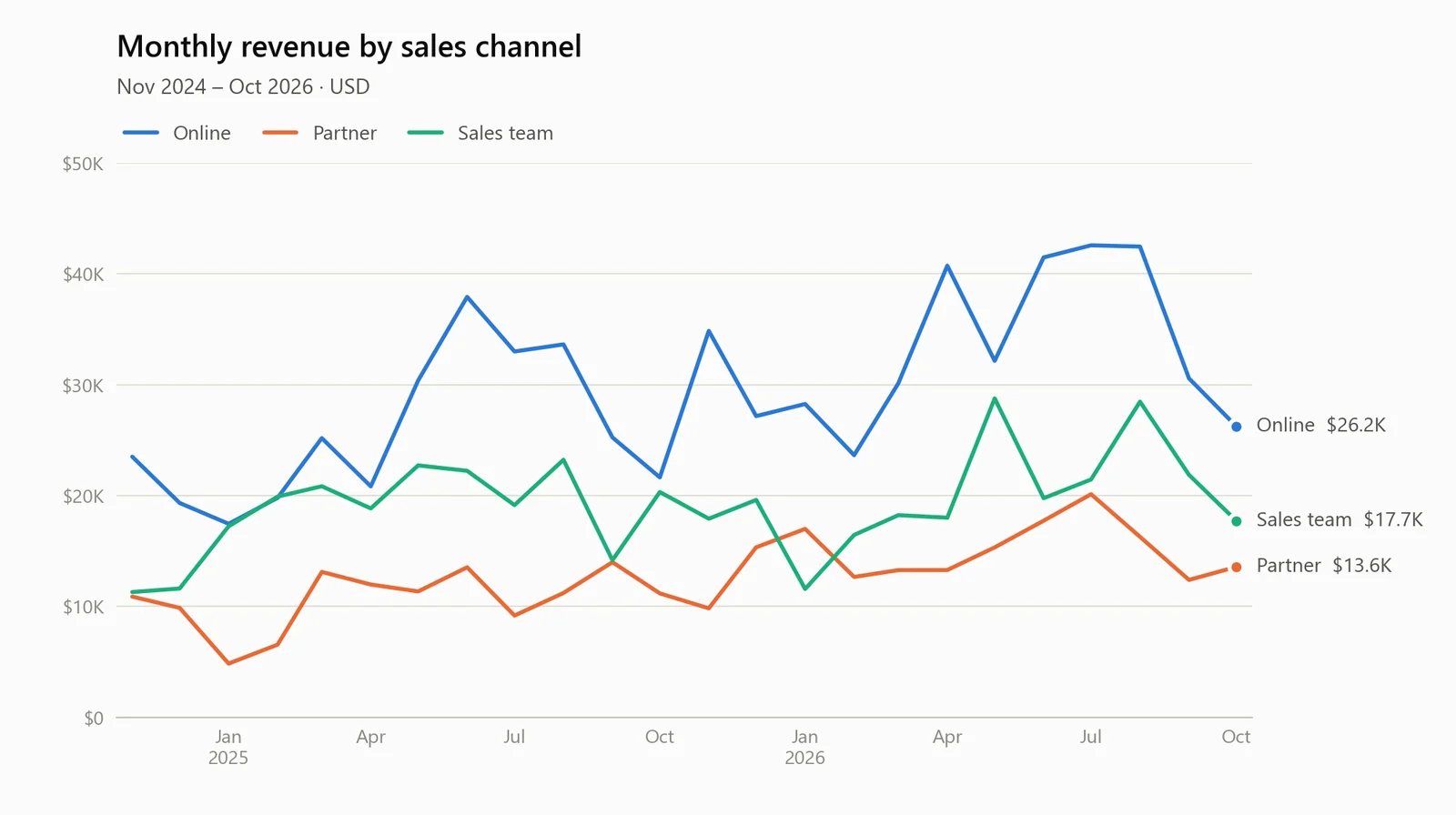
Two things it did that we didn't ask for. It checked whether October was complete before applying our rule ("Every channel has orders through 2026-10-31"), kept it, and tested the rule anyway on a copy of the data cut off on 17 October. And it gave each channel a fixed colour, so a filter can't repaint the lines, and made the script stop with an error on a channel it doesn't know rather than invent a colour. The labels are right: October's revenue was $26,239 online, $17,715 through the sales team and $13,563 through partners.
3. Check data quality before a report
claude -p "Check sales.csv for data quality problems before I use it in a report. Do not change the file. Keep the answer short."I found no real data quality problems in `sales.csv`, and I didn't change the file.
I checked its 4,734 rows, which cover 2024-11-01 to 2026-10-31:
- **Structure:** every row has 10 fields, with no blanks, stray spaces or placeholders like "N/A".
- **IDs:** order IDs run from 10001 to 14734 with no gaps or duplicates, and there are no duplicate rows.
...
Two things to keep in mind:
1. **2026-03-07 has no orders.** At about 6.5 orders a day, one empty day in two years is likely just chance, not missing data.
2. **The data ends on 2026-10-31.** If your report covers calendar Q4 2026, only October is in the file.We checked the specifics: 4,734 rows, order IDs 10001 to 14734 with no duplicates, 13 products, quantities from 1 to 12, revenue always equal to quantity times price, and exactly one day with no orders, 7 March 2026. All correct. Saying what the check is for ("before I use it in a report") is what got it to mention the Q4 coverage gap.
4. Write tests, and run them
claude -p "Write pytest tests for the rule in chart.py that drops an incomplete last month, put them in test_chart.py, and run them."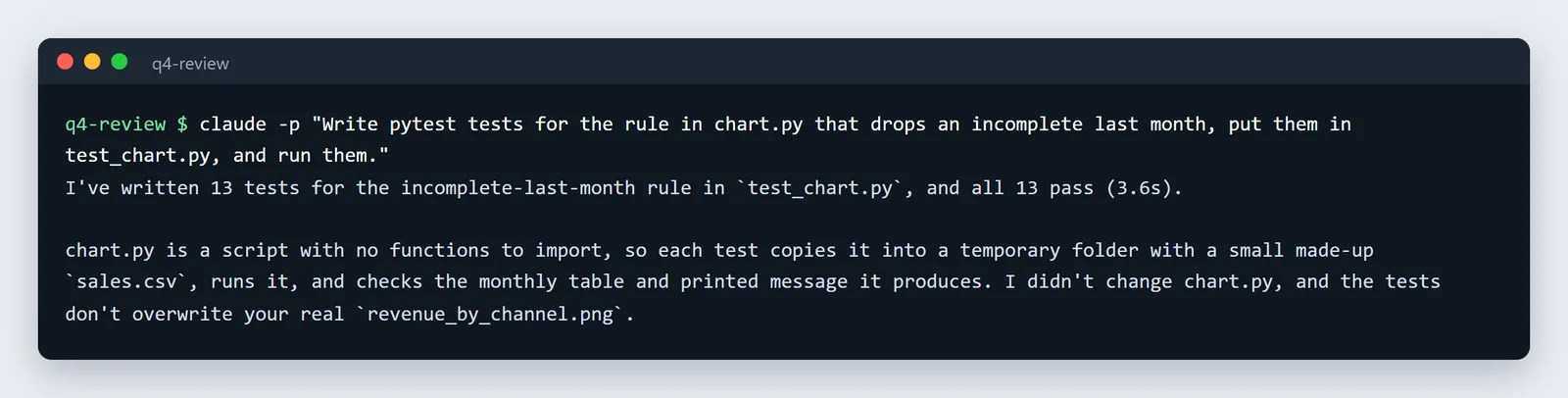
chart.py was a flat script with no functions to import, so it tested it the hard way: each test writes a small CSV into a temporary folder, runs a copy of the script, and checks what it produced. The cases include a leap-year 29 February, 30- and 31-day months and data whose rows aren't in date order.
Then it checked that the tests can fail, by running them against two deliberately broken copies of chart.py: "Each made 7 of the 13 tests fail." And it found a bug in the code it wrote earlier:
Crash on single-month data: if every order falls in one incomplete month, the rule drops everything and chart.py crashes with
IndexError: index 0 is out of bounds.
It didn't fix it, because "the right behaviour isn't defined yet". We ran the tests ourselves: 13 passed in 5.17s.
Point Claude at your database.
Start free →5. Write a CLAUDE.md with /init
/init reads the project and writes CLAUDE.md, the file Claude Code reads at the start of every session in that folder.
claude -p "/init"After a short description of the project, the file it wrote lists the commands and then the thing a future session most needs to know (excerpts):
## Commands

python chart.py                      # regenerate revenue_by_channel.png (overwrites it)
python -m pytest -q                  # run all tests
python -m pytest -q -k uses_latest   # tests matching a name

## How chart.py is structured, and why it matters for tests

- `chart.py` is a flat script: no functions, no `main()`, and no `if __name__ == "__main__"` guard.
- These changes will break the tests unless the tests change with them: renaming `df` or `monthly`,
  moving logic into functions, switching to CWD-relative paths, or rewording that print message.
That last point is the kind of thing that's obvious to the person who wrote the tests and invisible to everyone else, including the next Claude session. It also recorded the data rules and the chart's styling conventions, and noted that the folder "isn't a git repository yet". Keep the file short and edit it: everything in it is read at the start of every session.
6. Connect Claude Code to a database or service
Claude Code reaches other systems through MCP servers. One command adds one:
claude mcp add --transport http notion https://mcp.notion.com/mcp
claude mcp add playwright -- npx -y @playwright/mcp@latest
claude mcp list
Checking MCP server health…
notion: https://mcp.notion.com/mcp (HTTP) - ! Needs authentication
playwright: npx -y @playwright/mcp@latest - ✔ Connected"Needs authentication" means the next step is /mcp inside a session to sign in. For a database, use a server with a read-only database login; Anthropic's own docs use DBHub with one. Our Claude Code MCP guide covers scopes, .mcp.json and the Windows quirks, and connecting Claude to a database has read-only SQL we tested.
What made these prompts work
- Say what the result is for. "Before I use it in a report" got a check that thought about the report; "in a small table" got a small table.
- Say what not to touch. "Do not change the file" was respected every time. Prompts are not permissions, though: the real guard was that we hadn't allowed it to write in that example.
- Let it check its own work, then check it yourself. It tested its chart rule, mutation-tested its tests, and verified the
/initcommands. We still recomputed every number, and it's worth doing: a model reporting a check is not the same as the check. - Expect pushback. Its best moments were the caveats: the seasonality warning, the fiscal-quarter question, the crash on one-month data. Read past the table.
Running examples like these on a schedule
chart.py answers a question once, on a file. Most teams want it again every Monday, on fresh data from the database, for people who'll never open a terminal. In Fastero, a Python project like this runs on a schedule next to your team's databases, with the connection's credentials kept in Secrets rather than in the script, and Claude Code can build it there through Fastero's MCP server.
FAQ
What can Claude Code do with data?
Read CSVs and other files, write and run Python or SQL, make charts, check data quality, write tests, and query databases through their command-line tools or MCP servers. In our examples it also explained what its numbers did and didn't show.
Do I need a paid plan for Claude Code?
Yes. It comes with Claude's Pro, Max, Ultra, Team and Enterprise plans, or with an API account; the free claude.ai plan doesn't include it.
What does claude -p do?
It runs Claude Code once on the prompt you give it and prints the answer, without opening an interactive session. It's how you script Claude Code, and how we ran these examples.
What is CLAUDE.md?
A Markdown file in your project that Claude Code reads at the start of every session: commands, conventions and things to avoid. /init writes a first version from your code.
Is Claude Code good at data analysis?
In these six tasks it got every number right and added caveats we'd have wanted. It still needs checking: run its numbers against an independent query once, and read the caveats, not just the table.
Related reading:
- Claude Code for data analysis: 7 setups
- Claude Code MCP: how to add MCP servers
- Claude Code and Jupyter notebooks
- Claude skills examples
- Best MCP servers for Claude Code
Sources: every prompt and output above comes from Claude Code 2.1.284, run in print mode on 8 November 2026 on a folder of invented sales data; we recomputed its figures with pandas and re-ran its tests. Plans: Claude Code setup. Commands: CLI reference, MCP.
Try Fastero free — run scripts like these on a schedule next to your team's databases, and let Claude Code build them there. No credit card required.