 Fastero Dev Team
Agent teams arrived in Claude Code 2.1.32 on 5 February 2026, the day Claude Opus 4.6 launched, as a research preview. Nine months later, Anthropic's docs still call them experimental and leave them off by default.
The short answer: an agent team is one Claude Code session acting as team lead plus several teammates, each a full Claude Code session with its own context window. They coordinate through a shared task list (pending, in progress, completed, with dependencies) and message each other directly, and you can talk to any teammate yourself. Turn them on by setting CLAUDE_CODE_EXPERIMENTAL_AGENT_TEAMS to 1 in settings.json or your shell, then ask Claude to spawn teammates. They need an interactive session; with -p, Claude doesn't spawn them. They cost more: token use grows with every active teammate, and Anthropic puts it at about 7x a standard session when teammates run in plan mode. Use a team for parallel research, review, debugging with competing theories, or a feature split cleanly by files. For sequential work or edits to the same file, use one session or subagents.
Fastero
Point Claude at your database.
Add Fastero to claude.ai or Claude Code. Claude builds the dashboard, deploys the app or publishes a live page, and your team opens it in Fastero.
Try free →What an agent team is
| Part | What it does |
|---|---|
| Team lead | "The main Claude Code session that spawns teammates and coordinates work" |
| Teammates | "Separate Claude Code instances that each work on assigned tasks" |
| Task list | "Shared list of work items that teammates claim and complete" |
| Mailbox | "Messaging system for communication between agents" |
It all lives on your machine. Each agent's mailbox is a JSON file under ~/.claude/teams/{team-name}/inboxes/, the team config sits in ~/.claude/teams/{team-name}/config.json and is removed when the session ends, and the task list stays in ~/.claude/tasks/{team-name}/. Don't edit the config by hand; to define reusable roles, use subagent definitions instead.
Agent teams vs subagents
Both run work in separate context windows. The difference is who talks to whom.
| Subagents | Agent teams | |
|---|---|---|
| Context | Own window; results return to the caller | Own window; fully independent |
| Communication | Report a result back to the main agent; subagents Claude named can also message each other | Teammates message each other directly, and you can message any of them |
| Coordination | The main agent manages all the work | Shared task list, self-claiming, plus messages |
| Can spawn more agents? | Yes, nested subagents | No: "teammates cannot spawn their own teammates" |
| Best for | "Focused tasks where only the result matters" | "Complex work requiring discussion and collaboration" |
| Token cost | Lower: results are summarized back | Higher: each teammate is a separate Claude instance |
| Status | Standard | Experimental, off by default |
Anthropic's advice: "Use subagents when you need quick, focused workers that report back. Use agent teams when teammates need to share findings, challenge each other, and coordinate on their own."
Claude Code now has five ways to run work in parallel, and a team is only one of them:
| Approach | Use it when |
|---|---|
| Subagents | A side task would flood your conversation with logs or search results |
Agent view (claude agents, research preview) |
You hand off several independent tasks and check back later |
| Agent teams | Claude should split a project, assign the pieces and keep the workers in sync |
| Dynamic workflows | A script should run many subagents and cross-check them: a codebase audit, a 500-file migration |
| Projects (public beta) | Work spans days or weeks and should keep running when your machine is off |
All five are Claude Code features. For an agent your own app runs on Anthropic's servers through the API, see Claude Managed Agents.
How to turn on agent teams
Add the variable to settings.json:
{
  "env": {
    "CLAUDE_CODE_EXPERIMENTAL_AGENT_TEAMS": "1"
  }
}
Or set it in your shell before starting Claude Code, in bash or PowerShell:
export CLAUDE_CODE_EXPERIMENTAL_AGENT_TEAMS=1$env:CLAUDE_CODE_EXPERIMENTAL_AGENT_TEAMS = "1"Check your version first; the feature arrived in 2.1.32, and we ran everything below on a later build:
$ claude --version
2.1.284 (Claude Code)
Two side effects to know before you switch it on:
- Teams can form when you didn't ask. While the setting is on, "a subagent that Claude names launches as a teammate", and Claude names subagents on its own. Set the variable to
0insettings.jsonto get ordinary subagents back, without restarting. - Nothing changes in
-pmode. With the-pflag, "including Agent SDK sessions, Claude doesn't spawn teammates". We checked: in-pmode, with the setting off and then on, we asked Claude Code to list its tools with Team, Task, Message or Agent in the name. It reported the same four both times.
$ P="List the exact names of the tools available to you whose names contain Team, Task, Message or Agent. Reply with the names only, comma-separated, or NONE. Do not call any tool."
$ CLAUDE_CODE_EXPERIMENTAL_AGENT_TEAMS=0 claude -p "$P" --model haiku --max-turns 1 --strict-mcp-config --output-format json
... "result":"Agent, ListAgents, SendMessage, TaskStop" ...
$ CLAUDE_CODE_EXPERIMENTAL_AGENT_TEAMS=1 claude -p "$P" --model haiku --max-turns 1 --strict-mcp-config --output-format json
... "result":"Agent, ListAgents, SendMessage, TaskStop" ...
Each call cost about $0.08 by Claude Code's own count (total_cost_usd). To see a team, you have to work interactively.
Display mode. By default teammates run "in-process", inside your main terminal, which works in any terminal app. Split panes, one per teammate, need tmux or iTerm2 and aren't supported in VS Code's integrated terminal, Windows Terminal or Ghostty. Set "teammateMode": "auto" in ~/.claude/settings.json to use panes when available. The --teammate-mode flag "is experimental and doesn't appear in claude --help", and on 2.1.284 it doesn't.
Starting a team and steering it
Describe the task and the teammates in plain language. Anthropic's example:
I'm designing a CLI tool that helps developers track TODO comments across
their codebase. Spawn three teammates to explore this from different angles:
one on UX, one on technical architecture, one playing devil's advocate.
Claude may use subagents instead; if the panel shows no team, ask again and request an agent team explicitly. Then:
- Watch and talk. Teammates appear in a panel under the prompt. Up and down arrows select one, Enter opens its transcript so you can message it,
xstops it, and Ctrl+T shows the task list. - Pick the size and model. "Spawn 4 teammates to refactor these modules in parallel. Use Sonnet for each teammate." Without a model in the prompt, a teammate uses its subagent definition's model, then
CLAUDE_CODE_SUBAGENT_MODEL, then the lead's model. - Reuse roles. "Spawn a teammate using the security-reviewer agent type" applies that subagent definition's tools, model and instructions.
- Plan first. Put the lead in plan mode before spawning, and each teammate plans before it edits. Its plan approval request is approved automatically unless you changed that teammate's mode.
- Gate the work with hooks.
TeammateIdle,TaskCreatedandTaskCompletedhooks can exit with code 2 to send feedback and keep a teammate working or block a task. More in Claude Code hooks. - End it. "Ask the researcher teammate to shut down", and the teammate can agree or refuse with a reason.
Point Claude at your database.
Start free →How teammates coordinate
- The task list. The lead creates tasks; teammates take assigned ones or "self-claim" the next unassigned, unblocked task. A task can depend on others and shows as blocked until they finish; finishing one unblocks the rest automatically. Claiming "uses file locking to prevent race conditions".
- Messages. Any teammate can message any other by name, and messages arrive without polling. There's no broadcast: "To reach everyone, send one message per recipient." When a teammate finishes, the lead gets a notification with its final answer.
- Context. Each teammate loads CLAUDE.md, MCP servers and skills like a normal session, plus the lead's spawn prompt. "The lead's conversation history does not carry over", so put the details in the spawn prompt. See CLAUDE.md for what every session reads.
- Permissions. A teammate starts in the lead's permission mode, including bypass mode if you started the lead with it, and its permission prompts appear in the lead's session. A teammate "can't approve a permission prompt or supply consent on your behalf".
- Files. Teams don't give teammates separate worktrees. "Two teammates editing the same file leads to overwrites", so give each one its own set of files.
What agent teams cost
Every teammate is a full Claude Code session, so you pay for each context window. Anthropic's numbers and advice:
- "Agent teams use approximately 7x more tokens than standard sessions when teammates run in plan mode".
- "Token costs scale linearly": each teammate "continues consuming tokens until it exits or the session ends."
- An in-process teammate's prompt cache lasts five minutes by default, even on a subscription. Setting
subagentPromptCacheTtlto1hkeeps it longer, at a higher cache-write rate on the API.
To keep the bill down: use Sonnet for teammates, start with 3 to 5 of them ("Three focused teammates often outperform five scattered ones"), give each 5 to 6 tasks, keep spawn prompts short, and shut teammates down when they're done. How Claude Code usage adds up on a plan or the API is covered in Claude Code usage limits.
Limits
From Anthropic's docs, checked 12 November 2026.
- No resuming in-process teammates:
/resumeand/rewinddon't bring them back. - Task status can lag, which blocks dependent tasks until someone updates it.
- Shutdown can be slow: a teammate finishes its current request first.
- One team per session, and the lead is fixed for the session's lifetime.
- No nested teams.
- No per-teammate permission modes at spawn time.
- No background subagents from in-process teammates.
- Split panes only in tmux or iTerm2.
When agent teams help, and when they waste tokens
| Task | Team? | Why |
|---|---|---|
| Review a pull request for security, performance and test coverage at once | Yes | Three independent lenses, no shared files |
| Find a bug with several plausible causes | Yes | Teammates "test different theories in parallel" and try to disprove each other |
| Build a feature across frontend, backend and tests | Yes, if each teammate owns its own files | Parallel work with clear boundaries |
| A sequence of dependent steps, or edits to one file | No | Coordination overhead with nothing to parallelize; use one session |
| Run the tests or search logs and report back | No | A subagent keeps the noise out of your context for less |
| Change 500 files the same way | No | A dynamic workflow or /batch fits better |
| Several unrelated jobs you'll check on later | No | Agent view |
Anthropic's suggestion for a first try is work that writes no code: "reviewing a PR, researching a library, or investigating a bug."
When the team's work is for people who weren't in the session
A team of agents can check numbers against each other well: one writes a query, another tries to break it. But the result ends up in a transcript that only you read. To leave it somewhere colleagues open, give the team a connector to a shared workspace.
Fastero is an AI and data platform where people and AI agents work together on a team's data, reached through a remote MCP server:
- Every teammate can use it. In-process teammates load MCP servers from your project and user settings, so a server added with
--scope useris available to each of them. That's from Anthropic's docs; we haven't run Fastero inside an agent team. - Adding it takes one command:
claude mcp add --scope user --transport http fastero https://api.fastero.com/api/v1/mcp, then/mcpto sign in through the browser. Keys, for scripts that can't sign in, last at most 90 days and allow read and SQL by default. - Its SQL tool only reads: one
SELECT,WITH,EXPLAINorSHOWstatement per call, at most 500 rows back. - Claude works as you, in one workspace and never beyond your role; revoking access ends it at once.
- The result is a dashboard colleagues open with their own login, and viewers are free.
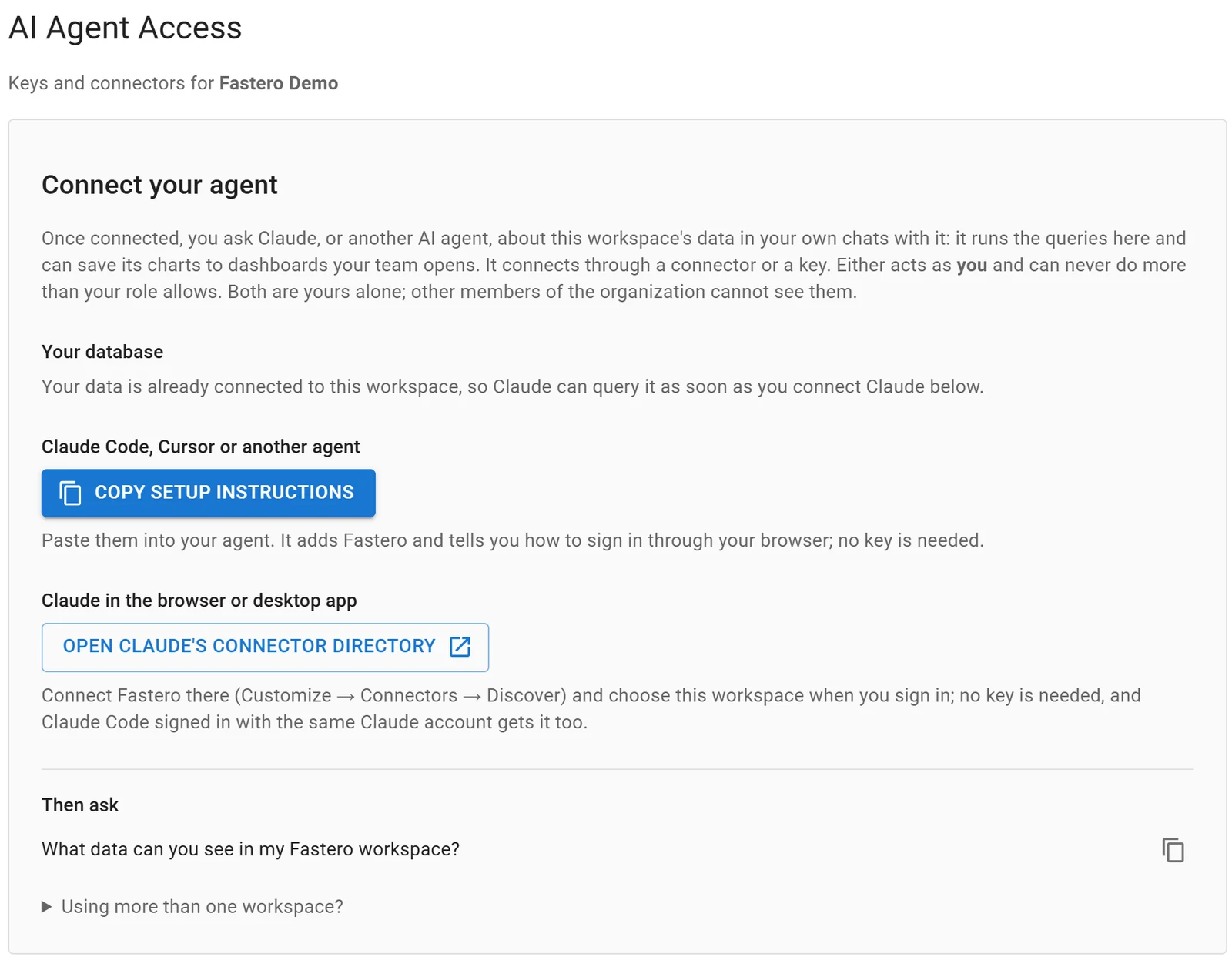
Settings, AI Agent Access: an agent signs in through the browser, so there is no key to copy.
For other servers worth giving Claude Code, see the best MCP servers for Claude Code.
FAQ
What are Claude Code agent teams?
An experimental Claude Code feature where one session leads several teammate sessions. Each teammate has its own context window; they share a task list, message each other directly, and the lead combines their results.
How do I enable agent teams in Claude Code?
Set CLAUDE_CODE_EXPERIMENTAL_AGENT_TEAMS to 1, either under env in settings.json or in your shell, and start an interactive session. Then ask Claude to spawn teammates. The feature has been in Claude Code since version 2.1.32.
What's the difference between agent teams and subagents?
Subagents report their result back to the main agent and only it manages the work. Teammates in an agent team message each other, claim tasks from a shared list, and can be addressed by you directly. Teams cost more tokens.
How many teammates should I use?
Anthropic suggests 3 to 5 for most work, with 5 to 6 tasks each. There's no hard limit, but token costs grow with every teammate and coordination gets harder.
Do agent teams cost more?
Yes. Each teammate is a separate Claude instance with its own context window, and Anthropic estimates about 7x the tokens of a standard session when teammates run in plan mode.
Do agent teams work with claude -p or the Agent SDK?
No. In non-interactive mode, including Agent SDK sessions, Claude doesn't spawn teammates, and a named subagent runs as an ordinary subagent.
Do agent teams work on Windows or in VS Code?
The default in-process mode works in any terminal. Split-pane mode needs tmux or iTerm2 and isn't supported in VS Code's integrated terminal or Windows Terminal.
Sources
Checked 12 November 2026. Hands-on: Claude Code 2.1.284 on Windows 11, claude --version, claude --help and two claude -p calls with --strict-mcp-config.
- Claude Code docs: Orchestrate teams of Claude Code sessions, Run agents in parallel, Create custom subagents, Manage costs effectively, Changelog (2.1.32, 5 February 2026)
- Anthropic: Introducing Claude Opus 4.6 (5 February 2026)
- Fastero: MCP server