 Fastero Dev Team
Cursor and Claude Code started from opposite ends. Cursor is an editor with an agent built in; Claude Code is an agent that lives in your terminal and reaches into editors through extensions. In 2026 they overlap more than ever, and Cursor now reads several of Claude Code's own configuration files.
The short answer: pick Cursor if you want to work in an editor, with tab completion and a choice of model providers. Pick Claude Code if you mainly want Claude models at a flat monthly price, in a terminal or in the editor you already use. Price is what changed: Cursor is now sold through The X Subscription, and its weekly pool covers only Cursor's own models (Grok 4.7, 4.6, 4.5 and Composer 2.5). Claude in Cursor is "billed at API list prices from the first use", from prepaid credit, on Premium ($30 a month) and above; Plus ($8) and Free can't use it at all. Claude Code comes with every paid Claude plan: Pro at $20 a month ($17 billed yearly), Max at $100 and Ultra at $200, with Opus 5.5 as the default model. You don't have to choose one: Claude Code's extension installs in Cursor. Prices checked 12 November 2026.
Fastero
Point Claude at your database.
Add Fastero to claude.ai or Claude Code. Claude builds the dashboard, deploys the app or publishes a live page, and your team opens it in Fastero.
Try free →Cursor and Claude Code at a glance
| Cursor | Claude Code | |
|---|---|---|
| What it is | A VS Code-based editor (it imports VS Code settings and uses the Open VSX registry), an Agents Window, a CLI called agent, and cloud agents |
A terminal agent, plus extensions for VS Code (Cursor included) and JetBrains, a desktop app and claude.ai/code in the browser |
| Models | Grok 4.7, 4.6, 4.5 and Composer 2.5 in the plan; Claude, GPT, Gemini and others at API list price | Claude only: Opus 5.5 by default, Sonnet 5.5, Haiku 5.5, and Fable 5.2 on usage credits or plan limits |
| Cheapest way to use Claude | Premium, $30 a month, plus Claude's API price per token | Claude Pro, $20 a month |
| Usage limits | One weekly pool, shared with Grok's apps | Limits every 5 hours and every week, shared with Claude chat |
| Jupyter | Opens and runs .ipynb with the Jupyter extension; the agent edits cells |
Edits cells one at a time; runs them in VS Code after you confirm |
| Sharing results | Canvases and hosted Apps | Artifacts published to claude.ai |
Editor or terminal agent: what it means day to day
In Cursor you work in files. Tab completes as you type, the agent edits beside you, and the Agents Window, "Cursor's agent-first interface", runs agents across "local, cloud, remote SSH, and more". Cursor also has a CLI, agent, and works inside JetBrains IDEs on a paid plan.
In Claude Code you work in a conversation: you describe the change, Claude reads the repo, runs commands and edits files, and you review the diff. Its VS Code extension comes with an "Install for Cursor" link, so you can run Claude Code inside Cursor and keep Cursor's Tab completion.
Both tools now import each other's setup. We checked Claude Code's import command:
$ claude --version
2.1.284 (Claude Code)

$ claude import --help
Usage: claude import [options] [source]

Import config from another AI coding agent into Claude Code

Arguments:
  source      Which agent to import from (codex, gemini, cursor)

Options:
  --dry-run   Show what would be imported without writing anything
...
The current release is 2.1.322, from 10 November 2026; ours was older. In the other direction, Cursor loads Claude Code's hooks, subagents and skills, covered below.
Models and pricing (checked 12 November 2026)
Cursor's plans on The X Subscription, which also bundles Grok and X features:
| Plan | Monthly | Included usage | Third-party models |
|---|---|---|---|
| Free | $0 | Limited | Not available |
| Plus | $8 | Base | Not available |
| Premium | $30 | 4x Plus | API list price, from prepaid credit |
| Super | $100 | 15x Plus | API list price, from prepaid credit |
| Ultra | $200 | 50x Plus | API list price, from prepaid credit |
| Teams | $30, $100 or $200 a seat | Matches the seat's tier | API list price plus the Cursor Token Rate |
Yearly billing is $80 for Plus, $300 for Premium, $1,000 for Super and $2,000 for Ultra. Plus has no Cloud Agents, third-party models or your own API keys.
If you already pay for Cursor, moving to The X Subscription is optional: "Your current plan, price, and features continue unless you change or cancel." Switching combines your Cursor and Grok accounts, and Cursor warns that "The switch is permanent."
Claude Code's plans, from Anthropic:
| Plan | Monthly | Usage |
|---|---|---|
| Free | $0 | No Claude Code |
| Pro | $20 ($17 billed yearly) | Limits every 5 hours and every week |
| Max | $100 | 5x Pro |
| Ultra | $200 | No 5-hour limit for verified accounts; 10x Pro every week |
| Team | $25 a seat monthly ($20 yearly); premium seats $125 ($100) | Premium seats get 5x a standard seat |
Claude inside Cursor costs Anthropic's list price: Opus 5.5 at $4 per million input tokens and $20 per million output, Sonnet 5.5 at $2 and $10, the same figures as on Anthropic's pricing page. Teams and Enterprise add a Cursor Token Rate of $0.25 per million tokens. On Premium, Super and Ultra you can bring your own Anthropic key instead, billed by Anthropic. Legacy Cursor plans (Pro at $20, Pro+ at $60, Ultra at $200) keep a monthly pool for "Other Models".
One trap: a subagent "can also run a named third-party model while the picker still shows Auto, Grok, or Composer", and those requests "bill as third-party usage". On Claude Code with an API key instead of a plan, Anthropic puts the enterprise average at "around $13 per developer per active day".
Agent features: background agents, subagents, hooks and rules
| Cursor | Claude Code | |
|---|---|---|
| Background agents | Cloud Agents "run in isolated VMs in the cloud with full development environments", started from the editor, web, iOS, Slack, GitHub, Linear or the API | claude --bg runs a session in the background and claude agents lists them (research preview); cloud sessions on Pro and up, with "no separate charge for the cloud VM" |
| Subagents | .cursor/agents/, and also .claude/agents/ and .codex/agents/ |
.claude/agents/, plus agent teams (experimental) |
| Hooks | hooks.json, with events such as beforeShellExecution; also "can load and execute hooks configured for Claude Code" |
33 events in Anthropic's hooks guide, including SessionStart, PreToolUse and Stop |
| Instructions | .mdc rules in .cursor/rules and AGENTS.md; the CLI "also reads AGENTS.md and CLAUDE.md at the project root" |
CLAUDE.md; AGENTS.md only when there's no CLAUDE.md, or imported with @AGENTS.md |
| Skills | .agents/skills/, plus .claude/skills/ and .codex/skills/ |
.claude/skills/ |
| Approvals | Recommends Auto-review: a sandbox for shell commands, a classifier for the rest | Auto mode since 2.1.283: a classifier approves most actions; the shell sandbox is off by default |
If a team uses both, keep shared instructions in one AGENTS.md and have CLAUDE.md import it; our CLAUDE.md guide shows how. Cursor's warning applies to both classifiers: "Auto-review is not a security boundary".
Point Claude at your database.
Start free →MCP support
Both connect to local and remote MCP servers and sign in with OAuth. Cursor reads .cursor/mcp.json or ~/.cursor/mcp.json, installs servers in one click from its marketplace, and supports MCP Apps, so a tool can return interactive UI. Claude Code takes one command, claude mcp add --transport http <name> <url>, and picks up the connectors you added in claude.ai. Our Claude Code MCP guide has the details.
Jupyter notebooks
Cursor opens .ipynb files "with full cell execution" once Microsoft's Jupyter extension (ms-toolsai.jupyter) is installed, and its docs say "Tab and Agents work within notebooks". Users have reported bugs on Cursor's forum this year: the agent's notebook tool dropping required fields and leaving an invalid file (May), accepted agent edits that Ctrl+Z and checkpoints couldn't undo (February, version 2.4.28), and an open notebook that didn't show the agent's changes (May). Commit before you let the agent loose.
Claude Code reads a notebook with its outputs and edits it with NotebookEdit, which replaces, inserts or deletes one cell at a time by its cell_id but doesn't run it. To run a whole notebook from the terminal, it can use jupyter nbconvert --execute. In VS Code its extension can run Python "in the active Jupyter notebook's kernel", and "Jupyter execution always asks first". More in our Claude Code and Jupyter guide.
Data work: SQL, notebooks and dashboards
For SQL, both reach a database through its command-line tool or an MCP server; Cursor's data science guide shows a Postgres MCP config and suggests database extensions for PostgreSQL, BigQuery, SQLite and Snowflake. Either way, give the agent a read-only login, because both tools approve most commands without asking once their classifiers are on.
The bigger difference is where the result goes:
- Cursor Canvases are "interactive artifacts that render next to the chat", such as a dashboard. Publish gives teammates a read-only link to "a live snapshot of the view", on paid plans and only within a team.
- Cursor Apps, launched on 5 November 2026, have a cloud agent build a web app, provision Postgres, put it "behind Cursor sign-in" and host it.
- Claude Code artifacts publish a page from your session to claude.ai, private, for your organization or by public link, on Pro and up. One can be a status board that pulls fresh data through MCP each time someone opens it, but it's "one self-contained page with no backend".
Our Claude Code for data analysis guide covers files, warehouses and checking the numbers.
Pick Cursor when, pick Claude Code when
Pick Cursor when:
- You want an editor first, with tab completion and inline edits, and an agent second.
- You want several model providers in one place, or Grok and Composer included in the plan.
- You want cloud agents that test their work in a VM and host small internal apps.
Pick Claude Code when:
- You mostly use Claude models and want them in a flat plan, not billed per token.
- You live in the terminal or JetBrains, or want the same agent in Cursor, the browser and CI.
- You script agents:
claude -pruns one prompt and exits.
When the result is for your team
Both tools end in your terminal, editor or a chat page. When a dashboard or notebook is for colleagues who use neither, it needs a home. Fastero is an AI and data platform where people and AI agents work together on a team's data, and a remote MCP server with OAuth sign-in:
- One setup screen. Settings → AI Agent Access gives the
claude mcp addline for Claude Code and the entry for Cursor's~/.cursor/mcp.json; you sign in through the browser. We've tested it with Claude and Claude Code. - Read-only SQL. The SQL tool runs one
SELECT,WITH,EXPLAINorSHOWstatement and returns at most 500 rows. - Keys that start small. For scripts that can't sign in, a key reads and queries by default, never exceeds your role and expires within 90 days.
- Dashboards colleagues open. Charts go onto a dashboard that refreshes on a timer, or when the data changes on Postgres and BigQuery. Colleagues sign in with their own login, viewers are free, and a public link can be revoked.
- Notebooks next to the data. SQL cells use the workspace's stored connections and land in Python as a pandas DataFrame.
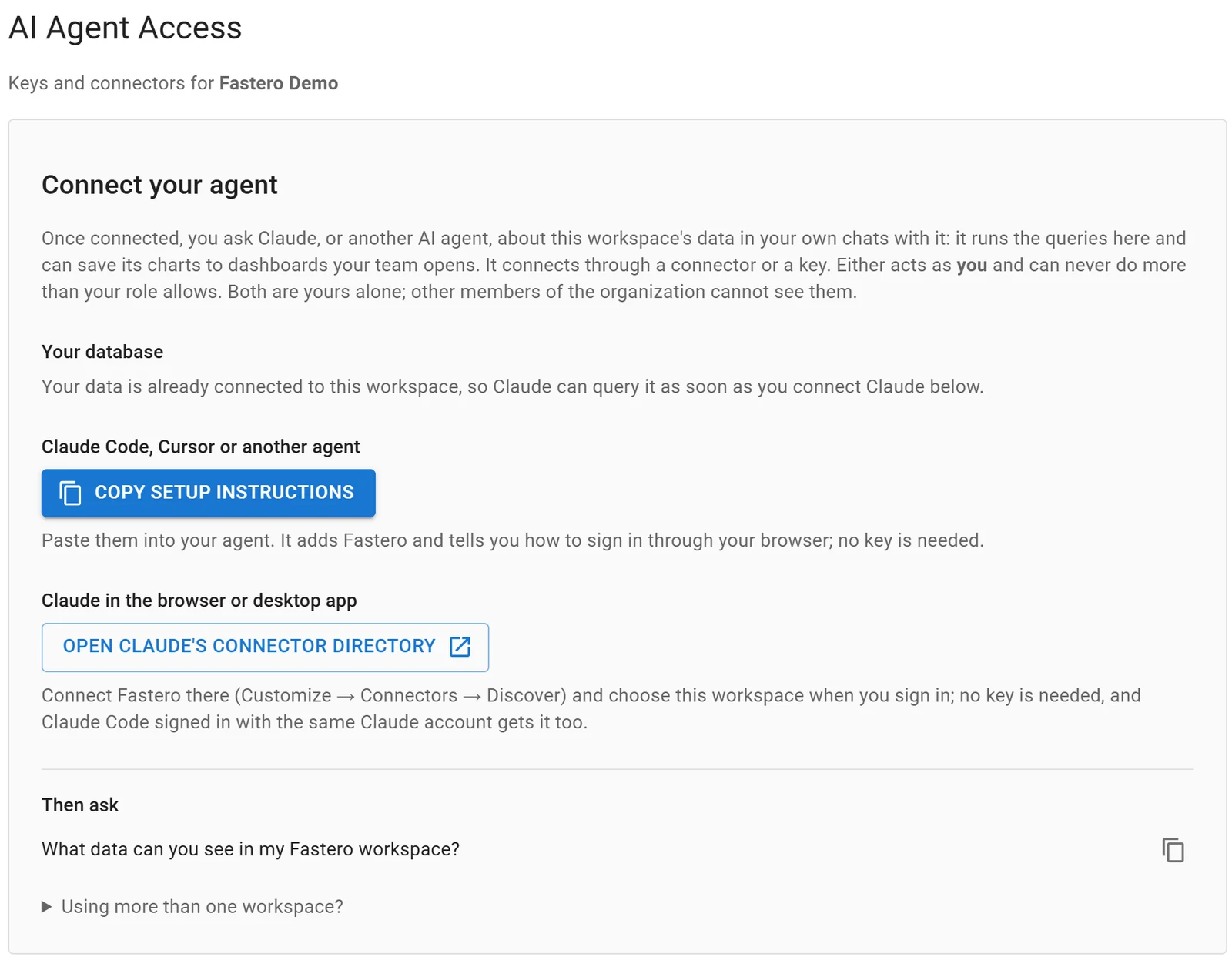
Settings, AI Agent Access: an agent signs in through the browser, so there is no key to copy.
FAQ
Is Claude Code better than Cursor?
Neither is better at everything. Claude Code suits people who want Claude in a flat plan, in a terminal or several editors. Cursor suits people who want an editor with tab completion and a choice of models.
Can I use Claude models in Cursor?
Yes, on Premium ($30 a month) and above, at Anthropic's API list price from prepaid credit, or with your own Anthropic key. Plus and Free include Cursor's own models only.
Can I use Claude Code inside Cursor?
Yes. Claude Code's VS Code extension installs in Cursor, and the CLI runs in Cursor's terminal. Usage counts against your Claude plan, not Cursor's pool.
Does Cursor read CLAUDE.md?
Cursor's CLI reads CLAUDE.md and AGENTS.md at the project root; the editor uses .cursor/rules and AGENTS.md. Cursor also loads Claude Code's subagents, skills and hooks.
Which is better for Jupyter notebooks?
Cursor runs notebooks in the editor, though users have reported agent edits that broke a notebook or couldn't be undone. Claude Code edits one cell at a time and runs notebooks with nbconvert, or in VS Code after you confirm. Commit first with either.
Is Cursor free?
There's a Free plan with limited Agent and Chat use on Cursor's own models. Paid plans start at $8 a month, and Claude, GPT and Gemini need Premium at $30 or more, checked 12 November 2026.
Sources
Checked 12 November 2026. Claude Code commands ran on version 2.1.284 on Windows.
- Cursor: Pricing, Models & Pricing, Pricing and plans, Usage and limits, The X Subscription, Agents Window, CLI, Using the CLI, JetBrains, Migrate from VS Code, Rules, Subagents, Skills, Hooks, Third-party hooks, Run modes, MCP, Cloud Agents, Canvases, Apps, Data science guide, Changelog
- Cursor forum reports: EditNotebook strips required fields, notebook edits can't be undone, notebook editor doesn't refresh
- Anthropic: Claude pricing, API pricing, Model configuration, Costs, VS Code, JetBrains, Run agents in parallel, Agent view, Cloud sessions, Subagents, Hooks guide, Memory and AGENTS.md, Permission modes, Sandboxing, MCP, Tools reference, Artifacts, Changelog