 Fastero Dev Team
Codex and Claude Code are the two coding agents most developers end up comparing. Both run in a terminal, in VS Code and in the cloud, read your repository, run commands and open pull requests. They differ in models, in what a command may do before you're asked, and in how you pay.
The short answer: pick Codex if you already pay for ChatGPT, want OpenAI's models, or want every command sandboxed with the network off by default. Pick Claude Code if you want Claude's models, cell-by-cell notebook editing, or a larger ecosystem of hooks and subagents. Codex comes with ChatGPT Plus at $20 a month (CLI, IDE extension, web and iOS), Pro from $100, and Business at $20 a user billed yearly; Free and Go list GPT-6 Luna in the ChatGPT desktop app, "subject to rollout". Claude Code comes with Claude Pro at $20 ($17 billed yearly), Max at $100 and Ultra at $200, and not with Free. Codex reads AGENTS.md; Claude Code reads CLAUDE.md, and AGENTS.md when there's no CLAUDE.md. Both speak MCP, review GitHub pull requests and can import each other's setup. Prices checked 12 November 2026.
Fastero
Point Claude at your database.
Add Fastero to claude.ai or Claude Code. Claude builds the dashboard, deploys the app or publishes a live page, and your team opens it in Fastero.
Try free →Codex and Claude Code at a glance
| Codex | Claude Code | |
|---|---|---|
| Where it runs | CLI, IDE extension (VS Code, Cursor, Windsurf), Codex Cloud and the ChatGPT desktop app; JetBrains and Xcode through their own integrations | CLI, VS Code and JetBrains extensions, desktop app, and cloud sessions at claude.ai/code |
| Models | GPT-6 Astra, GPT-6.1 Sol, GPT-6.1 Terra, GPT-6 Luna; local open models with --oss |
Opus 5.5 by default, Sonnet 5.5, Haiku 5.5 and Fable 5.2 |
| Cheapest plan with the CLI | ChatGPT Plus, $20 a month | Claude Pro, $20 a month |
| With an API key | CLI, SDK and IDE only, "No cloud-based features" | Everything local, billed per token |
| Default safety | An OS sandbox: writes in the workspace, no network, asks before going further | Auto mode: a classifier approves most actions; the shell sandbox is off |
| Instructions | AGENTS.md, up to 32 KiB |
CLAUDE.md, or AGENTS.md when there's no CLAUDE.md |
| Notebooks | No notebook tool in the docs | Edits cells one at a time; runs them in VS Code after you confirm |
Both CLIs, hands-on
We installed Codex into a scratch folder with npm (npm install @openai/codex, not globally); --help needs no sign-in. Its options show the two settings that shape everything else, the sandbox and the approval policy, and a way to run local models:
$ npx codex --version
codex-cli 0.167.2

$ npx codex --help
...
      --oss
          Use open-source provider

      --local-provider <OSS_PROVIDER>
          Specify which local provider to use (lmstudio or ollama). If not specified with --oss,
          will use config default or show selection
...
  -s, --sandbox <SANDBOX_MODE>
          Select the sandbox policy to use when executing model-generated shell commands

          [possible values: read-only, workspace-write, danger-full-access]

  -a, --ask-for-approval <APPROVAL_POLICY>
          Configure when the model requires human approval before executing a command

          Possible values:
          - on-request: The model decides when to ask the user for approval
          - never:      Never ask for user approval Execution failures are immediately returned to
            the model
...
Claude Code's equivalent is a single permission mode:
$ claude --version
2.1.284 (Claude Code)

$ claude --help
...
  --permission-mode <mode>              Permission mode to use for the session
                                        (choices: "acceptEdits", "auto",
                                        "bypassPermissions", "manual",
                                        "dontAsk", "plan")
The current Claude Code release is 2.1.322, from 10 November 2026; ours was older.
Models and pricing (checked 12 November 2026)
Codex is priced as part of ChatGPT, and "ChatGPT Work and Codex share usage":
| Plan | Monthly | Codex |
|---|---|---|
| Free | $0 | GPT-6 Luna in the desktop app, subject to rollout |
| Go | $8 | The same |
| Plus | $20 | Web, CLI, IDE extension and iOS; GPT-6.1 Sol and GPT-6 Luna; automatic code review |
| Pro | $100, $200 or $500 | Everything in Plus; "Pro plans currently have no five-hour limit" |
| Business | $20 a user billed yearly, $25 monthly | Larger cloud machines, SAML SSO, no training on your data by default |
| API key | API pricing | CLI, SDK and IDE extension, without cloud features |
OpenAI estimates a Plus account at 15 to 160 local messages per five hours on GPT-6.1 Sol, 5 to 45 on GPT-6 Astra and 350 to 3,000 on GPT-6 Luna, with weekly limits on top, and warns that "These estimates are not fixed message limits". GPT-6.1 Sol has a 500,000-token context window in Codex. GPT-5.5 left Codex for ChatGPT sign-ins on 14 October 2026 and stays available with an API key.
Claude Code is priced as part of Claude:
| Plan | Monthly | Usage |
|---|---|---|
| Pro | $20 ($17 billed yearly) | Limits every 5 hours and every week, shared with Claude chat |
| Max | $100 | 5x Pro |
| Ultra | $200 | No 5-hour limit for verified accounts; 10x Pro every week |
| Team | $25 a seat ($20 yearly); premium $125 ($100) | Premium seats get 5x a standard seat |
Its default model on every paid plan is Opus 5.5, with a 1M-token context window in Claude Code; Fable 5.2 is paid with usage credits on Pro and takes up to half the weekly limit on Max and Ultra. With an API key, Anthropic puts the enterprise average at "around $13 per developer per active day". Our Claude Code pricing guide has the detail.
Sandboxing and approvals: the biggest difference
Codex isolates first. "By default, the agent runs with network access turned off", inside "an OS-enforced sandbox that limits what it can touch (typically to the current workspace)". Its Auto preset, --sandbox workspace-write --ask-for-approval on-request, can "read files, make edits, and run commands in the working directory automatically", and asks before writing outside the workspace or using the network. On Windows it has a native sandbox, or uses Linux sandboxing under WSL2.
Claude Code trusts a classifier. "With Claude Code v2.1.283 or later, auto mode is the built-in starting permission mode for interactive terminal and VS Code sessions": a model reviews each action instead of you. Manual mode asks before edits, commands and network access; claude -p starts in Manual, so unattended runs refuse anything you haven't allowed. The shell sandbox is "off by default" (/sandbox turns it on) and runs on macOS, Linux and WSL2, but "On native Windows, Claude Code runs commands unsandboxed."
For data work this matters on day one. With Codex's defaults, psql against a remote database waits for your approval, unless you turn on network access in config.toml. Claude Code's commands reach the network unless you sandbox them. Either way, the control that holds is a database login that can only read.
AGENTS.md vs CLAUDE.md
Codex reads ~/.codex/AGENTS.md (or AGENTS.override.md), then one file per folder from the project root down to where you started, and stops at 32 KiB by default, a limit set by project_doc_max_bytes. project_doc_fallback_filenames adds other names it should treat as instructions.
Claude Code reads CLAUDE.md files. Since version 2.1.277 it reads AGENTS.md directly, but only when there's no CLAUDE.md; with both, it reads "Your CLAUDE.md files only". The tidy setup for a repo both agents use is one AGENTS.md and a CLAUDE.md that imports it with @AGENTS.md, as our CLAUDE.md guide shows.
Switching is easy in both directions. Codex's /import brings over Claude Code or Cursor setup: instructions, settings, skills, MCP servers, hooks, subagents and "up to 50 chats from the last 30 days". Claude Code's claude import takes codex, gemini or cursor.
Point Claude at your database.
Start free →MCP, subagents and hooks
| Codex | Claude Code | |
|---|---|---|
| MCP transports | STDIO and Streamable HTTP | HTTP, SSE (deprecated), stdio and WebSocket |
| MCP sign-in | Bearer token or OAuth, including dynamic client registration | OAuth, or headers; plus your claude.ai connectors |
| Where it's set | ~/.codex/config.toml, or .codex/config.toml in trusted projects |
claude mcp add, .mcp.json |
| Subagents | Custom agents as TOML in ~/.codex/agents/ or .codex/agents/ |
Markdown in .claude/agents/, plus agent teams (experimental) |
| Hooks | Events such as SessionStart, PreToolUse, PostToolUse and Stop |
33 events in Anthropic's hooks guide |
The desktop app, CLI and IDE extension share Codex's MCP configuration. Our list of MCP servers for Claude Code covers the data servers worth adding.
GitHub and the cloud
Codex reviews pull requests on its own once you connect a repository and turn on Automatic review, or when someone comments @codex review; it "follows your repository guidance" in AGENTS.md. The Codex GitHub Action (openai/codex-action@v1) runs codex exec in a workflow. Codex Cloud tasks check out repositories "through your connected GitHub or GitLab account" and "keep working while your computer is asleep".
Claude Code sets up GitHub Actions from the terminal with /install-github-app, after which @claude in an issue or pull request starts a run. A managed Code Review service is for Team and Enterprise. Cloud sessions run on Pro and up, with "no separate charge for the cloud VM", and claude --cloud moves work there.
Data work: SQL, notebooks and dashboards
- SQL. Both reach databases through command-line tools or MCP servers. Codex's network-off default makes it the safer starting point; with Claude Code, use a read-only login and consider the sandbox.
- Notebooks. Claude Code edits Jupyter notebooks one cell at a time, by cell ID, and in VS Code runs Python "in the active Jupyter notebook's kernel" after you confirm. Codex's documentation describes no notebook tool; both can run a notebook with
jupyter nbconvert --execute. More in our Claude Code and Jupyter guide. - Pages and dashboards. Claude Code publishes artifacts, live pages on claude.ai you can keep private, share with your organization or publish by link, on Pro and up; a page can pull fresh data through MCP each time someone opens it. Codex has Sites, which "lets you build, host, and share a website by describing it in ChatGPT or Codex", a dashboard among the examples; it's in public beta, and building one counts toward your Codex usage.
Pick Codex when, pick Claude Code when
Pick Codex when:
- You already pay for ChatGPT and want the agent in the same plan and usage.
- You want commands sandboxed with the network off unless you allow it.
- You want automatic GitHub reviews without writing a workflow, or local open models through
--oss.
Pick Claude Code when:
- You prefer Claude's models, or want one agent across the terminal, VS Code, JetBrains and the browser.
- You work in Jupyter notebooks and want cell-level edits.
- You rely on hooks, subagents and skills; Cursor and Codex can import Claude Code's.
When the result is for your team
Both agents leave their answers in a terminal, an editor or a chat. When colleagues need the dashboard next week, it needs somewhere they can open it. Fastero is an AI and data platform where people and AI agents work together on a team's data, and a remote MCP server with OAuth sign-in. Codex's docs say it connects to remote servers with OAuth; we've tested Fastero with Claude and Claude Code.
- One command in Claude Code.
claude mcp add --scope user --transport http fastero https://api.fastero.com/api/v1/mcp, then/mcpto sign in through the browser. Settings → AI Agent Access has the instructions. - Read-only SQL. The SQL tool runs one
SELECT,WITH,EXPLAINorSHOWstatement and returns at most 500 rows, whatever the agent's own permission mode. - Keys for CI. A key reads and queries by default, never exceeds your role in the workspace and expires within 90 days.
- Dashboards and notebooks for people. Charts go onto dashboards that refresh on a timer, or when the data changes on Postgres and BigQuery; notebooks run SQL cells on the workspace's connections. Colleagues sign in with their own login, and viewers are free.
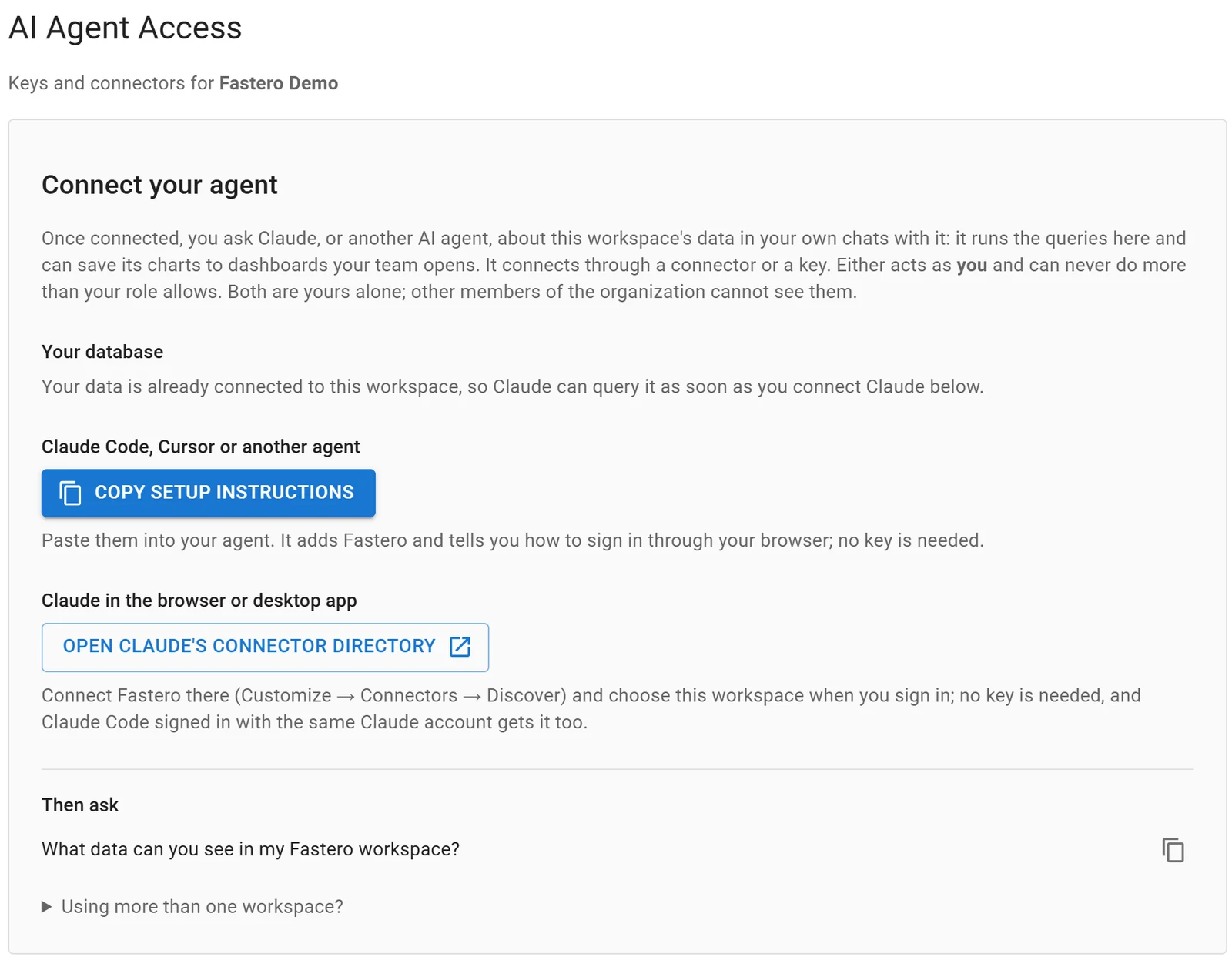
Settings, AI Agent Access: an agent signs in through the browser, so there is no key to copy.
FAQ
Is Codex free?
Partly. OpenAI lists GPT-6 Luna in the ChatGPT desktop app on Free and Go, subject to rollout. The CLI, IDE extension and cloud are listed from Plus at $20 a month, or you can use an OpenAI API key billed per token, checked 12 November 2026.
Is Codex better than Claude Code?
Each leads somewhere. Codex has the safer defaults, a sandbox with no network, and comes with ChatGPT plans. Claude Code has more editor surfaces, notebook editing and a deeper hooks and subagents system. Try both on the same repository; each imports the other's setup.
Does Codex read CLAUDE.md?
Not by default. Codex reads AGENTS.md; you can add other file names to project_doc_fallback_filenames, or run /import to convert a Claude Code setup to AGENTS.md.
Does Claude Code read AGENTS.md?
Yes, since version 2.1.277, when the repository has no CLAUDE.md. With both files, it reads CLAUDE.md only, so import AGENTS.md from it.
Can Codex use Claude models?
Not directly. With ChatGPT sign-in Codex uses OpenAI's models. A custom provider needs a compatible Responses API endpoint, and OpenAI says "A working Chat Completions or Anthropic Messages endpoint doesn't establish Responses compatibility". --oss runs local open models through LM Studio or Ollama.
Which is safer by default?
Codex: its sandbox limits writes to the workspace and keeps the network off. Claude Code's auto mode relies on a classifier, and its sandbox is off by default and unavailable on native Windows.
Sources
Checked 12 November 2026. Codex CLI 0.167.2 was installed locally with npm; Claude Code ran version 2.1.284 on Windows.
- OpenAI: Codex pricing, Models, Codex CLI, IDE extension, Codex Cloud, Agent approvals and security, Windows, Authentication, AGENTS.md, Subagents, Hooks, MCP, Import from another agent, CLI slash commands, GitHub code review, GitHub Action, Gateway compatibility, Sites, npm package
- Anthropic: Claude pricing, API pricing, Model configuration, Costs, Permission modes, Sandboxing, Memory and AGENTS.md, MCP, Subagents, Hooks guide, Tools reference, VS Code, GitHub Actions, Code Review, Cloud sessions, Artifacts, Changelog