 Fastero Dev Team
The best data analysis tool depends on what you already know and who needs to see the answer. Excel or Google Sheets for a table and one question, DuckDB if you know SQL and your data is in files, Python in Jupyter for custom analysis, Power BI if your company runs on Microsoft, Claude or ChatGPT to ask in plain English, and Metabase or Fastero when a whole team needs to open the result without a bill per reader.
Most lists stop at what each tool does. This one also answers what happens next: can a colleague open your work without buying a seat, and does it update by itself? That's where the real cost is. For one person building and ten reading, the same job costs $0 on some of these tools and $225 a month on others.
Pick by what you already know
| Your situation | Start with | Move on when |
|---|---|---|
| I have a spreadsheet and one question | Excel or Google Sheets | You pass 1,048,576 rows or 20 million cells, or someone wants it every week |
| I want to ask about a file in plain English | Claude or ChatGPT | It's a recurring question, or the answer has to stay on live data |
| I know SQL and the data is in files | DuckDB | Other people need to open the result |
| I know SQL and the data is in a database | Metabase if you can host it, Data Studio if you live in Google, Fastero if you want it hosted with an AI agent | You need more than one database per question |
| I know Python | Jupyter and pandas | Memory runs out (add DuckDB), or a team needs it (Hex, Deepnote, Fastero) |
| I know R | RStudio or Positron | People need private access to the result |
| My company runs on Microsoft | Power BI | Paying for every reader adds up |
| I want rich visual exploration and have budget | Tableau | Viewer seats become the main cost |
| My team needs to open it with no bill per reader | Data Studio, Metabase Open Source, Deepnote, Fastero | Choose by where the data lives and who builds |
Fastero
Connect your database. Ask questions. Get dashboards.
Postgres, BigQuery, Snowflake, and 10+ sources — live-connected, AI-powered, no dashboard builder learning curve.
Try free →The 14 compared
| Tool | 1 builder + 10 readers, per month | Live database | Colleagues open it free? | Runs on a schedule |
|---|---|---|---|---|
| Excel | $0 on the web; $9.99 for desktop Personal | Yes, Power Query | Yes, as a file | Needs a business licence and Power Automate |
| Google Sheets | $0 | BigQuery; others by code | Yes, by link | By code |
| Python + Jupyter | $0 plus any hosting | Yes, by code | As a file | Add-on or cron |
| R + RStudio or Positron | $0 public; $59 private link | Yes, by code | Public, or paid | From $19 a month |
| DuckDB | $0 | Reads Postgres directly | No viewer of its own | Cron |
| Power BI | $154 | Yes | No, below F64 capacity | 8 refreshes a day |
| Tableau | $225 | Yes | No | Yes |
| Data Studio (formerly Looker Studio) | $0 | Yes, 150K rows a query | Yes, by link | Daily PDF |
| Metabase | $0 plus a server; $136 hosted | Yes | Yes | Hourly to monthly |
| Hex | From $36; reader cost varies by plan | Yes | Depends on plan | Team plan, $75 per editor |
| Deepnote | $0; $39 with schedules | Warehouses need Team | Yes | Team plan and up |
| Fastero | $0; $20 on Pro | Yes | Yes, viewers are free | Yes, on Free |
| ChatGPT | Chat tool, no shared view | Custom MCP, depends on plan | A conversation link | Yes, 3 tasks on Free |
| Claude | Chat tool; $17 to $20 to build | Connectors, one custom on Free | By link, with a Claude account | Pro and above |
The cost column is our arithmetic from list prices in US dollars, for 1 builder and 10 people who only read, on annual billing where a vendor quotes it. It leaves out usage charges, servers and tax. Power BI is 11 × $14. Tableau is $75 + 10 × $15. Metabase Starter is $100 for 5 users + 6 × $6.
Spreadsheets
1. Excel
Excel for the web is free, and Microsoft 365 Personal costs $9.99 a month. Nothing else on this list is as familiar: everyone can open a workbook, and pivot tables answer most one-off questions. Power Query pulls from live databases, with the widest choice on Windows.
Where it falls short: 1,048,576 rows per sheet. It holds a copy of the data, so two people soon have two answers, and scheduled refreshes need a business licence plus Power Automate; Microsoft says built-in script scheduling "is temporarily disabled".
2. Google Sheets
Free with a Google account, and best when several people edit one small table. A link can open it for anyone, with no sign-in, if your admin allows it. Connected Sheets reads BigQuery natively.
Where it falls short: 20 million cells or 100 MB. MySQL, SQL Server and Postgres connections take Apps Script, which is code.
Connect any database. Ask in plain English.
Connect database →Code
3. Python with pandas in Jupyter
Free and without vendor limits, this is the standard for custom analysis, statistics and machine learning. read_sql works with any database SQLAlchemy supports, and you can read how to run SQL in a Jupyter notebook or try Jupyter with nothing to install.
import pandas as pd
from sqlalchemy import create_engine

engine = create_engine("postgresql+psycopg://reader:password@db.example.com:5432/shop")
orders = pd.read_sql("SELECT order_date, category, revenue FROM orders", engine)
print(orders.groupby("category")["revenue"].sum().sort_values(ascending=False))
Where it falls short: pandas works in memory, and "Even datasets that are a sizable fraction of memory become unwieldy". Sharing means sending a file, and scheduling takes an add-on or your own server.
4. R with RStudio or Positron
RStudio is free and open source; Positron is Posit's free newer editor for R, Python and SQL. R remains the strongest choice for statistics and publication-quality charts, and DBI connects it to Postgres, MySQL, BigQuery and more.
Where it falls short: R also holds everything in memory. Free sharing on Posit Connect Cloud is public only; private links start at $59 a month.
5. SQL with DuckDB
Free and open source, with no server to run. Point it at a CSV or Parquet file and write SQL, and it spills to disk when data outgrows memory. It's the quickest way to get real SQL on a laptop:
SELECT category, SUM(revenue) AS revenue
FROM 'orders.csv'
GROUP BY category
ORDER BY revenue DESC;
It can also read a running Postgres database directly. MotherDuck hosts it, free up to 10 GB and three users.
Where it falls short: it's an engine, with no way for a colleague to open a result, and only one process can write at a time.
BI tools
6. Power BI
Desktop is free, and Pro costs $14 per user a month paid yearly. It's the natural choice inside a Microsoft company, with live DirectQuery connections and eight scheduled refreshes a day.
Where it falls short: readers pay. "Only Power BI Pro users can publish, share, or consume other Pro users' content unless it resides in a Power BI Premium capacity", and free viewing starts at F64 capacity. "Publish to web" is the free route, but "anyone on the Internet can view" it. Pro models are limited to 1 GB, and DAX takes real learning.
7. Tableau
Creator costs $75 per user a month, Explorer $42 and Viewer $15, billed annually on the Standard plan. It's still the richest tool for visual exploration, and viewers can set up their own subscriptions.
Where it falls short: there are no monthly plans, and every reader needs a licence, which is why this is the most expensive row in the table. Tableau Public shows your work to anyone and isn't for commercial use. The newer Desktop Free Edition can't publish or share.
8. Data Studio (formerly Looker Studio)
Free, and Google renamed it in April 2026, so search both names. Reports share by public link with no login required, and a free report can email a PDF up to once a day.
Where it falls short: MySQL and Postgres connections stop at 150,000 rows per query, and queries can time out after three to five minutes. Your database needs a public address. It's built around Google's own data.
9. Metabase
The open-source edition is free with unlimited users if you host it; hosted Starter costs $100 a month for five users, then $6 each. A visual question builder lets people who don't know SQL explore, and subscriptions send dashboards to email or Slack hourly to monthly.
Where it falls short: joins only work "from the same database". Row-level permissions and SSO are on Pro, at $575 a month for ten users. Somebody has to run the free edition.
Notebooks and team workspaces
10. Hex
SQL and Python in one notebook, which you publish as an interactive app. Community is free, Professional costs $36 and Team $75 per editor a month.
Where it falls short: Community is limited to five notebooks and five apps. Scheduled runs are a Team feature, and viewer seats "may be free or paid depending on your pricing plan". There's more in the best Hex alternatives.
11. Deepnote
Managed Jupyter-style notebooks with live co-editing. The free plan covers three editors, five projects and unlimited viewers. Team costs $39 per editor a month, billed yearly.
Where it falls short: the free plan has no scheduled runs and connects to Postgres, MySQL and a few others. BigQuery, Snowflake, Redshift and Databricks need Team, and hourly schedules are Enterprise only.
12. Fastero
Fastero is for the last step most of these tools leave to you: a result your whole team opens, on live data, that keeps itself up to date. Connect a database, a Google Sheet or an uploaded file, then work the way you prefer: ask its AI agent or Claude in plain English, write SQL, or use Python notebooks and Streamlit apps. It's all in one workspace behind your team's login.
Free has no time limit and needs no card, and every new account gets 14 days of Pro. Pro costs $20 per editor a month, and viewers are free on both. Dashboards refresh on a schedule and email themselves with a PDF attached, including to people with no account.
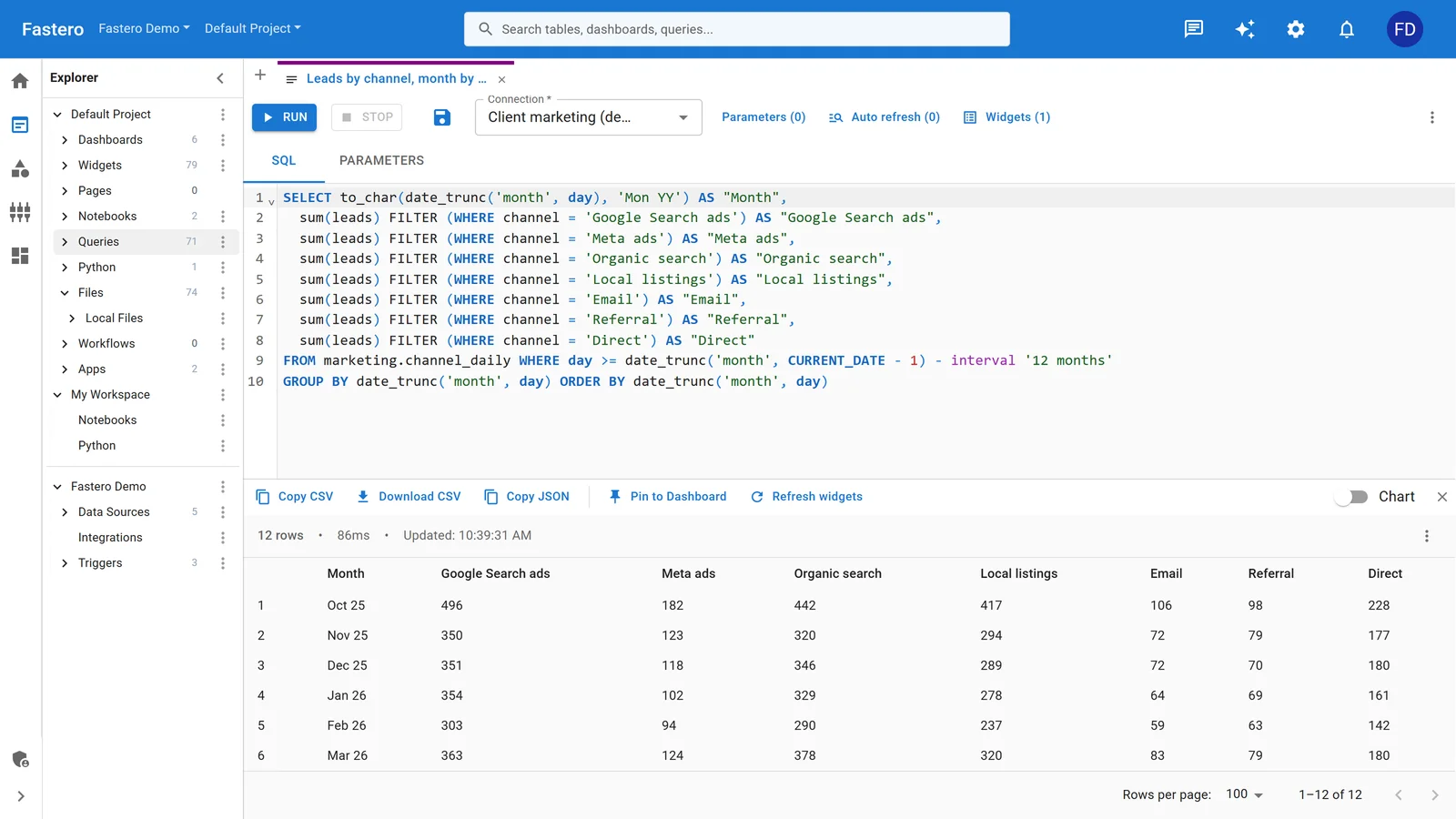
Fastero's SQL editor. Sample data.
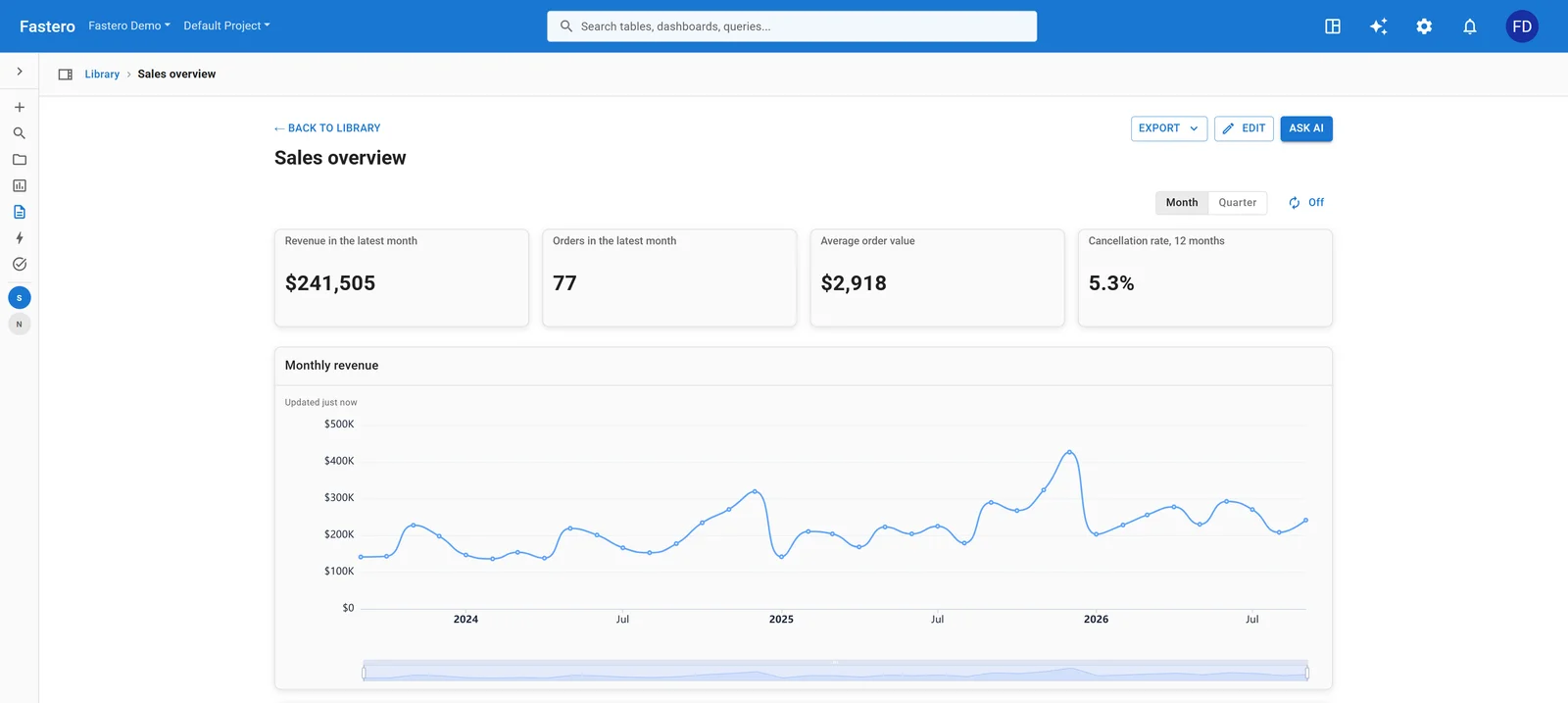
What a colleague opens with their own login. Sample data.
AI chat
13. ChatGPT
Free to start, with Plus at $20 a month. Upload a file and ask in plain English, and it writes and runs the code. Scheduled tasks are on every plan, with three active on Free. Spreadsheets are limited to roughly 50 MB, and live databases need a custom MCP server on eligible plans.
Where it falls short: a shared link shows a conversation, and anyone who continues it gets a private copy. There's no shared view that stays current. ChatGPT vs Claude for data analysis goes deeper.
14. Claude
Free to start, with Pro at $17 to $20 a month. Claude is strong at reading a messy table and explaining what it found, and it builds interactive pages from your data. Anthropic gives 500 MB per file in chat and 30 MB per file in the sandbox where code runs. Through connectors it queries live databases, with one custom connector on Free.
In Fastero, compare revenue last month with the month before, by product. Use full months,
show the SQL, and list the three biggest changes first.
Where it falls short: "Everyone needs a Claude account" to open what you share, and scheduled tasks start at Pro. With a connector into a workspace, the answers become dashboards anyone on the team can open. Start with 12 prompts for data analysis.
Four more worth knowing
- Julius is a chat tool for bigger files, at $20 a month for Plus. Database connections start at Pro, $45 a month.
- KNIME is free on the desktop: drag-and-drop workflows with 300+ connectors. Schedules are on paid plans, from €19 a month.
- Alteryx suits analysts whose company pays. Starter costs $250 per user a month and reads files only; databases start at Professional.
- Databricks is for data too big for one machine. Its Free Edition is non-commercial; paid plans bill by usage.
FAQ
What are the most common data analysis tools?
Tableau, Power BI, Python and Excel. Of the 11 "best tools" lists we read for this page, Tableau and Power BI appeared in 10, and Python and Excel in 9.
What is the best data analysis tool for beginners?
A spreadsheet. Excel for the web and Google Sheets are free, and you can get a real answer on your first day. If you'd rather not learn formulas, upload the file to Claude or ChatGPT and ask in plain English.
Do I need to code to analyze data?
No. Spreadsheets, BI tools and AI chat don't need code. Python, R and DuckDB do, and SQL is the most useful thing to learn first.
Is SQL a data analysis tool?
Yes, and for data in a database it's often the most direct one. DuckDB gives you SQL over local files with no server at all.
Are there free data analysis tools for commercial use?
Yes: Python, R, DuckDB, Metabase Open Source, Google Sheets, Data Studio and Fastero Free. Check the terms on others, because Tableau Public and Databricks Free Edition rule out commercial use.
Which tool handles large datasets?
Excel stops at 1,048,576 rows and Sheets at 20 million cells. pandas is limited by your computer's memory, while DuckDB spills to disk on one machine. Past that, you need a warehouse such as BigQuery or Snowflake, or Databricks.
How do I share analysis with people who don't have the tool?
Check the "Colleagues open it free?" column first. Data Studio, Metabase, Deepnote and Fastero all let people read without a paid seat. On Power BI and Tableau, each reader normally needs a licence.
Sources
Read 2 to 3 November 2026. Prices marked by vendors as subject to change; check before buying. Tableau, Julius, ChatGPT and Microsoft 365 Business pages were read through search results.
- Spreadsheets: Excel limits, Microsoft 365 plans, Office Scripts scheduling, Google Sheets limits, Connected Sheets
- Code: Jupyter, pandas scaling, RStudio, Positron, Connect Cloud plans, DuckDB, DuckDB concurrency, MotherDuck pricing
- BI: Power BI pricing, Power BI licences, Tableau pricing, Tableau editions, Data Studio rename, Data Studio Postgres connector, Data Studio schedules, Metabase pricing, Metabase joins
- Workspaces: Hex pricing, Deepnote pricing, Deepnote scheduling, Fastero pricing
- AI chat: ChatGPT pricing, ChatGPT file uploads, ChatGPT scheduled tasks, Claude pricing, Claude uploads, Claude code execution, Sharing Claude artifacts
- Others: Julius pricing, KNIME Pro, Alteryx pricing, Databricks Free Edition
Try Fastero free — connect your data, ask in English, SQL or Python, and give your team live results. Viewers are free. No credit card required.