 Fastero Dev Team
An MCP server for Redshift lets Claude look at your clusters and run SQL on your warehouse, so "which regions grew fastest this quarter?" gets an answer from the data. AWS publishes an official one, it gained a write mode in October 2026, and claude.ai in the browser needs a different route altogether. This guide covers all three, and what to lock down first.
The short answer: AWS's official Redshift MCP server is the open-source awslabs.redshift-mcp-server (0.1.3, 9 November 2026, Apache-2.0). It runs on your machine through uvx, finds your provisioned clusters and Serverless workgroups with your AWS credentials, and runs SQL through the Redshift Data API. Add it to Claude Code with claude mcp add --transport stdio redshift --env AWS_PROFILE=<profile> --env AWS_REGION=<region> -- uvx awslabs.redshift-mcp-server@latest. It's read-only by default, running each query inside BEGIN READ ONLY … ROLLBACK; pair that with a database role that can only SELECT. For claude.ai in a browser, use AWS's hosted AWS MCP Server or a hosted connector.
Fastero
Point Claude at your database.
Add Fastero to claude.ai or Claude Code. Claude builds the dashboard, deploys the app or publishes a live page, and your team opens it in Fastero.
Try free →Which Redshift MCP server to use
| Option | Runs where | Works in | Writes? | Best for |
|---|---|---|---|---|
awslabs.redshift-mcp-server |
Your machine (uvx) |
Claude Code, Claude Desktop | Read-only by default; opt-in read-write since October 2026 | Engineers querying Redshift from Claude Code |
| AWS MCP Server | AWS, hosted | claude.ai, Claude Desktop, Claude Code | Whatever your IAM role allows | Teams already on AWS who want claude.ai access |
| A hosted connector such as Fastero | Hosted | claude.ai, Claude Desktop, Claude Code, phones | No: refuses changes | Questions from claude.ai, and results colleagues open |
AWS's server "provides tools to discover, explore, and query Amazon Redshift clusters and serverless workgroups." It first appeared in June 2025, and AWS's own announcement in September 2025 said it "integrates seamlessly with Amazon Q Developer command line interface (CLI), Claude Desktop, Kiro, and other MCP-compatible tools." There's no Redshift-specific connector in Claude's directory; the AWS one covers all of AWS.
Option A: AWS's Redshift MCP server
Install
You need uv (for uvx) and AWS credentials for a role that can see the cluster. In Claude Code:
claude mcp add --transport stdio redshift \
  --env AWS_PROFILE=claude-redshift-ro --env AWS_REGION=us-east-1 \
  -- uvx awslabs.redshift-mcp-server@latest
Put the server name before --env: "If the server name comes directly after --env, the CLI reads the name as another pair and rejects it". On Windows the README gives a different form, uv tool run --from awslabs.redshift-mcp-server@latest awslabs.redshift-mcp-server.exe, though plain uvx also worked in our test from Git Bash. The first start downloads Python and about 50 packages; if Claude Code gives up, raise MCP_TIMEOUT.
For Claude Desktop, the same command goes in claude_desktop_config.json:
{
  "mcpServers": {
    "awslabs.redshift-mcp-server": {
      "command": "uvx",
      "args": ["awslabs.redshift-mcp-server@latest"],
      "env": { "AWS_PROFILE": "claude-redshift-ro", "AWS_REGION": "us-east-1", "LOG_LEVEL": "WARNING" }
    }
  }
}
It exposes eight tools: list_clusters, list_databases, list_schemas, list_tables, list_columns, execute_query, review_cluster (a health check) and retrieve_skill_file, which serves AWS's Redshift guide to Claude.
What read-only means, and what we found
"The server is read-only by default." Each query runs as "BEGIN READ ONLY … ROLLBACK, so nothing is persisted", and a typo in the setting "falls back to read-only". On top of that, a statement guard rejects some SQL before it's sent. We started version 0.1.3 with no AWS credentials on 11 November 2026, listed its tools, and ran its guard against a set of statements:
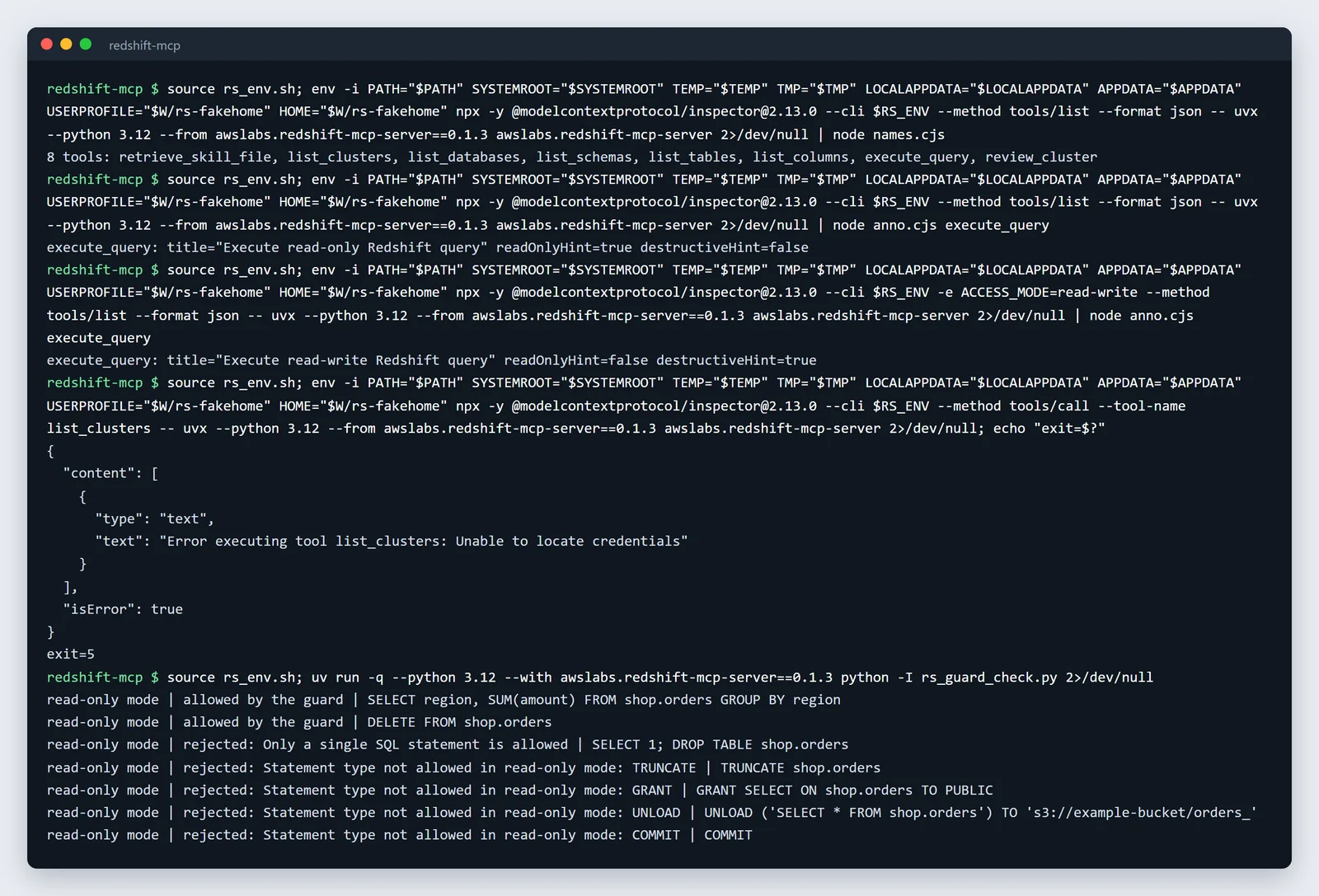
Our test of the server and its SQL guard, unedited.
The guard rejected stacked statements, TRUNCATE, GRANT, UNLOAD and COMMIT, but let a plain DELETE through. What stops that DELETE is the read-only transaction at the database, which we couldn't run without a Redshift cluster. AWS is clear that the guard isn't the safeguard: "Treat it as defense in depth, not a security boundary", and "The database user's privileges are the security boundary, not this server."
The read-write mode
Since October 2026 (version 0.1.2), ACCESS_MODE=read-write "lets an AI model modify and delete your data." Writes then need a confirmation, and a client that can't show one "is refused rather than allowed to run the write unconfirmed". Claude Code can show it. If you turn this on, do it for a separate server entry, with a separate database user.
Give it a role that can only read
The server connects as your IAM identity, so the database user is IAMR:<role> or IAM:<user>, and "the double quotes are required for those names." Run this as a superuser, after the server has connected once:
CREATE ROLE claude_reader;
GRANT USAGE ON SCHEMA analytics TO ROLE claude_reader;
GRANT SELECT ON ALL TABLES IN SCHEMA analytics TO ROLE claude_reader;      -- existing tables
GRANT SELECT FOR TABLES IN SCHEMA analytics TO ROLE claude_reader;         -- scoped: current and future tables
REVOKE CREATE ON SCHEMA public FROM PUBLIC;                                -- by default every user can create here
GRANT ROLE claude_reader TO "IAMR:claude-redshift-ro";
The REVOKE matters: "By default, all users have CREATE and USAGE permissions on the PUBLIC schema of a database." For IAM, use the README's policy and leave out redshift:GetClusterCredentials, which "is not needed either, and is best left out" because it can mint credentials for any user.
Three limits to know: results are capped at 1,000 rows by default, and "A larger result is refused rather than cut short"; one statement per call; and at DEBUG log level, the logs contain "every statement's full SQL", so treat them as sensitive.
Point Claude at your database.
Start free →Option B: the AWS MCP Server, for claude.ai
A server on your laptop can't be added to claude.ai in a browser. AWS's hosted AWS MCP Server can: it became generally available on 6 May 2026, "at no additional charge", and has been in Claude's connector directory since August 2026. Its OAuth sign-in "Works for web clients (such as Claude.ai and ChatGPT.com)". In Claude Code:
claude mcp add aws-mcp https://aws-mcp.us-east-1.api.aws/mcp --transport httpIt isn't Redshift-specific: "Agents can now call any AWS API through a single tool", so Claude would run SQL through Data API calls, with no SQL guard. Your IAM policy is the only limit, and AWS gives an example that "allows read operations but denies destructive actions when the request comes through AWS MCP Server." Scope that role tightly.
Option C: a hosted connector
To ask questions from claude.ai or a phone, or to share the results with colleagues, use a hosted connector. Fastero is an AI and data platform where people and AI agents work together on a team's data. Add Redshift once from the connection form, with host, port, database and a read-only login, then add Fastero to Claude from its connector directory.
Claude can then list the tables, read the metric definitions your team has saved, and run SQL in Redshift's dialect. Fastero refuses any statement that could change data before it reaches the database, and returns at most 500 rows per query. A chart Claude draws can go onto a Fastero dashboard that colleagues open with their own login, without Claude, and that refreshes from Redshift on a schedule. More on SQL MCP servers in general, the Postgres MCP server and connecting MCP servers to Claude Code.
Keep it safe: a checklist
- A database role with
USAGEandSELECTonly, andCREATEonpublicrevoked. - An IAM role without
redshift:GetClusterCredentials. - Leave
ACCESS_MODEunset (read-only), unless a separate server entry needs writes. - Keep the server's logs out of shared places: at
DEBUGthey hold every query. - For the hosted AWS MCP Server, an IAM policy that denies destructive actions through MCP.
FAQ
Is there an official Amazon Redshift MCP server?
Yes. AWS publishes awslabs.redshift-mcp-server, open source under Apache-2.0, which runs on your machine. AWS also runs the hosted AWS MCP Server, which reaches Redshift through general AWS API calls.
Does it work with Redshift Serverless?
Yes. It discovers Serverless workgroups alongside provisioned clusters, and queries both through the Redshift Data API.
Is the Redshift MCP server read-only?
By default, yes: each query runs in a read-only transaction that's rolled back. Since version 0.1.2 (October 2026), ACCESS_MODE=read-write allows writes after a confirmation. Use a read-only database role either way.
Can I use Redshift with claude.ai in the browser?
Not with the local server. Use a hosted connector: AWS's AWS MCP Server, which is in Claude's directory, or a hosted data connector such as Fastero.
Which database user does the MCP server connect as?
Your IAM identity: IAMR:<role> for a role or IAM:<user> for a user. Quote the name in GRANT statements.
Sources
Read on 11 November 2026; our test used awslabs.redshift-mcp-server 0.1.3 with no AWS credentials on Windows 11: