 Fastero Dev Team
Oracle's MCP server for Claude doesn't need installing separately: it's built into SQLcl, Oracle's free command-line tool. It has no read-only switch, its documentation and its changelog disagree about how locked down it starts, and its activity log quietly doesn't exist for the safest kind of login. We ran it against Oracle Database 26ai Free to check each of those.
The short answer: Oracle's MCP server for Claude is built into SQLcl, its free command-line tool (26.3.1, released 3 November 2026, Java 17, 21 or 25). Save a connection with conn -save claude_ro -savepwd user/password@//host:1521/service, then add claude mcp add --transport stdio sqlcl -- /path/to/sqlcl/bin/sql -R 4 -mcp to Claude Code, or the same command with the -mcp argument in Claude Desktop's config. SQLcl has no read-only switch, and since version 26.1.2 it starts unrestricted, so pass -R 4 and connect as a user with only CREATE SESSION and SELECT. For a hosted option, Oracle offers Autonomous AI Database, OCI Database Tools and ORDS MCP servers.
Fastero
Point Claude at your database.
Add Fastero to claude.ai or Claude Code. Claude builds the dashboard, deploys the app or publishes a live page, and your team opens it in Fastero.
Try free →Which Oracle MCP server to use
Oracle lists three ways in: "SQLcl MCP Server for local stdio workflows, OCI Database Tools MCP Server for managed Oracle Cloud Infrastructure deployments, or the built-in ORDS MCP endpoint for secure HTTPS streaming", plus a fourth for Autonomous databases.
| Option | Runs where | Works in | Good for |
|---|---|---|---|
SQLcl (sql -mcp) |
Your machine, free | Claude Code, Claude Desktop | Any Oracle database you can reach with SQLcl |
| Autonomous AI Database MCP Server | Oracle Cloud, per database (since December 2025) | Remote clients, via OAuth | Autonomous Serverless databases, 26ai and 19c |
| OCI Database Tools MCP Server | Oracle Cloud, managed (since May 2026) | Remote clients | Teams on OCI |
ORDS /mcp |
Your ORDS server, 26.2 or later | Remote clients | Teams already running ORDS; "The MCP feature is disabled by default." |
| A hosted connector such as Fastero | Hosted | claude.ai, Claude Desktop, Claude Code | Questions from claude.ai and results colleagues open |
There's no Oracle connector in Claude's directory, and Oracle's GitHub reference servers say they're "not intended for production use".
Option A: SQLcl's MCP server
Set it up
SQLcl has run as an MCP server since 25.2 (July 2025). It uses connections you've saved, and "For a connection to be accessible to an MCP client, you must save its password." Save one for a read-only user (below), then add the server:
# once, in SQLcl: save a read-only connection with its password
sql /nolog
SQL> conn -save claude_ro -savepwd mcp_reader/<password>@//dbhost:1521/FREEPDB1

# Claude Code, macOS or Linux
claude mcp add --transport stdio sqlcl --env JAVA_HOME=/path/to/jdk -- /opt/sqlcl/bin/sql -R 4 -mcp
Oracle documents only Claude Desktop and Cline, not Claude Code. For Claude Desktop, "Replace PATH/bin/sql with the absolute path of your SQLcl installation":
{
  "mcpServers": {
    "sqlcl": {
      "command": "/opt/sqlcl/bin/sql",
      "args": ["-R", "4", "-mcp"],
      "env": { "JAVA_HOME": "/path/to/jdk", "TNS_ADMIN": "/path/to/wallet" }
    }
  }
}
TNS_ADMIN is only needed for a tnsnames.ora or an Autonomous wallet. Saved connections live in ~/.dbtools; since 25.4, -home points SQLcl at a separate folder, which keeps an agent's connections apart from yours.
Pass -R 4: it starts unrestricted
SQLcl's documentation says the server "defaults to the most restrictive level, that is , level 4". Its changelog for 26.1.2, in May 2026, says the opposite: "SQLcl MCP startup now defaults to unrestricted. This was previously set to restriction level 4". We checked on 26.3.1. Started without -R, a host command ran on our own machine through the MCP tool:
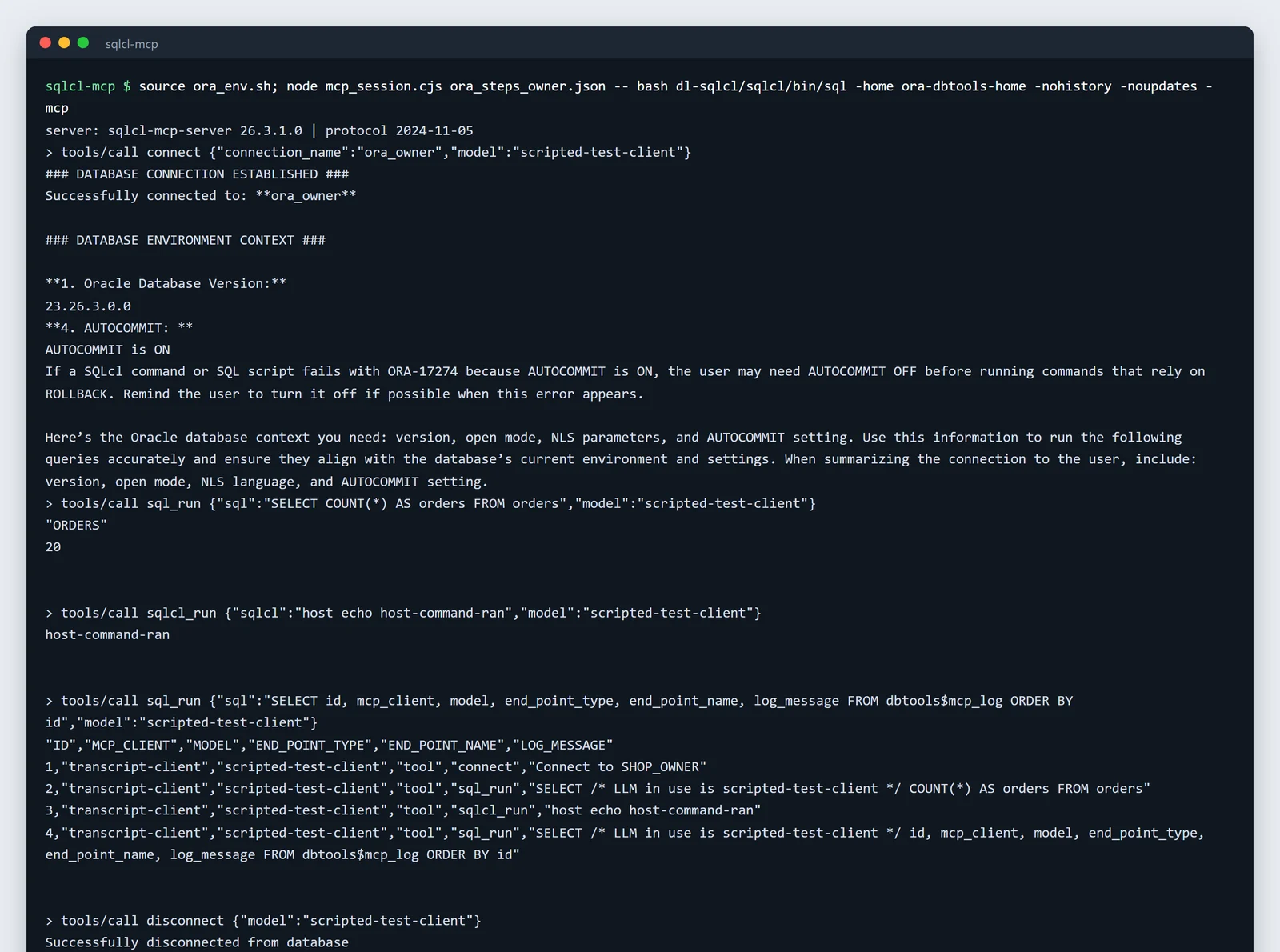
SQLcl 26.3.1 started with no restrict level: the host command ran.
Started with -R 4, the same call was refused:
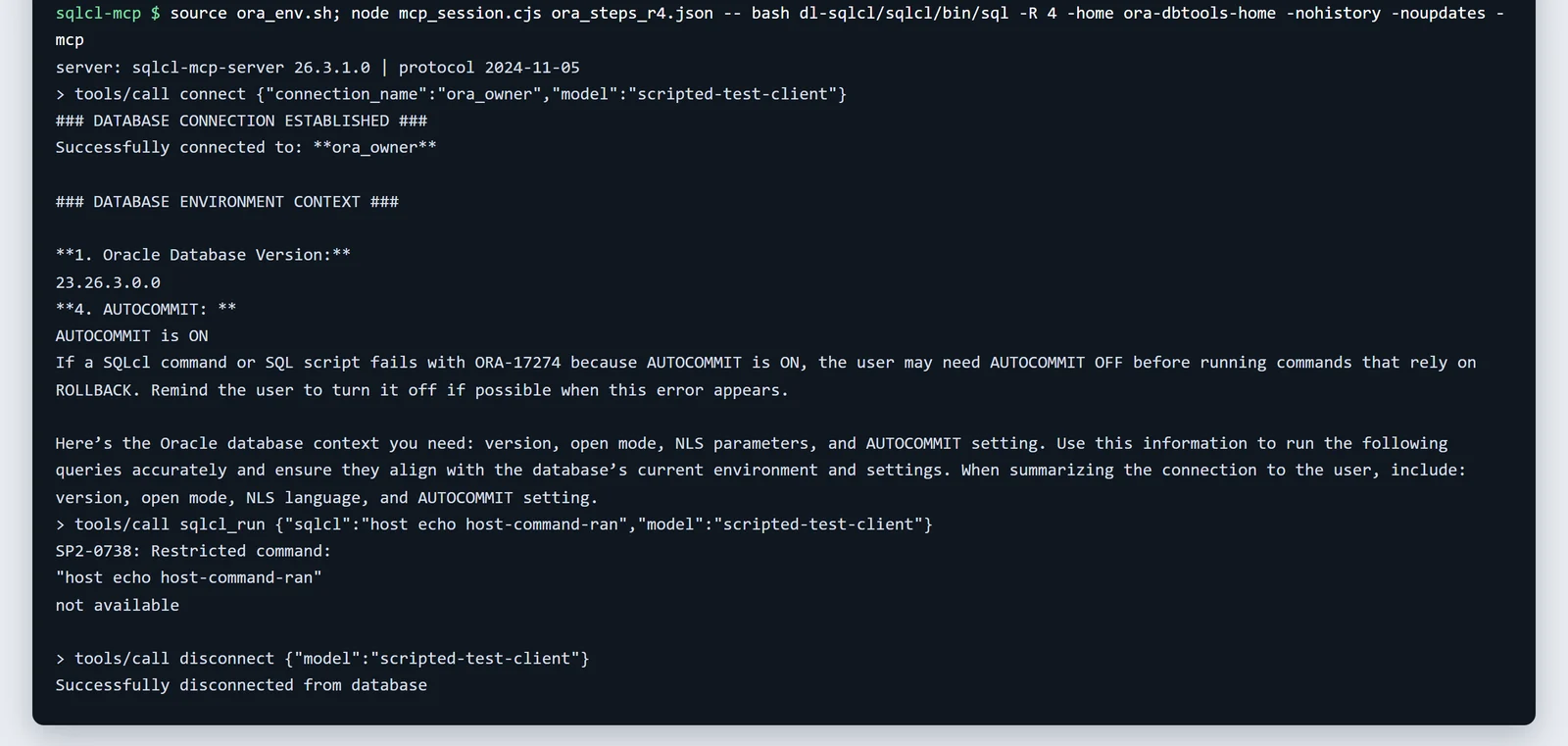
With -R 4: "SP2-0738: Restricted command".
Restrict levels limit SQLcl's own commands, such as host. They don't stop SQL: sql_run describes itself as destructive, and every session starts with "AUTOCOMMIT is ON", so a write commits at once. The database user is what keeps Claude to reading.
Give it a user that can only read
Oracle's own advice: "Configure the database user account used by the LLM with the absolute minimum permissions required for its tasks." This is what we ran as SYSTEM in our test database:
CREATE USER mcp_reader IDENTIFIED BY "<password>";
GRANT CREATE SESSION TO mcp_reader;
GRANT SELECT ON shop_owner.orders TO mcp_reader;

-- 23ai and 26ai: a READ ONLY user, with a grant that covers the schema's future tables too
CREATE USER mcp_ro IDENTIFIED BY "<password>" READ ONLY;
GRANT CREATE SESSION TO mcp_ro;
GRANT SELECT ANY TABLE ON SCHEMA shop_owner TO mcp_ro;
Both held. An INSERT as mcp_reader failed with "ORA-41900: missing INSERT privilege", and even after we granted INSERT to the READ ONLY user, Oracle refused it: "ORA-28194: Can perform read operations only". The table still had 20 rows. On 19c there are no READ ONLY users or schema-level grants, so use object grants, through a role for many tables.
The audit log isn't there for read-only users
Oracle says "The server automatically records the execution history of every request in the DBTOOLS$MCP_LOG table." It does, in the connected user's own schema, and only if that user can create tables: the log in our pictures above exists because that session ran as the table owner. For both read-only users, user_tables came back with "no rows selected": no log at all. With a properly locked-down login, use Oracle's own auditing on that user instead. SQLcl also tags each statement with a comment naming the model, for example /* LLM in use is ... */, which shows up in session monitoring.
Tool names and other gotchas
- The documentation lists old tool names. It says
list-connections,run-sqlandskill_sync; 26.3.1 actually exposes ten tools namedconnections_list,connect,disconnect,sqlcl_run,sql_run,schema_information,skills_sync,context_retrieve,request_statusandannotation_generate. - Claude Code once rejected the tools. In January 2026 Claude Code reported "tools.21.custom.input_schema: JSON schema is invalid." for SQLcl 25.4; Oracle fixed it in 25.4.1. Use a current SQLcl.
- Windows. In our test,
sql.execrashed with Oracle JDK 25.0.5 while thebashlauncher worked. On Windows, usesql.exewith JDK 17 or 21 and an absolute path.
Point Claude at your database.
Start free →Option B: Oracle's hosted MCP servers
claude.ai in a browser can't launch SQLcl. Oracle's hosted options:
- Autonomous AI Database MCP Server. Since 23 December 2025, "a managed, per-database MCP server" for Autonomous Serverless (26ai and 19c). Its tools are the Select AI Agent tools you define, and it "supports OAuth authentication through dynamic or static client registration."
- OCI Database Tools MCP Server. Launched 12 May 2026, with "Remote MCP support: Works with MCP clients through Streamable HTTP transport."
- ORDS MCP, at
/mcpon ORDS 26.2 or later, off by default. Itssql_runtool "can run statements that modify database state", so the database user matters here too.
Oracle's Claude Desktop examples for these go through mcp-remote.
Option C: a hosted connector
To ask questions from claude.ai or a phone, and to share results with colleagues, use a hosted connector. Fastero is an AI and data platform where people and AI agents work together on a team's data. Add Oracle once from its connection form, with the read-only user, then add Fastero to Claude from its connector directory.
Claude can then list the tables, read the metric definitions your team has saved, and run SQL in Oracle's dialect. Fastero refuses any statement that could change data before it reaches the database, and returns at most 500 rows per query. Charts can go onto a Fastero dashboard that colleagues open with their own login and that refreshes on a schedule. More on SQL MCP servers, the SQL Server MCP server and connecting MCP servers to Claude Code.
Keep it safe: a checklist
- Start SQLcl with
-R 4, whatever the documentation says the default is. - Connect as a user with
CREATE SESSIONandSELECTonly, or aREAD ONLYuser on 23ai and later. - Remember AUTOCOMMIT is on: a write from any user with write rights commits immediately.
- Audit the MCP user with Oracle's auditing, because SQLcl's log table won't exist for it.
- Keep agent connections in their own folder with
-home.
FAQ
Does Oracle have an official MCP server?
Yes. SQLcl, Oracle's free command-line tool, runs as one with sql -mcp. Oracle also offers hosted MCP servers in Autonomous AI Database, OCI Database Tools and ORDS.
How do I connect Oracle to Claude Code?
Save a connection in SQLcl with its password (conn -save name -savepwd ...), then run claude mcp add --transport stdio sqlcl -- /path/to/sqlcl/bin/sql -R 4 -mcp.
Can I make the SQLcl MCP server read-only?
There's no read-only switch. Connect as a user that can only SELECT, or a READ ONLY user on Oracle 23ai and later, and start SQLcl with -R 4 so it can't run operating-system commands.
What does -R 4 do in SQLcl?
It sets the most restrictive level, which turns off SQLcl commands such as host that reach your machine or its files. Since SQLcl 26.1.2 the MCP server starts unrestricted unless you pass it. It doesn't block SQL.
Where are SQLcl MCP activities logged?
In a DBTOOLS$MCP_LOG table in the connected user's schema, but only if that user can create tables. A read-only user gets no log, so use Oracle's database auditing for it.
Why does Claude Code reject the SQLcl MCP tools?
SQLcl 25.4 had a tool schema that Claude Code's strict validation rejected. Oracle fixed it in 25.4.1; update SQLcl.
Sources
Read on 11 November 2026; our test used SQLcl 26.3.1 and Oracle JDK 25.0.5 against Oracle AI Database 26ai Free in Docker, with invented data: