 Fastero Dev Team
Neon's MCP server gives Claude far more than a SQL connection: it can create projects, branch databases, reset branches and manage roles. That's useful for building an app with Claude, and risky on a database that matters. Neon also has the best controls of any database MCP server we've looked at, if you switch them on.
The short answer: Neon's official MCP server is hosted at https://mcp.neon.tech/mcp; the old local npm package is deprecated. In claude.ai or Claude Desktop, add the Neon connector from Settings › Connectors and sign in; in Claude Code, run claude mcp add --transport http neon https://mcp.neon.tech/mcp. It exposes 141 tools, and 82 of them can change things, from create_project to delete_branch; run_sql can write too. To keep Claude read-only, untick Allow writes when you sign in, or add ?readonly=true&projectId=…&roleName=… to the URL with a Postgres role that can only SELECT.
Fastero
Point Claude at your database.
Add Fastero to claude.ai or Claude Code. Claude builds the dashboard, deploys the app or publishes a live page, and your team opens it in Fastero.
Try free →The Neon MCP server today
"This repository provides a remote MCP Server for Neon", open source under MIT; version 2.0.0 shipped on 5 November 2026. The local package is gone: npm now says "This package is deprecated. Use the remote MCP server at mcp.neon.tech instead." Its last release, 0.6.5, dates from September 2025, so guides showing npx @neondatabase/mcp-server-neon are out of date.
Neon has been an official Claude connector since August 2026, made by "Neon (A Databricks, Inc. company)", and "During authorization, choose read-only or full access." Neon itself is blunt about where it belongs: "We do not recommend using the Neon MCP Server in production environments."
Add it to Claude
- claude.ai and Claude Desktop: in Settings › Connectors, "Click Browse connectors (top-right of that page), find Neon, and add it." Sign in with your Neon account.
- Claude Code:
claude mcp add --transport http neon https://mcp.neon.tech/mcp, then/mcpto sign in. Neon also ships a Claude Code plugin with skills, installed with/plugin install neon-postgres@neon. - With an API key instead of OAuth, for an agent that runs unattended, send it as a header:
"Authorization": "Bearer <$NEON_API_KEY>".
Two details: OAuth opens your personal projects, so for an organisation's project "you must explicitly provide either the org_id or the project_id in your prompt", and if your project uses IP Allow, add Neon's two egress addresses, "34.192.103.46 and 23.22.233.166". The old SSE address is retired: "deprecated HTTP+SSE /sse and /message endpoints return 410 Gone."
What it can change
Neon publishes its tool list at a public address, so we counted on 11 November 2026, without signing in:
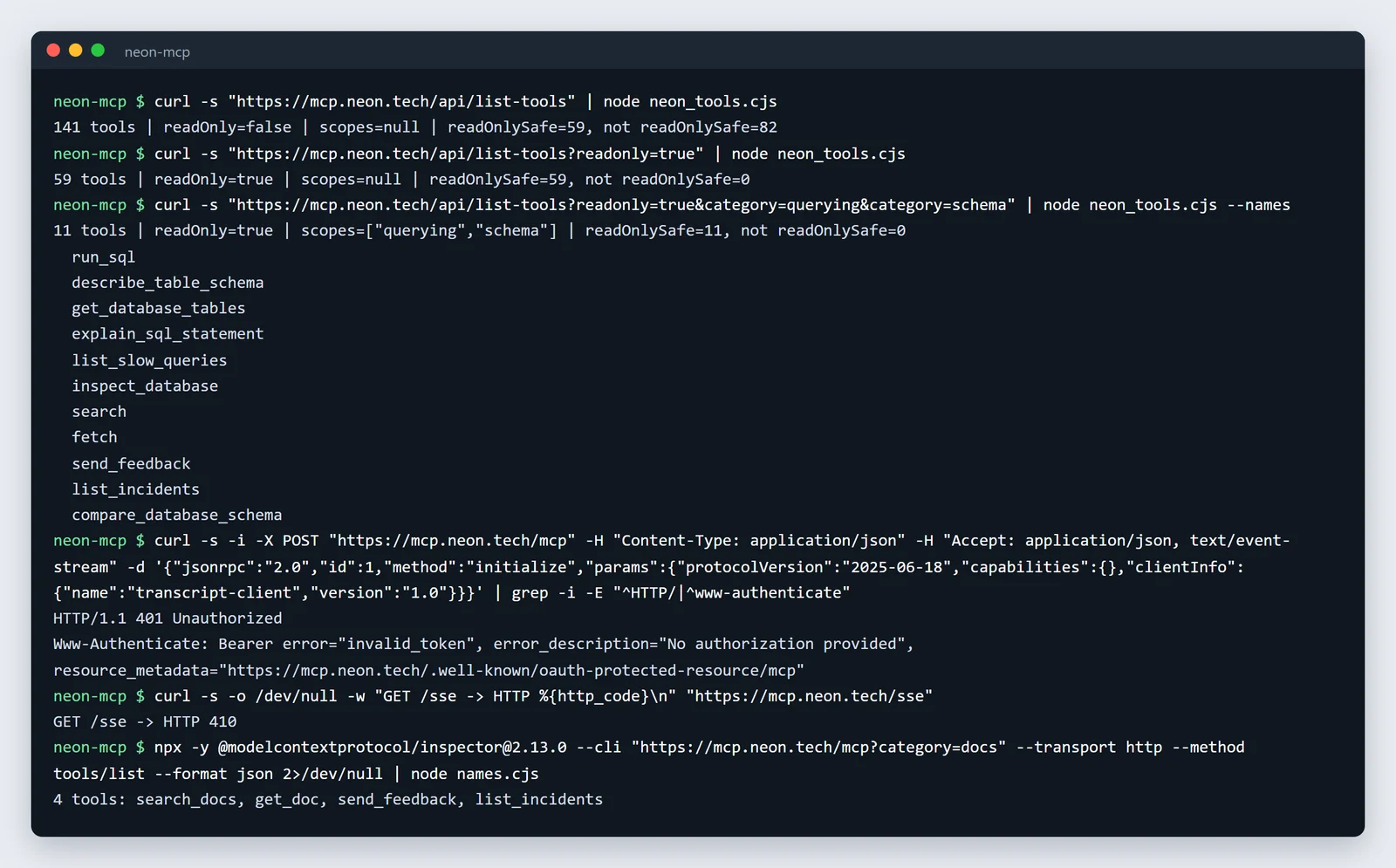
Neon's tool counts on 11 November 2026, unedited.
With full access there are 141 tools, and 82 of them aren't safe in read-only mode. Among them are create_project, delete_project, create_branch, delete_branch and reset_from_parent, which "Discards writes since the branch diverged." The 2.0 surface also covers Neon Auth, the Data API, functions and storage. run_sql is the subtle one: it "Supports both read and write operations" with full access, while in read-only mode it "stays available and runs each query in a READ ONLY transaction."
Some tools are designed to be careful: database migrations create "a temporary branch to apply and test the migration safely before affecting the main branch."
Four controls, and how they combine
- Read-only. "Connect with https://mcp.neon.tech/mcp and uncheck Allow writes on the authorization page", or put
readonly=truein the URL, which "cannot be widened to writes on that page." That cuts the tools to 59 and withholds connection strings, because "the connection string carries a privileged role password". - One project.
projectIdwill "Scope all operations to a single project", and "delete_projectis also hidden." - A tool category.
category=querying&category=schemaleaves 11 tools in read-only mode:run_sql,describe_table_schema,get_database_tables,explain_sql_statementand a few more. - A Postgres role.
roleNamewill "Run all SQL as this Postgres role instead of the owner". "Without it, SQL runs as the database owner."
Together, for Claude Code:
claude mcp add --transport http neon-ro \
  "https://mcp.neon.tech/mcp?readonly=true&projectId=<project-id>&roleName=claude_reader&category=querying&category=schema"
Two catches. A role made in Neon's Console or API can "read all data, so pinning one of those roles doesn't limit what the agent can read", so create the role in SQL, and "do not add it to neon_superuser". And with an API key, "Anyone who can edit the connection URL and holds the API key can change or remove it": the URL parameters are a setting, not a lock. Neon has no read-only API key type, and a project-scoped key "can read and modify project resources".
The read-only role
From Neon's database-access guide, run as the owner:
CREATE ROLE claude_reader LOGIN PASSWORD '<password>';
GRANT CONNECT ON DATABASE neondb TO claude_reader;
GRANT USAGE ON SCHEMA public TO claude_reader;
GRANT SELECT ON ALL TABLES IN SCHEMA public TO claude_reader;
ALTER DEFAULT PRIVILEGES IN SCHEMA public GRANT SELECT ON TABLES TO claude_reader;
"The role must exist on each branch you query and be able to log in." Since 3 November 2026, Claude can make one for you: create_postgres_role "takes access: read_only or read_write".
For work that does need writes, give Claude a child branch rather than your main one. projectId scopes a project, not a branch, so tell Claude the branch in your prompt.
Point Claude at your database.
Start free →Results the team can open
Neon's server is built for developing with a database: branches, migrations, roles. If the goal is answering business questions from a Neon database and sharing the answers, a hosted data connector fits better.
Fastero is an AI and data platform where people and AI agents work together on a team's data. Neon is Postgres, so add it as a Postgres connection with the claude_reader role, then add Fastero to Claude from its connector directory. Claude can then list the tables, read the metric definitions your team has saved and run SQL. Fastero refuses any statement that could change data before it reaches the database, and returns at most 500 rows per query. Charts can go onto a dashboard colleagues open with their own login, refreshed on a schedule. More on the Postgres MCP server, the Supabase MCP server and Postgres connection strings.
Keep it safe: a checklist
- Untick Allow writes, or use
readonly=true, unless you mean to let Claude change the project. - Add
projectId, so other projects anddelete_projectare out of reach. - Pin
roleNameto a role created in SQL withSELECTonly. - Do schema work on a branch, never on your main branch.
- Don't use it in production: Neon itself advises against it.
FAQ
Is there an official Neon MCP server?
Yes. Neon runs it at https://mcp.neon.tech/mcp, its source is open under MIT, and it's an official connector in Claude's directory. The old local npm package is deprecated.
How do I add Neon to Claude Code?
Run claude mcp add --transport http neon https://mcp.neon.tech/mcp and sign in through /mcp. Add ?readonly=true and the other parameters to the URL to limit it.
Can the Neon MCP server be read-only?
Yes: untick Allow writes when you sign in, or add readonly=true to the URL. In read-only mode 59 tools remain, run_sql runs in a read-only transaction, and connection strings are withheld.
Can Claude delete my Neon database?
With write access, yes: delete_project and delete_branch are among its tools. Read-only mode removes them, and projectId also hides delete_project.
Do I need an API key?
No. Claude signs in with OAuth. An API key is for agents that run without a person to sign in, and Neon has no read-only key, so pair it with readonly=true.
Why does my client fail on mcp.neon.tech/sse?
That endpoint was retired in version 2.0.0 and returns 410 Gone. Use https://mcp.neon.tech/mcp.
Sources
Read on 11 November 2026; the tool counts come from Neon's public tool-list endpoint, without an account: