
Ask an AI assistant for last quarter's revenue by channel and, until recently, you got a paragraph or a table of text. With MCP Apps, the tool that fetched the numbers can draw the chart itself, inside the conversation, with buttons that do something.
The short answer: MCP Apps are interactive pages — charts, forms, dashboards — that an MCP server's tool shows inside an AI chat. The server declares a ui:// HTML resource; the host (Claude, ChatGPT, VS Code, Cursor, Microsoft 365 Copilot) draws it in a sandboxed frame, hands it the tool's result, and lets it call the server's tools back.
Where did MCP Apps come from?
Two efforts were solving the same problem separately: the open-source MCP-UI project, and OpenAI's Apps SDK, which put interactive apps inside ChatGPT. In November 2025, people from MCP-UI, Anthropic and OpenAI proposed one standard for both (SEP-1865). It shipped as a stable spec on 26 January 2026, as the first official extension to the Model Context Protocol, under the identifier io.modelcontextprotocol/ui.
Since then the old names have folded in. ChatGPT runs MCP Apps, with its own window.openai features as an optional layer on top, and MCP-UI's client library became a host SDK for MCP Apps.
How does an MCP App work?
Five steps, all over the protocol your server already speaks:
- The tool points to a page. In
tools/list, the tool carries_meta.ui.resourceUri, aui://address. - The host fetches the page. It reads that resource, an HTML document of type
text/html;profile=mcp-app. Hosts may fetch it ahead of time and cache it. - The host draws it in a sandbox. The page runs in an iframe with a strict content security policy: no outside domains unless the server declares them, no access to the host's page, cookies or storage.
- The tool's result reaches the page. When Claude or ChatGPT calls the tool, the host sends the input and the result into the frame as notifications.
- The page talks back. Over JSON-RPC on
postMessage, the page can call the server's tools (tools/call), read resources, post a message into the conversation (ui/message), update what the model knows (ui/update-model-context), open a link, or ask for a bigger display — inline, fullscreen or picture-in-picture.
On the wire, the two server-side pieces look like this — a tool that names its page, and the page itself:
{
  "name": "show_chart",
  "description": "Show a chart of a query to the person.",
  "inputSchema": { "type": "object", "properties": { "sql": { "type": "string" } } },
  "_meta": { "ui": { "resourceUri": "ui://example/chart" } }
}
{
"contents": [
{
"uri": "ui://example/chart",
"mimeType": "text/html;profile=mcp-app",
"text": "<!doctype html><html>…</html>"
}
]
}Two rules matter from day one. Always return text as well, because hosts that can't draw the page — a terminal, for one — still need an answer. And a tool marked "visibility": ["app"] is callable by the page but hidden from the model, which is how a page fetches its own data without the numbers passing through the conversation.
You don't need a framework, but the official TypeScript SDK, @modelcontextprotocol/ext-apps, handles the handshake: an App class for the page (with a React hook), helpers to register app tools and resources on the server, and a bridge for people building hosts. Version 2.0 shipped in September 2026; the wire protocol didn't change, so 1.x and 2.x interoperate. In Python, the official examples use the plain mcp SDK, and FastMCP supports MCP Apps from version 3.
Fastero
Point Claude at your database.
Add Fastero to claude.ai or Claude Code. Claude builds the dashboard, deploys the app or publishes a live page, and your team opens it in Fastero.
Try free →Where do MCP Apps work today?
Checked 8 October 2026.
| Host | MCP Apps since | Worth knowing |
|---|---|---|
| Claude (web and desktop) | 26 January 2026 | Every plan, Free included; Free accounts get one custom connector |
| Claude (iOS and Android) | 25 March 2026 | Add the connector on web or desktop first; inline height is capped |
| ChatGPT | February 2026 | Custom apps in developer mode are web-only; full support needs Business, Enterprise or Edu |
| VS Code | Version 1.109, February 2026 | |
| Cursor | Version 2.6, March 2026 | |
| Microsoft 365 Copilot | April 2026 | In Copilot Chat |
| Goose | Version 1.19, January 2026 | One of the first hosts |
| Claude Code | — | A terminal: it gets the tool's text answer, not the page |
At Claude's launch, Amplitude, Asana, Box, Canva, Clay, Figma, Hex, monday.com and Slack shipped interactive connectors. Analytics products moved quickly: Hex shows charts, tables and the SQL behind each answer, Amplitude draws its charts in Claude and Cursor, and Datadog added live graphs and monitors in June. Claude's own help centre now notes that it prefers an app's interface over drawing visuals of its own.
MCP Apps vs Claude artifacts
They look alike in the chat, but they come from opposite ends:
- An artifact is a page Claude writes itself, during the conversation, from whatever it knows. It's a snapshot unless it calls connectors, and it lives in Claude. See how to share a Claude artifact with your team.
- An MCP App is a page the server ships and maintains. It's drawn the same way every time, filled with the server's live data, and its buttons act in the server's product — save, approve, open, refresh.
Use artifacts for one-off exploration. Build an MCP App when the same view should look right every time, carry the product's own logic, or lead to an action.
A real one: Fastero's chart card in Claude
Fastero's Claude connector ships two MCP Apps, and they show the pattern better than any diagram.
The chart card. Ask Claude for "revenue by channel this year" with the connector on. Claude calls fastero_show_chart with a read-only SQL query and the chart it wants. The tool names a page, ui://fastero/chart, so claude.ai fetches it and draws the answer in the chat — the chart as Fastero draws it, with a button to save it to the dashboard you're working on, and Different dashboard… to pick another.
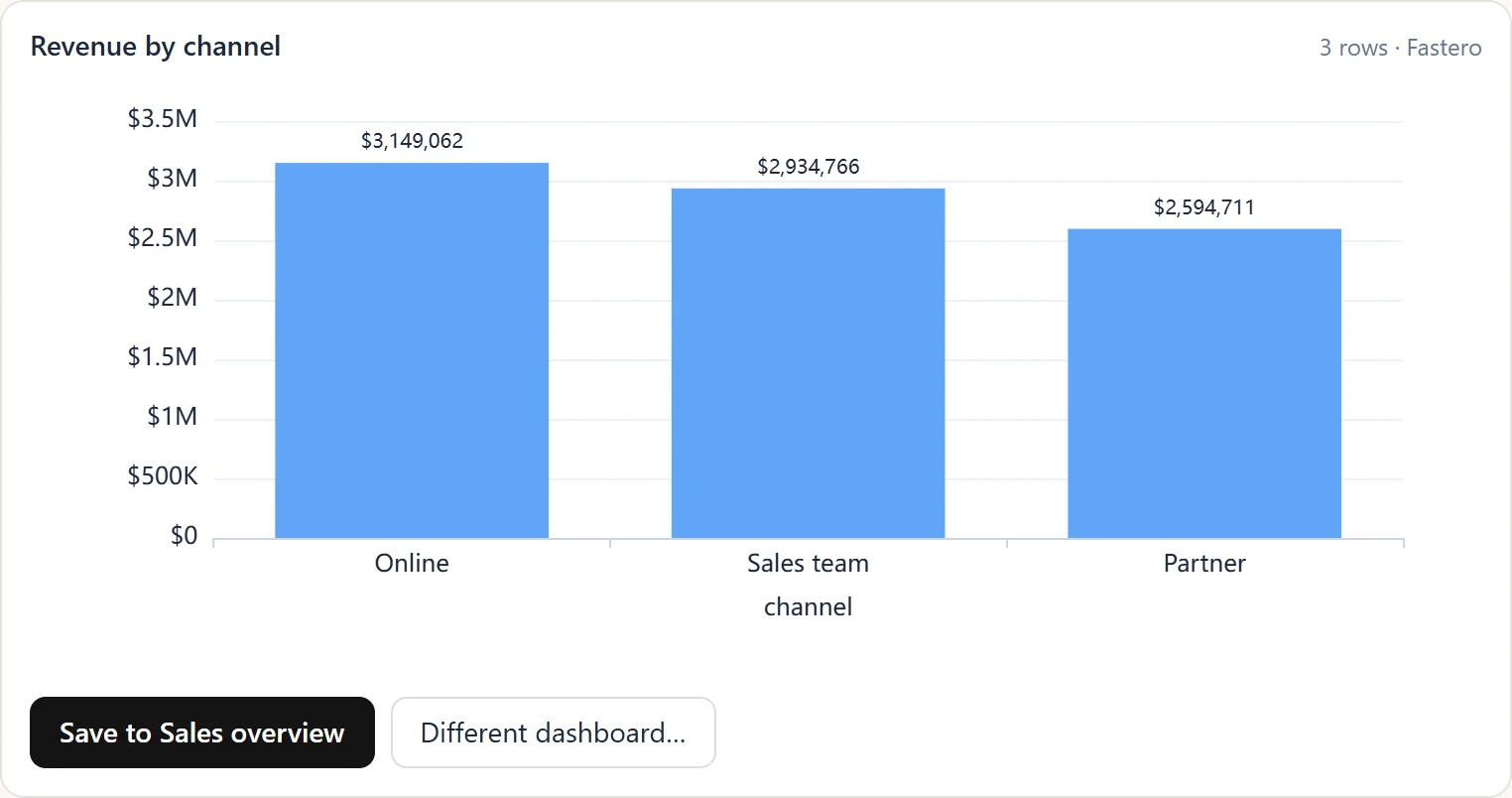
Fastero's chart card, drawn inside Claude from the tool's answer. Sample data.
Three things happen that a text reply can't do:
- The card holds no data of its own. The page is the same for everyone; the rows arrive as the tool's structured result, and the card draws whatever the query returned.
- The buttons call back to the server. Save puts the query, the chart and its place on a dashboard into Fastero in one call (
fastero_save_chart) — the same call Claude could make itself. - A host that can't draw the card still gets an answer. In Claude Code, the same tool returns the first 30 rows as text and tells Claude it can save the chart and hand back a link.
The page card. fastero_show_page puts a whole hosted dashboard in the chat, with Refresh, Open in Fastero and Expand. The card reads the page's numbers through tools only the card can call, so the figures never enter the conversation, and it shows exactly what a colleague sees when they open the page in Fastero.
What do developers trip over?
- The wrong MIME type. The original proposal used
text/html+mcp; the stable spec saystext/html;profile=mcp-app. Older tutorials still show the first. - No server push. A page can't be told when data changes. The SDK's guidance is an app-only tool the page polls — or, as in Fastero's page card, a Refresh button.
- Outside domains are blocked. Fonts, scripts, images or APIs from another origin need declaring in the resource's CSP (
connectDomains,resourceDomainsand the rest), and Claude restricts nested frames. - Tool lists get cached. In our experience, claude.ai keeps a connector's tool list until you choose Refresh tools list in Settings → Connectors, and a chat keeps the list it started with; ChatGPT asks you to press Refresh after changing tools or UI, and to treat the
ui://address as a cache key. The 28 July 2026 spec makes this explicit: tool lists and resources now carry their own cache lifetimes. - Every call mounts a new frame. Claude draws a fresh page for each tool call, and earlier ones stay live in the conversation.
- Big results never arrive. In Claude, a tool result over about 150,000 characters becomes a file when code execution is on, and the page never gets its data. Aggregate before you return.
- Directory rules. Claude's connector directory wants a read-only or destructive hint on every tool and three to five screenshots; ChatGPT's review checks your declared CSP against what the page actually loads.
When is an MCP App worth building?
When the answer is visual, or ends in a decision. A chart someone should save, a list someone should approve, a record someone should open — those are better as a page with buttons than as a paragraph. If the answer is a sentence or a number, plain text is still the right reply, and it's the one every host can show.
FAQ
Are MCP Apps free to use in Claude?
Yes. Interactive connectors work on every Claude plan, including Free, on the web, desktop and mobile apps. A Free account can add one custom connector of its own.
Do MCP Apps work in ChatGPT?
Yes. ChatGPT has been compatible with the MCP Apps spec since February 2026; OpenAI's own window.openai features are an optional layer on top. Custom apps in developer mode run on the web only, and full support needs a Business, Enterprise or Edu workspace.
Are MCP Apps safe?
Each page runs in a sandboxed frame with a strict content security policy, can't touch the host's page, cookies or storage, and can only reach domains the server declares. Hosts can ask the person before a page calls a tool, and admins can switch interactive tool calls off.
Can an MCP App update in real time?
Not by push. A page can poll an app-only tool, or offer a Refresh button. Socket connections work only to domains the server declares in its security policy.
How is an MCP App different from a Claude artifact?
Claude writes an artifact during the conversation; a server ships an MCP App and fills it with its own data. Artifacts suit one-off exploration; MCP Apps suit views that must look the same every time and lead to an action.
Sources
Checked on 8 October 2026:
- MCP Apps overview and client support matrix — modelcontextprotocol.io
- MCP Apps specification, 2026-01-26 and the SDK patterns guide
- The proposal, 21 November 2025 and the stable release, 26 January 2026 — MCP blog
- Interactive tools in Claude, Use interactive connectors in Claude and Building MCP Apps for Claude
- MCP Apps in ChatGPT and developer mode and MCP Apps
- VS Code 1.109 · Cursor 2.6 · MCP Apps in Copilot Chat · Goose
- Hex in Claude · Datadog MCP Apps
- MCP specification 2026-07-28 changelog
Related reading:
- How to Share a Claude Artifact With Your Team
- Best Claude Connectors for Data Analysis (2026)
- Claude Code + Postgres: Build a Dashboard Your Team Can Open
Try Fastero free — point Claude at your database and get charts and dashboards inside the chat, saved where your team can open them. No credit card required.