 Fastero Dev Team
marimo is a Python notebook that keeps code, outputs and memory in step: change a cell or move a slider and marimo reruns every cell that uses it. We installed it, built a small sales explorer on invented data, and recorded what it did. Our marimo vs Jupyter comparison covers the theory; this is the hands-on version.
The short answer: marimo is an open-source notebook (Apache 2.0, version 0.25.2 on PyPI, checked 20 November 2026) that stores each notebook as a plain .py file. Install it with pip install marimo, open the editor with marimo edit notebook.py, and serve the same file as a web app with marimo run notebook.py. When a cell runs, marimo reruns the cells that read its variables, so there is no hidden state; interacting with a mo.ui dropdown or slider reruns only the cells that use it. SQL cells run on DuckDB and return a DataFrame. marimo convert turns a .ipynb into a marimo notebook, and marimo export writes HTML, PDF, .ipynb or a WebAssembly page. Switch from Jupyter if out-of-order cells and unreadable git diffs cost you time. Stay if you depend on IPython magics or need outputs saved inside the file, because marimo supports neither.
Fastero
Jupyter notebooks for your team, with nothing to install.
Start a notebook or bring your .ipynb files. SQL cells query your databases with no password in the code, and a notebook runs now or on a schedule. Colleagues open it with their own login; viewers are free.
Try free →marimo at a glance
From marimo's docs and PyPI, checked 20 November 2026:
| marimo 0.25.2 | |
|---|---|
| Licence | Apache-2.0 (PyPI); the docs answer "Is marimo free?" with "Yes!" |
| Python | 3.10 or later |
| File format | A .py file; outputs are not saved in it |
| Editor | Browser editor (marimo edit), plus extensions for VS Code (also Cursor) and PyCharm |
| Runs cells | Automatically, by dependency; can be set to mark cells stale instead |
| SQL | SQL cells run on DuckDB, result returned as a Polars or pandas DataFrame |
| As an app | marimo run, code hidden by default |
| In the cloud | molab: free, 4 CPUs and 32 GB RAM per notebook by default, notebooks "public but undiscoverable by default" |
Install marimo and open the editor
We used a fresh venv on Windows with Python 3.14.3. marimo's install guide suggests marimo[recommended] for extras; we added marimo[sql], which the SQL guide says SQL cells need:
python -m venv .venv
.venv/Scripts/python -m pip install marimo pandas altair
.venv/Scripts/python -m pip install "marimo[sql]"
.venv/Scripts/marimo --version0.25.2That gave marimo 0.25.2, pandas 3.1.1, altair 6.3.0, duckdb 2.0.0, polars 2.1.0 and sqlglot 30.33.0. The marimo commands below ran from that venv. To open a notebook in the editor:
marimo edit sales_explorer.py --headless --port 8632 --no-token--headless stops marimo opening a browser and --no-token turns off the access token for a local test; plain marimo edit sales_explorer.py opens your browser for you. One surprise: the editor opened with no cells run. In 0.25.2 the built-in default is auto_instantiate = false (marimo config show lists it), so nothing runs until you press Run.
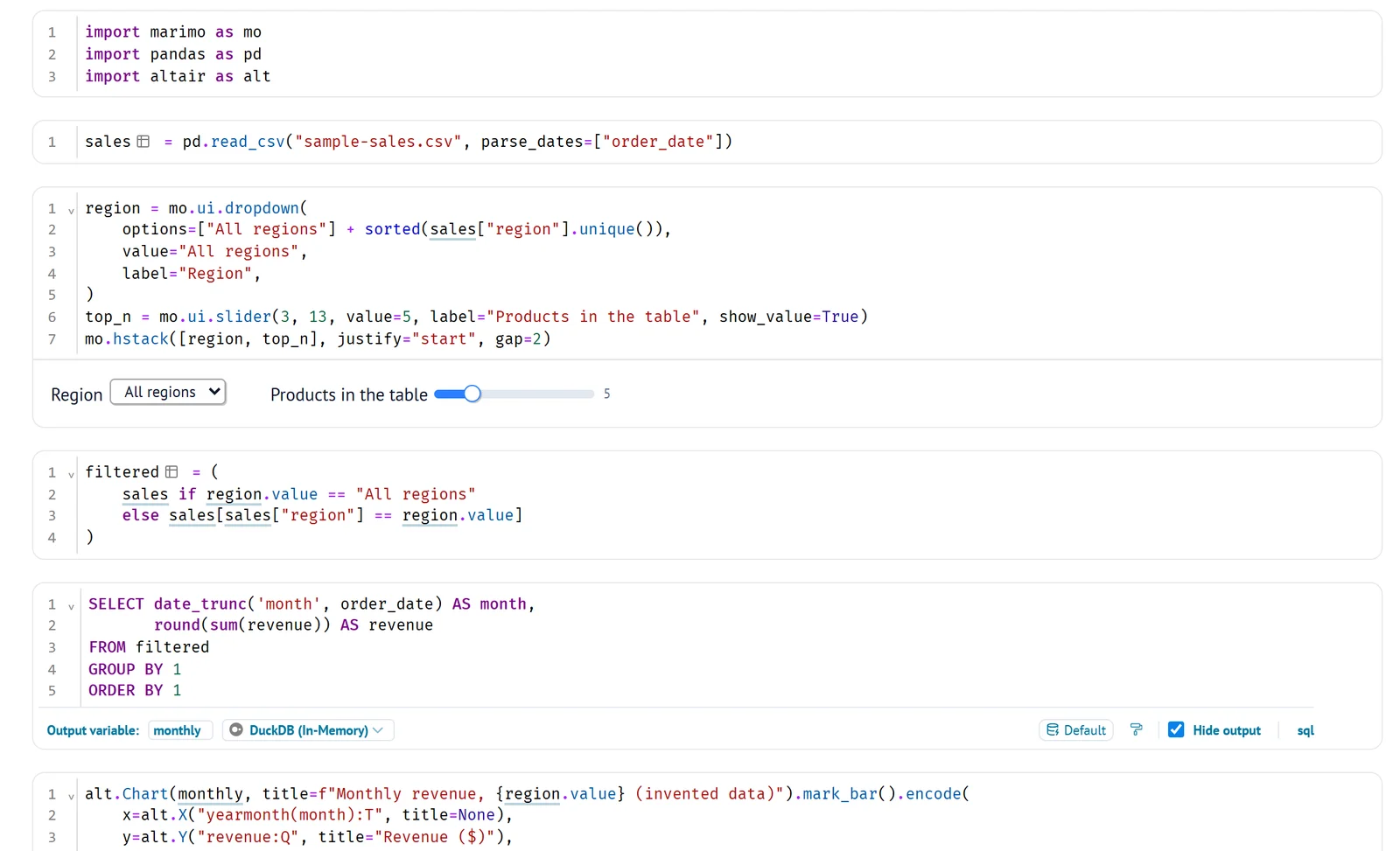
The marimo 0.25.2 editor with our notebook open. The SQL cell is stored as Python but edited as SQL. Invented sample data.
The notebook is a .py file
Here is the whole notebook, sales_explorer.py, over Fastero's invented sample sales data (4,734 orders, November 2024 to October 2026). marimo check reports no problems, and python sales_explorer.py runs it as a script (exit code 0), which is also how cron or CI would run it.
import marimo

__generated_with = "0.25.2"
app = marimo.App(width="medium")

@app.cell
def _():
    import marimo as mo
    import pandas as pd
    import altair as alt
    return alt, mo, pd

@app.cell
def _(pd):
    sales = pd.read_csv("sample-sales.csv", parse_dates=["order_date"])
    return (sales,)

@app.cell
def _(mo, sales):
    region = mo.ui.dropdown(
        options=["All regions"] + sorted(sales["region"].unique()),
        value="All regions",
        label="Region",
    )
    top_n = mo.ui.slider(3, 13, value=5, label="Products in the table", show_value=True)
    mo.hstack([region, top_n], justify="start", gap=2)
    return region, top_n

@app.cell
def _(region, sales):
    filtered = (
        sales if region.value == "All regions"
        else sales[sales["region"] == region.value]
    )
    return (filtered,)

@app.cell
def _(filtered, mo):
    monthly = mo.sql(
        f"""
        SELECT date_trunc('month', order_date) AS month,
               round(sum(revenue)) AS revenue
        FROM filtered
        GROUP BY 1
        ORDER BY 1
        """,
        output=False,
    )
    return (monthly,)

@app.cell
def _(alt, monthly, region):
    alt.Chart(monthly, title=f"Monthly revenue, {region.value} (invented data)").mark_bar().encode(
        x=alt.X("yearmonth(month):T", title=None),
        y=alt.Y("revenue:Q", title="Revenue ($)"),
        tooltip=["yearmonth(month):T", "revenue:Q"],
    ).properties(width="container", height=260)
    return

@app.cell
def _(filtered, top_n):
    top_products = (
        filtered.groupby("product", as_index=False)
        .agg(orders=("order_id", "count"), revenue=("revenue", "sum"))
        .sort_values("revenue", ascending=False)
        .head(top_n.value)
        .round({"revenue": 0})
        .reset_index(drop=True)
    )
    top_products
    return
Each cell is a function: its arguments are the names it reads, its return values the names it defines. The SQL cell queries the pandas DataFrame filtered by name, and marimo's docs say the result "is a Polars DataFrame (if you have polars installed) or a Pandas DataFrame (if you don't)". A SQL cell also shows its result table by default; our first run had a 24-row table above the chart until we added output=False.
Because the region comes from a dropdown with fixed options, putting it in an f-string is safe. marimo's SQL guide warns against interpolating anything a viewer can type, and shows DuckDB parameter binding in a Python cell instead.
Which cells re-run when you change something
The rule, from marimo's reactivity guide: "When a cell is run, marimo automatically runs all other cells that reference any of the global variables it defines." For UI elements, the interaction reruns the cells that read the element but not the cell that defines it.
To see it, we made a copy of the notebook in which each cell appends its name to runs.log, served it with marimo run, and drove it with a headless browser: open the app, pick West in the dropdown, then press the right arrow three times on the slider. The log:
02:52:40.504  imports
02:52:40.508  load sales
02:52:40.525  controls
02:52:40.698  filter by region
02:52:40.700  SQL: monthly revenue
02:52:41.175  chart
02:52:41.234  top products table
---- picked "West" in the Region dropdown
02:52:44.483  filter by region
02:52:44.489  SQL: monthly revenue
02:52:44.502  chart
02:52:44.527  top products table
---- moved the slider from 5 to 8 (three arrow-key presses)
02:52:47.721  top products table
02:52:47.888  top products table
02:52:48.054  top products table
Opening the app ran all seven cells. Changing the region re-ran the four cells downstream of region and left the imports, the CSV load and the controls alone. Each slider step re-ran one cell, the table, because nothing else reads top_n.
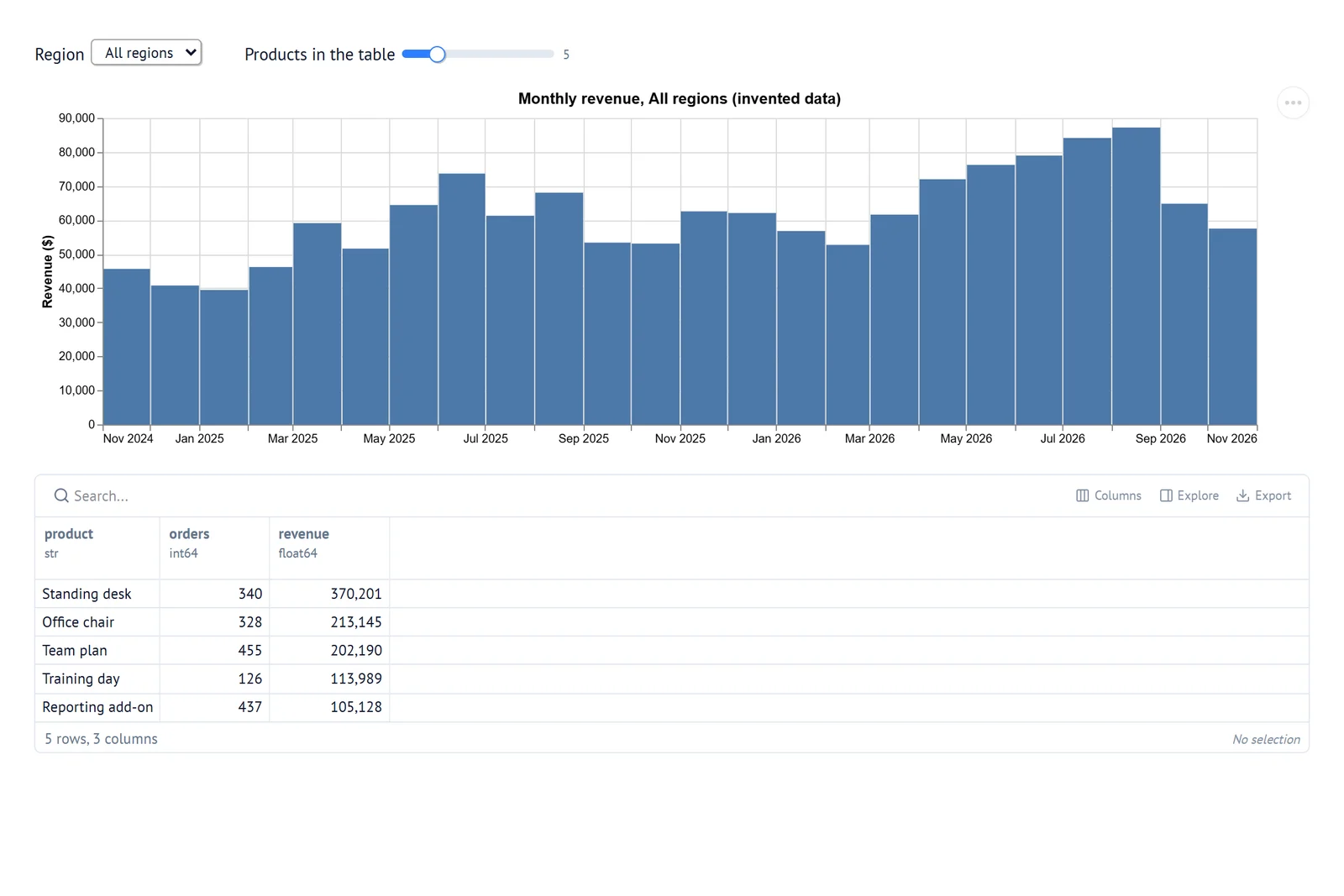
The notebook served with marimo run on first load. Invented sample data.
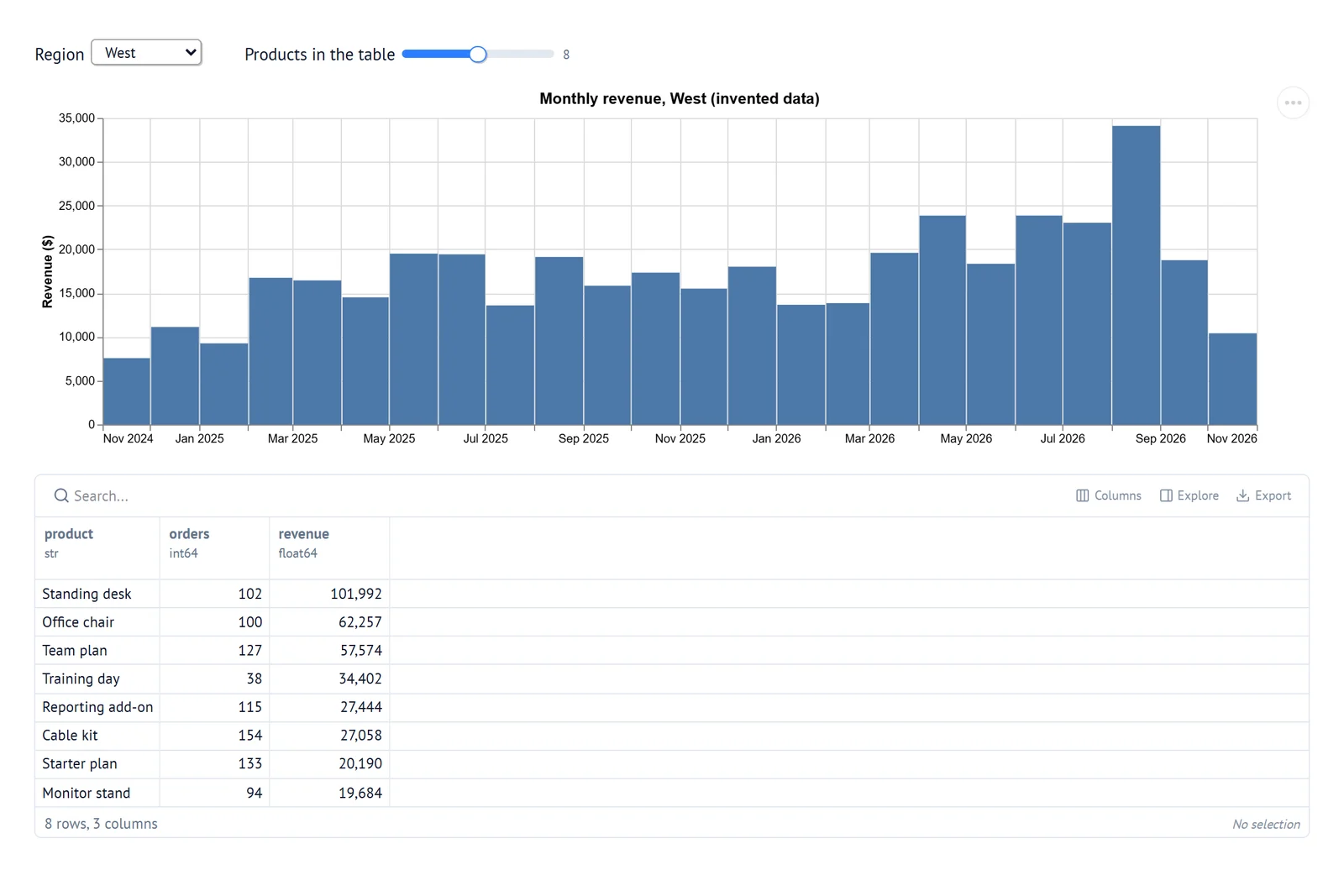
After picking West and moving the slider to 8: the chart and the table changed, the CSV was not read again. Invented sample data.
Two limits come with this model, both from the docs: marimo "does not track mutations to variables, nor assignments to attributes", so df["x"] = ... in a second cell won't trigger anything; and every global name must be defined in exactly one cell. Names starting with an underscore are local to their cell.
Jupyter notebooks for your team.
Start free →Run it as an app with marimo run
marimo run sales_explorer.py --port 8631 --headless➜ URL: http://localhost:8631marimo run --help in 0.25.2 shows the defaults that matter: it listens on 127.0.0.1, uses no token ([default: no-token]), and does not send the notebook's source to the browser unless you pass --include-code. For anything beyond a password-style token, the docs are direct: "marimo does not provide a built-in authentication/authorization system", and they show how to add your own with ASGI middleware such as FastAPI. Hosting, HTTPS and user accounts are yours to set up.
Convert a Jupyter notebook with marimo convert
We wrote a five-cell .ipynb: a Markdown title, a read_csv, a cell that reassigns df, a %time magic, and a groupby. Then:
marimo convert revenue_by_channel.ipynb -o revenue_by_channel.pyConverted notebook saved to revenue_by_channel.pyThe two interesting cells of the output:
@app.cell
def _(df):
    df_1 = df[df['channel'] != 'Partner']
    return (df_1,)

@app.cell
def _(total):
    # magic command not supported in marimo; please file an issue to add support
    # %time total = df["revenue"].sum()
    total
    return
marimo renamed the reassigned df to df_1, since a name can only be defined once, and rewired the later cell to use it. The magic was commented out, which left total undefined. marimo check passed anyway, then running the file failed:
NameError: name 'total' is not definedReplacing the comment with total = df_1["revenue"].sum() fixed it. Check converted notebooks for magics before you trust them.
Export to HTML, PDF, ipynb or WebAssembly
| Export | Command (from marimo's docs) | What we saw |
|---|---|---|
| Static HTML | marimo export html nb.py -o nb.html |
Ran the notebook and wrote a 48 KB file in about 9 seconds |
| WebAssembly | marimo export html-wasm nb.py -o out --mode run |
Failed (exit code 1) with "uv must be installed to resolve local imports for html-wasm export" until pip install uv put uv in the venv and on the PATH; then a 28 MB folder |
marimo export pdf nb.py -o nb.pdf |
Not tested; the editor's PDF export "also requires LaTeX" | |
| Jupyter | marimo export ipynb nb.py -o nb.ipynb |
Not tested |
The WebAssembly page runs Python in the visitor's browser, but "Internet access is required to load Pyodide and Python packages", and the folder must be served over HTTP, not opened from file://. A notebook that reads a local CSV, like ours, also has to make that file reachable from the browser: the docs say the directory export can bundle a public/ folder, and the single-file export can't. marimo also lists a Quarto extension for publishing marimo notebooks; our Quarto guide covers Quarto itself.
Should you switch from Jupyter?
| marimo | Jupyter | |
|---|---|---|
| Cell order | Set by dependencies; no hidden state | Whatever order you ran them |
| File | .py, diffs like code |
.ipynb JSON with outputs inside |
| Outputs in the file | No: "notebook outputs (e.g., plots) are not stored in the file" | Yes |
Magics and ! commands |
Not supported | Supported |
| Widgets | mo.ui, no callbacks needed |
ipywidgets with observers |
| App from the notebook | marimo run |
Separate tool (Voilà, Streamlit) |
Reassigning df across cells |
Not allowed | Normal |
Pick marimo for new analysis that goes into git, gets reviewed, or turns into a small app. Stay with Jupyter for notebooks full of magics, for kernels other than Python, or where readers expect to open the file and see results without running it. More options in our list of Jupyter notebook alternatives.
When the notebook is for a team
Fastero is an AI and data platform where people and AI agents work together on a team's data. Its notebooks are Jupyter .ipynb files, not marimo, so this is for the Jupyter notebooks your team relies on, the ones that read the company database and get read by colleagues:
- SQL cells query a workspace connection with its stored credentials and hand the rows to Python as a pandas DataFrame named after the cell, so no password sits in the notebook.
- Secrets reach cells as environment variables, in interactive and scheduled runs.
- Schedules: any cron schedule, on the Free plan.
- Sharing: colleagues sign in to read it, and viewers are free. Promote to App turns the notebook into an app behind the same login, with cells you choose hidden.
- Limits: one workspace server with 1 CPU and 2 GB, no GPUs, and no real-time co-editing.
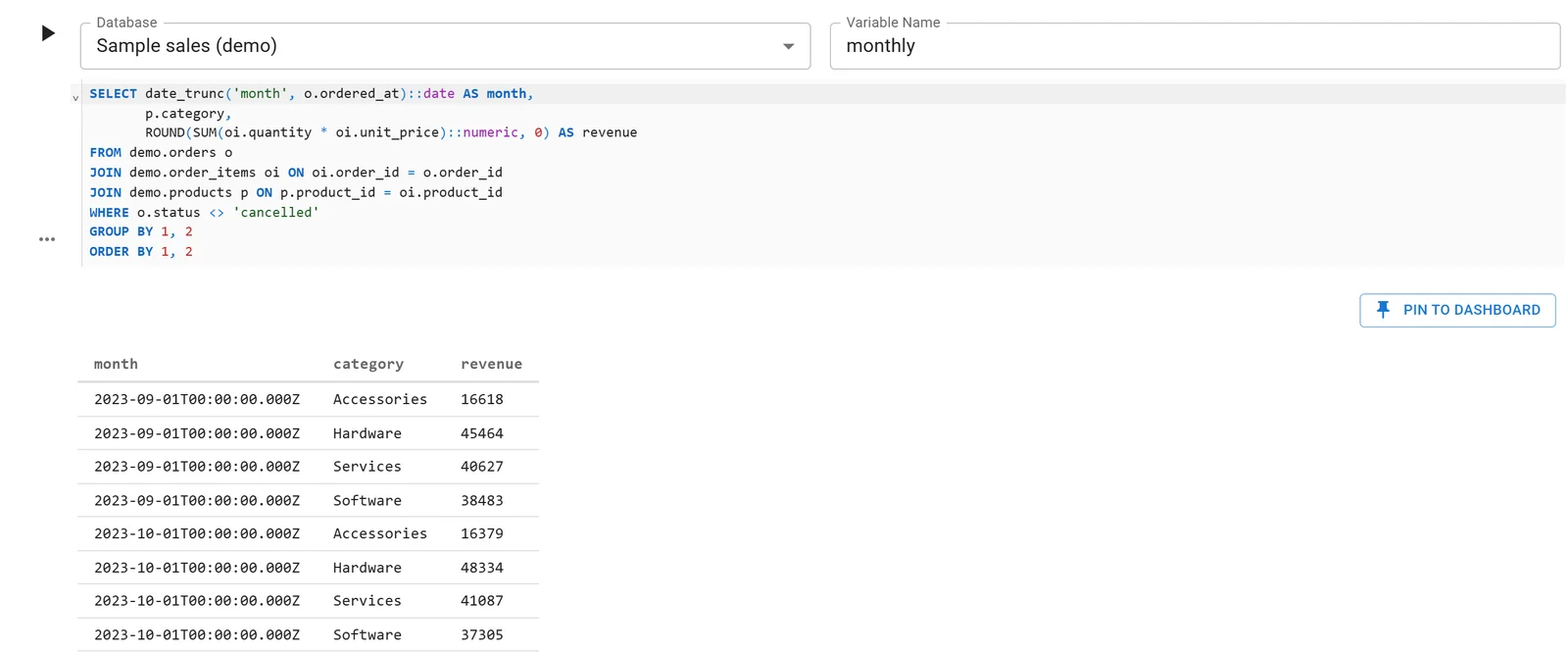
A Fastero notebook whose SQL cell reads a database connection; the rows arrive in Python as a DataFrame. Sample data.
More in SQL in a Jupyter notebook and scheduling a Jupyter notebook.
FAQ
Is marimo free?
Yes. marimo is open source under the Apache 2.0 licence, and its docs answer "Is marimo free?" with "Yes!". molab, marimo's hosted notebook service, is also free, with notebooks public but undiscoverable by default.
Is marimo better than Jupyter?
It is better at keeping a notebook reproducible: cells run in dependency order, deleted cells take their variables with them, and the file is plain Python. Jupyter is better when you need magics, other languages' kernels, or outputs stored in the file.
How do I convert a Jupyter notebook to marimo?
Run marimo convert notebook.ipynb -o notebook.py. marimo renames variables that were reassigned across cells and comments out magics, so run the result once with python notebook.py to catch anything the conversion left undefined.
Can marimo run SQL?
Yes. A SQL cell is stored as mo.sql(f"..."), runs on DuckDB, can query DataFrames in the notebook by name, and returns a Polars DataFrame if Polars is installed, otherwise pandas. SQL cells need the extra packages from pip install "marimo[sql]".
Does marimo work in VS Code?
Yes. marimo has a VS Code extension that also works in Cursor and other VS Code forks, plus a PyCharm plugin. Because a notebook is a .py file, any editor can open it.
How do I share a marimo notebook?
Send the .py file, serve it with marimo run, export it with marimo export html for a static page or marimo export html-wasm for a page that runs in the browser, or put it on molab. marimo run has no user accounts, so a shared app needs your own login in front of it.
Sources
Read on 20 November 2026, with marimo 0.25.2 installed that day:
- marimo docs: home, installation, key concepts, running cells, interactive elements, SQL, run as an app, authentication, coming from Jupyter, scripts, export, static HTML, PDF, WebAssembly HTML, molab, CLI, FAQ
- marimo on PyPI and the marimo GitHub repository
marimo --help,marimo run --helpandmarimo checkoutput from the installed version