
A year ago, AI help for a data scientist mostly meant autocomplete and a chat box that suggested code. The tools worth using in 2026 go further: an agent writes a cell, runs it, reads the output and fixes the error, usually asking before each step. Colab, Deepnote, Databricks and Snowflake have such an agent built in, GitHub Copilot does it inside VS Code, Hex's and SageMaker's agents write the cells for you to accept, and Claude Code and Cursor edit notebooks from your editor.
The short answer: if you work in VS Code or a terminal, use Claude Code or GitHub Copilot. If you live in JupyterLab, Jupyter AI 3 brings those same agents into the notebook for free. If your data sits in Databricks, Snowflake or AWS, start with the agent that comes with it, since it already knows your tables and permissions. For free, try marimo, whose hosted notebooks include a GPU, Positron with your own model key, or Colab's free tier. Many products were renamed this year, so names in older lists may no longer exist.
What the surveys say
No large survey from 2025 or 2026 looks at data scientists on their own, so these are the closest numbers:
- 73% of respondents to Stack Overflow's 2026 survey, which heard from 30,903 developers, use coding assistants and agents daily. Among coding agents, Claude Code (66%) and GitHub Copilot (59%) lead. 48% trust AI when they can easily check the answer, and only 16% trust it with most tasks short of important work decisions.
- 72% of data practitioners in dbt Labs' State of Analytics Engineering 2026 prioritize AI-assisted coding, and 71% name wrong or made-up answers reaching stakeholders as a top concern.
Both point the same way: AI writes a lot of the code now, and checking its work is the job.
15 AI tools for data science, compared
| Tool | Does its AI run notebook cells itself? | Where you use it | Free | Paid from |
|---|---|---|---|---|
| Claude Code | In VS Code, after you approve each run; elsewhere it edits .ipynb files and runs scripts |
Terminal, VS Code, JetBrains IDEs, desktop, web | No | Pro, $20 a month |
| GitHub Copilot | Yes, in VS Code: it creates notebooks, runs cells and reads outputs | VS Code and other editors | 2,000 completions and 50 chat requests a month | Pro, $10 a month |
| Cursor | Edits cells; running them needs a Jupyter extension and a kernel | Desktop editor | A limited free plan | Plus, $8 a month (Grok and Cursor's own models only) |
| PyCharm | Its agents create and run cells on a live kernel | Desktop IDE | Core PyCharm free; 3 AI credits every 30 days | AI credits at $1 each |
| Jupyter AI 3 | Through the agent you connect, with approval prompts | JupyterLab 4 | Free; you pay for the agent or model | — |
| Google Colab | Its Data Science Agent plans, runs code and fixes errors | Browser, VS Code extension | Free tier, for adults in supported countries | Colab Pro, or a Google AI plan |
| Hex | Its agent creates and edits cells and fixes errors | Hosted | 5 AI credits a month | $36 per editor a month |
| Deepnote | Its agent runs blocks and checks the output | Hosted, VS Code extension | 5 agent calls a month | $39 per editor a month, billed yearly |
| Databricks | Genie Code plans, runs code, reads outputs and fixes errors | Databricks workspace | 150 DBUs per user a month | Billed beyond that |
| Snowflake | CoCo runs a whole notebook or the cells you pick | Snowsight, CLI, desktop | $40 of trial credits | $20 a month on its own, or per token in your account |
| Positron | Posit Assistant uses your session's data and plots | Desktop IDE for Python and R | Free with your own model key | Posit AI Pass, $20 a month |
| marimo | Agent mode edits and runs cells | Your machine, VS Code, molab in the browser | Free, with a free GPU on molab | — |
| SageMaker | Data Agent writes each step as a cell, with your approval | AWS | 250 notebook hours for 2 months | $0.04 per credit |
| ChatGPT | Runs Python in its own sandbox on files you upload | Web, desktop, mobile | Free plan | Go $8, Plus $20 a month |
| Fastero | Builds and runs analysis notebooks, dashboards and Streamlit apps; outside agents connect through MCP | Hosted | Free plan with $20 of AI | $20 per editor a month |
Prices are in US dollars per person per month, from each vendor's own page on 21 October 2026. Hex's page doesn't say whether its price is billed monthly or yearly.
Fastero
Connect your database. Ask questions. Get dashboards.
Postgres, BigQuery, Snowflake, and 10+ sources — live-connected, AI-powered, no dashboard builder learning curve.
Try free →Coding agents that work on your notebooks
Claude Code reads a notebook with its outputs, charts included, and edits it one cell at a time. In VS Code it can also run Python in the open notebook's kernel, and every run asks first: the code arrives as a new cell for you to confirm. Outside VS Code it runs scripts and shell commands instead. It comes with every paid Claude plan, from Pro at $20 a month.
GitHub Copilot goes furthest inside VS Code: its agent creates a notebook, writes and runs cells, reads the outputs and fixes what fails, and you can hand it a DataFrame from the kernel as context. Since June 2026, Copilot bills in AI credits worth a cent each, with 1,500 a month on the $10 Pro plan; completions stay unlimited on paid plans.
Cursor edits notebook cells with its agent, but running them needs Microsoft's Jupyter extension and a kernel. Cursor has been part of SpaceX since August 2026, and new customers buy it through the X Subscription: Plus at $8 a month is limited to xAI's Grok models and Cursor's own, and Claude or GPT are billed on top, at API prices, from Premium at $30.
AI inside the notebook you already use
Jupyter AI 3, released in April 2026, changed what the official JupyterLab extension is: instead of its own chatbot, it is a chat window for outside agents such as Claude Code, Codex and GitHub Copilot's CLI. Through a built-in Jupyter MCP server they can edit files, run notebooks and fix failing cells, asking permission before each change. The extension is free and open source; you pay only for the agent.
Google Colab's Data Science Agent analyzes a dataset, plans the work, runs the code and fixes its own errors, and the AI features are on by default for adults in supported countries. Since September 2026, Google's AI plans include Colab compute. Note what Colab collects: prompts, code and output may be read by human reviewers and kept for up to 18 months, and Google's FAQ says not to enter sensitive data.
PyCharm is now a single product whose core is free, including running notebooks. Its agents create and run real cells on a live kernel, and a JetBrains AI subscription lets you work with Claude, Codex or JetBrains' own Junie. DataSpell's product page now shows PyCharm.
Positron, Posit's free IDE for Python and R, replaced Positron Assistant and Databot with Posit Assistant in its July 2026 release. It works with your loaded data, plots and console history; bring your own key from Anthropic, OpenAI, Gemini and others, or pay $20 a month for Posit AI Pass.
marimo stores reactive notebooks as .py files. Its agent mode adds, edits and runs cells, and marimo pair lets Claude Code, Codex or OpenCode work inside a running notebook. molab, marimo's hosted version, is free and since June 2026 can attach an NVIDIA RTX Pro 6000 GPU to each notebook "as long as usage is reasonable". CoreWeave agreed to buy marimo in October 2025, and the notebook stays open source.
Data platforms with their own agent
Databricks renamed Databricks Assistant to Genie Code in March 2026 and made its agent mode generally available. It plans a task, runs code or SQL, reads the results and fixes errors, asking you to allow, skip or auto-approve each action, inside your Unity Catalog permissions. Each user gets 150 DBUs a month free (Databricks' example: $10.50 in US East), and use beyond that has been billed since July 2026.
Snowflake retired Copilot in favor of CoCo, the new name for Cortex Code. In Snowflake's Notebooks in Workspaces it adds and reorders cells, runs a whole notebook or the cells you choose, and fixes failed SQL. Note that AI features are off on self-service trial accounts until you add a card.
Hex's agent creates SQL, Python and chart cells, edits the cells you mention and fixes errors, with every change pending until you accept it. Since July 2026 its AI runs on credits: 30 a month per Professional editor, about one per simple question.
Deepnote's agent, in Edit mode, plans, runs code blocks and checks their output, and Deepnote's notebook format has been open source since November 2025. The Team plan includes $39 of AI credit a month.
Amazon SageMaker Data Agent, in SageMaker Unified Studio, proposes a plan, asks before each step and writes each step's code as a new cell, at $0.04 per credit. AWS will stop supporting the Amazon Q Developer IDE plugins on 30 April 2027.
Chat tools for a file you want answered now
ChatGPT runs Python on files you upload and returns tables and charts; Plus is $20 a month. It suits a one-off question about a CSV. It doesn't connect to your team's database or leave anything colleagues can open later. Julius AI works the same way, focused on data analysis.
From the notebook to something people use
Most of these tools stop at the notebook. The analysis is finished, and then someone asks for it every Monday, or wants a chart they can filter, or a small app for the sales team.
Fastero is a workspace for that step. Its AI analyzes an uploaded CSV or Excel file or a connected database, and builds dashboards and Streamlit apps from your data on request. Notebooks are real .ipynb files that run next to the workspace's database connections, with passwords kept in the workspace's Secrets, on a schedule if you want. Colleagues open the results with their own login, and viewers are free.
If you would rather keep working in Claude Code or GitHub Copilot, Fastero's MCP server lets them do the same through its tools: run read-only SQL, write and run notebooks, deploy a Streamlit app and schedule it all. The Free plan has no time limit and includes $20 of AI; Pro is $20 per editor a month.
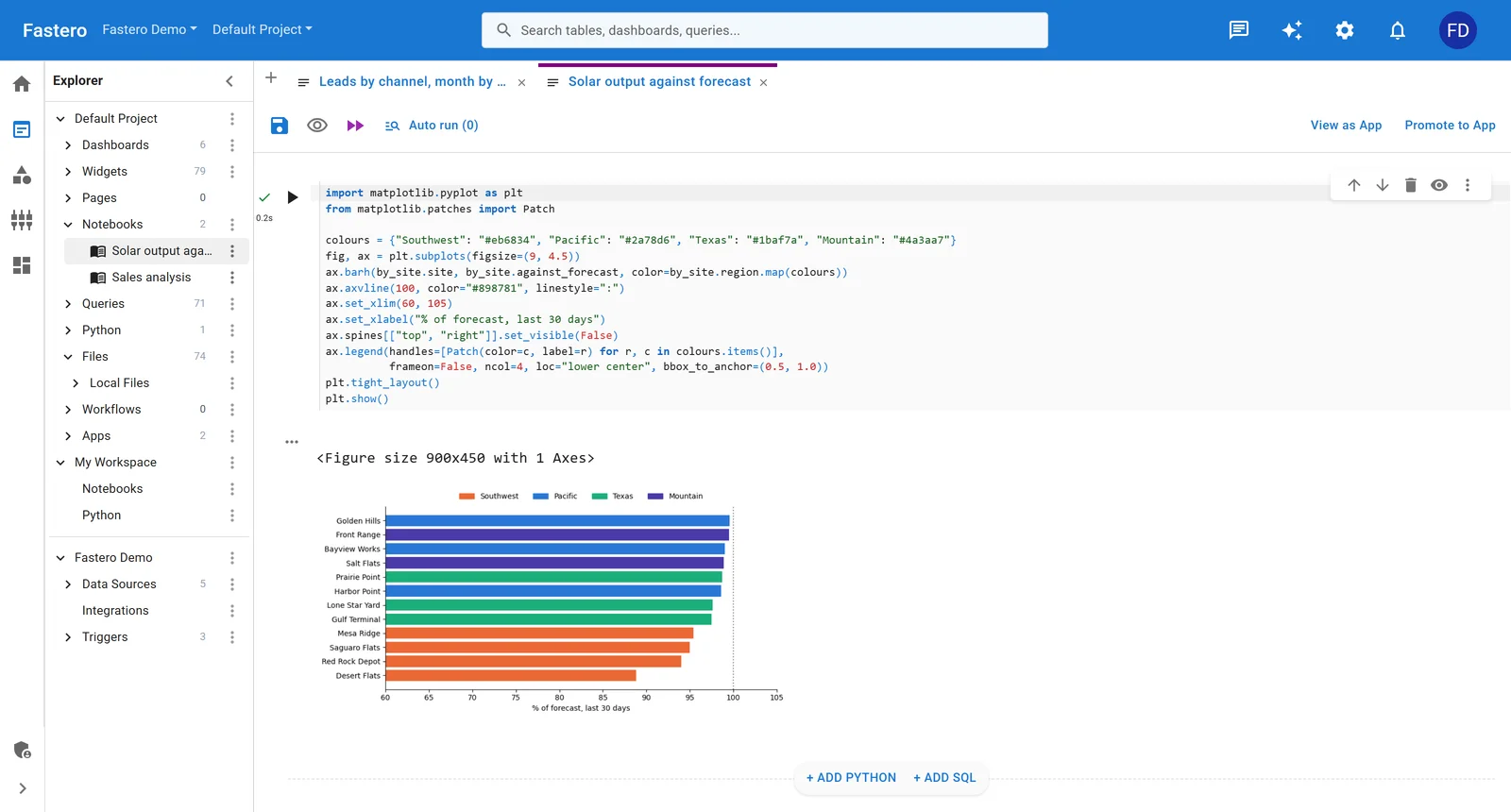
A notebook in Fastero: a Python cell and the chart it drew. Sample data.
How to choose
- You live in an editor: Claude Code or GitHub Copilot. Copilot does more inside a VS Code notebook; Claude Code also works from the terminal and across a whole repository.
- You live in JupyterLab: Jupyter AI 3, with the agent you already pay for.
- Your data is in Databricks, Snowflake or AWS: that platform's agent first, since it respects the permissions you already set.
- Your team shares notebooks: Hex or Deepnote for collaborative notebooks, or Fastero if the notebook has to become a dashboard, an app or a scheduled job.
- You want it free: marimo and molab, Positron with your own key, Colab's free tier, or Databricks Free Edition for non-commercial work.
Whichever you pick, give the agent a read-only database login, check its work on numbers you already know, and keep the notebook it produced: an analysis you can rerun is worth more than an answer you can't.
FAQ
What is the best AI tool for data scientists?
For most people working in code, Claude Code or GitHub Copilot, which can edit and run notebook cells. If your data is in Databricks, Snowflake or SageMaker, their built-in agents know your tables and permissions.
Can AI run my Jupyter notebook?
Yes. GitHub Copilot in VS Code, Colab's Data Science Agent, Databricks Genie Code, Snowflake CoCo, Deepnote's agent and Jupyter AI 3 with a connected agent can all write and run cells, mostly asking before each step. Claude Code runs cells in VS Code after you confirm each one.
Are there free AI tools for data science?
marimo (with free GPUs on molab), Jupyter AI and Positron, where you pay only for the model, Colab's free tier, Copilot Free, and Databricks Free Edition for non-commercial use.
Which AI is best for data analysis in Python?
Any of the coding agents writes good pandas and SQL. The difference is where the code runs: in your own notebook (Claude Code, Copilot, Jupyter AI), in a platform's notebook (Colab, Hex, Databricks), or in a chat sandbox (ChatGPT).
Will AI replace data scientists?
No survey measures that. What they do show is AI writing more of the code and checking its output becoming part of the work: in dbt Labs' 2026 survey, 71% of data practitioners named wrong AI answers reaching stakeholders as a top concern.
Related reading:
- Google Colab alternatives
- Jupyter Notebook online: ways to run Jupyter in your browser
- Best MCP servers for Claude Code
- ChatGPT vs Claude for data analysis
Sources: Stack Overflow Developer Survey 2026: AI, dbt Labs State of Analytics Engineering 2026, Claude Code tools reference, Claude Code in VS Code, Claude pricing, Notebooks with AI in VS Code, GitHub Copilot plans, Cursor pricing, Cursor for data science, PyCharm, JetBrains AI licensing, Jupyter AI, Colab FAQ, Colab in Google AI plans, Hex pricing, Hex credits, Deepnote pricing, Deepnote Agent, Databricks release notes, March 2026, Genie Code costs, Snowflake CoCo, CoCo in Snowsight, Posit Assistant, Posit AI Pass, marimo AI features, molab, CoreWeave and marimo, SageMaker Data Agent, SageMaker pricing, Amazon Q Developer, ChatGPT pricing. Checked 21 October 2026.
Try Fastero free — run your notebooks next to your team's data, and turn the analysis into a dashboard, an app or a scheduled job. No credit card required.