 Fastero Dev Team
Jupyter AI is the official open-source extension for using AI inside JupyterLab. Version 3, released on 1 April 2026, rebuilt it around a different idea: instead of calling a model directly, it gives JupyterLab a chat panel where an AI agent you already use, such as Claude Code, can read and edit your notebooks and run their cells. Most guides that rank for "Jupyter AI" still describe version 2.
The short answer: Jupyter AI 3 (currently 3.2.0) connects agents such as Claude Code, Codex, GitHub Copilot, Gemini and Goose to JupyterLab through the Agent Client Protocol. It ships no agent of its own, so you install one alongside it. Install it with pip install jupyter-ai; it needs JupyterLab 4 and Python 3.10 or later. The %%ai magics from older tutorials are now an optional extra: pip install "jupyter-ai[magics]", then %load_ext jupyter_ai_magic_commands. The old %load_ext jupyter_ai_magics fails with ModuleNotFoundError; we checked on 5 November 2026.
Fastero
Jupyter notebooks for your team, with nothing to install.
Start a notebook or bring your .ipynb files. SQL cells query your databases with no password in the code, and a notebook runs now or on a schedule. Colleagues open it with their own login; viewers are free.
Try free →What Jupyter AI does now
The project's own one-line description: "Jupyter AI brings agentic AI to JupyterLab." In version 3 that means:
- A chat panel for outside agents. You pick an agent installed on your machine (Claude Code, Codex, GitHub Copilot, Gemini, Goose, Kiro, Mistral Vibe or OpenCode) and talk to it from inside JupyterLab. Jupyter AI detects the agents you have installed, and you sign in through each agent's own command-line tool.
- Agents that act on notebooks. A built-in Jupyter MCP server lets the agent read and edit notebooks, run cells and open files, and the chat asks your permission before a tool runs.
- Chats saved as files. Each conversation is a
.chatfile next to your notebooks, and you can drag cells or files into the chat as context. - Your own tools. You can add MCP servers for the agent in
.jupyter/mcp_settings.json.
The maintainers explain why it ships no agent: "To allow users to freely choose which agents they want inside of JupyterLab, Jupyter AI does not ship with any agent by default."
Install Jupyter AI and connect Claude
From the getting-started guide: install Jupyter AI, install the adapter that lets Claude Code speak the Agent Client Protocol, and start JupyterLab:
pip install jupyter-ai
npm install -g @agentclientprotocol/claude-agent-acp
jupyter lab
You need Claude Code installed and signed in first, and Node.js for the npm step. Then open the chat panel in JupyterLab, choose Claude, and ask it to work on the open notebook: "Load sales.csv, clean the dates and chart weekly revenue in a new cell."
What the install looked like for us
On 5 November 2026 we installed it into a fresh environment on Windows 11 with Python 3.14:
pip install jupyter-aitook 78 seconds and installed jupyter-ai 3.2.0 with JupyterLab 4.6.5: 159 packages, 315 MB on disk.%load_ext jupyter_ai_magics, the line most tutorials give, failed withModuleNotFoundError: No module named 'jupyter_ai_magics'.%load_ext jupyter_ai_magic_commandsfailed too, because the magics aren't in the base install.pip install "jupyter-ai[magics]"added them in 65 seconds, plus LiteLLM and its dependencies: another 278 MB. After that,%load_ext jupyter_ai_magic_commandsloaded.
The maintainers recommend conda, mamba, uv or pixi over plain pip for upgrades, and warn that chat files aren't guaranteed to open in other versions. They are also frank about support: "We currently do not have the bandwidth to support older versions of Jupyter AI."
The %%ai magic in version 3
The %%ai cell magic sends a prompt to a model straight from a notebook cell, with no chat panel. The docs say: "Jupyter AI magic commands are now provided through the optional jupyter-ai-magic-commands package."
pip install jupyter-ai-magic-commands
%load_ext jupyter_ai_magic_commands
The first line runs in a terminal; the second goes in a notebook cell.
Models are now named provider/model, through LiteLLM. In our install, %ai list anthropic showed names such as anthropic/claude-sonnet-4-5, so a cell looks like this:
%%ai anthropic/claude-sonnet-4-5
Explain what each column in the orders table probably means, in one line each.
API keys for the magics come from a .env file in the folder you're working in: loading the extension without one printed a warning that no .env file with provider keys was found. %ai help lists the options, including --format code to get runnable code back and --api-key-name to name a different key.
Jupyternaut, the assistant built into version 2, is still available as an optional extra (pip install 'jupyter-ai[jupyternaut]'), but its docs say it "should be considered experimental" in version 3. It can use local models through Ollama.
Jupyter notebooks for your team.
Start free →Other ways to get AI into a notebook
| Option | What it does | Runs | Cost |
|---|---|---|---|
| Jupyter AI 3 | Chat panel for Claude Code, Codex, Gemini and other agents; agents can edit and run cells | Your JupyterLab | Free; you pay for the agent or model |
| Notebook Intelligence | Chat, inline edits, completion and an agent mode in JupyterLab; a Claude mode that uses Claude Code | Your JupyterLab | Free and open source |
| Jupyter AI Lite | Code completion and chat that run in the browser, also in JupyterLite | JupyterLab, Notebook 7 or JupyterLite | Free; you bring a model |
| VS Code + GitHub Copilot | An agent that creates notebooks, edits and runs cells and reads outputs | VS Code | A GitHub Copilot plan |
| Google Colab | Gemini in Colab and the Data Science Agent; the Colab MCP Server lets Claude Code drive a Colab notebook | Google's cloud | Free tier and paid plans |
| Databricks Genie Code | The agent formerly called Databricks Assistant, in notebooks, SQL and pipelines | Databricks | Usage-based, with a free allowance per user |
| marimo | A built-in assistant using Anthropic, OpenAI, Ollama or GitHub Copilot | marimo notebooks | Free and open source |
| Claude Code | Edits .ipynb files cell by cell with its NotebookEdit tool |
Your terminal | Claude plan |
| Fastero | Claude creates, writes and runs notebooks with Python and SQL cells in a hosted workspace | Fastero's cloud | Notebooks on the Free plan |
A few details worth knowing:
- Claude Code on its own edits but doesn't run. Its docs say: "NotebookEdit modifies a Jupyter notebook one cell at a time, targeting cells by their
cell_id." It can replace, insert or delete cells; running them needs a kernel, which is what Jupyter AI, the Colab MCP Server or a hosted workspace adds. - VS Code's agent does run cells. Microsoft's guide: "An agent can create a Jupyter notebook, edit and run cells, inspect outputs, and iterate on errors."
- Colab opened up to outside agents in March 2026. Google: "Starting today, we are releasing the new, open-source Colab MCP (Model Context Protocol) Server, opening up Google Colab to be accessed directly by any AI agent."
- Databricks renamed its assistant. "Databricks Assistant is now Genie Code, with expanded agentic capabilities for autonomous, multi-step data tasks."
- JupyterLab itself has no AI. It has an inline completer, but "JupyterLab ships with a single provider, the History provider, which suggests the lines you previously executed in the kernel." The AI comes from extensions like those above.
Claude in a hosted notebook: Fastero
Jupyter AI and Claude Code both work on notebooks on your own machine, with your own Python and your own database drivers. Fastero puts the notebook in a hosted workspace instead, next to your team's database connections.
Through Fastero's connector, Claude can create a notebook, write its cells, run it top to bottom and read the outputs, then fix what failed. Notebooks are standard .ipynb files with Python cells and SQL cells: a SQL cell runs on one of the workspace's connected databases, using credentials stored in the workspace rather than in the notebook, and its rows arrive in Python as a pandas DataFrame with the name you give it. The notebook below was written and run by Claude through the connector: a SQL cell reads a year of orders, and a Python cell charts them.
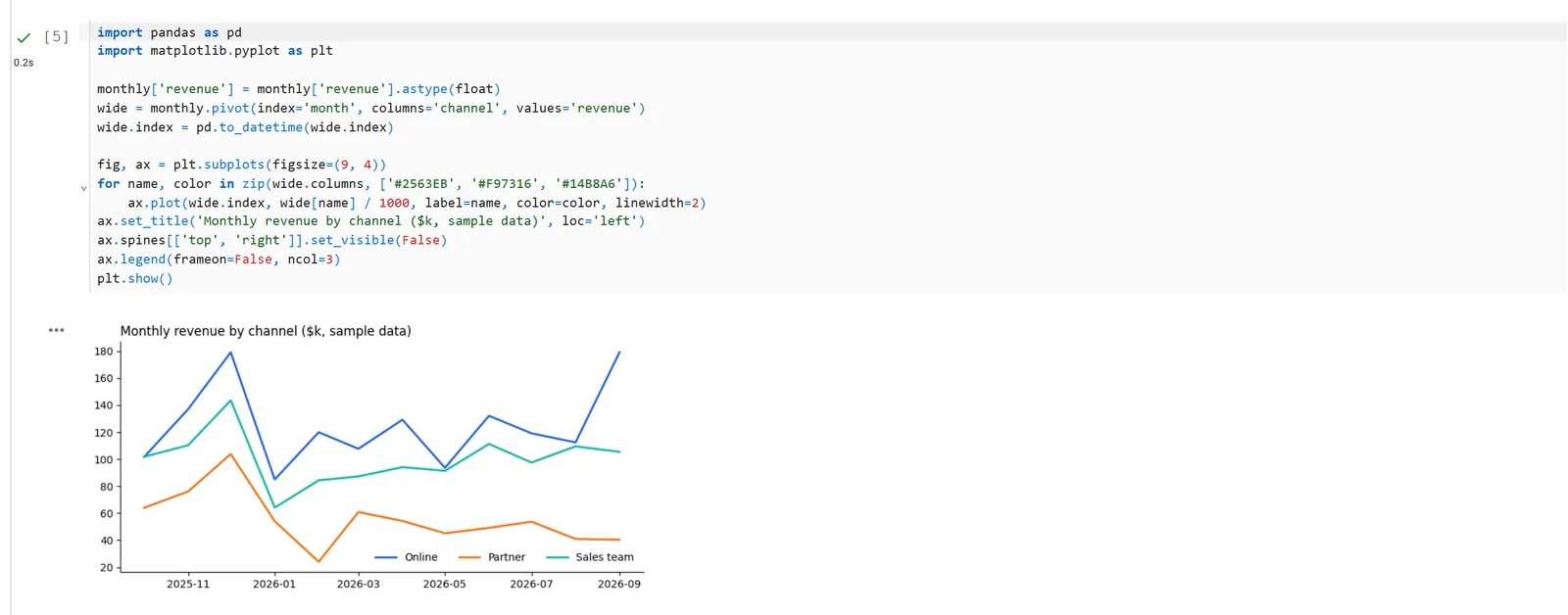
A notebook Claude wrote and ran through Fastero's connector. The SQL cell above it reads the orders; this cell charts them. Sample data.
Colleagues open the notebook in the workspace with their own login, and viewers are free. A cell's result can be pinned to a dashboard that updates when the notebook runs on its schedule, and the whole notebook can be turned into an app behind your team's login. Notebooks and schedules are on the Free plan.
FAQ
Is Jupyter AI free?
Yes. Jupyter AI is open source. You pay only for the agent or model behind it, such as a Claude plan for Claude Code or API usage for the %%ai magics.
Does Jupyter AI work with Claude?
Yes, in two ways. In the chat panel, Jupyter AI 3 connects to Claude Code through the @agentclientprotocol/claude-agent-acp adapter. With the optional magics, %%ai anthropic/<model> sends a prompt to a Claude model using an API key from your .env file.
Why does %load_ext jupyter_ai_magics fail?
That is the version 2 name. In version 3 the magics are a separate package: install jupyter-ai[magics] (or jupyter-ai-magic-commands) and load them with %load_ext jupyter_ai_magic_commands.
Which versions of JupyterLab and Python does it need?
JupyterLab 4 and Python 3.10 or later; some optional parts need Python 3.11. pip install jupyter-ai installs a matching JupyterLab if you don't have one.
Can Jupyter AI use local models?
Yes. Jupyternaut and the magics reach models through LiteLLM, which supports Ollama running on your machine. Agents such as Goose or OpenCode can also use local models through their own settings.
Can the AI run my notebook's cells, or only write them?
With Jupyter AI 3, the agent can run cells through the built-in Jupyter MCP server, after asking your permission. Claude Code's NotebookEdit tool on its own only edits cells. VS Code's agent and Fastero's connector both run notebooks.
Related reading:
- SQL notebooks: the options in 2026
- Jupyter notebook alternatives
- Claude Code for data analysis
- Run a Jupyter notebook online
- Schedule a Jupyter notebook
Sources: Jupyter AI on GitHub, Jupyter AI getting started, magic commands, versioning policy, Jupyter AI on PyPI, Notebook Intelligence, Jupyter AI Lite, JupyterLab completer, Claude Code tools reference, notebooks with AI in VS Code, Colab MCP Server announcement, Databricks March 2026 release notes, marimo AI. Install tested 5 November 2026; checked the same day.
Try Fastero free — let Claude write and run notebooks on your team's databases, with SQL cells, schedules and dashboards. No credit card required.