 Fastero Dev Team
Google Data Studio is Google's free tool for building reports and dashboards. Google renamed it Looker Studio in October 2022, announced on 11 April 2026 that the old name was coming back, and made the switch in the 16 April 2026 release.
The short answer: Data Studio, the former Looker Studio, is free: Google says it "is available at no charge for creators and report viewers" (checked 20 November 2026). The rename changed the name, the address and the home page, not your work: "All existing reports, data sources, assets and users will be transitioned to the new experience with no action on your part," and old lookerstudio.google.com links, report and embed links included, redirect to datastudio.google.com. You need a Google account to build; a public link needs none to view. Google's own connectors, from GA4 and Google Ads to Sheets, BigQuery, MySQL and PostgreSQL, cost nothing, while partner connectors for tools such as Facebook Ads or Salesforce can charge, and BigQuery bills the queries a report runs. Data Studio Pro costs $9 per user per project per month. For team and client work, the limits are ownership, sign-in for invited viewers, and one delivery schedule per report, at most daily.
Fastero
Connect your database. Ask questions. Get dashboards.
Postgres, BigQuery, Snowflake, and 10+ sources — live-connected, AI-powered, no dashboard builder learning curve.
Try free →What the rename changed
- The name. Looker Studio is Data Studio again, Looker Studio Pro is Data Studio Pro, and "Gemini in Looker is now Gemini in Data Studio."
- The address. Google's network requirements now list datastudio.google.com as the "Primary application URL" and lookerstudio.google.com as the "Legacy application URL".
- The home page. It is now "a single place to access your Data Studio reports and data sources, BigQuery conversational agents, and data apps built in Colab notebooks."
- Conversational Analytics (asking a BigQuery data agent questions in plain language) became available to all Data Studio users with the rename, in preview, and has been generally available since 30 July 2026.
What didn't change: your reports, data sources and users moved across by themselves, and Google's announcement says the free edition carries on at no cost. Looker, Google's paid enterprise BI platform, stays a separate product; Google calls Data Studio "the ideal choice for personal data exploration". Old names linger in places: the sign-up requirements still say "Accept the Looker Studio Terms of Service", and the phone app for Pro is "the Looker mobile app".
Old links keep working. We checked two with curl 8.17.0 on 20 November 2026, using a made-up report ID, without signing in:
$ curl -s -o /dev/null -D - https://lookerstudio.google.com/reporting/abc123 | grep -iE '^(HTTP|location)'
HTTP/1.1 301 Moved Permanently
Location: https://datastudio.google.com/reporting/abc123
$ curl -s -o /dev/null -D - https://lookerstudio.google.com/embed/reporting/abc123/page/xyz | grep -iE '^(HTTP|location)'
HTTP/1.1 301 Moved Permanently
Location: https://datastudio.google.com/embed/reporting/abc123/page/xyz
Both are permanent redirects that keep the path, so old report links and embeds still land on the same report.
What Data Studio costs (checked 20 November 2026)
| What you pay | Details | |
|---|---|---|
| Data Studio | $0 | For creators and viewers alike |
| Data Studio Pro | $9 per user per project per month | Only people who create, edit or manage Pro content need a licence; needs a Google Workspace or Cloud Identity account; 30-day trial |
| Google's connectors | $0 | Google built them, for its own products and for MySQL, PostgreSQL, SQL Server and Redshift |
| Partner connectors | The partner's price | Each declares a fee type: FREE, FREE_TRIAL or PAID |
| BigQuery data | BigQuery's own rates | "You might incur query processing or storage costs when you access BigQuery data through Data Studio reports" |
| Support for Pro | A Google Cloud support plan | For technical support "you'll need both a Google Cloud support plan and a Data Studio Pro subscription" |
What Pro adds, and what an agency pays for it, is in our Data Studio Pro guide; BigQuery's query prices are in BigQuery pricing.
Against paid BI tools, the free edition is hard to beat on list price. We put the published prices for two example teams into a short script (Python 3.14.3); the teams are examples, and the prices exclude partner connectors, hosting for self-hosted tools and tax:
$ python team_cost.py google-data-studio-team-cost.png
matplotlib 3.11.2, python 3.14.3; list prices checked 20 November 2026
Tool                     3 people build, 10 view    1 person builds, 30 view
Data Studio (free)                    $0 a month                  $0 a month
Data Studio Pro                      $27 a month                  $9 a month
Fastero Pro                          $60 a month                 $20 a month
Metabase Starter                    $148 a month                $256 a month
Power BI Pro                        $182 a month                $434 a month
Tableau                             $375 a month                $525 a month
saved google-data-studio-team-cost.png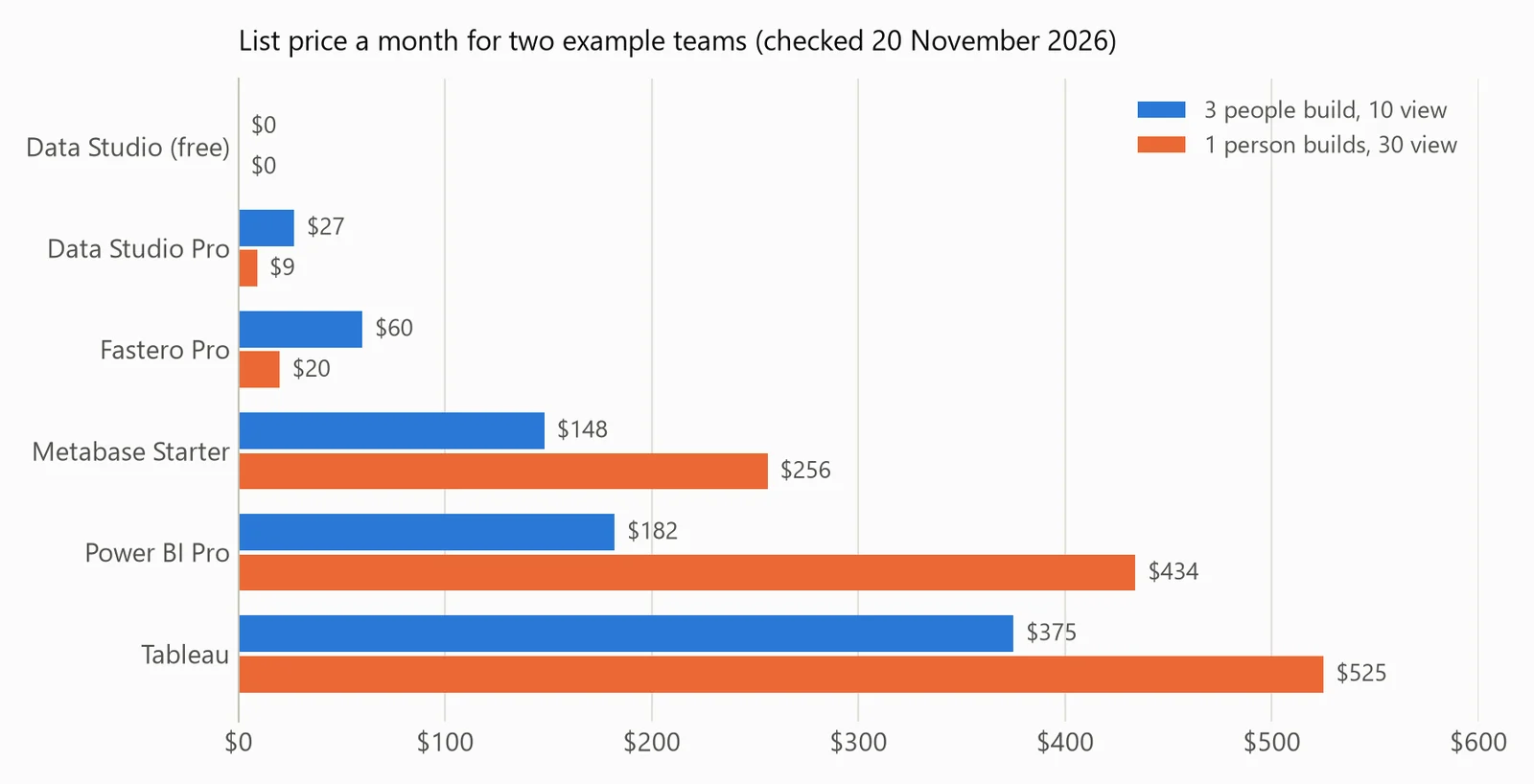
List price a month for two example teams, from each vendor's page on 20 November 2026. Viewers are free in Data Studio, Data Studio Pro and Fastero; Metabase counts everyone who signs in, Power BI viewers need Pro, Tableau sells $15 Viewer seats.
What Data Studio connects to
Google's catalogue of its own connectors, all free:
- Google marketing: Google Analytics, Google Ads, Search Console, YouTube Analytics, Campaign Manager 360, Display & Video 360, Search Ads 360, Google Ad Manager 360.
- Databases and Google Cloud: BigQuery, Cloud SQL for MySQL, Spanner, Cloud Storage, MySQL, PostgreSQL, Microsoft SQL Server, Amazon Redshift, and Looker.
- Files: Google Sheets, Microsoft Excel, CSV upload, and extracted data.
- Developer: Apigee and AppSheet.
So a Postgres or MySQL database needs no paid connector. Other tools go through partner connectors, which anyone can build with Apps Script; Google's product page counts "over 1,300 Community Connectors". Google charges nothing to use them, but a partner can: a connector marked PAID "Indicates the user will need to pay to use the connector." Supermetrics, for one, showed us its Starter plan from €39 a month billed yearly (€52 monthly) for 2 data sources and 1 user, in euros for our location. On Google Workspace, partner connectors also need Apps Script switched on: "When Apps Script is disabled, community connectors can't fetch data."
Limits on the data itself:
| Source | Limit (checked 20 November 2026) |
|---|---|
| CSV upload | 100 MB per dataset, 2 GB per user, 100 uploads per dataset a day; the datasets "are not shareable" |
| Excel upload | Files up to 100 MB; 2 GB of Excel storage, 5 GB on Pro; no Excel Online, macros, pivot tables or password-protected files |
| Google Sheets | One worksheet per data source; "Data Studio does not support accessing files on Team Drive" |
| Blends | Up to five data sources; unions as well as joins since 5 November 2026 |
| Freshness, Google marketing data | Every 12 hours, and "That rate can't be changed" |
| Freshness, databases and BigQuery | 12 hours by default, as often as every minute |
| Freshness, Google Sheets | Every 15 minutes by default |
Editors can refresh a report at any time, at least a minute apart; viewers only if the editor turns on "Viewer data refresh". A report that refreshes itself while open, for a wall screen, is a Pro feature.
A typical Data Studio report, rebuilt from sample data
We rebuilt the usual one-page Data Studio layout as a local HTML page, each panel labelled with the Data Studio component it stands for: two drop-down lists and a date range control, four scorecards against the previous year, a time series with last year dashed, a pie chart, a bar chart and a table. It is not Data Studio: we built it with DuckDB 2.0.1 and matplotlib 3.11.2 on Fastero's invented sample sales data.
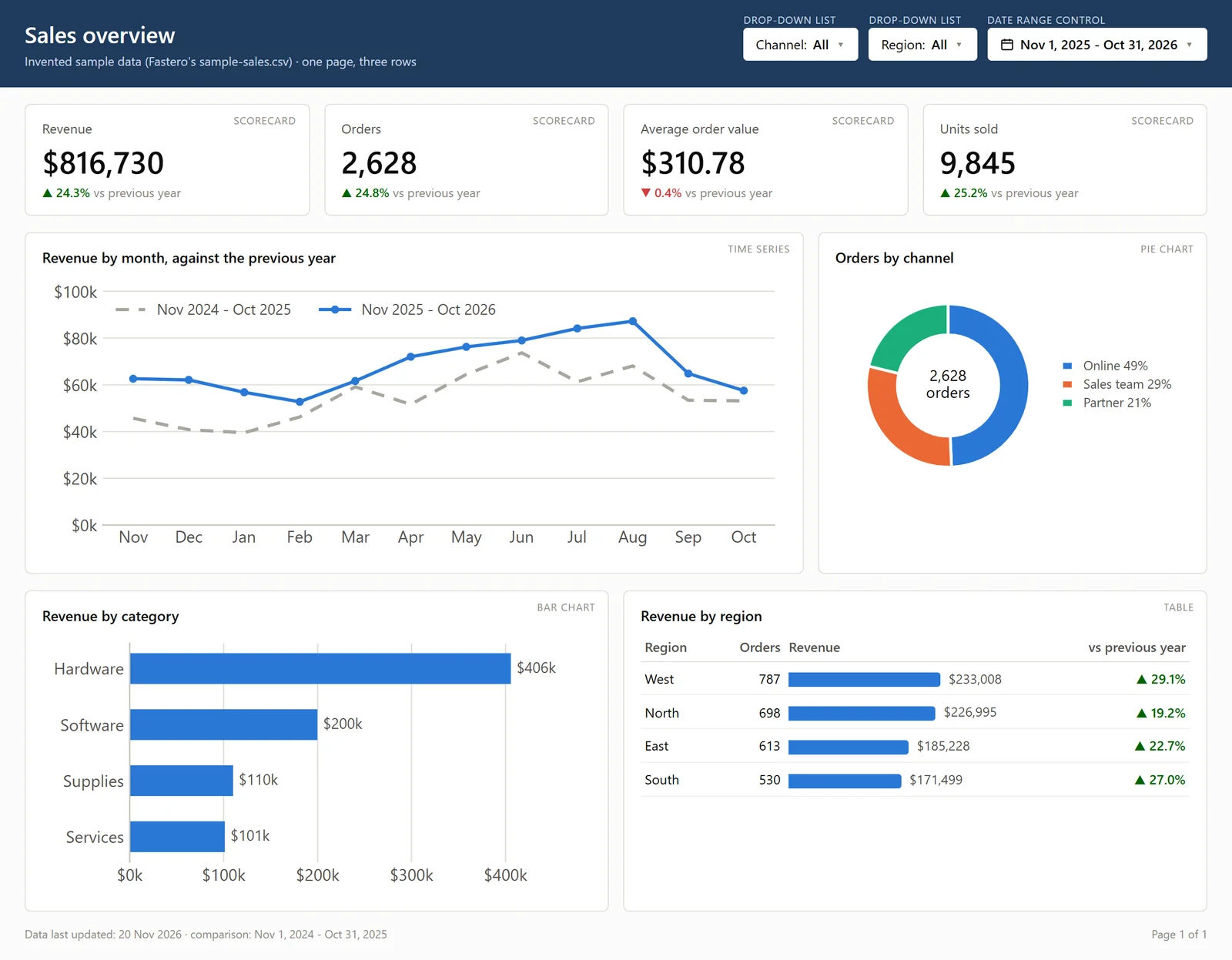
A typical Data Studio report layout, each panel labelled with its Data Studio component. Built as a local HTML page on invented sample data, 20 November 2026.
The four scorecards come from one query, one row per period:
select case when order_date >= date '2025-11-01' then 'Nov 2025 - Oct 2026'
            else 'Nov 2024 - Oct 2025' end      as period,
       round(sum(revenue), 2)                   as revenue,
       count(*)                                 as orders,
       round(sum(revenue) / count(*), 2)        as avg_order_value,
       sum(quantity)                            as units
from sales
where order_date >= date '2024-11-01' and order_date < date '2026-11-01'
group by 1
order by 1
┌─────────────────────┬───────────┬────────┬─────────────────┬────────┐
│ period │ revenue │ orders │ avg_order_value │ units │
│ varchar │ double │ int64 │ double │ int128 │
├─────────────────────┼───────────┼────────┼─────────────────┼────────┤
│ Nov 2024 - Oct 2025 │ 656971.03 │ 2106 │ 311.95 │ 7866 │
│ Nov 2025 - Oct 2026 │ 816729.84 │ 2628 │ 310.78 │ 9845 │
└─────────────────────┴───────────┴────────┴─────────────────┴────────┘Revenue rose 24.3% while the average order fell 0.4%, which is why the third scorecard is the only red one. In Data Studio, average order value would be a calculated field, SUM(revenue) / COUNT(order_id), and the comparison would come from the date range, not from a second row.
Limits for a team or for client reporting
- Reports belong to a person. In free Data Studio "you own that asset", and ownership can be transferred "only within your domain". If the person's account is deleted, "assets belonging to deleted users are permanently deleted after 20 days" unless an admin transfers them first. CSV upload data sources can't be transferred at all. Pro fixes this by making reports belong to the organisation's Cloud project.
- Invited viewers need a Google account. "To directly invite people to access your report, they must have a Google Account." A public link needs no sign-in, but "any embedded data sources within that report will also be accessible to anyone who has the link."
- Delivery is thin on the free plan. Without Pro, "each report can have no more than one schedule", sent at most "once per day", to no more than 50 addresses, within 200 emails a day and 800 a month on a personal account (500 and 3,000 on Workspace).
- Embeds carry Google's mark. "Embedded reports always contain the Data Studio watermark and full-screen option. You can't remove these."
- The phone app is Pro only. The Looker mobile app opens Data Studio Pro reports. Without Pro, a phone opens reports in its browser, which Google says is all a viewer needs.
For an agency, the first two decide it: how to share a dashboard with clients compares eight tools on exactly that, and our client report template covers what goes in the report.
Connect any database. Ask in plain English.
Start free →Data Studio alternatives (checked 20 November 2026)
| Tool | Free option | Paid price | Viewers | Pick it when |
|---|---|---|---|---|
| Data Studio | Free for creators and viewers | Pro: $9 per user per project a month | Free | The data is in GA4, Google Ads, Sheets or BigQuery |
| Power BI | A free account, for your own use | Pro $14, Premium Per User $24, per user a month, paid yearly | Need Pro, below an F64 capacity | The company runs on Microsoft 365 |
| Tableau | A free trial | Creator $75, Explorer $42, Viewer $15, per user a month, billed annually | $15 each | Analysts want deep visual exploration |
| Metabase | Open Source, self-hosted | Starter $100 a month with 5 users, then $6 a user | Everyone who signs in counts | SQL databases, and you can host it |
| Looker | None | Standard edition: "Call sales" | Viewer User licences, through sales | One governed data model for a large company |
| Fastero | Free, $0, no end date | Pro $20 per editor a month | Free on every plan | The numbers live in a database and readers are a team or clients |
For the free, self-hosted options in more depth, see the best free alternatives to Looker Studio; for Microsoft's licences, Power BI pricing.
When the dashboard is for a team or a client
Stay on Data Studio if the client's numbers are all GA4, Google Ads and Search Console: its free Google connectors are the shorter path. Fastero fits when the numbers sit in a database and the readers should not need a Google account. It is an AI and data platform where people and AI agents work together on a team's data:
- Connect once: Postgres (Supabase and Neon included), MySQL, SQL Server, Redshift, Oracle or BigQuery, or upload CSV and Excel files. Dashboards query them with the workspace's stored credentials.
- Refresh: on a timer (1, 5, 15 or 60 minutes) or, for Postgres and BigQuery data only, when the data changes.
- One client, one dashboard: "Just this person" in the Send dialog sends a dashboard to an email address, and that person sees only that dashboard, after a code sent to their inbox. "Anyone with the link" makes a public link you can turn off.
- Guests: invite a client to one project and they become a guest, a viewer of that project and nothing else.
- Scheduled email: daily, weekly or monthly, with the numbers, charts and tables plus a PDF; an address outside the workspace confirms first, and the same dialog can post to Slack once Slack is connected.
- Price: Free is $0 with no end date, Pro is $20 per editor a month, and viewers are free on every plan. A new account starts with $20 of AI and 14 days of Pro.
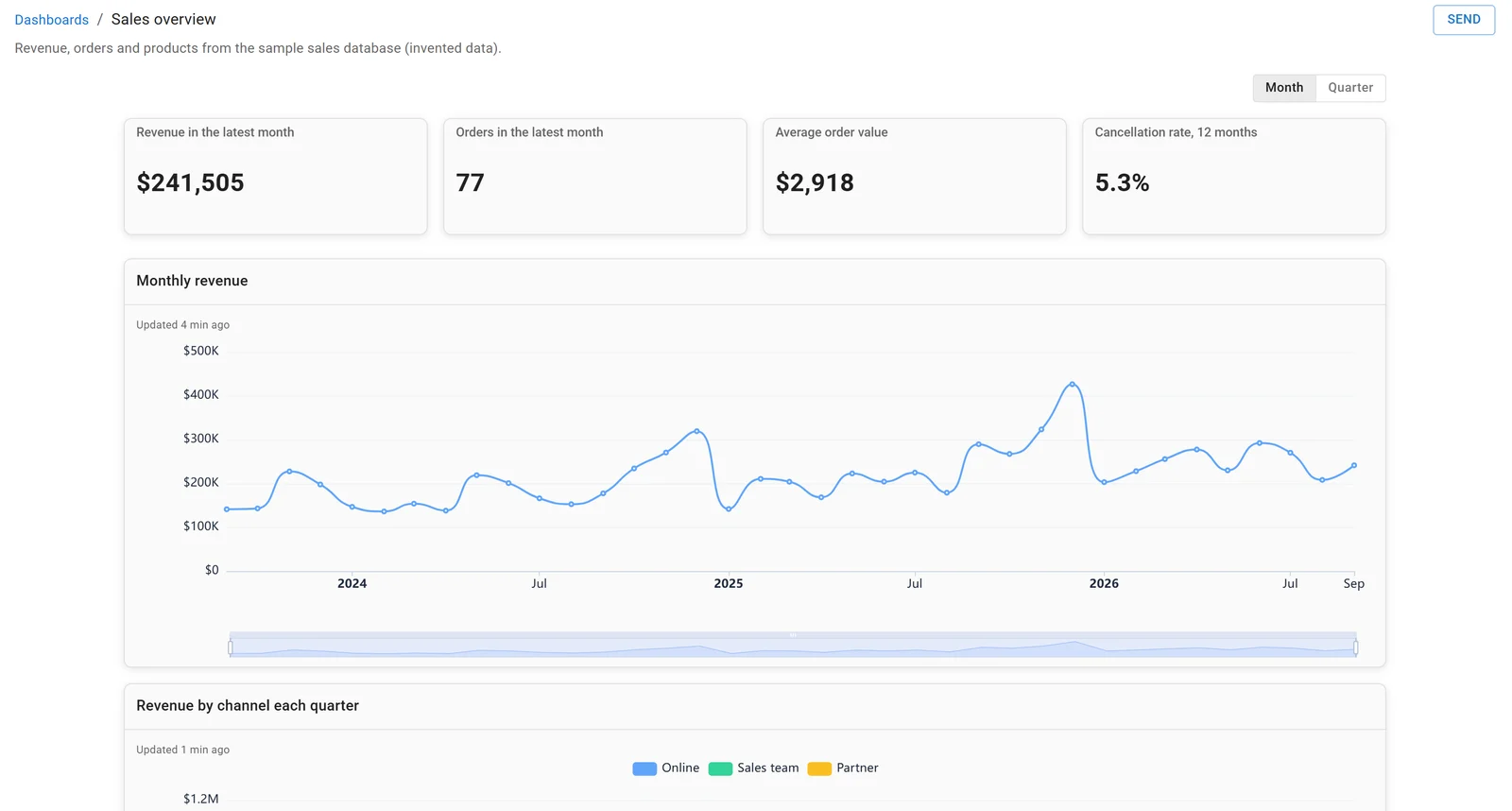
A dashboard in Fastero, built on the sample sales database. Invented data.
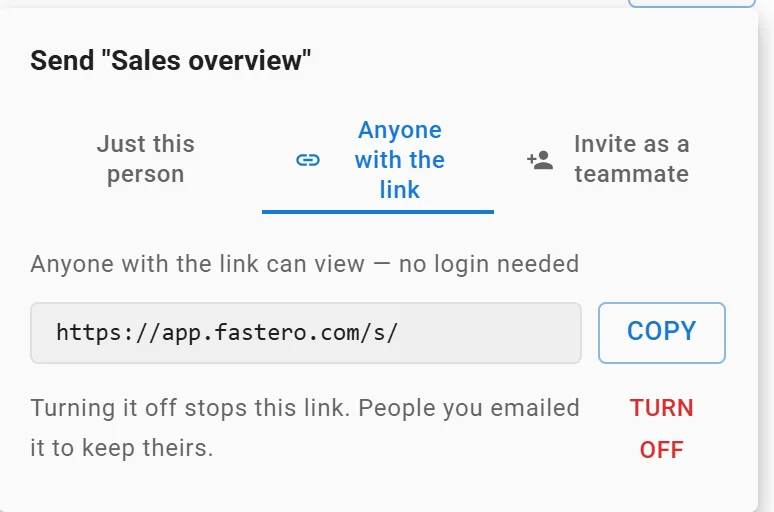
A dashboard's public link: anyone with it can view without a login, and turning it off stops it. Link shortened.
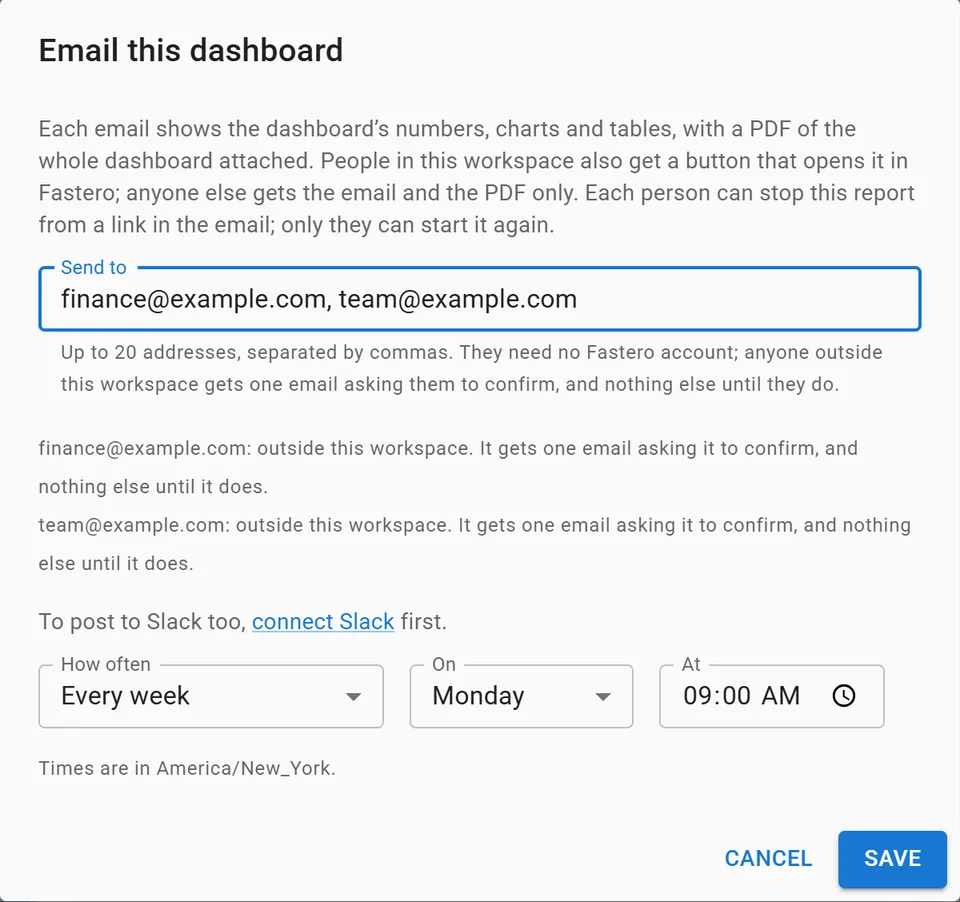
Setting up a weekly email of a dashboard, with invented addresses.
It doesn't white-label: clients see Fastero's name.
FAQ
Is Google Data Studio still available?
Yes. Google renamed it Looker Studio in October 2022 and back to Data Studio in April 2026, at datastudio.google.com. Existing reports moved across without any action, and old lookerstudio.google.com links redirect.
Is Google Data Studio free?
Yes. Google says Data Studio "is available at no charge for creators and report viewers." You may still pay for partner connectors, for BigQuery queries, or for Data Studio Pro at $9 per user per project a month.
Is Data Studio the same as Looker Studio?
Yes, it is the same product under its original name. Looker Studio Pro became Data Studio Pro, and Gemini in Looker became Gemini in Data Studio.
What is the difference between Data Studio and Looker?
Looker is Google's enterprise BI platform, built on a central data model and sold through Google Cloud sales. Data Studio is the free report builder that Google calls "the ideal choice for personal data exploration".
Do you need a Google account to use Data Studio?
To create or edit reports, yes. To view a report shared with a public link, no; to view one shared by invitation, the person needs a Google account, which can use any email address.
Can Data Studio connect to MySQL or PostgreSQL?
Yes, with Google's own connectors, at no charge. Since September 2026 it can also reach Cloud SQL for PostgreSQL over a private IP, and support for MySQL 5.6 and 5.7 ends on 26 February 2027.
Sources
Checked on 20 November 2026:
- Google Cloud: Data Studio product and pricing page, Data Studio returns as new home for Data Cloud assets (11 April 2026), Introducing the next evolution of Looker (11 October 2022), Looker pricing
- Data Studio docs: Release notes, What you need to use Data Studio, About Data Studio Pro, Pro subscription overview, Available connectors, About connectors, data sources and credentials, About community connectors, Connect to BigQuery, Connect to Google Sheets, Connect to Microsoft Excel, Upload CSV files, How blends work, Manage data freshness, Manage auto refresh, Transfer ownership, Invite others to your reports, Schedule report delivery, Embed a report, Use the mobile app
- Google developers: Community Connectors, Connector manifest reference
- Other vendors: Supermetrics pricing, Power BI pricing and licence types, Tableau pricing on Salesforce, Metabase pricing, Fastero pricing
- Our work: redirect check with curl 8.17.0; team cost script and the example report with Python 3.14.3, DuckDB 2.0.1 and matplotlib 3.11.2, run 20 November 2026
Try Fastero free: deliver your client's dashboard with their own login, nothing to host. No credit card required.