
Looker Studio is free, connects to every Google product, and falls apart the moment your data doesn't live in Google's ecosystem. If your production database is Postgres, your billing is in Stripe, and your CRM is HubSpot, Looker Studio needs a paid third-party connector for each one. Your "free" BI tool quietly costs $100-300/month in Supermetrics or Fivetran fees. These five tools are genuinely free and actually connect to your data.
Why do people leave Looker Studio?
Two reasons come up over and over.
The connector tax. Google Ads, GA4, Google Sheets, BigQuery — all plug in natively. Everything else requires a connector marketplace where third-party vendors charge per-source, per-month. A team with Postgres + Stripe + HubSpot can easily spend more on connectors than they would on a paid BI tool.
No SQL. Looker Studio gives you calculated fields. That's formulas on existing columns. No CTEs, no window functions, no subqueries. If you need ROW_NUMBER() OVER (PARTITION BY customer_id ORDER BY order_date) to find each customer's first purchase, you're pre-computing in a spreadsheet and importing the result. That workflow breaks every time the data changes.
There's also no alerting, no API access, and no scheduling beyond "email this PDF." But the connector lock-in and SQL gap are what push most teams to look elsewhere. For a deeper breakdown of those limitations, see our full Looker Studio alternatives guide.
And before you ask: no, Google Sheets doesn't count. Exporting data to a spreadsheet and building pivot charts is what people do before they find a BI tool, not after. The title of this post isn't a joke — "just use Sheets" is genuinely the most common advice, and it's terrible advice for anything that needs to stay current. Sheets doesn't auto-refresh from your database, doesn't handle more than a few hundred thousand rows, and turns into a governance nightmare once three people are editing the same workbook.
Power BI is the other obvious answer, but it's not free in any meaningful way. The desktop app is Windows-only and free for personal use. The moment you need to share a dashboard with your team, you're on Power BI Pro at $10/user/month. That's not "free alternative" territory.
Where does your data live? Start here.
Five tools is still a lot to evaluate. Before reading the details on each, answer one question about your stack. It cuts the list in half for most teams.
         Where does your data live?
         ├── Postgres / MySQL / SQL Server
         │   ├── Want a visual query builder? → Metabase
         │   └── Comfortable with raw SQL? → Redash or Superset
         ├── Prometheus / InfluxDB / Loki
         │   └── Grafana (nothing else comes close)
         ├── BigQuery / Snowflake / Redshift
         │   └── Superset or Fastero
         ├── SaaS APIs (Stripe, HubSpot, Shopify)
         │   └── Fastero (connects natively, no middleware)
         └── Mix of all of the above
             └── Fastero (cross-source DuckDB joins)
The tree is intentionally opinionated. If you disagree with a branch, skip to the tool that fits your situation. Every option below is free to start.
Now the details.
Fastero
Connect your database. Ask questions. Get dashboards.
Postgres, BigQuery, Snowflake, and 10+ sources — live-connected, AI-powered, no dashboard builder learning curve.
Try free →1. Metabase — SQL databases without the SQL requirement
Metabase is what most teams want when they outgrow Looker Studio. It connects directly to Postgres, MySQL, BigQuery, Snowflake, and a dozen other databases. No connector marketplace, no per-source fees. Docker pull, connect, done.
The standout feature is the visual query builder. Non-technical users can filter, group, and aggregate data without writing SQL. Pick a table, add filters, choose a visualization. It's closer to a spreadsheet experience than a SQL editor, which makes it popular with ops and marketing teams who need self-serve access to production data.
Where it beats Looker Studio: Direct database connections, visual query builder for non-SQL users, embeddable charts, and a genuinely open-source codebase (AGPL). No per-source connector fees.
Honest limitations: Self-hosting means you own the infrastructure (Docker, backups, upgrades). The visual builder struggles with complex joins. Alerting is basic — email when a number crosses a threshold, no anomaly detection. No cross-database queries. For a head-to-head, see Metabase vs Looker Studio.
Pricing: Free self-hosted. Metabase Cloud starts at $85/month for 5 users.
One thing Metabase handles well that Looker Studio doesn't: embedding. You can drop a Metabase chart into your own product with an iframe and signed JWT tokens. If you're building customer-facing analytics, that matters. Looker Studio embeds are view-only and require Google authentication.
2. Apache Superset — raw SQL power, steep entry
Apache Superset is the most powerful free BI tool if your team writes SQL. It supports dozens of databases via SQLAlchemy, has a rich chart library (40+ visualization types), and handles datasets that would make Looker Studio crawl.
The SQL Lab is where Superset shines. You write queries, explore results, save them as datasets, and build dashboards on top. It feels like a SQL editor with visualization bolted on — which is exactly what some teams want. Row-level security and role-based access make it viable for larger organizations where Metabase's permission model feels thin.
Where it beats Looker Studio: Full SQL support, no per-source fees, richer visualization library, row-level security, and Apache 2.0 licensing.
Honest limitations: Installation is not trivial. Superset is a Python/Flask app with Redis, Celery workers, and a metadata database. Budget a day for setup. The UI has improved but still feels less polished than Metabase. No built-in alerting (you'll need external tooling). Documentation can be sparse for advanced configurations. For a comparison with its closest open-source competitor, see Grafana vs Superset.
Pricing: Free (Apache 2.0). Preset (the managed cloud option) starts around $20/user/month.
One thing worth knowing: Superset's Jinja templating lets you build parameterized dashboards where viewers pick date ranges, regions, or customer segments from dropdowns, and the SQL re-runs with those values injected. Looker Studio does this with filters, but Superset's approach gives you full control over the underlying query, which matters when performance tuning on large tables.
3. Grafana — when your data is half metrics, half business KPIs
Grafana started as an infrastructure monitoring tool and evolved into something broader. If your team already runs Prometheus, InfluxDB, or Loki, Grafana is the obvious choice — it's the native visualization layer for those systems. But it also connects to Postgres, MySQL, and Elasticsearch, which means you can put server CPU usage and monthly revenue on the same dashboard.
That hybrid capability is Grafana's niche. No other free tool handles time-series monitoring data and business SQL queries equally well.
Where it beats Looker Studio: Native support for Prometheus/InfluxDB/Loki (Looker Studio doesn't connect to these at all), real-time auto-refresh, alerting with routing to Slack/PagerDuty/email, and a plugin ecosystem with 150+ data source integrations.
Honest limitations: Grafana thinks in time series. Building a bar chart of "revenue by product category" is possible but awkward compared to Metabase or Superset. The query editor assumes you know PromQL or SQL depending on the data source. Dashboard layout is panel-based and less visually flexible than dedicated BI tools. Not the right pick if your data is purely relational with no monitoring component.
Pricing: Free (AGPL for OSS). Grafana Cloud free tier includes 10k metrics, 50GB logs, 50GB traces.
Here's a practical test: if your engineering team already has Grafana for infrastructure and your ops team is on Looker Studio for business metrics, consolidating into Grafana is tempting. It can work if most of your business queries are time-series ("revenue per day," "signups per week"). It gets painful if you need categorical breakdowns, pivot tables, or non-time-indexed reports.
4. Redash — simple SQL, uncertain future
Redash is the most straightforward tool on this list. Connect a database, write a SQL query, pick a chart type, add it to a dashboard. No visual builder, no drag-and-drop, no abstractions. If you can write SQL, you can use Redash in ten minutes.
That simplicity is the appeal. There's almost no learning curve for SQL-literate teams. You write the same queries you'd run in psql or DataGrip, and Redash renders them as charts. Dashboards are collections of query results with auto-refresh. Parameters let you add dropdown filters backed by queries, so stakeholders can slice data without touching SQL.
Redash also has a useful permissions model: queries can be shared read-only with specific groups, which means your finance team sees revenue dashboards without seeing the underlying SQL or getting access to the query editor.
Where it beats Looker Studio: Full SQL, direct database connections, simple sharing via URLs, and a clean query-centric workflow. For a detailed comparison with its closest competitor, see Metabase vs Redash.
Honest limitations: Databricks acquired Redash in 2020 and the hosted version was shut down. The open-source project survives on community maintenance, but development has slowed significantly. No visual query builder (SQL only). Alerting is minimal. If you're starting fresh today, the uncertain maintenance trajectory is a real risk — you might invest in dashboards that become hard to maintain if the community fades. The BSD license is permissive, but permissive licensing on a stagnant project isn't much comfort.
Pricing: Free (BSD). No official hosted option. Self-host only.
5. Fastero — AI-powered, no self-hosting, 100+ sources
Fastero takes a different angle. Instead of making you build every dashboard manually, you connect your sources and ask questions. "Show me churn rate by plan tier for the last quarter" generates the SQL, runs it, and builds the visualization. You can still write raw SQL if you prefer — the AI is an accelerator, not a requirement.
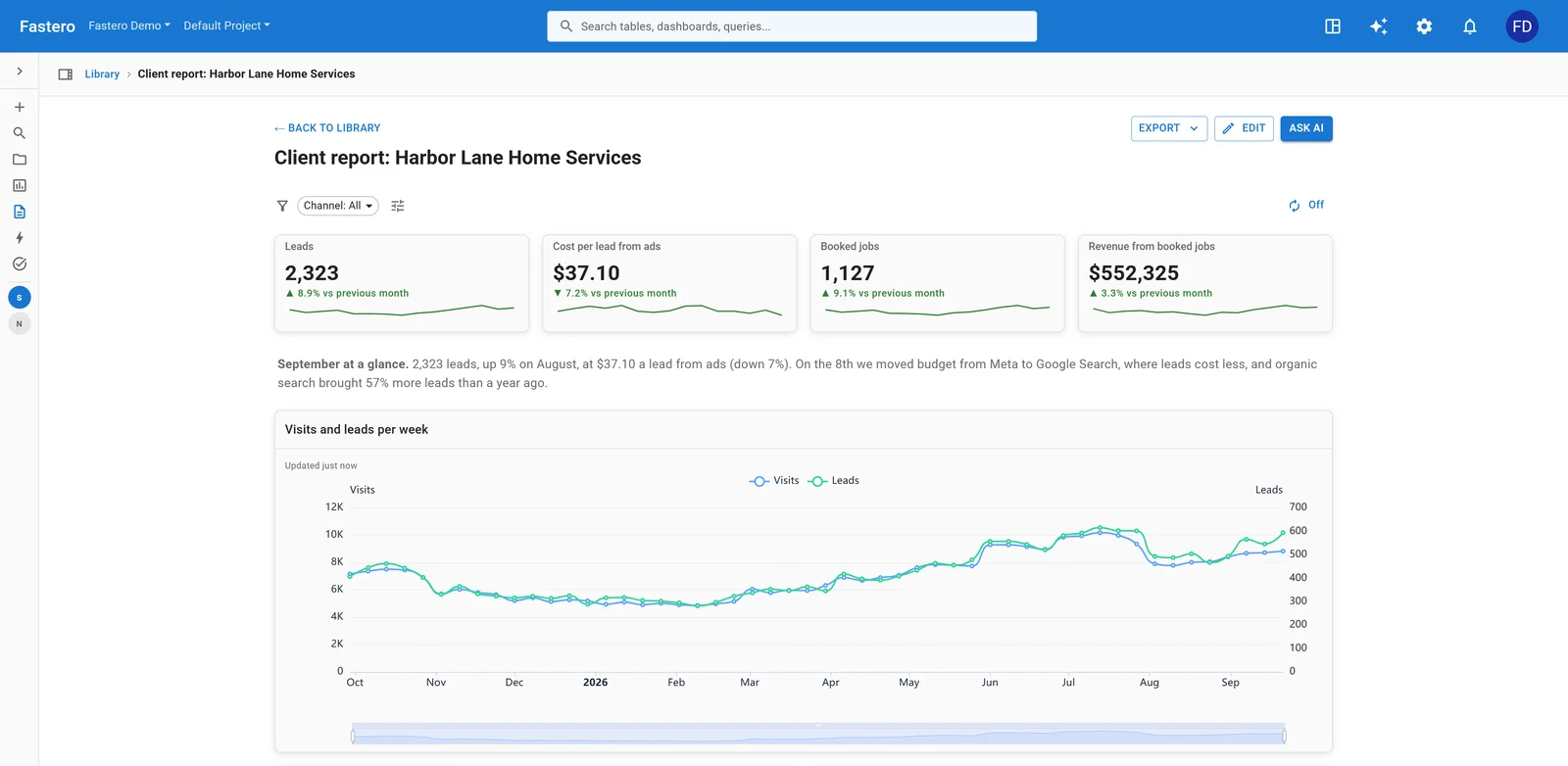
A client report in Fastero. Sample data.
The connector story is where Fastero diverges most from the open-source options above. Postgres, MySQL, BigQuery, Snowflake, Stripe, HubSpot, Shopify, Google Ads, and 100+ more connect natively. No self-hosting, no Docker, no third-party connector marketplace. The cross-source DuckDB store lets you join Stripe payments against your Postgres orders table without building a warehouse first.
That cross-source join capability solves the problem that drives most teams away from Looker Studio in the first place. Instead of exporting CSVs and vlookup-ing them together, you write standard SQL across sources: SELECT o.order_id, s.charge_status FROM postgres.orders o JOIN stripe.charges s ON o.stripe_charge_id = s.id. The data syncs on a schedule you control.
Where it beats Looker Studio: AI-generated queries and dashboards, native SaaS connectors (no connector tax), cross-source SQL joins, threshold and anomaly alerts via Slack/email/webhook, scheduled reports, and a public API for every query.
Pricing: Free tier available. Paid plans from $20/month.
Alerting is worth calling out separately. Looker Studio has none. The open-source tools above offer basic threshold alerts at best. Fastero supports both static thresholds ("alert me when MRR drops below $50k") and anomaly detection ("alert me when anything looks unusual in this query's output"), routed to Slack, email, or webhooks. For teams moving from Looker Studio, that alone eliminates one of the most common workaround tools from the stack.
How do they compare to Looker Studio?
| Feature | Looker Studio | Metabase | Superset | Grafana | Redash | Fastero |
|---|---|---|---|---|---|---|
| Price | Free | Free (self-host) | Free (self-host) | Free (self-host) | Free (self-host) | Free tier |
| SQL support | No (calc fields only) | Yes + visual builder | Yes (full SQL Lab) | Yes (per data source) | Yes (SQL only) | Yes + AI generation |
| Non-Google sources | Paid connectors | Direct DB | Direct DB | Direct DB + plugins | Direct DB | 100+ native |
| Alerting | None | Basic (email) | None (external) | Yes (with routing) | Basic | Yes (anomaly + threshold) |
| Self-hosting required | No | Yes (or $85/mo cloud) | Yes (or Preset) | Yes (or free cloud tier) | Yes | No |
| Cross-source joins | No | No | No | No | No | Yes (DuckDB) |
| API access | No | Yes | Yes | Yes | Yes | Yes |
| Learning curve | Low | Low-medium | High | Medium-high | Low (SQL required) | Low |
The big gap in this table: four of the five alternatives require self-hosting. That means Docker, a VM, SSL certificates, backups, and upgrades. If you're leaving Looker Studio partly because you don't want to manage infrastructure, Metabase Cloud ($85/mo), Preset ($20/user/mo for Superset), Grafana Cloud (free tier), or Fastero (free tier, fully hosted) are the realistic options.
FAQ
Is Looker Studio really free? Yes, Looker Studio itself is free. The hidden cost is connectors. Google-native sources (GA4, Ads, Sheets, BigQuery) are free. Everything else requires a third-party connector that typically costs $15-50/month per source. A team with three non-Google sources can easily spend $100+/month.
Can Metabase replace Looker Studio completely? For most teams with a SQL database, yes. Metabase handles direct database connections, visual queries, and dashboard sharing. You lose the native Google Ads and GA4 integration, but you gain SQL support and self-serve analytics. See Metabase vs Looker Studio for the full breakdown.
Is Apache Superset hard to set up? Harder than Metabase, easier than people fear. A Docker Compose deployment takes 30-60 minutes if you follow the official guide. The complexity comes from production hardening — SSL, Celery workers, metadata backups. For a managed experience, Preset handles hosting starting at $20/user/month.
Should I use Grafana for business dashboards? Only if you also have infrastructure monitoring needs. Grafana excels when your dashboard mixes server metrics (Prometheus/InfluxDB) with business data (Postgres/MySQL). If all your data is in relational databases, Metabase or Superset will give you a better experience. See Grafana vs Superset for the tradeoffs.
Is Redash still maintained? The open-source project has community contributors, but development pace has slowed since the Databricks acquisition. It works, and existing deployments run fine. Starting a new project on Redash in 2026 carries maintenance risk. Consider Metabase vs Redash before committing.
What about Power BI — isn't that free too? The desktop app is free for personal use on Windows. Sharing dashboards with teammates requires Power BI Pro at $10/user/month. There's no free self-hosted option and no Linux support. If "free" means "the whole team can use it without paying," Power BI doesn't qualify.
Can any of these tools join data across multiple databases? Not natively, except Fastero. Metabase, Superset, Grafana, and Redash each connect to multiple databases but can't run cross-database SQL. Fastero's DuckDB store syncs data from multiple sources and lets you query across them with standard SQL.
Related reading:
- Looker Studio Alternatives: When You Need More Than Google Data
- Metabase vs Looker Studio: Which Free BI Tool?
- Metabase vs Redash: SQL Dashboards Compared
- Grafana vs Apache Superset: Which Open-Source Dashboard?
- Connect Multiple Databases to One Dashboard Without a Warehouse
Try Fastero free — connect your databases and SaaS tools, ask questions in plain English, get dashboards that actually update themselves. No credit card required.