 Fastero Dev Team
Sharing a dashboard with a client sounds like one button. In practice you choose between a link anyone can open, a login for each client, an embed in your own site and a monthly email, and each tool makes one of those cheap and the others expensive.
The short answer: for marketing data, AgencyAnalytics ($20 per client a month, billed yearly) gives every client a branded login that shows only their account. For free, Data Studio (the new name for Looker Studio) shares reports by link, and viewers need no Google account. Power BI and Tableau Cloud charge for every client who views ($14 and $15 a user a month, yearly) unless you buy capacity. Metabase and Grafana have free public links, but showing each client only their own rows takes a paid plan or a dashboard per client. If the numbers live in the client's database, Fastero invites each client to their own project as a free guest viewer and emails the dashboard on a schedule. A public link, in any tool, is for numbers you'd be happy to see forwarded.
Fastero
Connect your database. Ask questions. Get dashboards.
Postgres, BigQuery, Snowflake, and 10+ sources — live-connected, AI-powered, no dashboard builder learning curve.
Try free →Four ways to put a dashboard in front of a client
| Way | What the client does | Watch out for |
|---|---|---|
| Public link | Opens a URL, no account | Anyone with the link sees it; per-client filters are often easy to remove |
| Client login | Signs in and sees what you shared | Some tools charge per viewer |
| Embed | Opens it inside your site or portal | Secure embeds usually need a paid plan or capacity |
| Scheduled email | Reads a PDF in their inbox | Some tools only email people who have an account |
Most agencies use two: a login or link for the client who likes to click around, and a scheduled email for everyone else. A client report template covers what goes in that email.
The tools compared
Prices from each vendor's own pages, checked 12 November 2026, in US dollars on yearly billing unless noted.
| Tool | What the client opens | Client needs an account? | Each client sees only their data | Scheduled email | White-label | Cost per client |
|---|---|---|---|---|---|---|
| Data Studio (Looker Studio) | Report by link or Google sharing | No, with a public link | Email filtering, which needs sign-in | Free: 1 schedule per report, daily | No documented option | $0; Pro is $9 per user per project for your team |
| Power BI | Report in Power BI, or your app | Yes, plus a licence, unless F64+ capacity or an embed | Row-level security | Pro or PPU; outside addresses need Premium capacity | Through Power BI Embedded | $14 per viewer (Pro) |
| Tableau Cloud | Tableau site | Yes, a licence per user | User filters | Subscriptions to Tableau users | Your logo; no custom URL | $15 per Viewer |
| Metabase | Public link, embed or login | No for public links and guest embeds | Signed embeds or row security (Pro) | Yes, even to people without an account | Pro and Enterprise | $0 by link; $6 to $12 per extra user |
| Grafana Cloud | Externally shared dashboard | No | No: shared dashboards don't support variables | Reporting on Cloud and Enterprise | Paid Cloud and Enterprise | $8 per active user on Pro |
| AgencyAnalytics | White-labelled client portal | Yes, a free client user | Yes, per client | Included | Included | $20 per client |
| Databox | Shared dashboard, public link or snapshot | No for public links | Separate client accounts | Snapshots by email, to any address | $200 a month add-on | Agency plan $79, plus $20 per client account |
| Fastero | Project as a guest, or public link | A free login, or none by link | One project per client | Daily, weekly or monthly, PDF attached, to any address | No | $0: viewers are free |
Connect any database. Ask in plain English.
Start free →Looker Studio, now Data Studio
Google renamed Looker Studio back to Data Studio in April 2026, and it is still free: "Data Studio is available at no charge for creators and report viewers." Share by link and "No login is required for a user to view a report that is shared with public link sharing."
Two limits matter for client work. Filtering by each viewer's email address is Google's "row-level data security", but "Viewers must sign in to view a report with email filtering applied, even if the report is shared publicly." And through a public link, "any embedded data sources within that report will also be accessible to anyone who has the link." So the safe free setup is one report per client.
Without Pro, a report gets one schedule, at most daily, to up to 50 recipient addresses. Pro, at "$9 per user per project per month", allows hourly schedules, and people who only view Pro reports need no Pro licence.
Pick it when: the client's data is in Google Ads, Google Analytics, Sheets or BigQuery and the budget is zero.
Power BI
Power BI is priced per person, clients included: Pro is $14.00 and Premium Per User $24.00 a user a month, paid yearly. Clients can join as Microsoft Entra B2B guests, Gmail addresses included, but "the guest user must have the proper licensing in place to view the content that you shared." Free viewing needs a Fabric capacity of F64 or above.
Both ways round it cost something. Publish to web is public: "Viewing requires no authentication", and "anyone can access the underlying data in your model even if your report does not display it". Embed for your customers shows reports in your own app, where "your users don't need to sign in to Power BI or have a Power BI license", on an Embedded capacity billed by the hour: $1.0081 for the smallest A1 node in East US. Email subscriptions to outside addresses need a Premium capacity.
Pick it when: the client already runs Microsoft 365 and has Power BI licences of their own.
Tableau Cloud
Tableau Cloud licenses every viewer too: Creator $75, Explorer $42 and Viewer $15 per user a month, billed annually. There is no guest user, so each client needs a licence. For outside viewers Tableau offers "usage-based licensing for those external use cases", and since July 2026 capacity-based units. Subscriptions email a PDF or image, but only to Tableau users. Without a user filter, "all users who have access to the workbooks can see all of the data shown in the views." You can add your logo, not a custom URL.
Pick it when: your clients are large companies that already pay for Tableau.
Metabase
Metabase shares a live dashboard by link on every plan, open source included: "no Metabase account required." The catch: "If someone gets access to the public link URL, they can remove the parameters from the URL to view the original question or dashboard", so a link filtered to one client isn't private.
For per-client data, guest embeds let you "sign the customer’s ID into the embed’s token as a locked parameter", and their viewers don't count as users; on open source and Starter they carry a "Powered by Metabase" banner. Row and column security, full app embedding and white-labelling are Pro and Enterprise only. Starter is $100 a month ($90 billed yearly) with 5 users, then $6 per user; Pro is $575 ($517.50 yearly) with 10, then $12. Subscriptions can go to people without an account.
Pick it when: you're comfortable embedding dashboards in your own site, or one public dashboard per client is enough.
Grafana
Grafana's externally shared dashboards (formerly public dashboards) work in open source too: "Anyone with the URL can access the dashboard." They don't support variables, so one dashboard can't switch between clients there, and sharing with named people is in private preview. Grafana Cloud's free tier is "Limited to 3 active users per month"; Pro costs $19 a month with 3 active users, then $8 per active user. Scheduled PDF reports are on Cloud and Enterprise; custom branding needs a paid account.
Pick it when: the client needs a live operational screen (servers, sensors, logs) rather than a monthly report.
AgencyAnalytics and Databox
Built for agencies, these make client access the product rather than a workaround.
- AgencyAnalytics costs $20 per client a month billed annually, with a free 14-day trial. Every client gets "Unlimited Client Users", a "White-labeled client portal" on your domain, and report scheduling; you choose which clients each login reaches. See AgencyAnalytics alternatives for ten others.
- Databox has no free plan. Its Agency plan is $79 a month billed annually, plus $20 a month per client account. White-labelling is a $200 add-on. Dashboards go out as public links, optionally with a password or an IP allowlist, and snapshots can be emailed to outside addresses.
Pick them when: the numbers come from marketing platforms and a branded portal is part of what you sell.
How to keep each client's data apart
- One dashboard, project or account per client, not one dashboard with a client filter. Filters in public links can be removed (Metabase) or aren't supported (Grafana).
- Never put two clients in the data behind a public link. Data Studio's embedded data sources travel with the link; Power BI's Publish to web exposes the model.
- Logins for anything sensitive, links only for numbers the client would happily forward.
- Revoke links when the contract ends.
More in sharing live dashboards without giving database access.
When the client's dashboard runs on their database
Agency tools shine on marketing connectors. When the numbers come from the client's own database or spreadsheet, you need SQL behind the dashboard and a clean way to hand it over. Fastero is an AI and data platform where people and AI agents work together on a team's data. For client work:
- One project per client, as a guest. Invite a client to one project and, if they aren't a member of your workspace, they become a guest: a viewer of that project and nothing else. They don't see your other clients' projects.
- No charge per client. Viewers are free on every plan. You pay for editors: Free is $0 with no end date, Pro is $20 per editor a month.
- A public link when a login is too much. Publish a dashboard's link for people without an account, and revoke it whenever you like.
- The report arrives by email. Schedule a dashboard daily, weekly or on the 1st of each month: each email shows its numbers, charts and tables, run fresh, with a PDF of the whole dashboard attached. Recipients need no Fastero account; an address outside your workspace is asked to confirm first.
- Every number is a query you can check. Connect Postgres, MySQL, SQL Server, Redshift, Snowflake, Oracle or BigQuery, a Google Sheet or a CSV or Excel file. Give each client their own connection, so their charts can only read their data.
It doesn't white-label: clients see Fastero's name.
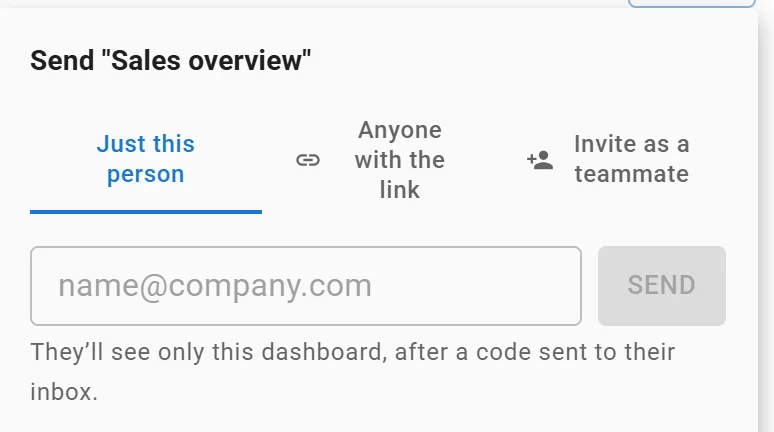
Sending one dashboard to one person: they see only that dashboard. Invented data.
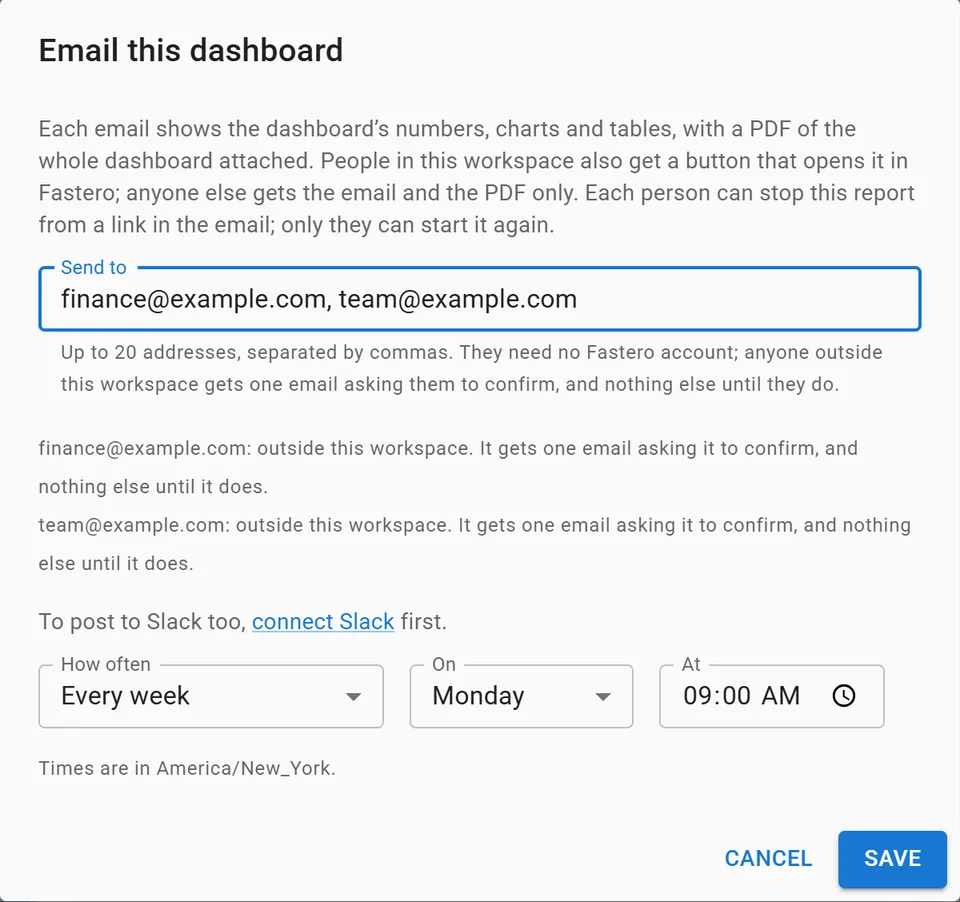
Setting up a weekly email of a dashboard, with invented addresses.
FAQ
How do I share a dashboard with a client without showing them everything?
Give each client their own dashboard, project or account, and share it with a login. A single dashboard filtered by client is risky behind a public link: in Metabase the filter can be removed from the URL.
Can a client view a Looker Studio report without a Google account?
Yes, if you share it by public link: Google says no login is required. Filtering a report by each viewer's email address does need them to sign in, even when the report is public.
Do clients need a Power BI licence to see my reports?
Usually: a Pro or Premium Per User licence, unless the content sits in a Fabric capacity of F64 or above. Publish to web (public, unsecured) and Power BI Embedded in your own app are the exceptions.
What is the cheapest way to share dashboards with clients?
Data Studio is free for creators and viewers, and Metabase public links are free on its open-source edition. In Fastero, guests are viewers, free on every plan. AgencyAnalytics charges $20 per client a month.
Can I white-label a client dashboard?
AgencyAnalytics includes it. Databox sells it as a $200-a-month add-on, Metabase includes it on Pro and Enterprise, Grafana on paid accounts, and Power BI through Embedded. Tableau Cloud lets you change the logo, not the URL. Data Studio and Fastero don't offer it.
Is it safe to send a client a public dashboard link?
Only for numbers you'd be fine seeing forwarded: anyone with the link can open it, and in Data Studio and Power BI the data behind the report can be reached too. Revoke links when a project ends.
Sources
Checked 12 November 2026:
- Data Studio (Google): Data Studio, the rename, Invite others, Ways to share, Filter by email, Schedule delivery, Pro subscription
- Power BI (Microsoft): Pricing, Entra B2B guests, Fabric licences, Publish to web, Embed for your customers, Subscriptions, Azure retail prices
- Tableau: Tableau on Salesforce, Site roles, Licence models, Moving to Tableau Cloud, Subscriptions, User filters
- Metabase: Pricing, Public links, Guest embedding, Row and column security, Subscriptions
- Grafana: Pricing, Shared dashboards, Reporting, Custom branding
- AgencyAnalytics: Pricing, Users, White label
- Databox: Pricing, Share a dashboard, Dashboard notifications
- Fastero: Pricing