 Fastero Dev Team
Power BI's price list fits on one screen. The bill doesn't, because it depends less on who builds reports than on who opens them.
The short answer: Power BI Pro is $14.00 per user a month and Premium Per User (PPU) $24.00, both paid yearly, as of 20 November 2026; Microsoft raised them from $10 and $20 on 1 April 2025. A free account builds reports for yourself but can't share them. Everyone who opens a shared report needs Pro or PPU as well, unless the workspace sits on a Fabric capacity of F64 or larger, where viewers need only a free licence and the Viewer role. F64 costs $8,409.60 a month pay-as-you-go or $5,002.67 on a one-year reservation in East US, so it only beats buying viewers Pro from 358 viewers. Smaller capacities, from $262.80 a month for F2, don't remove viewer licences. Power BI Embedded, for reports inside your own app, starts at $1.0081 an hour, and the app's users need no licence.
Fastero
Connect your database. Ask questions. Get dashboards.
Postgres, BigQuery, Snowflake, and 10+ sources — live-connected, AI-powered, no dashboard builder learning curve.
Try free →Power BI plans and prices
US list prices, checked 20 November 2026. Capacity prices are for the East US region.
| Plan | Price | What it's for | What a viewer of shared content needs |
|---|---|---|---|
| Free | $0 | Building reports for yourself; Power BI Desktop is a free download | Can't share: "Upgrade to Pro or Premium to share reports" |
| Pro | $14.00 a user a month, paid yearly | Publishing and sharing; included in Microsoft 365 E5 and Office 365 E5 | Pro or PPU |
| Premium Per User | $24.00 a user a month, paid yearly ($14.00 add-on for Pro and E5 users) | Models up to 100 GB instead of 1 GB, 48 refreshes a day instead of 8 | PPU |
| Fabric capacity (F SKUs) | F2 from $262.80 a month; F64 $8,409.60, or $5,002.67 reserved | An organisation's shared pool, billed through Azure | Below F64: Pro or PPU. F64 and up: a free licence and the Viewer role |
| Premium capacity (P SKUs) | Not on the price list | Being retired | Free licence and Viewer role, from P1 |
| Power BI Embedded (A SKUs) | A1 from $1.0081 an hour | Reports inside your own app | Nothing, in the "app owns data" model |
Authors need Pro on every capacity. P capacities "are available only to customers who have them on an active Enterprise Agreement" and are being retired, so new buyers get F SKUs.
Who needs a paid licence to view a report
Where the report is stored decides it:
- A Pro workspace (the default): every viewer needs Pro or PPU.
- A PPU workspace: "to collaborate and share content in a PPU workspace, all users need a PPU license." A colleague with only Pro can't open it.
- A Fabric capacity from F2 to F32: no change for viewers. "On F SKUs smaller than F64, each user viewing Power BI content must have Pro, PPU, or an individual trial."
- F64 or larger, or P1 and up: "On F64 or larger, users with only a Free license and a viewer role can view Power BI content." Any other workspace role still needs Pro, and the semantic model must sit on the capacity too: "both the report and its underlying semantic model must be in Premium capacity."
- An app you build ("app owns data"): the pricing page lists "Consume Power BI content without a paid per-user license (App Owns Data scenario only)". Embedding in SharePoint, Teams or an internal portal follows the rules above.
Fabric capacity prices (F SKUs)
Azure bills Fabric per capacity unit (CU) an hour: $0.18 in East US, unchanged since November 2023 in Azure's price list. Pricing is regional, and "Azure bills per second with a one-minute minimum." A one-year reservation costs $938 per CU, which Microsoft sells as "saving 40.5% over pay-as-you-go prices". Our calculator reproduces that 40.5%. A month here is 730 hours (24 × 365 / 12):
| F SKU | Capacity units | Pay-as-you-go, a month | 1-year reservation, a month |
|---|---|---|---|
| F2 | 2 | $262.80 | $156.33 |
| F4 | 4 | $525.60 | $312.67 |
| F8 | 8 | $1,051.20 | $625.33 |
| F16 | 16 | $2,102.40 | $1,250.67 |
| F32 | 32 | $4,204.80 | $2,501.33 |
| F64 | 64 | $8,409.60 | $5,002.67 |
| F128 | 128 | $16,819.20 | $10,005.33 |
Pay-as-you-go capacity can be paused. The free Fabric trial lasts 60 days; Microsoft's pages disagree on its size: "includes F64 capacity equivalent" on one, "either an F4 or F64 SKU" on another.
Power BI Embedded pricing
Power BI Embedded is the Azure offer for putting reports in your own product. A SKUs are billed by the hour, with no commitment, and can be paused:
| A SKU | Same compute as | Per hour | Running all month |
|---|---|---|---|
| A1 | F8 | $1.0081 | $735.91 |
| A2 | F16 | $2.0081 | $1,465.91 |
| A3 | F32 | $4.0242 | $2,937.67 |
| A4 | F64 / P1 | $8.0565 | $5,881.24 |
| A5 | F128 / P2 | $16.1210 | $11,768.33 |
| A6 | F256 / P3 | $32.2506 | $23,542.94 |
An F SKU of any size also serves "app owns data" embedding, and a reserved F8 ($625.33) costs less than A1 running all month for the same compute. A1 comes out cheaper if it runs fewer than 620 hours a month and is paused the rest. Either way you build the app and its login. See Power BI Embedded vs Tableau Embedded, and for clients outside your company, how to share a Power BI report with external users.
Power BI price changes since 2024
- 1 April 2025: Pro went from $10 to $14 a user a month and PPU from $20 to $24, as The Register reported; Microsoft's blog confirms "we updated pricing for commercial customers of Teams Phone and Power BI" that day. It was announced on 12 November 2024; existing customers kept the old price until renewal, and Power BI bought through Microsoft 365 E5 or Office 365 E5 on annual terms with annual billing didn't change.
- 1 July 2025: increases for US government clouds (GCC, GCC High and DoD) began, phased over several years.
- 1 April 2026: Azure's price list carries a three-year Fabric reservation at $2,814 per CU, the same monthly price as one year.
- 1 October 2026: Azure's price list adds on-demand billing, which "Fabric zero-provisioned (F0)" uses by default: Power BI work costs $0.54 per CU an hour, three times the provisioned rate. Microsoft's licensing page doesn't mention F0, so don't plan free viewers on it.
What three example teams pay
We wrote a small calculator in Python 3.14.3, in a venv, that reads Microsoft's own price list (the Azure Retail Prices API, saved on 20 November 2026) and the per-user prices above. The team sizes are examples; the prices are list prices before tax and discounts:
$ python power_bi_cost.py fabric-eastus.json embedded-eastus.json
Fabric pay-as-you-go: $0.18 per CU an hour; 1-year reservation: $938.00 per CU a year
Reservation saving vs pay-as-you-go: 40.5%
...
F64 reserved costs less than Pro for every viewer from 358 viewers
F64 pay-as-you-go costs less than Pro for every viewer from 601 viewers
209 PPU licences cost more a month than a reserved F64 ($5,002.67)| Option, a month | 3 editors + 20 viewers | 10 editors + 200 viewers | 25 editors + 1,000 viewers |
|---|---|---|---|
| Power BI Pro for everyone | $322.00 | $2,940.00 | $14,350.00 |
| Premium Per User for everyone | $552.00 | $5,040.00 | $24,600.00 |
| F64 reserved + Pro for editors | $5,044.67 | $5,142.67 | $5,352.67 |
| F64 pay-as-you-go + Pro for editors | $8,451.60 | $8,549.60 | $8,759.60 |
| Fastero Pro (editors only) | $60.00 | $200.00 | $500.00 |
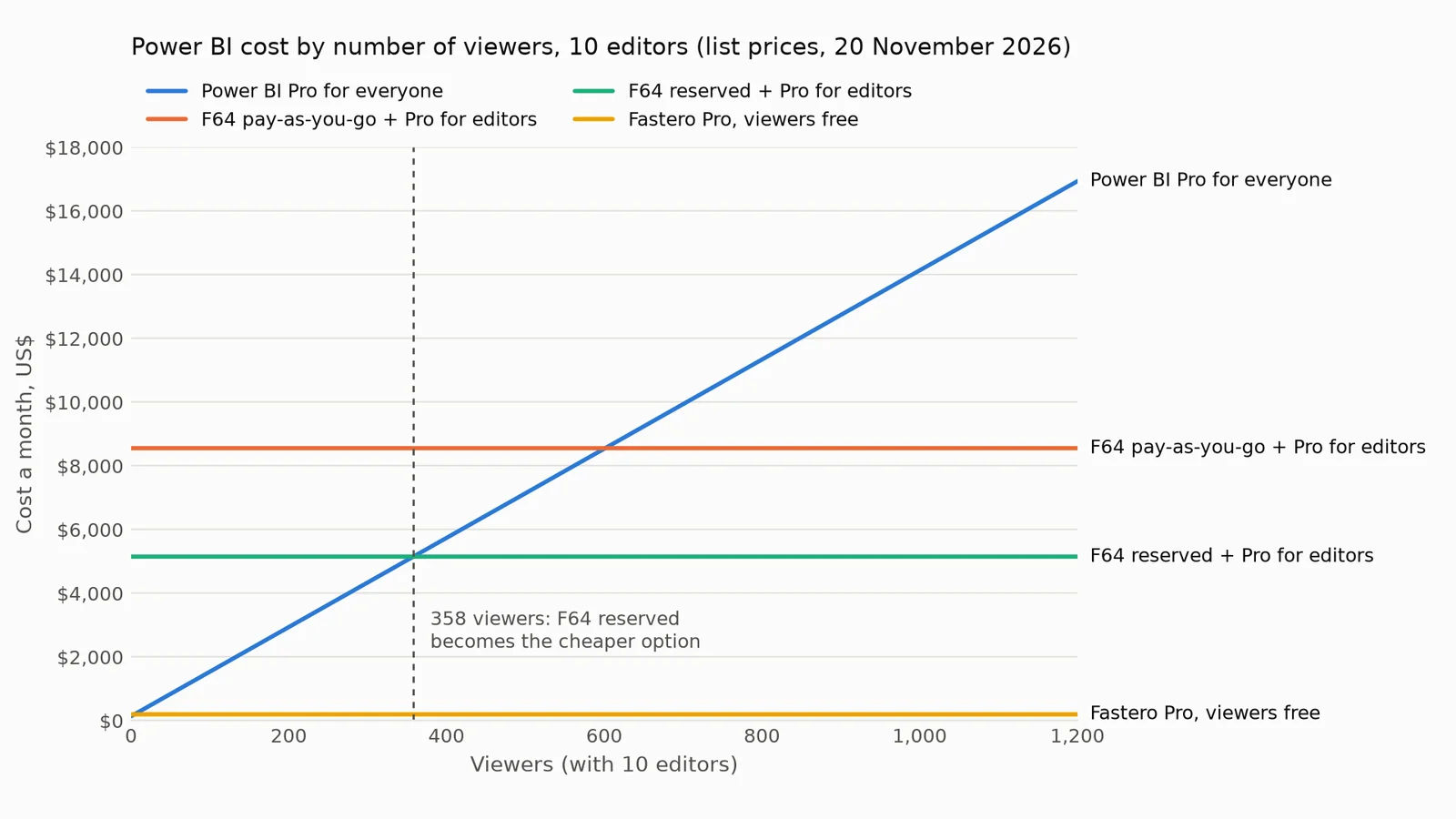
Monthly cost by number of viewers for a team of 10 editors, at list prices on 20 November 2026
What the numbers say:
- Up to a few hundred viewers, Pro for everyone is the cheapest Power BI: $2,940 for the 10 + 200 team, against $5,142.67 with a reserved F64.
- From 358 viewers, a reserved F64 wins, and the gap grows fast: the 1,000-viewer team saves $8,997.33 a month with it. Pay-as-you-go F64 only wins from 601 viewers.
- PPU's own threshold has moved. Microsoft's licensing page still says PPU "is more cost effective when Power BI Premium features are needed for fewer than 250 users"; at $24, 209 PPU licences already cost more than a reserved F64.
- Per editor, Power BI is cheaper than Fastero. Power BI Pro is $14 an editor; Fastero Pro is $20. Fastero comes out lower in this table only because its viewers are free.
Connect any database. Ask in plain English.
Start free →When Power BI is the right buy
- Your company already has Microsoft 365 E5: Pro is included, so sharing among licensed colleagues costs nothing extra.
- Your analysts live in Excel, Power Query and DAX, and the people who read the reports already have Pro.
- You have more than about 358 viewers in one organisation and want Fabric's lakehouses and pipelines as well.
For other tools in the same price range, see the best Power BI alternatives and Power BI vs Tableau.
When most of the people are viewers
Fastero is an AI and data platform where people and AI agents work together on a team's data. Its pricing answers the question this post keeps coming back to, who pays to view, with no capacity to size:
- Viewers are free on every plan, with no limit on how many you invite and no F64 to reach.
- Pro is $20 per editor a month, counting owners, admins and editors; the Free plan is $0 with no end date. A new account starts with $20 of AI and 14 days of Pro.
- Dashboards run on your own data: Postgres, MySQL, SQL Server, Redshift, Oracle and BigQuery, plus CSV and Excel files.
- Sharing outside the team is a public link that can be turned off, or a scheduled email with the numbers, charts and a PDF.
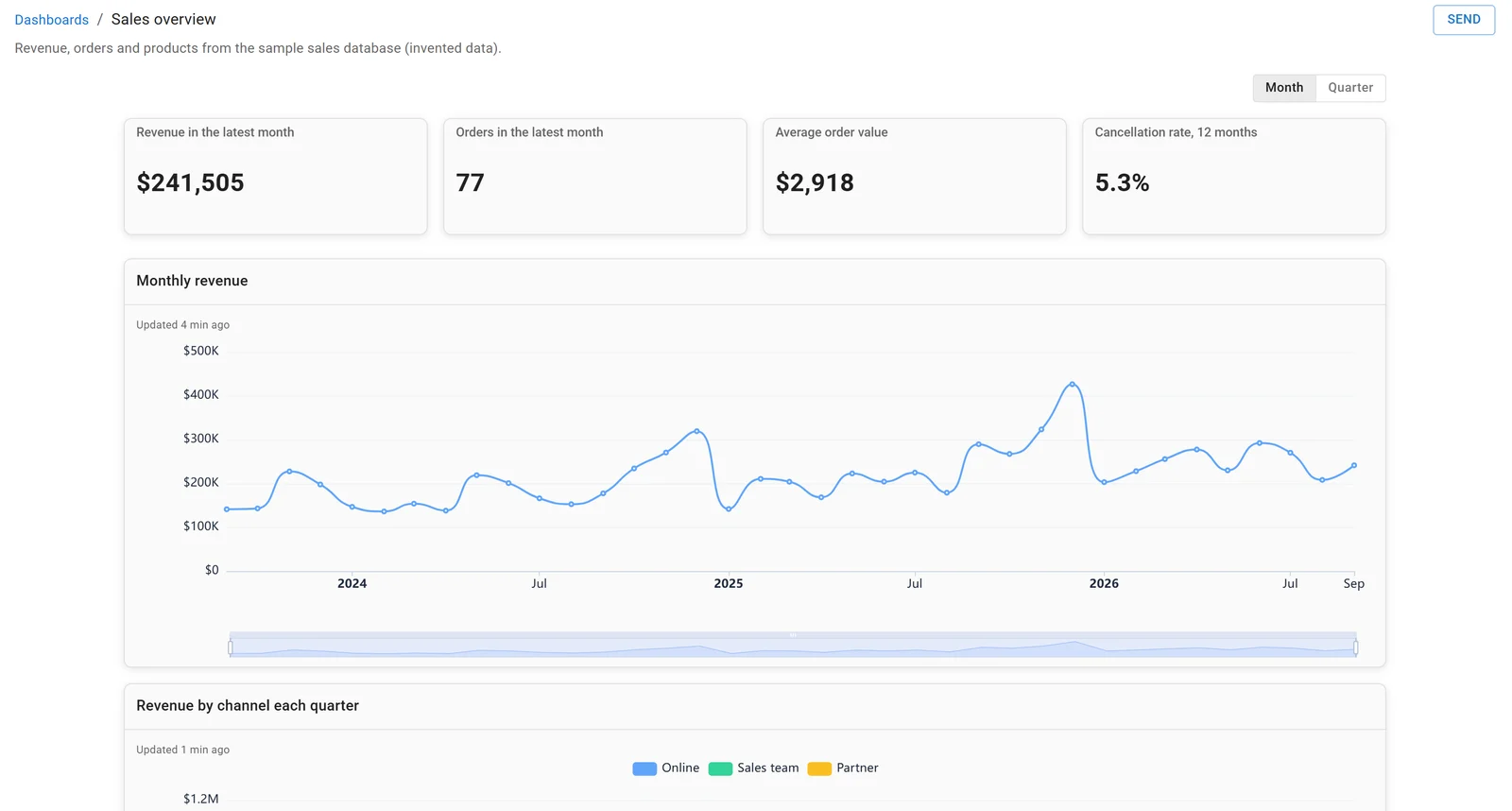
A dashboard in Fastero, built on the sample sales database. Invented data.
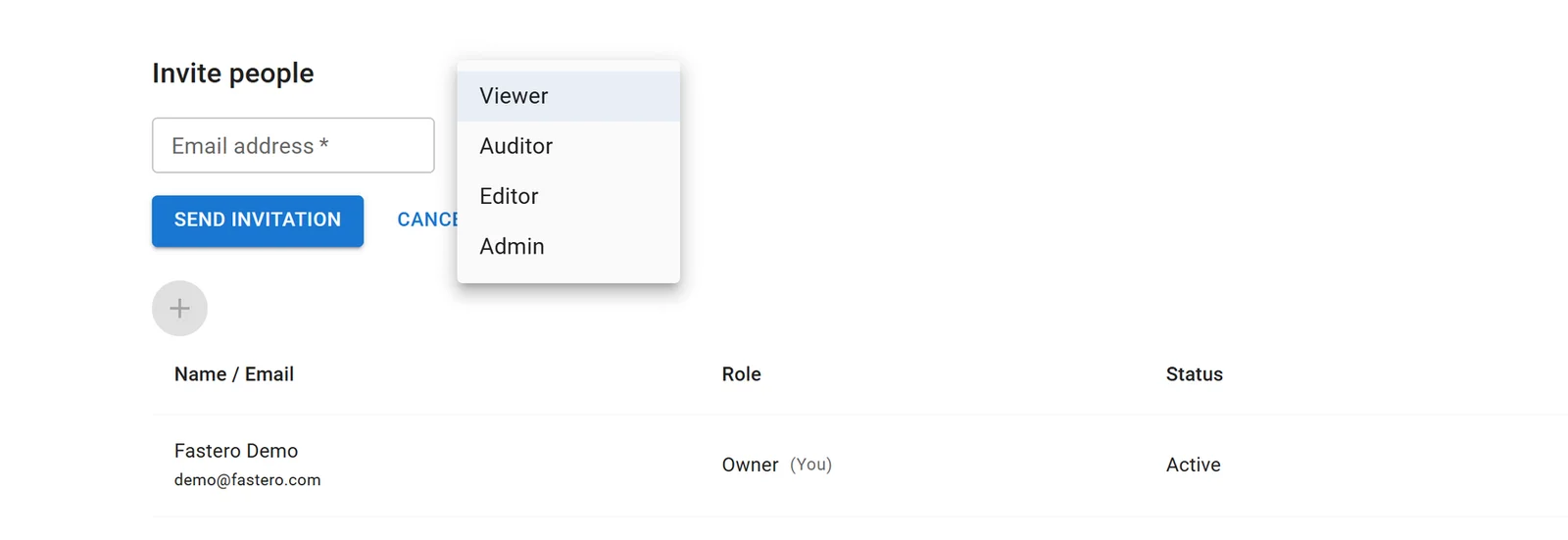
Inviting someone to a Fastero workspace. Viewers read everything shared with them and don't count as paid editors.
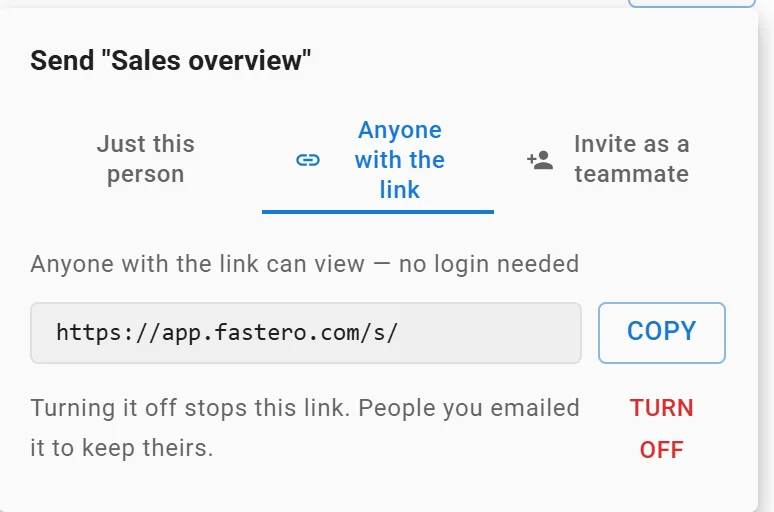
A dashboard's public link: anyone with it can view without a login, and turning it off stops it. Link shortened.
It won't open a .pbix file or run DAX, so a team with years of Power BI models has rebuilding to do.
FAQ
How much is Power BI Pro per month?
$14.00 per user a month, paid yearly, in the US, as of 20 November 2026. It was $10 until 1 April 2025. Pro is also included in Microsoft 365 E5 and Office 365 E5.
Is Power BI free?
Power BI Desktop is a free download, and a free account can build reports for its own use. Sharing takes a Pro or PPU licence for the author, and for every viewer too unless the report sits on a Fabric capacity of F64 or larger.
Do viewers need a Power BI Pro licence?
Yes, unless the report and its semantic model sit on a Fabric capacity of F64 or larger, or a P1 or larger, and the viewer has the Viewer role. Users of an app you build with Power BI Embedded ("app owns data") need no licence.
What's the difference between Power BI Pro and Premium Per User?
PPU costs $24 instead of $14 and adds Premium features per person: models up to 100 GB instead of 1 GB and 48 scheduled refreshes a day instead of 8. Content in a PPU workspace can only be viewed by other PPU users.
How much does Power BI Embedded cost?
A1, the smallest A SKU, is $1.0081 an hour in East US, $735.91 for a full month, and can be paused. F SKUs also serve embedding, from $156.33 a month for a reserved F2. The app's users need no Power BI licence.
Sources
Checked on 20 November 2026:
- Microsoft: Power BI pricing, Microsoft Fabric pricing, Power BI Embedded pricing, Azure Retail Prices API (services Microsoft Fabric and Power BI Embedded, East US)
- Microsoft Learn: Microsoft Fabric licenses, Power BI service features by license type, Capacity and SKUs in Power BI embedded analytics, Share Power BI reports and dashboards
- Price changes: Licensing and pricing updates for Teams Phone and Power BI (Microsoft, 3 April 2025), Microsoft ups the price for Power BI Pro by 40 percent (The Register, 2 April 2025)
- Fastero: Pricing
- Our calculator: Python 3.14.3, run 20 November 2026 on the saved price list
Try Fastero free: build dashboards on your own data and invite as many viewers as you like, free. No credit card required.