 Fastero Dev Team
On 11 April 2026 Google announced that Looker Studio was going back to its old name, Data Studio, so Looker Studio Pro is now Data Studio Pro. Its price is one line on Google's page, and for an agency the last two words of it, "per project", decide the bill.
The short answer: Data Studio Pro, formerly Looker Studio Pro, costs "$9 per user per project per month" (checked 20 November 2026). You buy a licence for each person who creates, edits or manages Pro content and pay monthly for every licence "regardless of whether or not those licenses are used", through the Google Cloud billing account linked to the subscription's project. People who only view Pro reports need no licence. Pro adds reports owned by your organisation rather than whoever made them, team workspaces, up to 200 delivery schedules per report sent as often as hourly to email, Google Chat or Slack, no daily email quota, Gemini features in Preview, and Google Cloud support if you also buy a support plan. To buy it you need a Google Workspace or Cloud Identity managed account, so a personal gmail.com account can't subscribe. The trial lasts 30 days with no user limit. For an agency with 3 staff, Pro costs $27 a month for any number of clients if the reports live in the agency's own project, and $810 if the same 3 people are licensed inside 30 client projects.
Fastero
Connect your database. Ask questions. Get dashboards.
Postgres, BigQuery, Snowflake, and 10+ sources — live-connected, AI-powered, no dashboard builder learning curve.
Try free →Data Studio Pro price and billing (checked 20 November 2026)
| Data Studio (free) | Data Studio Pro | |
|---|---|---|
| Price | "No charge" for creators and report viewers | $9 per user per project per month |
| Who needs a licence | Nobody | Each person who creates, edits or manages content in Pro workspaces |
| People who only view | Free | Free, with "the appropriate sharing permissions" |
| Billing | None | Monthly, per licence bought, to a Cloud Billing account linked to the project |
| Trial | Not needed | 30 days, any number of users; billing starts automatically after |
| Support | Community forum | Cloud Customer Care, which also needs a Google Cloud support plan |
"Every Data Studio Pro subscription is associated with one (and only one) Google Cloud project", and the price is per project, so a person who works in two subscriptions needs a licence in each. Google says the price "varies depending on the length of the customer's subscription" but publishes only the $9. Large organisations can instead have an organisation-wide subscription billed by monthly active users, which Google Cloud's sales team sets up.
What Pro adds to free Data Studio (checked 20 November 2026)
| Feature | Data Studio (free) | Data Studio Pro |
|---|---|---|
| Who owns reports and data sources | The person who made them | Your organisation, through the Cloud project |
| Team workspaces | No | Yes, with roles from Viewer to Manager |
| Delivery schedules per report | 1 | Up to 200 |
| Most frequent schedule | Once a day | Once an hour |
| Scheduled emails a day / a month | 200 / 800 (personal account); 500 / 3,000 (Workspace) | Unlimited |
| Send to Google Chat or Slack | No | Yes |
| Custom subject, Send now, filter by recipient's email | No | Yes |
| Let a viewer create their own schedules | No | Yes ("Can create schedules") |
| Alerts when a chart meets a condition | No | Yes |
| Gemini: calculated fields from a prompt, charts into Slides | No | Yes, in Preview |
| Customer-managed encryption keys, data residency | No | Yes |
Two catches. Pro limits apply only to Pro content: "Any reports in the Owned by me folder are considered to be personal reports and will be subject to quotas" until you move them into a team workspace or your Sandbox. And the Gemini features are "available at no additional cost for a limited time only"; Google says that after the Preview "you may be required to purchase" them.
Some limits stay the same on both: a schedule takes "no more than 50 recipient addresses", follows "your operating system's timezone", and attaches a PDF of the pages you pick.
Who can buy Data Studio Pro, and how to start the trial
Google lists the requirements for a self-service subscription:
- "You must be a Google Workspace or Cloud Identity user with a Managed Google account to subscribe to or use Data Studio Pro." A freelancer on a personal Gmail address can use free Data Studio, but not Pro.
- A Google Cloud project that your organisation owns, linked to a billing account, not already used by another Pro subscription.
- The Owner or Looker Studio Pro Manager role on that project. The role still carries the old name.
You can subscribe from Data Studio itself (Pro subscription in the left menu, then Add subscription), from the Google Cloud console, or from the Google Workspace Admin console. "You can cancel your Data Studio Pro subscription at any time during the trial and you won't be charged."
Data Studio Pro for agencies: whose project holds the reports
An agency has two ways to set Pro up, and they differ by a factor of the client count:
- In the agency's project. One subscription, licences for your own staff, every client's reports in your team workspaces. Clients view free. The reports belong to your organisation, not the client's.
- In each client's project. The client owns the subscription, the reports and the bill. Google says "A partner cannot directly purchase or initiate a new Data Studio Pro subscription for a project that resides in a client's separate Google Cloud organization." The client subscribes, and licenses your staff by enabling Trusted Orgs, which needs "an active support contract with Cloud Customer Care" and a support case, and "You can't disable the trusted organizations feature after enabling it". The bill can go to a billing account you manage, such as a reseller sub-billing account.
We put both into a short Python script (Python 3.14.3, in a venv) for an example agency of 3 staff with 10 or 30 clients, on the prices saved 20 November 2026. Standard Support, the cheapest paid Google Cloud support plan, has a "Minimum spend of $29.00" a month or 3% of Cloud charges; the script counts the minimum for each client:
$ python agency_cost.py
Agency with 3 staff building reports; client viewers need no licence in either tool

Setup | 10 clients: a month / a year / per client a month | 30 clients: a month / a year / per client a month
Free Data Studio | $0.00 / $0.00 / $0.00 | $0.00 / $0.00 / $0.00
Pro in the agency's own project (3 licences) | $27.00 / $324.00 / $2.70 | $27.00 / $324.00 / $0.90
Pro in each client's project, staff licensed in each | $270.00 / $3,240.00 / $27.00 | $810.00 / $9,720.00 / $27.00
  + Standard Support per client for Trusted Orgs (at the $29 minimum) | $560.00 / $6,720.00 / $56.00 | $1,680.00 / $20,160.00 / $56.00
Fastero Free (viewers free) | $0.00 / $0.00 / $0.00 | $0.00 / $0.00 / $0.00
Fastero Pro, 3 editors (viewers free) | $60.00 / $720.00 / $6.00 | $60.00 / $720.00 / $2.00
What that means for an agency:
- Pro in your own project is cheap: $27 a month whatever the client count, under a dollar a client at 30.
- Client-owned Pro costs $27 a client a month in licences for a 3-person team, and $56 with the cheapest support plan, unless the client already has one.
- Fastero Pro with 3 editors, at $60, costs more than Data Studio Pro in your own project. What it buys is different, covered below.
Partner connectors aren't in the table. Google's connector spec has a fee type PAID, which "Indicates the user will need to pay to use the connector", so check a connector's own pricing before you quote a client.
A monthly client report, and what Pro changes about sending it
To show the job Pro is bought for, we built the usual one-page client report: date range, four scorecards against last month, a daily trend with September for comparison, two breakdowns, a top-products table and four lines of commentary. It's a local HTML page on invented data (Fastero's sample sales file), built with DuckDB 2.0.0 and matplotlib 3.11.2, not a Data Studio report. The scorecards come from one query:
select date_trunc('month', order_date) as month,
       sum(revenue)                     as revenue,
       count(*)                         as orders,
       sum(revenue) / count(*)          as avg_order_value,
       sum(quantity)                    as units
from sales
where order_date >= date '2026-09-01' and order_date < date '2026-11-01'
group by 1 order by 1
KPI query, September and October 2026:
2026-09 revenue 64,819.38 orders 227 avg order 285.55 units 824
2026-10 revenue 57,517.58 orders 202 avg order 284.74 units 811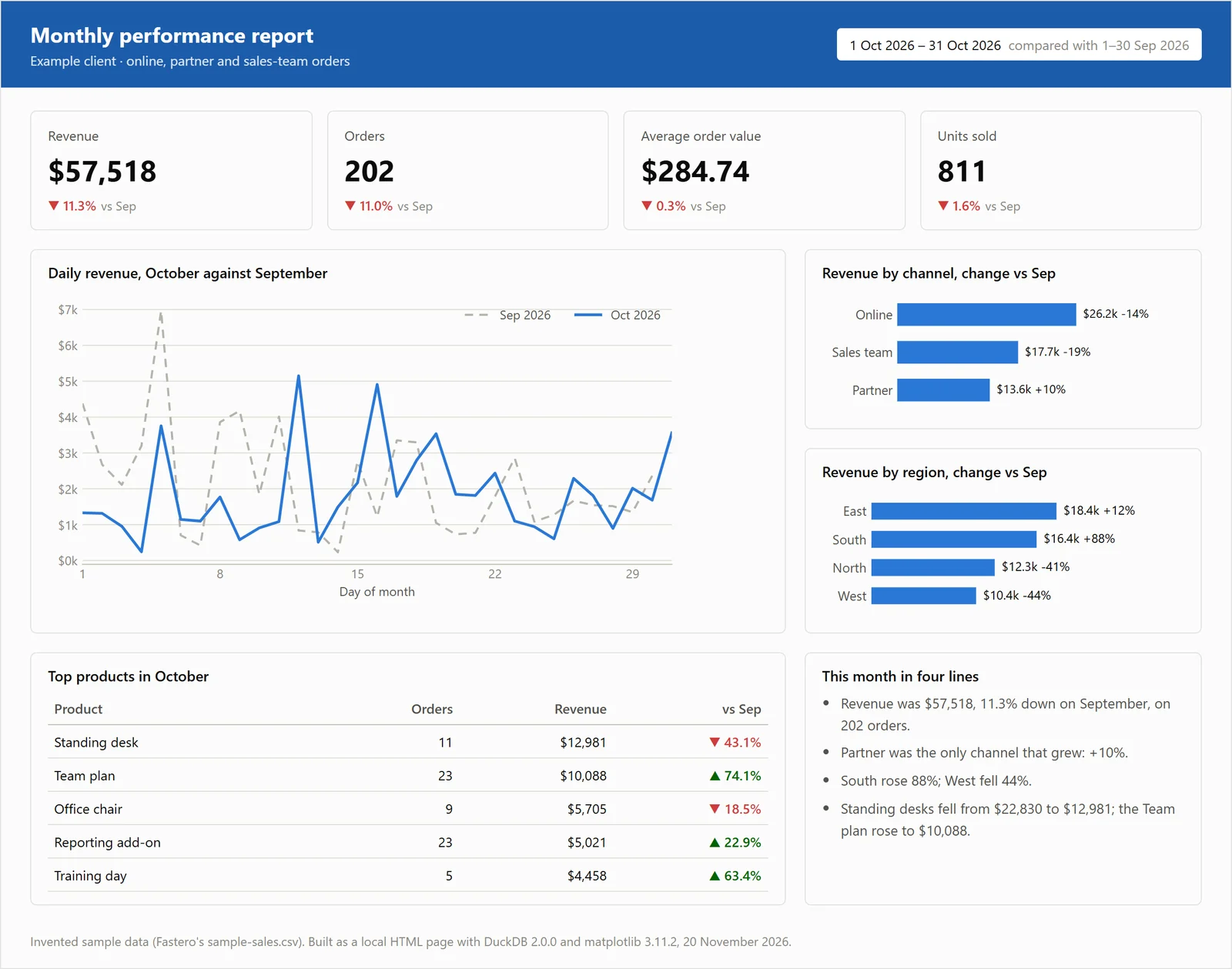
A typical one-page client report layout, built as a local HTML page on invented sample data, 20 November 2026
In Data Studio, sending this every month is a delivery schedule. On the free plan a report gets one schedule, at most daily. On Pro the same report can carry a schedule per client contact, each with its own subject and message, and "Filter by recipient email address" sends each person only their own rows, once every data source has an email field.
Connect any database. Ask in plain English.
Start free →Limits that matter for client reports (checked 20 November 2026)
- Sign-in. "To directly invite people to access your report, they must have a Google Account." Link sharing needs none, but "any embedded data sources within that report will also be accessible to anyone who has the link." A Workspace admin may block sharing outside your domain: "you'll see an error message if you try to share externally."
- Google Analytics quotas. Reports on GA4 "are subject to Google Analytics Data API (GA4) quotas" and may show an error when they run out. A standard property gets 40,000 core tokens an hour, 14,000 per project per property per hour, 200,000 a day and 10 concurrent requests. Google's Pro pages don't mention raising them.
- Google Chat delivery goes only "to Google Chat users who are in your organization", so for clients it's email or Slack.
For what the free plan can do on its own, see the best free alternatives to Looker Studio and Power BI vs Looker Studio; for what goes in the report, our client report template.
When free Data Studio is enough, and when Pro earns its $9
- Stay free if each client gets one monthly PDF and a link, from Google Ads, GA4, Search Console and Sheets.
- Buy Pro when a report needs more than one schedule, hourly sends, Slack, or per-recipient filtering, or when you can't risk a departing employee owning the client's reports.
- Look elsewhere when clients need their own login without a Google account, or when the numbers live in a client's database. How to share a dashboard with clients compares eight tools on exactly that, and sharing a Power BI report with external users covers Microsoft's side.
When the client's numbers live in a database
Fastero is an AI and data platform where people and AI agents work together on a team's data. It connects to Postgres, MySQL, SQL Server, Redshift, Oracle and BigQuery, plus CSV and Excel files, and hands the result to clients like this:
- "Just this person" in the Send dialog sends one dashboard to an email address. That person sees only that dashboard, after a code sent to their inbox.
- Guests on one project: invite a client who isn't in your workspace to one project and they become a guest, a viewer of that project and nothing else. They don't see the workspace's other projects.
- "Anyone with the link" makes a public link, and it can be turned off.
- A scheduled email, daily, weekly or monthly, with the numbers, charts and tables plus a PDF. An address outside your workspace confirms first.
- Viewers are free on every plan. Free is $0 with no end date; Pro is $20 per editor a month.
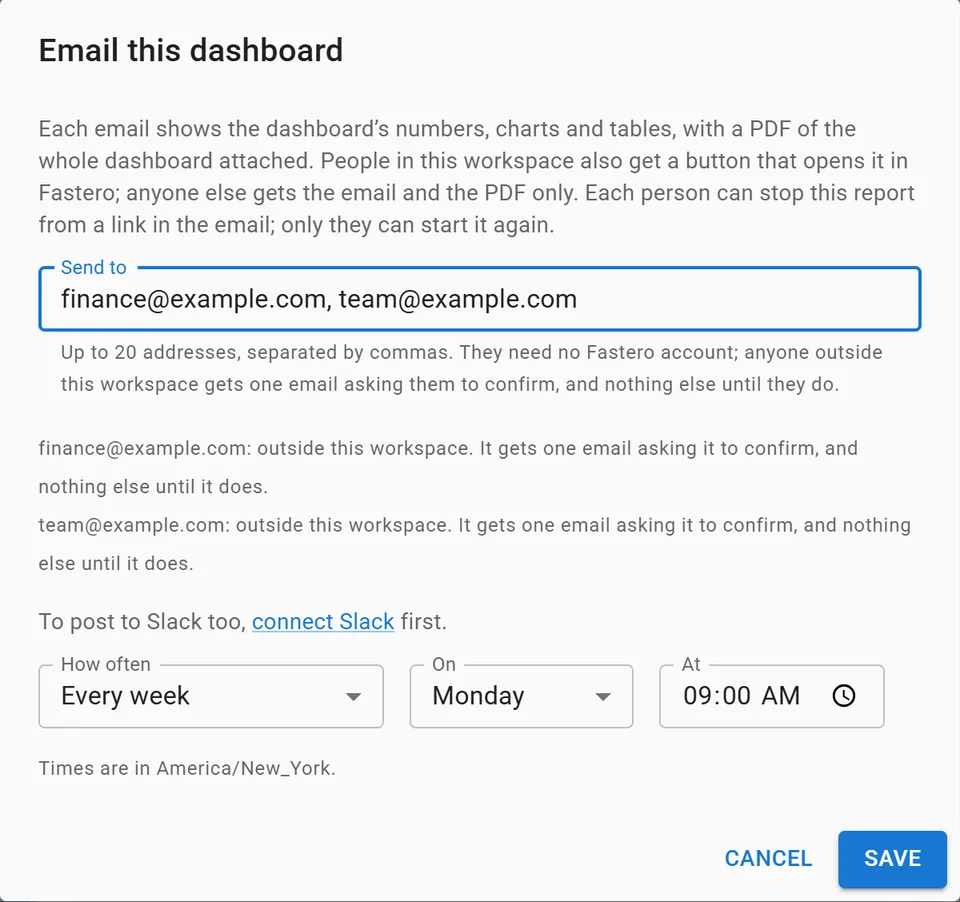
Setting up a weekly email of a dashboard, with invented addresses.
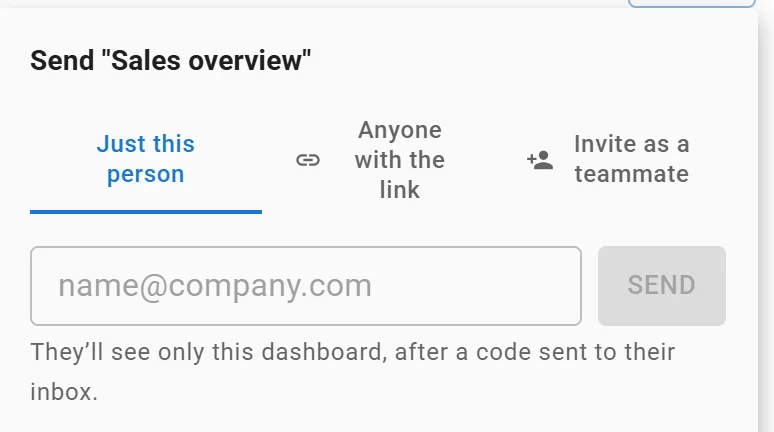
Sending one dashboard to one person: they see only that dashboard. Invented data.
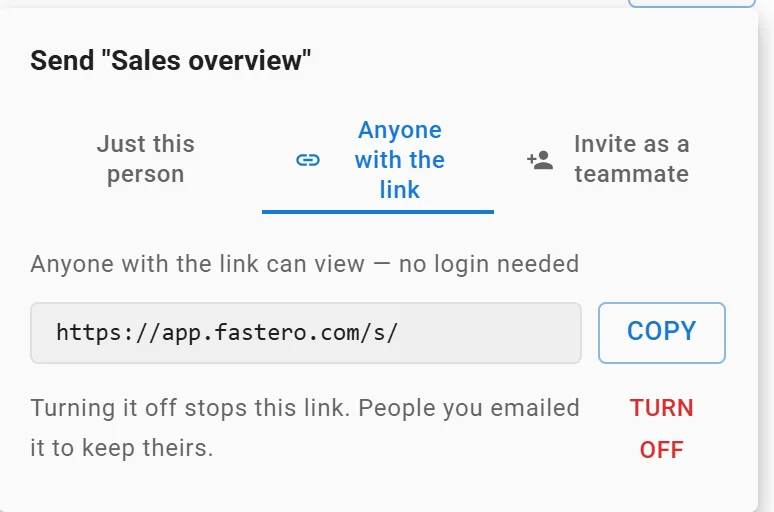
A dashboard's public link: anyone with it can view without a login, and turning it off stops it. Link shortened.
It doesn't white-label: clients see Fastero's name. If a client's reporting is all Google Ads and GA4, Data Studio's own Google connectors are the shorter path.
FAQ
How much does Looker Studio Pro cost?
$9 per user per project per month, as of 20 November 2026, under its new name Data Studio Pro. You pay for every licence in the subscription, used or not, through Google Cloud billing; people who only view reports need no licence.
Is Looker Studio free?
Yes. Google says Data Studio, as Looker Studio is now called, "is available at no charge for creators and report viewers." Pro is the paid upgrade for teams, and some partner connectors charge their own fees.
What is the difference between Looker Studio and Looker Studio Pro?
Pro keeps everything in the free version and makes reports belong to your organisation through a Google Cloud project. It adds team workspaces, up to 200 schedules per report, hourly, with Slack and Google Chat delivery, alerts, Gemini features and Cloud support.
Do viewers need a Looker Studio Pro licence?
No. Only people who create, edit or manage Pro content need a licence. Viewers need sharing permission on the report, and a Google account unless you share by link.
Can I get Looker Studio Pro with a Gmail account?
No. Google requires "a Google Workspace or Cloud Identity user with a Managed Google account to subscribe to or use Data Studio Pro", plus a Google Cloud project your organisation owns, linked to a billing account.
Is there a free trial of Looker Studio Pro?
Yes, 30 days, with no limit on how many users you add. Billing starts automatically when it ends unless you cancel. Eligible Looker customers also get at least 1,000 free Pro licences, though not for Looker instances created, or contracts signed, after 1 August 2026.
Sources
Checked on 20 November 2026:
- Google Cloud: Data Studio product and pricing page, Data Studio returns as new home for Data Cloud assets (11 April 2026), Google Cloud support pricing
- Data Studio docs: About Data Studio Pro, Pro subscription overview, Start a new Pro subscription, Add people to the subscription, Enable Trusted Orgs, About team workspaces, Schedule report delivery, Invite others to your reports, Gemini in Data Studio, Connect to Google Analytics
- Google developers: Community Connectors, Connector manifest reference, Google Analytics Data API quotas
- Fastero: Pricing
- Our work: agency cost script and the example report, Python 3.14.3, DuckDB 2.0.0 and matplotlib 3.11.2, run 20 November 2026
Try Fastero free: deliver your client's dashboard with their own login, nothing to host. No credit card required.