 Fastero Dev Team
Gemini CLI is Google's open-source terminal coding agent. It launched in June 2025 with a free tier of 1,000 requests a day on a personal Google account and passed "100,000 GitHub stars", by Google's count. In 2026 Google moved almost everyone off it. The tool still ships every week, but who it's for has changed twice.
The short answer: since 18 June 2026, Gemini CLI no longer serves free accounts (Gemini Code Assist for individuals) or Google AI Pro and Ultra subscribers; they use Antigravity CLI (agy) instead. Gemini CLI is now "Designed for Gemini Code Assist Standard / Enterprise licenses" and Code Assist for GitHub on Google Cloud, plus paid Gemini API and Vertex AI keys. And since 9 October 2026 Google no longer sells new Code Assist subscriptions, so in practice it's for companies that already have one, until those subscriptions end (the last renewals are in 2027). It installs with npx @google/gemini-cli (Node.js 20 or later), reads GEMINI.md files for instructions, and takes MCP servers in ~/.gemini/settings.json. The current release is 0.68.0, from 10 November 2026. Checked 12 November 2026.
Fastero
Point Claude at your database.
Add Fastero to claude.ai or Claude Code. Claude builds the dashboard, deploys the app or publishes a live page, and your team opens it in Fastero.
Try free →What changed, and when
| Date | What happened |
|---|---|
| 25 June 2025 | Gemini CLI 0.1.0 published on npm |
| Until spring 2026 | Free tier: "60 requests/min and 1,000 requests/day with personal Google account" |
| 19 May 2026 | Google announces Antigravity CLI, "available to everyone" |
| 18 June 2026 | Gemini CLI and the Code Assist IDE extensions stop serving free individuals, Google AI Pro and Ultra |
| 4 September 2026 | New Code Assist subscriptions only through Google Cloud sales for billing accounts without one |
| 9 October 2026 | No new Code Assist Standard or Enterprise subscriptions; new Gemini Enterprise plans no longer include Code Assist |
| 31 January 2027 | Last auto-renewal of annual Code Assist subscriptions, and last day to add licences |
| 31 March 2027 | Existing Gemini Enterprise subscriptions lose their Code Assist entitlement |
| 31 December 2027 | Last auto-renewal of monthly Code Assist subscriptions |
Google's reason, from the May announcement: users "now require multiple agents communicating with each other", so it put one agent harness behind Antigravity's app and CLI. Antigravity CLI is "Built in Go" and keeps "Agent Skills, Hooks, Subagents, and Extensions (now as Antigravity plugins)", though Google warned "there won't be 1:1 feature parity right out of the gate".
The model story changed too. In May Google promised enterprise users "access to the latest Gemini models"; by October its Code Assist page said "Support will be limited to the Gemini 3.x model family only". The README now says Gemini CLI is "Not optimized for Gemini 4+" and adds: "Don't use Gemini CLI to benchmark Gemini models".
Who can still use Gemini CLI
| You have | Gemini CLI | Use instead |
|---|---|---|
| A free personal Google account | No: "Login with Google" no longer works | Antigravity CLI, free with a weekly quota |
| Google AI Pro or Ultra | No | Antigravity CLI, with your plan's limits |
| A Code Assist Standard or Enterprise licence | Yes, until your subscription ends | Antigravity through Gemini Enterprise |
| Code Assist for GitHub through Google Cloud | Yes | |
| A paid Gemini API key or Vertex AI project | Yes: it "will remain accessible via paid Gemini and Gemini Enterprise Agent Platform API keys" | Antigravity CLI with a Google Cloud project |
| A company starting today | Can't buy Code Assist since 9 October 2026 | Antigravity, included in Gemini Enterprise editions |
Gemini Code Assist itself is covered in our Gemini Code Assist guide.
Free limits before and now
| Account | Before 18 June 2026 | Now (12 November 2026) |
|---|---|---|
| Personal Google account | 60 requests a minute, 1,000 a day | Not served |
| Google AI Pro / Ultra | 1,500 / 2,000 requests a day | Not served |
| Unpaid Gemini API key | 1,000 a day "with Gemini 3 (mix of flash and pro)" (April 2026 README) | Unclear, see below |
| Code Assist Standard / Enterprise | 1,500 / 2,000 requests per user a day | The same, for existing subscriptions |
Google's own pages disagree on the unpaid API key. The README says "No free tier or Google AI plans". The quota page, under a banner saying unpaid users were replaced on 18 June, still lists 250 requests a day for an unpaid key, Flash models only, which is also lower than the README's old figure. We couldn't test it without an API key, so plan on paying. Code Assist limits are shared: "Quotas for requests from Gemini Code Assist agent mode and Gemini CLI are combined", and one prompt can use several requests.
Install Gemini CLI
Google's supported methods:
npx @google/gemini-cli            # run without installing
npm install -g @google/gemini-cli # install globally
brew install gemini-cli           # macOS and Linux
It needs Node.js 20 or later; Google recommends macOS 15+, Windows 11 24H2+ or Ubuntu 20.04+, and 4 GB of RAM for short sessions. Stable releases come out on Tuesdays at 20:00 UTC (@latest), previews at 23:59 UTC (@preview), and nightlies daily.
We installed it into a scratch folder (not globally) and ran it with an empty home folder, so nothing was signed in:
$ npm install @google/gemini-cli
$ npx gemini --version
0.68.0

$ npx gemini --help
Usage: gemini [options] [command]

Gemini CLI - Defaults to interactive mode. Use -p/--prompt for non-interactive (headless) mode.

Commands:
  gemini mcp                   Manage MCP servers
  gemini extensions <command>  Manage Gemini CLI extensions.  [aliases: extension]
  gemini skills <command>      Manage agent skills.  [aliases: skill]
  gemini hooks <command>       Manage Gemini CLI hooks.  [aliases: hook]
  gemini gemma                 Manage local Gemma model routing
  gemini models [command]      Manage or list Gemini models.
...
  -p, --prompt                    Run in non-interactive (headless) mode with the given prompt. Appended to input on stdin (if any).  [string]
  -w, --worktree                  Start Gemini in a new git worktree. If no name is provided, one is generated automatically.  [string]
  -s, --sandbox                   Run in sandbox?  [boolean]
      --approval-mode             Set the approval mode: default (prompt for approval), auto_edit (auto-approve edit tools), yolo (auto-approve all tools), plan (read-only mode)  [string] [choices: "default", "auto_edit", "yolo", "plan"]
...

$ npx gemini -p "hello"
Please set an Auth method in your ...\.gemini\settings.json or specify one of the following environment variables before running: GEMINI_API_KEY, GOOGLE_GENAI_USE_VERTEXAI, GOOGLE_GENAI_USE_GCA
Authentication options
| Method | How | Who it suits now |
|---|---|---|
| Sign in with Google | Run gemini, choose Sign in with Google; set GOOGLE_CLOUD_PROJECT for a licence |
Organisations with a Code Assist Standard or Enterprise licence |
| Gemini API key | export GEMINI_API_KEY=... ($env:GEMINI_API_KEY=... in PowerShell), key from Google AI Studio |
Paid API keys, scripts, headless runs |
| Vertex AI | Application Default Credentials (gcloud auth application-default login), a service account JSON key, or a Google Cloud API key; set GOOGLE_CLOUD_PROJECT and GOOGLE_CLOUD_LOCATION |
Google Cloud projects, CI pipelines |
For headless mode, Google recommends an API key or Vertex AI.
GEMINI.md: project instructions
Gemini CLI reads context files called GEMINI.md, joins them and "sends them to the model with every prompt":
- Global:
~/.gemini/GEMINI.md, for every project. - Workspace:
GEMINI.mdfiles in your workspace folders and their parent folders. - Just in time: when a tool touches a folder, the CLI looks for
GEMINI.mdthere and in its parents, up to a trusted root.
/memory show prints what was loaded and /memory reload re-reads it. A file can pull in others with @./components/instructions.md. To share one file with other agents, set "context": {"fileName": ["AGENTS.md", "GEMINI.md"]} in settings.json. Antigravity CLI reads both GEMINI.md and AGENTS.md without changes, and our CLAUDE.md guide shows how Claude Code can import the same AGENTS.md.
Point Claude at your database.
Start free →MCP servers in settings.json
MCP servers go in an mcpServers object in ~/.gemini/settings.json (user) or .gemini/settings.json (project). Each needs one of command (stdio), url (SSE) or httpUrl (Streamable HTTP), with optional args, env, headers, timeout (default 10 minutes), trust, includeTools and excludeTools:
{
  "mcpServers": {
    "github": {
      "command": "npx",
      "args": ["-y", "@modelcontextprotocol/server-github"],
      "env": { "GITHUB_PERSONAL_ACCESS_TOKEN": "$GITHUB_TOKEN" },
      "trust": false
    }
  }
}
Or let the CLI write it. gemini mcp add defaults to the project file; --scope user writes the global one. What 0.68.0 wrote for us:
$ npx gemini mcp add --scope user --transport http docs https://example.com/mcp
MCP server "docs" added to user settings. (http)

$ cat ~/.gemini/settings.json
{
  "mcpServers": {
    "docs": {
      "url": "https://example.com/mcp",
      "type": "http"
    }
  }
}
Note that the command wrote url with "type": "http", not the httpUrl key the docs describe. For remote servers that need sign-in, the CLI detects the 401, discovers the OAuth endpoints and does "dynamic client registration if supported", then opens your browser. Moving to Antigravity CLI, servers live in ~/.gemini/config/mcp_config.json under serverUrl, and httpUrl isn't accepted there. More on what to connect in our Claude Code MCP guide.
Gemini CLI vs Antigravity CLI
| Gemini CLI | Antigravity CLI | |
|---|---|---|
| Command | gemini |
agy |
| Install | npm, npx, Homebrew, MacPorts, conda | Install script for macOS, Linux, Windows |
| Who it serves | Code Assist licences, Code Assist for GitHub, paid API and Vertex AI keys | Free and paid Google accounts, Gemini Enterprise, Google Cloud projects |
| Models | Gemini 3.x; not tuned for Gemini 4 | Gemini 4 Carbon, Argon and Hydrogen, Gemini 3.8 Flash, Claude 5.5 on some plans |
| Instructions | GEMINI.md (other names via context.fileName) |
GEMINI.md and AGENTS.md |
| MCP config | ~/.gemini/settings.json |
~/.gemini/config/mcp_config.json |
| Workspace skills | .gemini/skills/ |
.agents/skills/ |
| Add-ons | Extensions | Plugins (agy plugin import gemini converts them) |
Google also ships a third tool, the Gemini API CLI (gemini-api), a "Stateless API CLI" that gives other agents and scripts direct commands for Gemini models; it isn't a coding agent. For how Google's agents compare with Claude's, see Gemini vs Claude and Codex vs Claude Code.
When the agent's work is for your team
Terminal agents leave answers in a terminal. When the answer is a chart or a table that colleagues need every Monday, it needs a home they can open. Fastero is an AI and data platform where people and AI agents work together on a team's data, and a remote MCP server with OAuth sign-in at https://api.fastero.com/api/v1/mcp. Gemini CLI's docs describe OAuth with dynamic client registration for remote servers; we've tested Fastero with Claude and Claude Code.
- Sign in through the browser. In Claude Code:
claude mcp add --scope user --transport http fastero https://api.fastero.com/api/v1/mcp, then/mcp. Settings → AI Agent Access has the steps for other agents. - Keys for CI. For anything that can't sign in, a key reads and runs SQL by default, never exceeds your role and expires within 90 days.
- Read-only SQL. One
SELECT,WITH,EXPLAINorSHOWstatement at a time, at most 500 rows back. - Dashboards and notebooks people log in to. Dashboards refresh on a timer, or when the data changes on Postgres and BigQuery, and can go out by scheduled email. Viewers are free; Free has no end date and Pro is $20 per editor a month.
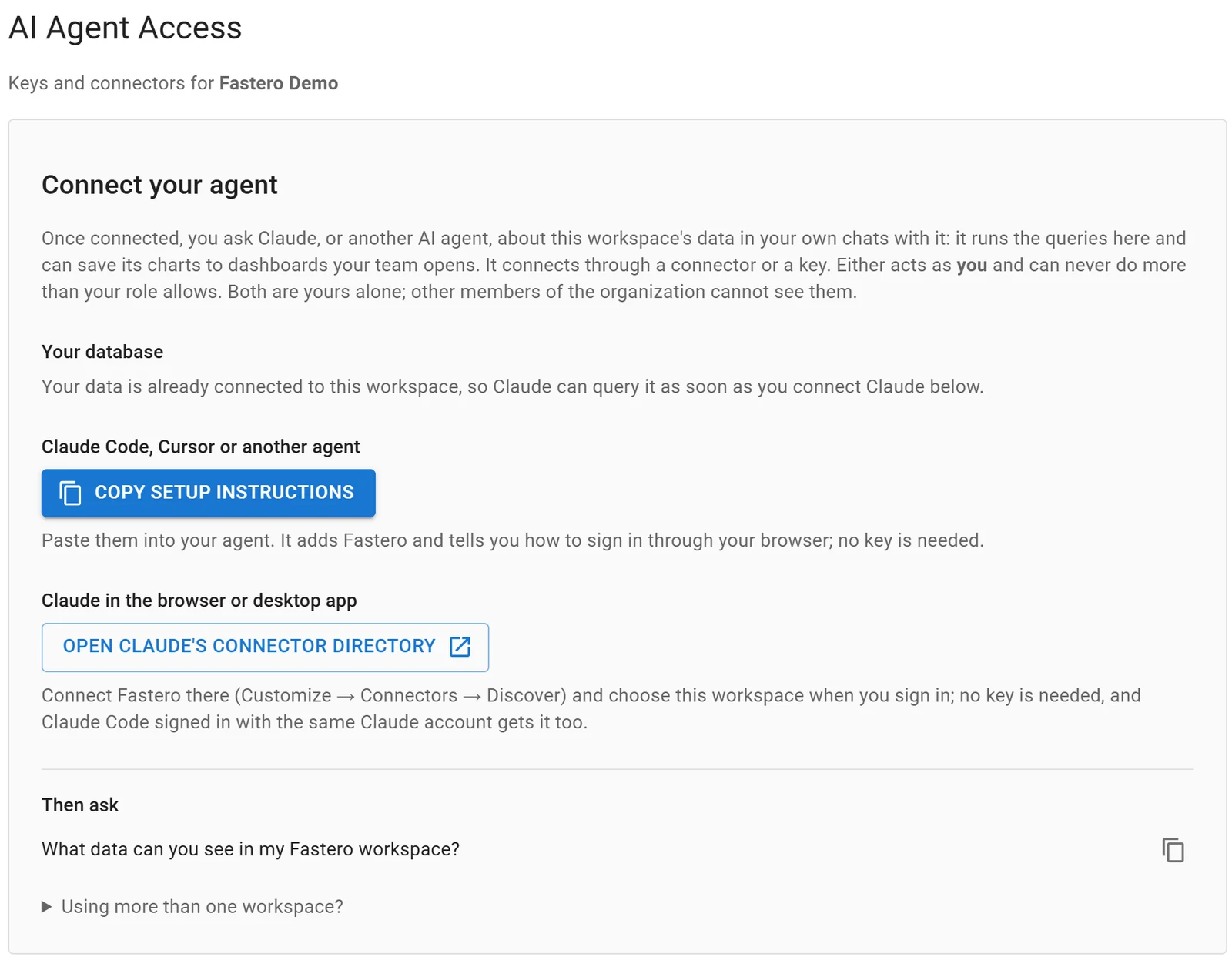
Settings, AI Agent Access: an agent signs in through the browser, so there is no key to copy.
FAQ
Is Gemini CLI still free?
Not for individuals. Since 18 June 2026 it no longer serves free Google accounts or Google AI Pro and Ultra; those users get Antigravity CLI, which has a free plan with a weekly quota. Gemini CLI itself is open source (Apache 2.0) and costs nothing to install, but it needs a Code Assist licence or a paid API or Vertex AI key to run.
What replaced Gemini CLI?
Antigravity CLI (agy), announced on 19 May 2026. It shares Antigravity's agent harness, reads GEMINI.md and AGENTS.md, and converts Gemini CLI extensions with agy plugin import gemini.
What were Gemini CLI's free limits?
60 requests a minute and 1,000 a day with a personal Google account, according to the README until spring 2026. Google's quota page listed 1,500 a day for AI Pro and 2,000 for AI Ultra.
Can I still log in with Google?
Only with an organisation account that has a Gemini Code Assist Standard or Enterprise licence, with GOOGLE_CLOUD_PROJECT set. For free, AI Pro and AI Ultra accounts, Google says "you can no longer use the Login with Google option".
How do I add an MCP server to Gemini CLI?
Run gemini mcp add <name> <command-or-url>, with --transport http for a remote server and --scope user to make it global, or add it to mcpServers in ~/.gemini/settings.json.
Does Gemini CLI support Gemini 4?
Not officially. Google says it is "Not optimized for Gemini 4+" and that Code Assist support will stay on Gemini 3.x. Use Antigravity CLI for Gemini 4 models.
Sources
Checked 12 November 2026. Gemini CLI 0.68.0 was installed locally with npm and run without signing in.
- Gemini CLI: README, README at v0.40.0, 28 April 2026, Installation, Authentication, GEMINI.md, MCP servers, Quotas and pricing, Release notes, npm package
- Google: Transitioning Gemini CLI to Antigravity CLI, Code Assist for individuals deprecation, Code Assist Standard and Enterprise subscriptions, Gemini for Google Cloud quotas, Code Assist release notes, Migrating from Gemini CLI to Antigravity CLI