 Fastero Dev Team
Google Antigravity launched in November 2025 as an IDE with a separate Agent Manager view. A year later it's a family of products: a desktop app for running several agents at once, the original IDE, a terminal CLI, extensions for other editors and a Python SDK, all sharing one agent harness. Since 18 June 2026 it's also where Google sends individual Gemini CLI users.
The short answer: Google Antigravity is "our agentic development platform, allowing anyone to build in the agent-first era", in Google's words. Agents plan, edit code, run the terminal and drive a browser, and report through artifacts: implementation plans, diffs, screenshots and browser recordings you can comment on. It comes as the Antigravity App (v2.31.2), the Antigravity IDE (v2.6.0), the Antigravity CLI agy (v1.5.7), extensions for VS Code, Visual Studio, JetBrains, Zed, Xcode and Eclipse, and an SDK, on macOS, Windows, Linux and Googlebook. It's free with a personal Google account and a quota "refreshed weekly"; Google AI Pro ($19.99 a month) refreshes "every five hours until the weekly limit is reached", and AI Ultra costs $99.99 or $199.99 for 5x or 20x Pro. Gemini 4 Hydrogen and Gemini 3.8 Flash are on every plan, Gemini 4 Argon and Claude Opus 5.5 need paid AI Pro, and Gemini 4 Carbon needs Ultra. It supports MCP servers in all three main surfaces. Checked 12 November 2026.
Fastero
Connect your database. Ask questions. Get dashboards.
Postgres, BigQuery, Snowflake, and 10+ sources — live-connected, AI-powered, no dashboard builder learning curve.
Try free →What Google Antigravity is: the five surfaces
| Surface | What it is | Latest version (12 Nov 2026) |
|---|---|---|
| Antigravity App | "Your command center to manage multiple local agents in parallel", with projects, scheduled tasks and a built-in browser | v2.31.2 |
| Antigravity IDE | The editor: Tab completion, commands and an agent side panel | v2.6.0 |
Antigravity CLI (agy) |
A terminal client on the same agent harness as the app | v1.5.7 |
| IDE extensions | VS Code, Visual Studio, JetBrains, Zed, Xcode and Eclipse (preview) | VS Code v1.12.0 |
| Antigravity SDK | A Python package (pip install google-antigravity) for building your own agents |
v0.1.23 |
Three ideas run through all of them:
- Agent-first. At launch Google described the Agent Manager as "mission control for spawning, orchestrating, and observing multiple agents across multiple workspaces in parallel". That surface became the Antigravity App in version 2.0.
- Artifacts. Agents hand back "rich Markdown plans (implementation plans), code diffs, architecture diagrams, images, and browser recordings", and you steer them by commenting on the plan before any file changes.
- Browser control. A built-in browser agent is rolling out in the app (v2.30.0 and later) for personal accounts: describe what to check and the agent opens your local app, clicks through it and reads console errors. The CLI and IDE use your own Chrome (version 144 or later) through
/browser.
Antigravity IDE vs the Antigravity App
If you're looking for the Antigravity IDE, know that it is no longer the whole product. On 19 May 2026 Google shipped Antigravity 2.0, a separate desktop app where "there is no IDE", and said: "In an upcoming release, we plan to remove the Agent Manager from the Antigravity IDE, turning the IDE into a purely agent-powered IDE."
So today:
- Use the IDE if you want an editor with Antigravity's agent beside the code. Its v2.6.0 release (26 October 2026) added Gemini 4 Argon, inline diff shortcuts and inline comments that queue feedback for the next prompt.
- Use the app for agent work across several folders or repositories, scheduled tasks (
/schedule), parallel subagents and the built-in browser. - Use an extension if you already live in VS Code or JetBrains. Google recommends "dual-wielding" the app with your IDE of choice.
One limit for companies: the standalone IDE "is not supported for enterprise deployments"; business accounts use the app, the CLI and the extensions.
Antigravity CLI hands-on
The CLI installs with one command per platform, which puts agy in ~/.local/bin or AppData\Local\agy\bin:
# macOS and Linux
curl -fsSL https://antigravity.google/cli/install.sh | bash
# Windows PowerShell
irm https://antigravity.google/cli/install.ps1 | iexTo keep our machine clean we read the Windows installer, downloaded the same binary it fetches into a scratch folder, checked its SHA-512 against Google's manifest and ran it with a throwaway home folder. --version and --help need no sign-in:
$ agy --version
1.5.7

$ agy --help
Usage of agy.exe:
  --dangerously-skip-permissions  Auto-approve all tool permission requests without prompting
  --effort                        Reasoning effort for the current CLI session (low|medium|high|xhigh|max)
  --mode                          Set the agent execution mode for this session (accept-edits, auto, plan)
  --model                         Model for the current CLI session
  -p                              Short alias for --print
  --remote-agent                  Run this session's conversations using remote agents; ...
  --sandbox                       Run in a sandbox with terminal restrictions enabled
...
Available subcommands:
  acp             Start the Agent Client Protocol (ACP) stdio server
  mcp             Manage MCP servers (add, remove, list, enable, disable)
  models          List available models
  plugin          Manage plugins (install, uninstall, list, enable, disable)
  remote-control  Manage the remote-control background daemon (start, status, stop)
  update          Update CLI
Adding an MCP server works offline too, and shows where the config lives:
$ agy mcp add docs https://example.com/mcp
Added MCP server "docs" (http)

$ cat ~/.gemini/config/mcp_config.json
{
  "mcpServers": {
    "docs": {
      "disabled": false,
      "serverUrl": "https://example.com/mcp"
    }
  }
}

$ agy models
Fetching available models...
Error: Please sign in to view available models. Launch the CLI without arguments to sign in.
Version 1.5.7 came out on 12 November 2026 and changed the default agent mode to Auto, where safe commands run in the sandbox without asking; choose Default in /config to get prompts back. Coming from Gemini CLI, agy reads your GEMINI.md and AGENTS.md files, agy plugin import gemini converts extensions to plugins, and workspace skills move from .gemini/skills/ to .agents/skills/. Our Gemini CLI guide covers who can still use the old tool.
Models by plan
| Model | Free and AI Plus | AI Pro | AI Ultra |
|---|---|---|---|
| Gemini 4 Carbon | No | No | Yes |
| Gemini 4 Argon | No | Paid plans, or trials on eligible devices | Yes |
| Gemini 4 Hydrogen | Yes | Yes | Yes |
| Orchestrator (Carbon plans, Hydrogen builds) | No | No | Yes |
| Gemini 3.8 Flash | Yes | Yes | Yes |
| Claude Opus 5.5 and Sonnet 5.5 (thinking) | No | Paid, non-trial plans | Yes |
| Claude Opus 4.6, Sonnet 4.6 and GPT-OSS-120b | Until 18 November 2026 | Until 18 November 2026 | GPT-OSS only, until 18 November |
Gemini 4 Hydrogen and Orchestrator arrived on 12 November. Google's model table lists Hydrogen on every plan, while its launch post says it is "rolling out across paid Google AI Pro and Ultra subscribers", so free accounts may not see it yet. After 18 November the free plan's agent models are Gemini only.
Plans, prices and limits (checked 12 November 2026)
| Plan | Price | Antigravity quota |
|---|---|---|
| Free (personal Google account) | $0 | "A meaningful quota, refreshed weekly" |
| Google AI Pro | $19.99 a month | Refreshed every five hours, within a weekly limit |
| Google AI Ultra | $99.99 or $199.99 a month | 5x or 20x Pro's tokens; the highest quota every five hours |
| Gemini Enterprise (Google Cloud) | Standard and Plus "starting at $30 USD per seat per month", or pay-as-you-go with no seat fee | Pooled seat credits, then consumption billing |
Google's Antigravity blog rounds these to $20, $100 and $200; the Google AI subscription page lists $19.99, $99.99 and $199.99. The quota counts work, not prompts: limits "correlate with the amount of work done by the agent", so a hard task uses more. Pro and Ultra can keep going on purchased AI credits when the quota runs out, controlled by an AI Credit Overages setting (Never or Always). There is no bring-your-own-key option.
Who can sign in: personal Google accounts aged 18 or over in a supported country; Workspace accounts only if an admin turns Antigravity on. And keep the login inside Google's tools: Google's FAQ says using third-party software such as Claude Code, OpenClaw or OpenCode to access Antigravity breaks its terms and "can result in suspension or termination of your account".
Connect any database. Ask in plain English.
Start free →MCP in Antigravity
All three main surfaces take MCP servers:
- App: Customizations, then Installed, then MCP Servers, with a searchable list to add from.
- CLI:
/mcpopens a manager;agy mcp addwrites the config. - IDE: an MCP Store in the agent panel, or View raw config.
The files are ~/.gemini/config/mcp_config.json (every project) and .agents/mcp_config.json (one workspace). "Remote MCP servers must use the Streamable HTTP transport", and "The legacy HTTP+SSE transport and the httpUrl field aren't supported", so Gemini CLI configs need their URL key renamed. For servers that sign in with OAuth, Antigravity handles PKCE automatically when the server supports dynamic client registration or Client ID Metadata Documents. Our list of MCP servers worth adding to a coding agent applies here too.
Platforms
| macOS | Windows | Linux | Googlebook | |
|---|---|---|---|---|
| Antigravity App | 13 (Ventura) or later | 10 (64-bit) or later | glibc 2.28 or later | Pre-installed |
| Antigravity CLI | Yes | PowerShell or CMD | Yes | Linux terminal |
| Terminal sandbox | Seatbelt (sandbox-exec) |
AppContainer; needs Windows 11 24H2 with the August 2026 update | Kernel namespaces | Not stated |
Antigravity vs Cursor vs Claude Code
| Google Antigravity | Cursor | Claude Code | |
|---|---|---|---|
| What it is | Agent app, IDE, agy CLI, editor extensions, Python SDK |
An AI code editor, a CLI called agent, cloud agents from Premium |
A terminal agent, IDE extensions, desktop app and web |
| Free plan | Yes: weekly quota, Gemini models | Yes: "Limited agent requests" | No: starts with Claude Pro |
| Paid plans | $19.99, $99.99, $199.99 | $8, $30, $100, $200 | $20 ($17 yearly), $100, $200 |
| Models | Gemini 4 and 3.8; Claude 5.5 on paid Pro and Ultra | Grok and Composer in the plan; Claude, GPT and Gemini at API list price from Premium | Claude: Opus 5.5, Sonnet 5.5, Haiku 5.5 |
| MCP | mcp_config.json; stdio and Streamable HTTP |
mcp.json; stdio, SSE, Streamable HTTP |
claude mcp add, .mcp.json; HTTP, stdio, SSE (deprecated) |
Our Cursor vs Claude Code comparison and Claude Code pricing guide go deeper on those two; Gemini vs Claude covers the chat apps.
Pick Antigravity when you want a free plan with Gemini 4 models, browser testing built into the app, or several agents working in parallel from one window. Pick Cursor when you want an editor first and a choice of model vendors, and are happy to pay API prices for Claude, GPT or Gemini. Pick Claude Code when you want Claude's models at a flat monthly price, in the terminal or the editor you already use.
When the agent's work is for your team
Antigravity's agents leave their results in your repository, a plan or a terminal. When the result is a dashboard colleagues need next week, it needs somewhere they can open it. Fastero is an AI and data platform where people and AI agents work together on a team's data, and a remote MCP server with OAuth sign-in at https://api.fastero.com/api/v1/mcp. Antigravity's docs say it signs in to remote servers that support dynamic client registration; we've tested Fastero with Claude and Claude Code.
- One command in Claude Code.
claude mcp add --scope user --transport http fastero https://api.fastero.com/api/v1/mcp, then/mcpto sign in through the browser. Settings → AI Agent Access has the instructions. - Read-only SQL. The SQL tool runs one
SELECT,WITH,EXPLAINorSHOWstatement and returns at most 500 rows. - Keys for scripts. A key reads and queries by default, never exceeds your role and expires within 90 days.
- Dashboards people open with their own login. They refresh on a timer (1, 5, 15 or 60 minutes) or, for Postgres and BigQuery data, when the data changes. Viewers are free.
- Plans. Free has no end date; Pro is $20 per editor a month.
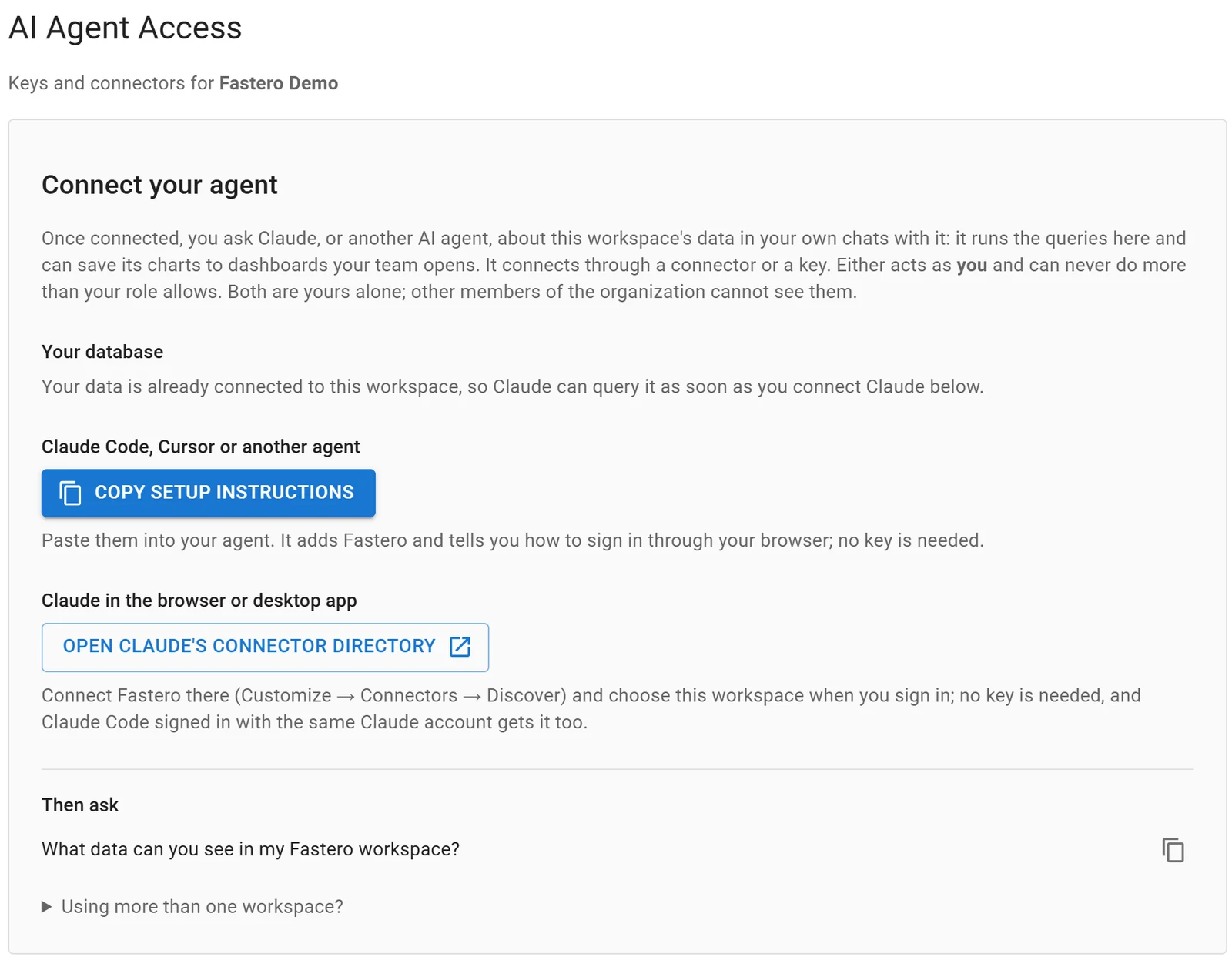
Settings, AI Agent Access: an agent signs in through the browser, so there is no key to copy.
FAQ
Is Google Antigravity free?
Yes. A personal Google account gets the app, CLI, IDE and extensions with a weekly quota and unlimited Tab completions. Google AI Pro ($19.99 a month) and Ultra ($99.99 or $199.99) raise the limits, refresh them every five hours and add models, checked 12 November 2026.
What is the Antigravity IDE?
The original Antigravity editor, with Tab completion, commands and an agent side panel. Since May 2026 the agent manager has its own app, Antigravity 2.0, and Google plans to remove the Agent Manager from the IDE. The IDE is at v2.6.0.
What models does Antigravity use?
Gemini 4 Hydrogen and Gemini 3.8 Flash on every plan, Gemini 4 Argon and Claude Opus 5.5 and Sonnet 5.5 on paid AI Pro, and Gemini 4 Carbon and Orchestrator on AI Ultra. Claude 4.6 and GPT-OSS-120b leave on 18 November 2026.
Does Antigravity support MCP?
Yes, in the app, CLI and IDE, configured in ~/.gemini/config/mcp_config.json or .agents/mcp_config.json. Remote servers must use Streamable HTTP, and OAuth sign-in works for servers with dynamic client registration.
What is the Antigravity CLI?
agy, a terminal client that shares the app's agent harness and settings. It replaced Gemini CLI for free users and Google AI Pro and Ultra subscribers on 18 June 2026. Version 1.5.7 is current.
Can I use my Antigravity login in Claude Code or other tools?
No. Google's FAQ says using third-party software to access Antigravity violates its terms, and recommends "a Gemini Enterprise or Google AI Studio API key" for third-party coding agents instead.
Sources
Checked 12 November 2026. Antigravity CLI 1.5.7 was downloaded from Google's release manifest and run locally without signing in.
- Google Antigravity: Home, Products, Antigravity IDE, Antigravity CLI, Download, Pricing, Getting started, Plans, Models, Artifacts, Browser use, IDE browser, MCP, Terminal sandbox, Migrating from Gemini CLI, Enterprise, FAQ, Changelog
- Antigravity blog: Introducing Google Antigravity, Antigravity 2.0, Antigravity CLI, Changes to Antigravity plans, IDE extensions, Gemini 4 Carbon and /swarm, Gemini 4 Hydrogen and Orchestrator
- Google: Gemini subscriptions, Transitioning Gemini CLI to Antigravity CLI
- Cursor: Pricing, Models, CLI, MCP
- Anthropic: Claude pricing, Claude Code overview, Model configuration, MCP