 Fastero Dev Team
Codex CLI is OpenAI's coding agent for the terminal. It reads your repository, edits files and runs commands on your machine, inside a sandbox you choose. This guide covers the setup decisions in the order you meet them, with real output from the current release.
The short answer: install it with npm install -g @openai/codex, Homebrew (brew install --cask codex) or OpenAI's installer script, then run codex in a project folder and choose Sign in with ChatGPT, or pipe an API key to codex login --with-api-key. With ChatGPT sign-in the CLI comes with Plus ($20 a month), Pro (from $100) and Business ($20 a user billed yearly); with an API key you pay API rates and lose the cloud features. The default model in our test was gpt-6.1-sol. By default Codex writes only inside the workspace, keeps the network off and asks before going further; codex exec runs read-only for scripts and CI. It reads AGENTS.md for instructions (up to 32 KiB) and ~/.codex/config.toml for settings and MCP servers. Prices checked 12 November 2026. For how it compares with Claude Code, see Codex vs Claude Code.
Fastero
Connect your database. Ask questions. Get dashboards.
Postgres, BigQuery, Snowflake, and 10+ sources — live-connected, AI-powered, no dashboard builder learning curve.
Try free →Install the Codex CLI
| Method | Command | Notes |
|---|---|---|
| macOS and Linux | curl -fsSL https://chatgpt.com/codex/install.sh | sh |
The same command updates it |
| Windows | powershell -ExecutionPolicy ByPass -c "irm https://chatgpt.com/codex/install.ps1 | iex" |
Run from a new PowerShell window |
| npm | npm install -g @openai/codex |
Update with the same command |
| Homebrew | brew install --cask codex |
Update with brew upgrade --cask codex |
We installed it with npm into a scratch folder rather than globally, on Windows 11 with Node 24, and pointed CODEX_HOME at an empty folder so nothing touched a real setup. OpenAI's docs warn that if you set CODEX_HOME, "the directory must already exist."
$ npm install @openai/codex
added 2 packages in 9s

$ npx codex --version
codex-cli 0.167.2

$ npx codex login status
Not logged in
Version 0.167.2 was also the latest on npm that day. npx codex --help lists the subcommands you'll use most: exec, review, login, mcp, resume, apply, sandbox, doctor and update.
Sign in: ChatGPT plan or API key
The first codex run asks how to sign in. Your choice decides how you pay and which features work:
| Sign-in | How | Billing | What you lose |
|---|---|---|---|
| ChatGPT account | codex login, then a browser window |
Your plan's included usage, then credits on Plus and Pro | Nothing |
| ChatGPT on a headless machine | codex login --device-auth (beta, turn it on in ChatGPT's security settings first) |
Same | Nothing |
| API key | printenv OPENAI_API_KEY | codex login --with-api-key |
Standard API rates | Cloud features: "No cloud-based features (GitHub code review, Slack, etc.)" |
| Codex access token | codex login --with-access-token |
Enterprise workspace | For trusted automation only |
"Codex cloud requires signing in with ChatGPT." Credentials are cached in ~/.codex/auth.json or the OS credential store; cli_auth_credentials_store = "keyring" forces the credential store. OpenAI's advice is blunt: "Treat ~/.codex/auth.json like a password".
What Codex CLI costs (checked 12 November 2026)
Codex is priced as part of ChatGPT:
| Plan | Price | Codex |
|---|---|---|
| Free | $0 | GPT-6 Luna in the desktop app, subject to rollout |
| Go | $8 a month | GPT-6 Luna in the desktop app, subject to rollout |
| Plus | $20 a month | CLI, IDE extension, web and iOS; GPT-6.1 Sol and GPT-6 Luna |
| Pro | $100, $200 or $500 a month | Everything in Plus; "Pro plans currently have no five-hour limit." |
| Business | $20 a user a month billed annually, $25 monthly, 2+ users | Larger cloud machines, SAML SSO; more in our ChatGPT Business pricing guide |
| API key | API rates | CLI, SDK and IDE extension |
OpenAI's estimates for Plus and a Standard Business seat, in local messages per five hours, come with the warning that "These estimates are not fixed message limits":
| Model | Plus and Standard Business |
|---|---|
| GPT-6 Astra | 5-45 |
| GPT-6.1 Sol | 15-160 |
| GPT-6.1 Terra | 35-285 |
| GPT-6 Sol | 15-150 |
| GPT-6 Luna | 350-3,000 |
Weekly limits may apply on top. Fast mode uses included usage 2.5 times as fast. Type /status in a session to see what's left.
Pick a model
Our unsigned codex exec run printed its defaults before it failed, which shows what a fresh install uses:
OpenAI Codex v0.167.2
--------
model: gpt-6.1-sol
provider: openai
approval: never
sandbox: read-only| Model | Slug | OpenAI's description |
|---|---|---|
| GPT-6 Astra | gpt-6-astra |
"Our most capable model for complex work across code, apps, and research" |
| GPT-6.1 Sol | gpt-6.1-sol |
"Near-Astra performance for complex work at a lower cost than Astra." |
| GPT-6.1 Terra | gpt-6.1-terra |
Writing, visual understanding and computer use; needs CLI 0.159.0 or later |
| GPT-6 Luna | gpt-6-luna |
"Our most efficient model for focused, high-volume tasks" |
Switch with /model in a session, codex -m gpt-6-astra at launch, or model = "gpt-6.1-sol" in config.toml. GPT-6.1 Sol has a 500,000-token context window in Codex. GPT-5.5 left Codex for ChatGPT sign-ins on 14 October 2026 and stays available with an API key. --oss runs a local open model through LM Studio or Ollama.
Sandbox and approval modes
Two settings decide what Codex may do. The sandbox limits what commands can touch; the approval policy decides when it stops to ask. "By default, the agent runs with network access turned off." Our --help output shows the choices:
  -s, --sandbox <SANDBOX_MODE>
          [possible values: read-only, workspace-write, danger-full-access]

  -a, --ask-for-approval <APPROVAL_POLICY>
          - on-request: The model decides when to ask the user for approval
          - never:      Never ask for user approval Execution failures are immediately returned to
the model| What you want | Flags | Effect |
|---|---|---|
| The default (Auto) | none, or --sandbox workspace-write --ask-for-approval on-request |
Reads, edits and runs commands in the workspace; asks before writing outside it or using the network |
| Look, don't touch | --sandbox read-only --ask-for-approval on-request |
Reads files; asks before anything else |
| Unattended and read-only | --sandbox read-only --ask-for-approval never |
Never asks; can't change anything |
| Fewer prompts | --approve-for-me |
Sends approval requests to an automatic reviewer, inside the workspace-write sandbox |
| No guard rails | --dangerously-bypass-approvals-and-sandbox (--yolo) |
No sandbox and no approvals; meant for an isolated container |
Codex recommends Auto for folders under version control and read-only for others. Inside the workspace, .git, .agents, .codex and .aws stay read-only. Network access for commands is one setting:
[sandbox_workspace_write]
network_access = true
Older guides use --full-auto and an untrusted approval policy; both are gone, which is why -a now offers only on-request and never. On Windows the CLI uses a native sandbox: mxc is "The recommended sandbox on compatible Windows devices", with elevated and unelevated as fallbacks.
AGENTS.md: instructions Codex reads first
"Codex reads AGENTS.md files before doing any work." It takes ~/.codex/AGENTS.md (or AGENTS.override.md) first, then one file per folder from the repository root down to where you started, and stops at 32 KiB, set by project_doc_max_bytes. Files closer to your working folder come later, so they win. /init writes a starter AGENTS.md; to check what loaded, OpenAI suggests:
codex --ask-for-approval never "Summarize the current instructions."If the same repository also uses Claude Code, keep one AGENTS.md and import it from CLAUDE.md, as our CLAUDE.md guide explains.
Connect any database. Ask in plain English.
Start free →config.toml: the settings file
Your settings live in ~/.codex/config.toml, and a repository can add .codex/config.toml, which loads only once you trust the project. Command-line flags and -c key=value overrides win, then project files, then a profile chosen with --profile name (read from ~/.codex/name.config.toml), then your user file. A small starting file:
model = "gpt-6.1-sol"
model_reasoning_effort = "medium"
approval_policy = "on-request"
sandbox_mode = "workspace-write"
web_search = "cached"   # the default; "live" is the same as --search
One setting matters for data work: ignore_default_excludes, under shell_environment_policy. It "defaults to true, which skips automatic filtering for variable names containing KEY, SECRET, or TOKEN", so a database password in your environment reaches the commands Codex runs. If you don't want that, set it to false in config.toml:
[shell_environment_policy]
ignore_default_excludes = false
Add MCP servers
codex mcp add writes to config.toml, and the CLI, IDE extension and ChatGPT desktop app share the result. We added a local server and a remote one in our test home:
$ npx codex mcp add context7 -- npx -y @upstash/context7-mcp
Added global MCP server 'context7'.

$ npx codex mcp add openai-docs --url https://developers.openai.com/mcp
Added global MCP server 'openai-docs'.

$ cat $CODEX_HOME/config.toml
[mcp_servers.context7]
command = "npx"
args = ["-y", "@upstash/context7-mcp"]

[mcp_servers.openai-docs]
url = "https://developers.openai.com/mcp"
Codex speaks STDIO and Streamable HTTP, with bearer tokens (--bearer-token-env-var) or OAuth, including dynamic client registration; run codex mcp login <name> to sign in. Per server you can set enabled_tools, disabled_tools, startup_timeout_sec (default 10) and tool_timeout_sec (default 60). "Destructive app/MCP tool calls always require approval when the tool advertises a destructive annotation". Type /mcp in a session to see what's loaded.
codex exec: Codex in scripts and CI
codex exec "<task>" runs once without the interface: progress goes to stderr and only the final message to stdout, so you can pipe it. "By default, codex exec runs in a read-only sandbox"; add --sandbox workspace-write to let it edit. It also refuses to run outside a Git repository, as our first attempt showed:
$ npx codex exec "List the files here"
Not inside a trusted directory and --skip-git-repo-check was not specified.
With --skip-git-repo-check it started, printed the defaults above and stopped with 401 Unauthorized, because we never signed in. The flags you'll want in automation:
--jsonprints every event as JSON Lines;-o filesaves the final message.--output-schema schema.jsonmakes the final answer match a JSON Schema.--ephemeralkeeps no session files;codex exec resume --lastcontinues the previous run.CODEX_API_KEY=<key> codex exec ...uses a key for that one run.
For GitHub, use the Codex GitHub Action, openai/codex-action@v1, which runs codex exec behind a proxy for your key, on Linux or macOS runners. OpenAI warns: "Do not set OPENAI_API_KEY or CODEX_API_KEY as a job-level environment variable in workflows that check out or run repository-controlled code."
Codex CLI on a database
- The network is off.
psqlor a Python driver talking to a remote database waits for your approval unless you turnnetwork_accesson. - Give it a read-only login. The sandbox guards your files, not what a SQL statement does on the server.
- Or go through an MCP server for the database, so each query is a tool call you can see, and tools marked destructive always need your approval. Our guide to the Postgres MCP server covers the options.
When the result is for your team
Codex leaves its work in your terminal and your repository. When colleagues need the numbers next week, they need somewhere to open them. Fastero is an AI and data platform where people and AI agents work together on a team's data, and it runs a remote MCP server with OAuth sign-in. Codex's docs say it connects to Streamable HTTP servers with OAuth; we've tested Fastero with Claude and Claude Code, not with Codex.
- Read-only SQL. The SQL tool runs one
SELECT,WITH,EXPLAINorSHOWstatement and returns at most 500 rows. - Keys for scripts. A key reads and queries by default, never exceeds your role in the workspace and expires within 90 days. Settings → AI Agent Access has the setup instructions.
- Dashboards people can open. Charts go onto dashboards that refresh every 1, 5, 15 or 60 minutes or, for Postgres and BigQuery data only, when the data changes. Viewers are free on every plan.
- Notebooks with SQL cells. A SQL cell runs on the workspace's stored connection and lands in Python as a pandas DataFrame; cron schedules work on Free, which costs $0 with no end date. Pro is $20 per editor a month.
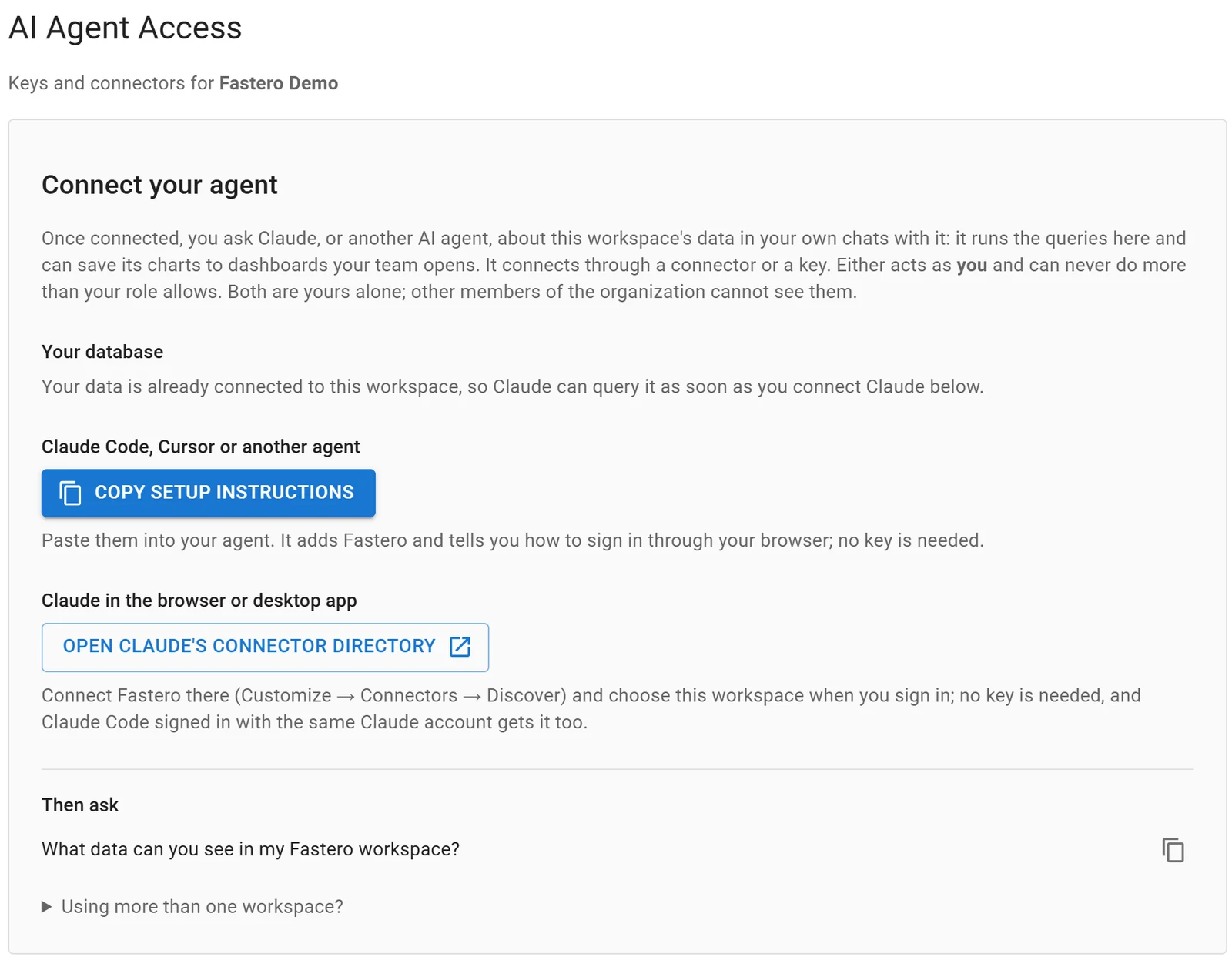
Settings, AI Agent Access: an agent signs in through the browser, so there is no key to copy.
FAQ
Is Codex CLI free?
Not on its own. OpenAI lists the CLI from ChatGPT Plus at $20 a month; Free and Go get GPT-6 Luna in the ChatGPT desktop app, subject to rollout. With an API key you pay standard API rates instead, checked 12 November 2026.
How do I install Codex CLI on Windows?
Run powershell -ExecutionPolicy ByPass -c "irm https://chatgpt.com/codex/install.ps1 | iex" in a new PowerShell window, or npm install -g @openai/codex. The CLI has a native Windows sandbox, and OpenAI also documents running it under WSL.
Can I use Codex CLI with an API key?
Yes: printenv OPENAI_API_KEY | codex login --with-api-key. You pay API rates, models follow your API account, and cloud features such as GitHub code review aren't available.
Which model does Codex CLI use?
Our fresh install defaulted to gpt-6.1-sol. Change it with /model, -m or model = "..." in config.toml. GPT-6 Astra is the strongest and GPT-6 Luna the cheapest on usage.
How do I stop Codex asking for approval?
-a never stops the prompts but keeps the sandbox, so with --sandbox read-only nothing changes on disk. --approve-for-me hands approvals to an automatic reviewer. Only use --yolo inside a container you can throw away.
Where are config.toml and AGENTS.md?
In ~/.codex/ (or wherever CODEX_HOME points), plus .codex/config.toml and AGENTS.md files inside a repository. Project config loads only for trusted projects.
Can Codex CLI use local models?
Yes. codex --oss uses an open model through LM Studio or Ollama, chosen with --local-provider.
Sources
Checked 12 November 2026. Codex CLI 0.167.2 was installed locally with npm on Windows 11, with a separate CODEX_HOME and no sign-in.
- OpenAI docs: Codex CLI, Command line options, Authentication, Pricing, Models, Agent approvals and security, Windows sandbox, AGENTS.md, Config basics, Environment variables, MCP, Non-interactive mode, GitHub Action
- OpenAI: Codex pricing, ChatGPT pricing, Codex on GitHub, npm package
- Fastero: MCP server · Pricing