 Fastero Dev Team
Claude Team is Anthropic's plan for groups of 2 to 150 people. It adds shared projects, single sign-on and central billing to what a Pro account gets, and includes Claude Code and Cowork on every seat.
The short answer: a Standard seat costs $20 a month billed annually or $25 billed monthly; a Premium seat costs $100 or $125. The minimum is two seats, down from five since July 2026, and the maximum is 150. Usage limits belong to each person and aren't pooled. Anthropic doesn't train on Team data by default. SSO is included; SCIM, audit logs, custom roles and custom retention are Enterprise only. Everyone who opens something shared from Claude needs a Claude account, so reports for people without a seat need somewhere else to live.
Fastero
Point Claude at your database.
Add Fastero to claude.ai or Claude Code. Claude builds the dashboard, deploys the app or publishes a live page, and your team opens it in Fastero.
Try free →Claude plans compared
| Plan | Price (US, before tax) | People | Usage | Shared projects and admin |
|---|---|---|---|---|
| Pro | $17 a month annually, $20 monthly | 1 | The baseline | No |
| Max | $100 a month | 1 | 5x Pro, per session and per week | No |
| Ultra | $200 a month | 1 | 10x Pro per week, no 5-hour limit | No |
| Team Standard | $20 a seat annually, $25 monthly | 2 to 150 | 1.25x Pro per session | Yes |
| Team Premium | $100 a seat annually, $125 monthly | 2 to 150 | 6.25x Pro per session | Yes |
| Enterprise | $20 a seat annually, plus usage at API rates | 20 or more | No included allowance | Yes, with SCIM, audit logs and more |
Prices vary by region, and Anthropic's pricing page is the one to trust on the day you buy.
Standard or Premium?
You can mix the two, so the question is per person. Both seats include Claude on the web, desktop and mobile, Claude Code and Cowork, all drawing on one allowance.
- Standard suits people who chat, write and analyze, with occasional Claude Code. It has 1.25x Pro's usage per session.
- Premium suits people who spend the day in Claude Code or leave long Cowork tasks running. It has 6.25x Pro's usage per session, or five times a Standard seat.
Three details are easy to miss:
- Limits are per person. Anthropic says "Usage limits on Team plans are per-member", and unused usage can't move to a colleague. A quiet seat doesn't help a busy one.
- Both seats also have a weekly limit across all models. Anthropic publishes the per-session multiples but not how the weekly limit compares with Pro's.
- Running past the limit costs extra. Owners can buy usage credits, billed at API rates, and set a monthly limit for the organization and for each person. To see what a developer costs in practice, read our Claude Code usage guide.
Separately, since October 7, 2026, Team seats earn monthly API credits: $20 per Standard seat and $100 per Premium seat, pooled and capped at $500. They need a linked Console organization and don't cover interactive Claude Code.
Team or several Max accounts? Per session, a Premium seat (6.25x) gives more than Max (5x), at the same $100 if you pay annually. Anthropic doesn't compare the weekly limits. Team also brings central billing, SSO and no training on your data by default; Max accounts are separate, with training controlled by each person's setting.
What Team includes, and what stays on Enterprise
| Team | Enterprise | |
|---|---|---|
| Single sign-on (SSO) | Yes | Yes |
| Verify a domain and block new personal accounts | Yes | Yes |
| Claim existing accounts on your domain | No | Yes |
| Automatic provisioning | Just-in-time only | Just-in-time and SCIM |
| Roles | Owner, Admin, User | Custom roles |
| Admin control of connectors, org-wide skills and instructions | Yes | Yes |
| Usage analytics and spend controls | Yes | Yes |
| Audit logs and Compliance API | No | Yes |
| Custom data retention | No | Yes |
| HIPAA-ready offering | No | Yes |
Anthropic's "What is the Team plan?" help page still lists domain capture and role-based permissions. Its pricing table and its domain article say otherwise, and the table above follows those two. If either decides your purchase, ask Anthropic in writing.
Your data. Anthropic says it won't use inputs or outputs from commercial products to train its models by default; thumbs up and down feedback is the exception, and Owners can turn that button off. Chats stay until deleted, and a deleted chat leaves Anthropic's back-end systems within 30 days. The Primary Owner can export the organization's data, including members' conversations.
How to set up a Team plan
- Sign in and open claude.ai/upgrade. The person who creates the plan needs a business email address.
- Decide what happens to your own account. By default the upgrade converts it in place, cancelling your individual subscription with a prorated refund. Tick Keep your personal account separate to keep it apart.
- Invite people. A pending invitation holds a seat, new seats are charged at once on a prorated basis, and removing a seat takes effect at renewal with no refund.
- Each member chooses when they accept: Keep both accounts, or use the organization only and Bring your data with you or Delete your data. Bringing data over can't be undone.
| Moves with the person | Doesn't move |
|---|---|
| Chats and the artifacts in them | Custom skills |
| Projects, with their instructions and files | Connector sign-ins (everyone signs in again) |
| Uploads and memory | Custom connectors they added themselves |
| Claude Code memory and settings | Published artifacts and public chat links |
| Cowork sessions and Claude Code cloud sessions |
When someone leaves, colleagues lose access to that person's chats and private projects. Projects shared with others stay.
Connectors on a team
Connectors give Claude your other tools: Slack, Drive, your database. On Team they work in two steps.
- An Owner opens Organization settings → Connectors, chooses Browse connectors and adds one for the team. Only Owners can add a custom connector. A member who wants one clicks Request.
- Each person clicks Connect and signs in with their own account. Adding a connector for the team gives nobody access by itself.
Owners can set each tool to Always allow, Needs approval or Blocked for the whole organization, and members can't override it. In Cowork, one more setting matters: Allow "Always allow" for connector tools is off by default, so members approve write tools task by task. Read-only tools skip that only when the connector marks them read-only, and "Most custom connectors don't annotate their tools". More in Claude connectors: how to add one.
What a team can share, and who can open it
| What you share | Who can open it | Good to know |
|---|---|---|
| A chat | People in your organization | A view-only snapshot; raw connector data is hidden; no public links |
| A project | People you pick, or the whole organization | Can view or Can edit; each person's chats stay private |
| An artifact | People you invite, your organization, or anyone with the link if an Owner allows it | Everyone needs a Claude account; up to 50 outside invitees |
| An artifact on connected apps | People who connect those apps themselves | Two people can see different data; not available as "Anyone with the link" |
The rule underneath all four: "Everyone needs a Claude account. People without one can't open a shared artifact, even with the link." Outside your organization, "Parts of the artifact that use Claude or your connectors don't work." See how to share Claude artifacts with your team for each route in detail.
Point Claude at your database.
Connect Claude →When the reader doesn't have a Claude seat
A seat makes sense for the people who work with Claude. Your CFO, a client or a store manager only wants this week's numbers, and they should see the same numbers as everyone else.
That's the job Fastero does beside a Team plan. Connect Fastero to Claude, and Claude queries your database and builds a dashboard that lives in a workspace, on live data. Colleagues open it with their own login and role; viewers are free and need no Claude account. Charts refresh on a schedule, and each dashboard can be emailed with a PDF attached, including to people with no account at all.
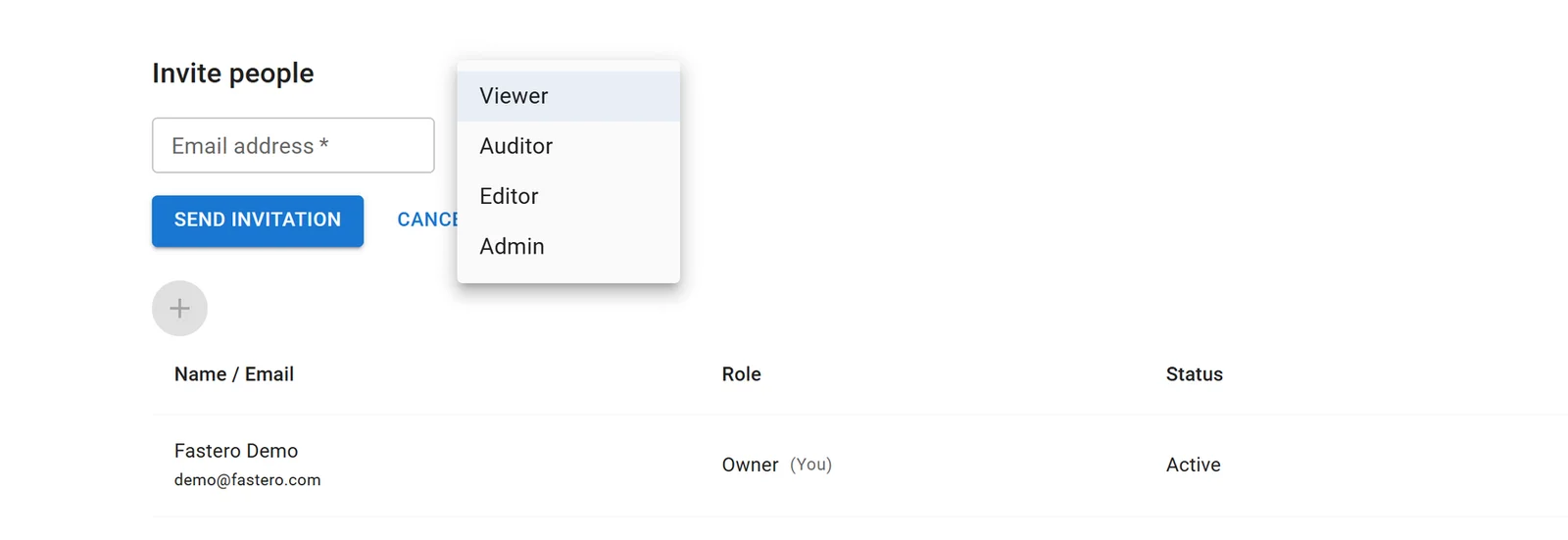
Inviting someone to a Fastero workspace. Viewers read everything shared with them and don't count as paid editors.
Everyone on a Team plan can connect their own Fastero sign-in, so Claude only ever does what that person's role allows. Then ask:
In Fastero, build a dashboard called Weekly numbers on our orders database: revenue, new
customers and open tickets as number cards with the change on the week before, then revenue
per week for 12 full weeks. Refresh it every morning, and email it to finance@example.com
every Monday at 8:00.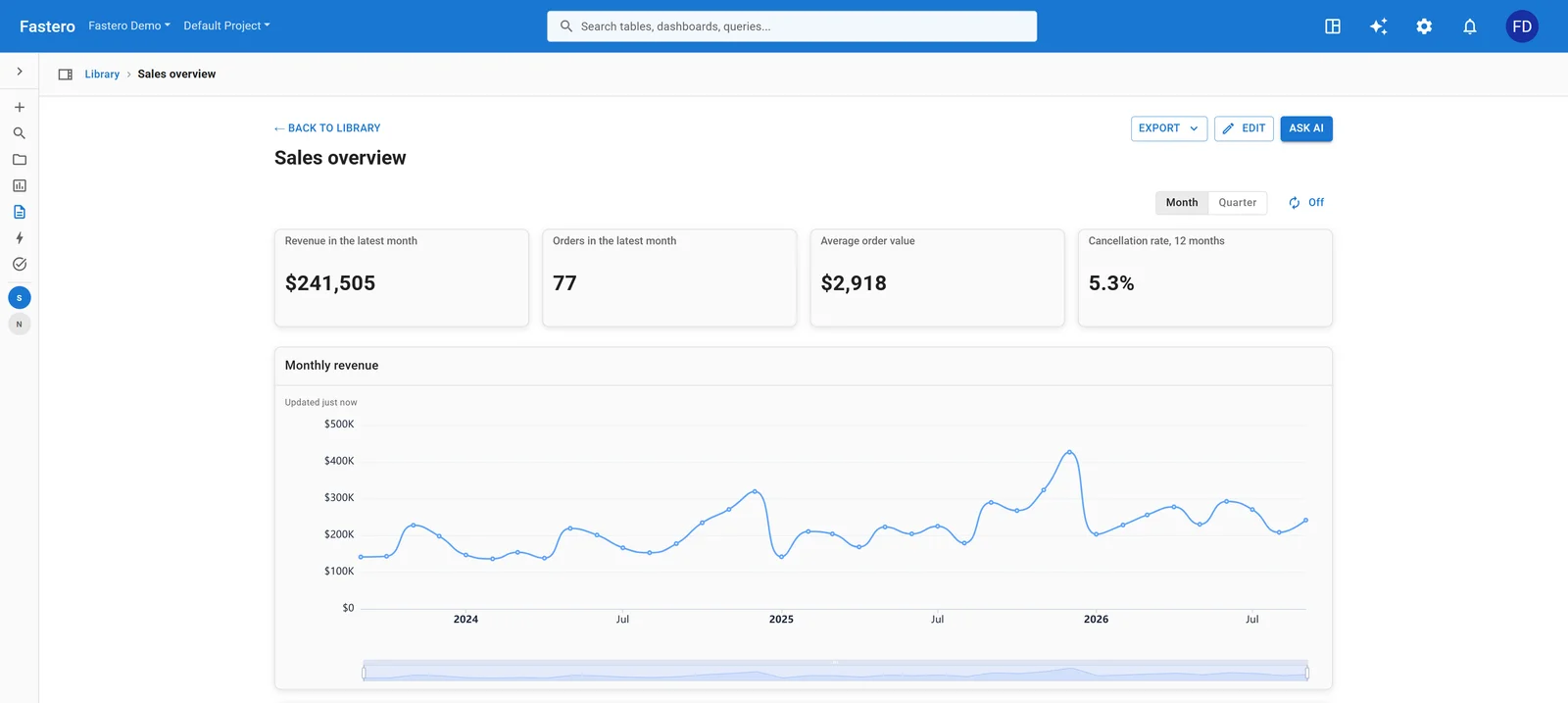
The result opens in Fastero for anyone you invite, with or without Claude. Sample data.
FAQ
Can two people use Claude Team?
Yes. The minimum dropped from five seats to two in July 2026, and Anthropic's pricing page now reads "For teams of 2 to 150". Anthropic says the plan is "not intended for individual use".
How much does Claude Team cost?
$20 per Standard seat a month billed annually or $25 billed monthly, and $100 or $125 for a Premium seat, in US dollars before tax. Two Standard seats cost $40 to $50 a month.
Is SSO included in Claude Team?
Yes. Team has SSO, domain verification and just-in-time provisioning. SCIM, claiming existing accounts on your domain, audit logs and custom roles are Enterprise only.
Does Claude Team include Claude Code and Cowork?
Yes, on both seat types. All of it draws on the same per-person allowance, and Cowork uses that allowance faster than chat.
Does Anthropic train on Claude Team data?
Not by default. Anthropic's pricing table lists model training as "None by default" on Team and Enterprise, and "Opt-out" on Free, Pro, Max and Ultra. Thumbs up and down feedback is the exception.
Can people outside my team see what we make in Claude?
Only with a Claude account of their own, and only if your Owners allow it. Live sections that use connectors don't work for them. To give someone numbers without Claude, host the work where they can log in, or email it.
Sources
Read on 2 November 2026:
- Plans: Claude pricing, What is the Team plan?, Get started with the Team plan, Purchase and manage seats, Usage credits, Monthly API credits. The July 2026 date for two seats comes from outside trackers of the pricing page; Anthropic's pages don't date the change.
- Admin: Provisioning, Domains, Roles and permissions, Audit logs
- Data: Model training, Retention, Moving a personal account, When a member is removed
- Sharing: Connectors, Cowork on Team and Enterprise, Share a chat, Share a project, Share artifacts, Artifacts on connected apps
Try Fastero free — connect Claude, and give your whole team live dashboards they can open with or without a Claude seat. No credit card required.