 Fastero Dev Team
A ChatGPT project is a folder for one body of work: its chats, the files and links ChatGPT should know about, and instructions that apply to every chat inside it. You stop re-uploading the same spreadsheet and re-explaining the same background.
The short answer: projects are on every ChatGPT plan, Free included. Each one has Chats, Sources (uploaded files, Slack and Google Drive links, pasted notes and saved answers) and instructions that apply across its chats. OpenAI's announced file limits are 5 per project on Free, 25 on Plus, Go and Edu, and 40 on Pro, Business and Enterprise. Memory is either default or project-only; shared projects are always project-only, and OpenAI says ChatGPT Work isn't available in project-only projects. Since October 2025 every personal plan can share a project with invited people or anyone with the link, with up to 5 collaborators on Free, 10 on Plus and Go and 100 on Pro; in a company workspace, sharing is an admin permission. Claude Projects differ most on sharing: Claude limits it to Team and Enterprise. Checked 12 November 2026.
Fastero
Connect your database. Ask questions. Get dashboards.
Postgres, BigQuery, Snowflake, and 10+ sources — live-connected, AI-powered, no dashboard builder learning curve.
Try free →What's inside a ChatGPT project
| Part | What it does | Good to know |
|---|---|---|
| Chats | Conversations that belong to the project | "The same project can contain chats started with Chat or ChatGPT Work." |
| Sources | Files and connected context every chat can use | Uploads, Slack channel and Google Drive links, pasted text, saved answers |
| Instructions | How ChatGPT should behave here | "Project instructions apply across its chats." |
| Memory | What ChatGPT carries between chats | Default, or project-only (below) |
On the web, "A ChatGPT project doesn't provide direct access to a folder on your computer, so upload or connect the sources you want ChatGPT to use." The ChatGPT desktop app is different: its Projects view also holds local projects, where "A local project gives chats access to one or more folders on your computer". Voice works in projects too: since August 2026 ChatGPT Voice can reference "recent project chats, sources, and project instructions".
When to make a project
OpenAI's rule is a good one: "Create a project when work will continue over time, produce more than one output, or depend on the same files and sources." A monthly report, a client or a research question qualifies; a one-off question doesn't. Inside a project, start a new chat for each outcome, with a title that names it, such as OpenAI's example "Q3 launch brief", so each chat stays focused while the project holds the shared context.
How to set one up
- Create a project from the ChatGPT sidebar and give it a name.
- Choose its memory: default or project-only. You can switch later under the project's menu, Project settings, as long as it isn't shared.
- Write instructions: what a good answer looks like, which sources to trust, what to avoid.
- Add sources. Since February 2026 you can "Paste a link to a Slack channel or Google Drive file or folder to add it directly as a project source", paste notes, or "Save useful ChatGPT responses into your project so great outputs become reusable knowledge."
- Start chats from inside the project, in Chat or Work. If an existing chat grows, move it into the project.
Instructions for a reporting project might read:
Use only the files in Sources and the linked Drive folder. Report full months, state the dates,
and compare each number with the month before. Say which file each number came from. If two
sources disagree, show both and stop. Keep the summary short enough to paste into Slack.
Project memory: default or project-only
| Default memory | Project-only memory | |
|---|---|---|
| Uses your saved memories from outside | Yes | No |
| Uses other chats in the same project | Yes | Yes |
| Carries project details into other chats | Can | No: "Information from the project is also kept out of memory used in chats outside the project." |
| ChatGPT Work | Available | "ChatGPT Work is not available in projects using project-only memory." |
| Shared projects | Not possible | Always: "Shared projects continue to use project-only memory and cannot be switched to default memory." |
Those last two notes come from the same release, on 14 August 2026, and together they mean a shared project can't use ChatGPT Work. If you need Work (the agent that builds spreadsheets and decks, covered in our ChatGPT agent guide), keep that project private with default memory.
Limits per plan
From OpenAI's release notes of 3 September and 23 October 2025, the latest figures we could open; checked 12 November 2026.
| Plan | Price | Projects | Files per project | Collaborators on a shared project |
|---|---|---|---|---|
| Free | $0 | Yes | 5 | 5 |
| Go | $8 a month | Yes | 25 | 10 |
| Plus | $20 a month | Yes | 25 | 10 |
| Pro | $100, $200 or $500 a month | "Expanded projects" | 40 | 100 |
| Business | $20 a user a month billed annually, $25 monthly | Yes | 40 | Not stated in the notes |
| Enterprise and Edu | Contact sales | Yes | 40 (Enterprise), 25 (Edu) | Not stated in the notes |
OpenAI's help-center article on projects, which holds the current numbers, refused our requests, so these come from the release notes. A third-party guide updated in September 2026 reports the same file counts, plus a cap of 10 files per upload and 512 MB per file, puts Edu at 40 rather than 25, and quotes users still hitting a 25-file limit in 2026. Check the count your own account shows. OpenAI states no limit on the number of projects.
How to share a ChatGPT project
Sharing arrived for "all ChatGPT users, including for Free, Plus, Pro, and Go users" on 23 October 2025. The owner picks one of two settings and can change it later:
- Only those invited: named people.
- Anyone with a link: whoever has the address.
Collaborators work from everything in the project, its chats, files and instructions, so they can pick up where you left off. Three side effects to know:
- Memory goes project-only, and with it ChatGPT Work, as above.
- Personal Space files drop out. "Sharing a project removes personal Space files from its sources without deleting the originals."
- In a workspace, admins decide. OpenAI's admin guide for Edu workspaces lists separate permissions for Create and manage projects, Share projects and Share projects via workspace links. When someone leaves, "the workspace automatically reassigns their projects and custom GPT ownership to a workspace owner."
Projects, Space, Sites and custom GPTs
| Use | When |
|---|---|
| Project | Many chats need the same files and instructions |
| Space page | A document you edit with colleagues and ChatGPT; "Space replaces Library for accounts with access; your existing Projects remain separate." |
| Site | A hosted page or dashboard others open by link; see ChatGPT dashboards |
| Custom GPT | Being retired: OpenAI's workspace guidance says "Custom GPTs are scheduled to retire on December 11, 2026", with plugins as the replacement |
Connect any database. Ask in plain English.
Start free →ChatGPT Projects vs Claude Projects
| ChatGPT Projects | Claude Projects | |
|---|---|---|
| Plans | All, Free included | All, Free included |
| Number of projects | No stated limit | Five on Free; no stated limit on paid plans |
| Files | 5, 25 or 40 per project by plan | No count limit, but "total content must fit within Claude's context window" |
| Size per file | 512 MB (third-party report) | "30MB per file" |
| Large knowledge | Not described | Paid plans switch to retrieval, expanding capacity "by up to 10x" |
| Linked sources | Slack channels, Google Drive files and folders | Google Docs that "sync directly from Google Drive" (private projects only), GitHub repositories you sync |
| Memory | Default or project-only; shared projects are project-only | "Each project has its own memory." |
| Sharing | Every personal plan, and workspaces where admins allow it: invited people or anyone with a link | Team and Enterprise only, inside the organization, as Can view or Can edit |
| Agent work in a project | ChatGPT Work, unless memory is project-only | A redesigned beta in Claude Code runs a project as parallel cloud threads, for one person |
The practical split: ChatGPT is the one to pick if you want to share a project with someone outside a company plan, or link a Slack channel or a whole Drive folder. Claude suits large document collections, since paid plans search the knowledge instead of capping the file count. Our Claude Projects guide covers its side in detail, and Claude Team covers sharing there.
When a project's numbers need to be shared and current
A spreadsheet in a project is a snapshot: ask about last week in a month's time and ChatGPT answers from the old file. Colleagues on a shared project also see only what the project holds. When a team needs the same live numbers every week, keep them in a tool built for that.
Fastero is an AI and data platform where people and AI agents work together on a team's data:
- Projects with their own people. Invite someone to one project and, if they aren't a workspace member, they become a guest who views that project and nothing else.
- Live data, not uploads. Connect Postgres, MySQL, SQL Server, Redshift, Snowflake, Oracle or BigQuery; dashboards refresh every 1, 5, 15 or 60 minutes or, for Postgres and BigQuery data only, when the data changes.
- Free viewers. Viewers cost nothing on every plan; Free is $0 with no end date and Pro is $20 per editor a month.
- Agents can work in it. Fastero is a remote MCP server with OAuth sign-in; we've tested it with Claude and Claude Code, not with ChatGPT.
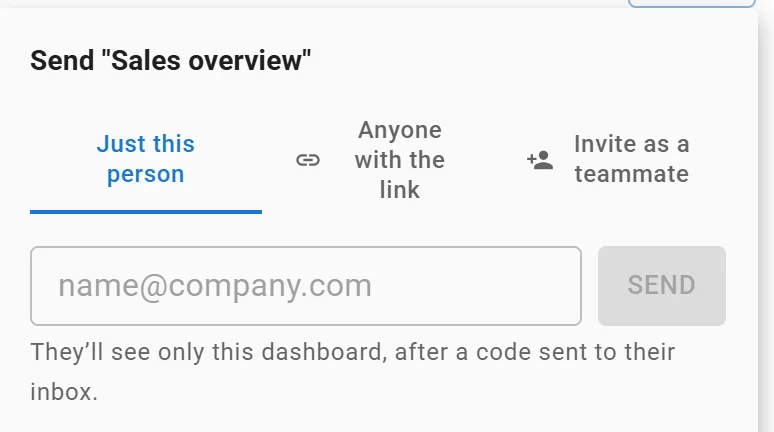
Sending one dashboard to one person: they see only that dashboard. Invented data.
FAQ
Are ChatGPT Projects free?
Yes. Projects are on the Free plan, with up to 5 files per project and up to 5 collaborators when shared. Paid plans raise the file count to 25 or 40, checked 12 November 2026.
How many files can I upload to a ChatGPT project?
5 on Free; 25 on Plus, Go and Edu; 40 on Pro, Business and Enterprise, according to OpenAI's September 2025 release notes. A third-party guide reports 10 files per upload and 512 MB per file on top.
Can I share a ChatGPT project?
Yes, on Free, Go, Plus and Pro, with invited people or anyone with the link. A shared project always uses project-only memory, and in a workspace your admin can turn sharing off.
Do chats in a project remember each other?
Yes, with memory on: ChatGPT can use other conversations in the same project for context. With project-only memory it uses only those, and nothing from outside the project.
Can I use ChatGPT Work inside a project?
In a project with default memory, yes. OpenAI says Work isn't available in projects using project-only memory, which includes every shared project.
ChatGPT Projects or Claude Projects?
ChatGPT if you need to share with people outside a company plan, or add Slack channels and whole Drive folders as sources. Claude if you have many documents, since paid plans search large project knowledge instead of capping the number of files.
Sources
Checked 12 November 2026. OpenAI's help-center article on projects refused our requests; the other OpenAI pages below opened. We had no ChatGPT account for this, so nothing here is hands-on.
- OpenAI: ChatGPT release notes (3 September 2025, 23 October 2025, 25 February 2026, 7 and 14 August 2026, 29 September 2026), ChatGPT pricing
- ChatGPT docs: Projects and chats, Memories, Pricing, ChatGPT Space, Manage ChatGPT Space, Edu roles and permissions, User lifecycle
- Third party: Elephas, ChatGPT Projects limits (September 2026)
- Anthropic: What are projects?, Create and manage projects, Project sharing, Upload files
- Fastero: Pricing