 Fastero Dev Team
ChatGPT agent, the mode that let ChatGPT browse websites and finish multi-step tasks on its own computer, has a new name and a wider job. If you search for agent mode in ChatGPT today, you land on ChatGPT Work.
The short answer: OpenAI's old agent page, chatgpt.com/features/agent, now redirects to ChatGPT Work, which OpenAI introduced on 9 July 2026 as "an agent for longer, more involved tasks". Switch the composer from Chat to Work and describe an outcome. Free and Go get limited Work in the desktop app; Plus ($20 a month), Pro (from $100), Business, Enterprise and Edu get it on desktop, web and mobile. Work shares its usage limits with Codex. It can use your files, projects, memory and more than 1,400 plugins, browse with its own cloud browser (on paid plans other than Free and Go), sign in to websites on Plus and Pro, and on the desktop app use local files, apps and your browser. It asks before visiting a new website by default and always before consequential actions such as a payment. For data work it's good at turning several sources into a finished spreadsheet or deck, and weak at anything that has to stay current for a team. Checked 12 November 2026.
Fastero
Connect your database. Ask questions. Get dashboards.
Postgres, BigQuery, Snowflake, and 10+ sources — live-connected, AI-powered, no dashboard builder learning curve.
Try free →What happened to ChatGPT agent mode
| Date | What changed |
|---|---|
| 4 June 2026 | OpenAI's release notes still list "agent mode" among the features Lockdown Mode restricts |
| 9 July 2026 | ChatGPT Work launches; Sites goes to public beta; Atlas, OpenAI's browser, is deprecated |
| 9 August 2026 | Atlas "is scheduled to stop working" |
| November 2026 | chatgpt.com/features/agent redirects to chatgpt.com/work; the pricing page lists ChatGPT Work and no agent mode |
OpenAI didn't publish a retirement notice for agent mode that we could find; Composio, a third party, describes Work as having "replaced the earlier Agent Mode feature". The sources don't all agree: OpenAI's Codex pricing page still lists "Expanded deep research and agent mode" on Plus. What you get today is Work. OpenAI says: "Use ChatGPT Work when you want ChatGPT to complete a task with a clear outcome, such as a brief, deck, analysis, recurring update, workflow, or file you can review and use."
Which plans include ChatGPT Work
Checked 12 November 2026 on OpenAI's pricing and documentation pages.
| Plan | Price | Where Work runs | Cloud browser | Signs in to websites |
|---|---|---|---|---|
| Free | $0 | Desktop app, limited | No | No |
| Go | $8 a month | Desktop app, limited | No | No |
| Plus | $20 a month | Desktop, web and mobile | Yes | Yes |
| Pro | $100, $200 or $500 a month | Desktop, web and mobile, with "Longer Codex and ChatGPT Work sessions" | Yes | Yes |
| Business | $20 a user a month billed annually, $25 monthly | Desktop, web and mobile | Yes | Not stated |
| Enterprise and Edu | Contact sales | Desktop, web and mobile, as the admin allows | If an admin enables it | No |
"Cloud browsing is available in all regions on paid plans other than Free and Go. Enterprise admins must enable cloud browsing for their workspace." Website sign-in is documented for Plus and Pro, and "Website sign-in isn't available for Enterprise or Edu workspaces." Scheduled tasks, which let Work repeat a job, are on Go and above, not Free.
Usage limits
"ChatGPT Work and Codex share usage." Work inside ChatGPT uses the same pricing, credits and limits as Codex, so a long Work task and a coding session draw from one allowance. OpenAI's estimates for a Plus account, per five hours, are 5 to 45 local messages on GPT-6 Astra, 15 to 160 on GPT-6.1 Sol and 350 to 3,000 on GPT-6 Luna, and "Cloud tasks may use more of your allowance than local messages." Weekly limits may also apply. "Pro plans currently have no five-hour limit."
Bigger tasks cost more: "Longer or more complex tasks may use more credits because ChatGPT is doing more on your behalf." OpenAI suggests Chat "for quick questions, short rewrites, and decisions where you only need advice." If you hit the limit mid-task, the current turn can finish; Plus and Pro users can then buy credits. Our guide to Codex CLI has the full table, and ChatGPT Business pricing covers team seats.
What ChatGPT Work can reach
| Source | Where | Good to know |
|---|---|---|
| Uploaded files, projects, memories | All surfaces | Project sources and instructions apply to Work chats in that project |
| Plugins | All surfaces | More than 1,400; type @ and the plugin name to point Work at one |
| Cloud browser | Web and mobile | "Work uses its own browser, running on a separate computer in the cloud", and keeps going after you close your laptop |
| Built-in browser | Desktop app | A separate browser profile; Computer Use lets Work click, type and check pages |
| Your own browser tabs | Desktop app, with the browser extension | Chrome, Edge, Brave, Opera or Vivaldi, including sites where you're signed in |
| Local files and desktop apps | Desktop app | With your permission; Computer Use on macOS and Windows |
| Code | Cloud container or your computer | Runs code and shell commands, analyzes data |
The cloud browser keeps its own cookies and sessions: "It doesn't use your personal browser's open tabs, browsing history, saved passwords, cookies, extensions, or existing signed-in sessions." Work can produce documents, presentations, spreadsheets, PDFs, interactive visualizations and Sites, and it can delegate parts of a big task to subagents.
Confirmations and safety
Work is built to pause, and you choose how often:
- Website access. Under Settings → Cloud browser: Always ask, Auto approve (Work checks a site is relevant first) or Always allow, of which OpenAI says "We offer this option for minimal friction, but do not recommend this option."
- Consequential actions. "ChatGPT Work will always ask for confirmation before consequential actions, such as submitting your information to book an appointment or completing a payment."
- Sign-ins. A secure form takes your password: "ChatGPT cannot see your username or password, and they are never seen by the model or used in model training." A separate review model checks sign-in requests for phishing first.
- Plan mode. "In Plan mode, ChatGPT gathers context, asks questions, and creates a step-by-step plan." You approve it before work starts.
- Taking over. "If ChatGPT is ever blocked for any reason, you can take over its computer and use it yourself on mobile and desktop."
- Monitoring. "GPT-6 Astra includes safety monitoring in Codex and ChatGPT Work", which can pause a task after the fact.
- Lockdown Mode. An opt-in setting that limits web access and external services to reduce the risk of data leaking through prompt injection.
The underlying risk is the same as before. "Treat page content as untrusted context." A web page can contain instructions meant for the agent, so keep Work off sites and plugins it doesn't need for the task.
Connect any database. Ask in plain English.
Start free →Good and bad at for data work
Good at:
- Pulling several sources into one deliverable. A survey sheet in Google Sheets, a forecast file and a Slack thread become one spreadsheet or deck with a summary tab.
- Comparisons and reconciliation. "Compare this quarter's pipeline spreadsheet against last week's forecast" is one of OpenAI's own examples.
- Recurring updates. A scheduled task can refresh a weekly report from the same plugins.
- Live warehouse questions, through plugins or a custom MCP server; see ChatGPT MCP for adding one.
A prompt that plays to those strengths:
Using the attached orders export and @Google Drive's Q3 targets sheet, build a spreadsheet of revenue by month and region against target, flag regions more than 10% below target, and add a summary tab. Stop before sharing anything.
Weak at:
- Numbers that stay current. A result is a file or a visualization, and "A visualization is generally a snapshot of the information available when ChatGPT created it, not a live dashboard". Keeping it fresh means a scheduled task, as our guide to ChatGPT dashboards explains.
- The same answer for everyone. Work uses the plugins and sign-ins of the person asking, so two colleagues can get different numbers.
- Some websites. "Some sites block automated browsers or require a CAPTCHA", and Work "can't automate file uploads in the built-in browser."
- Checking itself. OpenAI's own advice: "Review the result against your source materials, especially names, numbers, and details taken from images."
When the analysis is for a team
ChatGPT Work is good at work one person does with an assistant. A weekly report a team, a manager or a client opens needs the same figures for everyone, on a schedule, whether or not they use ChatGPT. Fastero is an AI and data platform where people and AI agents work together on a team's data:
- One connection to the database. Connect Postgres, MySQL, SQL Server, Redshift, Snowflake, Oracle or BigQuery once; dashboards and notebooks use the stored credentials.
- Dashboards that refresh. On a timer (every 1, 5, 15 or 60 minutes) or, for Postgres and BigQuery data only, when the data changes.
- A scheduled email. Daily, weekly or monthly, with the numbers, charts and tables plus a PDF; an address outside the workspace confirms first.
- Viewers are free. Free costs $0 with no end date; Pro is $20 per editor a month.
- Agents can build it. Fastero's AI agent builds dashboards from a question, and Fastero is a remote MCP server with OAuth sign-in. We've tested it with Claude and Claude Code, not with ChatGPT.
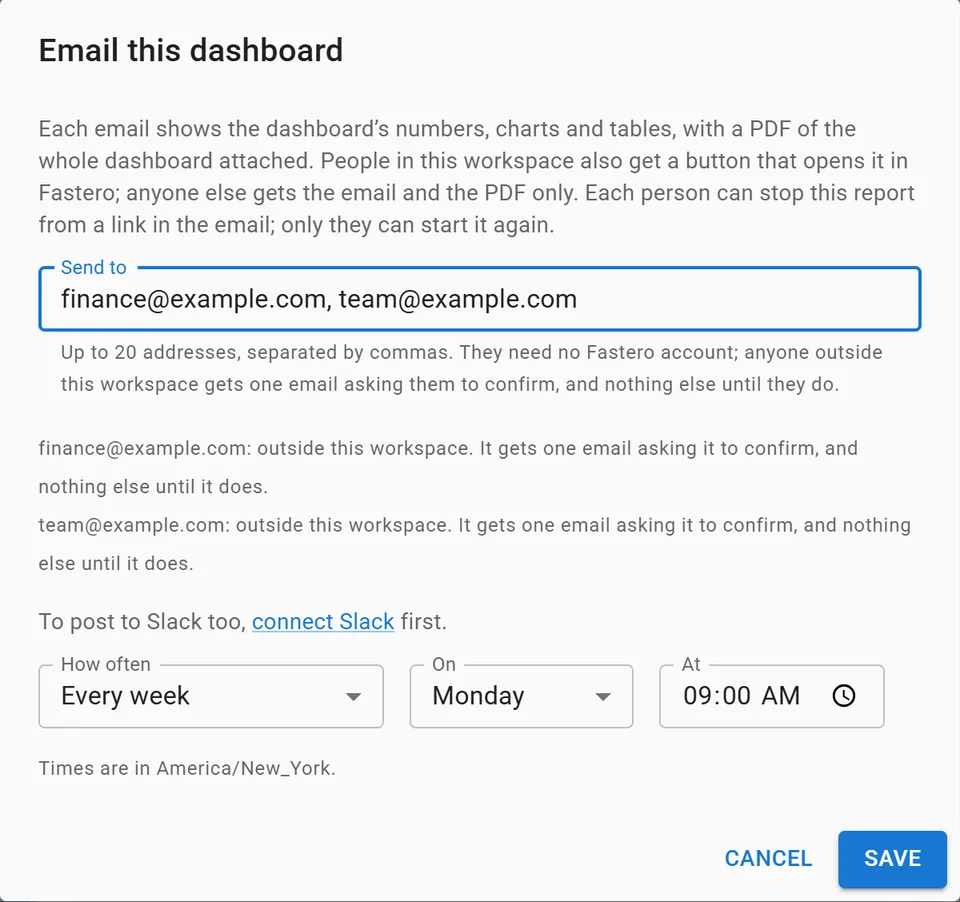
Setting up a weekly email of a dashboard, with invented addresses.
FAQ
Is ChatGPT agent still available?
Under a new name. OpenAI's agent page redirects to ChatGPT Work, which does what agent mode did (browsing, multi-step tasks, finished files) plus scheduled tasks, plugins and desktop apps. Switch the composer to Work to use it.
Is ChatGPT agent free?
Partly. Free and Go get limited ChatGPT Work in the desktop app. Web and mobile, the cloud browser and website sign-in start at Plus, $20 a month, checked 12 November 2026.
How do I turn on agent mode in ChatGPT?
Open ChatGPT, switch the composer from Chat to Work, and describe the outcome you want. You don't pick the browser separately: "ChatGPT decides when to use it based on your request."
Can ChatGPT agent log in to websites?
Yes, on Plus and Pro, on the web and mobile, through a secure sign-in form the model can't read. It isn't available in Enterprise or Edu workspaces, and OpenAI's pages don't say either way for Business.
What's the difference between ChatGPT Work and Codex?
They share capabilities and usage limits. Work hides technical detail and aims for finished documents; Codex shows diffs, commands and pull requests for software work. See Codex vs Claude Code for the coding side.
Can ChatGPT agent connect to my database?
Through a plugin or a custom MCP server you add, using your own credentials. It reads current data when you ask, but what it hands back is a file or a snapshot, not a live dashboard.
Sources
Checked 12 November 2026. We had no ChatGPT account for this, so nothing here is hands-on.
- OpenAI: ChatGPT release notes, ChatGPT Work (where chatgpt.com/features/agent now redirects), ChatGPT pricing, Codex pricing
- ChatGPT docs: Get started with ChatGPT Work, Use ChatGPT, Browser, Browser extension, Computer Use, Pricing, Models, Agent approvals and security, Plugins, Visualizations, Work usage and cost
- Third party: Composio on ChatGPT agent mode (August 2026), TestingCatalog on the Work launch
- Fastero: Pricing