 Fastero Dev Team
ChatGPT has three kinds of upload limit: how big one file can be, how many files you can add, and how much text the model can read. OpenAI publishes most of the first two as fixed numbers. The third depends on your plan and model, and a file can pass the first two and still not be read in full.
The short answer: any file uploaded to ChatGPT or a GPT can be up to 512 MB. Text and document files are also capped at 2M tokens each, CSV files and spreadsheets at about 50 MB, and images at 20 MB. You can attach up to 20 files to one message. A project holds 5 files on Free, 25 on Go and Plus, and 40 on Pro, Business, Enterprise and Edu. Library storage is 500 MB on Free, 4 GB on Go, 20 GB on Plus and Business, and 100 GB on Pro. OpenAI lists the per-file caps with no difference by plan; Free gets "Limited" file uploads and data analysis. All checked 18 November 2026.
Fastero
Connect your database. Ask questions. Get dashboards.
Postgres, BigQuery, Snowflake, and 10+ sources — live-connected, AI-powered, no dashboard builder learning curve.
Try free →The limits
| Where | Limit | OpenAI's wording |
|---|---|---|
| Any file, chat or GPT | 512 MB | "a hard limit of up to 512MB per file" |
| Text and document files | 2M tokens each | "capped at up to 2M tokens per file. This limitation does not apply to spreadsheets." |
| CSV files and spreadsheets | About 50 MB | "cannot exceed approximately 50MB, depending on the size of each row" |
| Images | 20 MB each | "a limit of 20MB per image" |
| Files in one message | 20, since 13 February 2026 | "upload up to 20 files at once (previously 10)" |
| Files in a project | 5 / 25 / 40 by plan, 10 at a time | "only 10 files can be uploaded at the same time" |
| Files in a GPT | 20, up to 512 MB each | "You can attach up to 20 files to a GPT." |
| Library storage | 500 MB to 100 GB by plan | "storage is separate from daily attachment/chat limits" |
| Uploads per day | Not on any page we could open | Free: "Limited messages with uploads" |
OpenAI's main upload article, "Uploading files and audio to ChatGPT", refused our request (HTTP 403) on 18 November 2026, so the daily counts some guides quote aren't repeated here. Everything above is from OpenAI pages that opened normally.
Limits by plan
| Free | Go | Plus | Pro | |
|---|---|---|---|---|
| File uploads | Limited | Yes | Yes | Yes |
| Data analysis | Limited | Yes | Yes | Yes |
| Files per project | 5 | 25 | 25 | 40 |
| Library storage | 500 MB | 4 GB | 20 GB | 100 GB |
| GPT Instant context | 27K | 54K | 54K | 128K |
| Instant input maximum | ~12 pages | ~40 pages | ~40 pages | ~250 pages |
| Reasoning context | Varies | 256K | 256K | 400K |
Business has Plus's 20 GB of storage and 40 files a project. The context rows decide how much of a document the model reads in one go, and OpenAI adds that "The portion available for user input is smaller than the total window".
What we measured: how many rows each limit holds
We have no ChatGPT account for this post, so we measured a table against the published limits instead. It's Fastero's invented sample of sales orders: 4,734 rows, 10 columns. We counted tokens with tiktoken, OpenAI's tokenizer library, using o200k_base, the encoding it maps to the GPT-5 family; it has no entry for GPT-6 models yet, so treat the counts as close, not exact. Then we repeated the rows, with new order ids, up to 50 MB. Lines from the output, unedited:
date 2026-11-18 | python 3.14.3 | pandas 3.1.1 | pyarrow 26.0.1 | openpyxl 3.1.5 | tiktoken 0.14.0

rows 4,734  columns 10  bytes 382,923  bytes/row 80.9
o200k_base tokens, whole CSV 154,630  tokens/row 32.7
same rows as JSON lines: bytes 959,047  tokens 272,957  tokens/row 57.7

[csv at ~50 MB] out\sales_50MB.csv: rows 611,826  bytes 49,999,936
tokens if read as text (rows x tokens/row) ~19,984,507
same 611,826 rows as Parquet: bytes 5,335,309  (10.7% of the CSV)

[xlsx] 100,000 rows: bytes 4,839,960  bytes/row 48.4  -> rows in 50 MB at that rate ~1,033,066

Free, GPT Instant total context             27,000 tokens -> CSV rows ~827
Pro, GPT Reasoning total context           400,000 tokens -> CSV rows ~12,246
2M-token cap on a text file (JSON lines) 2,000,000 tokens -> JSON rows ~34,687  (~7 MB)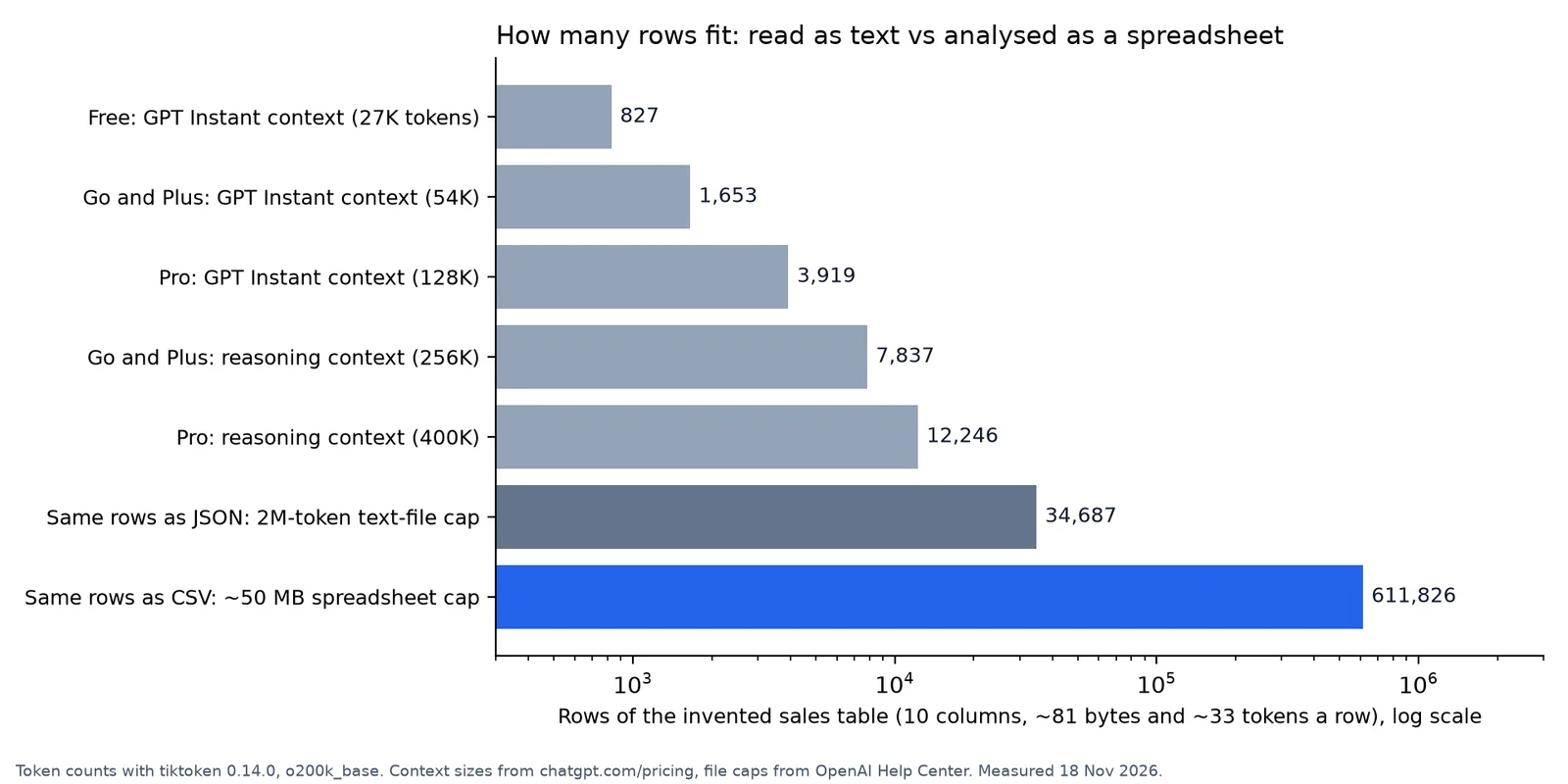
Read as text, a Free chat's whole context holds about 827 rows of this table; as a CSV that ChatGPT analyses with Python, about 611,826 rows fit under the 50 MB cap. Invented data, measured 18 November 2026.
Three things follow:
- Text and spreadsheets are different limits. Read as text, even Pro's 400K-token reasoning context holds about 12,000 rows. A 50 MB CSV is about 20 million tokens, so ChatGPT can only answer from it by running code.
- Send CSV, not JSON. OpenAI exempts only spreadsheets from the 2M-token cap, and its data-analysis page lists JSON with text files. As JSON lines, the same rows hit 2M tokens at about 34,700 rows and 7 MB.
- Excel packs more rows into 50 MB: about 1.03 million at 48.4 bytes a row, close to Excel's own maximum of 1,048,576 rows per sheet.
Spreadsheets and data analysis
For data, "ChatGPT writes and runs Python code in a stateful Jupyter notebook environment." It reads .xls, .xlsx and .csv files, PDFs, and text and data files such as .json, .xml, .yaml, .txt and .md. From OpenAI's data-analysis article:
- Passing the upload isn't passing the analysis: "A file may upload successfully but still be too large, complex, image-heavy, or poorly structured for complete analysis." In spreadsheets, "the number and complexity of formulas can also affect processing".
- The Python environment "cannot make external web requests or API calls", so upload or connect any data it needs.
Parquet, which cut our 50 MB CSV to 5.3 MB, isn't among the file types OpenAI lists, so keep it for the API or a database.
Images and PDFs
Each image can be up to 20 MB, and vision is "Limited" on Free. A PDF counts as a document: 512 MB and 2M tokens at most. On scans, ChatGPT "may not reliably extract exact values from image-based tables, scanned files, or files with complex visual layouts", so upload the spreadsheet behind a scanned report when the numbers matter.
What happens over the limit
- A full project: "Remove older or unnecessary uploads, combine file data, or split work into multiple projects."
- Full storage: the Storage button in Library shows your usage and "whether you are over your limit". Deleting a chat doesn't delete its files; delete them from Library.
- A long paste: since 4 August 2026 every plan turns one into an attachment, to stop it "consuming your entire context window". The latest notes put the threshold at 10,000 characters (5,000 for Plus, Pro and Business in March).
- Daily limits: OpenAI refers to "daily attachment/chat limits" and your "remaining file-upload allowance", but no page we could open gives the numbers.
Connect any database. Ask in plain English.
Start free →Projects and GPTs
| Plan | Files per project | Collaborators |
|---|---|---|
| Free | 5 | 5 |
| Go, Plus | 25 | 10 |
| Pro | 40 | 100 |
| Business, Enterprise, Edu | 40 | 100 |
Slack channels and Google Drive links added as project sources "have a separate limit". More in ChatGPT Projects.
A GPT takes 20 knowledge files of up to 512 MB each, but plan for its end: "Custom GPTs are scheduled to retire on Dec 11, 2026", or 11 February 2027 for FedRAMP workspaces and approved deferrals. Migrating a GPT to a plugin brings its knowledge files across.
How to work with bigger data
- Aggregate first. Monthly revenue by category turned our 4,734 rows (154,630 tokens) into 96 rows and 1,182 tokens, small enough to read as text on any plan.
- Upload CSV, the format with the roomiest cap.
- Reuse instead of re-uploading: Add from library, or attach from Google Drive, OneDrive or SharePoint where plugins are available.
- Use the API for bigger files. The Files API takes files "up to 512 MB, and each project can store up to 2.5 TB"; Code Interpreter containers come in 1, 4, 16 and 64 GB sizes, from $0.03 per 20-minute session. Files sent straight to a model are capped at 50 MB a request.
- Leave the data where it lives. A database answers with a query, so only the answer travels.
When the data is already in a database
An upload is a copy: next month's numbers need next month's file, and a chart made from it is a snapshot. When the data sits in a database, let the questions run against it. Fastero is an AI and data platform where people and AI agents work together on a team's data.
- Connect Postgres (Supabase and Neon connect as Postgres), MySQL, SQL Server, Redshift, Snowflake, Oracle or BigQuery. Questions run as SQL on the database; nothing is uploaded.
- A dashboard refreshes every 1, 5, 15 or 60 minutes or, for Postgres and BigQuery data only, when the data changes.
- In the Send dialog, Just this person sends one dashboard to an email address; Anyone with the link makes a public link you can turn off.
- A scheduled email goes out daily, weekly or monthly with the numbers, charts and tables plus a PDF.
- Viewers are free. The Free plan has no end date; Pro is $20 per editor a month.
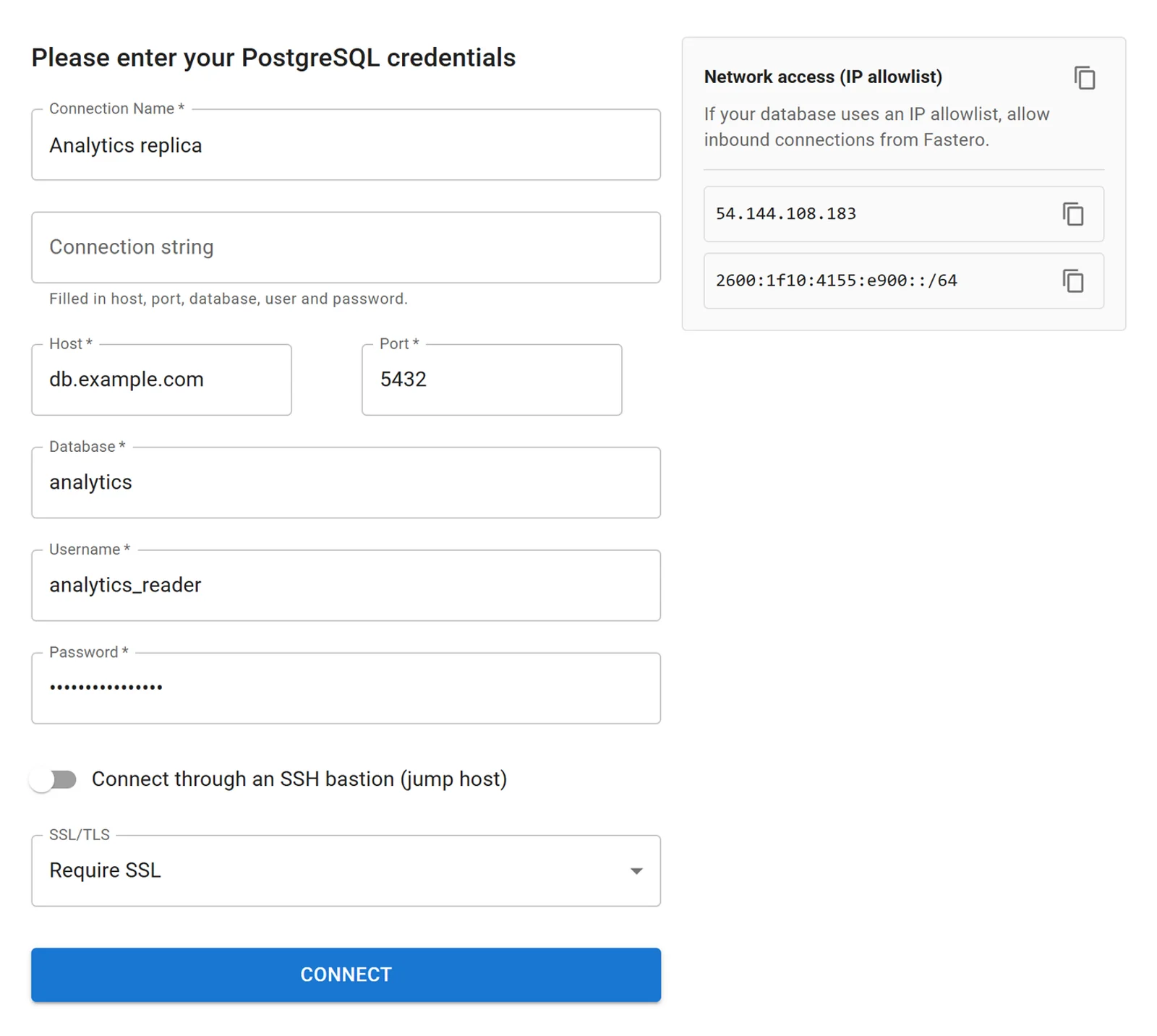
The Postgres connection form after pasting a connection string, with invented values.
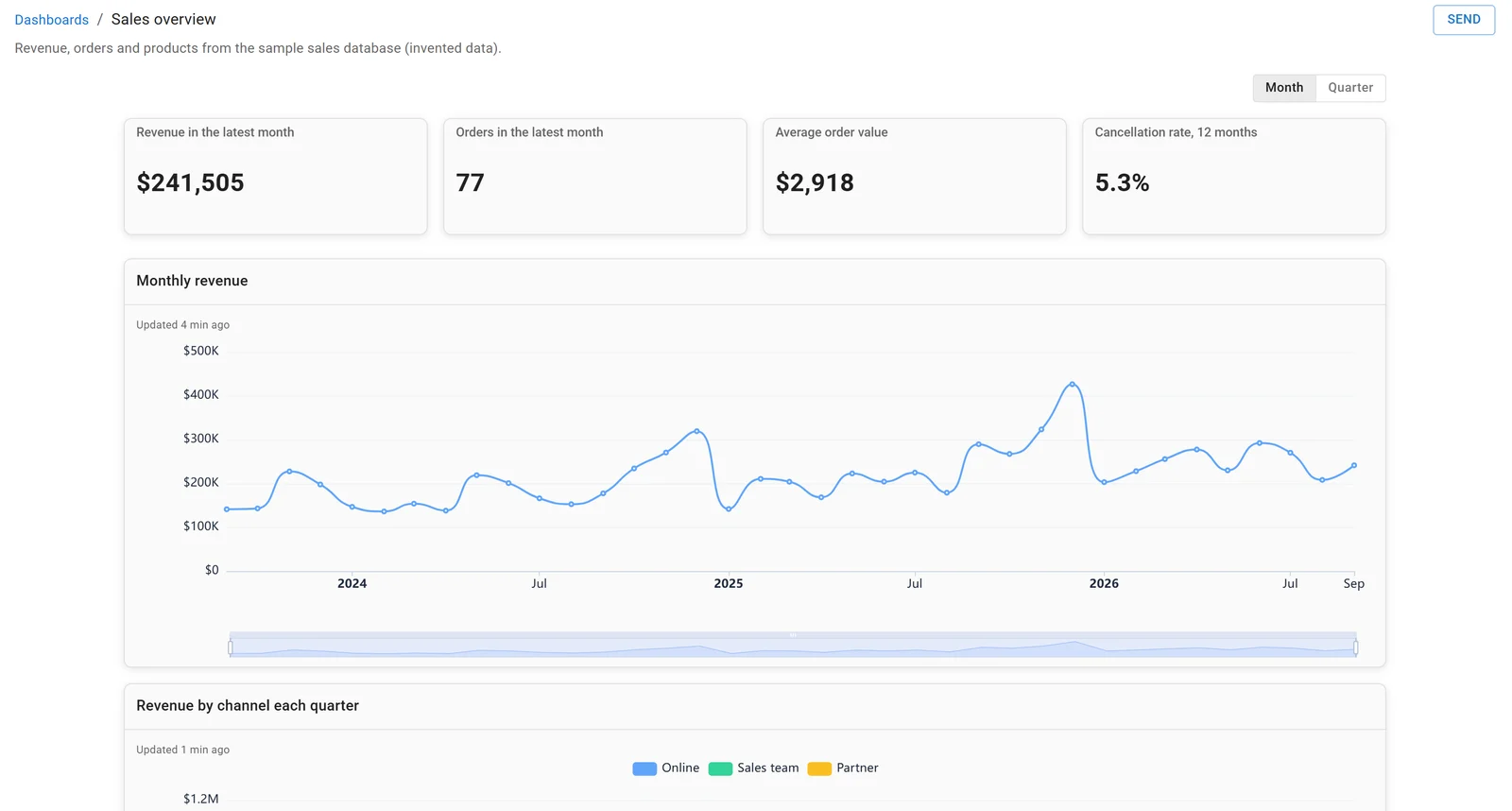
A dashboard in Fastero, built on the sample sales database. Invented data.
See also Claude file upload limits and ChatGPT data analysis alternatives.
FAQ
What is the file upload limit for ChatGPT?
512 MB per file, in chats and GPTs. Text and document files are also capped at 2M tokens each, CSVs and spreadsheets at about 50 MB, and images at 20 MB, checked 18 November 2026.
How many files can I upload to ChatGPT at once?
Up to 20 in one message, raised from 10 on 13 February 2026. A project takes 10 at a time, up to 5, 25 or 40 in total depending on your plan.
What is the maximum Excel or CSV file size in ChatGPT?
About 50 MB, "depending on the size of each row". For our 10-column sales table that was 611,826 rows as CSV. The 2M-token cap on documents doesn't apply to spreadsheets.
Does ChatGPT Plus have a higher upload limit than Free?
The per-file caps are the same on every plan. Plus drops Free's "Limited" label on uploads and data analysis, and gets 25 project files instead of 5, 20 GB of storage instead of 500 MB, and 54K tokens of GPT Instant context instead of 27K.
How many files can I upload to ChatGPT per day?
OpenAI confirms a daily allowance, separate from Library storage, but the article with the numbers refused our request and no other OpenAI page we opened states them. Free is labelled "Limited".
Why didn't ChatGPT read my whole file?
Either its text is longer than your plan's context window, or the file is "too large, complex, image-heavy, or poorly structured for complete analysis". Aggregate or split it, upload data as CSV, and ask ChatGPT to analyse it with code.
Sources
Read on 18 November 2026; the measurements are our own, on invented data:
- OpenAI Help Center: Using Library to manage files, Data analysis with ChatGPT, Projects in ChatGPT, Creating and editing GPTs, Custom GPT retirement FAQ, release notes (13 February, 25 March, 4 August and 11 September 2026). Uploading files and audio returned HTTP 403.
- ChatGPT pricing
- OpenAI developer docs: Upload file, API docs export (file inputs, container pricing), tiktoken model map
- Microsoft: Excel specifications and limits