 Fastero Dev Team
ChatGPT can call tools from any remote MCP server, including tools that change data. The setup has moved twice: custom connectors in 2025, then apps behind a developer mode switch, and now Plugins, where OpenAI's help center says "You don't need to turn on Developer Mode first."
The short answer: on ChatGPT on the web, open chatgpt.com/plugins, click the plus button and choose Add custom MCP server. Enter the server's public HTTPS address, usually ending in /mcp, choose OAuth, No authentication or both, tick "I understand and want to continue", and select Create as a plugin. Install the plugin, then type @ in a new chat to use it. ChatGPT connects only to remote servers; a private one needs OpenAI's Secure MCP Tunnel, and you can't add servers on mobile. Plan rules differ between OpenAI's own pages: the help center gives full read and write MCP to Business and Enterprise/Edu and read/fetch to Pro, while the pricing page lists Developer mode (beta) on Plus and Pro. Developers get the same servers in the Responses API through the mcp tool.
Fastero
Point Claude at your database.
Add Fastero to claude.ai or Claude Code. Claude builds the dashboard, deploys the app or publishes a live page, and your team opens it in Fastero.
Try free →Connectors, apps, plugins and developer mode: what changed
OpenAI has renamed this feature more than once, which is why guides disagree:
| When | What OpenAI shipped |
|---|---|
| 4 June 2025 | Custom connectors through MCP for Pro, Team, Enterprise and Edu: "Requires a remote MCP server" and "Available only in deep research" |
| 17 October 2025 | "full Model Context Protocol (MCP) support with developer mode", so organisations could build connectors "with read/write capabilities" |
| Now | Custom MCP servers are added from Plugins; older custom apps show up as legacy apps |
Developer mode was ChatGPT's switch for full MCP support: read and write tools from a server you add yourself. It still exists, and Enterprise's Create plugins with MCPs permission reads "Use developer mode to create custom app connections." But in the Plugins experience, you "review and acknowledge the risk warning for each server you add" instead. A plugin can hold an MCP server, skills or both, and "ChatGPT and Codex share one universal plugin directory."
Which ChatGPT plans can add an MCP server
Checked 12 November 2026, OpenAI's pages don't agree, so here is what each says:
| Plan | Pricing page | Help center |
|---|---|---|
| Free | Developer mode (beta): No. Create & share Plugins: No | Not covered |
| Go | Developer mode (beta): No. Create & share Plugins: Yes | Not covered |
| Plus | Developer mode (beta): Yes | Not covered |
| Pro | Developer mode (beta): Yes | "Pro users can connect custom MCP servers with read/fetch permissions" |
| Business | Not on the individual table | Custom MCP and "full MCP support"; only admins and owners create and publish |
| Enterprise / Edu | Not on the individual table | The same; admins can let chosen members create connections |
The help center's summary is that "Full MCP is only available to Business and Enterprise/Edu users, currently", while OpenAI's developer guide says "ChatGPT supports both read and write tools from your server" without naming plans. If Add custom MCP server doesn't appear for you, your plan or your workspace's permissions are the likely reason.
How to add an MCP server to ChatGPT
- Go to chatgpt.com/plugins on the web.
- Click the plus button, then Add custom MCP server.
- Enter a name and, optionally, a description.
- Under Connection, enter the server URL, including the
/mcppath, or select Tunnel for a Secure MCP Tunnel. - Configure authentication: OAuth, No authentication, or OAuth or no authentication.
- Review the risk warning and select I understand and want to continue.
- Select Create as a plugin and check the tools ChatGPT discovered.
Then install the new plugin from your personal plugins, start a new conversation (OpenAI's quickstart uses a Work chat), type @, pick the plugin and ask for something its tools do. To practise on a harmless server, the quickstart uses a public demo at https://tinymcp.dev/api/moldy-aloof-zettabyte/mcp with one read-only roll_dice tool and no sign-in.
In a Business or Enterprise workspace, a server you add stays yours until an admin or owner publishes it. After approval, ChatGPT keeps a frozen snapshot of its tools, so server changes reach users only when an admin refreshes them; until then, calls to a tool that changed incompatibly can fail.
Getting the right tool called. OpenAI suggests naming the plugin and tool in the prompt, ruling out browsing and other apps, and writing tool descriptions with "Use this when…" guidance.
Read tools, write tools and confirmations
ChatGPT decides which tools are safe to run without asking from a single label:
- "Write actions by default require confirmation."
- It reads the MCP
readOnlyHintannotation, and "Tools without this hint are treated as write actions." - You can remember an approve or deny choice for a tool for the rest of a conversation; a new conversation asks again.
- "Some especially risky actions may be blocked instead of being presented for approval."
- Deep research can use custom apps "for read/fetch actions only - not for write actions."
- Search and fetch tools "are no longer required."
On Enterprise and Edu, admins can switch individual actions on or off, and new actions added on the server start switched off. Expanding a tool call in the chat shows its full JSON input and output.
Remote servers only, and how to reach a private one
"ChatGPT connects to remote MCP servers", over SSE or streamable HTTP. A server on your laptop, on-premises or on a private network needs Secure MCP Tunnel, a client from OpenAI's openai/tunnel-client repository that connects it "without exposing the server to the public internet". A plugin submitted to the public directory still needs a public HTTPS endpoint. And "Can I connect custom MCP servers on mobile? No - web only."
The ChatGPT desktop app is the exception: its Settings → MCP servers page adds STDIO or streamable HTTP servers for the Codex host it shares with the Codex CLI. ChatGPT on the web doesn't read that configuration.
OAuth and authentication
The custom server dialog offers OAuth, no authentication, or a mix in which listing tools needs no sign-in and each tool declares whether it needs OAuth. For OAuth, ChatGPT uses static client credentials if you give them, otherwise Client ID Metadata Documents when the authorisation server supports them, or dynamic client registration when configured. None of the listed options is an API key header.
Refresh tokens matter. OpenAI warns that "If OAuth is configured without offline_access, ChatGPT may lose access after the original authorization expires because refresh-token renewal may be unavailable, and users may need to reauthenticate."
What a client sees before signing in is standard MCP discovery. Fastero's server, for example, answers an unauthenticated request like this (we ran it on 12 November 2026; we haven't tested Fastero in ChatGPT):
$ curl -si -X POST https://api.fastero.com/api/v1/mcp -H "Content-Type: application/json" -H "Accept: application/json, text/event-stream" -d '{"jsonrpc":"2.0","id":1,"method":"tools/list"}'
HTTP/1.1 401 Unauthorized
WWW-Authenticate: Bearer resource_metadata="https://api.fastero.com/.well-known/oauth-protected-resource"

$ curl -s https://api.fastero.com/.well-known/oauth-authorization-server
{"issuer":"https://api.fastero.com", ... "registration_endpoint":"https://api.fastero.com/api/v1/oauth/register", ... "grant_types_supported":["authorization_code","refresh_token"], ... "code_challenge_methods_supported":["S256"]}
Headers and JSON trimmed where marked with "...".
The 401 points the client to the server's metadata, which names the authorisation server, and from there the client registers itself and opens the sign-in page.
The safety warnings OpenAI gives
OpenAI's warnings are unusually direct:
- "Only connect to MCP servers you trust. An untrusted server may access or steal information shared through app use, or trick ChatGPT into using tools in unintended ways, including changing or deleting data."
- The custom server page carries an Elevated risk label, which marks features "offered on an optional and early access basis, outside of the standard representations and warranties we make for our generally available services."
- "You are responsible for vetting and verifying the suitability of custom apps you build, or third party apps you add for use in your workspace."
- In the API guide's example of prompt injection, "a web page could instruct the model to look up a customer in your CRM and put the customer’s email address in a URL." Fetching that URL leaks the address even if the CRM tool can only read.
In practice: prefer the server a vendor hosts itself, give it a read-only login, read each write before approving it, and keep untrusted web content and private data apart. Our MCP security guide has twelve checks to run first.
Point Claude at your database.
Start free →For developers: the Responses API MCP tool
The same servers work in OpenAI's API. Add a tool of type mcp to a Responses API request, and the API lists the server's tools, lets the model call them and returns each call as an mcp_call item. From OpenAI's guide:
from openai import OpenAI

client = OpenAI()

resp = client.responses.create(
    model="gpt-6-astra",
    tools=[{
        "type": "mcp",
        "server_label": "openai_docs",
        "server_description": "Search and read the public OpenAI documentation.",
        "server_url": "https://developers.openai.com/mcp",
        "require_approval": "never",
    }],
    input="Search the OpenAI docs for Responses API streaming and return the relevant links.",
)
print(resp.output_text)
What to know, checked 12 November 2026:
- Approvals are on by default. "By default, OpenAI will request your approval before any data is shared with a connector or remote MCP server." You answer an
mcp_approval_requestwith anmcp_approval_response, or setrequire_approvalto"never"for all tools or for named ones. - Limit the tools.
allowed_toolsimports only the tools you list, which also cuts cost and latency. - Pass OAuth tokens per request. The
authorizationfield takes an access token, and "the Responses API does not store the value you provide", so send it every time. - Private servers use
tunnel_idinstead ofserver_url. - No per-call fee. You "only pay for tokens used when importing tool definitions or making tool calls."
The fields our installed SDK accepts on that tool (openai 3.49.0 for Python):
allowed_callers  allowed_tools  authorization  connector_id  defer_loading  headers
require_approval  server_description  server_label  server_url  tunnel_id  type
To try a server without code, the API Playground has Tools → Add → MCP Server.
A remote MCP server for a team's data
Whichever client you use, the server decides what an agent can reach. Fastero is an AI and data platform where people and AI agents work together on a team's data. Its MCP server is a remote server with OAuth sign-in at https://api.fastero.com/api/v1/mcp. We've tested it with Claude and Claude Code, not with ChatGPT.
- Remote, with sign-in. People connect by signing in through the browser, with no key to copy; keys exist for scripts and anything that can't sign in.
- Your role, one workspace. A connection acts as the person who made it, in one workspace, and never does more than their role allows. Revoking it ends access at once.
- Read-only SQL. The SQL tool runs one read statement at a time, refuses anything that writes, and returns at most 500 rows.
- Results the team opens. Charts and dashboards built through it open for colleagues with their own Fastero login. Viewers are free.
- Listed for Claude. Fastero is in Claude's connector directory, with Anthropic's Community label.
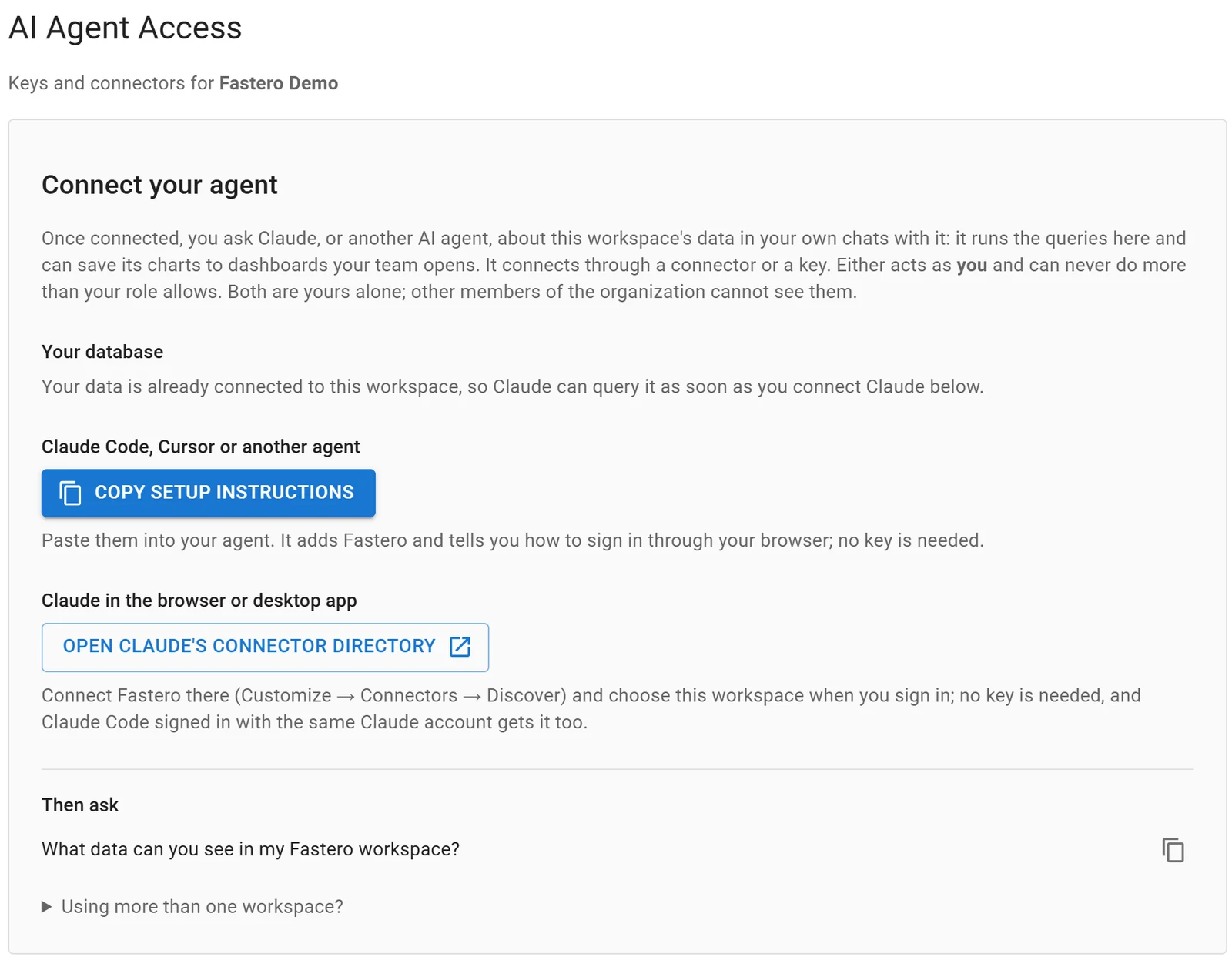
Settings, AI Agent Access: an agent signs in through the browser, so there is no key to copy.
New to the protocol? Start with what an MCP server is, with a tested 20-line server. For how ChatGPT and Claude compare on the analysis itself, see ChatGPT vs Claude for data analysis.
FAQ
Does ChatGPT support MCP?
Yes. ChatGPT on the web connects to remote MCP servers as plugins, with read and write tools, and the Responses API supports MCP servers through its mcp tool. The ChatGPT desktop app can also use local STDIO servers through its Codex settings.
How do I add an MCP server to ChatGPT?
Open chatgpt.com/plugins, click the plus button, choose Add custom MCP server, enter the server's HTTPS address and authentication, accept the risk warning and select Create as a plugin. Install it, then type @ in a new chat to use it.
Do I still need ChatGPT developer mode?
Not in the current Plugins experience: OpenAI's help center says you don't need to turn it on first, and you accept a risk warning per server instead. The pricing page still lists Developer mode (beta) on Plus and Pro.
Which ChatGPT plans support custom MCP servers?
OpenAI's help center says full MCP with write tools is for Business and Enterprise/Edu, with read/fetch for Pro. The pricing page lists developer mode on Plus and Pro, and not on Free or Go. Workspace admins can restrict it further.
Can ChatGPT connect to a local MCP server?
Not directly on the web. ChatGPT connects to remote servers; for one on your machine or a private network, OpenAI offers Secure MCP Tunnel. The desktop app's Codex settings can run local STDIO servers.
Will ChatGPT ask before an MCP tool changes data?
By default, yes. Write actions need confirmation, and any tool without the readOnlyHint annotation counts as a write. You can remember a choice for the rest of one conversation.
Sources
Checked 12 November 2026; the Fastero requests and the SDK check ran the same day, with openai 3.49.0 on Python 3.14.3:
- OpenAI Help Center: Connecting custom MCP servers in ChatGPT, Elevated Risk labels, ChatGPT release notes, ChatGPT Business release notes
- OpenAI developer docs: Add custom MCP server, MCP servers in the API, Secure MCP Tunnel, Plugins quickstart, Connect and test your plugin
- ChatGPT docs: Model Context Protocol, Plugin controls, Pricing